• Skip to primary navigation
  • Skip to main content
  • Skip to primary sidebar
  • Skip to footer
tech blog au

Digital Grog — Australia’s Tech, Gadgets & Digital Life Unfiltered

Digital Grog is Australia’s go‑to tech blog for sharp reviews, digital trends, AI tools, gadgets, cybersecurity updates, and practical how‑tos covering the latest in Aussie technology

  • Home
  • Webhosting
    • List of WordPress Web hosts
    • Comparisons
    • Blog Hosting
  • Make Money Online
    • Clickbank
    • Affiliate Programs Australia
      • Amazon
  • Domains Australia
    • Australian Domain Names
    • Register a domain name
  • Technology
    • Technology News
      • Gadgets
      • Software
  • Guest Posts
  • About
  • Contact us

Search Results for: search engines

The Step by Step guide to Clickbank Income in 2019

June 23, 2019 by admin 12 Comments


2017 click bank guide surf strength

Updated : 13/03/2019

I am a clickbank member for quite some time now, actually for the past 3+  years now and did nothing much with my CB account for quite some time. It just lay there idle.  I did not make much money with click bank at all in that time.

There was that intermittent or occasional sale now and then from  those old promo codes put on my websites, but no big money or  $$ or  anything and no spectacular income from those sales.

Then one day just randomly,  I decided to link to a click-bank  promo code for  an e-book directly related to one of the niches on one of my established blogs. To my surprise, I suddenly saw my sales jump ( like 2 to 3 ebooks being sold every month ) on a regular basis.

2019 become a super affiliateMind you the commission wasn’t great at about $3 to $4 per sale, however it was coming in on a regular basis. My earnings was still peanuts compared to some super affiliates like Rosalind Gardner(her course).

All it took me was 2 minutes to add that link to that article. Click-bank calls it a Hoplink. I was not a beginner in internet marketing, but surely a beginner in affiliate or clickbank marketing and so was happy to see these conversions happen so easy.

I was surprised and excited that just by  promoting  the correct “clickbank product” in the correct niche website,  I  started to earn money regularly without much effort at all. Off course, I do have to tell you that  the blog where the link was, was a good blog with genuine content that attracted a lot of unique users  to that niche.

At 700 to 900 unique visits a day  on that blog, I was doing pretty well selling  2 to 3 books a month  without much effort and I didn’t even use facebook or social media to promote  this click bank product. I actually didn’t even do any SEO or promotion or back linking. What was converting that product into sales was that targeted traffic i was getting

It didn’t even take much time  to create that article that made those sales happen. The article that sold most of the books was  probably 20 minutes. Of-course it helped that  the whole blog  was quite popular and had a good relevant content  and so the article was  easier to  find on google search engine.

Website: http://www.clickbank.com

Today you have the opportunity to cut the learning curve, by enrolling in clickbank university that teaches you the whole process of promoting a product online as well as making your own products to sell on their platform, its called Clickbank University 2 .

I did some research immediately  to see  how I could improve my “click bank sales” after noticing my spurt in sales initially, and I have detailed  a few tips  that might help you also improve your Click bank sales  if you re into  this kinds of affiliate internet marketing. These tips can give a boost to your earnings  and make you some money, if well implemented.

Its not a step by step guide to clikbank, but has enough information for you to get started on the right foot and  to get some sales going.

Browse CBGraph website ( the movers and shakers of click-bank) 

This is one of the most important sections of the site since it’s the only way to sort out the listings before/after making a keyword search. A useful site like Cbgraph shows the Movers and Shakers on CB and is an excellent resource.

Clickbank can be a very lucrative affiliate program because the commissions ( Some are as high as 75%.) are incredibly high. The products are mostly  digital products – eBooks, digital products, software etc. There are no distribution costs as goods are mostly delivered by email except for few, so that’s one reason Click-bank can afford to offer such a large share or commission  to their affiliates and publishers.

Here is a 2014  screenshot of my earnings from clickbank only.

Its increased much more since then to now in 2016 and i am still banking in 2019
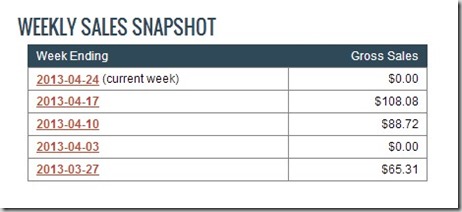
I  promote click-bank  on several of my websites  including gadgetaustralia.com  this blog and  digitalfrog.com.au and many others with several products on sale to make this kind of earnings.  I would suggest also getting a second CB account  to track your sales better and compare data.

Below you can watch a  video by nathanniel who has just started on the clickbank scene. Judging from his screen shots of earnings he is not earning as much as me  for now, but still good for  a starter  and  his methods  to select  a affiliate product is pretty good which are also shown in the  video.

By the way  to get that kind of sales  and $$ you will also need to spend some money on SEO, back linking  and advertising or then do it yourself  like me if you got time to spare.

But if you really want  a jump start with your affiliate marketing  and you are just beginning, then  this course from Affilorama – Internet and affiliate marketing course is pretty good

Tips and tricks to Increase click bank products sales

The complexities of the huge size of ClickBank  means there’s a lot of junk/worthless material on the website as well as good material to promote. The time taken to sift through the good products to promote,  and choose the correct products will eventually make you selling  efforts a winner.

The pic below with arrows shows the most relevant  stuff that you need to know  when you are choosing your affiliate product to promote . I just chose a random affiliate  today , that I  am testing right now and you can see I just got two hops on this offer already.

The red arrows point to relevant bits , with explanations below.

How to choose a Click bank affiliate product!

2017 clickbank course make money


This particular product pays $25.45 per sale on average. Now, it’s important to note that the amount you earn per sale may not match that number exactly due to upsells, sales tax, chargebacks, etc. However, this will give you an idea of what you can earn.

Check out the Stats information at the bottom of the result. This provides more details about what you can earn.

Notice the Initial $/sale stat is much lower than the average $/sale. This particular vendor offers several products, which is why the initial sale stat and average sale prices differ.

Average %/sale means the average commission for this product is 60% per sale.

The Avg Rebill Total of $, indicates this is a recurring billing product and that’s the average amount the affiliate earns. So not only can you earn for one sale, but you will also earn for any customer re-bills. This is how your income can really add up over time. There is no re-bill on this product

Popularity ( this is in the product search field when you are searching for a product to promote)

This should mean a measure of sales. I check the top 10 products in the category, sort them by referred sales (60%+ is best/$30+ earned per sale)

Gravity

What does ClickBank Gravity mean?

The meaning does not tell you how much money the product has made or what percentage it converts at. Gravity only counts the first sale each affiliate makes. However, if it has a high gravity it’s probably because people are having good success with it.

How to find high converting, high paying items with low return rates

A high commission product , recurring payments, and a high gravity is what you want to look for. Be sure to watch out for that gravity! I found more that one product with HUGE commissions and rebills, but a super low gravity.

Saying that , things are changing  and you can now find low gravity products  with low competition that you can make lots of money on , if you got a relevant niche website  on that  topic .

The key  for 2019  success is  just make sure  if you are using a landing page  that is is super built to convert  that product, or then  make a pre -landing page  if the affiliate landing page is not good enough for the product .

Making money with Clickbank and Facebook  Linked in and twitter

If you can make a good landing page then you can also convert sales for clickbank safely from traffic from facebook, twitter, linked in and other social media  accounts

If you can be bothered  about landing pages  just make a really good helpful article  with your  click bank  link sprinkled in the article with a call to action included in it.

Another good tip that has doubled my income in one of my blogs is free ebook giveaways. People love free stuff and if you are willing to put the time to create something of value to them for free, it is likely they will be grateful and give you a sale knowingly or unknowingly when they click on your affiliate link in that free ebook giveaway.

Steven Hall has  got a good clickbank product to make this free giveaway method seamless for you, with your website.

I would also recommend Rosalind Gardner  who is a super affiliate and has helped many into  their online affiliate marketing careers, she has two guides that she sells , one is called the “Affiliate Blogger Pro” and she has also got an indepth  affiliate guide called – “Super Affiliate: How I Made $436,797 In One Year which covers how to start Your Own Home-based Affiliate Marketing Business.

These guides will surely teach  you how to go about and start earning  with affiliate marketing or  increase your existing blog income

Obtaining Your Affiliate Link (Hoplink)

Once you decide on a product you want to promote. CHeck to make sure you are logged into clickbank then, click the green Promote button alongside the product  listing.

create a hoplink or aff link from marketplace


You will be presented with  two small  columns  ,  1st column  your id is  already input ( if you are logged into the clickbank website) and second column ( tracking id ) just input some text you can remember ( like the page name where you will  put this created code on ). This will help you know  that that page is generating sales, you can create multiple tracking ids  to track  sales from different pages to know where the sales is being generated from .

Now that you are ready to put his click-bank affiliate code in relevant pages on your website  and promote the product  and start earning commissions !!

If you haven’t yet got a website for yourself – then go here on wordpress.com for a free or paid website  or then  choose from one of our recommended  hosting providers to start your self hosted WP  website which is the best option for affiliate marketing.

Launch of CLICKBANK UNIVERSITY 2 – Step by step course for earning money online – by clickbank

Clickbank University is one of the more popular training programs now, about creating your own information products to sell on the Internet. It is a community with thousands of people trying to learn more about affiliate marketing and selling products online.

The main training program focuses on product creation with Training videos and also chat available with successful click bank entrepreneurs who earns thousands a day . Training also provided for maximising your  revenue by selling other  click bank vendors  existing products as an affiliate.

This powerful on-line marketing course series will provide you with everything you need to know to be a success and achieve your goal whether you decide to market someone else’s product or create your own. Learn more about it here

Advertising for your blog

One important method that many people shy away from is  spending money for advertising  your blog posts,  advertising gets you targeted traffic  and if you do it right  you can earn a lot more money  that you normally would, so start experimenting. Here are some good free starter coupon money to get you started with  bing advertising.  They are much easier and  flexible to advertise with than google ad words at the moment

What Are Bing Ads?
the bing ads logo in purple

Bing Ads is the advertising platform you use to show ads on the Bing and Yahoo search engines – also referred to as Yahoo Bing Network. You also have the ability for your ads to show on their syndicated partners such as Facebook, Amazon, Monster, WebMD, CNBC, and Viacom. They are the direct competitor to Google adwords and PPC

These COUPONS are only good for new customers.

New Business and website customers in the following markets receive free search adverting credits to help them get started:

  • US – $50 in Bing Ads credit – united-states-flag for bing coupon
  • Canada (English and French)- $50 in Bing Ads credit  – canadian-flag for bingads coupon
  • UK – £50 in Bing Ads credit – uk-flagfor ppc advertising credits
  • France – €50 in Bing Ads credit
  • Germany – €50 in Bing Ads credit
  • Brazil – R$60 in Bing Ads credit
  • Australia – $40 in Bing Ads credit – au-flag for bing microsoft advertising offers for bing7
  • New Zealand – $40 in Bing Ads credit – nz-flagfor yahoobing
  • India – Rs1000 in Bing Ads credit – india-flagfor rupees in 1000 advertising credits
  • Spain – €50 in Bing Ads credit ( New market!) – spainflagfor google adwords bingppc free credit
  • Italy – €50 in Bing Ads credit (New market!) – italyflagfor bingpizza


One last tip to increase your clickbank sales and income, try to increase  your organic traffic  to  the page where your  click-bank link is,  by trying to rank it in google for related buying keywords for your product. Once you get steady organic traffic  with good keywords, the sales will follow. Good Luck!


Technorati Tags: Australian affiliates,Click bank,Clickbank promotion,clicbank,Making money

Related articles across the web

  • 19 Ideas for Killer Lead Magnets
  • How To Earn Money with Affiliate Marketing in UAE with Local Brands
  • A Brief History of Affiliate Marketing – (1989-2015)

Filed Under: 2019, Clickbank, Make money blogging, Makemoney online Tagged With: Affiliate, clickbank, Makemoney online

Learn how a digital marketing agency could help your business by leaps and bounds

March 16, 2019 by admin Leave a Comment

Marketing is a particularly dynamic field and the traditional aspect of it has been replaced with digital marketing. Companies promote their services and products through various activities like social media campaigns, email marketing and the like.

social media 2019

A digital marketing agency is a professional entity that handles your online presence and markets your business online. Here is how a digital marketing company can help you expand your business.

Website Development

Driving relevant traffic to your website is crucial to improve leads and sales. A digital marketing agency can help you optimise your website for an increased number of visitors. Moreover, they can ensure that your website is mobile responsive as well.

A professional team would work on things like broken links, multiple redirects, optimised content and more. They also help you in incorporating the best content management system that helps you provide a user-friendly experience. With the attention span of visitors being 10 to 15 seconds, revamping your website is also a good idea. It should look attractive and be easy to navigate at the same time.

SEO and PPC

A digital marketing agency Adelaide helps you drive immense traffic to your website. SEO helps you in improving your rank in the search engines. These agencies help you put relevant content on your website infused with the right keywords to attract potential customers.

Another method of reaching customers is through pay per click i.e. PPC. Targeted ads are shown to users, and if they click on your ad and go to your website, you are charged a small amount for the click. Specialists create successful campaigns that can help you reach out to your target audience. They have years of experience in creating compelling campaigns that can help you generate more revenue.

Content Marketing

content marketing

Users are constantly looking for valuable information in terms of blogs, whitepapers, brochures, and podcasts. Valuable content can help you engage your audiences and connect with them. Taking assistance from a digital marketing agency can help you produce such pieces of content.

You can get your visitors to sign up with you in return for you providing them industry-relevant information. This will help you communicate with these visitors and convert them into clients. All you need to do is search for digital marketing Adelaide in Google and get connected with industry experts to help you with everything related to content.

Email Marketing

Email marketing can help you create a loyal customer base that benefits your business. When done in the right way, Email marketing can actually improve your brand awareness while keeping the customers coming back. Email marketing is trackable and can also be shared quickly.

According to studies, Email communication makes customers feel important and involved. They develop a close connection with the brand when relevant information and updates are shared with them from time to time. A digital marketing agency can help you build and automate Email marketing and increase conversion.

Social Media

The platforms like Facebook, LinkedIn, Twitter, YouTube, Snapchat and the like are widely being used more than ever before. Each of these platforms is known for a unique content type, marketing strategy, and active time frames. A digital marketing agency will help you maintain your online presence on these platforms and attract potential customers.

Moreover, the number of visitors, tags, subscribers, and followers can also be tracked. This gives you a fair idea of how much your social media endeavours are paying off. It should be noted that each platform has its own style of displaying content and connecting with the audience. Digital marketing agencies have social media experts in their team that focus on branding your business effectively.

Final Take

Thus, a professional digital marketing company can help you in the above-mentioned areas. The end result would be more visitors to your website, increased revenue and improved leads.

Filed Under: Marketing, Search, SEO Tagged With: Digital, Marketing, Seo Tips, Social Network

Top 1click install webhosting software to build websites in 2020

January 7, 2019 by admin 5 Comments

A website hosting company is as good as the services it provides to its customer. To compare from the best of the best, you need to know if they provide good speed, bandwidth, 1 click install, enough disk space and  good customer service to get value for money.

comparing hosting solutions for blog and websites in 2017 and 2018

I have  a hosting account with most of the webhosts featured over here at some stage and listed them comparing all these essential web hosting features.  While not all of them listed here in below table are Australian based hosting, most of the companies are US based servicing clients on a global basis. I prefer US based hosts as they are cheaper have multiple upgrade hosting options available compared to aussie hosts  and have a better custom or standard cpanel dashboard for administering  and building your website.

The software and quality of the  web-hosting company you choose can have a substantial impact on your success online and so it is important to start with the right choice.

Below is a Quick top 3, I recommend if you are on a budget and just starting!

WebHosting Co.

Price

Domain Free

Servers

Bandwidth

Offer

Bluehostbluehost canada

$2.75-12.95 USD

Free

Shared
Dedicated
VPS
Cloud

Unlimited

Go to site

Godaddylogo goddaddy australia

$5.49-10.99 AUD

Free

Cloud
Dedicated
VPS
Shared

Unmetered

Go to site

Hostgator
hostgator canada

$2.75-5.95 USD

From $0.95/year

Cloud
Dedicated
VPS

Unlimited

Go to site

Before I started my blog I pussyfooted around a lot as to where to get my blog hosting from and finally decided to get it from a US web Hosting company, even though my blog is based in Australia and Australian focussed, it was because of the huge price difference.

The other factor that eventually supported my decision was that you will get a lot of US traffic to your blog even if your blog or website is Australian focused and Australian based, so it does benefit speed wise for your website loading faster to viewers in both countries.

hosting australia start a website


Some features that are desirable in a hosting provider:

Unlimited domain hosting – you can host multiple domains names (www) in 1 hosting account (which means you can have more than one website in one account). The cheaper plans normally don’t provide this, but if your lucky you still can get a shared plan within $5 and under that provides you with the ability to host multiple blogs under one shared package.

Free Site builder Or wordpress support– All providers support wordpress, but not all have an inbuilt site builder. If you’re building a website with wordpress ( which is what I recommend) then you don’t need a site builder included as its easy and quick to build a website with wordpress.

Email Account: Not all providers give you an email account with your domain name, but most of them listed here do so. So if you got a website blahblah.com then you would be able to get an email such as yourname@blahblah.com for yourself for free. It is important to get a domain email to look more professional

Uptime Guarantee – You don’t want your hosting-company having downtime, which means you are paying them for hosting your website and their servers are overloaded and crashing all the time and so your website is not showing to your viewers or its just taking ages to load because of bad slow servers – not good. Most of the providers listed here have 99.9 % uptime. Page speed and load time are important.


Comparison of website hosting /Blog hosting

Below are some of the top hosting providers in the website and blogging industry, which also include a few which I am currently using with my affiliate referral and discount links. These are well known to established and pro bloggers, with most of these providers already in this industry for more than 10+ years.

The below list focuses more on starter plans featuring shared hosting packages $1 to 5.95 a month ( cheap web hosting ) compared to providers with VPS hosts and premium hosting packages that can range from $29 to $65 a month.

Below I am comparing hosting packages from many hosting providers to find the best features for your website at the best price for your budget

I have written a Recommended against the providers, for the ones I think I would readily sign up for a second account right now.

  • Speed 90% 90%
  • Price 87% 87%
  • 1 Click Install 100% 100%
  • Service 85% 85%

star rating

“Bluehost shared hosting prices are reasonably priced,  and they are one of the earlier adopters of 1 click install so that you can setup a wordpress blog in minutes. They provide good customer support and have upgrade options to make your journey future proof  when you grow with your website.”

— Shoutaloud.com September, 2018

Bluehost Hosting (Recommended)

bluehost australia

Website: www.bluehost.com

Price:$ 7.99 Now  $3.95 a month (54%off Link)

[ 2018 deal ]: Cloud Sites $9.99 $6.95 a month

  • unlimited domain hosting
  • unlimited hosting space
  • unlimited file transfer
  • unlimited email accounts
  • free domain name
  • free site builder w/ templates
  • free instant set-up

Plus Point:

One click Easy Word press installation

Updated NEW Fast Servers

Special Bonus:

60%  54% Percent off Bluehost  Hosting Special deal for 2018

Deal just updated – It’s not often that you get such a good hosting offer from Bluehost at  54 % off. The price – It’s an amazing $3.95 a month for 12/24/36 months just for Digitalgrog Blog Readers. Bluehost supports multiple website software and have auto 1 click install for 25 + website software including CMS, WordPress, Joomla, Picture galleries and more which allows you to get your website up and working quickly and easily. Get the latest deal below.

Get Todays Deal!
  • Speed 95% 95%
  • Price 60% 60%
  • 1 Click Install 70% 70%
  • Service 90% 90%

star rating

“WP Engine scored highest in the area of cloud capabilities.”

- Gartner, for Web Content Management Systems 2018

WP-Engine Hosting (Recommended fast hosting)

bluehost for blog

Website: www.wpengine.com

WP Engine (recommended)Starter Plan $35 a Month
[Wp engine has fast wordPress with baked in CDN]

  • 1 website
  • 25k Visits a month
  • 50 GB bandwidth
  • CDN & SSL(https) included
  • Migration is done free
  • Page performance free
  • Powerful tools available

Plus Point:

Get two months free with annual prepay

Managed wordpress platform for performance

WPEngine Discount offer!
  • Speed 85% 85%
  • Price 80% 80%
  • 1 Click Install 87% 87%
  • Service 67% 67%

star rating

“Hostgator prices are reasonably low,  and they provide great customer service. That means no outsourcing customer support to other countries, which naturally makes their representatives easier to follow for global users.”

— aus.pccomputermag.com September, 2018

Hostgator (Recommended)

hostgator sale for webshosting $5 domains and hosting for under 3 dollars

Website: www.hostgator.com

25% off Now @ $3.95 a month(25% off discount link)

Hostgator 1 Penny offer – click here 

(Create A Website For Just One Cent For Your First Month! Use Coupon: 1CENT.)

  • Unlimited Disk Space
  • Unlimited Bandwidth
  • Easy Control Panel
  • 1-CLICK Script Installs
  • 99.9% Uptime Guarantee
  • 24/7/365 Technical Support

Plus Point:

Reliable and stress free hosting

Good support

Get Gator Deal!
  • Speed 65% 65%
  • Price 99% 99%
  • 1 Click Install 99% 99%
  • Service 77% 77%

Godaddy (Recommended)

Website Builder Deals:

godaddy in australia

Website: www.godaddy.com

Price: AUS$ – A$.99*.Com Domain – Get it here with Godaddy

$1.00 Deal (normally$10.99) – Click Here


  • Easily create your own website
  • Free Hosting and Unlimited pages
  • Beautiful, customizable designs
  • Free Domain with the annual plan
  • Award-winning 24/7 technical support
  •  *99.9% uptime guarantee
  • .com.au domain $7.49 a year (limited time)

Plus Point:

They stand out with special deals often at 99 cents for domain and $1 month for hosting with a free domain name thrown in for the initial year. They also offer free USD $100 Bing Ad Credits  and Free USD $50 Facebook business promotion Ad Credit  with some restrictions applied.

Has Good 24/7 US-based phone support and many other blogger related services, like cheap domains, domain name privacy, SSL security certificates, Cheap domain names and ability to sell your domain name via their auctions.

Godaddy Specials
  • Speed 87% 87%
  • Price 90% 90%
  • 1 Click Install 90% 90%
  • Service 77% 77%

Hostmonster

hostmonster webshosting price matching

Website: www.hostmonster.com

Price: $4.95 a Month

[ Get Hostmonster Deal Here   Coupon: Gimmemore ]

  • Unlimited Space & Bandwidth
  • Free Domain
  • Unlimited Domain Hosting
  • Free Site Builders
  • Unlimited Email Accounts
  • Free Online Store
  • WordPress, Gallery and More
  • cPanel Interface

I’m a bit in favour to Hostmonster with their service speed and other ratings,  as I had a blog for 7 years on their platform and never really had a problem. If you really want good speed and your blog to flourish, I would recommend their pro plan at approximate $14 .95 a month to whihc I had upgraded – rather than their budget shared plan starting at $4.95

Hostmonster’s this  $14.95 package compares well to some of the premium hosts pricing of $29 to $39  that is offered elsewhere as premium fast hosting.

Hostmonster Deal
  • Speed 91% 91%
  • Price 85% 85%
  • 1 Click Install 80% 80%
  • Service 74% 74%

Dreamhost

dreamhost wordpress space for websites

Website: www.dreamhost.com

Price: Normally$9.95 a month ($119.40 yearly)

www.dreamhost.com

Our Current promo offer:$7.95 a month($95.40 yearly

+ Free lifetime domain registration (use this promo code: startwebsite )

*promo code also applies to two-year plans purchased

*This promo code adds 1 extra FREE lifetime domain registration to any plan signed up for with it!

  • Unlimited storage.
  • Unlimited bandwidth.
  • Free Domain Name!
  • cPanel cloud platform
  • SSD based storage
  • 24/7 x 365-day support

They also provide VPS Servers

Our Digitalgrog Dreamsaver Deal >>  $50 off hosting offer

Dream Deals
  • Speed 72% 72%
  • Price 74% 74%
  • 1 Click Install 70% 70%
  • Service 76% 76%

Digitalpacific

australian hosting company digital pacific

Price: $4.90 Month

  • Limited storage 1 GB
  • Limited bandwidth. 10 GB
  • 1 click install available but excluding personal basic plan
  • Unknown: If all plans support Word press and other blog software!
Browse Offers
  • Speed 78% 78%
  • Price 60% 60%
  • 1 Click Install 65% 65%
  • Service 78% 78%

Netregistry

net registry aussie webhsot

Website: http://www.netregistry.com.au

Price: $9.95 month

  • Free website builder
  • Limited 5 GB  Storage
  • Supports WordPress, Joomla, Drupal, Magento and more
  • Local data centreUnlimited 24×7 support

Smartyhost was taken over by Netregistry

Registry Deals!
  • Speed 81% 81%
  • Price 60% 60%
  • 1 Click Install 65% 65%
  • Service 78% 78%

Melbourne IT

aussiehosting melbourne it analysis

Website: https://www.melbourneit.com.au/

Price: $27.95 a month to $99.95 a month for cloud hosting and CPanel Hosting @ $12.95 a month.

Melbourne IT is one of Australia’s oldest domain provider and also provides hosting for websites. They have now got cloud hosting which is a bit pricier than shared hosting and supports wordpress, Joomla and Drupal.


MELB IT DEALS!
  • Speed 65% 65%
  • Price 60% 60%
  • 1 Click Install 55% 55%
  • Service 78% 78%

WPhosting

Website: www.wphosting.com.au

australian wp host affiliate reseller

Price: $19 a month
Australian Secure, scalable and rock solid hosting for your WordPress powered website

  • 10 GB Bandwidth
  • 1 GB Disk space
  • 99% uptime guarantee
  • Daily backups
WP Deals

Bomerang Hosting

Bomerang hosting (2)

Website: www.bomeranghosting.com

Price: Sale $6.99 Month (normally$9.99 month

  • 1 Website
  • 100 GB Space
  • Unlimited Bandwidth
  • 100 Email Accounts
  • 10 MySQL Databases (1 GB ea.)

Deluxe Plan($8.99 Month)

  • Unlimited Websites
  • Unlimited Storage
  • Unlimited bandwidth
  • 500 Email Addresses
  • Award-winning 24/7 technical support

Use coupon code: Boom2018  for discounts in 2018

loading speedLoading speed of your website among other ranking factors is a big factor, for your website or blog and so choosing a hosting company that meets all the essential criteria for your website is important. SSD storage  is a new feature that can improve site speed but not as much important compared to other factors.

It is necessary for your hosting solution provider to have a variety of shared hosting plans as well as dedicated server packages for when you want to upgrade.

FREE Domain Name with Webhosting?

Our list above compares local hosting or buying a hosting service for your website, but if you have not purchased a domain name yet – I recommend two providers.

The one I use is Godaddy.com (one of the best) for mainly domain names purchasing and if you are getting hosting from one of the providers above,  sometimes you also get a free domain with the webhosting package.free domain name

The other one is Bluehost who also offer a free domain name with  their shared $3.95 webhosting plan. They fall into the category of  “cheap hosting” and “shared web hosting” for their competitive prices offered and are recommended by wordpress.org as well.

If you intend to get multiple domain names over a period of time, I would suggest Go Daddy as they also provide transfer of domains from other registrars, plus many blogging/website related services all in one place. They have good  host & domains promo offers on a regular basis and  has 24/7 US phone support.

Today there are a growing trend of  new types of website-hosting including cloud hosting and green hosting, however for beginner blogs the shared plans to be the most popular mainly based on price factor.

The information and listing given above is generally what you will need to get started with a hosting company and choose a suitable hosting provider, but if you want to research a bit further, do read on and I will provide more general information on wordpress hosting


How to Choose the Best WordPress Hosting?

linux vs windows wp hosts

There are various different types of WordPress hosting options available such as Free, Shared, VPS, Dedicated, and Managed WordPress hosting. Generally, the shared hosting is one of the cheapest hosting-options ($3 to $5 a month) available and this should be suitable for most beginners in blogging or people starting a website.

If you are looking to start an online shop you can still use wordpress + woocommerce option, but a fully automated online shop solution is better supported with a Shopify solution. SSL certificates are also a important feature to have with eCommerce sites. Godaddy has a wide range of types of SSL certificates with different security levels that they sell. Content Delivery Network (CDN) and Cloudflare would also be a good addon to consider  if your hosting an online store.

The above listings are all shared hosting plan prices, with most of them also offering VPS or Dedicated hosting. Most Shared hosting plans easily handles traffic anywhere from 1000 to 4000 visits a day to your website without any problems or slowness.

Once you  are getting over 2000 visits a day you can easily generate some money from the traffic either from AdSense or other methods, and it’s time for you to consider moving to a more optimised hosting provider anyway to get the most from your blog traffic.

If you Are getting more than 2,000 to 4,000 Unique visits a day to your blog, it is worth checking out a CDN or then even VPS or Dedicated server hosting. When traffic  gets this big on your blog it is wise to do regular speed testing, check uptime  and have DDos protection enabled for further security.

The technical Bits – So what is Linux hosting Vs windows hosting

To most people, this won’t matter, unless your more technical minded and worry if your hosting uses Linux hosting or windows hosting. But irrespective of type, both of them do the job efficiently for your website.

linux vs windowsLinux and windows are just two different server systems or software which hold your website files and make it all work. Both Windows and Linux support the popular wordpress blogging platform and other website software, however wordpress is more popularly supported by Linux.

The only difference  between the hosting type is, if it is virtual private server or  dedicated hosting server  or shared web hosting  with virtual and dedicated normally being a bit faster in speed and pricier.

Most providers give you a custom control admin panel or cpanel which makes managing the backend of your website easy anyway, so it doesn’t matter if its windows or Linux based solution.

Know Your  Server and Software

web disk space server

Control panel – A cpanel control panel is very easy to navigate and do admin things on the backend of your hosting panel, so if they have this its a plus for you.  Most packages have a control panel/cpanel

Google AdWords  – Google/Facebook or Bing Adwords Free bonus provided with a plan is a good bonus to start some free advertising on the search engines for your website.  This can be used to get some free advertising traffic to your website when you start.

1 click install  – I click install makes it easy to install wordpress quickly and easily. This is the preferred blogging software among bloggers.

Unlimited Bandwidth  – Bandwidth is an important deciding factor for speed and loading of your website, so an unlimited plan is good for your website, but not necessary if you would be hosting just a few websites on your plan and not like 20 to 50 websites on one plan.

Unlimited Disk space  – This feature varies from provider to provider and if you get unlimited disk space then its a bonus, however most plans are sufficient to run many blogs in one plan.  The disk space if the storage for your files that make up your website.

Loading Speed  –  Speed of  your blog or business website can impact if more people end up visiting your website or not. This can get more important as your website grows.  Shared servers are good for a start, but  when you grow it would be good to have optimised servers with nginx customised infrastructure with caching and CDN if possible to maximise loading speed of your website.

VPS Hosting  – This though similar  to dedicated hosting is different and is a virtual server. If your hosting solution company have this  product when your traffic reaches thousands of viewers a day, this is a good upgrade option to grow from your cheap starter plans. Most hosting companies offer dedicated  hosting as well as virtual private server hosting as an upgrade plan.

Phone support vs Live chat  – This is good to have instant online support from your hosting company. Rather than pick up that phone and call, you can just have an online chat with a support officer to get support and help.

Renewal rates  – Make sure their renewal rates after the first year is not a rip-off. Most providers if they give a cheap inaugural price discount offer, it will usually default to standard pricing after the contract ends/renewal or 1st year – so be aware of this.

Hosting options : Managed WordPress Vs Cloud hosts – Cloud hosting is a new concept and is convenient for new websites with high bandwidth needs as resources can be more easily allocated and upgraded as per needs. Managed WP hosting is good as its speedier than normal plans due to customs server infrastructure that is optimised for better speeds. They normally use nginx, custom caching and advanced server configurations with PHP and CDN.

Linux or windows hosting – Most hosts use Linux hosting for blogging, but it really does not matter, if you just want to run a normal website or blog or online shop.

Support for Blogging software – Make sure it supports at least at the minimum wordpress and also  Joomla and Drupal. As these other two are good website alternatives if you think wordpress is not your thing.

Reseller Hosting – This is not really needed when you start  your website, but if the provider you sign up offers reseller hosting and you are happy with their service, you can set up your own hosting shop  with your own brand name and sell their services. Godaddy offers white label reselling of their hosting and domain name services.

Money back guarantee – Most  good  hosting companies offer a a moneyback guarantee for their plans from the range  of 30 days  to 90 days. If they include a free domain name in their plan you might need  to process a refund for that as well, but I personally have never had to  take a refund so far with the above hosts.

[ Disclosure: Digitalgrog.com.au is a Bluehost/ Hostgator/Hostmonster/ Godaddy / Dreamhost/ Ipage affiliate partner and we also have hosting accounts with these services, which means that in addition to using their service, we also receive a commission for referring new customers. To be fair, though, we would still use any of these Hosting services, but do have a preference for some and so we have done a full review of all the hosting partners we use. Ergo, we don’t recommend Bluehost or any featured host just because we’re an affiliate (every hosting company offers a similar affiliate program and you could pick any of them ), but we recommend Bluehost because they are the best, most reliable option. Plus, because we’re a partner, Bluehost offers a special price for digitalgrog.com.au readers: only $3.95 a month and you already have our GoDaddy $1 special above. That’s a phenomenal price. Links provided above will take you to the latest updated promo deals. Feel free to pick which host suits your budget or preference and good luck 🙂 ]

RELATED BLOG POSTS:

What Gadgets to Get for Your Special Someone on Valentine’s Day

With Valentine’s Day just around the corner, many people are starting to think about what to get that special someone in their life. Some of the most popular gifts are electronics and gadgets since they are not only fun, but very practical. Here are some of the top...

read more

The Instagram Purchase – What Does It Really Mean?

The investment of a cool $1 billion from the Facebook bank account was enough to purchase the digital photo-editing app Instagram, in a deal that has led inevitably to some people claiming that Zukerberg and his firm are all cash and no sense. What, in the grand...

read more

Are Indian affiliates marketing companies any good

I Like to stick  with Google  ad sense to make money, but you always need to have a back up plan so its good to dabble a bit in affiliates  earnings as well. Other options like Amazon and  Click bank and other affiliates can certainly  bring...

read more

Filed Under: 2019, Australian wordpress hosting, wordpress Tagged With: Comparison, Discounts, Hosting In australia, Reviews, Wordpress

Starting a Blog for Making Money Online in 2019

January 10, 2018 by admin 61 Comments

Recently I wrote a extensive post on “how to blog successfully and make your blog popular” ,  and I received a quite a few questions from new bloggers, who are  just getting into the blogging game asking me “How do they make money and start with blogging“. [updated 28 March 2019]

2016 moneymaker

The short story  is, that you will need a “Australian WordPress hosting”  account and  a good “WordPress Design Theme” to truly blog with freedom attract your audience  and grow  your  traffic to your blog.

Making Money from blogging

Making money from blogs  is not easy today, it used to be easy at one part of time but now everybody  and their dog is in the game.

Today  the blogging world  is kinda saturated  with mom bloggers, business bloggers, fashion bloggers, travel bloggers and all sorta bloggers ( my dog is a princess bloggers).

So you pick any damn niche and you already got competition.


It’s a struggle to survive – if your already in the game 

What google says  about what a blog is – “A blog is a website, where you write stuff on an ongoing basis” – I really like this simple and to the point definition.


Look and search everywhere, but there is no magic mantra or magic bullet  for a Sucessful Blog.

In addition, google keeps changing the goal posts with annoying algorithm updates that keep bugging SEO’s and bloggers.

Every year there is something new with google requirements  to be popular in their search engine , like now you need a https website  for security, your website design needs to be responsive, you need amp and what not.

Its harder and costlier  to make money every year.

What you should do  to become popular online ?

You should definitely get your blog a USP (Unique Selling Point) to stay on top of your competition.

If you get this right you will get blog viewers, likes and  sharing of your content, which will surely get your blog traffic coming back to you on a regular basis.

This will also encourage your  viewers  to  subscribe to your email list and also people to comment on your blog, which all creates a buzz around your blog.

These all work together in your favour and also help you #rank in google search

Trust me  people commenting on your posts  or  on the blog  and contacting you via your contact me button is a sure sign of you becoming more popular (or in some cases unpopular) in your blogging journey.


When you write quality interesting  content  better than most other blogs, have a professional looking designed website and you share  your top written content  in the right  social media channels and forums – Your blog will soon get  noticed and  be on its way to being successful.


If  all of this happens a lot (people interacting , commenting , likes on facebook, sharing your posts) and it happens more often, then your on your weay to becoming a blogging superstar so to speak and you don’t have to chase money, but the money will chase you sooner or later.

This shows people are listening(reading) to you, want to interact  with you and you  have become bit of a influencer, and companies and brands love that.

This is a sure sign of achieving success and if you get all these above tips/hints correct and implement it, you will be  lucky and will surely succeed. If your luckier  than most other bloggers/instagrammer’s then  brands will also approach you.

Success surely involves one important thing  in these times  and that is making authoritative and quality content  and getting the word spread  about that “Epic Content” you just created to the  blogosphere.

You do this  by getting it shared on social media ( Twitter, Facebook, Instagram, Linked in)  and  also getting mentioned by popular people of note in  your blog niche.

Today many people do outreach  to amplify their best content  and get it shared online  and this can  work for you as well. Its not hard to do, outreach can be done by yourself or then  you can hire an agency to do it.

Influencer’s are kinda getting big right now on the Instagram platform. Some popular infleuncers get paid  quite well if they have a huge following and can earn even more than a full time job.

However Blogging aint getting any easier, so  don’t expect the great Matt Mullenweg of wordpress or Matt cutts of google to help you out with this. This job will have to be done by you – by doing the hard yards.

There is another option to speed things up, I would recommend learning from a experienced blogger who is already earning income online. I have got an online tutorial if you want  to get started today atleast getting your blog online as a start.

In relation to making money online, I would recommend Rosalind Gardner  who is a super affiliate and has helped many into  their online affiliate marketing careers, she has an in-depth  affiliate guide called – “Super Affiliate: How I Made $436,797 In One Year which covers how to start Your Own Home-based Affiliate Marketing Business.

These guides will surely teach  you how to go about and start earning  with affiliate marketing or  increase your existing blog income

Keeping on top of competition, also involves churning out  regular awesome content,  sharing it on social media, doing proper SEO so that  the content shines,  promoting the blog and updating it regularly to match what google search engine  needs(SEO) to keep it ranked high on their search engines.

My Post of

“The 3 Steps to Setting Up a Popular and Successful Blog”

just got published at dailyblogtips.com, so you might wanna check out this extensive post  to get some tips on – How to get a successful blog going!

3 steps to suucess in blogging

For People Looking to Start a blog

Luckily there are quite a few free platforms that help you start out on blogging  totally free and so you can start your blog without spending money.

Free Blog Platforms is not my recommended way of starting a blog  if your really serious about blogging, but if your cash strapped  then you can surely take  advantage of  this method and get started. 

Most successful bloggers would have used these free bloggin services at some part of time  or maybe even when they started their new bogging journey. WordPress.com offers free as well as paid options for a website, but if your after self hosted which is most suitable for making money with affiliate offers then the below offer might be more useful.

But, if you can  afford a reasonable >>  $3.49 hosting a month for a brand new self hosted wordpress blog. I would recommend this as a preferred starting platform. Not only  you will have 100 % ownership  of your own blog , you dont have the risk of ban or deletion of your website by google / tumblr /wordpress.com (whichever platform you decide to go with)

My recommended service for  a self hosted blog is  the wordpress software and the recommended service provider is Bluehost hosting. Below is a link to my blog post

startatechblog

With Bluehost WebHosting you get both Hosting and domain name , plus a 1 click install option to get your wordpress blog installed quickly.

The WordPress CMS is recommended, because it is one of the most versatile website software which give you 100 % flexibility in design. It also has  awesome flexibility in functionality  which can be added if needed with heaps of plugins , WP themes and tutorials available online.  Your website can be designed with easy install themes to make it look , just like any professional website. It is also one of the easiest to use blog/website software.

Bluehost hosting , I recommend because I have had blogs on their servers for ages, besides they also have a 1 click install which is so easy to install a website or  blog in minutes, just by following their install  prompts.

Below is a current deal for you from my blog as I am an affiliate partner with them

Special Promotion Offer for 2019  from Digital Grog + (BLUEHOST)

Special Feb/March bonus, My readers can enjoy the ultimate steal of  $7.99 $3.95/mo  on the  shared hosting plan (this promo is for a limited time! – Get it here )

+  offer, $3.49/mo for 36 months (link here) on the Basic Plan.

A self hosted wordpress blog is a website that your run on your purchased hosting account and have full freedom over  this website.

Most hosting  companies provide a 1 click install nowadays  to get your self hosted blog set up easily.


Getting a self hosted wordpress blog will also avoid the hassle of moving your blog later on  which every free blogger does eventually.

Because for sure,  if you sign up with a free service like blogspot or tumblr or wordpress.com, you will move sooner or later  to a self hosted wordpress blog like most professional bloggers do.

This normally happens when they realise the constraints and limitations of using a free blog service or getting a blog deleted for a policy violation.

However, choosing what blog service you want to start with is totally upto you and so are below are some free blogging hosts listed for you.

  • WordPress.com (or  from wordpress.org)

WordPress.org is one of  the largest self-hosted blogging tool and software in the world, used on millions of sites and seen by tens of millions of people every day. You can check out their features here  and get a free or Premium blog at wordpress.com

Get a free or paid wordpress blog here


  • Blogger.com ( from Google)

Blogger is free blogging platform by google.com  with a host of features to make blogging as simple and effective as possible. You will need a google account  or gmail account or  then just create one for free when registering with blogger.com

Get a free Blogger blog here


  • Tumblr.com

Tumblr is a mini blogging or micro blogging service and  lets you effortlessly share anything, Post text, photos, quotes, links, music, and videos from your browser, phone, desktop, email.

Get a free Tumblr blog here

These three services  are free to use  and if you get real popular fast you will have the option of breaking out or branching out from their services  to  transfer your blog to a paid server.

Most people when it is time  to upgrade, move to self hosted wordpress platform with their own custom domain name and webhosting.

As I said before , if you don’t want the hassle of moving hosts and your  blog  later when you get more traffic on your blog and start to earn some revenue, then I would recommend for you to sign up with Self hosted blog  choosing a hosting company  with 1 click install to get your blog started. Here are some price comparisons for hosting companies.

Intro – Digital Grog Blog Video


Review of website –>  Hosting 2019 ( Best WordPress Host Providers)

Website Hosting 2019 Australia 

However, just starting a blog is not sufficient to make money and the best way to ensure you are doing this the right way is to get the right training right from the start. This ensures that you dont have to waste time figuring things out and can start earning money quicker.

There are not many brick and mortar university courses that teach you how to earn money on-line  and the online courses that are available are for specific niches like social media marketing, web design and on-line marketing.

The on-line marketing course available in these universities go though the traditional approach and basic concepts of on-line marketing, but is often outdated as this subject matter changes rapidly.

It is best to take a course from a on-line marketing agency that is currently practising this in the market and that is why I recommend Rosalind Gardner  who is a super affiliate and has helped many into  their online affiliate marketing careers, she has  an indepth  affiliate guide called – “Super Affiliate: How I Made $436,797 In One Year which covers how to start Your Own Home-based Affiliate Marketing Business.

There is also Affilorama By Mark ling  and  click bank university .

Clickbank is one of the largest marketplace for digital products and has made many millionaires.

These courses, not only provide you training to earn money on-line as a affiliate (selling other peoples products through your blog/website) but also trains you for making and launching your own product and promoting it.

Some more Useful internet marketing courses

  1. The “Affiliate Blogger Pro”
  2. Affilorama By Mark ling
  3. CB Passive income for 2019
Step by step Instructions to start a WordPress blog 

If you don’t have a blog yet and you are ready to get started today with a wordpress website, then you might want to check my tutorial post with step by step instructions  on starting a website over here –  https://www.digitalgrog.com.au/australia/starting-a-tech-blog-in-six-easy-steps/. This post will give you a step by step break down of how to start your own WordPress blog today with bluehost webhosting.

You can start by choosing a good domain name  with our domain checker tool below

More tools : Bluehost Domain Checker

How to make money with  a wordpress blog

No one is going to give away  all their secrets for this one. But i can atleast point you int he right direction. Here are some tried and tested methods to make money with your website.

Google Adsense

This is one method whihc needs the least  effort  to make some money, but will also pay  peanuts if you dont have much traffic  to your blog or if your  blog is in a  niche where you cant earn much.


Affiliate Income

This is where many blogs earn top dollar, by promoting  products  in the niche they are bloggin about  to their audience.

Fashion bloggers can earn thousands of dollars promoting the right brands. Technology bloggers can earn thousands of dollars promoting technology and gadgets. Food bloggers can earn hundreds of dollars  promoting products in their niche.

I have seen  many people in all of  these mentioned niches doing  anywhere from $2,000 to $40,000 a month in revenue.


Ecommerce shop

This is a new trend where people are creating their own products and selling on platforms like shopify – online shops. 

They are many people not stock/products on hand, but selling stuff online and  getting it shipped directly to customers from vendors in china, while making a nice commission with no inventory, this is also called drop shipping.


Amazon Niche Websites (Amazon affiliate)

This income stream has taken off in the last couple of years. They are bloggers who write articles on certain niches. example fishing lures.

create an amazon store and product

The bloggers then have links to fishing products  from amazon on their website.  when a viewer purchase  a product from amazon, they earn a commission for advertising that product on their website and making a sale.

While all these methods are good, there is one basic  thing they need to make money – Qualified leads or  targeted traffic to your website.

If you are getting  the right people coming to your website  who are interested in your products, you will be making sales.

Targeted Traffic with Advertising

One way to get quick targeted traffic is online advertising with  the search engines themselves. I suggest Bing adwords as they are cheaper and more flexible with their  ads. Here are some free started coupons worth $50  to get you started.

With search engine advertising  you can make unlimited money if you get your advertising right.

New Business and website customers in the following markets receive free search adverting credits to help them get started:

  • US – $50 in Bing Ads credit – united-states-flag for bing coupon
  • Canada (English and French)- $50 in Bing Ads credit  – canadian-flag for bingads coupon
  • UK – £50 in Bing Ads credit – uk-flagfor ppc advertising credits
  • France – €50 in Bing Ads credit
  • Germany – €50 in Bing Ads credit
  • Brazil – R$60 in Bing Ads credit
  • Australia – $40 in Bing Ads credit – au-flag for bing microsoft advertising offers for bing7
  • New Zealand – $40 in Bing Ads credit – nz-flagfor yahoobing
  • India – Rs1000 in Bing Ads credit – india-flagfor rupees in 1000 advertising credits
  • Spain – €50 in Bing Ads credit ( New market!) – spainflagfor google adwords bingppc free credit
  • Italy – €50 in Bing Ads credit (New market!) – italyflagfor bingpizza


Other methods for targeted traffic is as  I have said before – SEO for your website, awesome content on your site/shop or blog,  promotion on social media  by you or a hired agency – which will get you on your road to success.

If all this is not your cup of tea and you would just rather doe something quick and earn money , then maybe  you need to check  these survey websites out here “Make money surveys – Australia”  or  iSurveyWorld Surveys (Australia) and just fill out surveys and make some money online.

Good luck!

Filed Under: 2012, Australia, Australian wordpress hosting, Blogger, Blogger Tools, BloggerTools, Guide, Make money blogging, Makemoney online, wordpress, Wordpress 3.0, wordpress themes Tagged With: 2016, Blogging For money, Hosting In australia, Wordpress update

Why SEO Copykat can save you time

December 30, 2017 by admin 6 Comments

You might be wondering what is really “SEO COPYKAT” , its not just a term I made up  to grab  your attention, But it actually works.

At no point should competitive SEO  analysis be about copying someone else’s SEO tactics or backlinks. Instead of copying, use it for inspiration, new ideas and a better understanding of what Google values and what you can do better than your competitor.

Copying the SEO’s

(this method) Its sneaky but not illegal – because  you are just using information that’s already freely available to  everyone on the internet. SEO COPYCAT is just a method of  copying what  the  popular top bloggers are already doing to make their blog a success and earning heaps of cash and doing the same on your website, but in your own way and not plagiarising.

So what we are really doing here is focusing on some money making and popular blogs and copying  common strategies that work which is used by them.

copycat seo copykat blogging making money

They are many top and reputed  bloggers  who earn 100’s of Dollars $$$ in money in a month or even day and  also reveal how they did it on their blogs, but do you really believe they have told you all or revealed all their secrets?

Nope  !! yeh that’s right  if they did tell you everything, everyone would be making a million dollars!

But fortunately blogs  or websites that are online and published  as such, cannot hide much – except for maybe a bit of secret code or plugin here and there and backlinks that they have blocked if any to google and the internet.


The main  secret of most top bloggers are in their blogs for the world to see by google and also by you. They are many tools available to let you see their backlink profile,  the traffic and the sources of that traffic  to thier blog,  thier social media ranking , their top ranking keywords etc  to find out how they are ranking and banking online.

The people who are able to see the real secrets by analysing these famous blogs  can be winner’s sooner than the rest of the general public and be on their way to financial freedom.

It is not hard to see what they are doing  based on onpage and offpage SEO on their sites and even analyse their backlink structure. Some tools that may help you find out what top bloogers or competitors are doing are software like Ahrefs ( paid membership) , Semrush (paid monthly membership) and SEO PowerSuite  that is standalone Desktop software(NO monthly membership – one off payment)

Guest Posting is good

So what I have noticed, after the recent EVIL Google Animal Updates (panda-penguin) is that these bloggers and many of my favourite bloggers are suddenly getting heaps of guest posts on their blogs .

This means possibly two things “ either Google prefers or likes  blogs that are updated more regularly or then  the blogging scene is getting more competitive  and so more regular content is needed to keep your traffic steady and improving”. ( hint..hint)

Some of my favourite SEO Gurus  that I would recommend checking out in 2018  for SEO tips is  listed below

  1. https://backlinko.com
  2. https://neilpatel.com
  3. https://chasereiner.com
  4. https://diggitymarketing.com/blog/

See what they are doing in their own blogs and learn from those online live  websites

Trends in Earning money or making money

The other trend  that  is growing is  that many popular bloggers  have now becoming more of a salesman  and less of a  blogger like on of  the blog i follow of  chris guthrie for eg , which proves that Selling software and plugins means earnings $$$$ .

There are still many who are true to the blogging game  ( giving their audience value) and prefer to blog, but that possibly because they got some  back up site or biz making them their money.

Another trend i have noticed recently  and so have you is that suddenly everybody is talking about EBOOKS because that is also where the new money is , The smartphone market is booming  and so is the tablet market so go ahead and make that ebook that you were planning to make and “make some money”

A classic example of  a blog that is doing really good with guest posts and raking in the $$$  with their massive traffic is Daily Blog tips


2018 SEO Update

This blog post needed a bit of a recent update, so below are a few tips to check SEO needed for your blog in your niche.

  1. Do a Search for your keyword and  see the top ten results in google.

  2. Analyse Site titles and descriptions for top ten competitors and make better ones for yours (

    Meta Tag Analyzer – SEOCentro)

  3. Check their back links and link structure (do follow, no follow, edu links etc ) and follow same or better  ratio and test. SEMRUSH and Ahrefs tools will help with this.

  4. Check keyword density in competing page for keyword and adjust yours.

  5. Check your content quality of writing/article against  top competitors and improve

  6. Check content length of your article against others and compare

  7. Check UX Design, Responsivesness, Font size ,  https url , Speed loading of site, layout of blog  and other factors against yours to compare and make yours better.

  8. Now check all these factors with other top search engines in mind like Bing search and yahoo

Good Luck !!

And  keep checking  back for the series on SEO and  continuation post for this post and if you want to check out what your competitors are upto .

And  maybe  these tools featured in search engine land will give you some nice tips  as well  to help you in your SEO process.

Related articles
  • Link Building for Bloggers(dailyblogtips.com)

  • 3 Useful Courses for Professional Bloggers(howtospoter.com)

  • 10 Amazing Blogs About Blogging to Start Reading NOW(hubspot.com)

Enhanced by Zemanta

Filed Under: 2012, 2018, Featured, Make money blogging, Makemoney online, SEO Tagged With: Blog, Copykat, E-book, SEO

Looking for Australian article writers for websites

September 5, 2017 by admin 6 Comments

If you own a blog or website one of the most time consuming work you would be doing to make you blog or website more popular would be writing  great articles and good content for your website. Many bloggers or website owners wish they could outsource this task to other people.

Are Australian Article Writers – Hard to get

In fact many bloggers have already started doing it  , but many have since realised that the quality and engagement created by the article is not worth the money or then they are not getting any Google love due to the weak articles produced for cheap money spent.

content management


Websites offering Content writing

Websites such a

freelancer.com

and elance.com

odesk.com and other similar websites  – focus more on website development  and is pretty good for that , but fail to deliver on copy writing  or content writing in my opinion  as these areas are not their main focus.

The professional level of English sought for the articles for a well established blog or website are often hard to get from these kinda websites due to the writers bidding for the projects not being that professionally adept for the job.

check it out

I Currently have a free $20 bonus from freelancer  for new sign ups, so feel free to use this for any writing or website project of yours that you are planning  to outsource to someone on freelancer.

Content produced by a professional like copyblogger is often hard to get , or if not hard to get  then quite pricey  to afford  ($80 for 300 words wow..they might be writing with a gold pen ) for a blogger or website owner  to make any financial sense  to them. Often you have to search  hard until you get the perfect candidate for writing.

With the new google panda update affecting how we manage our blog and content on it  and also now search engines like bing are getting in on the act of re-defining their SEO and search parameters.

A post οn Webmasterworld frοm Duane Forrester explains that if a user searches for a term and reaches your website and  quickly clicks out of your website  its obvious the content is not as interesting or good and they search engines are definitely taking into account these statistics into their search algorithms.

Get Australian article writers for your blog or website

article creation copywriterIf you’re looking for a good copywriter in Australia or another country for your web pages or other online marketing material,  I write articles about finance , technology, Stock market and Business and political issues with a Australian focus  but can also write  for an international focus.

I mainly do only these articles  as I like to follow the news  around these topics.

The website or blog content you receive from me will be high quality and unique. It will not be sold to others or re-used and it will not have been created by any article spinning software that some cheap article writers use on some of the more popular freelancing providing websites.

Writing is a process of constant learning and self-improvement, but the good news is, there is a wide range of organisations and and services across the country devoted to helping writers improve their craft.

If you are interested in getting a article writer and want to contact me or get an example of the different articles I have written, send me an enquiry from the contact me page.


Technorati Tags: Aussie writer,Article writer,Australian writer for blogs,Freelancer,Freelance writer,Wrte for money,Business writer,aussie articles,copywriter,article writing jobs,content writing

Filed Under: Australia, Australian, Australian Bloggers, Solution, wordpress Tagged With: Article writing, Content writing

  • « Go to Previous Page
  • Page 1
  • Page 2
  • Page 3
  • Page 4
  • Go to Next Page »

Primary Sidebar

Recent Posts

  • Cute & Funny USB Drives (Perfect Gifts!)
  • 2026 – Step-by-Step Guide to Building Your Site With AI
  • Underwater Drones for Recording Video and Taking Pictures
  • Why I chose hostgator for blog hosting
  • Top 10 Software Programs For Your Windows PC

Recent Comments

  1. Roberto Mcgee on 2026 – Step-by-Step Guide to Building Your Site With AI
  2. google on Wacky new underwear invention 2b released by Durex
  3. Patrick McCormick on How to secure your desktop and laptop with antivirus software
  4. JJ on 20 Top brands with affilate programs to make you money in 2019
  5. JJ on This WPengine Genesis Pro Deal Will Give You 35 Studiopress themes

Archives

  • September 2026
  • June 2022
  • February 2022
  • July 2021
  • May 2021
  • April 2021
  • March 2021
  • November 2020
  • September 2020
  • August 2020
  • July 2020
  • June 2020
  • May 2020
  • April 2020
  • March 2020
  • February 2020
  • January 2020
  • December 2019
  • September 2019
  • August 2019
  • July 2019
  • June 2019
  • April 2019
  • March 2019
  • February 2019
  • January 2019
  • December 2018
  • November 2018
  • October 2018
  • September 2018
  • July 2018
  • June 2018
  • April 2018
  • February 2018
  • January 2018
  • December 2017
  • October 2017
  • September 2017
  • July 2017
  • June 2017
  • May 2017
  • April 2017
  • March 2017
  • February 2017
  • January 2017
  • December 2016
  • November 2016
  • October 2016
  • September 2016
  • August 2016
  • July 2016
  • May 2016
  • April 2016
  • March 2016
  • February 2016
  • January 2016
  • December 2015
  • November 2015
  • October 2015
  • September 2015
  • August 2015
  • July 2015
  • June 2015
  • May 2015
  • March 2015
  • February 2015
  • January 2015
  • December 2014
  • November 2014
  • October 2014
  • September 2014
  • August 2014
  • July 2014
  • June 2014
  • May 2014
  • April 2014
  • March 2014
  • February 2014
  • January 2014
  • November 2013
  • October 2013
  • September 2013
  • August 2013
  • July 2013
  • June 2013
  • May 2013
  • April 2013
  • March 2013
  • February 2013
  • January 2013
  • December 2012
  • November 2012
  • October 2012
  • September 2012
  • August 2012
  • July 2012
  • June 2012
  • May 2012
  • April 2012
  • March 2012
  • February 2012
  • January 2012
  • December 2011
  • November 2011
  • September 2011
  • August 2011
  • July 2011
  • June 2011
  • May 2011
  • April 2011
  • March 2011
  • February 2011
  • January 2011
  • December 2010
  • November 2010
  • October 2010
  • September 2010
  • August 2010
  • July 2010
  • June 2010
  • May 2010

Categories

  • $heldon $ingh
  • 2010
  • 2011
  • 2012
  • 2013
  • 2015
  • 2017
  • 2018
  • 2019
  • 2020
  • 2021
  • 2022
  • Accounting
  • Adsense
  • Affiliate
  • Amazon
  • Anti Virus
  • Apple
  • Apps
  • Asus
  • Aussie
  • Australia
  • Australian
  • Australian Bloggers
  • Australian wordpress hosting
  • Banks
  • Blog-Hosting
  • Blogger
  • Blogger Tool
  • Blogger Tools
  • BloggerTools
  • BuddyPress
  • CARS
  • CDN
  • Celebrity
  • Clickbank
  • Compare
  • Computer
  • Domains
  • Done Deals
  • Ebook
  • Email
  • Facebook
  • Featured
  • Finance
  • Free
  • Gadgets
  • Google
  • Gpost
  • Guide
  • Hackers
  • Hosting
  • India
  • Internet
  • Ipad
  • Kindle
  • Laptop
  • Make money blogging
  • Makemoney online
  • Marketing
  • Melbourne Cup
  • Movies
  • Netbook
  • Network
  • News
  • Online betting account
  • PC
  • Review
  • Search
  • SEO
  • sheldon singh
  • Software
  • Solution
  • Sports
  • Subscribers
  • Taxes
  • Technology News
  • Themes
  • Top 10
  • Tutorial
  • Video
  • Wacky
  • web hosting
  • Website Review
  • Wierd
  • Windows
  • wordpress
  • Wordpress 3.0
  • Wordpress 3.1
  • wordpress themes
  • World cup
  • Wp Answers
  • WP Turbo
  • WPMU

Footer

Technology

With an emphasis on technology, webdesign, and gadgets, our blog features articles related to these categories.

Browse our archives.

Privacy

Your privacy matters. We collect only essential information to ensure your data stays safe and confidential.

Learn more about Privacy.

Videos

Explore our video library designed to teach, inspire, and guide you. Dive in and discover content that brings ideas to life..

Check out our videopage.

Copyright © 2026 · Genesis Sample on Genesis Framework · WordPress · Log in

  • Resources
  • Privacy policy
  • Website Review
  • Subscribe