
• Skip to primary navigation
  • Skip to main content
  • Skip to primary sidebar
  • Skip to footer

Digital Grog — Australia’s Tech, Gadgets & Digital Life Unfiltered

Digital Grog is Australia’s go‑to tech blog for sharp reviews, digital trends, AI tools, gadgets, cybersecurity updates, and practical how‑tos covering the latest in Aussie technology

  • About Us
  • Contact Us
  • Block Examples
  • Landing Page

Recover

How to prevent a DDoS attack

October 19, 2014 by admin Leave a Comment

dos attacks security

http://pixabay.com/en/man-despair-problem-null-one-65049/

For many years now the internet has enabled businesses to reach a much broader audience with their products and services and ultimately boost their revenue as a result. But the internet is not without its pitfalls and dangers. One of the major problems comes from hackers and it seems that we now hear about cyber-attacks occurring on an almost weekly, if not daily basis.

Network Security Priority and attacks

However, one of the most prevalent types of cyber-attack nowadays actually doesn’t seek to steal any information or exploit security vulnerabilities. In fact, DDoS attacks, as they’re known, are designed to cause disruption, damage reputations and basically be a real nuisance to businesses who have an online presence.

A perfect example of how DDoS attacks can cripple websites can be seen in this International Business Times article from last month. The massively popular Eve Online video game was taken offline for more than 12 hours because of a focused DDoS attack on one of its server clusters.

http://upload.wikimedia.org/wikipedia/commons/4/4b/Guy_Fawkes_mask_22mai2012.jpg

But with DDoS attacks emerging as one of the biggest threats harbored by the internet today, what can you do to ensure your business is in the best possible shape to prevent one?

Know your ‘normal’ loads

How will you ever know if your business is experiencing a DDoS attack if you don’t know your ‘normal’ hardware loads? It is essential to instrument your key infrastructure, such as network switches and servers, during normal operation to record their ‘normal’ query loads. Failure to do this will leave you completely in the dark further down the line when faced with a possible DDoS attack. You won’t know if it’s just a slightly abnormal load or a potentially devastating cyber-attack.

A great way to reduce server load is by implementing an email archiving solution. This will allow all of your company’s historic emails to be relocated to a separate storage device, thus freeing up your primary server resources. Mimecast cloud storage email archiving is one such solution that will ensure your important business emails are securely archived in a cloud environment.

Secure all externally-facing hardware

With your normal operating loads recorded, it’s time to start securing all of your externally-facing business hardware. Network switches, routers and servers all need to have the latest security patches and updates installed, as well as proven security protocols implemented such as anti-virus.

Furthermore, your technical architecture team should analyze your infrastructure map to identify any potential bottlenecks and single points of failure. This is vital as it will allow you to eliminate any potential areas that could, if compromised, affect your entire business.


Brief key individuals

If a DDoS attack rears its ugly head then it’s crucial that your key IT staff is fully briefed and know what to do. Server teams, network engineers service desk managers and staff all need to know their role.

A quick response will inevitably minimise the effects of the attack and ensure that any disrupted services are brought back online as soon as possible. Just remember to allow for staff holidays and sickness by briefing various backup teams.

Planning ahead to mitigate a DDoS attack is essential for your company’s online welfare. After all, a cyber-attack can literally come completely out of the blue. This article in the Guardian last month shows how quickly a DDoS attack can be orchestrated and also emphasizes that the reasons behind them are often trivial.

Filed Under: Hackers, Internet Tagged With: Digital, Gateway, Recover

Software to recover permanently deleted files

December 15, 2012 by admin 2 Comments

You accidentally permanently deleted a big folder or file in your pc  and now want to get it back but cant find it  because your pc said its permanently deleted.

If you got a problem with any of these situations below

“permanently deleted mp3 folder”

“Permenantely deleted Video or movie”

‘”how to undelete deleted file”

“recover deleted files”

Recover accidentally-deleted files

Then read below for some solutions.

Before  you try expensive  data recovery services ,giving this software one shot is probably worth it specially if you are on a budget

Well guess  what – it isn’t  permanently deleted !!

When a file is deleted from your computer, its contents aren’t immediately destroyed. Windows simply marks the hard drive space as being available for use by changing one character in the file table. If you manage to start an undelete process before Windows overwrites that part of hard disk with new files. You can set that flag back to "on" and get your file.

I recently had this situation  and immediately did a Google search  and found this software listed on a website.

pandora recover permenantely deleted files

Its called Panda Recovery and it worked like magic . I managed to recover most files in click of a button. You can check out their software on their website Panda Recovery

Website and download : http://www.pandorarecovery.com/

Other File undelete software

There are two more software that you can try out if you want more options

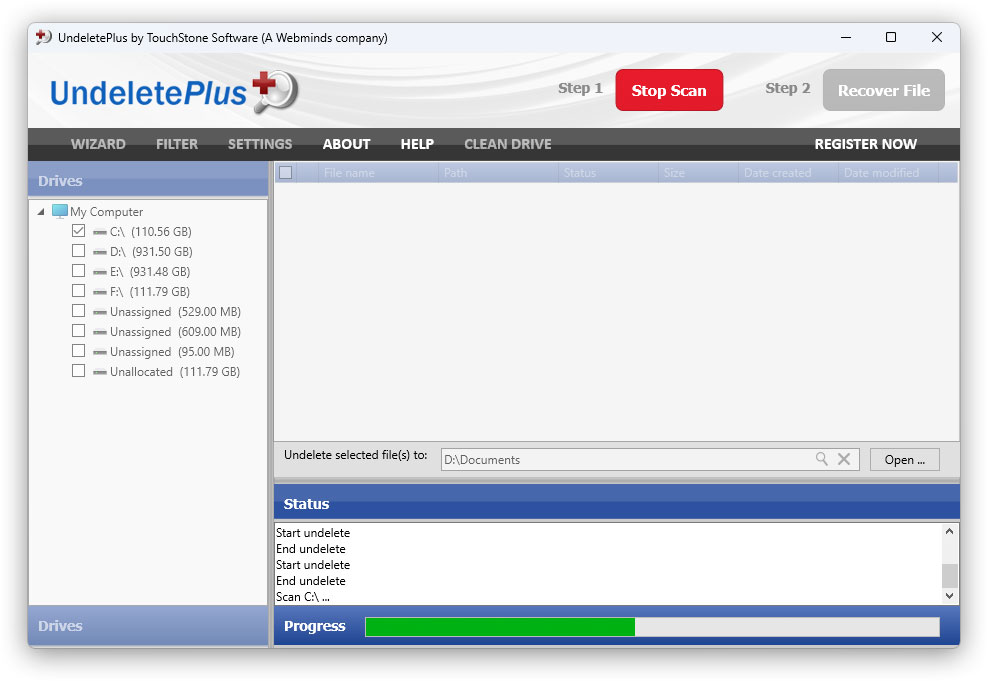
Undelete plus

Website and download -  http://undelete-plus.com/

The plus in this software, It can also recover files that have been emptied from the Recycle Bin and permanently

eSupport UndeletePlus Scan

It also recovers files

  1. Deleted files within Windows using the Shift + Delete
  2. Files that have been deleted from within a Command Prompt.
  3. Works with win 98/Me/NT/2000/XP/2003/Vista operating systems.
  4. The program supports FAT12/16/32,NTFS/NTFS5 and image recovery from CompactFlash, SmartMedia, MultiMedia and Secure Digital cards.
  5. Program is only 583 KB in size and requires no installation and is  Portable

With so much features and so small size i would buy  a special usb drive just to have this loaded and kept ready for emergencies

Tokiwa Data Recovery software -  Japanese software untility

DataRecovery is a  freeware tool that does the job of undeleting permanently deleted files even from recycle bin.

recover permanently deleted files

It supports FAT12, FAT16, FAT32 and NTFS undeletion including NTFS compressed files and EFS encrypted files.

The Zip file is only 198 KB in size, no installation required and it’s portable.

Download: TOKIWA Data Recovery or Download CNet Link

Filed Under: $heldon $ingh, 2012, Software, Solution, Website Review Tagged With: Data recovery, Permenantely Deleted files, Recover, Undelete

Primary Sidebar

Recent Posts

  • Underwater Drones for Recording Video and Taking Pictures
  • Why I chose hostgator for blog hosting
  • Top 10 Software Programs For Your Windows PC
  • What you should know before investing in Cryptocurrency and bitcoin
  • The Best Social Media Platforms for Marketing a Gaming App

Recent Comments

  1. Patrick McCormick on How to secure your desktop and laptop with antivirus software
  2. JJ on 20 Top brands with affilate programs to make you money in 2019
  3. JJ on This WPengine Genesis Pro Deal Will Give You 35 Studiopress themes
  4. Lisa Gomes on 16 Ways to Make Money Online Working From Home
  5. KatVine on This WPengine Genesis Pro Deal Will Give You 35 Studiopress themes

Archives

  • June 2022
  • February 2022
  • July 2021
  • May 2021
  • April 2021
  • March 2021
  • November 2020
  • September 2020
  • August 2020
  • July 2020
  • June 2020
  • May 2020
  • April 2020
  • March 2020
  • February 2020
  • January 2020
  • December 2019
  • September 2019
  • August 2019
  • July 2019
  • June 2019
  • April 2019
  • March 2019
  • February 2019
  • January 2019
  • December 2018
  • November 2018
  • October 2018
  • September 2018
  • July 2018
  • June 2018
  • April 2018
  • February 2018
  • January 2018
  • December 2017
  • October 2017
  • September 2017
  • July 2017
  • June 2017
  • May 2017
  • April 2017
  • March 2017
  • February 2017
  • January 2017
  • December 2016
  • November 2016
  • October 2016
  • September 2016
  • August 2016
  • July 2016
  • May 2016
  • April 2016
  • March 2016
  • February 2016
  • January 2016
  • December 2015
  • November 2015
  • October 2015
  • September 2015
  • August 2015
  • July 2015
  • June 2015
  • May 2015
  • March 2015
  • February 2015
  • January 2015
  • December 2014
  • November 2014
  • October 2014
  • September 2014
  • August 2014
  • July 2014
  • June 2014
  • May 2014
  • April 2014
  • March 2014
  • February 2014
  • January 2014
  • November 2013
  • October 2013
  • September 2013
  • August 2013
  • July 2013
  • June 2013
  • May 2013
  • April 2013
  • March 2013
  • February 2013
  • January 2013
  • December 2012
  • November 2012
  • October 2012
  • September 2012
  • August 2012
  • July 2012
  • June 2012
  • May 2012
  • April 2012
  • March 2012
  • February 2012
  • January 2012
  • December 2011
  • November 2011
  • September 2011
  • August 2011
  • July 2011
  • June 2011
  • May 2011
  • April 2011
  • March 2011
  • February 2011
  • January 2011
  • December 2010
  • November 2010
  • October 2010
  • September 2010
  • August 2010
  • July 2010
  • June 2010
  • May 2010

Categories

  • $heldon $ingh
  • 2010
  • 2011
  • 2012
  • 2013
  • 2015
  • 2017
  • 2018
  • 2019
  • 2020
  • 2021
  • 2022
  • Accounting
  • Adsense
  • Affiliate
  • Amazon
  • Anti Virus
  • Apple
  • Apps
  • Asus
  • Aussie
  • Australia
  • Australian
  • Australian Bloggers
  • Australian wordpress hosting
  • Banks
  • Blog-Hosting
  • Blogger
  • Blogger Tool
  • Blogger Tools
  • BloggerTools
  • BuddyPress
  • CARS
  • CDN
  • Celebrity
  • Clickbank
  • Compare
  • Computer
  • Domains
  • Done Deals
  • Ebook
  • Email
  • Facebook
  • Featured
  • Finance
  • Free
  • Gadgets
  • Google
  • Gpost
  • Guide
  • Hackers
  • Hosting
  • India
  • Internet
  • Ipad
  • Kindle
  • Laptop
  • Make money blogging
  • Makemoney online
  • Marketing
  • Melbourne Cup
  • Movies
  • Netbook
  • Network
  • News
  • Online betting account
  • PC
  • Review
  • Search
  • SEO
  • sheldon singh
  • Software
  • Solution
  • Sports
  • Subscribers
  • Taxes
  • Technology News
  • Themes
  • Top 10
  • Tutorial
  • Video
  • Wacky
  • web hosting
  • Website Review
  • Wierd
  • Windows
  • wordpress
  • Wordpress 3.0
  • Wordpress 3.1
  • wordpress themes
  • World cup
  • Wp Answers
  • WP Turbo
  • WPMU

Footer

Design

With an emphasis on typography, white space, and mobile-optimized design, your website will look absolutely breathtaking.

Learn more about design.

Content

Our team will teach you the art of writing audience-focused content that will help you achieve the success you truly deserve.

Learn more about content.

Strategy

We help creative entrepreneurs build their digital business by focusing on three key elements of a successful online platform.

Learn more about strategy.

Copyright © 2026 · Genesis Sample on Genesis Framework · WordPress · Log in