• Skip to primary navigation
  • Skip to main content
  • Skip to primary sidebar
  • Skip to footer
tech blog au

Digital Grog — Australia’s Tech, Gadgets & Digital Life Unfiltered

Digital Grog is Australia’s go‑to tech blog for sharp reviews, digital trends, AI tools, gadgets, cybersecurity updates, and practical how‑tos covering the latest in Aussie technology

  • About Us
  • Contact Us
  • Block Examples
  • Landing Page

2020

The apps that got Melbourne through lockdown

November 29, 2020 by admin 1 Comment

HEALTH APPS AUSTRALIA

To say that Melbourne went through a collective trauma is not an overstatement. Those eight long months of lockdown felt like an eternity, feeling even longer with the rest of the country coming out of isolation and moving on with their lives. There were brief reprieves and inspirations that caught our attention, like the quest to make the best banana bread and then trying to master a sourdough. Although, ultimately, it was the smart app developments that we spent too much time on that passed the months, each of them serving our needs in different ways and at different points of struggle.

Government App

The government has provided an app to keep you informed and safe during the Covid crisis in Australia. The COVIDSafe app is a tool that helps identify people exposed to coronavirus (COVID-19). This helps us support and protect you, your friends and family. Western Australia has come out with a new SafeWA app that small businesses can use to register visiting clients via a mobile phone app for contact tracing just in case of a breakout.

News apps

ABC’s rolling coverage of COVID-19 was in high rotation for many Victorians, especially when the restrictions were tightening or easing by the minute. Other than the ABC app, so many other news sources reported on the events unfolding bringing a varied dialogue in their own app form or part of the general News app. PedestrianTV covered the news with a millennial slant, Betoota Advocate provided the satire, as well as the stalwart outlets of The Age and the Australian. Given the mix of cultural, political and personal persuasions in Melbourne, choosing a ‘source of truth’ has been integral to all Victorians and was heavily relied on in times of uncertainty.

Mindfulness apps

If the need for mindfulness was a theory for some before lockdown, it was swiftly put into practice as isolating circumstances were not always conducive with a healthy mindset. Calm and Headspace are leading mindfulness apps in the marketplace offering guided meditation and playlists to support the goal of sleep, anxiety relief and affirmations. Other apps are designed to purely capture grateful moments or journaling prompts, and others encourage small activities that can bring some calm to lockdowns, such as visualisation or mindful walking. Checking in with yourself has always been an important priority, especially as the lockdown was testing the resilience of many.

Social network apps

TikTok wasn’t that new to the world at the start of 2020, but it really reached its stride in Australia at around the time lockdown took effect in March. The simple act of filming dance challenges and short videos provided a point of connection and purpose to the community who needed it. House Party was another popular app during the lockdown, which facilitated video calls and group games in the easy-to-use social platform.

Health-tracking apps

When exercise was permitted for one hour a day, this was a significant announcement to those who were used to spending more time outside exercising and commuting. The closure of gyms also encouraged many to download health-tracking apps to clock how many steps a day were taken and logging exercise as it happened. Given the nature of the virus that prompted the Melbourne lockdown, the community was more attuned with their health and became more aware of any changes or possible symptoms as they were occurring.

Podcast apps

Podcasts were growing in popularity even before the lockdown, but so many more were started in the Melbourne lockdown as a way of connecting with others and making use of the extended periods at home. Consuming news daily was a given, but hearing your trusted podcast hosts digesting that same news and discussing the state of play was a way of accepting the long lockdown that Melbourne found itself in. With podcasts now available on the Podcast app (on Apple), Spotify and Stitcher, it’s never been easier to tune in.

It was an incredible day when Melbourne came out of the eight-month-long lockdown, and it was a feat that none want to go through again. As parts of the world start their own second lockdown, apps and digital resources will no doubt assist in the long slog ahead.

Filed Under: 2020, Apps, Internet Tagged With: Australia, Melbourne, Technology education

Black Friday Deals 2020 – The Top 20 picks for Australia

November 27, 2020 by admin 5 Comments

I search online for black friday deals and find Australian businesses like Harvey Norman, Kogan and News.com.au flogging deals for this American online sale frenzy that happens each year in November. The weird thing is most people in Australia don’t have a clue what this whole online sale event is about.

Before Google Search Australia got invaded with “black friday sales” by all the commercial websites for a “thanksgiving day that Australia does not celebrate”,  it used to show the real black friday bushfires in Australia that everybody knew about. The bushfires that happened in 1939 in Victoria, Australia.

The Royal Commission noted that “it appeared the whole State was alight on Friday, 13 January 1939”. The infamous Black Friday bushfires happened on the 13 January 1939, in Victoria, Australia. It was said to be among the worst natural bushfires (wildfires) in the world. Almost 20,000 km² (4,942,000 acres, 2,000,000 ha) of land was burned, 71 people died, several towns were entirely obliterated. So we pay our respects to those affected by those bush fires.

Black Friday for the US  is a commercial bonanza for  retail and online business. Black Friday  and Cyber Monday is a  big event in the US and massive discounts are available online. Everybody loves a good bargain online and for this reason, I have done a roundup of all the good deals  that I have updated from  2020 to 2018. I made a list, so you too can benefit from these online sale offers here in Australia.

One deal I always get  every year @blackfriday is a new hosting account as I am into blogging and website as a hobby.   This year I got myself a  siteground website hosting deal . They got 75% off on the 12 month shared hosting $4.99 deal and also deals on the 24 month $7.49 deal.

I signed up as  an affiliate  so you can get their deals here. Maybe I will need to end my $700 Aud Presidium hosting account  now.

australia black friday discounts

I know most  webhosts have deals right now including Bluehost and HostGator which I also use for websites. Bluehost has  Shared Hosting starting at $2.65/mo* for 36 months and Hostgator has a 75% off deal. Connor clothing my local shirt shop also has a 30% off deal right now. Below are some more deals.

"black
[table “6” not found /]

Most of these crazy upto 60% to 70% off online offers are available this cyber weekend (yes that’s what they call it) So you can get off on this – this weekend, but surely some of them companies will extend their offers at the end of this November date, because they so like to give us deals -don’t they.

wordpess dealsSome of the deals/links listed above will convert  to the Black Friday discounts  when they start on black friday and some are just discount offers that are listed  for your online shopping convenience from my affiliate partners.  You get a discount and I get  compensated at no extra cost to you for listing the deals.

I have used  most of these products( tech, website and gadgets related ) on this page  and  hope to  test out the rest, which I have not used yet. Hope you find a deal that interests you.

When is Black friday and cyber monday ?

  • Black Friday 2020 is on 27 November 2020 
  • Cyber Monday is on  Monday, 30 November 2020
Black Friday is an informal name for the day following Thanksgiving Day in the United States.
From wikipedia
The earliest evidence of the phrase Black Friday applied to the day after Thanksgiving in a shopping context suggests that the term originated in Philadelphia, where it was used to describe the heavy and disruptive pedestrian and vehicle traffic that would occur on the day after Thanksgiving.
 
This usage dates to at least 1961. More than twenty years later, as the phrase became more widespread, a popular explanation became that this day represented the point in the year when retailers begin to turn a profit, thus going from being “in the red” to being “in the black”

Website Design and Theme – Offers

Website deals – It is the perfect time to invest in loads of useful wordpress plugins, tools, themes, plans and more. Our list above features a lot of website related products, whether you need it for your own website, or a client’s, purchasing a product that is priced way below its actual price is always a good deal.

Software Blackfriday Deals

The list also features streaming and recording software, video editing  and  website and online shops software. This holiday season is the perfect time  to get into  downloading or editing videos with our discounted software  products listed above.

If you do spot any good deals worth listing here this year, do send me a note over here and I will include it in my 2020-21 edition of deals, if good.

You want to check out what we featured earlier check out our 2016 deals post here and these earlier posts over here and here.

"Blackfriday

Happy deal hunting and have a good cyber 2020 !

Restrictions: Most offers featured over here are valid for new customers . Not valid for existing customers, renewals, upgrades, or any other product purchase. 

Validity: The deals featured above are mostly over the  Black Friday and  Cyber Monday weekend, unless they are extended by respective providers.

Filed Under: 2018, 2020, Australia, Compare Tagged With: Cybermonday deals, Hosting In australia, Software, VIDEO, Wordpress

Top Video and Audio Conferencing Software for Business in 2020

September 21, 2020 by admin 1 Comment

"best

Covid has brought upon us the work from home generation and this culture is likely here to stay or get absorbed into the new working culture. With these current “do everything from home” circumstances, has come the rise of the new business productivity apps. If you are looking for the top video conferencing app for your business needs, our list and comparison below will point you in the right direction.

Zoom the web conferencing app has had a big exposure due to the current circumstances where a lot more people are using the internet to chat or meet online for personal or business reasons. It has not only multiples its user base in a very short span of time, but allowed itself to grow multifold in its market value due to the current circumstances.

WebEx and Microsoft teams are other such players in this field. Webex has been there for a while, but Microsoft teams is a new and fresh contender which his also gaining popularity for its ease of use in the business world. Below we have some software for business needs and also some for personal use like video chatting with family.

Let’s have a look at some of this apps/software and how they work

Top 5 Business Productivity Apps

ZOOM

zoom to video chat

https://zoom.us/whatsnew

Zoom is best-known for being the go-to choice for businesses that need access to quick and convenient video for internal and external audio or video conferencing.

  • Offers high-quality HD video and audio.
  • Simple and easy to use platform
  • Offers  collaboration facilities such as text chat and screen sharing
  • You do not sign up for the app to join a Zoom meeting (hopefully this doesn’t change)
  • To host a video conference, you need to create an account
  • Can sign up using existing Facebook and Google accounts
  • Works with Windows, macOS, Android, and iOS
  • Desktop users can also begin a local recording
  • There is extra functionality with plugins like integration with outlook , google chrome, Firefox to make using the app from within these software easier

Zoom app is offered in both free and paid versions. The paid version has some additional features like you can add up to 1000 participants, record calls, and much more.


WEBEX by cisco

webex australia

https://www.webex.com/pricing/index.html

WebEx is a flexible conferencing solution designed for businesses of any sizes you can think. Cisco owns the WebEx brand and has been around for a while with a high degree of reliability.

  • High quality web and HD video meeting software
  • It has Integrated application/file sharing(screen sharing)
  • Integrated with Outlook – add WebEx to a meeting in my calendar and all invitees will have the information
  • Cross platform – works with Windows, Mac, iPad and support mobile meetings for iPhones, Blackberries, Androids.
  • With WebEx meetings you can also chat using your phone or home line and watching the video/ video conference or meeting using your internet connection.
  • Supports immediate playback of multi-media content like flash and windows media player
  • Great customer service

Webex makes a good reliable software/app for  video and audio conferencing  for business needs and integrates well with their  most browsers and  their other products like jabber.


Microsoft Teams by Microsoft

teams by microsoft

https://www.microsoft.com/en-au/microsoft-365/microsoft-teams/

Microsoft Teams is a new player in the market that has rapidly taken over market share from webex and zoom.

With the competition heating up for video conferencing platforms like Google Meet and many other free video conferencing platforms, Microsoft has made it free to collaborate with your colleagues with some limitations.


  • Multi-Platform support -You can use Microsoft Teams on most platforms including Android, iOS, Windows, Linux, and macOS.
  • Schedule video/audio meetings with one person or a team or make a call directly to your teammates.
  • Features includes screen sharing and call recording, background blur and chat.
  • Just share a link with your team to join the call or a meeting.
  • Easy to use – The interface is clean and simple to understand. You can initiate an online meeting or can schedule one as per your requirement.
  • Host a webinar or meeting with up to 10,000 participants.
  • App is integrated with Microsoft 365
  • If the other person is unable to answer, you can leave a voicemail-like message.
  • With Microsoft Teams integrations with Outlook, you can schedule a video call in advance and you get an alert before it begins.
  • The free account offers 10 GB of team file storage and 2 GB of personal file storage per person
  • It supports most Microsoft software. Teams let you collaborate in real-time with MS Office including Word, Excel, PowerPoint, and OneNote. Let your teammates access, share, and edit Word docs, PowerPoint, and Excel files in real-time
  • You can communicate and collaborate with teams up to 500K users
  • Microsoft keeps your data secure by using Secure Real-time Transport Protocol (SRTP) technology for video and audio data encryption.


How to set up Microsoft Teams:

You can download the app directly from the app store or Microsoft website and use your email account to log in. It can also be accessed via a web browser.

If you remember skype owned by Microsoft and still use it, MT has been built using some features “Skype for Business” that has been rolled into Teams. Teams support VoIP calling features where you can call anyone with a phone using Microsoft’s cloud-based PBX.

Microsoft Teams is ideal for businesses who already use or are familiar with Microsoft products and for others it could be an expensive option. It is however a perfect solution to collaborate with your team with plenty of features and third-party app integration options, which is not available with competitors.


How to use and set up Zoom Meeting:

First, you need to get the Zoom app on your device.

You will need the code and password for the meeting you wish to join.

At the time of the meeting, enter your Zoom app and type in the meeting code. After a short while, you will be prompted to put in the password. Type it on the password line. You will get a message telling you to wait to be invited into the meeting by the host.

Once you get the invitation, you will see the host (or some meeting participants) on your screen. If you want them to be able to see and hear you during the meeting, tap the video and audio icons at the bottom of the screen to join the meeting with visual and audio.

You can also press “mute” any time you want to remain silent to the host or other participants. Just remember to press “unmute” if you want to be heard again. [ These zoom instructions can be quite similar to use for most other video conferencing apps too ]


Most of these apps work by creating a meeting id or a URL that you can share with people to join your meeting or video chat.

Companies or organisations will have to take into account – companies licensing agreements, hardware, budget, communication needs before signing up with such providers.

Historically with these apps none has been truly web-based, as they require a download, only work on certain devices, and don’t always work on all browsers. But this has changed now with most of these being able to be used with web browsers using plugins as alternatives and some even in stand- alone browsers.

Zoom vs WebEx

Zoom is the hot new web conferencing toy in the industry, but is proving itself to be well received in the workplace due to its ease of use and nice video interface. Cisco is a bit pricier when compared to others, but Zoom costs can add on with charges for add-on charges for extra features.


Other Business Video conferencing & Productivity APPS

Below are some apps that have been used for business as well as popular with personal use for video chat and audio calling features


GoToMeeting (popular with business use)

go to meeting business app

Go TO Meeting has been popular as a video conferencing app prior to the launch of these new popular apps who have grabbed user share. With GoToMeeting, you can schedule conferences for any time or place you choose. Additionally, attendees can join from a computer, laptop, tablet or smartphone.


Google Meet (popular with personal use)

video by google meet

If you have heard of google hangouts, this had evolved into google meet.  You can plan a video meeting in the Google calendar, Gmail, or Meet by signing in to the G Suite account.  Enter https://meet.google.com in a web browser

It has features like real-time captions and support for up to 250 participants and 100,000 live stream viewers


Facebook Messenger & What’s app (popular with personal use)

facebook messengerwhatsapp videochat

Both are owned by Facebook.

WhatsApp is one of the most popular chats on the planet. It counts over 1 billion active users. It offers you voice calls, video calls, and many other features.


Slack (business and personal use)

group chat by slack

Slack is a useful chat or conferencing app where you can create chats with different users, mention users via @ and view all team members files at one place. Slack allows you to make voice and video calls and show your work, you can share your screen just like in Skype.


Viber for Business (popular with personal use)

viber of business chat

Viber for Business completes the Skype for Business alternatives when looking for a collaboration or team chat environment.

Pricing:

Most providers have different type of plans like Pro, Business or Enterprise which are quoted according to your needs.  Pricing can also be calculated on per participant per meeting prices or then flat licensing deals. The typical lowest starting price is from $12/month to $15/ a month , however price can vary according to your  business needs.

Conclusion:

You can’t run a company without meetings and you cant video chat with friends without a video chat app.  Video conferencing services make communicating with your entire team or your group of friends and family easy. Today its possible to video chat or conference with large number of people depending on which platform you are using.

Which video conferencing apps do you use? Let us know in the comments below!

Filed Under: 2020, Apps, Australia, Compare, Internet, Software, Solution, Video Tagged With: apps, Comparison, Internet, Security, smartphone app, Technology education, VIDEO

16 Ways to Make Money Online Working From Home

July 26, 2020 by admin 1 Comment

"make

Losing a job is never easy and even if you are still being supported by your employer in this health crisis or have some savings, money will run out eventually. You need to have a plan for long term, just in case it takes more than normal time to get back up again.

Immediately after you’ve been let go, you may find yourself experiencing a range of emotions – panic upon not getting a regular pay check anymore, a sense of mixed happiness or exhilaration as you embrace a new life without a set routine, rage when you reflect on your employer let you go  after so much hard work and loyalty you gave to the job.

If you are a person comfortable doing a job, then letting people know you’re available for new opportunities is the first step in getting your job search off the ground and don’t forget to register with Centrelink.  Otherwise considering new options is an opportunity and a plan for now.

The plan is not to get caught up in emotions, recognise that they’re all normal – move on and focus on the future.

You can look at other options while you have the time to earn money online via the internet.  There are websites online that can help you make money on the side from home. PayPal is a essential tool you will need to receive money online for any services provided or any side hustle.


2020 has been a tough year  for holding a steady income  and surviving. Below is a list of different ways you can make money online today by basically taking advantage of the internet and online opportunities.

That Pet Project or Business idea

Remember that business idea you had or pet project that you had in mind when you had a job and was all secure financially, now is the time to give it a go. It can be anything from creating crafts to sell or starting your own takeway.

You have the risk of losing money with any new business idea if things don’t pan out, but it’s your call and you have the time right now (if you have some spare money).  If you are more risk averse,  then maybe looking to do something online and earning money should be your plan, read on.

"pet

Provide a service /freelance

You can easily earn money online by providing a service through the internet. Did you know that Approximately 57 million Americans were freelancing in 2019. This is called the new “gig economy” or freelancer economy.

You can be called a virtual assistant or freelancer. The jobs that  you do online can vary from  being a virtual assistant for a specific task, writing an article for  website or blog, making a promo video , translation of text audio,  transcribing, creating an audio track, entering data into excel word, accounting work, online marketing work and many more services that you can provide online.

On these websites  (listed to the right) you can charge people using your services anywhere starting from $5 to $500 depending on the value of the service you are providing. You can advertise your service, fees and time you will take to complete tasks on the platform. The freelance website will take a cut from your earnings as their service fee.

arrow right

"article

"Links"

Three popular websites online that can help you find work online are given below

  • https://www.fiverr.com/
  • https://www.upwork.com/


Stock Trading & Investment

Many say investing in the stock market is as good as taking a gamble at the casino and in such troubled times picking a winner can be fraught with risks.  So, this is an option not for the faint at heart.

If done right there could be good returns, but there is always the risk. I would suggest that don’t put in money that you can’t afford to lose. Investing int eh stock market can be from as low as $500 , however to make some kind of decent returns at least $20,000 investment as start is recommended.

Most big banks (CBA, NAB, ANZ & Westpac allow you to trade shares with them once you open a share trading account with them. Trading a share can cost you anywhere from $8 to $20 per trade. Apart from the big banks there are brokers like self-wealth and Ig Markets that allow you to trade shares.

"ASX

Starting a blog

This can be a hobby if you go the time or you can turn this hobby into a business if you can get many people visiting your blog or website. If you like gadgets you can start a gadget blog with reviews of gadgets or then if you like writing about life or cooking you can start a lifestyle or cooking blog.

How you can make you hobby into a business online with a blog is by providing links to cookbooks in your cooking blog or links to gadgets in your gadget blog and when visitors click on these links and buy you get a commission.  You can sign up with an affiliate program or amazon to get these links to put on your website or blog. Check this article on how to create a blog withing 10 to 15 minutes on this article.

"build

Selling stuff online

This is a continuation from what I just said about starting a blog above.  However, if your sole purpose is for starting a website to sell something online then you will be just listing your products online, advertising and expecting sales.  This is also called ecommerce.

For this I would suggest a platform that is specifically designed for easy set up and use even by beginners. I would recommend shopify platform.

This platform makes it easy to list your products on your shopify website and is easy to integrate with facebook to sell to Facebook audience.

People are increasingly using social platforms like Instagram and twitter to sell online.  So, making your personal or business profile on these platforms might help sales for your business. You can also pay influencers to spruik your products online to get massive sales. Some people are also making a living by just selling stuff on facebook marketplace online and gumtree.

You can design and make you own product in china and start selling it on shopify, or then make your own product locally and sell online or then even sell an online product eg. like an ebook, knitting design templates for an online delivery.

"sell

Study / Do an online education course

back to school

If you ever thought of going back to school, this is the time to do it.

If enrolling in a class or two will make you more marketable and you can afford it, go for it. During your downtime you can do workshops and they could boost your self-esteem and offer a positive outlet.

Get yourself some online education by studying a new course or skill.  This might come handy in the short to longer term. Maybe get a skill or education that will add to your existing qualifications.

There are many education institutes in Australia offering study courses online apart from specialised online study organisations. Below are some of them.

  • https://www.open.edu.au/
  • https://www.lynda.com/
  • https://www.udemy.com/
DigitalGrog

Global Gyan

Rent out your home/ take an overseas student (homestay)

homestay no entry

Got a spare room in your house or a spare house.  You could rent it out, take in a homestay student or make it Air BNB rental or stayz holiday home.  Register with Air BNB or stays to list your house for short term rentals. If you need a renter, list your room online on an online listing website, or a rent a room website or on your local uni student board.

Homestay is when you accommodate a student/overseas student in your home and provide meals for them. You get a paid a fee to do this and the student gets to learn local culture while getting an Australian education. May universities and schools are on the lookout for homestays for their international students.

Rental Websites:

https://www.airbnb.com.au/

https://www.stayz.com.au/

https://www.booking.com/holiday-homes/index.en.html

Answer surveys online to make money

Many people don’t know this, but you can make money answering surveys online or even taking surveys for survey companies. Answering surveys is as easy as registering with a survey taking website and answering their surveys.

There are a few survey websites that allow you to make money in this way like survey junkie, swag bucks. Google has got into this as well.

https://surveys.google.com/google-opinion-rewards/

With google every time a new survey is available, you will get a notification and between one to 10 multiple choice questions. While payout is usually a few dimes or quarters, when you hit $2, you can transfer the money right to your PayPal account.

The money is not great, but it is something to do.

"make
"Answer

Become a tutor

Have a skill.  Good at maths. Good at singing. Good at computers. Become a tutor and teach others.

There are plenty of people willing to pay money to learn new skills and  gets hands on training. There are many online platforms today where you can advertise your skills and willingness to teach for a fee. If you have qualifications in your skills from a certified education institution, you can be at an advantage.  You might need to get further relevant local security clearances for your job.

Sign up with a tutoring agency and get a tutoring job.

"become

Rent your car / dress/ shoes

gucci vs ysl vs prada

In today’s world almost everything is made used of – and nothing goes to waste. Go a car that you hardly use, there are websites on which you can list them for people who don’t have cars to use them and pay you.

Got a Gucci shoe/bag that you paid $1200 for, got a valentine or Piccioli dress that you paid a couple of grand for – just rent it on one of the local popular rent a dress/shoe website and earn some money

Dress rentals

https://www.thevolte.com/

Bag rentals

https://www.fashionconfidential.com.au/

Work from home Jobs

At such time there is not many jobs going around, but some successful jobseekers online might be able to snare a job working online and not even have to attend a workplace.

Some popular Australian online job sites are

  • seek.com.au
  • indeed.com
  • linkedin.com
  • https://www.jobaccess.gov.au/home

Recruitment companies

  • http://www.chandlermacleod.com/
  • http://www.hays.com.au/
  • https://www.job-directory.com.au/


"home

Making money from Social Media like – Youtube, Podcasts, Instagram, twitch and Facebook

Making money using social media is a new avenue of making money that many youngsters are taking advantage of  be it running a podcast , becoming a Instagram influencer  or becoming a youtube star or making use of new social platforms like tik tok and twitch (gaming). Online gaming is also a big niche today.  This social media method relies of you getting many fans or followers/subscribers online via social media which has a predominantly younger customer base.  Read more below

Become a YouTube Star

You-tube today has grown to be an alternative to TV as well. Most smart tvs have you tube app readily available to watch it online on your tv and it is easily available also from your laptops and desktops increasing its reach to billions of people.

Savvy youngsters are taking advantage of this and making a name for themselves online via their self-created video channels. This also opens this medium to make money by anybody who can create a loyal and popular fan following on many numbers of viewers to their video channel. In YouTube terms it is called channel subscriptions. The more people subscribing to your video channel and watching your videos, the more popular you are considered online.

Create a Youtube Channel:

https://youtube.com/watch?v=l0eM1_JVqHE

Youtube.com

Starting a video channel can be anything from making videos of opening children toys and explaining how they work to talking about stock market trading and educating people on how it works. The things that people do on youtube are so different yet many people successfully can make up to $40,000 + a month from a  YouTube channel.

How money is earned – People watch your videos on YouTube  – in between watching your video an ad pops up ,every ad that a viewer sees you are paid money for it. More people watching your videos = more watching the ads in between =more $$

There is a website called social blade that lists estimated earnings of youtube stars online. Check out popular Australian youtubers channels here.


Become a Instagram Influencer

instagram income methods

Instagram is more popular within the fashion, Food, Travel and health and wellbeing niches today.  There are many celebrities on Instagram. Many people are making money promoting make up products, Perfumes and designer clothing brands and many more innovative products on Instagram. Money is made by sponsored posts on Instagram.

Register for Instagram website or app : https://www.instagram.com/

For eg.  You can just make an Instagram post saying you really liked this new perfume and if you have 120,000 followers that means you just promoted this product to all 120,000 of them and some of them might actually buy it.  The perfume company could pay you anywhere from $200 to $20,000 for a sponsored post mentioning their perfume.

It works on the same principle as other social media methods- the larger following you have (followers) the bigger audience you can promote too and therefore earn more money.


Become a Podcast Broadcaster

A podcast is an audio channel that people subscribe too. Its like listening to the radio online. People have their own podcast talking about different subjects, conduct interviews of other people online and you can listen to it on demand. Podcasters generally cre

ate a series of their podcasts so that people can subscribe to them and listen regularly.

subcribers and win


The first time I heard of podcast was thanks to the apple products ipad and iPhone that promoted podcast (even though I am a

Samsung fan)


Top podcast websites:

  • Apple podcasts/itunes (could not find the podcast weblink without downloading an apple app)
  • Tunein
  • Spotify
  • Google Podcasts

The more people subscribing and listening to your podcast regularly, the more potential for you to make money.  Money is made by you mentioning and advertiser’s product on the broadcast or allowing an ad to be broadcast in your podcast. The ad could be in between your podcast or at the start or end of the podcast.

Eg. $25 per 1,000 downloads for a 60–second mid–roll slot

Her is a list of top podcaster platforms ( no surprise that it does only list Amercan podcast websites)


Become a  Online Gaming Broadcaster/Publisher

earn cash playing games

This is a new niche that is currently just gaining traction and has become quite lucrative as well. Many online gamers today are using this method to make money while enjoying playing online games.

How it works is – you sign up with a platform to record yourself playing games online like eg Fortnite, Minecraft, counterstrike or GTA online and this gets broadcast live to an audience while you are playing the game. If you are an expert in playing that game, other gamers will subscribe to your regular broadcasts to learn how to play better from you.  Players also ask for donations online while playing to show off their particular gaming skills.  Female gamers increasingly have taken to this platform with growing income potential as this has been mainly a male interest niche so far

The more people subscribing to your live/recorded gaming broadcasts they more potential you have of earning money online.

Popular online gaming platforms:

  • Twitch
  • Facebook online gaming (previously mixer)
  • YouTube gaming

godaddy girl

There are new online platforms today like patreon and onlyfans.com that cater to other niches while also being adult oriented to cater to a more diverse audience. They are many people from the Adult industry that use these platforms for obvious self-promotion reasons.

Making money from home can sound like all glitz and glam and kind off a lifestyle choice —  however if you want to seriously make money from your venture it can be quite similar to doing a fulltime  job, but it can be also satisfying  when you earn a  good income and because you are working for yourself.

Filed Under: 2020, Australia, Guide, Makemoney online Tagged With: Business Start up, Money for blogging, online selling

10 Tips To Get Ready Working From Home Successfully

July 4, 2020 by admin Leave a Comment

​Not many people realised that they would be working from home this year, No thanks to the Bl**dy virus that has turned the world upside down.  The covid virus has got hundred and thousands of people sick and has changed our lives in so many ways.

People now have turned to working from home in large numbers due to this calamity. People are self-isolating out of fear and safety.  A lot many have learnt to manage their lives remotely through video conferencing and virtual meetings.  It is essential for you to have a plan if you are going to work from home. In this post, we are going to look at what you need to start working from home ( more like a checklist)

A few things to sort out before you begin to work from home.

  • Make sure you have a proper table and chair that follow appropriate safe, ergonomic standards
  • Get a sit stand up desk if needed
  • Take regular breaks
  • Screen size of your laptop/desktop
  • Lighting in the room
  • Good NBN OR Internet connectivity
"

A proper table and chair set up is very essential if you are going to be working from home. The long hours (5 to 8 hours a day or more) sitting down can be tiresome, and you need to get your posture right, or you can damage your back or neck.  Luckily when you are in office, this is all taken care off by the workplace, so it is wise to take extra care with this while working from home.  This video here might give you a few tips.

A sit stand up desk

Sitting down in front of a laptop for long hours can result in cramped shoulders or back. Why not invest in a sit stand up desk. This should allow you to do work while sitting and also do work while standing half the time.  This method does wonders for many.

Take Regular breaks

Take breaks as if you would do so at your office.  If you took a morning break and an afternoon break with a walk around your block while at the office – do the same when you work from home.

Exercise keeps you healthy and more productive. Don’t forget when in office you do take some time to have a chat with fellow colleagues as well, so make sure you break up your continuous work time.

Getting Ready to Work from home

Gadgets, Settings and Adjustments you will need to make.

Work Monitors/ Docking stations

​WORK MONITORS: Turn your laptop into a Desktop. Your workplace monitors may be huge or dual monitors, so it enables you to see screens easily for long hours. Make sure you get a laptop which is easy to do work for long hours without strain on your eyes. Eye health is important too.

Get your laptop attached to your home desktop monitor or get your office laptop docking station to your home. Maybe get a laptop glare protector if you need one.

Proper lighting in room

LIGHTS: ​If there isn’t suitable or sufficient light in the room, it can lead to a strain on your eyes affecting your work, so it is essential to have enough light while working and lights that are not reflecting too much on your work area. Adjust as needed.

Hydrate

HYDRATION: If you don’t have a water bottle on your desk at work, you should get one. Office aircon are known to get the air dry around you, and you need to hydrate, so don’t forget to do the same when you are working from home. Get your regular dose of hydration.

​

Using your own mobile for work

​COMMUNICATION: Enquire with your office how you would make calls to clients. If they provide an office mobile or if you can use your own mobile or home phone and claim deductions or claim expenses back from office.

If you use your own mobile, for Samsung mobile you can block caller id or hide your number for a single call by entering #31# before the number you wish to dial. If you are a iPhone user The quickest way to block your iPhone’s caller ID is to use the *67 trick, which is referred to as “star six seven”

Headset with mic

You might need a good headset or headphones with mic to take part in video conferencing and training from home or then listen to training packages, without disturbing people at home or keeping conversations confidential.

Most laptops have a built-in camera nowadays, but if your doesn’t then just get one from your office or a  portable webcam from the tech shop or online.

Record Keeping of Expenses

Keep records of your expenses incurred due to working from home so that you can claim it from your office or then claim deductions if allowed. It is easy not to get all the expenses claimed back, which is due if you don’t keep detailed records and receipts.

Plan your lunch or brekky in advance

It is wise to plan your brekky and lunch in advance even though you are working from home to stop unnecessary interruptions at work, just like you would do so regularly. However, make sure you take your breaks.

Kids at home

​Set the rules. If you have kids at home while working, it can be difficult.  Have a sit-down conversation with your kids? Make them understand that you need minimal interruptions. Plan a daily routine for them as well, Learning time (online learning time), TV time and outdoor play time. Pre-plan activities for them to do.

Good Internet connection

​A good stress-free work time can be achieved with good internet connections and good connectivity. Make sure you test your laptop if set up to work from home first from your office before you bring it to home.

To avoid disconnections and lag while working – your office will need good virtual network set up, and also you will need a good internet connection. A good idea would be for your kids to not watch Netflix, YouTube videos or stream audio via internet during when you work – if this is possible.

Work Start /End Timing

All companies or workplaces have different rules, though you can expect quite a few to be the same when it comes to work start and end times. You need to plan your start and finish times.

If you are working from home, you save the travel time. So, with that bonus, you could possibly start a bit early and finish early.  Some offices don’t allow you to accrue flex time, and some do, so if its allowed maybe you can work an extra half hour every day and accumulate some flex with an early start. If its not allowed, then you can still start early and finish early and get more time to your day.

Psychology of working from home

Many people will jump at the idea of working from home, not knowing what it entails or how they will cope. Some will succeed it doing it well, and some will fail miserably and not get much done affecting their productivity.

It is essential to know hat kind of work person you are to succeed, if you can get along just fine without an office formal atmosphere and work in your pyjamas that’s okay. But if you will find it hard to work in a casual home setting, maybe you will still need to dress (formals) and act the part to work from home. It’s all about getting your mind into the right frame of work.

Conclusion:

Just finished counting the points, so in total there was “14 tips to get you started working from home successfully”

There are other things you might need – if you suddenly have had to start working from home like printers, printing paper, envelopes, office mobile, paper shredder, filing box or files, stationery and your help desk and support contact numbers ready.  

Enquire with your office if they allow you to take equipment home for working from home- You might be surprised. Good luck and please do comment below if you have any additional tips you can add to my article.

  • WiFi Range Extender
  • Sit stand up desk
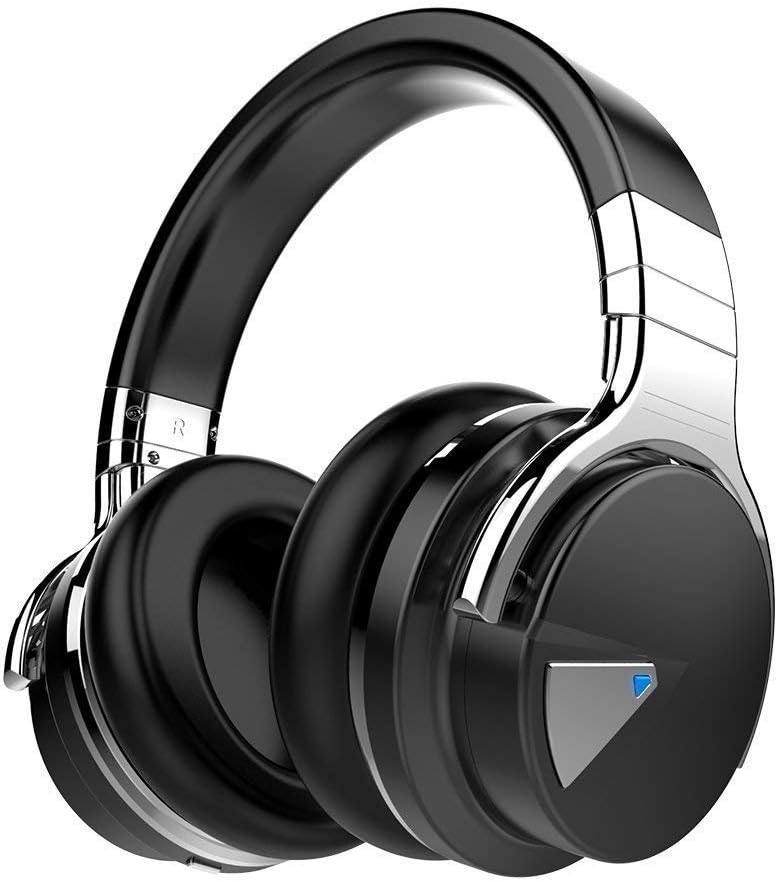
  • Headphones with mic
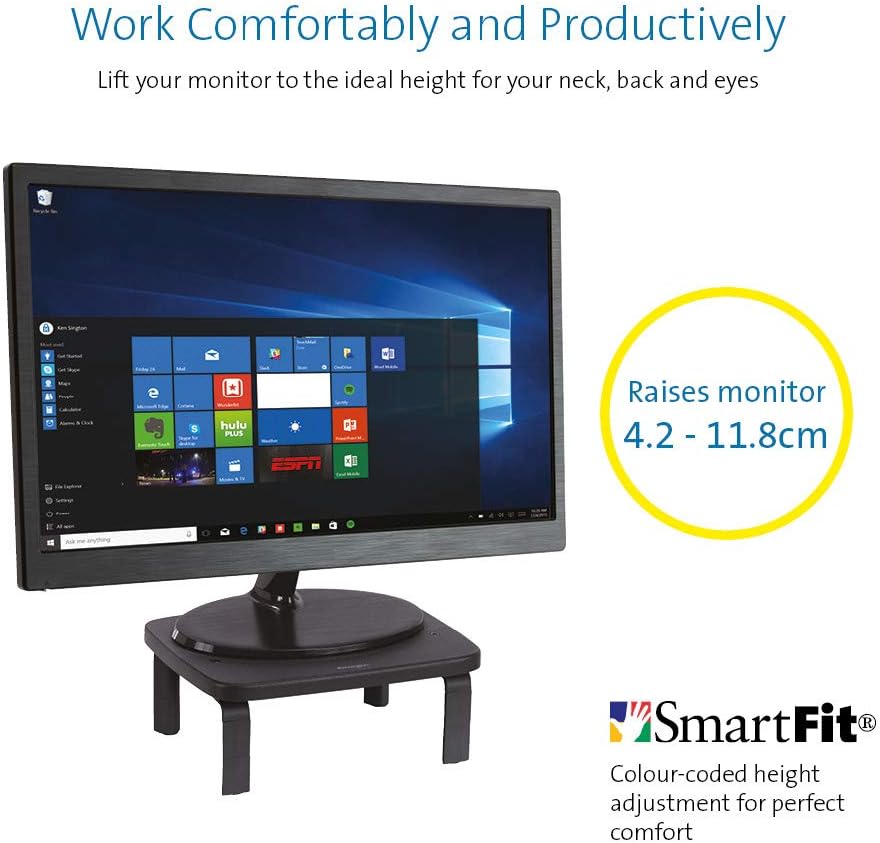
  • KENSINGTON Monitor Stand
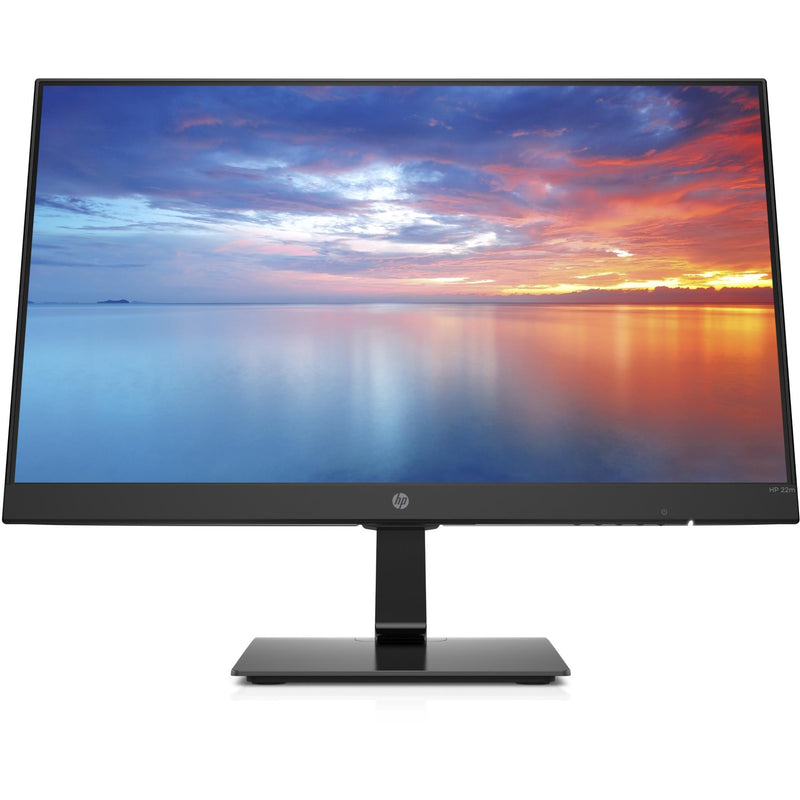
  • Desktop Monitor
  • Docking station for laptops
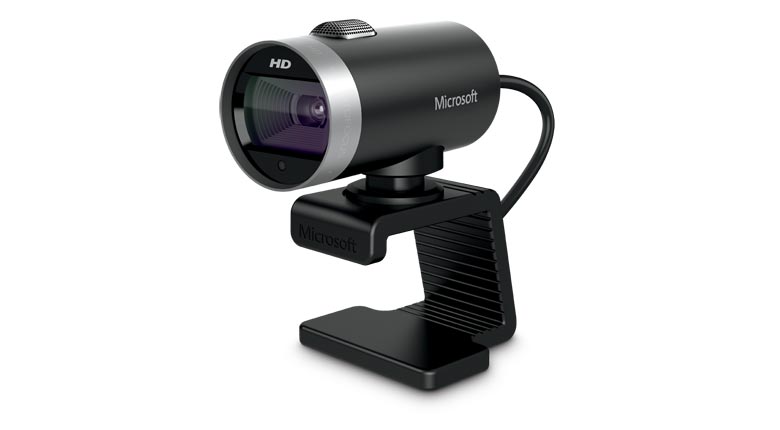
  • Webcam for Desktop or Laptop

tp link modem router

WAVLINK WiFi Range Extender AC1200 Wireless Router/AP Access Point/WiFi Extenders Signal Booster/Range Extender with Dual Band 5Ghz 2.4Ghz 1200Mbps Works Any Route

This is something you might need  to get proper wifi coverage to get  your work done at home.  You will only need this if your modem/router is not good enough in distributing the  wifi signal around your house.

 Network extender mode boosts wireless signal to previously unreachable or hard-to-wire areas flawlessly Miniature size and wall-mounted design make it easy to deploy and move flexibly
 
Features

Eliminates Dead Spots and Extends the Existing Wireless-AC Coverage

    1. Using the Wavlink 575A3 Range Extender, you can easily extend the range of your existing wireless router to create a strong Wi-Fi signal for all the devices in and around your home, including smartphones, tablets, ultra-books, and more.
    2. Greater coverage allows you to enjoy fast Wi-Fi speeds on your laptop or tablet .
    3. It can Creates Wi-Fi speeds that are up to three times faster than wireless-N. With this extra speed, you can stream HD-quality videos and play online games seamlessly without interruptions or lag.
 

pro plus 36 white desk sit stand up desk

Featured Pro plus 36 Varidesk model

The sit stand up desk is becoming a popular alternative today to improve more healthy computer use and prevent your body from bad posture health risks. It helps reduces incidents at the workplace.

Features:

· Best selling model

· Risk-free for 30 days

· Two-tier design: upper display surface, lower keyboard/mouse deck

· 5 year warranty

· Shipped fully assembled and best-in-class materials used


Prices and more over here


You can get a cheapo PC headset at officeworks  for between $10 to $20 that will do the job  for video and audio conferencing or then you can purchase a fancy noise cancelling headphones with mic  that will do the job and allow you to listen to music at high quality.


This is the COWIN E7 Active Noise Cancelling Headphones Bluetooth Headphones with Mic Deep Bass Wireless Headphones Over Ear with inbuilt mic. It has active noise cancelling technology

Link here: https://www.amazon.com.au/Cancelling-Headphones-Bluetooth-Comfortable-Cellphone/dp/B07RW8DT4S/


If you  got a monitor or need to jack up the height of your laptop then you need this.


KENSINGTON(R) 52785 Monitor Stand, SMARTFIT Standard

Stand positions monitor in line with your eyes to help reduce eye strain.

Price: $39.00 & FREE Delivery.

Check updated prices here 

If this is not your thing, you might want to check laptop stand on Amazon.com.au.

Acer ET322QR 31.5" Curved Flat Panel Monitor

If you are game enough to get a fancy new curved monitor then this is the one you need to pick up from Harvey Norman. It’s the Acer ET322QR 31.5″ Curved Flat Panel Monitor.

This Curved Flat Panel Monitor delivers clear and vibrant images at ideal viewing angles, while also adding a stylish touch to your entertainment setup.

Key Features
  • The Acer ET322QR 31.5″ Curved Flat Panel Monitor has a 1920 x 1080 resolution (60Hz refresh rate and 4ms response time) for sharp and detailed visuals.
  • Made with an 1800R curvature, the ET322QR monitor’s screen has a wrapping effect at optimal viewing distances to provide an immersive viewing experience.
  • Integrating Acer Flicker-less, BlueLight Shield, and Low dimming technologies, the monitor’s visual output is easy on the viewer’s eyes.
  • This Acer curved monitor has one VGA port and two HDMI ports to suit a variety of input sources.
  • For added convenience, this curved flat panel monitor supports a 100 x 100mm VESA wall mount.

Price Range: From $300 to $450

https://www.harveynorman.com.au/acer-et322qr-31-5-curved-flat-panel-monitor.html

If you want something more cheap and traditional looking, this is what you need below from Jb hi fi

HP 3WL44AA 21.5\" FHD IPS Monitor


HP
Price: $169 to $200

HP 3WL44AA 21.5″ FHD IPS Monitor

Key Features

21.5″ IPS LED Display

FHD (1920 x 1080 @ 60 Hz)

1 HDMI 1.4 (with HDCP support); 1 VGA

Contrast ratio: 1000:1 static

14ms grey to grey response time

Anti-glare

On screen controls

Tilt: -5 to +20°

178° horizontal and vertical viewing angles

If you are going to work from a laptop then  a docking station might come handy. A docking station allows you to connect to devices that you could not use in the past. Devices like flat-panel monitors and digital cameras are not always compatible with laptops.  It provides a single connection point that allows a laptop to use a connected monitor, printer, keyboard, and mouse.

This allows a laptop to function like a desktop computer.

UPTab USB-C Docking Station with Ethernet, DisplayPort 4K, HDMI 4K, VGA, 3 Port USB 3.0, USB C PD and SD/TF Card Reader

Pic above is from https://au.uptab.com/uptab-usb-c-docking-station/

UPTab

USB-C Docking Station

$192.62 $129.41

Some more docking station gadgets

  1. StarTech Thunderbolt 3 Dual-4K Docking Station. …
  2. Targus USB 3.0 Dual Video Docking Station with Power. …
  3. AmazonBasics USB 3.0 Universal Laptop Docking Station. …
  4. Kensington USB 3.0 Docking Station. …
  5. Toshiba Dynadock V3. …
  6. Microsoft Surface Dock. …
  7. J5Create JUD500 USB 3.0 Ultra Station. …
  8. Dell USB 3.0 UHD Triple Video Docking Station.

or just get one from officeworks 

https://www.officeworks.com.au/shop/officeworks/p/kensington-universal-usb-c-powered-laptop-dock-sd4600p-kensd4600p

If you are going to do video conferencing or use zoom you will need a webcam 
 
LifeCam Cinema
 
This simple yet high quality webcam will do the job and last you a long time.

Lifecam Cinema

https://www.microsoft.com/accessories/en-us/products/webcams/lifecam-cinema/h5d-00013

Part #: H5D-00013

MSRP

$69.95


Enjoy high-quality 720p HD widescreen video together with crystal clear audio, with the LifeCam Cinema

You dont need a high end camera with ridiculous price, this will do the job

"Ref

Provide guidance on what is a safe home office environment, including what a good work station set up looks like and how to keep physically –  https://www.safeworkaustralia.gov.au/covid-19-information-workplaces/working-home

Fairwork Australia – https://www.fairwork.gov.au/employee-entitlements/flexibility-in-the-workplace/flexible-working-arrangements

Find out which employees can request flexible working arrangements, how to work..

Filed Under: 2020, Australian, Internet, Laptop, Solution, Top 10 Tagged With: Australia, Online, Technology, VIDEO

Is Online Learning Part of a New Educational Evolution

June 30, 2020 by admin Leave a Comment

love to learn (1)

Inked feathers, pens, typewriters, computers, and now online learning. Each had its own place in the evolution of modern education. The COVID global lockdown spurred a new appreciation for studying at home rather than slogging down to a college or university. With that in mind, the question is, is online learning now a component of educational evolution.

I Had to Go to a Library

Here is a line from the great comedian Ron White, “Back when I was in school, if we wanted to know something, we had to go to a library, which was a building. We would walk down there seeking knowledge, and sometimes, they would tell us that the knowledge we seek isn’t there, and to come back next week.”

Most millennials have a vague recollection of those days of visiting a library and hoping the book you need is there. When you look back, it is frightening to think that we had to go through all of that just to learn whatever our teachers had set out. Yet, education evolved, and online learning is no doubt a component in the next step of education evolution.

I Filled My Head with Garbage

While quoting popular culture, here is a snippet from the Simpsons. A new teacher asks a question, Martin Prince answers, and the teacher says, “Why have you learned that fact off by heart when anybody with a smartphone can look it up in seconds, To which Martin replies dramatically, “I’ve crammed my head full of garbage.”

We are leaving the era where you have to memorise a bunch of facts and figures in order to pass a test. In fact, the few places where such learning is still relevant is chemistry and physics. Other than those two, we are seeing exams rely less and less on the regurgitation of facts and figures from memory. This ties in very well with online learning because it is almost devoid of such memorising. You may need to memorise concepts and/or scenarios, but the verbatim recital of facts and figures are not as heavily relied upon, which is in line with the current evolution of the education system.

More Sit-at-a-Computer Vocations

Perhaps online learning courses are becoming more popular because they are also becoming more relevant. For example, twenty years ago there were far fewer jobs that could be done at a computer, and even fewer that could be (or learned) from home. For example, you cannot learn how to change a tyre from home, but you can learn logistics, programming, digital marketing, graphic design, bookkeeping, video editing, audio editing, and so forth from home.

You can then go out and get a job working in an office using those skills, or perhaps get remote work using those skills. The COVID lockdown has perhaps proven that many in-classroom courses need not take place in a classroom, which spurs on the changes that make digital learning a larger part of the mainstream education system.

Will the Human Factor Change?

There are some people who learn better when they are told by a teacher rather than reading it from a screen. A teacher can adapt and change the lesson based on the comprehension of the group, and in-classroom learning creates a sense of urgency, whereas many online courses can be failed through simple procrastination or lack of the sort of motivation that a teacher gives.

Conclusion – Digital Learning Should be a Facet of Modern Education

One could argue that online digital learning (from home) just doesn’t work for some people, but the same can be said for classroom learning and on-the-job learning. Nobody is saying that digital learning should become the one and only method of learning. It should simply factor into what makes up the modern education system.

Perhaps modern learning should be more adaptive. There are some students who will never learn chemistry through reading alone, who will need practical lessons, teachers, and so forth. There are some people who will never learn engineering correctly without on-the-job learning, self-teaching, and so forth. With any hope, modern education will one day lean towards teaching students the way they learn the best, be that in classrooms, digitally, on the job, or some mixture that works for the student in hand.

Filed Under: 2020, Australian, Internet, Netbook, Solution Tagged With: Online, Technology education

  • Page 1
  • Page 2
  • Page 3
  • Go to Next Page »

Primary Sidebar

Recent Posts

  • Underwater Drones for Recording Video and Taking Pictures
  • Why I chose hostgator for blog hosting
  • Top 10 Software Programs For Your Windows PC
  • What you should know before investing in Cryptocurrency and bitcoin
  • The Best Social Media Platforms for Marketing a Gaming App

Recent Comments

  1. Patrick McCormick on How to secure your desktop and laptop with antivirus software
  2. JJ on 20 Top brands with affilate programs to make you money in 2019
  3. JJ on This WPengine Genesis Pro Deal Will Give You 35 Studiopress themes
  4. Lisa Gomes on 16 Ways to Make Money Online Working From Home
  5. KatVine on This WPengine Genesis Pro Deal Will Give You 35 Studiopress themes

Archives

  • June 2022
  • February 2022
  • July 2021
  • May 2021
  • April 2021
  • March 2021
  • November 2020
  • September 2020
  • August 2020
  • July 2020
  • June 2020
  • May 2020
  • April 2020
  • March 2020
  • February 2020
  • January 2020
  • December 2019
  • September 2019
  • August 2019
  • July 2019
  • June 2019
  • April 2019
  • March 2019
  • February 2019
  • January 2019
  • December 2018
  • November 2018
  • October 2018
  • September 2018
  • July 2018
  • June 2018
  • April 2018
  • February 2018
  • January 2018
  • December 2017
  • October 2017
  • September 2017
  • July 2017
  • June 2017
  • May 2017
  • April 2017
  • March 2017
  • February 2017
  • January 2017
  • December 2016
  • November 2016
  • October 2016
  • September 2016
  • August 2016
  • July 2016
  • May 2016
  • April 2016
  • March 2016
  • February 2016
  • January 2016
  • December 2015
  • November 2015
  • October 2015
  • September 2015
  • August 2015
  • July 2015
  • June 2015
  • May 2015
  • March 2015
  • February 2015
  • January 2015
  • December 2014
  • November 2014
  • October 2014
  • September 2014
  • August 2014
  • July 2014
  • June 2014
  • May 2014
  • April 2014
  • March 2014
  • February 2014
  • January 2014
  • November 2013
  • October 2013
  • September 2013
  • August 2013
  • July 2013
  • June 2013
  • May 2013
  • April 2013
  • March 2013
  • February 2013
  • January 2013
  • December 2012
  • November 2012
  • October 2012
  • September 2012
  • August 2012
  • July 2012
  • June 2012
  • May 2012
  • April 2012
  • March 2012
  • February 2012
  • January 2012
  • December 2011
  • November 2011
  • September 2011
  • August 2011
  • July 2011
  • June 2011
  • May 2011
  • April 2011
  • March 2011
  • February 2011
  • January 2011
  • December 2010
  • November 2010
  • October 2010
  • September 2010
  • August 2010
  • July 2010
  • June 2010
  • May 2010

Categories

  • $heldon $ingh
  • 2010
  • 2011
  • 2012
  • 2013
  • 2015
  • 2017
  • 2018
  • 2019
  • 2020
  • 2021
  • 2022
  • Accounting
  • Adsense
  • Affiliate
  • Amazon
  • Anti Virus
  • Apple
  • Apps
  • Asus
  • Aussie
  • Australia
  • Australian
  • Australian Bloggers
  • Australian wordpress hosting
  • Banks
  • Blog-Hosting
  • Blogger
  • Blogger Tool
  • Blogger Tools
  • BloggerTools
  • BuddyPress
  • CARS
  • CDN
  • Celebrity
  • Clickbank
  • Compare
  • Computer
  • Domains
  • Done Deals
  • Ebook
  • Email
  • Facebook
  • Featured
  • Finance
  • Free
  • Gadgets
  • Google
  • Gpost
  • Guide
  • Hackers
  • Hosting
  • India
  • Internet
  • Ipad
  • Kindle
  • Laptop
  • Make money blogging
  • Makemoney online
  • Marketing
  • Melbourne Cup
  • Movies
  • Netbook
  • Network
  • News
  • Online betting account
  • PC
  • Review
  • Search
  • SEO
  • sheldon singh
  • Software
  • Solution
  • Sports
  • Subscribers
  • Taxes
  • Technology News
  • Themes
  • Top 10
  • Tutorial
  • Video
  • Wacky
  • web hosting
  • Website Review
  • Wierd
  • Windows
  • wordpress
  • Wordpress 3.0
  • Wordpress 3.1
  • wordpress themes
  • World cup
  • Wp Answers
  • WP Turbo
  • WPMU

Footer

Design

With an emphasis on typography, white space, and mobile-optimized design, your website will look absolutely breathtaking.

Learn more about design.

Content

Our team will teach you the art of writing audience-focused content that will help you achieve the success you truly deserve.

Learn more about content.

Strategy

We help creative entrepreneurs build their digital business by focusing on three key elements of a successful online platform.

Learn more about strategy.

Copyright © 2026 · Genesis Sample on Genesis Framework · WordPress · Log in