• Skip to primary navigation
  • Skip to main content
  • Skip to primary sidebar
  • Skip to footer
tech blog au

Digital Grog — Australia’s Tech, Gadgets & Digital Life Unfiltered

Digital Grog is Australia’s go‑to tech blog for sharp reviews, digital trends, AI tools, gadgets, cybersecurity updates, and practical how‑tos covering the latest in Aussie technology

  • About Us
  • Contact Us
  • Block Examples
  • Landing Page

Top 10

10 Tips To Get Ready Working From Home Successfully

July 4, 2020 by admin Leave a Comment

​Not many people realised that they would be working from home this year, No thanks to the Bl**dy virus that has turned the world upside down.  The covid virus has got hundred and thousands of people sick and has changed our lives in so many ways.

People now have turned to working from home in large numbers due to this calamity. People are self-isolating out of fear and safety.  A lot many have learnt to manage their lives remotely through video conferencing and virtual meetings.  It is essential for you to have a plan if you are going to work from home. In this post, we are going to look at what you need to start working from home ( more like a checklist)

A few things to sort out before you begin to work from home.

  • Make sure you have a proper table and chair that follow appropriate safe, ergonomic standards
  • Get a sit stand up desk if needed
  • Take regular breaks
  • Screen size of your laptop/desktop
  • Lighting in the room
  • Good NBN OR Internet connectivity
"

A proper table and chair set up is very essential if you are going to be working from home. The long hours (5 to 8 hours a day or more) sitting down can be tiresome, and you need to get your posture right, or you can damage your back or neck.  Luckily when you are in office, this is all taken care off by the workplace, so it is wise to take extra care with this while working from home.  This video here might give you a few tips.

A sit stand up desk

Sitting down in front of a laptop for long hours can result in cramped shoulders or back. Why not invest in a sit stand up desk. This should allow you to do work while sitting and also do work while standing half the time.  This method does wonders for many.

Take Regular breaks

Take breaks as if you would do so at your office.  If you took a morning break and an afternoon break with a walk around your block while at the office – do the same when you work from home.

Exercise keeps you healthy and more productive. Don’t forget when in office you do take some time to have a chat with fellow colleagues as well, so make sure you break up your continuous work time.

Getting Ready to Work from home

Gadgets, Settings and Adjustments you will need to make.

Work Monitors/ Docking stations

​WORK MONITORS: Turn your laptop into a Desktop. Your workplace monitors may be huge or dual monitors, so it enables you to see screens easily for long hours. Make sure you get a laptop which is easy to do work for long hours without strain on your eyes. Eye health is important too.

Get your laptop attached to your home desktop monitor or get your office laptop docking station to your home. Maybe get a laptop glare protector if you need one.

Proper lighting in room

LIGHTS: ​If there isn’t suitable or sufficient light in the room, it can lead to a strain on your eyes affecting your work, so it is essential to have enough light while working and lights that are not reflecting too much on your work area. Adjust as needed.

Hydrate

HYDRATION: If you don’t have a water bottle on your desk at work, you should get one. Office aircon are known to get the air dry around you, and you need to hydrate, so don’t forget to do the same when you are working from home. Get your regular dose of hydration.

​

Using your own mobile for work

​COMMUNICATION: Enquire with your office how you would make calls to clients. If they provide an office mobile or if you can use your own mobile or home phone and claim deductions or claim expenses back from office.

If you use your own mobile, for Samsung mobile you can block caller id or hide your number for a single call by entering #31# before the number you wish to dial. If you are a iPhone user The quickest way to block your iPhone’s caller ID is to use the *67 trick, which is referred to as “star six seven”

Headset with mic

You might need a good headset or headphones with mic to take part in video conferencing and training from home or then listen to training packages, without disturbing people at home or keeping conversations confidential.

Most laptops have a built-in camera nowadays, but if your doesn’t then just get one from your office or a  portable webcam from the tech shop or online.

Record Keeping of Expenses

Keep records of your expenses incurred due to working from home so that you can claim it from your office or then claim deductions if allowed. It is easy not to get all the expenses claimed back, which is due if you don’t keep detailed records and receipts.

Plan your lunch or brekky in advance

It is wise to plan your brekky and lunch in advance even though you are working from home to stop unnecessary interruptions at work, just like you would do so regularly. However, make sure you take your breaks.

Kids at home

​Set the rules. If you have kids at home while working, it can be difficult.  Have a sit-down conversation with your kids? Make them understand that you need minimal interruptions. Plan a daily routine for them as well, Learning time (online learning time), TV time and outdoor play time. Pre-plan activities for them to do.

Good Internet connection

​A good stress-free work time can be achieved with good internet connections and good connectivity. Make sure you test your laptop if set up to work from home first from your office before you bring it to home.

To avoid disconnections and lag while working – your office will need good virtual network set up, and also you will need a good internet connection. A good idea would be for your kids to not watch Netflix, YouTube videos or stream audio via internet during when you work – if this is possible.

Work Start /End Timing

All companies or workplaces have different rules, though you can expect quite a few to be the same when it comes to work start and end times. You need to plan your start and finish times.

If you are working from home, you save the travel time. So, with that bonus, you could possibly start a bit early and finish early.  Some offices don’t allow you to accrue flex time, and some do, so if its allowed maybe you can work an extra half hour every day and accumulate some flex with an early start. If its not allowed, then you can still start early and finish early and get more time to your day.

Psychology of working from home

Many people will jump at the idea of working from home, not knowing what it entails or how they will cope. Some will succeed it doing it well, and some will fail miserably and not get much done affecting their productivity.

It is essential to know hat kind of work person you are to succeed, if you can get along just fine without an office formal atmosphere and work in your pyjamas that’s okay. But if you will find it hard to work in a casual home setting, maybe you will still need to dress (formals) and act the part to work from home. It’s all about getting your mind into the right frame of work.

Conclusion:

Just finished counting the points, so in total there was “14 tips to get you started working from home successfully”

There are other things you might need – if you suddenly have had to start working from home like printers, printing paper, envelopes, office mobile, paper shredder, filing box or files, stationery and your help desk and support contact numbers ready.  

Enquire with your office if they allow you to take equipment home for working from home- You might be surprised. Good luck and please do comment below if you have any additional tips you can add to my article.

  • WiFi Range Extender
  • Sit stand up desk
  • Headphones with mic
  • KENSINGTON Monitor Stand
  • Desktop Monitor
  • Docking station for laptops
  • Webcam for Desktop or Laptop

tp link modem router

WAVLINK WiFi Range Extender AC1200 Wireless Router/AP Access Point/WiFi Extenders Signal Booster/Range Extender with Dual Band 5Ghz 2.4Ghz 1200Mbps Works Any Route

This is something you might need  to get proper wifi coverage to get  your work done at home.  You will only need this if your modem/router is not good enough in distributing the  wifi signal around your house.

 Network extender mode boosts wireless signal to previously unreachable or hard-to-wire areas flawlessly Miniature size and wall-mounted design make it easy to deploy and move flexibly
 
Features

Eliminates Dead Spots and Extends the Existing Wireless-AC Coverage

    1. Using the Wavlink 575A3 Range Extender, you can easily extend the range of your existing wireless router to create a strong Wi-Fi signal for all the devices in and around your home, including smartphones, tablets, ultra-books, and more.
    2. Greater coverage allows you to enjoy fast Wi-Fi speeds on your laptop or tablet .
    3. It can Creates Wi-Fi speeds that are up to three times faster than wireless-N. With this extra speed, you can stream HD-quality videos and play online games seamlessly without interruptions or lag.
 

pro plus 36 white desk sit stand up desk

Featured Pro plus 36 Varidesk model

The sit stand up desk is becoming a popular alternative today to improve more healthy computer use and prevent your body from bad posture health risks. It helps reduces incidents at the workplace.

Features:

· Best selling model

· Risk-free for 30 days

· Two-tier design: upper display surface, lower keyboard/mouse deck

· 5 year warranty

· Shipped fully assembled and best-in-class materials used


Prices and more over here


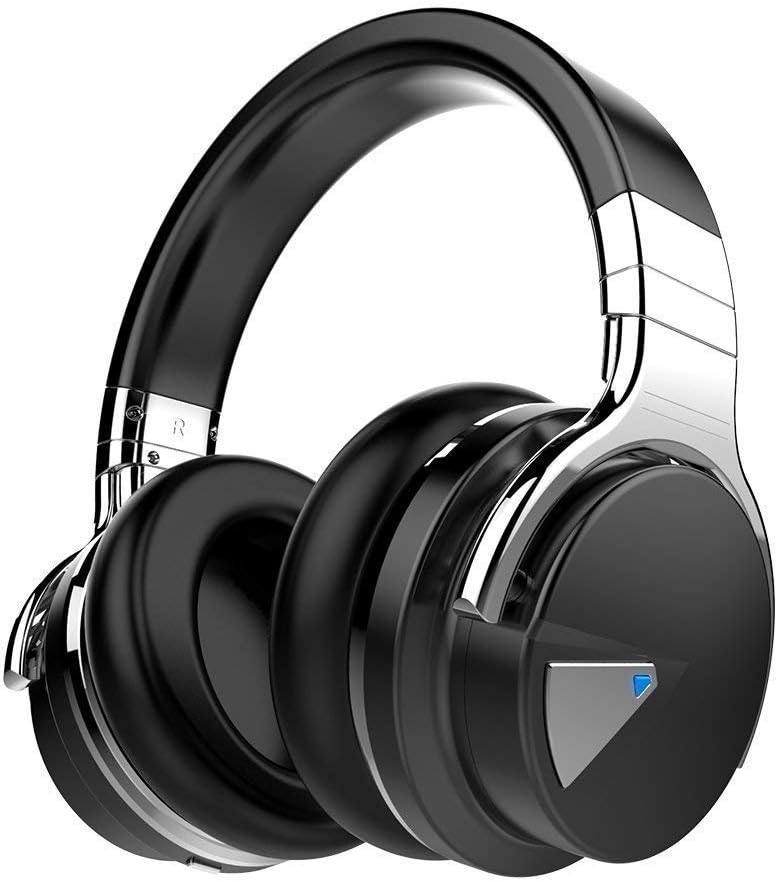
You can get a cheapo PC headset at officeworks  for between $10 to $20 that will do the job  for video and audio conferencing or then you can purchase a fancy noise cancelling headphones with mic  that will do the job and allow you to listen to music at high quality.


This is the COWIN E7 Active Noise Cancelling Headphones Bluetooth Headphones with Mic Deep Bass Wireless Headphones Over Ear with inbuilt mic. It has active noise cancelling technology

Link here: https://www.amazon.com.au/Cancelling-Headphones-Bluetooth-Comfortable-Cellphone/dp/B07RW8DT4S/


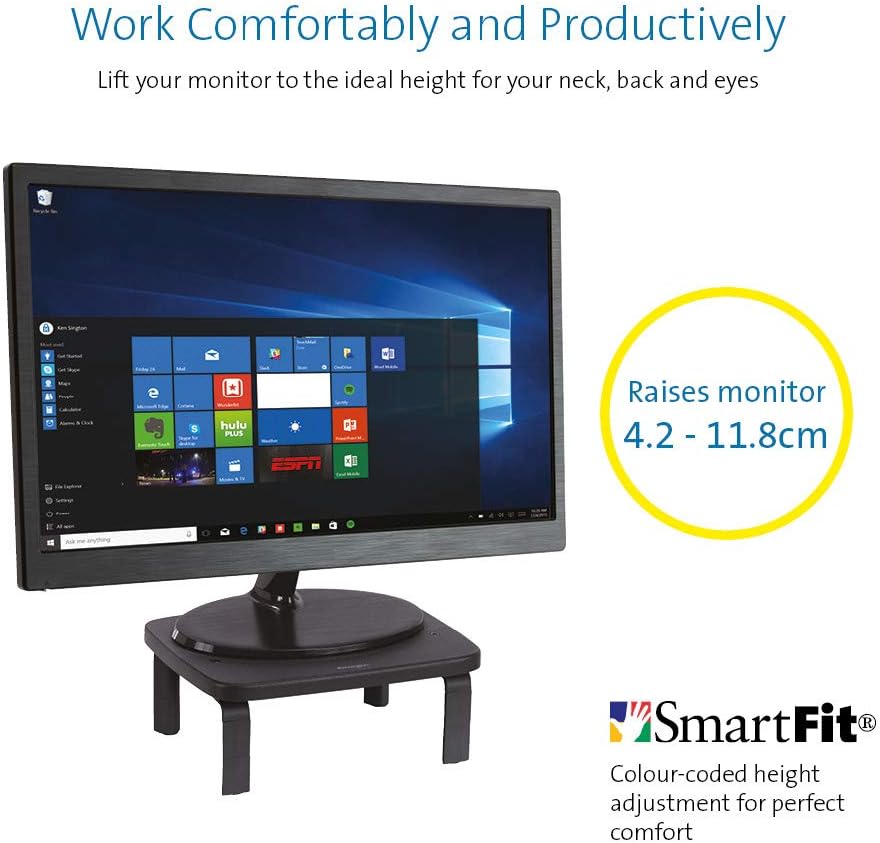
If you  got a monitor or need to jack up the height of your laptop then you need this.


KENSINGTON(R) 52785 Monitor Stand, SMARTFIT Standard

Stand positions monitor in line with your eyes to help reduce eye strain.

Price: $39.00 & FREE Delivery.

Check updated prices here 

If this is not your thing, you might want to check laptop stand on Amazon.com.au.

Acer ET322QR 31.5" Curved Flat Panel Monitor

If you are game enough to get a fancy new curved monitor then this is the one you need to pick up from Harvey Norman. It’s the Acer ET322QR 31.5″ Curved Flat Panel Monitor.

This Curved Flat Panel Monitor delivers clear and vibrant images at ideal viewing angles, while also adding a stylish touch to your entertainment setup.

Key Features
  • The Acer ET322QR 31.5″ Curved Flat Panel Monitor has a 1920 x 1080 resolution (60Hz refresh rate and 4ms response time) for sharp and detailed visuals.
  • Made with an 1800R curvature, the ET322QR monitor’s screen has a wrapping effect at optimal viewing distances to provide an immersive viewing experience.
  • Integrating Acer Flicker-less, BlueLight Shield, and Low dimming technologies, the monitor’s visual output is easy on the viewer’s eyes.
  • This Acer curved monitor has one VGA port and two HDMI ports to suit a variety of input sources.
  • For added convenience, this curved flat panel monitor supports a 100 x 100mm VESA wall mount.

Price Range: From $300 to $450

https://www.harveynorman.com.au/acer-et322qr-31-5-curved-flat-panel-monitor.html

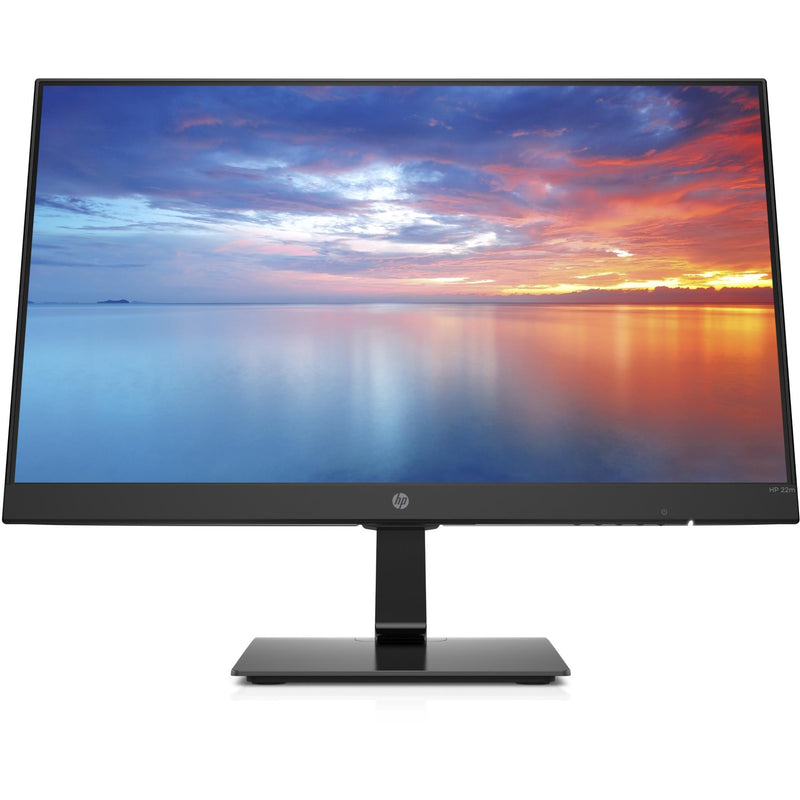
If you want something more cheap and traditional looking, this is what you need below from Jb hi fi

HP 3WL44AA 21.5\" FHD IPS Monitor


HP
Price: $169 to $200

HP 3WL44AA 21.5″ FHD IPS Monitor

Key Features

21.5″ IPS LED Display

FHD (1920 x 1080 @ 60 Hz)

1 HDMI 1.4 (with HDCP support); 1 VGA

Contrast ratio: 1000:1 static

14ms grey to grey response time

Anti-glare

On screen controls

Tilt: -5 to +20°

178° horizontal and vertical viewing angles

If you are going to work from a laptop then  a docking station might come handy. A docking station allows you to connect to devices that you could not use in the past. Devices like flat-panel monitors and digital cameras are not always compatible with laptops.  It provides a single connection point that allows a laptop to use a connected monitor, printer, keyboard, and mouse.

This allows a laptop to function like a desktop computer.

UPTab USB-C Docking Station with Ethernet, DisplayPort 4K, HDMI 4K, VGA, 3 Port USB 3.0, USB C PD and SD/TF Card Reader

Pic above is from https://au.uptab.com/uptab-usb-c-docking-station/

UPTab

USB-C Docking Station

$192.62 $129.41

Some more docking station gadgets

  1. StarTech Thunderbolt 3 Dual-4K Docking Station. …
  2. Targus USB 3.0 Dual Video Docking Station with Power. …
  3. AmazonBasics USB 3.0 Universal Laptop Docking Station. …
  4. Kensington USB 3.0 Docking Station. …
  5. Toshiba Dynadock V3. …
  6. Microsoft Surface Dock. …
  7. J5Create JUD500 USB 3.0 Ultra Station. …
  8. Dell USB 3.0 UHD Triple Video Docking Station.

or just get one from officeworks 

https://www.officeworks.com.au/shop/officeworks/p/kensington-universal-usb-c-powered-laptop-dock-sd4600p-kensd4600p

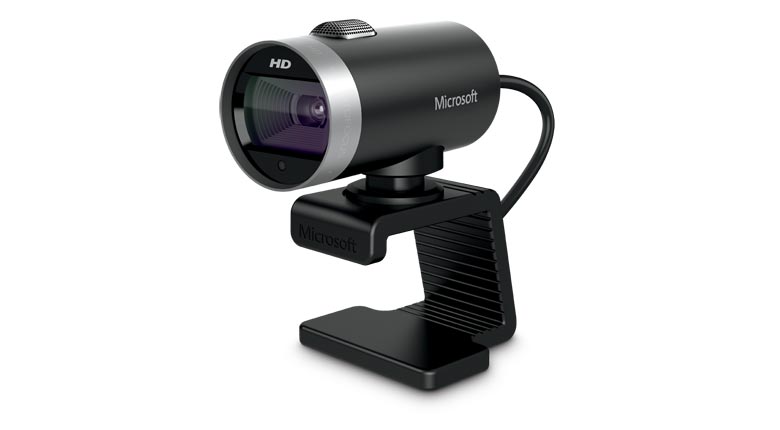
If you are going to do video conferencing or use zoom you will need a webcam 
 
LifeCam Cinema
 
This simple yet high quality webcam will do the job and last you a long time.

Lifecam Cinema

https://www.microsoft.com/accessories/en-us/products/webcams/lifecam-cinema/h5d-00013

Part #: H5D-00013

MSRP

$69.95


Enjoy high-quality 720p HD widescreen video together with crystal clear audio, with the LifeCam Cinema

You dont need a high end camera with ridiculous price, this will do the job

"Ref

Provide guidance on what is a safe home office environment, including what a good work station set up looks like and how to keep physically –  https://www.safeworkaustralia.gov.au/covid-19-information-workplaces/working-home

Fairwork Australia – https://www.fairwork.gov.au/employee-entitlements/flexibility-in-the-workplace/flexible-working-arrangements

Find out which employees can request flexible working arrangements, how to work..

Filed Under: 2020, Australian, Internet, Laptop, Solution, Top 10 Tagged With: Australia, Online, Technology, VIDEO

7 New Cool gadgets at CES Technology show 2017

February 7, 2017 by admin 4 Comments

Yes 2017 is here and there is a lot of innovation happening in the technology space.  If you have not heard of the new car with no steering wheel and the machine that automatically  does the ironing and folding of clothes for you,  then you are not up to scratch with your tech news.

Here are some more interesting innovating gadgets unveiled at the CES show this year.

The automated ironing machine that can do the dull and drab work of ironing and folding your clothes right is called fondimate and is available for USD $850 dollars.

It just got unveiled at the  CES show in Las Vegas, Nevada USA….  It not only steams and presses your shirt but also folds it neatly.

This lady who won the million dollar lotto and said the first thing she would do is hire somebody to do the ironing would surely be interested in this. Here it is:

FoldiMate laundry robot

clip_image001

Above: FoldiMate folds your laundry. Image Credit: FoldiMate

FoldiMate is the womens and mens ultimate dream gadget. It has created a robot that will fold your laundry. Foldi Mate’s machine does this all when you clip your clothes onto a slot on the machine (this is just the bit that takes some work). The robot then pulls the clothing over a board and steams it, then folds it. Thats it done. Too easy.

You need this now! It takes the robot about just about 10 seconds to fold one item, and it has a capacity of about 15 to 20 items which is quite good and will save you quite some time. Once this smart little robot machine is finished with the whole load of clothes, it neatly delivers out the folded clothes for you to remove and stack or use. The machine is said to cost around $850 or so.

Next : 

The Car with no steering wheel

The company that is so confident about its auto driving car that they haven’t put in a steering wheel is the auto giant  ford. ITS not launched yet, but its not too far away with current technology advances and will be released in 2021.

Ford plans to build a fully autonomous vehicle without a steering wheel or pedals by 2021, the company announced. The vehicle will be aimed at ride-hailing and ride-sharing fleets.

Ford CEO Mark Fields  and  no sterring wheel

The motor vehicle  wont have steering wheel, brake or gas pedals, offering full Level 4 self-driving features which don’t require a human driver at all

Well ironing automated gadgets and cars that have no steering wheels is not the only breakthroughs of 2017. 

This new retro kind of cool gadget just released will definitely make the romantics happy.  It’s called the love box (don’t ask) , what it does – ok then i will tell you…

Love box:

The LoveBox was invented by a French guy who missed his wife. She wasn’t as tech minded as him and didn’t like Skype or WhatsApp calling methods, and so he thought about a more convenient and romantic alternative to send messages between the two of them.

The sender using love box can type a small message for the receiver to see on a mirrored surface. The box heart spins when there’s a new message and the message is delivered. It will cost $120, with shipping starting in June 2017.

I love cars and this 2017  release from Toyota sure caught my fancy :

Toyota Concept-i

clip_image002

The future of cars is self-driving cars, but Toyota wants to give you more than that. The Concept-i vehicle shown at CES 2017 show would be capable of driving autonomously, with its biggest draw is the smart artificial intelligence that powers it.

Toyota claims the car learns to be smarter with this smart car being able to learn more about the drivers’ preferences and needs over time as you interact with it more just like a human being. By learning more it can start to suggest destinations after a driver chats with it and more features are going to be added as this unfolds and updates. This vehicle’s virtual assistant also got a name – not siri 2 – its called “Yui.”

Gadgets I crave and  I could not , not feature this amazing drone  from  parrot.They make amazing drones and this ones a bit special.

clip_image002[6]

BEST OF INNOVATIONS: DRONES AND UNMANNED SYSTEMS

The POWERUP FPV – Paper Airplane VR Drone from parrot

This was released by parrot as part of their POWERUP TOYS release

They had a stall at Booth #50801

The gadget PowerUp FPV lets you experience flight as if you were sitting in the cockpit of your very own paper airplane creation. This takes the virtual reality to another level with its ingenuity. The airplane generates a live video stream to the included VR cardboard Viewer.

You can see what your plane sees, and also control your paper drone with intuitive movements of your head making it soar higher that you expected. You need to get this!

What not to love about this laptop ?

I still am in search for the perfect laptop, i got a DELL laptop last year – but im due for an upgrade and change and  this one makes me takeout my wallet!!

Razer Project Valerie – The gamers/hackers laptop

clip_image002[8]

This will turn out to be many peoples dream laptop. It’s got the power and also the screens to go with it.

When you’re using a laptop for doing work, playing video games, Hacking code or streaming Netflix , one screen isn’t just enough. So why settle with two and instead have three?

Razer’s Project Valerie concept new dream computer laptop does just that by adding two screens to your laptop. These screens are foldable and have displays that expand out from the main screen in the centre. The screens are 17 inches diagonally and supports the newest 4K resolution

The good thing is that the company says the screens can be used independently or together as one giant display. Theta all to pro – the only con is – It weighs 12 pounds, which is more than the average notebook but more closer to top end gaming laptops.

Dont Be cruel to your family Jewels

There is something for everyone at the CES technology and gadgets  show  an this one is amazing and Men Only . Nah Not CES release seriously,  but indiegogogo

Spartan: the anti-radiation boxer shorts

clip_image002[10]

INDIEGOGO

Smartphones have become popular beyond belief and its takes over the phone world so much so, that we can’t do without one in everyday life. The thing that is on everyone’s corner of the mind, but not many people talk about is radiation from phones.

People have started to put their smart phones in their back pockets or front pockets at the risk of it slipping off and falling or getting lost, but he radiation fear still persists in the corner of your mind.

Spartan has developed a undergarment that looks to shield any man’s family jewels from this modern dilemma. It’s called the Spartan Boxer Briefs and these special undergarments feature anti-radiation tech that aim to protect men’s health and fertility. It does this by creating an electromagnetic shield that blocks wireless radiation from cellphone and WiFi signals.

This technology in the garment works on the same principle as a microwave but keeping the radiation out instead of inside. The technology definitely teaches you not to be cruel to your family jewels

USB DRIVES JUST GOT SUPER UPGRADED

One of the other gadgets that is close to my heart and got  released recently is a gadget by Kingston. I collect USB drives! I think that company is a south korean company, they have quality stuff and I have bought from them before. They just released a 2 terabyte USB drive , daymm !  I mean 2 TERABYTE in a small little USB that’s amazing.

The company has created a 2kingston 2 terbyte drive  1 terbyte small picTB pocket flash drive (also available in 1TB), called DataTraveler Ultimate GT (Generation Terabyte). This is now the world’s largest capacity USB flash drive. Data Traveler Ultimate GT offers superior quality being made of a zinc-alloy metal casing for shock resistance.

Specs of Kingston Drive

  • Capacities1: 1TB, 2TB
  • Speed: USB 3.1 Gen. 1 (USB 3.0)
  • Dimensions: 72mm x 26.94mm x 21mm
  • Operating Temperature: -25°C to 60°C
  • Storage Temperature: -40°C to 85°C
  • Warranty: 5-year warranty with free technical support
  • Compatible with: Windows 10, Windows 8.1, Windows 8, Windows 7 (SP1), Mac OS v.10.9.x+, Linux v.2.6.x+, Chrome OS

But then its Korea, they had 1 terabyte pcs.. when we were still selling pcs with 200 gb in the shops 10 years ago (my Korean flatmate 10 years ago said so and had one)

The CES show is one of the biggest technology shows in the world and most big companies worth their money  showcase their new breakthrough products in this show.  Look out for the 2018 show next year! This year among other things, there was  a lot of focus on self driving cars and  home robots as well.

You can check out the CES official website link below to go check all the new technology that was released in 2017

Australia Technology Shows 2017

CEBIT 2017

CeBIT Australia is celebrating its 16th year in 2017. The event attracts thousands of technology professionals from Government, enterprise, SMEs and start-upsand is held in Sydney this year. Website : http://www.cebit.com.au/

CeBIT Australia 2017, 23-25 May 2017,
International Convention Centre Sydney, Darling Harbour

MAR.11

RUN THE WORLD TECH-FORMATION | Female Entrepreneurs Tech Conference | Melbourne

by The FBOMB Show  More details : https://www.eventbrite.com.au/e/run-the-world-tech-formation-female-entrepreneurs-tech-conference-melbourne-2017-tickets-30215239595?aff=es2

Connect Expo

ConnectExpo

Melbourne Convention and Exhibition Centre

Registration: Door 7 & 8, Exhibition Hall
Address: 2 Clarendon Street, South Wharf VIC

Connect Expo is a major trade show – combined with multiple Industry & Technology tracks – focused on how to stimulate innovation, increase collaboration and drive growth and productivity through investment in technology.

Expo Opening Hours

Entrance: Door 8, Exhibition Hall

29 March 2017 l 10:00am – 5:00pm
30 March 2017 l 10:00am – 4:30pm

If you did attend  the show and found anything interesting there, do leave us a comment  of what you liked  and what interested you. Until the next CES 2018. Adios/jeff

Filed Under: Featured, Gadgets, Top 10 Tagged With: Electronics, Event, Technology education

The Near-Future Role of A SEO

August 19, 2015 by admin Leave a Comment

seo in perth sydney melbourne  victoria australia

A SEO’s role is always changing and adapting ever since webmasters were optimizing sites in the mid-1990’s. With every technological change and every Google algorithm update, a SEO’s job changes little by little. In the near future, a SEO’s role will not become more specialized, but broader. SEO’s will need to widen their scope of skills in order to stay competitive. A SEO’s job will revolve around these three main roles:

1. Search Engine Compliance Officer

The Search Engine Compliance Officer’s primarily responsible will be overseeing and managing Search Engine compliance issues within an organization. This is the role that will be most important for corporations and enterprises to have. The job will be much similar to what it is now, knowing all of Google and Bing’s Webmaster guidelines, and making sure that all things on a site are compliant to those guidelines.

The Search Engine Compliance Officer would be the “first line of defense” against Search Engine penalties. Any new additions to the site must pass the SEO before being pushed live (new pages, new content, tools, categories, sections, tagging, etc), moreover, a SEO should also be present during any meetings of new additions to a site to make sure that that integration is being completed well within a Search Engine’s guidelines and best preferred practices.

The SEO will also need to make sure that all incoming backlinks are compliant with a Search Engine’s policies. SEOs will need to monitor and investigate:

· How the backlink was obtained to make sure that it was not purchased

· The anchor text of the link and comparing it to the anchor text breakdown of the entire link profile

· The “spamminess” of a link

· Whether a banner ad or sponsored link has been nofollowed

· The top level IP’s of links to make sure that they are not apart of a link farm or link scheme

How To Prepare Yourself:

· Read Google and Bing’s Webmaster Guidelines

· Read Google Webmaster Blog

· Become Proficient in Google Webmaster Tools

· Learn To Use Google Analytics

· Learn To Use Screaming Frog

· Stay Up To Date With On SEO Blogs, such as:

o Moz.com

o SearchEngineLand.com

o SERoundTable.com

· Learn To Use Link Monitoring Tools, like:

o Open Site Explorer

o MonitorBacklinks.com

o Majestic SEO

o Ahrefs

· Learn to Decipher The Site Speed Recommendations From Pingdom

2. Creative Director

Since Wil Reynold’s gave his amazing RCS presentation at Mozcon 2012, content marketing has been on every marketing/SEO department checklist. Developing great content has been and is the key to sustainable online growth. That will not soon change with the ongoing rise of social media, which are essentially content sharing networks.

SEOs will have to become more like Creative Directors – birthing an interesting and captivating idea, leading the communication for design and copy, and developing the ways for it to gain visibility. The SEO must guide teams with skills and experience related to graphic design, fine arts, motion graphics, content, social media, and development. It would be beneficial for any SEO to study up on and receive certification in any tools that designers, developers, and project manager’s use. The key is to not only be able to speak their language for optimal communication, but also be able to get hands-on in every project.

From the beginning of an idea to the point where it is generating a company traffic, mentions, and backlinks, a SEO has to be the point person, directing his or her creative vision to lead to content that will be a success online or off.

How To Prepare Yourself:

· Take Courses in the Adobe Creative Suite

· Study and Get Certified in Project Management

· Start Reading Any of These Books

· Brush Up on Advertising

· Learn to Use Social Media Tools, like:

o Sprout Social

o HootSuite

o Facebook Ads

· Ingratiate Yourself into Social Communities Like Twitter, Facebook, Reddit, Vine, etc To Learn What Is On the Cusp of Social Popularity

3. New Technology Optimizer

Technology is ever changing and there is always going to be a new channel to advertise through. At the moment, it is social and mobile. In the near future, it will probably be voice search especially with the growth of businesses like Wolfram Alpha, Viv, and of course, Siri. The goal of these three technologies is to serve you the best information, with the least amount of barriers. Even though search will be done through voice, there will still need to be a database, a place to pull information from, and that will still be web properties like websites or social pages that they can crawl and serve data.

A SEO is the near future will need to be able to optimize for all these channels. They will need to on the cusp of technology and know how to gain visibility through every new platform that arises – whether it is search engines, app stores, voice search, or even information or ads brought to you during your Google self-driving taxi ride.

How To Prepare Yourself:

· Research and Read the Latest News in Technology

· Learn About Viv AI Through this article and this article

· Stay Up To Date On What Google is Working on

In conclusion, things are not getting more specialized for SEOs, they are getting a bit broader. A SEO in the near future will need to be a jack-of-all-trades, in a sense. Moreover, a SEO in the near future will need to know how any why a search engines ranks a site and make sure that companies are compliant with those guidelines, be creative that can not only come up with an idea, but work with teams to execute and find success, and lastly will stay up to date with all technologies and be able to optimize for every platform.

Filed Under: Search, SEO, Top 10 Tagged With: blog tools, Optimized, Websites, Wordpress

Review of traffic Travis SEO software not Affilorama

June 3, 2013 by admin 4 Comments

You have done your reviews on SEO software, reading  different reviews and decided to go ahead and choose your software. Have you heard of traffic Travis , probably not –  but hey wait “what’s affilorama”.

Software to help  rank your blog – traffic travis 

It can get a bit confusing when you go thier purchase page to buy traffic Travis  with or without discount. (currently there is no “traffic travis discount” ) and you see  Affilorama page instead

Snapshot of the buy page on traffic Travis below. ( Explanation below on how to order traffic travis)

seo moz traffic travis simple seo software

Wording from above pic “Traffic Travis does not auto rebill, we will contact you in 12 months to see if you want to renew. Your one month free trial of Affilorama Premium rebills after 30 days at $67/month. You can easily cancel at any time.”

If you have not checked reviews of the software , check our quick review below

You gotta be careful while ordering  other wise you can get lumped with  a extra $67  a month in addition to  the traffic travis software valued at $97.

Affilorama Vs Traffic Travis

So just to make sure you know what you are doing , Traffic travis is the SEO software  to help you with  SEO for your blog or website  and if your purchase a AFFILORAMA subscription, it entitles  you to guides and help to set yourself up successfully as an affiliate marketer. Affilorama  gives you detailed strategies to become a successful online entrepreneur and make money online

Traffic Travis provides four distinct functions that allow you to collect data and do research on your selected Web site.

The first one searches for popular keywords and competition, and another shows your site’s ranking amongst the top four search engines.

Yet another tracks point-and-click advertisements, and the fourth grades your own site for its search engine optimization.

Make sure you uncheck or untick  the  Affilorama  check box  charging you $0 dollars ( the $0 dollars is only for the first month , then they charge you  from the second month onwards if you dont cancel the affilorama free trial) if you dont want both programs at the same time.

If you interested only in the traffic travis software  just untick the affilorama trial second box and you should be good  ( Click Here to buy! )

What is this affilorama trial ?

Affilorama Premium is an online monthly subscription product  that gives you access to highly detailed advanced affiliate marketing training and powerful pro-level marketing tools.

Affilorama aims provide a step-by-step, over the shoulder training courses for beginners and advanced affiliate marketers to build a successful affiliate business online.

SO only check this second box above if you want this affiliate marketing tools  and can afford the extra $67 a month.

They provide detailed VIDEO LESSONS for internet marketing fore beginners as well as more advanced marketers, If you want to know more about affilorama video lessons  go here 

About traffic travis v4.0 Pro ( Quick review)

Traffic travis is an awesome seo software  and i totally recommend it over market samurai  or SEO MOZ membership  as its a simple to use software  and gives most of the needed benefits that are also present in the other premuim SEO software providers.

FOR eg What you need is there in this software

  • * Tracking your page rank of your site and movement of it up and down the google rank
  • *Finding linking partners  via their software  ( blogs websites or directories) to get valid links from relevant  niche
  • * Finding Do follow and No follow links on your blog and other blogs to make your linking ratio perfect for google search
  • *comparison of your website with other websites in relating to backlinks , keywords etc
  • * top ten comparison and much more features  which all can  be adjusted with advanced settings for that extra bit more ( you also get free flash made  tutorials  for every section of the software, which i didn’t need to use as the software is so easy to use)

Snapshot of main dashboard

Traffic-Travis-Dashboard software

http://www.traffictravis.com/professional/order

[This above review video  showing the software is  bit outdated  as the current updated  interface  has become much more simpler and easy to use.]

Traffic Travis Free SEO And PPC Software

traffic travis free and paid seo software

From Free To Professional Edition ( Click Here to buy! )

Traffic Travis is freeware, but it requires a free online registration. It comes as a compressed file.

Around the web :

Scarcity Samurai 60% OFF “WSO Discount” 

If you haven’t already snapped up your
Scarcity Samurai 60% OFF “WSO Discount” –
your time is running out…

…because TOMORROW – this crazy Warrior
Special Offer expires and the price of
Scarcity Samurai will revert from $75, back
to the normal retail price of $197…check out more details here 


 Scarcity Samurai customers…

“Sales have been pouring in. Thanks for
the great product. It’s easy to install,
can be setup and seconds, and there is no
doubt that it works.” – Logan Christopher


Filed Under: $heldon $ingh, 2013, Affiliate, Blogger, Blogger Tools, Featured, Free, Make money blogging, Review, SEO, Software, Solution, Top 10, Wordpress 3.0 Tagged With: Australian Blog, clickbank, Free version, Paid version, SEO software, Software, Technology Blog, Travis software

When celebrities swap Frocks at Golden globe awards

January 18, 2013 by admin 2 Comments

Celebrities put a lot into  how they are going to look at the big awards  function , if it is the Grammy awards, the Oscar awards or then the GOLDEN GLOBE AWARDS.

Fashion houses and designers vie to show  their best design on celebrities before the grand show,

Don’t you feel sometimes that  that absolutely marvellous dress would look better on you , we have just done that  and mixed it up a bit  with our “GOLDEN GLOBE CELBRITY  SWAP”

Lets check out some altered pic’s  of how some celebrities would look if  they swapped dresses  with another celebrity  at the golden globe awards day .
Here are the celebrity in thier original dresses

Link : Full size pic

and below are thier dress swap photos

Golden Globe Celebrity frock Swap

Amy Poehler as nicole kidman Golden globe awards

Dress swap : Nicole Kidman in Amy Poehler dress

francesca eastwood in Jennifer Lopez frock

Dress swap: Francesca Eastwood In a Jennifer Lopez dress

jessica beil in Halle Berry dress

Dress swap : Jessica Biel in a  Halle berry dress

jennifer Lopez  in Francesca Eastwood dress

Dress Swap : Jennifer Lopez in  a Francesca Eastwood dress

kate hudson in Tina Feys dress

Dress swap : Kate Hudson in Tina fey’s dress

You can check out More celebrity swap pics at  my other blog  Net Skool over here

Filed Under: 2013, Review, Top 10, World cup Tagged With: Golden Globe Awards

Curiosity with the Top 5 MARS /Moon riders or Space Invaders

September 10, 2012 by admin Leave a Comment

These four wheel drives are not your average petrol guzzling kind , but are kind off elite and take on special terrain surfaces like mars and the moon. Since curiosity  landed on mars  there is abuzz around  these crazy techo wizz vehicles that can do more than pull out rabbit from hats.

Check out some cool SPACE AGE  Four wheel drives Winking smile

Curiosity’s  Navcams will begin taking one-megapixel stereo pictures 360 degrees around the rover. These cameras have medium-angle, 45-degree fields of views and could resolve the equivalent of a golf ball lying 82 feet (25 meters) away. T

The cameras on these bad boy can take color pictures and even 3D video

You see that Box attached on top behind the cam , it  can use its laser to burn holes real quick  upto a depth of  25 feet to identify chemical properties

cameras on NASA's Curiosity rover

Watch NASA TV

Curiosity Mars Science Laboratory Launch

Spacecraft: Mars Science Laboratory, Curiosity Rover
Launch Vehicle: United Launch Alliance Atlas V
Launch Site: Cape Canaveral Air Force Station
Launch Pad: Space Launch Complex 41
Launch Date: Nov. 26, 2011
Launch Time: 10:02 a.m. EST

SOME OTHER COOL FACTS ON CURIOSITY

BUDGET:2.5 Billion

DISTANCE TRAVELLED: 566 Million KMS and counting

GOAL:TO SEARCH FOR ESSENTIAL SIGNS OF LIFE CARBON NITROGEN, PHOSPOROUS SULPHUR AND OXYGEN.

Chinese mars Rover prototype

Chinese researchers from Shanghai institute unveiled a prototype lunar rover which is in the ruinning to be selected by China’s space authority for the country’s first moon mission in 2012


Ref: http://cache.wists.com/thumbnails/fef1c-orig

The robot is designed to move much faster than NASA’s robots as it is capable of traveling 100 meters in one hour. China and the U.S. are in a race to put a man on the Moon after 2015

Lama Russian Marsokhod Rover

lama russian marsokhod rover

Lama is a Marsokhod rover built by VNII Transmach in St Petersburg, Russia. It was bought by Alcatel Space Industries in 1995, and has been lent to LAAS in 1996.

Its got a few modifications since with AC/DC converters box that feed the motors and instruments or charges the batteries located inside the wheels. A fiber-optic gyrometer replaces the compass, and a differential carrier-phase GPS.

NASA’s Lunar Chariot

NASA’s Lunar Chariot, which costs a reported $2 million to build but a  top speed of only 15 mph.

NASA Lunar Chariot

View images of the lunar truck.
View video of the lunar truck. Windows Media | Real Player

Other than these spiffy rovers and moon riders  there have been few others that have been developed  and also a few  still being developed or modified which  includes  the”JPL Blue Rover prototype 1987 Moon Mars”

Blue Rover (circa 1987) - The JPL Blue Rover, originally a lunar rover prototype, was used for Mars rover technology development in the late 1980's.

Ref:http://www-robotics.jpl.nasa.gov/gallery/mige=311

and the “SOVIET Lunokhod-1 Moon Rover” as below

Lunokhod 1 (high resolution).jpg

Ref: http://en.wikipedia.org/wiki/Lunokhod_1

Filed Under: 2012, Featured, Top 10 Tagged With: All terrain Vehicles, AWD, Four wheel Drive, Moon

  • Page 1
  • Page 2
  • Go to Next Page »

Primary Sidebar

Recent Posts

  • Underwater Drones for Recording Video and Taking Pictures
  • Why I chose hostgator for blog hosting
  • Top 10 Software Programs For Your Windows PC
  • What you should know before investing in Cryptocurrency and bitcoin
  • The Best Social Media Platforms for Marketing a Gaming App

Recent Comments

  1. Patrick McCormick on How to secure your desktop and laptop with antivirus software
  2. JJ on 20 Top brands with affilate programs to make you money in 2019
  3. JJ on This WPengine Genesis Pro Deal Will Give You 35 Studiopress themes
  4. Lisa Gomes on 16 Ways to Make Money Online Working From Home
  5. KatVine on This WPengine Genesis Pro Deal Will Give You 35 Studiopress themes

Archives

  • June 2022
  • February 2022
  • July 2021
  • May 2021
  • April 2021
  • March 2021
  • November 2020
  • September 2020
  • August 2020
  • July 2020
  • June 2020
  • May 2020
  • April 2020
  • March 2020
  • February 2020
  • January 2020
  • December 2019
  • September 2019
  • August 2019
  • July 2019
  • June 2019
  • April 2019
  • March 2019
  • February 2019
  • January 2019
  • December 2018
  • November 2018
  • October 2018
  • September 2018
  • July 2018
  • June 2018
  • April 2018
  • February 2018
  • January 2018
  • December 2017
  • October 2017
  • September 2017
  • July 2017
  • June 2017
  • May 2017
  • April 2017
  • March 2017
  • February 2017
  • January 2017
  • December 2016
  • November 2016
  • October 2016
  • September 2016
  • August 2016
  • July 2016
  • May 2016
  • April 2016
  • March 2016
  • February 2016
  • January 2016
  • December 2015
  • November 2015
  • October 2015
  • September 2015
  • August 2015
  • July 2015
  • June 2015
  • May 2015
  • March 2015
  • February 2015
  • January 2015
  • December 2014
  • November 2014
  • October 2014
  • September 2014
  • August 2014
  • July 2014
  • June 2014
  • May 2014
  • April 2014
  • March 2014
  • February 2014
  • January 2014
  • November 2013
  • October 2013
  • September 2013
  • August 2013
  • July 2013
  • June 2013
  • May 2013
  • April 2013
  • March 2013
  • February 2013
  • January 2013
  • December 2012
  • November 2012
  • October 2012
  • September 2012
  • August 2012
  • July 2012
  • June 2012
  • May 2012
  • April 2012
  • March 2012
  • February 2012
  • January 2012
  • December 2011
  • November 2011
  • September 2011
  • August 2011
  • July 2011
  • June 2011
  • May 2011
  • April 2011
  • March 2011
  • February 2011
  • January 2011
  • December 2010
  • November 2010
  • October 2010
  • September 2010
  • August 2010
  • July 2010
  • June 2010
  • May 2010

Categories

  • $heldon $ingh
  • 2010
  • 2011
  • 2012
  • 2013
  • 2015
  • 2017
  • 2018
  • 2019
  • 2020
  • 2021
  • 2022
  • Accounting
  • Adsense
  • Affiliate
  • Amazon
  • Anti Virus
  • Apple
  • Apps
  • Asus
  • Aussie
  • Australia
  • Australian
  • Australian Bloggers
  • Australian wordpress hosting
  • Banks
  • Blog-Hosting
  • Blogger
  • Blogger Tool
  • Blogger Tools
  • BloggerTools
  • BuddyPress
  • CARS
  • CDN
  • Celebrity
  • Clickbank
  • Compare
  • Computer
  • Domains
  • Done Deals
  • Ebook
  • Email
  • Facebook
  • Featured
  • Finance
  • Free
  • Gadgets
  • Google
  • Gpost
  • Guide
  • Hackers
  • Hosting
  • India
  • Internet
  • Ipad
  • Kindle
  • Laptop
  • Make money blogging
  • Makemoney online
  • Marketing
  • Melbourne Cup
  • Movies
  • Netbook
  • Network
  • News
  • Online betting account
  • PC
  • Review
  • Search
  • SEO
  • sheldon singh
  • Software
  • Solution
  • Sports
  • Subscribers
  • Taxes
  • Technology News
  • Themes
  • Top 10
  • Tutorial
  • Video
  • Wacky
  • web hosting
  • Website Review
  • Wierd
  • Windows
  • wordpress
  • Wordpress 3.0
  • Wordpress 3.1
  • wordpress themes
  • World cup
  • Wp Answers
  • WP Turbo
  • WPMU

Footer

Design

With an emphasis on typography, white space, and mobile-optimized design, your website will look absolutely breathtaking.

Learn more about design.

Content

Our team will teach you the art of writing audience-focused content that will help you achieve the success you truly deserve.

Learn more about content.

Strategy

We help creative entrepreneurs build their digital business by focusing on three key elements of a successful online platform.

Learn more about strategy.

Copyright © 2026 · Genesis Sample on Genesis Framework · WordPress · Log in