• Skip to primary navigation
  • Skip to main content
  • Skip to primary sidebar
  • Skip to footer
tech blog au

Digital Grog — Australia’s Tech, Gadgets & Digital Life Unfiltered

Digital Grog is Australia’s go‑to tech blog for sharp reviews, digital trends, AI tools, gadgets, cybersecurity updates, and practical how‑tos covering the latest in Aussie technology

  • About Us
  • Contact Us
  • Block Examples
  • Landing Page

Computer

The Smallest PC To Connect to your TV or Monitor

April 26, 2021 by admin 5 Comments

This original post was written in 2012 (updated 2021 and  2013)  title is “The smallest PC that can connect to your TV” – so its kinda obsolete now, since most tv’s now come  as smart tvs with inbuilt  wifi connectivity and ability to install apps so you got pretty much  anything that can be streamed from the internet on your tv.

However small little mini pcs still have their unique uses and so  this post is still relevant today for people who still have a non-wifi TV.  I have added a  couple more alternatives to our favourite raspberry pi below  to keep this updated with 2020 -2021.

Mini Raspberry Pi Computer

Giving more competition to  the Apple Mac and the Blackberry who are into small gadgets nowdays, a hand-held computer called the Raspberry Pi went on sale for just £22 today and was sold out within hours.

amd computer small chicks mini pc raspberry

It has neither keyboard nor monitor and is pretty much a bare bones mini PC

Mini Raspberry Pi computer

The bare bones Raspberry Pi computer ships totally naked without any clothes( box) and  costs £22. It is aimed at encouraging children to learn how to programme and code

While the Raspberry PI has always been the most popular mini PC amongst geeks and techy people apart from ASUS mini pcs  , there are many more readymade options available in the market for mini pcs, that just offer plug an play making it easy  for anyone to attach a mini pc to their monitor or TV.

Mini PC to Connect to TV or  Computer Monitor

small pc chrome OS

Asus Chromebit 

asus chrome bit nano pc

The ASUS Chromebit CS10 measures 12cm long and is the world’s smallest Chrome OS device. It can connect to your TV or monitor and work just fine over  your wifi connection. It plugs into the HDMI port of your monitor or TV. It can connect to networks via 802.11 wireless a/b/g/n/ac.
You will just need  to connect via a wireless keyboard and mouse to  operate it as a computer.

Here are the features of the Chromebit CS10

  • A candy-bar-sized computer – the world’s smallest Chrome OS device which fits in your pocket
  • Make your TV smarter — enjoy a large full-screen Chrome OS experience in your living room
  • Ideal for surfing the web, keeping up with friends and family on social media, and HD entertainment
  • Easy-to-manage, cost-effective, and highly-scalable solution for signage, kiosks, and other business applications
  • Bundled extension cable or bendable Flex Connect HDMI connector for easy connections to hard-to-reach HDMI ports
  • Runs the latest Chrome OS, and features automatic updates and anti-virus software for a smart and secure digital environment
  • Dual-band 802.11ac Wi-Fi, with 100GB of Google Drive space free for 2 years.
  • 2015 Good Design and 2016 CES Innovation Award-winning design available in stylish colors

Is Chromebit cs10 available in Australia ?

https://www.asus.com/au/Mini-PCs/Chromebit-CS10/

Yes it is! its not available in the brick and mortar stores yet and it is a new product, however available via US and online shops.

Price Comparison

@Fishpond.com.au $256

@kogan.com.au $225

@ebay.com.au $76

@amazon.com  USD $170 +$15 shipping

@staples.com US website  USD$94.99

The Asus Vivostick TS10 is also available for AUD $219 to $229

https://www.ple.com.au/Ready-To-Go-PLE-Mini-PCs

Asus Mini PC PN-50

pn50 micropc

Its built-in graphic card can support up to four 4k displays or even an 8K display at 60hz.

Dimensions of this PC are 1.9 x 4.52 x 4.52 inches and it is powered by AMD Ryzen 4000 series processor

  • Support up to 4 displays simultaneously with 4K resolution
  • Dual USB 3.2 Gen 2 Type-C port for data transfer, battery charging and DisplayPort functionality
  • Support INTEL® WI-FI 6 (GIG+) + BT 5.0
  • Configurable Ports support DP1.4/VGA/LAN/COM options
  • Infrared (IR) receiver for remote control of applicationsMicrosoft Cortana support with dual-array front microphones
  • Dual-storage design with up to a 2.5-inch HDD up to 1 TB and an M.2 SSD up to 512 GB


More Alternatives to Raspberry PI (banana PI M3)

There are other fruits like orange and mango in contention too, but today we will focus on the banana.

Specked out with 2GB of RAM, Gigabit Ethernet, a SATA port, Wi-Fi, and Bluetooth, the Banana Pi M3 challenges the Raspberry Pi 3.

Its Cortex A7 packs in a whopping eight cores and the PowerVR GPU is a capable video processor. You can run Android, as well as Linux on this baby. Its got Octa-core processing and a beefy GPU and this Banana stands out as one of the most appealing mini pc boards available.

May more version available now BPI-M5, BPI-F2P, BPI-F2S and more

Cost: $80

http://www.banana-pi.org/m3.html


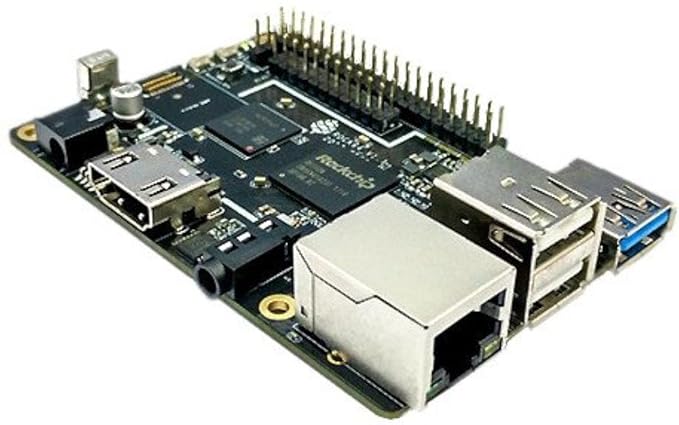
Rock64 Media Board

ROCK64 Single Board Computer

Pros

The Rock64 Media Board comes loaded with a 1.5GHz Rockchip RK3328 64-bit quad-core A53 processor and a Mali-450 MP2 GPU. It ships in three configurations offering 1GB ($25), 2GB ($35), and 4GB ($45) of 1600MHz LPDDR3 RAM.

There’s a bootable eMMC socket alongside the more typical MicroSD, so it’s possible to add 16GB ($14), 32GB ($19), or 64GB ($31) directly to the board

Cons

Unfortunately the Rock64 doesn’t include wireless functionality, so you’ll have to add a USB dongle. There’s also no DSI (display) and CSI (camera) interfaces

$24.95 – Check Current price at Amazon

More mini-pc options – Intel NUC 9 Extreme Kit , MSI – Cubi 5 

the smallest pc with wifi and graphic card and windows

Get more of you gadget news at @http://www.gadgetaustralia.com/

Filed Under: 2012, Apple, Computer, Gadgets Tagged With: Linux PC, Media center PC, Mini PC, Rasberry, Smallest Computer, UK

A-Z Guide on Removing Unwanted Ads and Apps from Your Mac

September 1, 2020 by admin Leave a Comment

Using a Mac has always been associated with advanced security and intactness to viruses, all kinds of malware, and cyber-crime. But times change, and Mac users increasingly face a variety of malicious threats and data theft cases. Nobody is immune to cyber-crime in the 21st century, with hackers preying on your sensitive data and funds. Thus, it is imperative for every computer user to know more about malware, to learn how to scan their devices for viruses, and to find out how to remove ads on Mac (as they can also contain malicious code). Here we present an A-Z guide for everyone wishing to advance their Mac security. Read on to get the cutting-edge knowledge and skills for securing your devices and data.

mac security  for computers online

Why Is Your Computer Showing Too Many Ads?

We live in the era of pop-up ads that attack mobile phone and desktop users alike. These notifications can take the form of commercials, special offers, alerts, notifications of winning a prize or lottery, etc. Many of them are phishing attacks on your browser organized by third-party ad providers, while some ads are a healthy response of your browser to your search preferences. So, when does getting ads become too much or too annoying?

· You visited too many shopping websites and clicked “Allow” on the bar asking for sending you pop-up notifications.

· You have some unwanted software or adware installed on the browser.

In the first case, you need to go to Settings and block the pop-up notifications from merchants. In the second case, your browser has been hijacked, and you need to take action to restore its healthy functioning.

Blocking Adware in Safari

Once you realize that the ads are getting too annoying, it’s high time to install an ad blocker. It is a program removing most types of ads from your browser and blocking dubious pop-up notices. To choose an ad blocker suiting your goals, consider either standalone software covering all ads on your computer or a customized add-on to your computer browser. Besides, there is a built-in ad blocker function in the Safari browser on Macs. Let’s consider each of the options in more detail.

Safari Ad Blocker

To block all incoming ads in your Safari browser, go to the “Security” settings in the section of “Safari preferences.” There, you should indicate that you want to block pop-ups and fraud warnings. Mac security settings allow getting alerts of visiting fraudulent websites, locking pop-up windows, and specifying the plug-in installation preferences. Another option is to double-check the “Extensions” section where the illicit adware may reside.

Standalone Software

If you’re using a third-party ad blocker program, first install it on your Mac and run it on the computer. By following the app’s instructions, you can customize the ad blocking preferences, indicating which ads you would like to receive, and which should be blocked.

Are Ads only Bothersome or Really Dangerous?

Internet commercials have long been considered the “necessary evil” as they help web resource creators sustain a regular revenue stream from advertisers, thus allowing them to provide valuable content to users for free. You can also enjoy some free resources online by only watching several ads, so is that bad?

Overall, there is nothing criminal about ads as such; the problem may be suspected if you see too many pop-up ads that worsen your browsing experience and distract you from the critical browser use goals. Besides, the red flag of something going wrong is seeing much irrelevant, even obscene advertising content, such as adult toys, dubious websites, etc. In such cases, you should suspect having some malicious adware on your Mac, which requires action.

Ad Blockers: A New Word in Mac Security?

There is no unanimous opinion about whether using an ad blocker to achieve complete blocking of ads is a good decision. On the one hand, you can avoid viewing distractive commercials, which speeds up and improves the browsing experience, at the same time securing you from the accidental installation of viruses and malware hiding in malicious ads. On the other hand, with so much shopping conducted online these days, you deprive yourself of an opportunity to receive customized suggestions based on intelligent analysis of your purchase intentions and preferences.

Besides, seeing no ads on free websites minimizes your support for website creators who earn from ads to deliver content to users for free. A tendency to block ads may soon transform into paid, subscription-based content access. Thus, it’s up to you to decide whether to spend a couple of minutes watching a short ad or paying for online content in other ways.

Filed Under: Australia, Computer, Hackers, Internet, Software Tagged With: Advertising, Apple, apps, Malware, pc

An expert guide to online gaming security

July 8, 2019 by admin Leave a Comment


With roughly 2.3 billion gamers across the globe, video gaming is now the largest entertainment industry in the world. But while online gaming is a fun, highly popular pastime, it can also present a number of cyber security risks to unsuspecting users.

security for gamers


From personal and financial data to in-game items and cryptocurrency, there are a range of assets that can fetch significant real-world prices for cybercriminals – and online gamers often trust as much of their personal information to gaming platforms as they do when online shopping. A moderator for RuneScape recently stole billions in virtual money from players, with a real-world value of $100,000.

To help, the experts at ESET have put together a list of 10 tips for staying safe when online gaming:

1. Keep your authentication game strong

Password reuse is a common issue in online game, as gamers often need to manage accounts for multiple platforms, like Steam and Origin, and for individual games themselves. This can result in the use of duplicate, or easy to remember but weak, passwords that are easy for hackers to breach.

To prevent this from happening, ensure you choose a strong password. If the platform or game has a two-factor authentication option, enable that for your account and create a password of at least 12 characters. If two-factor authentication is not available, or you choose not to use it, choose a password of at least 16 characters.

In either case, choosing a phrase consisting of several words (that aren’t too common) like a book or song title, song lyrics or similar, will make your password easier to remember. Finally, ensure you have a different password for every account or game. If you’re worried you won’t remember them all, consider using a password managing service to help.

2. Be careful what you click on

From unofficial cheat codes to unfamiliar links, be wary of downloading anything from an unknown source. These are unlikely to work and may contain some form of malware. Likewise, only download official upgrades and levels. Phishing campaigns are frequently targeted towards online gamers using popular games, and can even pose as a friend in an attempt to send malicious links via chat platforms.

3. Guard your personal data

Often player accounts are most valuable to the cybercriminal, and hence the most highly targeted. From geotargeting to monthly payment subscriptions, online and mobile games can collect large quantities of data about their users. This provides hackers with a wealth of opportunities to steal personal information such as your location, online activity, and financial details.

Avoid providing too many personal details where possible, and make sure you verify the legitimacy of any platform or game you engage with. Delete all personal details from consoles and PCs when you pass them on to others, are using a public device, or are throwing your device away.

4. Protect your email

You might not think your email is as important as your bank details, but it can still be used by cybercriminals to attempt a breach. Be sure to protect your contact details such as email, phone number or social media accounts as carefully as possible. Never give away your email address to unauthorised sources, as you might then receive spam or emails that contain malware.

5. Keep your real name under lock and key

Online gaming can expose you to a wide range of strangers, and you can’t always verify if everyone you interact with is trustworthy. Beware of who you talk to and what you say to other game players. Never reveal any personal information such as your full name, email, school or workplace, and choose a username that is completely different to your real name. In addition, never put a clue to your date of birth in a username or add personal details to your online profile or avatar.

6. Secure your mobile devices

Many online gamers now use mobile apps to play – giving hackers the opportunity to breach vulnerable mobile devices. Unwanted or infected applications might cause harm by exploiting your phone’s data or functions. However, there are many kinds of mobile security solutions, such as antivirus, anti-phishing and proactive anti-theft protection, with options for both Android and Apple.

7. Make the most of multi-factor authentication

Many games and platforms offer options for two-factor authentication. This will add an extra step to the login process, sending a code to either a registered email or phone number, or a predetermined code, to ensure you remain protected in the event someone obtains or guesses your password.

8. Watch out for bad behaviour

Report any inappropriate behaviour, bullying or abuse you see online to game administrators or software makers through their official reporting procedures (which they should always have). See if the game can block abusive players directly, and take steps to remove yourself from any unpleasant situations.

9. Ensure extra security for children

games online

If you are a parent, guardian, or teacher, it’s highly important to establish appropriate parental controls to prevent children from entering unknown pages or links. You should also educate children about basic rules and tips of cyber security to suit their age, and carefully monitor what young children in your care are accessing on the internet, so you can ensure they’re staying safe at all times. Some cyber security solutions even provide parental controls as part of their service.

Never allow your children to meet up with people they have met only online.

10. Keep your devices updated

Whatever device you use for online gaming, outdated software can provide an array of vulnerabilities for cyber criminals to attack. To avoid a breach, it’s vital to ensure all your devices’ operating systems, antivirus software and critical applications are properly installed and kept fully up-to-date.

Play safe and have fun

Online gaming should be a fun, safe pastime you and your family can enjoy worry-free. A comprehensive, multi-device security solution such as ESET’s Smart Security Premium is a great way to stay protected against malicious online activity, ensure the apps you download are safe, and unmask potentially unwanted applications.

Filed Under: 2019, Computer, Hackers, Internet, Software Tagged With: Antivirus software, Secure, Security

How server technology is becoming agile with co-location

June 5, 2015 by admin Leave a Comment

Colocation is the hot new thing in the IT crowd and for small businesses – but what exactly is it? To explain things in a way that is going to be easy to understand for you, colocation is a process that effectively works to give you the ability to own your own hardware and servers, but to locate them in another company’s data centre. What this means is that instead of keeping all of the systems and equipment in house, and paying to maintain them and keep them powered and up and running – even in the event of a power outage or a storm (the consequences of not doing so can be disastrous!) you pay someone else to do it for you.

Captureheart merger new

Colocation is a new innovation driven by the fact that there are many new startups and businesses around who simply do not have the facilities to store something like servers within their own office. These companies want the freedom to have their own servers but don’t want to maintain them, and thus, colocation was the best option.

This practice gives you the freedom to upgrade the hardware as and when you need to, and it also proves to be a far cheaper option as a business owner. Now that we’ve outlined some of the basics of colocation, we can have a look at some of the pros of colocation for a business.

You own the server and the machinery. That means that if you suddenly decide that a machine is too slow for your needs, or that it doesn’t have the memory that your business required to run successfully, then you can simply upgrade it without having to ask anyone else about it. Another benefit to this is that you own the server software that comes with your machinery. You do not have to sit around waiting for a provider to make some upgrades if things are slow or too behind the times. You can just do it yourself. The same things goes if you decide that you want to use ASP or ColdFusion, you can just buy the software and then go and install it all.

Another bonus to using server colocation is that if you move offices for example, you can leave the server that you have in the borrowed rack up and running for the entire time. If you host your own domain, you’re going to find that you have to pay for two lines for a period of time in order to move domains over to a new location or to deal with the possible outages while the servers take time to move over to the new location.

Using colocation means that there is additional security being provided for your machines, and your server is going to be stored and maintained in a secure and well-maintained environment. After all, the company who is going to be storing your servers are also going to be storing their own servers there, so it makes sense that they would take care of things really well. You will also find that many colocation servers are going to offer a service whereby they take care of and manage your server – for an additional cost on top of your service agreement. If you don’t have an IT department this is going to be a very useful service for you.

Hopefully this article has gone some way towards explaining what colocation is, with a quick look at some of the advantages of using it for your business as well. Only time will tell how effective this practice is going to be in the future – but suffice to say, it’s working well so far. For further information regarding the benefits of colocation and how it could help your business, click here.

Filed Under: CDN, Computer, Network, PC Tagged With: ASP, Coldfusion, Colocation, Hosting In australia

Tech and business: four ways to utilise technology for your work

April 11, 2013 by admin 3 Comments

Technology and business have been working hand-in-hand since the ‘80s, so it’s no surprise that today, gadgets and hardware can do wonders for workplace productivity, communication, and accessibility.

When it comes to technology, there is an abundance of choice but it can be hard to know what to choose. If you’re looking to utilise technology in your workplace, here are four tools that can help dramatically improve efficiency, workflow, and collaboration in your business.

technology in cloud

Forget the bird – the cloud is the word

Cloud computing is this year’s latest buzzword, but it isn’t just hot air. Cloud computing basically allows you to upload files onto a server that can be accessed from anywhere at any time; essentially, all your information is now literally at your fingertips.

For document storing and sharing, Google Drive is your best friend. Collaborate, collate, and edit documents with others in your workplace – you can even have a chat thread where everyone can discuss the document you are working on. For larger files (including presentations and videos), Dropbox or Yousendit are the way to go.

Task-management tools

Every project has certain steps and tasks, and nothing is more frustrating than not knowing what you are supposed to contribute to a project, or what stage the project is currently at. Luckily, task management tools like Asana and Hitask can help; you can assign certain tasks to team members, track project statuses, and even pass projects on to colleagues. For a simpler to-do list platform, Toodledo is the way to go.

Have a dedicated social media team

No matter what company you are with, social media can help you. Social media helps you connect to potential influencers and customers, and enables you to share your latest campaigns or ideas with people who are interested in what you have to say.

Having a company or brand Facebook, Twitter, LinkedIn, YouTube (and possibly Pinterest) account will benefit your company in ways like never before. However, don’t assume that social is easy. To do it right, you need a dedicated social media manager or social media team to help manage, grow, and engage the community – and that’s a full-time job.

Consumer products: how can tablets help you?

Tablets are everywhere now, and for good reason – they are great for accessibility, communication, and for convenience. Why not utilise this for your company? If you’re running a restaurant, have waiters take orders on an iPad mini. If you’re in consulting, equip your consultants with tablets so they can quickly pull up web pages, type up notes, or check the web for information when dealing with a client. It may seem expensive now, but equipping your team members with this technology will make them seem professional – plus, it helps you get things done. –

Author byline: From laptops to gaming, +Kayla Jenkins loves everything tech. One day, she’ll find some office space for lease and start her own tech company.

Filed Under: 2013, Australia, Computer, Featured, Internet, Software Tagged With: Cloud, Technology

Ultrabooks Vs Laptops: What’s the Difference between them

May 16, 2012 by admin 4 Comments

There is not much different from a new laptop and a ultrabook with the basic Concepts, but when you look much deeper into the technology and features  you can clearly see the difference.

Difference between ultrabooks and Laptops

An Ultrabook is a higher-end type of sub notebook defined by Intel. Ultrabooks are designed to feature reduced size and weight without compromising performance and battery life. They use low-power Intel processors with integrated graphics, and unibody chassis to fit larger batteries into smaller cases. Some models have limited external ports (e.g. USB) due to their extremely thin profile.

clip_image001

Image courtesy of Intel Free Press on WikiMedia

At a presentation at the Consumer Electronics Show, an Intel Manager stated that market analysis revealed that screen size motivated some of the reluctance to switch to 13″ Ultrabooks. As a result, Intel is planning to ensure, through cooperation with manufacturers, a 14 or 15-inch screen on 50% of the 75 Ultrabooks that will likely come to market in 2012


Laptops and ultra books both have their unique features and options the laptop is the more traditional pc laptop, while the ultra-book is the more modern version of the laptop.

Filed Under: 2012, Asus, Computer, Gadgets, Laptop Tagged With: Netbooks, Ultrabooks

  • Page 1
  • Page 2
  • Go to Next Page »

Primary Sidebar

Recent Posts

  • Underwater Drones for Recording Video and Taking Pictures
  • Why I chose hostgator for blog hosting
  • Top 10 Software Programs For Your Windows PC
  • What you should know before investing in Cryptocurrency and bitcoin
  • The Best Social Media Platforms for Marketing a Gaming App

Recent Comments

  1. Patrick McCormick on How to secure your desktop and laptop with antivirus software
  2. JJ on 20 Top brands with affilate programs to make you money in 2019
  3. JJ on This WPengine Genesis Pro Deal Will Give You 35 Studiopress themes
  4. Lisa Gomes on 16 Ways to Make Money Online Working From Home
  5. KatVine on This WPengine Genesis Pro Deal Will Give You 35 Studiopress themes

Archives

  • June 2022
  • February 2022
  • July 2021
  • May 2021
  • April 2021
  • March 2021
  • November 2020
  • September 2020
  • August 2020
  • July 2020
  • June 2020
  • May 2020
  • April 2020
  • March 2020
  • February 2020
  • January 2020
  • December 2019
  • September 2019
  • August 2019
  • July 2019
  • June 2019
  • April 2019
  • March 2019
  • February 2019
  • January 2019
  • December 2018
  • November 2018
  • October 2018
  • September 2018
  • July 2018
  • June 2018
  • April 2018
  • February 2018
  • January 2018
  • December 2017
  • October 2017
  • September 2017
  • July 2017
  • June 2017
  • May 2017
  • April 2017
  • March 2017
  • February 2017
  • January 2017
  • December 2016
  • November 2016
  • October 2016
  • September 2016
  • August 2016
  • July 2016
  • May 2016
  • April 2016
  • March 2016
  • February 2016
  • January 2016
  • December 2015
  • November 2015
  • October 2015
  • September 2015
  • August 2015
  • July 2015
  • June 2015
  • May 2015
  • March 2015
  • February 2015
  • January 2015
  • December 2014
  • November 2014
  • October 2014
  • September 2014
  • August 2014
  • July 2014
  • June 2014
  • May 2014
  • April 2014
  • March 2014
  • February 2014
  • January 2014
  • November 2013
  • October 2013
  • September 2013
  • August 2013
  • July 2013
  • June 2013
  • May 2013
  • April 2013
  • March 2013
  • February 2013
  • January 2013
  • December 2012
  • November 2012
  • October 2012
  • September 2012
  • August 2012
  • July 2012
  • June 2012
  • May 2012
  • April 2012
  • March 2012
  • February 2012
  • January 2012
  • December 2011
  • November 2011
  • September 2011
  • August 2011
  • July 2011
  • June 2011
  • May 2011
  • April 2011
  • March 2011
  • February 2011
  • January 2011
  • December 2010
  • November 2010
  • October 2010
  • September 2010
  • August 2010
  • July 2010
  • June 2010
  • May 2010

Categories

  • $heldon $ingh
  • 2010
  • 2011
  • 2012
  • 2013
  • 2015
  • 2017
  • 2018
  • 2019
  • 2020
  • 2021
  • 2022
  • Accounting
  • Adsense
  • Affiliate
  • Amazon
  • Anti Virus
  • Apple
  • Apps
  • Asus
  • Aussie
  • Australia
  • Australian
  • Australian Bloggers
  • Australian wordpress hosting
  • Banks
  • Blog-Hosting
  • Blogger
  • Blogger Tool
  • Blogger Tools
  • BloggerTools
  • BuddyPress
  • CARS
  • CDN
  • Celebrity
  • Clickbank
  • Compare
  • Computer
  • Domains
  • Done Deals
  • Ebook
  • Email
  • Facebook
  • Featured
  • Finance
  • Free
  • Gadgets
  • Google
  • Gpost
  • Guide
  • Hackers
  • Hosting
  • India
  • Internet
  • Ipad
  • Kindle
  • Laptop
  • Make money blogging
  • Makemoney online
  • Marketing
  • Melbourne Cup
  • Movies
  • Netbook
  • Network
  • News
  • Online betting account
  • PC
  • Review
  • Search
  • SEO
  • sheldon singh
  • Software
  • Solution
  • Sports
  • Subscribers
  • Taxes
  • Technology News
  • Themes
  • Top 10
  • Tutorial
  • Video
  • Wacky
  • web hosting
  • Website Review
  • Wierd
  • Windows
  • wordpress
  • Wordpress 3.0
  • Wordpress 3.1
  • wordpress themes
  • World cup
  • Wp Answers
  • WP Turbo
  • WPMU

Footer

Design

With an emphasis on typography, white space, and mobile-optimized design, your website will look absolutely breathtaking.

Learn more about design.

Content

Our team will teach you the art of writing audience-focused content that will help you achieve the success you truly deserve.

Learn more about content.

Strategy

We help creative entrepreneurs build their digital business by focusing on three key elements of a successful online platform.

Learn more about strategy.

Copyright © 2026 · Genesis Sample on Genesis Framework · WordPress · Log in