• Skip to primary navigation
  • Skip to main content
  • Skip to primary sidebar
  • Skip to footer
tech blog au

Digital Grog — Australia’s Tech, Gadgets & Digital Life Unfiltered

Digital Grog is Australia’s go‑to tech blog for sharp reviews, digital trends, AI tools, gadgets, cybersecurity updates, and practical how‑tos covering the latest in Aussie technology

  • Home
  • Webhosting
    • List of WordPress Web hosts
    • Comparisons
    • Blog Hosting
  • Make Money Online
    • Clickbank
    • Affiliate Programs Australia
      • Amazon
  • Domains Australia
    • Australian Domain Names
    • Register a domain name
  • Technology
    • Technology News
      • Gadgets
      • Software
  • Guest Posts
  • About
  • Contact us

2019

The Desk that wont break your back

August 28, 2019 by admin 1 Comment

There is no denying that we have started to use computers more and more and therefore spend more time on a table and chair. In this progressing new age, where almost everything is available on the click of a mouse or on a smartphone, health risks are becoming more apparent and more frequent.

Today we look at a brand called varidesk that provides sit stand up desks for a healthy working environments with the perfect ergonomics.

pro plus 36 white desk sit stand up desk


Featured Pro plus 36 Varidesk model

There is not only risk to our eye health  with continuous use of computers and long hours of work, but today there is also the risk to our wrists, backs and spines  if you do not have a proper healthy desktop  working environment. Good posture is important for health and to also avoid back problems and incidents in the workspace or even a home office space. A break from you sitting posture not only breaks up longer periods of sitting down in front of your computer or home desk but also prevents or lessen risks of back injury or wrist injury.

The sit stand up desk is becoming a popular alternative today to improve more healthy computer use and prevent your body from bad posture health risks. It helps reduces incidents at the workplace.

Regular breaks and good posture are always advised in good corporate companies that look after their employees. Now most top companies and government organisations provide their employees the option of sit stand up desks for daily work. The sit stand up desks has been starting to be adopted more with people who work from home or also self -employed people doing a lot of computer or desk work from their home.

Today we look at the VARIDESK Pro plus 36 model sit stand up desk. The company’s products are used in many popular Australian corporate companies today. They have many other models apart from the pro plus 36, in different wood finishes and features so feel free to have a browse of all models int he link below. The Pro plus 36 is the best-selling model.

This particular model comes in three different sizes 30-inch, 36 inch and 38 inch. It also comes in three different colours black, dark wood and white colour. This desk can accommodate most standard desktop equipment and also a dual monitor set up if you have one.

It’s got 11 height settings and its spring-loaded boost mechanism and dual handle design makes it super easy to lift, lower and adjust to suit your needs.

This is an easy setup as it sits on top of existing desk and requires no assembly.


pro plus 36 darkwood

Varidesk sit-standup desk  36 in Darkwood Model

Features:

· Best selling model

· Risk-free for 30 days

· Two-tier design: upper display surface, lower keyboard/mouse deck

· 5 year warranty

· Shipped fully assembled and best-in-class materials used


Choosing the right sit stand up desk

Knowing your space available and what you really need is important when choosing a sit stand up desk. A few pointers below will help you choose the desk that is suitable to your needs.

· Decide if you need a height adjustable sit stand desk or one that is portable and will sit on your existing desk

· Measure the space where your will have your desk. Dimensions of the desk are important to the space where you will use it.

· Does your desk need electricity or is it hydraulic

· Desks are heavy. What are the shipping charges for your product.

Are they health benefits with sit-stand desks ?

posture or positioning for stand up desk

According to a study published in the Journal of Physical Activity and Health, it’s not clear that standing instead of sitting burns a significant number of calories. It did find that you burn slightly more calories an hour when standing rather than sitting.

However, we do know that long hours of sitting are linked to obesity, diabetes, heart disease, some types of cancer, and shorter life. So rather than sitting, standing would counteract these risks. There have not been enough studies done yet to either prove or disprove these assumptions.

Keep in mind that using a standing desk is like any other “Change in lifestyle or workstyle”. It can come with its own “side effects.” For example, if you suddenly go from sitting all day to standing all day, you run the risk of getting leg, foot pain. The best is to ease into it by starting with 30 to 60 minutes a day and gradually increasing it as is appropriate for your body.

Check out the entire Varidesk desk range over here.

Filed Under: 2019, Gadgets, Technology News Tagged With: Australia, Auto, laptop

How to start a online ecommerce store business with dropshipping and shopify

July 30, 2019 by admin 13 Comments

If you are looking to make money online via blogging or  ecommerce stores in Australia, then this tutorial with shopify for creating your online shop will help you get started in 2020.

It involves making an eCommerce online store and selling stuff/products on the internet from other merchants and making a commission (this is called drop shipping) as opposed  to  making money with affiliate commissions via links on your blog.

Creating your australia online store

I have researched online shops and selling quite extensively before starting my first online store and there are many ways you can do this, but using Shopify and Ali express seems to be the easiest way to getting started with your own online internet shop.

You can even give it a go by trying it for free today with the free trial offer listed here.

#

 The shopify online shop setup Guide

This has worked for many newcomers and also internet marketers in the eCommerce niche because it’s easy to set up and requires minimal effort.

These two platforms are one of the best platforms for this method and is the most easy to use internet-shop building software available today.

If you are just looking to build an income, by just starting a website or your own blog then you can read my this post over here, but if you are serious about making some  money on the side selling stuff on the internet then read on.

I can most certainly vouch for the getting started process  given below as I myself have just started a shopify ecommerce drop-shipping shop and got  sales going on my brand new shop. I’m not yet there,  like some of the other gurus/wizkids who do up to  a incredible $50k  a month and possibly wont be there for a while, but hope to make some spare change in the meanwhile.

I do know a few people who make that kind of money(10k to 50k turnover  a month) doing this featured online-selling method.

Some of the tips, in this detailed guide has been provided to me by my experienced marketer friend who is making up to $10,000+ a month.He is using aliexpress and shopify for his stores with this drop-shipping method  for selling stuff online.

#

 Earn with dropshipping

So what is this dropshipping – Drop-shipping is the process where you buy from a wholesaler online and resell it online to another buyer and make a commission in between.

This can be done by you selling a product collecting money  for it  from the buyer – then purchasing the same product from a  wholesaler and providing  the buyer address (from your shop) for the wholesaler  to ship the product to that client. This is called dropshipping as you physically dont have to store any products  or ship any products to your customer but just get all this arranged between the buyer and wholesaler
Drop shipping VS selling your own product !

Normal selling as opposed to  dropshipping involves  selling your own product , keeping inventory of your products , handling all shipping, packing ,tracking etc until  the product reaches your  customer/client.  You will also need space to store your products that you are selling. This  does involve a lot more work and money.

drop shipping 2017

Many punters start with dropshipping because it is easy to start  with and if you start getting sales – it is quite easy to scale up to $10k to $25 K a month easily if you become good at it and learn all the ropes  – and this has become a full time income to many successful people.

This is a new  growing trend  in the online world and so is not saturated yet , so if you get in fast  you can still make money.

I  will provide you some screenshots of how I started my store along with the essential tips my experienced buddy gave me to promote and scale the shop and online bizness.

#

 Free trial offers Ecommerce

There is two things you definitely need to start an online store with dropshipping

1. You need a Shopify account

2. An Aliexpress account

Shopify for newbies (in short) – Its a ecommerce platform that allows you to build your online store and sell stuff online in a few clicks  – Its that easy.


Get your aliexpress account  here – Free registration

Get the – Free 15 day trial  for shopify stores to test it out


I suggest using this 15 day trial if your a beginner, however in my humble opinion it would take at least a  month or two to start getting some real traction with sales-So its best really if your have atleast 2 months fees to start with  to trail this service,but this is upto you entirely to make that call.

What’s aliexpress for newbies – Aliexpress is   one of the biggest  china wholesale website  that sells everything from gadgets , garments  clothes,  consumer products ,electronics , jewellery and many more. With  drop shipping you can easily buy from Ali express and sell on shopify making a commission. To register with  aliexpress is free – Register here

This trend of creating your online shop and making money has just recently caught on, and many people have become full-time online entrepreneurs with this new hot trend.

Unfortunately all good things do not last very long and trends and new ventures get saturated  quickly – and so if you want to get in – NOW is the time.

#

 How to start your own store

How to get your store online?

diferrent kind of stores online 2017
Well the reason so many people are starting ecommerce online shops is that shopify has made it  so easy to set up a store in minutes.
It doesn’t matter if you got  your own products to sell, selling someone else’s products for a commission, or you are selling digital products – you can do this by getting a shopify account.

Here is a quick step by step process to get you started with your new online  shop with shopify

1. Sign up for the free trial here  ( they will ask you for your email )

2.They will send you login info for your online shop  and you need to pick  an appropriate plan for your shop ( recommended one is  $29 for beginners- though if you can afford more go for $79 a month)

pick a plan 1

I chose the $29 plan as you can see

Then you  choose a name for your store and  click publish and its done , you will see the welcome screen like below

welcome screen shopify 2 shop small

Now you can  add products to your store manually by  clicking on the products  link as shown above and adding prices and pics and descriptions (its that easy  and you can start selling in minutes). Here is a look at the front end and back end of a shopify store.

If you are going to do dropshipping than you can pay like an extra $4.99 a month  and get oberlo app add on – which makes it really easy  to add products and pics description automatically from aliexpress with one click ( Aliexpress is china’s biggest wholesaler that sells stuff cheap online and many new online store entrepreneurs use this website to do  dropshipping selling stuff on their online store).

To make a profit , you will need  to mark up the product prices you import into your website with oberlo and then sell.

If you dont want to spend the extra money  on oberlo, then you can do the adding products manually as well.

I would suggest adding atleast  20 products  to your store  as a start to get some variety in your store  and setting up the structure and important pages ( privacy policy , about us , contact us pages, social media buttons +pages etc)

change to a proper domain name from godaddy

I would suggest though that you get a good domain name  for your shop from godaddy  (they got a current 30% off deal for au users- get it here ) eg. www.myrabbitgear.com, rather than the  free shopify domain name that you get  with  your  shop account.  eg. rabbitgear32.shopify.com as a proper name with .com looks more professional.

You can do this by  buying a relevant domain name from godaddy and then  getting it to point  to your online shop by following instructions from the domains area in your online shop  or then  contacting godaddy support and getting them to help you out doing that.

Improving your online store look

By default  there are many free themes  you can use on shopify once you sign up for an account.

A theme is basically what changes the look of your shop and you can choose any free theme to change the look of your shop.

Shopify has some decent  free shop themes .Another way of making your shop more attractive is  to get a nice paid theme  for your store that will make it look better than the rest,  but the free provided themes have some great ones  too if you are on a budget.

They are  shopify them providers from outside of shopify as  well if you want o shop for a great cheap theme outside of shopify.

The best way to promote your new shop  is to  start a facebook page for your shop and then integrate it with  facebook to show new products launched , it will look something like this  once integrated

the 007 shop small

They also make it seamless to advertise with Facebook advertising and ads  for your online-shop.

#

 Why choose shopify

Why shopify as a ecommerce platform?

People who are more into coding and programmers prefer magento ecommerce software, but most people prefer  shopify  for these reasons(my reasons)

  • Easy to use and set up
  • Amazing free themes (don’t pay)
  • Set up online shop in minutes
  • Can start making money quickly due to  easy integration with facebook and facebook ads
  • Case studies & success stories from people who started shops provided
  • Regular tips and tutorial posts from shopify newsletters
  • Easy for Promoting  your store and getting sales
  • Free 14 day Trial offer to test it out for free

#

 Promotion Methods

Once you have your store online, you will need to promote it to make sales.  Facebook , instagram  are good platforms to get sales for your shop with advertising on Facebook and Instagram  sponsored shout outs.

Google Adwords, Bing advertising , linked in and Pinterest advertising are other advertising options you could try depending on your niche.

Health products normally do well with Instagram promotion.  With Facebook advertising – if you target your niche properly it can do wonders.

You can s start making money with this method just by getting the monthly plan and Facebook advertising- but there is  many  add-ons that can still help you get more sales.

They are some paid ones which I will list below.

  • Oberlo – adding products seamlessly to your onlinestore (available via shopify portal)
  • Coin – Changing currency from AUD to USD and other curencies
  • Scarcity – Showing urgency with count down timer etc

Get your free Oberlo trail here – Free Oberlo trial

Oberlo features and Pricing:

FREE Starter Plan is for those who are just starting out. It has all the main features and will perfectly suit you until you reach 50 orders/month.

Basic Plan ($29.90/mo) is for those who receive up to 500 orders/mo. It has shipment tracking and orders monitoring features.

Pro Plan ($79.90/mo) has all the features you need to scale your business. Unlimited orders number multiple users and sales channels.

WordPress + Ali affiliate

If you do decide wot work with wordpress instead of  shopify then this WP plugin below might help you

Aliexpress Affiliate Plugin

Aliplugin Allows You To Add Thousands Of Aliexpress Products To WordPress Website Quickly And Easily. The Plugin Will Put Your Affiliate Id In All Links Back To Aliexpress, So You Get Commission For All Sales Referred To Aliexpress.com. Get it here

You can also join  a Facebook group for support  to get tips and ideas and guidance.  if your in the online store niche with shopify in this facebook group – https://www.facebook.com/groups/211798732549122/ (Murray Edwards Mastermind). I am also a member of this group

Filed Under: 2019, 2020, Software Tagged With: Ecommerce, Online Sales, Store

An expert guide to online gaming security

July 8, 2019 by admin Leave a Comment


With roughly 2.3 billion gamers across the globe, video gaming is now the largest entertainment industry in the world. But while online gaming is a fun, highly popular pastime, it can also present a number of cyber security risks to unsuspecting users.

security for gamers


From personal and financial data to in-game items and cryptocurrency, there are a range of assets that can fetch significant real-world prices for cybercriminals – and online gamers often trust as much of their personal information to gaming platforms as they do when online shopping. A moderator for RuneScape recently stole billions in virtual money from players, with a real-world value of $100,000.

To help, the experts at ESET have put together a list of 10 tips for staying safe when online gaming:

1. Keep your authentication game strong

Password reuse is a common issue in online game, as gamers often need to manage accounts for multiple platforms, like Steam and Origin, and for individual games themselves. This can result in the use of duplicate, or easy to remember but weak, passwords that are easy for hackers to breach.

To prevent this from happening, ensure you choose a strong password. If the platform or game has a two-factor authentication option, enable that for your account and create a password of at least 12 characters. If two-factor authentication is not available, or you choose not to use it, choose a password of at least 16 characters.

In either case, choosing a phrase consisting of several words (that aren’t too common) like a book or song title, song lyrics or similar, will make your password easier to remember. Finally, ensure you have a different password for every account or game. If you’re worried you won’t remember them all, consider using a password managing service to help.

2. Be careful what you click on

From unofficial cheat codes to unfamiliar links, be wary of downloading anything from an unknown source. These are unlikely to work and may contain some form of malware. Likewise, only download official upgrades and levels. Phishing campaigns are frequently targeted towards online gamers using popular games, and can even pose as a friend in an attempt to send malicious links via chat platforms.

3. Guard your personal data

Often player accounts are most valuable to the cybercriminal, and hence the most highly targeted. From geotargeting to monthly payment subscriptions, online and mobile games can collect large quantities of data about their users. This provides hackers with a wealth of opportunities to steal personal information such as your location, online activity, and financial details.

Avoid providing too many personal details where possible, and make sure you verify the legitimacy of any platform or game you engage with. Delete all personal details from consoles and PCs when you pass them on to others, are using a public device, or are throwing your device away.

4. Protect your email

You might not think your email is as important as your bank details, but it can still be used by cybercriminals to attempt a breach. Be sure to protect your contact details such as email, phone number or social media accounts as carefully as possible. Never give away your email address to unauthorised sources, as you might then receive spam or emails that contain malware.

5. Keep your real name under lock and key

Online gaming can expose you to a wide range of strangers, and you can’t always verify if everyone you interact with is trustworthy. Beware of who you talk to and what you say to other game players. Never reveal any personal information such as your full name, email, school or workplace, and choose a username that is completely different to your real name. In addition, never put a clue to your date of birth in a username or add personal details to your online profile or avatar.

6. Secure your mobile devices

Many online gamers now use mobile apps to play – giving hackers the opportunity to breach vulnerable mobile devices. Unwanted or infected applications might cause harm by exploiting your phone’s data or functions. However, there are many kinds of mobile security solutions, such as antivirus, anti-phishing and proactive anti-theft protection, with options for both Android and Apple.

7. Make the most of multi-factor authentication

Many games and platforms offer options for two-factor authentication. This will add an extra step to the login process, sending a code to either a registered email or phone number, or a predetermined code, to ensure you remain protected in the event someone obtains or guesses your password.

8. Watch out for bad behaviour

Report any inappropriate behaviour, bullying or abuse you see online to game administrators or software makers through their official reporting procedures (which they should always have). See if the game can block abusive players directly, and take steps to remove yourself from any unpleasant situations.

9. Ensure extra security for children

games online

If you are a parent, guardian, or teacher, it’s highly important to establish appropriate parental controls to prevent children from entering unknown pages or links. You should also educate children about basic rules and tips of cyber security to suit their age, and carefully monitor what young children in your care are accessing on the internet, so you can ensure they’re staying safe at all times. Some cyber security solutions even provide parental controls as part of their service.

Never allow your children to meet up with people they have met only online.

10. Keep your devices updated

Whatever device you use for online gaming, outdated software can provide an array of vulnerabilities for cyber criminals to attack. To avoid a breach, it’s vital to ensure all your devices’ operating systems, antivirus software and critical applications are properly installed and kept fully up-to-date.

Play safe and have fun

Online gaming should be a fun, safe pastime you and your family can enjoy worry-free. A comprehensive, multi-device security solution such as ESET’s Smart Security Premium is a great way to stay protected against malicious online activity, ensure the apps you download are safe, and unmask potentially unwanted applications.

Filed Under: 2019, Computer, Hackers, Internet, Software Tagged With: Antivirus software, Secure, Security

The Step by Step guide to Clickbank Income in 2019

June 23, 2019 by admin 12 Comments


2017 click bank guide surf strength

Updated : 13/03/2019

I am a clickbank member for quite some time now, actually for the past 3+  years now and did nothing much with my CB account for quite some time. It just lay there idle.  I did not make much money with click bank at all in that time.

There was that intermittent or occasional sale now and then from  those old promo codes put on my websites, but no big money or  $$ or  anything and no spectacular income from those sales.

Then one day just randomly,  I decided to link to a click-bank  promo code for  an e-book directly related to one of the niches on one of my established blogs. To my surprise, I suddenly saw my sales jump ( like 2 to 3 ebooks being sold every month ) on a regular basis.

2019 become a super affiliateMind you the commission wasn’t great at about $3 to $4 per sale, however it was coming in on a regular basis. My earnings was still peanuts compared to some super affiliates like Rosalind Gardner(her course).

All it took me was 2 minutes to add that link to that article. Click-bank calls it a Hoplink. I was not a beginner in internet marketing, but surely a beginner in affiliate or clickbank marketing and so was happy to see these conversions happen so easy.

I was surprised and excited that just by  promoting  the correct “clickbank product” in the correct niche website,  I  started to earn money regularly without much effort at all. Off course, I do have to tell you that  the blog where the link was, was a good blog with genuine content that attracted a lot of unique users  to that niche.

At 700 to 900 unique visits a day  on that blog, I was doing pretty well selling  2 to 3 books a month  without much effort and I didn’t even use facebook or social media to promote  this click bank product. I actually didn’t even do any SEO or promotion or back linking. What was converting that product into sales was that targeted traffic i was getting

It didn’t even take much time  to create that article that made those sales happen. The article that sold most of the books was  probably 20 minutes. Of-course it helped that  the whole blog  was quite popular and had a good relevant content  and so the article was  easier to  find on google search engine.

Website: http://www.clickbank.com

Today you have the opportunity to cut the learning curve, by enrolling in clickbank university that teaches you the whole process of promoting a product online as well as making your own products to sell on their platform, its called Clickbank University 2 .

I did some research immediately  to see  how I could improve my “click bank sales” after noticing my spurt in sales initially, and I have detailed  a few tips  that might help you also improve your Click bank sales  if you re into  this kinds of affiliate internet marketing. These tips can give a boost to your earnings  and make you some money, if well implemented.

Its not a step by step guide to clikbank, but has enough information for you to get started on the right foot and  to get some sales going.

Browse CBGraph website ( the movers and shakers of click-bank) 

This is one of the most important sections of the site since it’s the only way to sort out the listings before/after making a keyword search. A useful site like Cbgraph shows the Movers and Shakers on CB and is an excellent resource.

Clickbank can be a very lucrative affiliate program because the commissions ( Some are as high as 75%.) are incredibly high. The products are mostly  digital products – eBooks, digital products, software etc. There are no distribution costs as goods are mostly delivered by email except for few, so that’s one reason Click-bank can afford to offer such a large share or commission  to their affiliates and publishers.

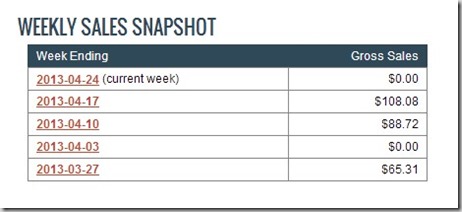
Here is a 2014  screenshot of my earnings from clickbank only.

Its increased much more since then to now in 2016 and i am still banking in 2019

I  promote click-bank  on several of my websites  including gadgetaustralia.com  this blog and  digitalfrog.com.au and many others with several products on sale to make this kind of earnings.  I would suggest also getting a second CB account  to track your sales better and compare data.

Below you can watch a  video by nathanniel who has just started on the clickbank scene. Judging from his screen shots of earnings he is not earning as much as me  for now, but still good for  a starter  and  his methods  to select  a affiliate product is pretty good which are also shown in the  video.

By the way  to get that kind of sales  and $$ you will also need to spend some money on SEO, back linking  and advertising or then do it yourself  like me if you got time to spare.

But if you really want  a jump start with your affiliate marketing  and you are just beginning, then  this course from Affilorama – Internet and affiliate marketing course is pretty good

Tips and tricks to Increase click bank products sales

The complexities of the huge size of ClickBank  means there’s a lot of junk/worthless material on the website as well as good material to promote. The time taken to sift through the good products to promote,  and choose the correct products will eventually make you selling  efforts a winner.

The pic below with arrows shows the most relevant  stuff that you need to know  when you are choosing your affiliate product to promote . I just chose a random affiliate  today , that I  am testing right now and you can see I just got two hops on this offer already.

The red arrows point to relevant bits , with explanations below.

How to choose a Click bank affiliate product!

2017 clickbank course make money


This particular product pays $25.45 per sale on average. Now, it’s important to note that the amount you earn per sale may not match that number exactly due to upsells, sales tax, chargebacks, etc. However, this will give you an idea of what you can earn.

Check out the Stats information at the bottom of the result. This provides more details about what you can earn.

Notice the Initial $/sale stat is much lower than the average $/sale. This particular vendor offers several products, which is why the initial sale stat and average sale prices differ.

Average %/sale means the average commission for this product is 60% per sale.

The Avg Rebill Total of $, indicates this is a recurring billing product and that’s the average amount the affiliate earns. So not only can you earn for one sale, but you will also earn for any customer re-bills. This is how your income can really add up over time. There is no re-bill on this product

Popularity ( this is in the product search field when you are searching for a product to promote)

This should mean a measure of sales. I check the top 10 products in the category, sort them by referred sales (60%+ is best/$30+ earned per sale)

Gravity

What does ClickBank Gravity mean?

The meaning does not tell you how much money the product has made or what percentage it converts at. Gravity only counts the first sale each affiliate makes. However, if it has a high gravity it’s probably because people are having good success with it.

How to find high converting, high paying items with low return rates

A high commission product , recurring payments, and a high gravity is what you want to look for. Be sure to watch out for that gravity! I found more that one product with HUGE commissions and rebills, but a super low gravity.

Saying that , things are changing  and you can now find low gravity products  with low competition that you can make lots of money on , if you got a relevant niche website  on that  topic .

The key  for 2019  success is  just make sure  if you are using a landing page  that is is super built to convert  that product, or then  make a pre -landing page  if the affiliate landing page is not good enough for the product .

Making money with Clickbank and Facebook  Linked in and twitter

If you can make a good landing page then you can also convert sales for clickbank safely from traffic from facebook, twitter, linked in and other social media  accounts

If you can be bothered  about landing pages  just make a really good helpful article  with your  click bank  link sprinkled in the article with a call to action included in it.

Another good tip that has doubled my income in one of my blogs is free ebook giveaways. People love free stuff and if you are willing to put the time to create something of value to them for free, it is likely they will be grateful and give you a sale knowingly or unknowingly when they click on your affiliate link in that free ebook giveaway.

Steven Hall has  got a good clickbank product to make this free giveaway method seamless for you, with your website.

I would also recommend Rosalind Gardner  who is a super affiliate and has helped many into  their online affiliate marketing careers, she has two guides that she sells , one is called the “Affiliate Blogger Pro” and she has also got an indepth  affiliate guide called – “Super Affiliate: How I Made $436,797 In One Year which covers how to start Your Own Home-based Affiliate Marketing Business.

These guides will surely teach  you how to go about and start earning  with affiliate marketing or  increase your existing blog income

Obtaining Your Affiliate Link (Hoplink)

Once you decide on a product you want to promote. CHeck to make sure you are logged into clickbank then, click the green Promote button alongside the product  listing.

create a hoplink or aff link from marketplace


You will be presented with  two small  columns  ,  1st column  your id is  already input ( if you are logged into the clickbank website) and second column ( tracking id ) just input some text you can remember ( like the page name where you will  put this created code on ). This will help you know  that that page is generating sales, you can create multiple tracking ids  to track  sales from different pages to know where the sales is being generated from .

Now that you are ready to put his click-bank affiliate code in relevant pages on your website  and promote the product  and start earning commissions !!

If you haven’t yet got a website for yourself – then go here on wordpress.com for a free or paid website  or then  choose from one of our recommended  hosting providers to start your self hosted WP  website which is the best option for affiliate marketing.

Launch of CLICKBANK UNIVERSITY 2 – Step by step course for earning money online – by clickbank

Clickbank University is one of the more popular training programs now, about creating your own information products to sell on the Internet. It is a community with thousands of people trying to learn more about affiliate marketing and selling products online.

The main training program focuses on product creation with Training videos and also chat available with successful click bank entrepreneurs who earns thousands a day . Training also provided for maximising your  revenue by selling other  click bank vendors  existing products as an affiliate.

This powerful on-line marketing course series will provide you with everything you need to know to be a success and achieve your goal whether you decide to market someone else’s product or create your own. Learn more about it here

Advertising for your blog

One important method that many people shy away from is  spending money for advertising  your blog posts,  advertising gets you targeted traffic  and if you do it right  you can earn a lot more money  that you normally would, so start experimenting. Here are some good free starter coupon money to get you started with  bing advertising.  They are much easier and  flexible to advertise with than google ad words at the moment

What Are Bing Ads?

the bing ads logo in purple

Bing Ads is the advertising platform you use to show ads on the Bing and Yahoo search engines – also referred to as Yahoo Bing Network. You also have the ability for your ads to show on their syndicated partners such as Facebook, Amazon, Monster, WebMD, CNBC, and Viacom. They are the direct competitor to Google adwords and PPC

These COUPONS are only good for new customers.

New Business and website customers in the following markets receive free search adverting credits to help them get started:

  • US – $50 in Bing Ads credit – united-states-flag for bing coupon
  • Canada (English and French)- $50 in Bing Ads credit  – canadian-flag for bingads coupon
  • UK – £50 in Bing Ads credit – uk-flagfor ppc advertising credits
  • France – €50 in Bing Ads credit
  • Germany – €50 in Bing Ads credit
  • Brazil – R$60 in Bing Ads credit
  • Australia – $40 in Bing Ads credit – au-flag for bing microsoft advertising offers for bing7
  • New Zealand – $40 in Bing Ads credit – nz-flagfor yahoobing
  • India – Rs1000 in Bing Ads credit – india-flagfor rupees in 1000 advertising credits
  • Spain – €50 in Bing Ads credit ( New market!) – spainflagfor google adwords bingppc free credit
  • Italy – €50 in Bing Ads credit (New market!) – italyflagfor bingpizza


One last tip to increase your clickbank sales and income, try to increase  your organic traffic  to  the page where your  click-bank link is,  by trying to rank it in google for related buying keywords for your product. Once you get steady organic traffic  with good keywords, the sales will follow. Good Luck!


Technorati Tags: Australian affiliates,Click bank,Clickbank promotion,clicbank,Making money

Related articles across the web

  • 19 Ideas for Killer Lead Magnets
  • How To Earn Money with Affiliate Marketing in UAE with Local Brands
  • A Brief History of Affiliate Marketing – (1989-2015)

Filed Under: 2019, Clickbank, Make money blogging, Makemoney online Tagged With: Affiliate, clickbank, Makemoney online

Best 10 picks for website name registration in Australia

April 1, 2019 by admin 33 Comments

UPDATED 01/04/2019:  If you want to “Start a Website”,  a blog or an online eCommerce shop you will need a domain name.  With a website name, you will also need a webhosting account to host your website files and website. The first most important thing you would need to consider is “Do I get an Australian .com.au domain” or do I get a  .com domain.  Website name prices are not getting any cheaper in 2019 and so it pays  to get a cheap webname provider.

digital grog au .com.au buy domains logo Sm

The price factor between .com and .com.au domain names can make a difference, and decide who you go with if you are on a tight budget.  The  Australian .au extensions are generally much pricier. Today there are heaps of  Domain name registration companies that not only provide Aussie domain extensions, but a whole lot of new exciting extension’s to choose from.

Table of Contents

  • Register a domain name
  • Australian .au name or .com name
  • Tips to choose a website name

Best Domain Name Providers Online

  1. Godaddy
  2. Crazydomains
  3. Namecheap
  4. Netregistry
  5. Hostgator
  6. Domaincentral
  7. Bluehost
  8. Domain
  9. 1 & 1
  10. Cloudflare


Search Widgets for Domain names

  • Domain Name finder
1

What is a domain name and how do you register one?

Let me explain it to you!

In simple terms, a domain or website name is like an online address to your blog or website.

Just like people need an address to get to your house, on the internet they need a domain name  eg.  johndoesblog.com , www.facebook.com  to find your blog or website .

So you can give a person your online address  which is  www.johndoesblog.com – they  then type that in their browser and reach your website/blog ( which is your online address).

You do not have to be a company or organisation to register a  top-level domain extension or a  .com.au domain name. Any individual can register a domain for themselves from less than $1 or $2 for a dot-com domain name (when they are special deals). When they are no discounts or promo offers available, the prices for this can be between the range of $10 and $14 for a year.

The dotcom.au Australia names are just a little bit pricier and can be priced anywhere between $22 to $49  a domain a year depending on who you buy it from – yes Australian domains are a bit pricier and you need an ABN (Australian Business Number) to get one.

In order to register .com.au domain names, as part of the registration process you’ll need to supply either:

  • an Australian Business Number (ABN)
  • an Australian Company Number (ACN)
  • a Registered Business Number (BN)
  • Trademark number


2

Should I get  a .com or .com.au domain extension

Your domain name is your website address or URL on the internet.

Domain names are the unique identity for your online Business. They help establish, promote and protect your brand. And they’re where you direct new and potential customers, so making sure your name belongs to you is essential.

Registering a .com.au domain improves local search results and marks your business as Australian. If you are just after starting a hobby website or a personal blog you can surely start off with a cheaper .com extension domain and it would not make much difference to your online presence.

Why is .au or .com.au  domain name important?

  • .au represents the Top Level Domain for Australia and is the preferred Domain Name for all Australians.  Japan (.jp) and Germany (.de) are other examples of TLD (Top Level Domains).
  • Any website that ends in .au is a website built specifically with Australian Internet users in mind, but open to a global audience.
  • .com.au are generally for commercial purposes and can include commercial entities – currently registered and trading in Australia, as well as commercial products and services.

One other way of getting a cheaper domain and still making the website name relevant to Australia is to either get the term/word Australia or Australian in the domain name you are planning to buy and get that as a .com  rather than .au

For example:  If you are thinking of starting a gadget blog – you could name it www.gadgetaustralia.com!  This way while you could be just paying $0.99 cents for a dot.com domain name and still letting people know that your domain is Australian focused. 

In this example even though you are not buying a .com.au extension, the name gadgetaustralia.com clearly shows that its an Australian related domain name and so you can get away with buying a .com at a cheaper price.

The price difference could be cheaper @$9.99 year (99 cents promo price)  instead of  $22 or more for a .com.au extension for a year. However saying that there are some providers that provide both  webhosting + free domain name offers, you can check out our 2019 listing of webhosts over here.


Quick Tips to choosing a Website Domain Name

  • Make it Memorable
  • Keep it short
  • Target your audience
  • Don’t use hyphens or numbers
  • Name should be brand-able
  • Keep it Interesting

Use these tips and you will not regret choosing  your website name or brand name for your business.

Most of the prices given below is  for 1 year term unless where specified for a longer term.

Most aussie domain names ending with .au extensions registration  has a minimum registration requirement of two years. This means  if the price is $22 for a year – you will be paying approximately $44 upfront to purchase or register a website name with au extension.


1

Comparison of  10  Australian .com.au and US .com  domain registration providers

Below I have provided short reviews detailing  price and information on some Australian and US based domain name registration and web-hosting companies that primarily provide names for blogs and websites.

"Get

www.godaddy.com.au  (Recommended)

Godaddy is one of the largest domain name registrar and Web hosting provider in the world and has more than 12 million customers around the world. They also cater to the Australian market and is the only US provider to compete with local domain providers  to give a cheaper price for .com.au domains
the go daddy domain discount girls sm

$9.99 for.com
$9.99 for .com.au (as of publishing)

2 year registration required for .com.au domains( regular price$14.99)

Updated Discount Link:

$1/mo WordPress Managed Hosting from GoDaddy!

Activate this link and get $1 per month on order of managed WordPress hosting

Sale/Discount – Coupon code: cjcwph1applied link

Get A$.99 .COM Domains at GoDaddy!

Get a domain name for just a 99 cent with this link. Coupon Code: cjc99com

AUS$ – 30%* off! Get going with GoDaddy!

EOFY Savings – Get your Australian business online with upto 56% off and .com.au domain name.

With this promo code you will save 30% off all your online purchase. If you are small business owner, this is an opportunity for you to order multiple items and save big.  This promo code also applies to basic, deluxe, and advanced plans.

24/7/365, round-the-clock customer care operations and good phone support

"Get

http://www.crazydomains.com.au (Aus)

For 2 years its $12 for.com ( current sale price)
Crazy Domains was originally founded in 2000 and provide services as  a domain name registrar, web hosting and online marketing company$3 for.com

$12 for .com.au
pamela anderson for crazy domain ad

Regular price is $9 for.com
Minimum registration period for .com.au is for 2 years

teh australian crazy domain provider

"Names

http://www.namecheap.com (US)

Namecheap was founded in 2000 and has over 800,000 clients and over 3 million domains under its management. They provide services like domain registration, web hosting packages, secure SSL certificates, WhoisGuard domain name privacy

They are the only provider who actually reduce the price if you register your domain for more years.$10.69 for.com
$14.98 for .com.au Prices get cheaper  a few cents if you register for more years

2 years minimum registration for .com.au domain
* Free WhoisGuard Privacy Protection, a $2.88 value*

when domain is namecheap

"Get

http://www.netregistry.com.au (AUS)

Netregistry since 1997 is Australia’s trusted online provider offering domain names, hosting and online marketing services$12.50 for.com.  They have helped over 500,000 Australian businesses establish themselves online and are well known as a web host and domain name provider.

In 2018, Netregistry became part of the ASX-listed Arq Group and remains owned and run by Australians, for Australians. With offices in Sydney, Melbourne, and Brisbane.

$16.95 for .com.au

aussie domain provider netregistry

Net registry has taken over many other hosting companies in this space including Smartyhost, Jumba, AussieHQ, Illsys and Uber.

get smart with smarty host domain registration

australian domain in abottle

uber domain provider australia

"Get

http://www.hostgator.com

Hostgator not only provides cheap hosting but also domains

HostGator.com LLC founded in 2002 is a world-wide provider of shared, reseller, VPS and dedicated web hosting$12.95 for.com
They do not provide .com.au aussie domains. With Hostgator you can get a .com domain and the webhosting for your domain in the same place and in one seamless transaction.

You can also  avail 25% off by going to www.hostgator.com website  via this partner link alternatively use  dg25percentoff  coupon code to get 25% off

the alligator that hosts domains

"Go

https://www.domaincentral.com.au/

Registrations for international and Australian domains

$22 for.com (1 year)
$22 for .com.au (1 year)

Its a bit surprising how Domain Central are so pricey.

Their list of extensions available for registration and  pricing is available over here

pricing


"Get

https://www.bluehost.com


Bluehost.com  currently has a special deal of $2.95 per month for hosting (until sep 15th)   which will not last long at this reduced rate. The reason  why I added them is their plans usually provide a free domain with hosting, so if you are planning  to start a website – this is a good option to get domain and hosting both in 1 go and get started.

They also have a 1 click install to get a word-press blog started quickly. check out their most current deals here.

Most of the  us providers provide the additional services like url forwarding and cloaking, email forwarding, dns and mx servers records adjusting  for free

blue host hosting for 2016


"Get

https://www.domain.com

Domain.com is known for the domain registration and web hosting services since 2000. They specialise in affordable domain names, web hosting, VPS hosting, Email, SSL certificates, web design, and online marketing services and provide free domain services including URL Forwarding, Email Forwarding, Transfer Lock, and Total DNS Management.

Dot.com starts as low as $9.99 a domain name and upwards.

Dotster.com and mydomain.com are listed as affiliate’s under domain.com in the commission junction affiliate program.

Domain.com LLC is a wholly-owned subsidiary of Endurance International Group Holdings, Inc.

domain.com australia

"Get

https://www.1and1.com

1 and 1 is known for their webhosting as well as domain registration services.  The 1&1 Group manages more than 19 million domain names.

1&1 currently offers a wide range of Web hosting products, including email solutions and high-end servers in 10 different countries including Germany, Spain, Great Britain and the United States.

Since it was founded 26 years ago, 1&1 has successfully established its product range in many different international markets. Its products are available in the following countries: Germany, Austria, Great Britain, Spain, France, Poland, United States, Canada, Italy and Mexico.

1 and 1

"Get

Cloudflare has been providing top webhosting companies like Bluehost, Dreamhost and WP engine with their free cloudflare CDN service, but now they have decided to enter the domain registration business.

Pricing :

cloudflare pricing

Cloudflare has decided to enter the business with a wholesaler price point for customers. They say they will get rid of promo discounts and just sell for a wholesaler even low price, rather than upping the domain name price when you need to renew. This is good news for those who are in the website or bloggin business for the long haul, rather than just testing/trying things out.


If you are serious about your domain name security, Custom Domain Protection, a Cloudflare Registrar feature available on the Enterprise Plan, is the highest level of registrar security. It protects your organization from domain hijacking with high-touch, on and offline verification of any changes to your Registrar account.

"Yahoo!

https://smallbusiness.yahoo.com/

Yahoo small business has got a unique offer where you purchase a domain and get email and hosting free. This is different from what other provider’s offer –where you get domain free with hosting. So this yahoo small business offer certainly sounds sweeter.

In this offer from yahoo, you can register a domain and instantly get a website and custom email at no extra cost or you can you can even get them for free when you purchase Website Builder or Business Mail.

Check yahoo small business domains for more details

yahoo

Can you buy a domain name forever?

Short Answer – No!

But luckily most domain name providers do  have a button in their settings/admin panel that say renew my domain automatically and your domain will renew automatically when 1 or 2 years are over. 

You can also set it to manually renew in your settings so that it doesn’t automatically get renewed on expiration and you don’t want get  charged for another year if you want to dump the domain name.

Most providers will send you and email saying your website name is going to expire and ask you if you want to renew or saying that it is auto renewing prior to expiring.

Domains ending with  .com  or .com.au are not the only options available and people can easily buy .info or .org  or .net .au which are generally more cheaper  than a .com or .com.au domain


when you need domain privacy block name address from domain

Privacy is another extra  that one might need to consider  while buying domain,  most domain providers  charge a extra charge for privacy ..so they block out your personal email contact and address from the website if you take the privacy option provide by the registrar.


How to Register Your Own Domain Name

If you have a website or blog , you should seriously consider registering your own domain name. So what is a domain name ? A “domain name” is a name like e.g. “www.digitalgrog.com.au/” or “gadgetaustralia.com” which you give to your website , which you can then  use to refer or point to your website or blog.

Registering a www domain in 5 minutes

Generally, there are no restrictions on who can register .com domain name, the period of registration can vary from 1 to 10 years

crazy ads coupons for domains

Buying your own domain name can be a great way to set up your own website/blog and/or personalized email address.

To register a domain name its as simple as doing search on the domain name provider for your name

Go daddy Domain Checker

Do a domain search in godaddy

Example: Say you are going to start a bbq recipe blog, go to the website godaddy.com and in the search button put in bbqrecipe and search (go) and they will tell you if its available or not available  to register ( and also provide you other name options and prices) .

If  the name you want is not available, you will need to try different variations to the name until you get related name and then buy the domain via PayPal or your credit card or other payment options available and this whole process is done in 5 minutes.


Bluehost Domain checker tool :

(Free Domain deal with hosting below )

You can also get our DG blog special offer  for bluehost Hosting  where you get a Domain free ( with an hosting account for $3.49 a month)- Get this deal here.


Why is it so difficult to register a Australian domain name ?

While eligibility rules for .AU names can be somewhat of a pain and  a bit more cumbersome than registering top level domains, they do serve a very important purpose – preserving the Australian namespace’s integrity and ensuring it continues to enjoy a solid reputation as one that can be trusted.

Popular Posts From Blog:

Digital marketing is at its most powerful state yet

by admin | Aug 18, 2020 | Affiliate, Amazon, Marketing, Subscribers

Marketing has always played an especially important role in the longevity and success of businesses across varying industries around the globe. This has never wavered and it never will. The role of marketing is important because marketing is the epicentre of how a...

read more

How To Scale Your Online Funnel And Make It COVID19-Proof

by admin | Apr 13, 2020 | Marketing, Solution

As COVID-19 shows no sign of slowing down, many businesses are going back to the drawing board to figure out how to continue operating in the new norm. The digital funnel sphere is getting even more crowded due to all businesses being forced to move their operations...

read more

Learn how a digital marketing agency could help your business by leaps and bounds

by admin | Mar 16, 2019 | Marketing, Search, SEO

Marketing is a particularly dynamic field and the traditional aspect of it has been replaced with digital marketing. Companies promote their services and products through various activities like social media campaigns, email marketing and the like. A digital marketing...

read more
« Older Entries

Filed Under: 2019, Australia, Australian, Domains, Done Deals Tagged With: Buy Domain Name, Comparison, Coupons, Discounts, Register Domain

5G Comes to Australia, but Hurdles Remain

February 6, 2019 by admin Leave a Comment

For the last few years, Australia has been positioning itself to become a major global technology hub. The government has doubled down on policies intended to support the push, including the Ideas Boom, investments in publicly-funded education, and partnerships with technology companies that share their vision. At the same time, however, the nation’s internet infrastructure hasn’t exactly kept pace.

Despite the grand vision of a national high-speed internet backbone promised by the now-troubled NBN, Australia’s tech sector has been hobbled by a lack of progress towards the kind of internet connectivity that will be necessary to support the kind of growth envisioned by all involved.

The only real saving grace has been the pending arrival of the latest in wireless technology, known as 5G, which is expected to be a quantum leap forward for Australia’s more than 20 million internet users. Now, that arrival seems imminent. Here’s a look at what’s happening.

A Step Forward

On January, 31st, Australian wireless provider Optus announced that it had activated the first three sites on its fledgling 5G network. Two of the sites are located in the Canberra suburbs, with the third in Sydney, but they represent just an opening act in a much larger play. Optus expects to have a full 60 5G sites activated by March, en route to a total of 1200 by 2020.

Crucially, the initial rollout seems like a shot across the bow of the NBN, since the Optus 5G network is launching with home broadband customers in mind rather than mobile users.

Optus is offering 5G home internet service at $70 per month, including a guaranteed minimum connection speed of 50Mbps. That’s already double the speed that the original NBN plan aimed to provide to Australian customers, and it is available right now.

Other Telcos Close Behind

Optus isn’t the only Australian wireless provider that’s gearing up to usher in the 5G era. In fact, Telstra already had 200 5G sites activated by the end of 2018 and has signed exclusive deals with handset manufacturers to provide 5G-ready smartphones by the middle of 2019.

Telstra, in contrast to Optus, is targeting their 5G rollout to wireless customers, with an eye towards picking up market share against its smaller regional rivals.

Together, the two rivals expect to blanket most of Australia in 5G coverage by the end of 2020, providing an enormous boost to both the capacity and reliability of internet access nationwide.

Clash on the Horizon

It’s important to note that the Optus and Telstra 5G networks won’t be using the entire broad wireless spectrum that designers expect will unleash the true potential of the technology – at least not right away.

The initial deployments will not include millimetre-wave (mmWave) transmission capability, owing mostly to the fact that the licenses required to use that part of the spectrum still have to be sorted out.

Already the NBN is trying to lock up crucial parts of the spectrum, which could hinder deployments for the major wireless providers. If the impasse isn’t resolved, the lack of mmWave access could lead to bottlenecks on the new 5g networks, when data-hungry apps and users start to exploit their new unlimited data plans.

The Bottom Line

Any way you look at it, 5G networks seem poised to shake up Australia’s internet market in the very near future. It’s still too soon to tell if their long-term ability to keep up with customer demand (depending on how they’re allowed to upgrade) will be enough to truly power the revolution that the nation’s tech businesses expect, but the prospects are good. That should be considered good news, both for Australia’s tech sector, as well as the millions of Aussies that use the internet for work and play every day.

Soon, Australia’s internet infrastructure could be a model for other nations to follow – and that would be a positive development for all.


Filed Under: 2019, Australia, Internet, Technology News Tagged With: Broadband, Technology education

  • Page 1
  • Page 2
  • Go to Next Page »

Primary Sidebar

Recent Posts

  • Cute & Funny USB Drives (Perfect Gifts!)
  • 2026 – Step-by-Step Guide to Building Your Site With AI
  • Underwater Drones for Recording Video and Taking Pictures
  • Why I chose hostgator for blog hosting
  • Top 10 Software Programs For Your Windows PC

Recent Comments

  1. Roberto Mcgee on 2026 – Step-by-Step Guide to Building Your Site With AI
  2. google on Wacky new underwear invention 2b released by Durex
  3. Patrick McCormick on How to secure your desktop and laptop with antivirus software
  4. JJ on 20 Top brands with affilate programs to make you money in 2019
  5. JJ on This WPengine Genesis Pro Deal Will Give You 35 Studiopress themes

Archives

  • September 2026
  • June 2022
  • February 2022
  • July 2021
  • May 2021
  • April 2021
  • March 2021
  • November 2020
  • September 2020
  • August 2020
  • July 2020
  • June 2020
  • May 2020
  • April 2020
  • March 2020
  • February 2020
  • January 2020
  • December 2019
  • September 2019
  • August 2019
  • July 2019
  • June 2019
  • April 2019
  • March 2019
  • February 2019
  • January 2019
  • December 2018
  • November 2018
  • October 2018
  • September 2018
  • July 2018
  • June 2018
  • April 2018
  • February 2018
  • January 2018
  • December 2017
  • October 2017
  • September 2017
  • July 2017
  • June 2017
  • May 2017
  • April 2017
  • March 2017
  • February 2017
  • January 2017
  • December 2016
  • November 2016
  • October 2016
  • September 2016
  • August 2016
  • July 2016
  • May 2016
  • April 2016
  • March 2016
  • February 2016
  • January 2016
  • December 2015
  • November 2015
  • October 2015
  • September 2015
  • August 2015
  • July 2015
  • June 2015
  • May 2015
  • March 2015
  • February 2015
  • January 2015
  • December 2014
  • November 2014
  • October 2014
  • September 2014
  • August 2014
  • July 2014
  • June 2014
  • May 2014
  • April 2014
  • March 2014
  • February 2014
  • January 2014
  • November 2013
  • October 2013
  • September 2013
  • August 2013
  • July 2013
  • June 2013
  • May 2013
  • April 2013
  • March 2013
  • February 2013
  • January 2013
  • December 2012
  • November 2012
  • October 2012
  • September 2012
  • August 2012
  • July 2012
  • June 2012
  • May 2012
  • April 2012
  • March 2012
  • February 2012
  • January 2012
  • December 2011
  • November 2011
  • September 2011
  • August 2011
  • July 2011
  • June 2011
  • May 2011
  • April 2011
  • March 2011
  • February 2011
  • January 2011
  • December 2010
  • November 2010
  • October 2010
  • September 2010
  • August 2010
  • July 2010
  • June 2010
  • May 2010

Categories

  • $heldon $ingh
  • 2010
  • 2011
  • 2012
  • 2013
  • 2015
  • 2017
  • 2018
  • 2019
  • 2020
  • 2021
  • 2022
  • Accounting
  • Adsense
  • Affiliate
  • Amazon
  • Anti Virus
  • Apple
  • Apps
  • Asus
  • Aussie
  • Australia
  • Australian
  • Australian Bloggers
  • Australian wordpress hosting
  • Banks
  • Blog-Hosting
  • Blogger
  • Blogger Tool
  • Blogger Tools
  • BloggerTools
  • BuddyPress
  • CARS
  • CDN
  • Celebrity
  • Clickbank
  • Compare
  • Computer
  • Domains
  • Done Deals
  • Ebook
  • Email
  • Facebook
  • Featured
  • Finance
  • Free
  • Gadgets
  • Google
  • Gpost
  • Guide
  • Hackers
  • Hosting
  • India
  • Internet
  • Ipad
  • Kindle
  • Laptop
  • Make money blogging
  • Makemoney online
  • Marketing
  • Melbourne Cup
  • Movies
  • Netbook
  • Network
  • News
  • Online betting account
  • PC
  • Review
  • Search
  • SEO
  • sheldon singh
  • Software
  • Solution
  • Sports
  • Subscribers
  • Taxes
  • Technology News
  • Themes
  • Top 10
  • Tutorial
  • Video
  • Wacky
  • web hosting
  • Website Review
  • Wierd
  • Windows
  • wordpress
  • Wordpress 3.0
  • Wordpress 3.1
  • wordpress themes
  • World cup
  • Wp Answers
  • WP Turbo
  • WPMU

Footer

Technology

With an emphasis on technology, webdesign, and gadgets, our blog features articles related to these categories.

Browse our archives.

Privacy

Your privacy matters. We collect only essential information to ensure your data stays safe and confidential.

Learn more about Privacy.

Videos

Explore our video library designed to teach, inspire, and guide you. Dive in and discover content that brings ideas to life..

Check out our videopage.

Copyright © 2026 · Genesis Sample on Genesis Framework · WordPress · Log in

  • Resources
  • Privacy policy
  • Website Review
  • Subscribe