• Skip to primary navigation
  • Skip to main content
  • Skip to primary sidebar
  • Skip to footer
tech blog au

Digital Grog — Australia’s Tech, Gadgets & Digital Life Unfiltered

Digital Grog is Australia’s go‑to tech blog for sharp reviews, digital trends, AI tools, gadgets, cybersecurity updates, and practical how‑tos covering the latest in Aussie technology

  • About Us
  • Contact Us
  • Block Examples
  • Landing Page

Windows

Top 10 Software Programs For Your Windows PC

February 13, 2022 by admin Leave a Comment

We all have computers at home or at office and they are some programs or software that we just can’t do without for the daily personal work or office work. These program or tools are suitable for most windows based PC’s.

This list of programs are essential software for every computer user

While a lot of the time, people stick to free and trial software which can sometimes do the job, many a time this software is kind of limited in features due to it being free.  If your looking for a good deal, then Black Friday and cyber Monday (a US online discount day) is one of the days that most online software goes at a discount and it’s a good time to get an online deal related to computers even if you are in Australia.

Today I bring you this essential list of software that most computer owners should have on their computer.

Some of these are free/trial software and some of them you pay to get the full versions.


1. ANTIVIRUS

While windows inbuilt antivirus security tool does a good job of blocking nasties on your computer, it is always good to get a good antivirus just to have that extra little bit of protection when your online.

Get an antivirus and computer security software bundled in one . Top providers are AVG, Mcafee, Norton, Bitdefender (check our entire recommended list here). Many of them offer Free trial limited versions which you can use for a long time.

anti virus


2. Unzip utility  / Zipped file extractor

Have you ever heard of winzip or winrar. Its that program that lets you unpack or unzip a locked  or zipped folder and see and use the contents within.

The WinZip file archiver creates archives in ZIP format by default, and can open archives of all popular compressed formats: ZIP, ZIPX, RAR, 7Z, TAR, GZIP, VHD, XZ, and POSIX TAR

The most popular programs are winzip and winrar, but there are others too. Winzip has a black friday deal on. Google it.

Capture unzipped

There is a  entirely free version that  you can use called 7 ZIP. 7-Zip is free software with open source. The most of the code is under the GNU LGPL license.

free unzip tool

Its available for download here. https://www.7-zip.org/

Supported formats:

  • Packing / unpacking: 7z, XZ, BZIP2, GZIP, TAR, ZIP and WIM
  • Unpacking only: AR, ARJ, CAB, CHM, CPIO, CramFS, DMG, EXT, FAT, GPT, HFS, IHEX, ISO, LZH, LZMA, MBR, MSI, NSIS, NTFS, QCOW2, RAR, RPM, SquashFS, UDF, UEFI, VDI, VHD, VMDK, WIM, XAR and Z.

3. Photo Image Editor

Most windows PC’s come with paint tool, however that is just not enough to get photos enhanced or fixed or if your kids want to do their homework. Some good photo tools are Paintshop Pro, Adobe photo shop, Paint.net Gimp.

An online subscription photo editor CANVA  is of great value if you want to create  good graphics easy and quick with a large in built library. If you want an online photo or image editor then Pixlr will do the trick.

Tools like these also help touch up photos taken on your smartphone or camera.

photo and image editor buy


4. Mp3  Downloader/Player

So you need songs to entertain yourself on your pc.

One of the most popular song programs is spotify, youtube or google music today which runs on a monthly subscription model. There are  good value if you like to listen to fresh and old music and create your own playlists.

There are websites like mp3jam and software like Audials that gets mp3s for you from popular online streaming websites.

Music Bee and Foobar are good mp3 music player programs to have ( Winamp used to be my favorite at one time)

MX player is a good Mp3 player for your smartphone

stream youtube online ripper


5. Desktop program/ Icon Organiser

I use fences for organising all the shortcuts that gets created on my desktop for programs that get installed on my computer.

You can manually organise all program or folder shortcuts onto your desktop with windows, however fences by stardock can help make your desktop look cool and clean while still organising it in a good way.

desktop funny


You can set it up so that the icons show only when the mouse is on top of it or you can make the icons on desktop blend into the background. Many more cool  customisation features are available.


6. PDF opener/ editor

Adobe is one of the leading programs for PDFs and they are good.

If you are looking to get pdf editors then have a look at this website for more programs. https://www.softpedia.com/hubs/Edit-PDF/ .

You can also get free programs from Microsoft store.


7. Microsoft Word /Powerpoint software

Today software like Microsoft word and PowerPoint, Publisher is essential for you or then for your kid’s homework. Microsoft software is not cheap and there are alternatives that will do the job like Google docs & Libre office.

Many schools and Uni’s offer student deals for office 365 and Microsoft software


8. VPN Software

If you like watching shows that are available in other countries and are getting blocked or if you want to anonymously download or browse websites then a VPN is what you need. Most VPN’s are easy to set up today with a few clicks.

They also enhance your PC security while browsing or downloading bit torrents due to not leaving any IP footprints. Popular VPN software is NORD VPN, Froot VPN, IP vanish, Express vpn and more.

Here is an entire list on our blog.

froot vpn australia


VPN are also getting popular due to Netflix, Amazon Prime and Disney plus. With a VPN you can check and watch shows  that are exclusive to other countries Netflix users and watch it . I know Breaking bad was available in many countries via netflix before Australia.

9. Movie and Media player

The best media player for years is VLC media player. You throw any file format at it and it will play it. People use it more for playing Movies though rather than mp3s. Get VLC media player here. It’s free.

https://www.videolan.org/vlc/index.html.

I also like GOM Player and MX player, but there are other popular software today like KM player, AIMP and the free windows media player.

DLNA software for tv streaming

[Plex streaming player for your movies and videos on computer via wifi]

Good DLNA/WIFI players to stream/play movies to your other devices or on your TV around the home is KODI and PLEX.

Emby server is another easy to use Home movie server  to play movies on your TV or tablet.

10. Best screen capture tool

If you want to capture your computer screen or screen that you are browsing on the internet – the best free tool to use is windows snipper (snipper tool old version). ( the new screen snip introduced in Windows 10 is crap)

I use screen hunter to get that little bit of extra more flexibility when capturing the screen and you can set easy key shortcuts to open the program if you’re a regular user.

If you want heaps of utilities with your screen capture for free then  ShareX software is another option.

screen hunter tool capture tool

Microsoft has just updated their new snip tool in windows 10, but  I already dont like their update as it does not have user friendly save options.

11. Free space on my computer

There are software’s that will analyse your computer and tell you which stuff on the computer is taking the most space.

So, you can run this program and then delete stuff to make more space on your computer.

This program I use is wiztree  for this. Its good  to keep it handy – as a full computer makes your computer run slow and sluggish just like a full tummy. This tool makes it makes it easy to reduce storage of unwanted large files by  giving an idea of size of files on your pc so that  you can delete unwanted ones.

Auslogics Duplicate finder tool is also a good tool to find duplicate files on your computer taking up a lot of space.

12. Belarc advisor

find computer information specs

This is useful program to have to see all the hardware and software specs of your computer. It will run checks on your computer and tell your how much memory it has, what operating system it has, what hard drives it has, what processor and circuit board it runs and much more information that you would expect that it would extract.

It is good information to give your PC repair guy if he needs it or to check if you need to upgrade hardware on your computer. If you want to find out your windows  software keys for your windows 10,7,8  or your windows office keys then the Jellybean key finder software might also help you.

Lin to software: Belarc Advisor | Belarc, Inc.


Hope you enjoyed my list of essential software for your  windows pc.  My top go to for downloading tools or searching for software are mostly direct from publisher sites or then I use these handy sites like softpedia or cnet download  en.softonic.com and fosshub.

Some other programs while not essential, I can recommend are

  • Filezilla for FTP
  • Camtasia Screen recorder for screen video capture

I do have heaps to add to this post and I can go on recommending tools that I use or have used previously, but I will keep it to 12 for now and add at a later stage.


Let me know if you ended up downloading any of these tools and how did you go.

Filed Under: Software, Windows Tagged With: 2019, Technology

Reset your windows 10 password in under 5 minutes

June 18, 2017 by admin 35 Comments

Updated 20 September 2020  – If you lost or forgot your windows password and need to “reset the windows 7 password” , its not to hard to recover your  forgotten windows account password with the right software. You can fix your desktop as well as laptop password problems even “windows 10” pass quickly with the right recovery tool.

If you have already googled the internet on “ways to recover your forgotten password”,  you might  have found and read various articles like below.

  • 7 Free Windows Password Recovery Tools

  • 5 Ways To Find Lost Windows Passwords

  • How to unlock windows admin  password with command line

Forgot windows 7 password then Unlock windows computer with Resetter windows password software and tool

To get the unlocking software go here or check updated 2020 software list below  or check out this youtube demo video before buying

If you forgot your account or administrator password in windows, then you can unlock windows computer with  Reset windows password software. What this software does is essentially just resets your password on your operating system,  so that  you can just login and create  a new password –  it does not have to retrieve your old  forgotten password.

You don’t need a Microsoft account for this unlocking process, but you will need a USB drive if you dont have a blank CD to gain access back into the PC.

Unfortunately, aside from the original password reset disk there is no Windows-provided way to reset a Windows 10 password.  If you have not created a password reset disk earlier, then your out of luck with this windows provided method.

A reset disk can still be created  when you use a different custom made software for this purpose (Link below)


3 NEW UNLOCKING SOFTWARE  BELOW (UPDATED 2020)

  1.  

the zapper australia

Get  the zapper software >> here on Amazon

2.


CD disk for recovery of password

Get the recovery disk >> here on Amazon

3.


win recovery USB

Get The WIN recovery USB >> over here on Amazon

Most people are not always looking for  a technical guide on how to unlock your computer after you have locked yourself out of your windows computer or just forgotten your pass. People are generally looking for a simple quick solution on how to gain access back again into their computer or PC.

The software below when used, can easily get you back into your  windows computer (or even laptop computer) if you are running any of the windows version  like –windows 7 , 8.1, windows 10, windows xp, windows 2000 or NT, windows vista  and even the Newest Windows 8 version and you don’t need the original “password reset disk”

This software is not suitable to reset your apple id or macbook computer or laptop or android  systems like Samsung galaxy note or tablets.

So if you looking to do one of the below

  1. Reset your forgotten windows password
  2. How to reset a windows 7 computer
  3. Recover your windows laptop computer password
  4. Forgot or lost your windows  10 password

Then this windows xp to 10 unlocking software is for you. You can  just load this software and get your windows 7 pc  password in under 5 minutes. This is  specialised windows unlocking software created specifically for this purpose. This program also works on the new windows 10 edition

You can reset your windows  7 password quickly  in 3 Easy steps

This software unlocks all these windows versions below including laptop computers

forgot windows 7 laptop 32 and 64 bit password get resetter and unlocker tool

recover windows vista password and xp too

How to reset windows xp or 2000 password and vista

and also the newest  windows 7 8 password laptop how to login into computer version


And best of all you don’t need  to be a nerd or geek and you don’t need any technical or programming skills to use this  software.

You can download the software and reset your password in just 3 easy steps

This software is called

password resetter and admin passreset password pro

What you need though  to unlock is

  • A spare CD/DVD or USB drive and stick
  • This Reset Password Pro ( software)
  • A few minutes of your time!

Go here to get the  quick process to  reset your windows password

Once you buy this software  you don’t need to worry  about ever forgetting your  windows password   as you will have this software handy and you could possibly help out a friend as well who has got into trouble  with forgetting their password.

Good luck!

Forgot windows 7 pass | Unlock windows computer | Reset windows password software

 
download the reset software now and unlock pc
This password solution software works on most brand computers including
  • DELL
  • HP
  • ACER
  • ASUS
  • Microsoft
  • Lenovo
and even more laptop brands as long as they are using  the windows operating system.
LIKE WHAT YOU’VE READ?
Please join over 1,000 people who receive exclusive notification every time I publish a new article on Digitalgrog.com.au. Click on the red button below to subscribe!
Check it out

Filed Under: 2017, Software, Solution, Windows Tagged With: Vista Windows, windows 7 Professional, Windows 8, windows ultimate 7

X Change my windows 8 start menu

June 21, 2015 by admin 1 Comment

Like to stay abreast with new technology updates &  windows , but don’t like the windows 8 start menu. You are not alone, windows 8 was a good update,modernised an all – but millions of people have shown their displeasure in how the start menu was totally obliterated and not user friendly with the windows 8 release.

They are two solutions for this,  either wait for windows 10 to release ( which should not be too far away) and hope they make some good changes to this  or then  force your windows 8 to go back to the much friendly Windows 7 start menu.

I have windows 8 on my laptop and  the nutty metro start menu started to drive me crazy, enough for me to look for a solution to make life easier. Here are the two solutions that will get you faster to where you want, when you start up a windows 8 laptop.

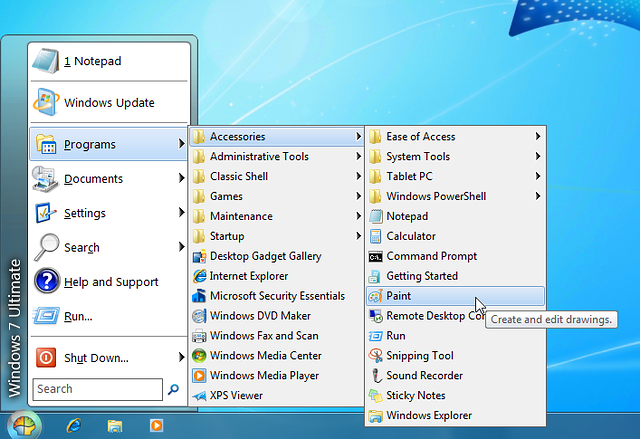
windows 7 start menu for windows 8  get it back

Luckily  there re programs out there that can  easily make your windows 8 start menu just like windows7 and also allow you to switch back and forth between them both, if you want to change your mind.

how to get the old windows start menu back

Below i will give you a paid product (stardock) short review  that does this and also  a  FREE version called  (classic shell) that  does a good job with changing the start menu.

Classic shell ( free version) – So what does classic shell do

[from thier website]

Classic Shell™ is free software that improves your productivity, enhances the usability of Windows and empowers you to use the computer the way you like it ( Like windows 7 start menu).

Classic start menu

[imgfrom http://www.classicshell.net/]

The main features are:

  • Highly customizable start menu with multiple styles and skins
  • Quick access to recent, frequently-used, or pinned programs
  • Start button for Windows 7, Windows 8, Windows 8.1 and Windows 10
  • Toolbar and status bar for Windows Explorer

Classic Shell has been in active development for 5 years and has over 25 million downloads.[DOWNLOAD NOW] .Visit their homepage if you like the program and interested in making a donation

Note: Classic Shell works on Windows 7, Windows 8, Windows 8.1, Windows 10 and their server counterparts (Windows Server 2008 R2, Windows Server 2012, and Windows Server 2012 R2). Both 32 and 64-bit versions are supported. The same installer works for all versions.

Start8 By Stardock (paid software $4.99)

This software is good, in that it does allow you to either go straight to the windows desktop,avoiding the windows 8 start screen. It also allows you to access the windows 8 start screen from the windows 7 style start menu you customised or created.

I  use another software by star dock called fences , which i truly recommend and has been of great use to me until today in organising my windows 7 desktop icons and shortcuts ( you can check it out in their website). However this windows 8 start menu software also has many good features

Start8 Features

  • Adds a Windows 7-styled Start menu with Windows 8 enhancements
  • Boot directly to the Windows 8 desktop (no more searching for your desktop)
  • Windows 8 Start screen accessible from Start menu
  • Adds option for WinKey to show fullscreen metro desktop
  • Skinnable start button

stardock start 8 and windows shell 7 start menu

Start Menu 8 is specially designed for Windows 8/8.1, as a freeware that can restore (simulate) the classic start menu of earlier version of Windows. It can be set to boot from startup, in order to skip the system default Metro start screen, thereby directly start into the traditional Windows desktop which is familiar for us.

There is the basic version that costs $4.99 and the Deluxe version that includes many other software enhancements and features for a windows desktop  that is $9.99 with a recurring monthly fee. Get details and download here

System Requirements

Windows 8.1/8 or Windows Server 2012/R2

If you have been searching google with any of these queries below,

  • How to bring back the Start Menu in Windows 8.1 / Windows 8
    Remove windows 8 start menu to windows 7
    Change the Start menu to Classic view – Windows – Microsoft
    Ways To Customize the Windows 8 Start Screen
    Change windows 8 start menu style
    How to change windows 8.1 start menu

then..these two software’s listed above will surely be able to help you in some way , let me know  how this works out for you and do leave me a comment 🙂

Filed Under: Windows Tagged With: Windows 10, windows 7 Activate, Windows 8, Windows Phone 8.1

Get and Download the Preview version of Microsoft Word, PowerPoint and Excel with windows 10 Technical preview

February 7, 2015 by admin Leave a Comment

Didn’t like windows 8, Excited  about a newer and a better version of windows. Now you can now try out Office for Windows 10 yourself, according to a post on the  Office Blog. new users signed up for the Windows 10 Technical Preview  can now download the apps – including Word, Powerpoint, and Excel – from the Windows Store Beta.

new windows 10 beta release try it and download here

Download links for Windows 10 Preview

Get windows 10 Technical preview iso [ Here ]

This includes Microsoft Word , Microsoft excel  and Microsoft PowerPoint

A universal version of OneNote already comes with Windows 10, while Outlook and Calendar are expected to be released at a later date. It is not know yet  what type of version would be released, including enterprise, Pro , Build , Version of this release and the prices for this release are also not known.

FREE upgrade for all WIndows 7 and 8 Users

At  the recent Microsoft’s Windows 10 event, it was announced that all Windows 7, 8 and 8.1 users will be able to upgrade to Windows 10, for free.

People who want to upgrade after that first year have to purchase it.

Only people who have a legitimate copy of Windows 7 or 8.1 will receive a license, as long as you claim it within a year after Windows 10’s launch.

release date password and technical preview download  of windows 10 beta

Microsoft said that the free upgrade will be valid for the first year immediately after the release; if you upgrade during that time, you’ll get Windows 10 for free, for the “lifetime” of your device. The Windows Phone 8.1 will also get the update to Windows 10 on their mobiles.

So why does windows want you to have the free technical preview download ?

Here is what they have to say

Help shape the future of Windows

Download the Windows 10 Technical Preview and try out the new features, give us your feedback, and get the chance to win cool stuff.

What Is A Technical Preview?

The Windows 10 Technical Preview (TP) is an evaluation copy for enterprise users. Basically, it’s an early test version. Businesses are given the chance to try it out, see how it fits into their routines and provide Microsoft with feedback. Ideally, Microsoft will integrate the collected data into a final product that meets the needs of its customers.

Get early access to releases

Experience Windows 10 in its earliest stages. Download the Windows 10 Technical Preview to get the latest build and see the progress as it’s happening.

Terry Myerson the VP of Windows at Microsoft said that the company wanted to make this version of windows a “seamless upgrade” for those users when it is released.

Microsoft usually charge around £100 for new releases of their highly popular OS

The Windows 10 Trial Will Expire [April 15, 2015.]

Another reason why you shouldn’t get too comfortable with using Windows 10 Technical Preview as your main OS, is that the preview build will expire on April 15, 2015.

activation of windows 10 preview  and expiry for key and  serial

You can sign up for said program by visiting the Insider website and logging in using an appropriate Microsoft account. After accepting the terms for the program, you’re walked through the download process for the Windows 10 preview.

We will be back with a detailed review and update on windows 10 when it is released in Australia or the USA

If you haven’t yet signed up for the Windows 10 Technical Preview, you can do so here.

Filed Under: Windows Tagged With: Operating system, Windows 10, windows 7 Activate, Windows Phone 8.1

Guide to Upgrading from Windows XP to Windows 7/Windows 8

March 20, 2014 by admin Leave a Comment

If you are still using Windows XP on your system and want to upgrade to Windows 7 or Windows 8, you can download free ebook with step by step instructions at the end of this post.

After a long time, Windows Operating System changed for good, disapproving a timeworn formula that Windows is equals corporate, boring while Apple signifies cool, creative and hip. Windows 8 has made many of us unlearn that.

clip_image002

Credits: TechRepublic

Need more reasons to do away with old fashioned Windows XP? Check this and see for yourself.

But since Windows 8 won’t support a straight upgrade from Windows XP, you will need to do a ‘custom install’ by re-installing all device drivers and applications that have been currently installed.

For some hardware, you may need updated drivers and the upgrade compatibility wizard of Windows 8 will tell you what’s compatible and should be removed to complete the upgrade.

Here is a detailed guide for a successful upgrade from Windows XP to Windows 8:

Backing up Important Data

There are certain important things that you need to take care of before proceeding with an upgrade.

First things first, take a backup of all important data.

Since Windows XP has limited backup options, it’s advisable to seek a third-party solution or professional assistance for restoring Windows XP in case Windows 8 installation doesn’t succeed. You should always consider a worst case scenario.

Things to Do before Attempting the Upgrade

If you want Windows XP to migrate smoothly to Windows 8, you will have to:

§ Uninstall currently installed software

§ Disable encryption utility, if installed

§ Remove any disk utility software such as CD/DVD burning utilities

§ Disconnect all external devices such as smartphones, pen drives, data drives etc. and do away with RAID configurations, if any

Choosing the Right Windows 8 Version

Since you are using Windows XP, the 32 bit Windows 8 version will be perfect.

You can use 64 bit only if you have 4GB RAM and an overall burly system configuration.

Upgrading Windows – Steps

Step 1: Start Setup

Insert your physical DVD of Windows 8 and let the setup begin automatically.

When the setup has launched, you can choose to go online to install updates.

Click ‘No, thanks’ if you don’t have an Internet connection.

Step 2: Entering Product Key

Product key has to be made available at the time of installation if you have bought Windows 8 from a Microsoft store and have the Upgrade Assistant.

Click ‘Next’ to continue after you’ve entered the product key and accept the user license agreement.

Step 3: Choosing What to Keep

‘Keep personal files only’ is an important option and part of the setup process that helps you keep all your personal files intact on your system; click on it.

You will have to reinstall your current drivers and programs for hardware devices. And if you select ‘nothing,’ your files will be placed in Windows.old folder by Windows 8 operating system.

Windows will carry out some final checks once you have clicked ‘next’ after choosing any of the given options.

Step 4: Ready to Install

Make sure you check the summary screen to review all changes that are displayed on the system.

Click ‘Back’ to go back and make changes in case you are not sure.

You can’t use your system during Windows upgrade and the total time of completion will depend upon processor speed, data set and memory. You can click ‘Install’ to start with Windows 8. The setup will restart several times and take a full-screen mode.

Step 5: Multiple Setup Screens

Windows 8 setup will continue and several screens will indicate completion of important tasks such as:

§ Windows setup preparation

§ Getting devices ready

§ Getting your system ready

The setup will continue after restarting and move your settings.

Step 6: Personalizing Windows Experience

You can choose a color you like to setup and personalize your Windows experience.

Also, the settings options will allow you to customize Windows in order to ensure smooth running by clicking ‘Use express settings.

When you click customize, Windows will finalize your settings. After final configuration is complete, Windows 8 will be ready for use.

Step 7: Starting to Use

After your successful migration to Windows 8, you can ascertain that all your files are in place by launching Windows Desktop app.  Enjoy your new windows.

Author Bio: Henry Chow is a managing director of an IT company – Motionwave Technologies. The company Motionwave Technologies started in 2010. They offer IT support at fixed monthly fee with unlimited support.

Filed Under: Software, Windows Tagged With: windows 7 Activate, Windows 8

Primary Sidebar

Recent Posts

  • Underwater Drones for Recording Video and Taking Pictures
  • Why I chose hostgator for blog hosting
  • Top 10 Software Programs For Your Windows PC
  • What you should know before investing in Cryptocurrency and bitcoin
  • The Best Social Media Platforms for Marketing a Gaming App

Recent Comments

  1. Patrick McCormick on How to secure your desktop and laptop with antivirus software
  2. JJ on 20 Top brands with affilate programs to make you money in 2019
  3. JJ on This WPengine Genesis Pro Deal Will Give You 35 Studiopress themes
  4. Lisa Gomes on 16 Ways to Make Money Online Working From Home
  5. KatVine on This WPengine Genesis Pro Deal Will Give You 35 Studiopress themes

Archives

  • June 2022
  • February 2022
  • July 2021
  • May 2021
  • April 2021
  • March 2021
  • November 2020
  • September 2020
  • August 2020
  • July 2020
  • June 2020
  • May 2020
  • April 2020
  • March 2020
  • February 2020
  • January 2020
  • December 2019
  • September 2019
  • August 2019
  • July 2019
  • June 2019
  • April 2019
  • March 2019
  • February 2019
  • January 2019
  • December 2018
  • November 2018
  • October 2018
  • September 2018
  • July 2018
  • June 2018
  • April 2018
  • February 2018
  • January 2018
  • December 2017
  • October 2017
  • September 2017
  • July 2017
  • June 2017
  • May 2017
  • April 2017
  • March 2017
  • February 2017
  • January 2017
  • December 2016
  • November 2016
  • October 2016
  • September 2016
  • August 2016
  • July 2016
  • May 2016
  • April 2016
  • March 2016
  • February 2016
  • January 2016
  • December 2015
  • November 2015
  • October 2015
  • September 2015
  • August 2015
  • July 2015
  • June 2015
  • May 2015
  • March 2015
  • February 2015
  • January 2015
  • December 2014
  • November 2014
  • October 2014
  • September 2014
  • August 2014
  • July 2014
  • June 2014
  • May 2014
  • April 2014
  • March 2014
  • February 2014
  • January 2014
  • November 2013
  • October 2013
  • September 2013
  • August 2013
  • July 2013
  • June 2013
  • May 2013
  • April 2013
  • March 2013
  • February 2013
  • January 2013
  • December 2012
  • November 2012
  • October 2012
  • September 2012
  • August 2012
  • July 2012
  • June 2012
  • May 2012
  • April 2012
  • March 2012
  • February 2012
  • January 2012
  • December 2011
  • November 2011
  • September 2011
  • August 2011
  • July 2011
  • June 2011
  • May 2011
  • April 2011
  • March 2011
  • February 2011
  • January 2011
  • December 2010
  • November 2010
  • October 2010
  • September 2010
  • August 2010
  • July 2010
  • June 2010
  • May 2010

Categories

  • $heldon $ingh
  • 2010
  • 2011
  • 2012
  • 2013
  • 2015
  • 2017
  • 2018
  • 2019
  • 2020
  • 2021
  • 2022
  • Accounting
  • Adsense
  • Affiliate
  • Amazon
  • Anti Virus
  • Apple
  • Apps
  • Asus
  • Aussie
  • Australia
  • Australian
  • Australian Bloggers
  • Australian wordpress hosting
  • Banks
  • Blog-Hosting
  • Blogger
  • Blogger Tool
  • Blogger Tools
  • BloggerTools
  • BuddyPress
  • CARS
  • CDN
  • Celebrity
  • Clickbank
  • Compare
  • Computer
  • Domains
  • Done Deals
  • Ebook
  • Email
  • Facebook
  • Featured
  • Finance
  • Free
  • Gadgets
  • Google
  • Gpost
  • Guide
  • Hackers
  • Hosting
  • India
  • Internet
  • Ipad
  • Kindle
  • Laptop
  • Make money blogging
  • Makemoney online
  • Marketing
  • Melbourne Cup
  • Movies
  • Netbook
  • Network
  • News
  • Online betting account
  • PC
  • Review
  • Search
  • SEO
  • sheldon singh
  • Software
  • Solution
  • Sports
  • Subscribers
  • Taxes
  • Technology News
  • Themes
  • Top 10
  • Tutorial
  • Video
  • Wacky
  • web hosting
  • Website Review
  • Wierd
  • Windows
  • wordpress
  • Wordpress 3.0
  • Wordpress 3.1
  • wordpress themes
  • World cup
  • Wp Answers
  • WP Turbo
  • WPMU

Footer

Design

With an emphasis on typography, white space, and mobile-optimized design, your website will look absolutely breathtaking.

Learn more about design.

Content

Our team will teach you the art of writing audience-focused content that will help you achieve the success you truly deserve.

Learn more about content.

Strategy

We help creative entrepreneurs build their digital business by focusing on three key elements of a successful online platform.

Learn more about strategy.

Copyright © 2026 · Genesis Sample on Genesis Framework · WordPress · Log in