• Skip to primary navigation
  • Skip to main content
  • Skip to primary sidebar
  • Skip to footer
tech blog au

Digital Grog — Australia’s Tech, Gadgets & Digital Life Unfiltered

Digital Grog is Australia’s go‑to tech blog for sharp reviews, digital trends, AI tools, gadgets, cybersecurity updates, and practical how‑tos covering the latest in Aussie technology

  • Home
  • Webhosting
    • List of WordPress Web hosts
    • Comparisons
    • Blog Hosting
  • Make Money Online
    • Clickbank
    • Affiliate Programs Australia
      • Amazon
  • Domains Australia
    • Australian Domain Names
    • Register a domain name
  • Technology
    • Technology News
      • Gadgets
      • Software
  • Guest Posts
  • About
  • Contact us

2012

The Smallest PC To Connect to your TV or Monitor

April 26, 2021 by admin 5 Comments

This original post was written in 2012 (updated 2021 and  2013)  title is “The smallest PC that can connect to your TV” – so its kinda obsolete now, since most tv’s now come  as smart tvs with inbuilt  wifi connectivity and ability to install apps so you got pretty much  anything that can be streamed from the internet on your tv.

However small little mini pcs still have their unique uses and so  this post is still relevant today for people who still have a non-wifi TV.  I have added a  couple more alternatives to our favourite raspberry pi below  to keep this updated with 2020 -2021.

Mini Raspberry Pi Computer

Giving more competition to  the Apple Mac and the Blackberry who are into small gadgets nowdays, a hand-held computer called the Raspberry Pi went on sale for just £22 today and was sold out within hours.

amd computer small chicks mini pc raspberry

It has neither keyboard nor monitor and is pretty much a bare bones mini PC

Mini Raspberry Pi computer

The bare bones Raspberry Pi computer ships totally naked without any clothes( box) and  costs £22. It is aimed at encouraging children to learn how to programme and code

While the Raspberry PI has always been the most popular mini PC amongst geeks and techy people apart from ASUS mini pcs  , there are many more readymade options available in the market for mini pcs, that just offer plug an play making it easy  for anyone to attach a mini pc to their monitor or TV.

Mini PC to Connect to TV or  Computer Monitor

small pc chrome OS

Asus Chromebit 

asus chrome bit nano pc

The ASUS Chromebit CS10 measures 12cm long and is the world’s smallest Chrome OS device. It can connect to your TV or monitor and work just fine over  your wifi connection. It plugs into the HDMI port of your monitor or TV. It can connect to networks via 802.11 wireless a/b/g/n/ac.
You will just need  to connect via a wireless keyboard and mouse to  operate it as a computer.

Here are the features of the Chromebit CS10

  • A candy-bar-sized computer – the world’s smallest Chrome OS device which fits in your pocket
  • Make your TV smarter — enjoy a large full-screen Chrome OS experience in your living room
  • Ideal for surfing the web, keeping up with friends and family on social media, and HD entertainment
  • Easy-to-manage, cost-effective, and highly-scalable solution for signage, kiosks, and other business applications
  • Bundled extension cable or bendable Flex Connect HDMI connector for easy connections to hard-to-reach HDMI ports
  • Runs the latest Chrome OS, and features automatic updates and anti-virus software for a smart and secure digital environment
  • Dual-band 802.11ac Wi-Fi, with 100GB of Google Drive space free for 2 years.
  • 2015 Good Design and 2016 CES Innovation Award-winning design available in stylish colors

Is Chromebit cs10 available in Australia ?

https://www.asus.com/au/Mini-PCs/Chromebit-CS10/

Yes it is! its not available in the brick and mortar stores yet and it is a new product, however available via US and online shops.

Price Comparison

@Fishpond.com.au $256

@kogan.com.au $225

@ebay.com.au $76

@amazon.com  USD $170 +$15 shipping

@staples.com US website  USD$94.99

The Asus Vivostick TS10 is also available for AUD $219 to $229

https://www.ple.com.au/Ready-To-Go-PLE-Mini-PCs

Asus Mini PC PN-50

pn50 micropc

Its built-in graphic card can support up to four 4k displays or even an 8K display at 60hz.

Dimensions of this PC are 1.9 x 4.52 x 4.52 inches and it is powered by AMD Ryzen 4000 series processor

  • Support up to 4 displays simultaneously with 4K resolution
  • Dual USB 3.2 Gen 2 Type-C port for data transfer, battery charging and DisplayPort functionality
  • Support INTEL® WI-FI 6 (GIG+) + BT 5.0
  • Configurable Ports support DP1.4/VGA/LAN/COM options
  • Infrared (IR) receiver for remote control of applicationsMicrosoft Cortana support with dual-array front microphones
  • Dual-storage design with up to a 2.5-inch HDD up to 1 TB and an M.2 SSD up to 512 GB


More Alternatives to Raspberry PI (banana PI M3)

There are other fruits like orange and mango in contention too, but today we will focus on the banana.

Specked out with 2GB of RAM, Gigabit Ethernet, a SATA port, Wi-Fi, and Bluetooth, the Banana Pi M3 challenges the Raspberry Pi 3.

Its Cortex A7 packs in a whopping eight cores and the PowerVR GPU is a capable video processor. You can run Android, as well as Linux on this baby. Its got Octa-core processing and a beefy GPU and this Banana stands out as one of the most appealing mini pc boards available.

May more version available now BPI-M5, BPI-F2P, BPI-F2S and more

Cost: $80

http://www.banana-pi.org/m3.html


Rock64 Media Board
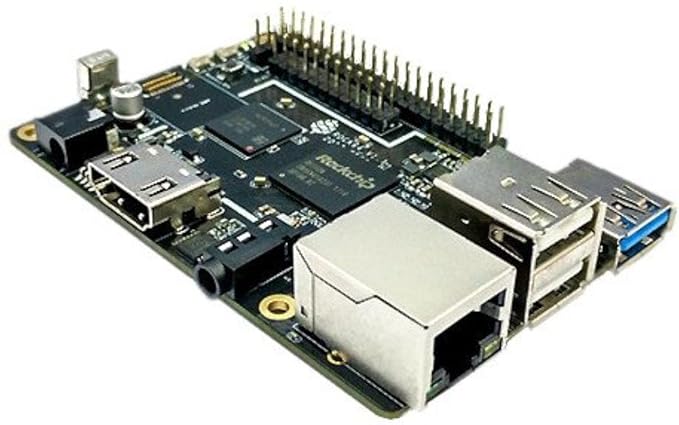
ROCK64 Single Board Computer

Pros

The Rock64 Media Board comes loaded with a 1.5GHz Rockchip RK3328 64-bit quad-core A53 processor and a Mali-450 MP2 GPU. It ships in three configurations offering 1GB ($25), 2GB ($35), and 4GB ($45) of 1600MHz LPDDR3 RAM.

There’s a bootable eMMC socket alongside the more typical MicroSD, so it’s possible to add 16GB ($14), 32GB ($19), or 64GB ($31) directly to the board

Cons

Unfortunately the Rock64 doesn’t include wireless functionality, so you’ll have to add a USB dongle. There’s also no DSI (display) and CSI (camera) interfaces

$24.95 – Check Current price at Amazon

More mini-pc options – Intel NUC 9 Extreme Kit , MSI – Cubi 5 

the smallest pc with wifi and graphic card and windows

Get more of you gadget news at @http://www.gadgetaustralia.com/

Filed Under: 2012, Apple, Computer, Gadgets Tagged With: Linux PC, Media center PC, Mini PC, Rasberry, Smallest Computer, UK

Make you own app with App inventor

November 1, 2018 by admin 2 Comments

Free Mobile and Android app maker

create a mobile smart app

Mobile is taking over the desktop usage and time spent on mobile or smartphones are seeing constant and rapid  growth.

Before you decide to build your first mobile app, your first most important task is to define or know the reason you want to create an app to begin with. Once you do this and write this down or know it,  the rest of the process becomes easier.

There are many app builders available today, some of them paid and some of them free. Today we are having a look at the app builder given below.


Yes you thought it was closed down but its back again. the popular google app inventor is back  thanks to Mit.edu  who have brought the “appinventor” back to the people to enable them to make apps without having to dip into their pockets for cash.

There are other online mobile app makers like widgetbox , but they charge  anyway from $25 per month/per app to $100 per month /per app which can be a bit too pricey  for a average user. i have done a demo app building on their interface and its pretty easy to make a mobile app at widgetbox

The app inventor from Mit.edu is free to use, though it does not have the advanced interface like widgetbox

mit edu app inventor google Make free apps

There is another online app builder  called http://ibuildapp.com/ as well but i have not checked it out.

Make Mobile apps for free with MIT app inventor

The “Android apps creation tool” is no longer being managed by Google — MIT has taken over the source and worked up its own version. Now you,  can go and log into the MIT App Inventor, so long as you have a valid Google ID and start creating your own apps.

The App Inventor, first launched by Google in mid-2010 before being discontinued and open-sourced last year

Check out More: MIT App Inventor

OTHER OPTIONS –  Building your own Mobile / tablet app

Other options to find yourself a cheap app builder  is to have a look on odesk.com  , freelancer.com for a app builder, or get in touch with me  and i will get you in touch with a app builder that built one for me  at a good price  some time ago.


Other App Builder Options:

There are special app development software – mobile platforms to create apps on your own.

You can also build a Android app using the Android Studio development environment. Android Studio is free development environment to learn on. It’s best if one has a working knowledge of the Java programming language for this tutorial because it is the language used by Android.

Go to http://developer.android.com/sdk/index.html to download Android Studio. More details here

Appmakr Studio

Website: https://www.appmakr.com/

You can make an iPhone app or Android app, with no programming skills. Appmakr created a DIY mobile app making platform that lets you build your own mobile app quickly through a simple drag-and-drop interface.

Kalipso Studio

Website: https://www.sysdevkalipso.com/

Kalipso Studio is a mobile application generator that enables users to program their own apps without having to deal with complex coding.

GoodBarber

Website: https://www.goodbarber.com/

This app development software platform works for native (iOS/Android) apps, HTML5, but the prime focus remains on progressive web apps (PWA).

Appery

Website: https://appery.io

A mobile app maker capable of producing native apps (Android, iOS, Windows Phone), responsive web apps and hybrid apps (across all devices).

Bizness Apps

Website: https://www.biznessapps.com/

A bit more advanced platform compared to other app builders aimed at small and mid-market level companies.

AppMachine

Website: http://www.appmachine.com/

For those who have a website and want to turn it into a nice mobile app version, this app maker is the way to go


PS: you might also want to check  this post from “sarah-perez” from ReadWritEweb on tools for building your own iphone app

Filed Under: 2012, Apps, Google, Review, Software Tagged With: Android, app inventor, apps, OpenSource, OpenSourced

Starting a Blog for Making Money Online in 2019

January 10, 2018 by admin 61 Comments

Recently I wrote a extensive post on “how to blog successfully and make your blog popular” ,  and I received a quite a few questions from new bloggers, who are  just getting into the blogging game asking me “How do they make money and start with blogging“. [updated 28 March 2019]

2016 moneymaker

The short story  is, that you will need a “Australian WordPress hosting”  account and  a good “WordPress Design Theme” to truly blog with freedom attract your audience  and grow  your  traffic to your blog.

Making Money from blogging

Making money from blogs  is not easy today, it used to be easy at one part of time but now everybody  and their dog is in the game.

Today  the blogging world  is kinda saturated  with mom bloggers, business bloggers, fashion bloggers, travel bloggers and all sorta bloggers ( my dog is a princess bloggers).

So you pick any damn niche and you already got competition.


It’s a struggle to survive – if your already in the game 

What google says  about what a blog is – “A blog is a website, where you write stuff on an ongoing basis” – I really like this simple and to the point definition.


Look and search everywhere, but there is no magic mantra or magic bullet  for a Sucessful Blog.

In addition, google keeps changing the goal posts with annoying algorithm updates that keep bugging SEO’s and bloggers.

Every year there is something new with google requirements  to be popular in their search engine , like now you need a https website  for security, your website design needs to be responsive, you need amp and what not.

Its harder and costlier  to make money every year.

What you should do  to become popular online ?

You should definitely get your blog a USP (Unique Selling Point) to stay on top of your competition.

If you get this right you will get blog viewers, likes and  sharing of your content, which will surely get your blog traffic coming back to you on a regular basis.

This will also encourage your  viewers  to  subscribe to your email list and also people to comment on your blog, which all creates a buzz around your blog.

These all work together in your favour and also help you #rank in google search

Trust me  people commenting on your posts  or  on the blog  and contacting you via your contact me button is a sure sign of you becoming more popular (or in some cases unpopular) in your blogging journey.


When you write quality interesting  content  better than most other blogs, have a professional looking designed website and you share  your top written content  in the right  social media channels and forums – Your blog will soon get  noticed and  be on its way to being successful.


If  all of this happens a lot (people interacting , commenting , likes on facebook, sharing your posts) and it happens more often, then your on your weay to becoming a blogging superstar so to speak and you don’t have to chase money, but the money will chase you sooner or later.

This shows people are listening(reading) to you, want to interact  with you and you  have become bit of a influencer, and companies and brands love that.

This is a sure sign of achieving success and if you get all these above tips/hints correct and implement it, you will be  lucky and will surely succeed. If your luckier  than most other bloggers/instagrammer’s then  brands will also approach you.

Success surely involves one important thing  in these times  and that is making authoritative and quality content  and getting the word spread  about that “Epic Content” you just created to the  blogosphere.

You do this  by getting it shared on social media ( Twitter, Facebook, Instagram, Linked in)  and  also getting mentioned by popular people of note in  your blog niche.

Today many people do outreach  to amplify their best content  and get it shared online  and this can  work for you as well. Its not hard to do, outreach can be done by yourself or then  you can hire an agency to do it.

Influencer’s are kinda getting big right now on the Instagram platform. Some popular infleuncers get paid  quite well if they have a huge following and can earn even more than a full time job.

However Blogging aint getting any easier, so  don’t expect the great Matt Mullenweg of wordpress or Matt cutts of google to help you out with this. This job will have to be done by you – by doing the hard yards.

There is another option to speed things up, I would recommend learning from a experienced blogger who is already earning income online. I have got an online tutorial if you want  to get started today atleast getting your blog online as a start.

In relation to making money online, I would recommend Rosalind Gardner  who is a super affiliate and has helped many into  their online affiliate marketing careers, she has an in-depth  affiliate guide called – “Super Affiliate: How I Made $436,797 In One Year which covers how to start Your Own Home-based Affiliate Marketing Business.

These guides will surely teach  you how to go about and start earning  with affiliate marketing or  increase your existing blog income

Keeping on top of competition, also involves churning out  regular awesome content,  sharing it on social media, doing proper SEO so that  the content shines,  promoting the blog and updating it regularly to match what google search engine  needs(SEO) to keep it ranked high on their search engines.

My Post of

“The 3 Steps to Setting Up a Popular and Successful Blog”

just got published at dailyblogtips.com, so you might wanna check out this extensive post  to get some tips on – How to get a successful blog going!

3 steps to suucess in blogging

For People Looking to Start a blog

Luckily there are quite a few free platforms that help you start out on blogging  totally free and so you can start your blog without spending money.

Free Blog Platforms is not my recommended way of starting a blog  if your really serious about blogging, but if your cash strapped  then you can surely take  advantage of  this method and get started. 

Most successful bloggers would have used these free bloggin services at some part of time  or maybe even when they started their new bogging journey. WordPress.com offers free as well as paid options for a website, but if your after self hosted which is most suitable for making money with affiliate offers then the below offer might be more useful.

But, if you can  afford a reasonable >>  $3.49 hosting a month for a brand new self hosted wordpress blog. I would recommend this as a preferred starting platform. Not only  you will have 100 % ownership  of your own blog , you dont have the risk of ban or deletion of your website by google / tumblr /wordpress.com (whichever platform you decide to go with)

My recommended service for  a self hosted blog is  the wordpress software and the recommended service provider is Bluehost hosting. Below is a link to my blog post

startatechblog

With Bluehost WebHosting you get both Hosting and domain name , plus a 1 click install option to get your wordpress blog installed quickly.

The WordPress CMS is recommended, because it is one of the most versatile website software which give you 100 % flexibility in design. It also has  awesome flexibility in functionality  which can be added if needed with heaps of plugins , WP themes and tutorials available online.  Your website can be designed with easy install themes to make it look , just like any professional website. It is also one of the easiest to use blog/website software.

Bluehost hosting , I recommend because I have had blogs on their servers for ages, besides they also have a 1 click install which is so easy to install a website or  blog in minutes, just by following their install  prompts.

Below is a current deal for you from my blog as I am an affiliate partner with them

Special Promotion Offer for 2019  from Digital Grog + (BLUEHOST)

Special Feb/March bonus, My readers can enjoy the ultimate steal of  $7.99 $3.95/mo  on the  shared hosting plan (this promo is for a limited time! – Get it here )

+  offer, $3.49/mo for 36 months (link here) on the Basic Plan.

A self hosted wordpress blog is a website that your run on your purchased hosting account and have full freedom over  this website.

Most hosting  companies provide a 1 click install nowadays  to get your self hosted blog set up easily.


Getting a self hosted wordpress blog will also avoid the hassle of moving your blog later on  which every free blogger does eventually.

Because for sure,  if you sign up with a free service like blogspot or tumblr or wordpress.com, you will move sooner or later  to a self hosted wordpress blog like most professional bloggers do.

This normally happens when they realise the constraints and limitations of using a free blog service or getting a blog deleted for a policy violation.

However, choosing what blog service you want to start with is totally upto you and so are below are some free blogging hosts listed for you.

  • WordPress.com (or  from wordpress.org)

WordPress.org is one of  the largest self-hosted blogging tool and software in the world, used on millions of sites and seen by tens of millions of people every day. You can check out their features here  and get a free or Premium blog at wordpress.com

Get a free or paid wordpress blog here


  • Blogger.com ( from Google)

Blogger is free blogging platform by google.com  with a host of features to make blogging as simple and effective as possible. You will need a google account  or gmail account or  then just create one for free when registering with blogger.com

Get a free Blogger blog here


  • Tumblr.com

Tumblr is a mini blogging or micro blogging service and  lets you effortlessly share anything, Post text, photos, quotes, links, music, and videos from your browser, phone, desktop, email.

Get a free Tumblr blog here

These three services  are free to use  and if you get real popular fast you will have the option of breaking out or branching out from their services  to  transfer your blog to a paid server.

Most people when it is time  to upgrade, move to self hosted wordpress platform with their own custom domain name and webhosting.

As I said before , if you don’t want the hassle of moving hosts and your  blog  later when you get more traffic on your blog and start to earn some revenue, then I would recommend for you to sign up with Self hosted blog  choosing a hosting company  with 1 click install to get your blog started. Here are some price comparisons for hosting companies.

Intro – Digital Grog Blog Video


Review of website –>  Hosting 2019 ( Best WordPress Host Providers)

Website Hosting 2019 Australia 

However, just starting a blog is not sufficient to make money and the best way to ensure you are doing this the right way is to get the right training right from the start. This ensures that you dont have to waste time figuring things out and can start earning money quicker.

There are not many brick and mortar university courses that teach you how to earn money on-line  and the online courses that are available are for specific niches like social media marketing, web design and on-line marketing.

The on-line marketing course available in these universities go though the traditional approach and basic concepts of on-line marketing, but is often outdated as this subject matter changes rapidly.

It is best to take a course from a on-line marketing agency that is currently practising this in the market and that is why I recommend Rosalind Gardner  who is a super affiliate and has helped many into  their online affiliate marketing careers, she has  an indepth  affiliate guide called – “Super Affiliate: How I Made $436,797 In One Year which covers how to start Your Own Home-based Affiliate Marketing Business.

There is also Affilorama By Mark ling  and  click bank university .

Clickbank is one of the largest marketplace for digital products and has made many millionaires.

These courses, not only provide you training to earn money on-line as a affiliate (selling other peoples products through your blog/website) but also trains you for making and launching your own product and promoting it.

Some more Useful internet marketing courses

  1. The “Affiliate Blogger Pro”
  2. Affilorama By Mark ling
  3. CB Passive income for 2019
Step by step Instructions to start a WordPress blog 

If you don’t have a blog yet and you are ready to get started today with a wordpress website, then you might want to check my tutorial post with step by step instructions  on starting a website over here –  https://www.digitalgrog.com.au/australia/starting-a-tech-blog-in-six-easy-steps/. This post will give you a step by step break down of how to start your own WordPress blog today with bluehost webhosting.

You can start by choosing a good domain name  with our domain checker tool below

More tools : Bluehost Domain Checker

How to make money with  a wordpress blog

No one is going to give away  all their secrets for this one. But i can atleast point you int he right direction. Here are some tried and tested methods to make money with your website.

Google Adsense

This is one method whihc needs the least  effort  to make some money, but will also pay  peanuts if you dont have much traffic  to your blog or if your  blog is in a  niche where you cant earn much.


Affiliate Income

This is where many blogs earn top dollar, by promoting  products  in the niche they are bloggin about  to their audience.

Fashion bloggers can earn thousands of dollars promoting the right brands. Technology bloggers can earn thousands of dollars promoting technology and gadgets. Food bloggers can earn hundreds of dollars  promoting products in their niche.

I have seen  many people in all of  these mentioned niches doing  anywhere from $2,000 to $40,000 a month in revenue.


Ecommerce shop

This is a new trend where people are creating their own products and selling on platforms like shopify – online shops. 

They are many people not stock/products on hand, but selling stuff online and  getting it shipped directly to customers from vendors in china, while making a nice commission with no inventory, this is also called drop shipping.


Amazon Niche Websites (Amazon affiliate)

This income stream has taken off in the last couple of years. They are bloggers who write articles on certain niches. example fishing lures.

create an amazon store and product

The bloggers then have links to fishing products  from amazon on their website.  when a viewer purchase  a product from amazon, they earn a commission for advertising that product on their website and making a sale.

While all these methods are good, there is one basic  thing they need to make money – Qualified leads or  targeted traffic to your website.

If you are getting  the right people coming to your website  who are interested in your products, you will be making sales.

Targeted Traffic with Advertising

One way to get quick targeted traffic is online advertising with  the search engines themselves. I suggest Bing adwords as they are cheaper and more flexible with their  ads. Here are some free started coupons worth $50  to get you started.

With search engine advertising  you can make unlimited money if you get your advertising right.

New Business and website customers in the following markets receive free search adverting credits to help them get started:

  • US – $50 in Bing Ads credit – united-states-flag for bing coupon
  • Canada (English and French)- $50 in Bing Ads credit  – canadian-flag for bingads coupon
  • UK – £50 in Bing Ads credit – uk-flagfor ppc advertising credits
  • France – €50 in Bing Ads credit
  • Germany – €50 in Bing Ads credit
  • Brazil – R$60 in Bing Ads credit
  • Australia – $40 in Bing Ads credit – au-flag for bing microsoft advertising offers for bing7
  • New Zealand – $40 in Bing Ads credit – nz-flagfor yahoobing
  • India – Rs1000 in Bing Ads credit – india-flagfor rupees in 1000 advertising credits
  • Spain – €50 in Bing Ads credit ( New market!) – spainflagfor google adwords bingppc free credit
  • Italy – €50 in Bing Ads credit (New market!) – italyflagfor bingpizza


Other methods for targeted traffic is as  I have said before – SEO for your website, awesome content on your site/shop or blog,  promotion on social media  by you or a hired agency – which will get you on your road to success.

If all this is not your cup of tea and you would just rather doe something quick and earn money , then maybe  you need to check  these survey websites out here “Make money surveys – Australia”  or  iSurveyWorld Surveys (Australia) and just fill out surveys and make some money online.

Good luck!

Filed Under: 2012, Australia, Australian wordpress hosting, Blogger, Blogger Tools, BloggerTools, Guide, Make money blogging, Makemoney online, wordpress, Wordpress 3.0, wordpress themes Tagged With: 2016, Blogging For money, Hosting In australia, Wordpress update

Why SEO Copykat can save you time

December 30, 2017 by admin 6 Comments

You might be wondering what is really “SEO COPYKAT” , its not just a term I made up  to grab  your attention, But it actually works.

At no point should competitive SEO  analysis be about copying someone else’s SEO tactics or backlinks. Instead of copying, use it for inspiration, new ideas and a better understanding of what Google values and what you can do better than your competitor.

Copying the SEO’s

(this method) Its sneaky but not illegal – because  you are just using information that’s already freely available to  everyone on the internet. SEO COPYCAT is just a method of  copying what  the  popular top bloggers are already doing to make their blog a success and earning heaps of cash and doing the same on your website, but in your own way and not plagiarising.

So what we are really doing here is focusing on some money making and popular blogs and copying  common strategies that work which is used by them.

copycat seo copykat blogging making money

They are many top and reputed  bloggers  who earn 100’s of Dollars $$$ in money in a month or even day and  also reveal how they did it on their blogs, but do you really believe they have told you all or revealed all their secrets?

Nope  !! yeh that’s right  if they did tell you everything, everyone would be making a million dollars!

But fortunately blogs  or websites that are online and published  as such, cannot hide much – except for maybe a bit of secret code or plugin here and there and backlinks that they have blocked if any to google and the internet.


The main  secret of most top bloggers are in their blogs for the world to see by google and also by you. They are many tools available to let you see their backlink profile,  the traffic and the sources of that traffic  to thier blog,  thier social media ranking , their top ranking keywords etc  to find out how they are ranking and banking online.

The people who are able to see the real secrets by analysing these famous blogs  can be winner’s sooner than the rest of the general public and be on their way to financial freedom.

It is not hard to see what they are doing  based on onpage and offpage SEO on their sites and even analyse their backlink structure. Some tools that may help you find out what top bloogers or competitors are doing are software like Ahrefs ( paid membership) , Semrush (paid monthly membership) and SEO PowerSuite  that is standalone Desktop software(NO monthly membership – one off payment)

Guest Posting is good

So what I have noticed, after the recent EVIL Google Animal Updates (panda-penguin) is that these bloggers and many of my favourite bloggers are suddenly getting heaps of guest posts on their blogs .

This means possibly two things “ either Google prefers or likes  blogs that are updated more regularly or then  the blogging scene is getting more competitive  and so more regular content is needed to keep your traffic steady and improving”. ( hint..hint)

Some of my favourite SEO Gurus  that I would recommend checking out in 2018  for SEO tips is  listed below

  1. https://backlinko.com
  2. https://neilpatel.com
  3. https://chasereiner.com
  4. https://diggitymarketing.com/blog/

See what they are doing in their own blogs and learn from those online live  websites

Trends in Earning money or making money

The other trend  that  is growing is  that many popular bloggers  have now becoming more of a salesman  and less of a  blogger like on of  the blog i follow of  chris guthrie for eg , which proves that Selling software and plugins means earnings $$$$ .

There are still many who are true to the blogging game  ( giving their audience value) and prefer to blog, but that possibly because they got some  back up site or biz making them their money.

Another trend i have noticed recently  and so have you is that suddenly everybody is talking about EBOOKS because that is also where the new money is , The smartphone market is booming  and so is the tablet market so go ahead and make that ebook that you were planning to make and “make some money”

A classic example of  a blog that is doing really good with guest posts and raking in the $$$  with their massive traffic is Daily Blog tips


2018 SEO Update

This blog post needed a bit of a recent update, so below are a few tips to check SEO needed for your blog in your niche.

  1. Do a Search for your keyword and  see the top ten results in google.

  2. Analyse Site titles and descriptions for top ten competitors and make better ones for yours (

    Meta Tag Analyzer – SEOCentro)

  3. Check their back links and link structure (do follow, no follow, edu links etc ) and follow same or better  ratio and test. SEMRUSH and Ahrefs tools will help with this.

  4. Check keyword density in competing page for keyword and adjust yours.

  5. Check your content quality of writing/article against  top competitors and improve

  6. Check content length of your article against others and compare

  7. Check UX Design, Responsivesness, Font size ,  https url , Speed loading of site, layout of blog  and other factors against yours to compare and make yours better.

  8. Now check all these factors with other top search engines in mind like Bing search and yahoo

Good Luck !!

And  keep checking  back for the series on SEO and  continuation post for this post and if you want to check out what your competitors are upto .

And  maybe  these tools featured in search engine land will give you some nice tips  as well  to help you in your SEO process.

Related articles
  • Link Building for Bloggers(dailyblogtips.com)

  • 3 Useful Courses for Professional Bloggers(howtospoter.com)

  • 10 Amazing Blogs About Blogging to Start Reading NOW(hubspot.com)

Enhanced by Zemanta

Filed Under: 2012, 2018, Featured, Make money blogging, Makemoney online, SEO Tagged With: Blog, Copykat, E-book, SEO

For $5 , I will do nothing says Fiverr

January 19, 2016 by admin 1 Comment

This website promises the world to you for just $5, you’d be amazed at what you can get done for just a fiverr. The website is called fiverr.com- Obiviously.

$5 dollar websites , 10 dollar live portraits

$20 professional produced videos  you name it , its there for . you. Its available now  thanks  to fiverr.com and also  now a host of similar copy cat websites  that have sprung up  and upped the dollar value  with people now doing stuff for $10  and $20 on different websites .

Get Interesting stuff done for $5

This GUY  licinhow  is just willing to do nothing  for $5 (SAY WOT!!!!)

His gig on Fiverr just cracked me up .

He’s dead serious about doing nothing for $5  and – so says his gig not surprisingly .

I will do nothing, just nothing I’m serious I do not even do anything, or maybe if I change my mind maybe I do something for you

Fiverr.com funny advertising

Fiverr.com  is a absolute bargain basement for online shoppers for not only  weird and wacky stuff  but also including professional  services like creating SEO or Financial reports etc , which is amazing,

ALL  FOR JUST $5

For eg . here is this JHbae25 who will draw am amazing art portrait of your for $5 ,

create-cartoon-caricatures_ws_1370703708

About This Gig

I will draw your portrait in my style from your photo. 5$ per person, head and shoulder only. It’s all digital work so it will be in jpg or png or tiff format.(if you don’t ask for specific format, it will be jpg). It’s a good use when you make holiday cards or when you need cool looking profile pictures! 🙂

Or you can get a video testimonial ( video promoting your website or product or anything) from a  beautiful sexy girl  like kymmypops Cute  geek girl

[For just $5 per 50 words, I will record a video as a geek girl.

I can promote your business, increase sales, connect with your audience, build customers trust, advertise deals, wish your friend a Happy Birthday, anything you like! 🙂 ]

or lixie 2016

I will put a Pie in the face and read your script

put a Pie in the face  and read your script

Some More interesting gigs on this website

  • I will deliver your message as a Nun for $5
  • I will show you the basics of Pioneer CDjs via Skype for $5
  • I will hula hoop in a bikini for you and say anything you want me to for $5
  • hula hoop in a bikini for you and say anything
  • [images from fiverr.com]
  • I will do a keyword research on any Niche AND provide you full report on the seo competition of the top… for $5

Filed Under: 2012, Done Deals, Wacky, Website Review Tagged With: Fiverr, Marketing

6 AWESOME, CHEAP PREMIUM WORDPRESS THEMES [updated: January 2015]

January 19, 2015 by admin 81 Comments

I’ve writ­ten else­where about  Free premium wordpress themes and how I finally switched from free themes to cheap paid premium themes after frustration from broken themes left from regular updates done by word press. I did for a while try designing my own WordPress themes, also tried  using free themes but was not really 100 % satisfied or problems kept cropping up and it needed more maintenance. I even shelled out a modest sum for a few pre­mium, professionally-designed WordPress themes and was burnt by making the wrong choices. I might get  small commission  if you do eventually decide to buy from some of the affiliate links listed below , though i honestly recommend  these theme providers as i have been using them over the past couple of years

Since trying out numerous cheap, free and also paid  themes, i have now pretty much narrowed down my preference to just  three theme providers for my wordpress blog themes. By the way themes are also called templates by some on-line webdesign stores, just to clear any confusion.

I have used many  Blog and website template and themes providers in my 10 + years of blogging and creating websites and blogs,  but these are the one’s below that i  still have a membership for in the last so many years and i am happy to recommend them.

Good  word-press themes can  normally be priced from as low as  $30 to $200  and that is just for  1 theme,  How ever most of these below is a membership and has more value  due to the number of themes  they provide in that membership.

My preferred Three WordPress blog theme providers are :

1. Elegant themes  ( Why – because they are cheap or affordable compared to others, looks nice  and has an up to date latest design and for Just $69 a year and you get to use 80 + premium themes for that one membership amount). Elegant  themes provide value  because of the sheer number of professional  themes you get  for just one price.

[updated  Elegant themes membership price :$69]

2. WP Zoom themes  ( Why – Because they got a nice set of professional news  and magazine themes in addition to blog themes and are a bit more advanced in design to elegant themes)- I’ve purchased the$9/mo -$199 SIGN-UP FEE membership option, but there are other –See pricing options

3. Solostream wordpressthemes ( This blog uses a solostream theme) – Truly SEO optimised and nicely structured blog  which is the next best option for a premium blog theme with excellent AdSense advertising options inbuilt which you can use for affiliate links as well.

This theme provider stands out  for the well designed professional look, with  very good options to integrate ad-sense and advertising banners and ads. You can also  change the  look of your blog  to different styles , like portfolio,  blog design, Full width length  posts without sidebar , adjust your sidebar designs  etc  with just a click of the button.

4. Themeforest Or Envato Market 

This one is one of my favourites for not only wordpress themes but also blogger themes and  wordpress plugins, email templates , Mailchimp plugins , facebook integration plugins from Envato-codecanyon  and many more  blog related stuff that i have bought  from them.

templates and design  for blog


[my membership badge with themesforest/envato above] Theme forest/ Envato – are one of the bigger providers for all related bloggin stuff from themes to plugins  to scripts for your blog etc. Check them out here 

Difference between Free WordPress themes and PAID wordpress themes

Free themes Pros :

  • They are FREE ( Oh yeah! )
  • There is a larger selection of Free themes

Free themes Cons :

  • Most don’t  have any  regular ongoing support ( theme breaking and  security updates slow)
  • Theme authors may no longer update themes (as its free after all )
  • Limited features  available

As part of Black Friday and Cyber Monday Deals, Solostream is offering a 20% discount on all products. Apply for discount – Coupon Code: 5084BE  [expired November 26, 2012].

All three theme providers provide AdSense  and seo options inbuilt.

Here area  few of the word-press themes that are free from these providers , Its a  roundup of some of the best, freshest—and cheap—new premium WordPress themes. If you really want the latest and the best and the most up to date themes, I would recommend you get a paid membership  from these guys.

Most of these “Free themes” don’t have any demo sites any longer ( as they usually do) , but you can get an idea of the theme by the pic below and can try them for free

SOLOSTREAM FREE PREMUIM THEMES BELOW

To check out the  demo themes click on word press themes a then free wordpress themes on the Solostream website

Bosco 2.0 Free cheap premuim solostream wordpress templates

Solostream Bosco 2.0 (Above)–  Download link

WP-Glory 1.0 solostream free premuim templates

Solostream Wp glory1.0 – Download link

torn 2.0 solostream cheap wordpress themes premuim

Solostream Torn 2.0 – Download link

Elegant themes doesn’t have any free themes as they are already are so cheap priced at $69 for 80 premuim themes, giving the designers no time to work and provide for free themes

WP ZOOM FREE PREMUIM THEMES BELOW

Click on the free button on the wpz website  to checkout  the demo version of free themes

Photoria free wp zoom theme

Photoria Wp Zoom Free theme – Download link

wp zoom Academica theme free premuim wordpressblog theme

Academica Wp Zoom Free theme – Download link

meeta sweet Budget theme for wordpressblogs

Meeta Wp Zoom Free  theme – Download link

I have these  “wordpress premium  themes” from Solostream , Wp zoom and Elegant themes installed on various blogs that i manage and i am totally pleased with them. Go check it out for yourself.

Check out my this blog theme  which is also from SOLOSTREAM called WP– CLEAR  (Use Solostream Coupon Code 26009B for a $10 Discount)

STILL LOOKING?

banner edited  elegant themes

ElegantThemes WordPress Themes

If you check out ElegantThemes, you’ll see a wide selection of beau­ti­fully crafted wordpress themes. Better yet, you get unlim­ited access to all of these themes (almost 80 as I write this) for only $69! It’s an incred­i­ble deal! Get it here

Disclosure: I earn commissions from some of the services (mostly web hosting) that I recommend on my blog,

Digitalgrog.com.au is a affiliate partner to most of the Hosting services and some other blog related promotion services that I have listed here on my blog and I use, which means that in addition to using their service, we also receive a commission for referring new customers. To be fair, though, we still use these services even if we weren’t an affiliate. We don’t recommend any particular host just because we’re an affiliate (every hosting company offers a similar affiliate program); we recommend certain Hosting companies because they are the best, most reliable option. Plus, because we’re a partner, these providers offers a special price for Digitalgrog readers. Get your hosting today.

More themes 

WordPress theme for food blog

WordPress theme for Business Blog

WordPress theme  for Gadget blog

WordPress theme for Sports blog

Filed Under: 2012, 2015, Themes, wordpress, Wordpress 3.1, wordpress themes Tagged With: Adsense, Black Friday, Budget, Cyber Monday, Free themes, Premuim, Theme, Worpress Amazon

  • Page 1
  • Page 2
  • Page 3
  • Interim pages omitted …
  • Page 9
  • Go to Next Page »

Primary Sidebar

Recent Posts

  • Cute & Funny USB Drives (Perfect Gifts!)
  • 2026 – Step-by-Step Guide to Building Your Site With AI
  • Underwater Drones for Recording Video and Taking Pictures
  • Why I chose hostgator for blog hosting
  • Top 10 Software Programs For Your Windows PC

Recent Comments

  1. Roberto Mcgee on 2026 – Step-by-Step Guide to Building Your Site With AI
  2. google on Wacky new underwear invention 2b released by Durex
  3. Patrick McCormick on How to secure your desktop and laptop with antivirus software
  4. JJ on 20 Top brands with affilate programs to make you money in 2019
  5. JJ on This WPengine Genesis Pro Deal Will Give You 35 Studiopress themes

Archives

  • September 2026
  • June 2022
  • February 2022
  • July 2021
  • May 2021
  • April 2021
  • March 2021
  • November 2020
  • September 2020
  • August 2020
  • July 2020
  • June 2020
  • May 2020
  • April 2020
  • March 2020
  • February 2020
  • January 2020
  • December 2019
  • September 2019
  • August 2019
  • July 2019
  • June 2019
  • April 2019
  • March 2019
  • February 2019
  • January 2019
  • December 2018
  • November 2018
  • October 2018
  • September 2018
  • July 2018
  • June 2018
  • April 2018
  • February 2018
  • January 2018
  • December 2017
  • October 2017
  • September 2017
  • July 2017
  • June 2017
  • May 2017
  • April 2017
  • March 2017
  • February 2017
  • January 2017
  • December 2016
  • November 2016
  • October 2016
  • September 2016
  • August 2016
  • July 2016
  • May 2016
  • April 2016
  • March 2016
  • February 2016
  • January 2016
  • December 2015
  • November 2015
  • October 2015
  • September 2015
  • August 2015
  • July 2015
  • June 2015
  • May 2015
  • March 2015
  • February 2015
  • January 2015
  • December 2014
  • November 2014
  • October 2014
  • September 2014
  • August 2014
  • July 2014
  • June 2014
  • May 2014
  • April 2014
  • March 2014
  • February 2014
  • January 2014
  • November 2013
  • October 2013
  • September 2013
  • August 2013
  • July 2013
  • June 2013
  • May 2013
  • April 2013
  • March 2013
  • February 2013
  • January 2013
  • December 2012
  • November 2012
  • October 2012
  • September 2012
  • August 2012
  • July 2012
  • June 2012
  • May 2012
  • April 2012
  • March 2012
  • February 2012
  • January 2012
  • December 2011
  • November 2011
  • September 2011
  • August 2011
  • July 2011
  • June 2011
  • May 2011
  • April 2011
  • March 2011
  • February 2011
  • January 2011
  • December 2010
  • November 2010
  • October 2010
  • September 2010
  • August 2010
  • July 2010
  • June 2010
  • May 2010

Categories

  • $heldon $ingh
  • 2010
  • 2011
  • 2012
  • 2013
  • 2015
  • 2017
  • 2018
  • 2019
  • 2020
  • 2021
  • 2022
  • Accounting
  • Adsense
  • Affiliate
  • Amazon
  • Anti Virus
  • Apple
  • Apps
  • Asus
  • Aussie
  • Australia
  • Australian
  • Australian Bloggers
  • Australian wordpress hosting
  • Banks
  • Blog-Hosting
  • Blogger
  • Blogger Tool
  • Blogger Tools
  • BloggerTools
  • BuddyPress
  • CARS
  • CDN
  • Celebrity
  • Clickbank
  • Compare
  • Computer
  • Domains
  • Done Deals
  • Ebook
  • Email
  • Facebook
  • Featured
  • Finance
  • Free
  • Gadgets
  • Google
  • Gpost
  • Guide
  • Hackers
  • Hosting
  • India
  • Internet
  • Ipad
  • Kindle
  • Laptop
  • Make money blogging
  • Makemoney online
  • Marketing
  • Melbourne Cup
  • Movies
  • Netbook
  • Network
  • News
  • Online betting account
  • PC
  • Review
  • Search
  • SEO
  • sheldon singh
  • Software
  • Solution
  • Sports
  • Subscribers
  • Taxes
  • Technology News
  • Themes
  • Top 10
  • Tutorial
  • Video
  • Wacky
  • web hosting
  • Website Review
  • Wierd
  • Windows
  • wordpress
  • Wordpress 3.0
  • Wordpress 3.1
  • wordpress themes
  • World cup
  • Wp Answers
  • WP Turbo
  • WPMU

Footer

Technology

With an emphasis on technology, webdesign, and gadgets, our blog features articles related to these categories.

Browse our archives.

Privacy

Your privacy matters. We collect only essential information to ensure your data stays safe and confidential.

Learn more about Privacy.

Videos

Explore our video library designed to teach, inspire, and guide you. Dive in and discover content that brings ideas to life..

Check out our videopage.

Copyright © 2026 · Genesis Sample on Genesis Framework · WordPress · Log in

  • Resources
  • Privacy policy
  • Website Review
  • Subscribe