• Skip to primary navigation
  • Skip to main content
  • Skip to primary sidebar
  • Skip to footer
tech blog au

Digital Grog — Australia’s Tech, Gadgets & Digital Life Unfiltered

Digital Grog is Australia’s go‑to tech blog for sharp reviews, digital trends, AI tools, gadgets, cybersecurity updates, and practical how‑tos covering the latest in Aussie technology

  • About Us
  • Contact Us
  • Block Examples
  • Landing Page

Apps

The apps that got Melbourne through lockdown

November 29, 2020 by admin 1 Comment

HEALTH APPS AUSTRALIA

To say that Melbourne went through a collective trauma is not an overstatement. Those eight long months of lockdown felt like an eternity, feeling even longer with the rest of the country coming out of isolation and moving on with their lives. There were brief reprieves and inspirations that caught our attention, like the quest to make the best banana bread and then trying to master a sourdough. Although, ultimately, it was the smart app developments that we spent too much time on that passed the months, each of them serving our needs in different ways and at different points of struggle.

Government App

The government has provided an app to keep you informed and safe during the Covid crisis in Australia. The COVIDSafe app is a tool that helps identify people exposed to coronavirus (COVID-19). This helps us support and protect you, your friends and family. Western Australia has come out with a new SafeWA app that small businesses can use to register visiting clients via a mobile phone app for contact tracing just in case of a breakout.

News apps

ABC’s rolling coverage of COVID-19 was in high rotation for many Victorians, especially when the restrictions were tightening or easing by the minute. Other than the ABC app, so many other news sources reported on the events unfolding bringing a varied dialogue in their own app form or part of the general News app. PedestrianTV covered the news with a millennial slant, Betoota Advocate provided the satire, as well as the stalwart outlets of The Age and the Australian. Given the mix of cultural, political and personal persuasions in Melbourne, choosing a ‘source of truth’ has been integral to all Victorians and was heavily relied on in times of uncertainty.

Mindfulness apps

If the need for mindfulness was a theory for some before lockdown, it was swiftly put into practice as isolating circumstances were not always conducive with a healthy mindset. Calm and Headspace are leading mindfulness apps in the marketplace offering guided meditation and playlists to support the goal of sleep, anxiety relief and affirmations. Other apps are designed to purely capture grateful moments or journaling prompts, and others encourage small activities that can bring some calm to lockdowns, such as visualisation or mindful walking. Checking in with yourself has always been an important priority, especially as the lockdown was testing the resilience of many.

Social network apps

TikTok wasn’t that new to the world at the start of 2020, but it really reached its stride in Australia at around the time lockdown took effect in March. The simple act of filming dance challenges and short videos provided a point of connection and purpose to the community who needed it. House Party was another popular app during the lockdown, which facilitated video calls and group games in the easy-to-use social platform.

Health-tracking apps

When exercise was permitted for one hour a day, this was a significant announcement to those who were used to spending more time outside exercising and commuting. The closure of gyms also encouraged many to download health-tracking apps to clock how many steps a day were taken and logging exercise as it happened. Given the nature of the virus that prompted the Melbourne lockdown, the community was more attuned with their health and became more aware of any changes or possible symptoms as they were occurring.

Podcast apps

Podcasts were growing in popularity even before the lockdown, but so many more were started in the Melbourne lockdown as a way of connecting with others and making use of the extended periods at home. Consuming news daily was a given, but hearing your trusted podcast hosts digesting that same news and discussing the state of play was a way of accepting the long lockdown that Melbourne found itself in. With podcasts now available on the Podcast app (on Apple), Spotify and Stitcher, it’s never been easier to tune in.

It was an incredible day when Melbourne came out of the eight-month-long lockdown, and it was a feat that none want to go through again. As parts of the world start their own second lockdown, apps and digital resources will no doubt assist in the long slog ahead.

Filed Under: 2020, Apps, Internet Tagged With: Australia, Melbourne, Technology education

Top Video and Audio Conferencing Software for Business in 2020

September 21, 2020 by admin 1 Comment

"best

Covid has brought upon us the work from home generation and this culture is likely here to stay or get absorbed into the new working culture. With these current “do everything from home” circumstances, has come the rise of the new business productivity apps. If you are looking for the top video conferencing app for your business needs, our list and comparison below will point you in the right direction.

Zoom the web conferencing app has had a big exposure due to the current circumstances where a lot more people are using the internet to chat or meet online for personal or business reasons. It has not only multiples its user base in a very short span of time, but allowed itself to grow multifold in its market value due to the current circumstances.

WebEx and Microsoft teams are other such players in this field. Webex has been there for a while, but Microsoft teams is a new and fresh contender which his also gaining popularity for its ease of use in the business world. Below we have some software for business needs and also some for personal use like video chatting with family.

Let’s have a look at some of this apps/software and how they work

Top 5 Business Productivity Apps

ZOOM

zoom to video chat

https://zoom.us/whatsnew

Zoom is best-known for being the go-to choice for businesses that need access to quick and convenient video for internal and external audio or video conferencing.

  • Offers high-quality HD video and audio.
  • Simple and easy to use platform
  • Offers  collaboration facilities such as text chat and screen sharing
  • You do not sign up for the app to join a Zoom meeting (hopefully this doesn’t change)
  • To host a video conference, you need to create an account
  • Can sign up using existing Facebook and Google accounts
  • Works with Windows, macOS, Android, and iOS
  • Desktop users can also begin a local recording
  • There is extra functionality with plugins like integration with outlook , google chrome, Firefox to make using the app from within these software easier

Zoom app is offered in both free and paid versions. The paid version has some additional features like you can add up to 1000 participants, record calls, and much more.


WEBEX by cisco

webex australia

https://www.webex.com/pricing/index.html

WebEx is a flexible conferencing solution designed for businesses of any sizes you can think. Cisco owns the WebEx brand and has been around for a while with a high degree of reliability.

  • High quality web and HD video meeting software
  • It has Integrated application/file sharing(screen sharing)
  • Integrated with Outlook – add WebEx to a meeting in my calendar and all invitees will have the information
  • Cross platform – works with Windows, Mac, iPad and support mobile meetings for iPhones, Blackberries, Androids.
  • With WebEx meetings you can also chat using your phone or home line and watching the video/ video conference or meeting using your internet connection.
  • Supports immediate playback of multi-media content like flash and windows media player
  • Great customer service

Webex makes a good reliable software/app for  video and audio conferencing  for business needs and integrates well with their  most browsers and  their other products like jabber.


Microsoft Teams by Microsoft

teams by microsoft

https://www.microsoft.com/en-au/microsoft-365/microsoft-teams/

Microsoft Teams is a new player in the market that has rapidly taken over market share from webex and zoom.

With the competition heating up for video conferencing platforms like Google Meet and many other free video conferencing platforms, Microsoft has made it free to collaborate with your colleagues with some limitations.


  • Multi-Platform support -You can use Microsoft Teams on most platforms including Android, iOS, Windows, Linux, and macOS.
  • Schedule video/audio meetings with one person or a team or make a call directly to your teammates.
  • Features includes screen sharing and call recording, background blur and chat.
  • Just share a link with your team to join the call or a meeting.
  • Easy to use – The interface is clean and simple to understand. You can initiate an online meeting or can schedule one as per your requirement.
  • Host a webinar or meeting with up to 10,000 participants.
  • App is integrated with Microsoft 365
  • If the other person is unable to answer, you can leave a voicemail-like message.
  • With Microsoft Teams integrations with Outlook, you can schedule a video call in advance and you get an alert before it begins.
  • The free account offers 10 GB of team file storage and 2 GB of personal file storage per person
  • It supports most Microsoft software. Teams let you collaborate in real-time with MS Office including Word, Excel, PowerPoint, and OneNote. Let your teammates access, share, and edit Word docs, PowerPoint, and Excel files in real-time
  • You can communicate and collaborate with teams up to 500K users
  • Microsoft keeps your data secure by using Secure Real-time Transport Protocol (SRTP) technology for video and audio data encryption.


How to set up Microsoft Teams:

You can download the app directly from the app store or Microsoft website and use your email account to log in. It can also be accessed via a web browser.

If you remember skype owned by Microsoft and still use it, MT has been built using some features “Skype for Business” that has been rolled into Teams. Teams support VoIP calling features where you can call anyone with a phone using Microsoft’s cloud-based PBX.

Microsoft Teams is ideal for businesses who already use or are familiar with Microsoft products and for others it could be an expensive option. It is however a perfect solution to collaborate with your team with plenty of features and third-party app integration options, which is not available with competitors.


How to use and set up Zoom Meeting:

First, you need to get the Zoom app on your device.

You will need the code and password for the meeting you wish to join.

At the time of the meeting, enter your Zoom app and type in the meeting code. After a short while, you will be prompted to put in the password. Type it on the password line. You will get a message telling you to wait to be invited into the meeting by the host.

Once you get the invitation, you will see the host (or some meeting participants) on your screen. If you want them to be able to see and hear you during the meeting, tap the video and audio icons at the bottom of the screen to join the meeting with visual and audio.

You can also press “mute” any time you want to remain silent to the host or other participants. Just remember to press “unmute” if you want to be heard again. [ These zoom instructions can be quite similar to use for most other video conferencing apps too ]


Most of these apps work by creating a meeting id or a URL that you can share with people to join your meeting or video chat.

Companies or organisations will have to take into account – companies licensing agreements, hardware, budget, communication needs before signing up with such providers.

Historically with these apps none has been truly web-based, as they require a download, only work on certain devices, and don’t always work on all browsers. But this has changed now with most of these being able to be used with web browsers using plugins as alternatives and some even in stand- alone browsers.

Zoom vs WebEx

Zoom is the hot new web conferencing toy in the industry, but is proving itself to be well received in the workplace due to its ease of use and nice video interface. Cisco is a bit pricier when compared to others, but Zoom costs can add on with charges for add-on charges for extra features.


Other Business Video conferencing & Productivity APPS

Below are some apps that have been used for business as well as popular with personal use for video chat and audio calling features


GoToMeeting (popular with business use)

go to meeting business app

Go TO Meeting has been popular as a video conferencing app prior to the launch of these new popular apps who have grabbed user share. With GoToMeeting, you can schedule conferences for any time or place you choose. Additionally, attendees can join from a computer, laptop, tablet or smartphone.


Google Meet (popular with personal use)

video by google meet

If you have heard of google hangouts, this had evolved into google meet.  You can plan a video meeting in the Google calendar, Gmail, or Meet by signing in to the G Suite account.  Enter https://meet.google.com in a web browser

It has features like real-time captions and support for up to 250 participants and 100,000 live stream viewers


Facebook Messenger & What’s app (popular with personal use)

facebook messengerwhatsapp videochat

Both are owned by Facebook.

WhatsApp is one of the most popular chats on the planet. It counts over 1 billion active users. It offers you voice calls, video calls, and many other features.


Slack (business and personal use)

group chat by slack

Slack is a useful chat or conferencing app where you can create chats with different users, mention users via @ and view all team members files at one place. Slack allows you to make voice and video calls and show your work, you can share your screen just like in Skype.


Viber for Business (popular with personal use)

viber of business chat

Viber for Business completes the Skype for Business alternatives when looking for a collaboration or team chat environment.

Pricing:

Most providers have different type of plans like Pro, Business or Enterprise which are quoted according to your needs.  Pricing can also be calculated on per participant per meeting prices or then flat licensing deals. The typical lowest starting price is from $12/month to $15/ a month , however price can vary according to your  business needs.

Conclusion:

You can’t run a company without meetings and you cant video chat with friends without a video chat app.  Video conferencing services make communicating with your entire team or your group of friends and family easy. Today its possible to video chat or conference with large number of people depending on which platform you are using.

Which video conferencing apps do you use? Let us know in the comments below!

Filed Under: 2020, Apps, Australia, Compare, Internet, Software, Solution, Video Tagged With: apps, Comparison, Internet, Security, smartphone app, Technology education, VIDEO

Make you own app with App inventor

November 1, 2018 by admin 2 Comments

Free Mobile and Android app maker

create a mobile smart app

Mobile is taking over the desktop usage and time spent on mobile or smartphones are seeing constant and rapid  growth.

Before you decide to build your first mobile app, your first most important task is to define or know the reason you want to create an app to begin with. Once you do this and write this down or know it,  the rest of the process becomes easier.

There are many app builders available today, some of them paid and some of them free. Today we are having a look at the app builder given below.


Yes you thought it was closed down but its back again. the popular google app inventor is back  thanks to Mit.edu  who have brought the “appinventor” back to the people to enable them to make apps without having to dip into their pockets for cash.

There are other online mobile app makers like widgetbox , but they charge  anyway from $25 per month/per app to $100 per month /per app which can be a bit too pricey  for a average user. i have done a demo app building on their interface and its pretty easy to make a mobile app at widgetbox

The app inventor from Mit.edu is free to use, though it does not have the advanced interface like widgetbox

mit edu app inventor google Make free apps

There is another online app builder  called http://ibuildapp.com/ as well but i have not checked it out.

Make Mobile apps for free with MIT app inventor

The “Android apps creation tool” is no longer being managed by Google — MIT has taken over the source and worked up its own version. Now you,  can go and log into the MIT App Inventor, so long as you have a valid Google ID and start creating your own apps.

The App Inventor, first launched by Google in mid-2010 before being discontinued and open-sourced last year

Check out More: MIT App Inventor

OTHER OPTIONS –  Building your own Mobile / tablet app

Other options to find yourself a cheap app builder  is to have a look on odesk.com  , freelancer.com for a app builder, or get in touch with me  and i will get you in touch with a app builder that built one for me  at a good price  some time ago.


Other App Builder Options:

There are special app development software – mobile platforms to create apps on your own.

You can also build a Android app using the Android Studio development environment. Android Studio is free development environment to learn on. It’s best if one has a working knowledge of the Java programming language for this tutorial because it is the language used by Android.

Go to http://developer.android.com/sdk/index.html to download Android Studio. More details here

Appmakr Studio

Website: https://www.appmakr.com/

You can make an iPhone app or Android app, with no programming skills. Appmakr created a DIY mobile app making platform that lets you build your own mobile app quickly through a simple drag-and-drop interface.

Kalipso Studio

Website: https://www.sysdevkalipso.com/

Kalipso Studio is a mobile application generator that enables users to program their own apps without having to deal with complex coding.

GoodBarber

Website: https://www.goodbarber.com/

This app development software platform works for native (iOS/Android) apps, HTML5, but the prime focus remains on progressive web apps (PWA).

Appery

Website: https://appery.io

A mobile app maker capable of producing native apps (Android, iOS, Windows Phone), responsive web apps and hybrid apps (across all devices).

Bizness Apps

Website: https://www.biznessapps.com/

A bit more advanced platform compared to other app builders aimed at small and mid-market level companies.

AppMachine

Website: http://www.appmachine.com/

For those who have a website and want to turn it into a nice mobile app version, this app maker is the way to go


PS: you might also want to check  this post from “sarah-perez” from ReadWritEweb on tools for building your own iphone app

Filed Under: 2012, Apps, Google, Review, Software Tagged With: Android, app inventor, apps, OpenSource, OpenSourced

EaseUS MobiMover- A One-click Data Transfer Solution for Apple Users

October 25, 2017 by admin Leave a Comment

clip_image003

Have you ever changed phones? You would surely know then that transferring your data on the phone to your new phone is always a concern. Whenever someone buys a new iPhone, the first thought that cross their minds are “how to back-up the data”.

While Samsung galaxy has the smart switch app, how can iphone users transfer their data the easy way. EaseUS MobiMover, as the name suggests is software that can easily transfer and manage your iPhone data. This allows an easy export or import of data from your iPhone without any cost.

It doesn’t matter if your got a brand new iphone7 , iphone8 or x or  plus model, the software should work for data transfers.

Itunes and Icloud could certainly help, but if you want an easy way transfering data , then this software will help you.

It exchanges information between two iOS devices, move content from iPhone/iPad to PC and conversely. Manage files and data within your iOS device.

Features

EaseUS MobiMover provides outstanding transferring and management’s features for iPhone devices.

The main features of this software are:

transfer my data

clip_image001 Transfer Features

  • Import variety of files from PC to iPhone device, without any cost.
  • Contacts, music, videos, books, photos any type of file can be imported.
  • Import and copy data in seconds.
  • Transferred files to iPhone or iPad are directly stored to Apple build in application.
  • Export contents to PC from iPhone for back-up, without any loss.
  • On a single click, transfers a complete content.
  • Save the file exported to PC in any customized location.
  • Automatically scan the files and rapidly export them.
  • Data can be moved by either choosing a file or a folder.

There are 3 iPhone data transfer types:

1. iOS to PC

2. iOS to iOS

3. PC to iOS

clip_image001[1] Management Features

  • iPhone contacts can be added, edited and saved on computer
  • All photos from the photo library can be deleted at once.
  • Notes and Calendars can be easily edited or deleted.
  • Safari bookmarks can be created and edited by management feature of the software.


Technical Specifications & System Requirements

new iphone 8 version from 7

The relative system requirements, device supported and technical specification for the working of EaseUS MobiMover software are:

Supported Apple Devices
iPhone Version 4s,

Ø 5, 5s

Ø 6, 6s, 6 plus, 6s plus

Ø 7, 7 plus

Ø 8, 8 plus, X

iPad Ø iPad mini 2, 3, 4

Ø iPad Air

Ø iPad Air 2

Ø iPad Pro

Supported Windows
Windows Ø 7

Ø 8

Ø 8.1

Ø 10

Supported iOS software
iOS Ø 8

Ø 9

Ø 10.1

Ø 10.2

Ø 10.3

Ø 11

Supported Formats
Music MP3, M4A, M4B, M4P, M4R, RM, WAV, WMA, MDI, AAC
Photos JPG, BMP, ICON, TIFF, PNG, GIF
Videos MP4, MOV, M4V, WMV, RM, MKV, AVI, FLV
Books PDF, EPUB
Safari Bookmarks, Notes and Contacts HTML


Easy to Use

The transfer and management of files between the iOS devices using EaseUS MobiMover software involves 3 easy steps. These steps are connection, selection and transfer of files as elaborated below.

clip_image005

With regards to execution, functionality and usefulness, only few can coordinate the proficiency of apple devices. It was only the absence of Bluetooth that caused little difficult in transferring any data. EaseUS MobiMover, a data transfer and management tool for Apple devices overcame this problem.

This iPhone transfer software, exchange contents on nothing out of pocket. It does not involve any complex operations and is easy to use. Provides you with the easiest and safest way to transfer data from an old iPhone to new one.

Filed Under: Apple, Apps, Gadgets Tagged With: Apple, Ipad, Iphone 5, smartphone app, Software

Staying Secure in the Mobile Gaming World

October 29, 2014 by admin Leave a Comment

If you’re a sports betting fan then you’ve probably already tested out Unibet’s iPhone betting app and know that it’s a fantastic place to ply your trade. However, aside from giving you competitive odds and instant access to a slew of live betting markets, the platform is also one of safest in the business. The new smart devices enable you to have a punt on the go, by just firing up your app on your tablet or smartphone and having a punt in minutes via your online account.

horsie selfie NSFW

Popular sporting events like Melbourne cup , Ashes cricket series and the local  state soccer championships are gaining in popularity and so are iPhone and smartphone devices to check scores , odds and having a punt.

As the mobile betting industry has evolved, so has the security features sites have in place to protect players. Of course, when you wager your hard earned cash on the latest sporting fixture, there’s a certain amount of trepidation when it comes to safety. However, as you’d expect from any reputable operator such as Unibet, there’s nothing to worry about.

All licensed iPhone betting apps will have a host of security features in place and that means your bankroll is completely safe. In fact, the first thing you should be aware of is that any product that’s put out by a licensed operator is that it meets certain standards. In order to meet the conditions of fair play and safety that any regulatory body insists on, a mobile betting app must have full 128-bit SLL digital encryption. This layer of protection is there to ensure your data can’t be intercepted and your details stolen.

Protecting Yourself

As well as an internal layer of protection, Unibet’s mobile betting app also requires a password on start-up. Set by the user and not accessible by anyone else (including staff at Unibet), this password is the first line of defence against hackers. Not only is it required the first time you login, but it will also be needed if you time out. Because Unibet’s mobile software will detect periods of inactivity, it will automatically shut down the app to ensure you stay secure.

download apps apple store melbourne cup

The final layer of security you should be aware of when you download a mobile betting app is the verification process. Before you can withdraw any cash you’ll be asked to provide evidence of who you are. This information is then used to confirm any subsequent transactions and stop anyone else from accessing your account and stealing your cash.

Mobile sports betting is one of the fastest growing areas of the gambling world and operators across the industry are putting a lot of effort into ensuring this stays the case. If players don’t feel safe then they won’t use an app and this is the reason why the software has been made as secure as possible.

Filed Under: Apple, Apps Tagged With: Gpost, Mobile, Tablets

Smartphone App launched by Dan Murphy’s Australia

October 19, 2013 by admin 4 Comments

If you like a glass of wine or beer or spirit, getting your favourite beer or wine has just become easier with the new DAN MURPHY’S SMARTPHONE APP. Dan Murphy’s has just launched their new application for smartphone that makes it easier for you to browse what’s available in their store on your smartphone and even place an order

review of apps australia

I downloaded the Dan Murphy’s smartphone app this weekend and was quite surprised with the professional looking and functional app that they have produced. The app screen makes it easy to browse and search the store for wines, beers and other alcohol and the weekly deals etc. are conveniently placed just in reach of a quick tap on the screen.

Dan Murphy’s gets social with smartphone launch


Right now they are offering the special smartphone application launch deals… so go grab it. When i checked on my phone there was the “ Yellowglen Vintage Perle”  white wine award winner for $89.40 for a case of 6 bottles with delivery. That brings the price down to $14.90 for a bottle for this classic vintage wine (definitely a good deal to get delivered to your home).

The Dan Murphy’s app main screen is as below (in pic)

dan murphys New mobile app

If you tap on the left bottle icon , you get taken to the screen with weekly deals/offers, search , store finder and  your account. Its advisable to  create a account if you get alcohol regularly from  Dan murphy’s. You can shop for alcohol right from this app and either get it delivered ( if available – mostly on six or 12 packs )  or pick it up from store. The bottom right shopping cart button on the screen shows what alcohol you have already checked in or bought via the smartphone app

The Dan Murphy’s story in short

In 1952 a bright young man, Daniel Francis Murphy was working in a liquor store owned and run by his father Timothy Murphy. Dan looked around one day and decided that he could run the shop better than his father and requested to take the reins and the rest is history.  Today  he has about 140 stores all around Australia and it is part of the Woolworths chain.

appstore dan murphy app australia

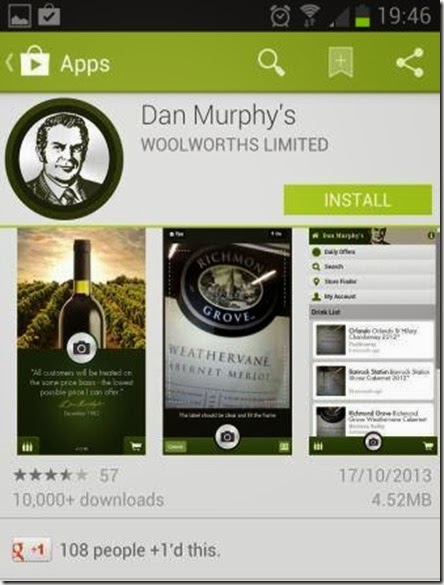
App download screen in Google play

According to wikipedia

“Dan Murphy’s is an Australian liquor supermarket chain owned by Woolworths Limited, which also owns BWS, another liquor chain with smaller stores. Dan Murphy’s competes principally with 1st Choice Liquor Superstore”

I tried out a special feature on the Dan Murphy’s  app, this app has got label recognition technology built in to the app. If you just click a photo ( via camera icon/button in app- see pic below) of  a label of the bottle in your bar or fridge and if the item is stocked at Dan Murphy’s, the app will come back with the current price of the bottle and also provide  information and reviews on the drink ( pretty neat huh).

smartphone app of dan murphy australia[how%2520the%2520dan%2520murphy%2520app%2520works%255B4%255D.jpg]

Img from:http://australianchinwag.blogspot.com.au/

This new app from Dan Murphy’s could possibly do wonders for many undiscovered small brands or relatively unknown wineries, by bringing them  into focus and increasing their audience  by putting them on  show to the world.

With an increasing number of smartphone users now using their devices to research products or services on-line, apps like this one are becoming the norm for tech-savvy shoppers. The Dan Murphy’s App is free to download onto your android and apple devices.

Customers can download the Dan Murphy’s App for free on their iPhone or Android device by searching for “Dan Murphy’s” in the App Store.

For more information on the Dan Murphy’s App and to view an instructional video, please visit:www.danmurphys.com.au/guides/app-content.

So go give this app a whirl , say cheers to me  and my blog “Digital GROG” and let me know your views on the app

Filed Under: 2013, Apps, Australia, Gpost, Review Tagged With: Australian, Deals, smartphone app

  • Page 1
  • Page 2
  • Page 3
  • Go to Next Page »

Primary Sidebar

Recent Posts

  • Underwater Drones for Recording Video and Taking Pictures
  • Why I chose hostgator for blog hosting
  • Top 10 Software Programs For Your Windows PC
  • What you should know before investing in Cryptocurrency and bitcoin
  • The Best Social Media Platforms for Marketing a Gaming App

Recent Comments

  1. Patrick McCormick on How to secure your desktop and laptop with antivirus software
  2. JJ on 20 Top brands with affilate programs to make you money in 2019
  3. JJ on This WPengine Genesis Pro Deal Will Give You 35 Studiopress themes
  4. Lisa Gomes on 16 Ways to Make Money Online Working From Home
  5. KatVine on This WPengine Genesis Pro Deal Will Give You 35 Studiopress themes

Archives

  • June 2022
  • February 2022
  • July 2021
  • May 2021
  • April 2021
  • March 2021
  • November 2020
  • September 2020
  • August 2020
  • July 2020
  • June 2020
  • May 2020
  • April 2020
  • March 2020
  • February 2020
  • January 2020
  • December 2019
  • September 2019
  • August 2019
  • July 2019
  • June 2019
  • April 2019
  • March 2019
  • February 2019
  • January 2019
  • December 2018
  • November 2018
  • October 2018
  • September 2018
  • July 2018
  • June 2018
  • April 2018
  • February 2018
  • January 2018
  • December 2017
  • October 2017
  • September 2017
  • July 2017
  • June 2017
  • May 2017
  • April 2017
  • March 2017
  • February 2017
  • January 2017
  • December 2016
  • November 2016
  • October 2016
  • September 2016
  • August 2016
  • July 2016
  • May 2016
  • April 2016
  • March 2016
  • February 2016
  • January 2016
  • December 2015
  • November 2015
  • October 2015
  • September 2015
  • August 2015
  • July 2015
  • June 2015
  • May 2015
  • March 2015
  • February 2015
  • January 2015
  • December 2014
  • November 2014
  • October 2014
  • September 2014
  • August 2014
  • July 2014
  • June 2014
  • May 2014
  • April 2014
  • March 2014
  • February 2014
  • January 2014
  • November 2013
  • October 2013
  • September 2013
  • August 2013
  • July 2013
  • June 2013
  • May 2013
  • April 2013
  • March 2013
  • February 2013
  • January 2013
  • December 2012
  • November 2012
  • October 2012
  • September 2012
  • August 2012
  • July 2012
  • June 2012
  • May 2012
  • April 2012
  • March 2012
  • February 2012
  • January 2012
  • December 2011
  • November 2011
  • September 2011
  • August 2011
  • July 2011
  • June 2011
  • May 2011
  • April 2011
  • March 2011
  • February 2011
  • January 2011
  • December 2010
  • November 2010
  • October 2010
  • September 2010
  • August 2010
  • July 2010
  • June 2010
  • May 2010

Categories

  • $heldon $ingh
  • 2010
  • 2011
  • 2012
  • 2013
  • 2015
  • 2017
  • 2018
  • 2019
  • 2020
  • 2021
  • 2022
  • Accounting
  • Adsense
  • Affiliate
  • Amazon
  • Anti Virus
  • Apple
  • Apps
  • Asus
  • Aussie
  • Australia
  • Australian
  • Australian Bloggers
  • Australian wordpress hosting
  • Banks
  • Blog-Hosting
  • Blogger
  • Blogger Tool
  • Blogger Tools
  • BloggerTools
  • BuddyPress
  • CARS
  • CDN
  • Celebrity
  • Clickbank
  • Compare
  • Computer
  • Domains
  • Done Deals
  • Ebook
  • Email
  • Facebook
  • Featured
  • Finance
  • Free
  • Gadgets
  • Google
  • Gpost
  • Guide
  • Hackers
  • Hosting
  • India
  • Internet
  • Ipad
  • Kindle
  • Laptop
  • Make money blogging
  • Makemoney online
  • Marketing
  • Melbourne Cup
  • Movies
  • Netbook
  • Network
  • News
  • Online betting account
  • PC
  • Review
  • Search
  • SEO
  • sheldon singh
  • Software
  • Solution
  • Sports
  • Subscribers
  • Taxes
  • Technology News
  • Themes
  • Top 10
  • Tutorial
  • Video
  • Wacky
  • web hosting
  • Website Review
  • Wierd
  • Windows
  • wordpress
  • Wordpress 3.0
  • Wordpress 3.1
  • wordpress themes
  • World cup
  • Wp Answers
  • WP Turbo
  • WPMU

Footer

Design

With an emphasis on typography, white space, and mobile-optimized design, your website will look absolutely breathtaking.

Learn more about design.

Content

Our team will teach you the art of writing audience-focused content that will help you achieve the success you truly deserve.

Learn more about content.

Strategy

We help creative entrepreneurs build their digital business by focusing on three key elements of a successful online platform.

Learn more about strategy.

Copyright © 2026 · Genesis Sample on Genesis Framework · WordPress · Log in