• Skip to primary navigation
  • Skip to main content
  • Skip to primary sidebar
  • Skip to footer
tech blog au

Digital Grog — Australia’s Tech, Gadgets & Digital Life Unfiltered

Digital Grog is Australia’s go‑to tech blog for sharp reviews, digital trends, AI tools, gadgets, cybersecurity updates, and practical how‑tos covering the latest in Aussie technology

  • About Us
  • Contact Us
  • Block Examples
  • Landing Page

Blogger Tool

5 FREE SEO tools and case study of your ranking and banking keywords

November 25, 2015 by admin Leave a Comment

There is SEO and then there is SEM, but you pretty much need both to succeed. The good thing is that most big players in the search engine optimization game offer free research tools to their punters to try/test  out their tools before buying.

These are the popular softwre companies like SEO MAJESTIC, AHREFS, SEM RUSH and MOZ.com

No prizes then for guessing which of these are my favourites

5 SEO Software tools for 2015


1. Ahrefs.com

2. Semrush.com

3. Moz.com

4. Seomajestic.com

5. Alexa.com (not a tool – Nielpatel – but he thinks that this also pulls the most relevant keywords from your blog)


Yes my likeability for them is pretty much in that same order. Now I have not been able to afford a full membership, because many of them start at a price between $69 to $150 a month which is a bit steep to me, but you on the other hand – if you have the money go ahead and try it.

I would like to try SEMRUSH if I had the chance & money as i like their interface and they are updating their indexed URL at a good pace to compete with the top guns( You know one of my wish list now – so feel free to buy me one :)

So what this post/case study  can help you with

  • Finding the Keywords Your Competitors Use
  • Checking Google Keyword Rankings and money maker keywords
  • FIND a good software SEO Tool

Anyway back to what I intended to show you today, how good is the data really on these SEO tools providers. I am going to compare them to the big daddy of data hoarders (Google webmaster tools and analytics) as google pretty much knows which website is doing what and have the most data on the internet on websites.

It’s pretty simple what I’m doing here

I go to stat counter and webmaster tools and then sync my keyword data from Google to what I have in stat counter dashboard and have a look at the merged and comparison keyword data in stat counter ( click link to see how its done).

This then will give me the keywords that are bringing in the most traffic to my blog and I can see which ones are bringing in the revenue.

NEXT….

·finding banking and rqanking keywords of your website

  • Meat lover Australia
  • Bacon and yoghurt bbq
  • Lemon and cheese special
  • Bourbon cucumber weed
  • Raw prawn chia seed pizza

Next : I do a comparison of these keywords against these SEO tools. I enter my blog url in SEM rush, Ahrefs etc and see if any of them picks up (keywords)  that i found via the data matching i did with &  found from Google and statcounter data

What I am trying to do here?

The aim of this case study is to find out – if any of the above listed seo tool providers can find out/match the ranking and banking keywords that I have got from GOOGLE WEBMASTER TOOLS/STATCOUNTER (merged) from doing a search on their webpage without signing in on their full membership. So pretty much we are trying to gauge – how good they are with the little data they are giving out before a person signs up to their membership plan for the full data.

Now I’m not going to use my sites for this experiment, even though I have used one of them… but im replacing some keywords with say Dominos pizza kinds of site keywords to make it interesting.

So the keywords will actually reflect the actual case study I have done for actual money maker & Google ranking keywords – but replaced it with pizza keywords

So let’s say those keywords (from stat counter and GWT merged data) were

So my data tells me that this is the money maker (Google ranking) keywords and I need to check with the big guns (Ahrefs, SEM rush etc if they can find that out) with a URL check.

::::::: I did these checks without logging into any of these providers’ websites::::

( I refer to snapshot page in this post as the first results page of the SEO tool provider after I enter url an click enter for results to display )


SEMRUSH

I put in the URL of the website and do a search on semrush.

SEMrush Competitive Data


So Semrush has one of the organic keywords (Raw prawn chia seed pizza) in their list that matches my GWT/statcounter keyword. But point to be noted is that they have many more organic keywords listed for the website but it can be seen only with a full SEM rush membership

[Additional note- Semrush gives you a basic snapshot of also your MAIN ORGANIC COMPETITORS  so you can also spy on your competitors for their  keywords]


Ahrefs

ahrefs seo tool for tracking and SEM

It gave no keyword data that matched my GWT/statcounter keywords.

I think SEM RUSH did a better job of listing my top 10 competitor’s urls, considering that the domain name I compared for this case study was a .com.au Australian domain. SEM rush returned not only Australian competitors but also relevant .com competitors in their snap shot, while the Ahrefs Top 10 competitors didn’t look relevant at all

[Additional note- Ahrefs give you a good look at the rising numbers of referring pages in their snapshot page .A steady rise in this number is good for SEO. It also gives you a good idea of how you’re US and UK organic traffic is increasing in numbers – under organic traffic heading and chart]


Seo Majestic

majestic seo for ranking and analysis

They didn’t provide any keywords in their snapshot page, but under pages column in snapshot the three urls/pages were present there that were the get/statcounter keywords pointing to those pages. Only somewhat helpful – not much ( and that is only because I knew what I was looking for , so wish they actually listed what keywords the website is organically ranking for in the snapshot page like the rest )

[Additional note – they do give a trust flow and citation flow ranking , but what I like is their pretty colourful charts showing backlink breakdown and anchor text breakdown – their backlink history graph can also be useful for SEO]


Moz.com

moz for da and pa and spam analysis

Moz did not give me any matching keywords on their open site explorer page. They did not list any keywords for website in their snapshot page

[additional note – Moz does a good job of giving you a Domain authority (DA) and Page authority (PA) score – I like the spam analysis they did on linking sites – which is sites linking to you, these can be good if you want to disavow (remove) links that are bad and linking to you]

spam analysisby moz for backlinking bad links

Moz bad links analysis


Alexa.com

Alexa.com didn’t give me any keywords that matched. They had five different keywords to what I got from GWT/statcounter.

clip_image010

Under their headings

Top Keywords from Search Engines

Which search keywords send traffic to this site?

I did not get any matched keywords to my GWT/Statcounter Keywords for the 5 keywords that they pulled of my website, so there you go (nielpatel)

[Additional note : I like the way how alexa give s you a global rank and show you if it’s been climbing high recently and also the stats of how much time people are actually spending on your website (How engaged are visitors) which can give you an idea of bounce rate and if you should improve content + also — > Which sites did people visit immediately before this site?]

Now I do know that I could possibly get much more relevant keywords and ranking data from these SEO DATA providers after signing up for a membership, but aren’t these companies supposed to provide good free data to entice us signing up for their full membership with their free SEO snapshot. Most failed in this and so there is plenty of marketing opportunity to improve I suppose for them.

I hope you have got something useful from this case study , as you can see I prefer to use sem rush for my SEO needs and also use other tools like AHREFS, Seo majestic etc to compare results . If you think there are some good tools that can give me that data I need, do leave a comment or get in touch with me via contact page and i would be glad to add it to this research/case study page

Filed Under: Blogger Tool, Review, SEO, Website Review Tagged With: Digital, Software, Solutions, Websites

10 Alternatives to Google RSS News reader

March 14, 2013 by admin 3 Comments

Everyone’s favourite Free RSS Google reader “Google reader” is set to retire on  1 July. Google reader  is a free RSS aggregator service where you can  add rss feeds from different websites  and track all  the different feeds data from those websites in one place

In a Google blogpost google’ senior vice-president of technical infrastructure, Urs Hölzle, said google Reader launched in 2005 will be retired as part of a Google spring clean.

The best RSS reader options after Google reader

There are different types of rss readers , some of them are “Desktop RSS readers” , “Standalone RSS reader” software” , RSS reader apps and also plugins that attaché to your favourite browser

google reader api

Well luckily Google is not the only provider that  provides a free rss reader service , so here are some alternatives  that do  a excellent job of aggregating all the news you interested in in one place

Feedly News reader

Feedly is a news aggregator or RSS feed reader application for various Web browsers and mobile devices running iOS and Android. It compiles news feeds from a variety of online sources for the user to customize and share with others Connect here at feedly

feedly screenshot

FeedDemon Lite or pro

Feed demon is  a RSS and Atom feed readers. FeedDemon has a clean interface,is excellent for managing hundreds of feeds (or more); lets you set up watch lists; offers an online edition; syncs podcasts with iPods and other handheld media players.

feed demon rss reader alternatives

Its Flexible, easy to read and organize news and articles from different websites. This used to be free but now they have a FeedDemon Pro or FeedDemon Lite. Download here


Fuzzy Duck RSS Reader 1.6.0.0 ( FREE)

Fuzzy Duck RSS Reader was designed to be a freeware RSS, ATOM and RDF news reader. Simple, fast and extremly small, this reader is designed to sit on your desktop and give you the latest headlines and descriptions from all of your news feeds DOWNLOAD HERE

FUzzy duck rss reader


Bloglines Web-based newsreader

The Bloglines Web-based newsreader runs inside your browser; no software to install; it’s free. It requires no software installation, so you can access your newsfeeds from any Internet-enabled computer.

bloglines web based newsreader browser

Download here


Feedreader ( FREE windows application)

Feedreader is a free RSS and Atom aggregator for Windows. It has a stripped down, though configurable, three-pane interface similar toNetNewsWire on Mac OS X. Recent beta versions use MySQL as database back-end.

feed reader windows software

Website – www.feedreader.com

Feedreader is a FREE RSS news aggregation solution. There is also a online version ( Feedreader Online )allows you to view your feeds from any web browser, on any device, without installing any software


NEWSGATOR FOR OUTLOOK

If you already rely heavily on your Microsoft Outlook, this newsreader is for you. NewsGator 2.6 is a unique newsreader, in that it integrates with Microsoft Outlook, thereby allowing Outlook users to browse newsfeeds from within the same program that delivers daily e-mail.

NewsGator Inbox for Outlook

Go to thier website


RSS Bandit

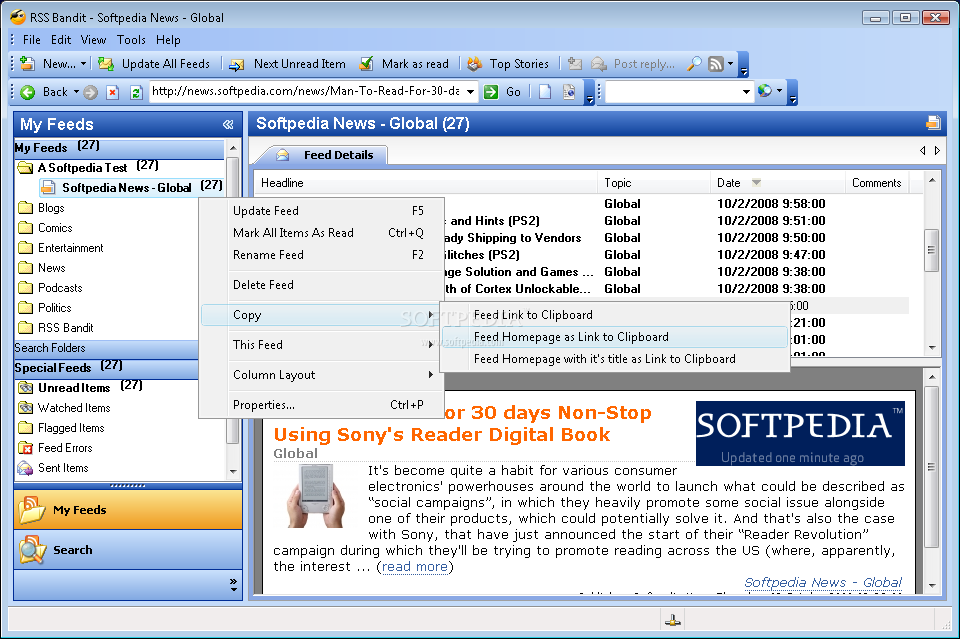
RSS Bandit is a nice, simple feed reader that lets you browse news in an organized fashion and has a Microsoft outlook type interface. With this software you can organize feeds in folders, RSS Bandit also detects relations between individual posts and threads them logically

RSS Bandit screenshot 1 - This is the main window of RSS Bandit where you can view all your categories and news feeds.

RSS Bandit is a RSS desktop feed aggregator.Check screenshots and download here


RSSOwl

RSSOwl is a free and powerful news feed reader. RSSOwl lets you gather, organize and search news in a convenient, easy to use interface with endless flexibility.
Home

WindowsDownload RSSOwl 2.1.6
Release Notes | Other Systems & Languages

Many people saddened by the announcement of this demise of Google reader  have taken to Twitter using the #SaveGoogleReader hashtag, determined to keep the site alive by creating  a online petition, you might wanna join the cause if you still like Google reader

Filed Under: Apps, Blogger Tool, Internet, Software, Solution, Technology News, Website Review Tagged With: RSS, Web browser News reader

From Panda to penguin with Google link building algorithm

August 3, 2012 by admin 3 Comments

IF your stats are out of whack and you  have been linked to  to your website  with a majority of the same keywords ( or anchor text ) to the same home page  and those  words are quite popular ( or pricey) keywords too . Then you have probably been officially been demoted on the Google search by Google.

Tools for penguin algorithm  update checking

And yes,  they can do it because they are the market leader in search. I do remember something similar happening with  Microsoft as well in a different aspect.

So how to get the Monkey ( penguin ) off your BACK

As you can see in the above pic   for eg

if you got a website with  a name  “Australian stock market” and  a majority of the links  are  mentioning  Australian stock market ( green  or brown in pie chart) and pointing to the  home page then its quite likely  you could be hit by the Google penguin.

seo penguin panda chart linking solution fix

The solution for linking properly and to show some love to the penguin

Here is what to do

Linking to be distributed in  4 different forms as below  including to home pages and internal; pages

digitalgrog.com.au

www.digitalkgrog.com.au

https://www.digitalgrog.com.au/

Http://digitalgrog.com.au


How to use anchor text

we will take the example of Digital grog Blog

Digital Grog Blog

DigitalGrogBlog

Digital grog blog

DGB

[Carefully notice the differences in linking above]

How to also use Mixed anchor text

Tech blog – digital grog

Australian Blog Digital Grog

Digital grog, a Australian tech blog

Common Anchor text is back in action

If your website is popular your are going to get genuine links like these( below)  to your website and Google knows this

“click here,”  “visit this website,” and “here.”

These links ( anchor text)  above which has  been regularly  used by  punters, now also help you escape the Google big hand  by diluting   your linking profile  so that they can see its genuine.

Delete or Dilute  your links ( anchor text) to fix them

so if you have been inadvertently been caught up in the big mad Google seo updates algorithm changes.  You will either need to dilute your links with more different  keywords  or gain more genuine links with different keywords or then change your already existing links ( if you can) and anchor text from links that  link to you.

Tools for penguin algorithm  update checking

Tools like  Majestic SEO or Open Site Explorer can help you find out your linking and anchor texts for your website

Filed Under: $heldon $ingh, Blogger Tool, Domains, Featured, Google, SEO, Solution, Tutorial Tagged With: Digital, Link profile, Panda Update, Penguin, SEO

Tops SEO blogs For Guest posting

July 31, 2012 by admin 1 Comment

I initially created  this SEO TOP List  as  a list  to do guest posting for my blog , but then soon realised  that the list is worth much more that it looks and so also permanently  out it in a special SEO folder in my chrome browser.

australian seo  google blog cheerleaders 420 x315

Enjoy !! The top seo blogs on the internet

This ranking has been created taking into account a list of tops SEO lists ranking as available from top SEO blogs like

http://www.invesp.com/blog-rank/SEO , blogging pro

The seomoz SEO TOP LIST

http://www.dailyblogtips.com/top-25-seo-blogs/ .

Top 10 SEO Blogs


The top 100 SEO blogs ranked based on 20+ different factors including RSS membership, monthly visitors, and social media factors as per the different list rankings

The list below also can be used to do guest posting on these websites which receive a lot of traffic to their popularity

1. SEOmoz Blog

2. Search Engine Land

3. Search Engine Watch

4. HubSpot Internet Marketing Blog

5. Yoast

6. Search Engine Journal

7. Graywolf’s SEO Blog

8. Seobook.com/blog

9. dailyblogtips.com

10. seobythesea.com

If you want to see the updates from most of these on the list in one place then http://seo.alltop.com/ is a good website to check this out

Filed Under: $heldon $ingh, 2012, Blogger Tool, BloggerTools, Guide, Internet, SEO, Top 10, Website Review Tagged With: Internet, Marketing

Now blogger has a Mobile template

January 24, 2011 by admin 1 Comment

Blogger mobile template released

Yes that’s  right , the much wanted feature of mobile enabled templates for blogger is now available in blogger.. Blogger has just upgraded their  features to enable  your blog to be  seen on most new smartphones , so that you dont have to do extra work on your blog for it to show on a mobile properly ( like Iphone 4 or Samsung galaxy s or any new smartphones)

Blogger releases Mobile template to make blogger blogs Smartphone enabled

All you need to do is login to blogger , got to settings  and enable the Blogger mobile template like in the figure below

Blogger mobile Smartphone template  settings

You can check out  these 2 blogs on your mobile ( http://bankrepossession.blogspot.com/ & http://nakedseo.blogspot.com/ ) to check out the new blogger Mobile template  and have a idea of how the new “blogger mobile template” works

Here is a example of how  your blogger blog will look like on a “Smartphone”

Blogger Mobile website

blogger blog on your mobile  mobile template for bloger

If you do like this post  do bookmark us or leave a comment to share your thoughts. Find more details on this  at the –>> blogger blog

Filed Under: 2011, Blogger Tool, Blogger Tools, Software Tagged With: Blogger for smartphone, Blogger Mobile template, Mobile template

Blogger tools – get the Digitech Photo magazine scanner

January 1, 2011 by admin Leave a Comment

Remember that time when you  saw that magazine in that  waiting room and wanted  so bad to somehow  get a copy of that page in that magazine  to take back home  or then  this old  family photo that you want to copy in a hurry  to send digital copies to everyone , well now you can do it  with this tool.

Handy Blogger tools – Portable scanner

The “Digitech  Portable scanner” can scan a magazine page with that nice recipe or hot photo, or then can scan that family photo or document ( just like in the james bond movies)  OR INTERESTING ART OF GRAFIITI .. whatever captures your eye.

digitech portable scanner blogger tools

The digitach scanner saves the image or scan to tthe Micro SD card or straight to your laptop / PC via the uSB cable. Get it here 

This can be a very handy told for bloggers to get  graphics and text  instantly transferred from magazines or  newspapers as well to  then reference or use ( with permission of author off course) for their blogs or website. Now days a smartphone is also well equipped to do these sorta tasks  , but unfortunately  they can scan  only to a certain  resolution  and transferring to pc can be a bit messy and time consuming , as with this  scanner you can just take the mem card out and insert in your pc  to transfer or then attache the scanner to your pc via usb.

Scanning on the go for your blog / website


digitech scanner portable blogger tool

The scanner has two scanning modes medium resolution at 3000 x300 dpi or then higher resolution at 600 x600 Dpi. The built in LCD displays your scanning status, selected resolution, remaining battery lifespan and memory status.  It also features an auto power-off after 3 minutes so you don’t drain your power for no reason.

It retails at AU $149.95. The gadget is available at latestbuy.com.au or you can browse Amazon for more listed options Here – > Portable scanners

Filed Under: Blogger Tool, Blogger Tools, BloggerTools, Gadgets Tagged With: Digitech, Portable Scanner

Primary Sidebar

Recent Posts

  • Underwater Drones for Recording Video and Taking Pictures
  • Why I chose hostgator for blog hosting
  • Top 10 Software Programs For Your Windows PC
  • What you should know before investing in Cryptocurrency and bitcoin
  • The Best Social Media Platforms for Marketing a Gaming App

Recent Comments

  1. Patrick McCormick on How to secure your desktop and laptop with antivirus software
  2. JJ on 20 Top brands with affilate programs to make you money in 2019
  3. JJ on This WPengine Genesis Pro Deal Will Give You 35 Studiopress themes
  4. Lisa Gomes on 16 Ways to Make Money Online Working From Home
  5. KatVine on This WPengine Genesis Pro Deal Will Give You 35 Studiopress themes

Archives

  • June 2022
  • February 2022
  • July 2021
  • May 2021
  • April 2021
  • March 2021
  • November 2020
  • September 2020
  • August 2020
  • July 2020
  • June 2020
  • May 2020
  • April 2020
  • March 2020
  • February 2020
  • January 2020
  • December 2019
  • September 2019
  • August 2019
  • July 2019
  • June 2019
  • April 2019
  • March 2019
  • February 2019
  • January 2019
  • December 2018
  • November 2018
  • October 2018
  • September 2018
  • July 2018
  • June 2018
  • April 2018
  • February 2018
  • January 2018
  • December 2017
  • October 2017
  • September 2017
  • July 2017
  • June 2017
  • May 2017
  • April 2017
  • March 2017
  • February 2017
  • January 2017
  • December 2016
  • November 2016
  • October 2016
  • September 2016
  • August 2016
  • July 2016
  • May 2016
  • April 2016
  • March 2016
  • February 2016
  • January 2016
  • December 2015
  • November 2015
  • October 2015
  • September 2015
  • August 2015
  • July 2015
  • June 2015
  • May 2015
  • March 2015
  • February 2015
  • January 2015
  • December 2014
  • November 2014
  • October 2014
  • September 2014
  • August 2014
  • July 2014
  • June 2014
  • May 2014
  • April 2014
  • March 2014
  • February 2014
  • January 2014
  • November 2013
  • October 2013
  • September 2013
  • August 2013
  • July 2013
  • June 2013
  • May 2013
  • April 2013
  • March 2013
  • February 2013
  • January 2013
  • December 2012
  • November 2012
  • October 2012
  • September 2012
  • August 2012
  • July 2012
  • June 2012
  • May 2012
  • April 2012
  • March 2012
  • February 2012
  • January 2012
  • December 2011
  • November 2011
  • September 2011
  • August 2011
  • July 2011
  • June 2011
  • May 2011
  • April 2011
  • March 2011
  • February 2011
  • January 2011
  • December 2010
  • November 2010
  • October 2010
  • September 2010
  • August 2010
  • July 2010
  • June 2010
  • May 2010

Categories

  • $heldon $ingh
  • 2010
  • 2011
  • 2012
  • 2013
  • 2015
  • 2017
  • 2018
  • 2019
  • 2020
  • 2021
  • 2022
  • Accounting
  • Adsense
  • Affiliate
  • Amazon
  • Anti Virus
  • Apple
  • Apps
  • Asus
  • Aussie
  • Australia
  • Australian
  • Australian Bloggers
  • Australian wordpress hosting
  • Banks
  • Blog-Hosting
  • Blogger
  • Blogger Tool
  • Blogger Tools
  • BloggerTools
  • BuddyPress
  • CARS
  • CDN
  • Celebrity
  • Clickbank
  • Compare
  • Computer
  • Domains
  • Done Deals
  • Ebook
  • Email
  • Facebook
  • Featured
  • Finance
  • Free
  • Gadgets
  • Google
  • Gpost
  • Guide
  • Hackers
  • Hosting
  • India
  • Internet
  • Ipad
  • Kindle
  • Laptop
  • Make money blogging
  • Makemoney online
  • Marketing
  • Melbourne Cup
  • Movies
  • Netbook
  • Network
  • News
  • Online betting account
  • PC
  • Review
  • Search
  • SEO
  • sheldon singh
  • Software
  • Solution
  • Sports
  • Subscribers
  • Taxes
  • Technology News
  • Themes
  • Top 10
  • Tutorial
  • Video
  • Wacky
  • web hosting
  • Website Review
  • Wierd
  • Windows
  • wordpress
  • Wordpress 3.0
  • Wordpress 3.1
  • wordpress themes
  • World cup
  • Wp Answers
  • WP Turbo
  • WPMU

Footer

Design

With an emphasis on typography, white space, and mobile-optimized design, your website will look absolutely breathtaking.

Learn more about design.

Content

Our team will teach you the art of writing audience-focused content that will help you achieve the success you truly deserve.

Learn more about content.

Strategy

We help creative entrepreneurs build their digital business by focusing on three key elements of a successful online platform.

Learn more about strategy.

Copyright © 2026 · Genesis Sample on Genesis Framework · WordPress · Log in