
• Skip to primary navigation
  • Skip to main content
  • Skip to primary sidebar
  • Skip to footer
tech blog au

Digital Grog — Australia’s Tech, Gadgets & Digital Life Unfiltered

Digital Grog is Australia’s go‑to tech blog for sharp reviews, digital trends, AI tools, gadgets, cybersecurity updates, and practical how‑tos covering the latest in Aussie technology

  • About Us
  • Contact Us
  • Block Examples
  • Landing Page

Laptop

10 Tips To Get Ready Working From Home Successfully

July 4, 2020 by admin Leave a Comment

​Not many people realised that they would be working from home this year, No thanks to the Bl**dy virus that has turned the world upside down.  The covid virus has got hundred and thousands of people sick and has changed our lives in so many ways.

People now have turned to working from home in large numbers due to this calamity. People are self-isolating out of fear and safety.  A lot many have learnt to manage their lives remotely through video conferencing and virtual meetings.  It is essential for you to have a plan if you are going to work from home. In this post, we are going to look at what you need to start working from home ( more like a checklist)

A few things to sort out before you begin to work from home.

  • Make sure you have a proper table and chair that follow appropriate safe, ergonomic standards
  • Get a sit stand up desk if needed
  • Take regular breaks
  • Screen size of your laptop/desktop
  • Lighting in the room
  • Good NBN OR Internet connectivity
"

A proper table and chair set up is very essential if you are going to be working from home. The long hours (5 to 8 hours a day or more) sitting down can be tiresome, and you need to get your posture right, or you can damage your back or neck.  Luckily when you are in office, this is all taken care off by the workplace, so it is wise to take extra care with this while working from home.  This video here might give you a few tips.

A sit stand up desk

Sitting down in front of a laptop for long hours can result in cramped shoulders or back. Why not invest in a sit stand up desk. This should allow you to do work while sitting and also do work while standing half the time.  This method does wonders for many.

Take Regular breaks

Take breaks as if you would do so at your office.  If you took a morning break and an afternoon break with a walk around your block while at the office – do the same when you work from home.

Exercise keeps you healthy and more productive. Don’t forget when in office you do take some time to have a chat with fellow colleagues as well, so make sure you break up your continuous work time.

Getting Ready to Work from home

Gadgets, Settings and Adjustments you will need to make.

Work Monitors/ Docking stations

​WORK MONITORS: Turn your laptop into a Desktop. Your workplace monitors may be huge or dual monitors, so it enables you to see screens easily for long hours. Make sure you get a laptop which is easy to do work for long hours without strain on your eyes. Eye health is important too.

Get your laptop attached to your home desktop monitor or get your office laptop docking station to your home. Maybe get a laptop glare protector if you need one.

Proper lighting in room

LIGHTS: ​If there isn’t suitable or sufficient light in the room, it can lead to a strain on your eyes affecting your work, so it is essential to have enough light while working and lights that are not reflecting too much on your work area. Adjust as needed.

Hydrate

HYDRATION: If you don’t have a water bottle on your desk at work, you should get one. Office aircon are known to get the air dry around you, and you need to hydrate, so don’t forget to do the same when you are working from home. Get your regular dose of hydration.

​

Using your own mobile for work

​COMMUNICATION: Enquire with your office how you would make calls to clients. If they provide an office mobile or if you can use your own mobile or home phone and claim deductions or claim expenses back from office.

If you use your own mobile, for Samsung mobile you can block caller id or hide your number for a single call by entering #31# before the number you wish to dial. If you are a iPhone user The quickest way to block your iPhone’s caller ID is to use the *67 trick, which is referred to as “star six seven”

Headset with mic

You might need a good headset or headphones with mic to take part in video conferencing and training from home or then listen to training packages, without disturbing people at home or keeping conversations confidential.

Most laptops have a built-in camera nowadays, but if your doesn’t then just get one from your office or a  portable webcam from the tech shop or online.

Record Keeping of Expenses

Keep records of your expenses incurred due to working from home so that you can claim it from your office or then claim deductions if allowed. It is easy not to get all the expenses claimed back, which is due if you don’t keep detailed records and receipts.

Plan your lunch or brekky in advance

It is wise to plan your brekky and lunch in advance even though you are working from home to stop unnecessary interruptions at work, just like you would do so regularly. However, make sure you take your breaks.

Kids at home

​Set the rules. If you have kids at home while working, it can be difficult.  Have a sit-down conversation with your kids? Make them understand that you need minimal interruptions. Plan a daily routine for them as well, Learning time (online learning time), TV time and outdoor play time. Pre-plan activities for them to do.

Good Internet connection

​A good stress-free work time can be achieved with good internet connections and good connectivity. Make sure you test your laptop if set up to work from home first from your office before you bring it to home.

To avoid disconnections and lag while working – your office will need good virtual network set up, and also you will need a good internet connection. A good idea would be for your kids to not watch Netflix, YouTube videos or stream audio via internet during when you work – if this is possible.

Work Start /End Timing

All companies or workplaces have different rules, though you can expect quite a few to be the same when it comes to work start and end times. You need to plan your start and finish times.

If you are working from home, you save the travel time. So, with that bonus, you could possibly start a bit early and finish early.  Some offices don’t allow you to accrue flex time, and some do, so if its allowed maybe you can work an extra half hour every day and accumulate some flex with an early start. If its not allowed, then you can still start early and finish early and get more time to your day.

Psychology of working from home

Many people will jump at the idea of working from home, not knowing what it entails or how they will cope. Some will succeed it doing it well, and some will fail miserably and not get much done affecting their productivity.

It is essential to know hat kind of work person you are to succeed, if you can get along just fine without an office formal atmosphere and work in your pyjamas that’s okay. But if you will find it hard to work in a casual home setting, maybe you will still need to dress (formals) and act the part to work from home. It’s all about getting your mind into the right frame of work.

Conclusion:

Just finished counting the points, so in total there was “14 tips to get you started working from home successfully”

There are other things you might need – if you suddenly have had to start working from home like printers, printing paper, envelopes, office mobile, paper shredder, filing box or files, stationery and your help desk and support contact numbers ready.  

Enquire with your office if they allow you to take equipment home for working from home- You might be surprised. Good luck and please do comment below if you have any additional tips you can add to my article.

  • WiFi Range Extender
  • Sit stand up desk
  • Headphones with mic
  • KENSINGTON Monitor Stand
  • Desktop Monitor
  • Docking station for laptops
  • Webcam for Desktop or Laptop

tp link modem router

WAVLINK WiFi Range Extender AC1200 Wireless Router/AP Access Point/WiFi Extenders Signal Booster/Range Extender with Dual Band 5Ghz 2.4Ghz 1200Mbps Works Any Route

This is something you might need  to get proper wifi coverage to get  your work done at home.  You will only need this if your modem/router is not good enough in distributing the  wifi signal around your house.

 Network extender mode boosts wireless signal to previously unreachable or hard-to-wire areas flawlessly Miniature size and wall-mounted design make it easy to deploy and move flexibly
 
Features

Eliminates Dead Spots and Extends the Existing Wireless-AC Coverage

    1. Using the Wavlink 575A3 Range Extender, you can easily extend the range of your existing wireless router to create a strong Wi-Fi signal for all the devices in and around your home, including smartphones, tablets, ultra-books, and more.
    2. Greater coverage allows you to enjoy fast Wi-Fi speeds on your laptop or tablet .
    3. It can Creates Wi-Fi speeds that are up to three times faster than wireless-N. With this extra speed, you can stream HD-quality videos and play online games seamlessly without interruptions or lag.
 

pro plus 36 white desk sit stand up desk

Featured Pro plus 36 Varidesk model

The sit stand up desk is becoming a popular alternative today to improve more healthy computer use and prevent your body from bad posture health risks. It helps reduces incidents at the workplace.

Features:

· Best selling model

· Risk-free for 30 days

· Two-tier design: upper display surface, lower keyboard/mouse deck

· 5 year warranty

· Shipped fully assembled and best-in-class materials used


Prices and more over here


You can get a cheapo PC headset at officeworks  for between $10 to $20 that will do the job  for video and audio conferencing or then you can purchase a fancy noise cancelling headphones with mic  that will do the job and allow you to listen to music at high quality.
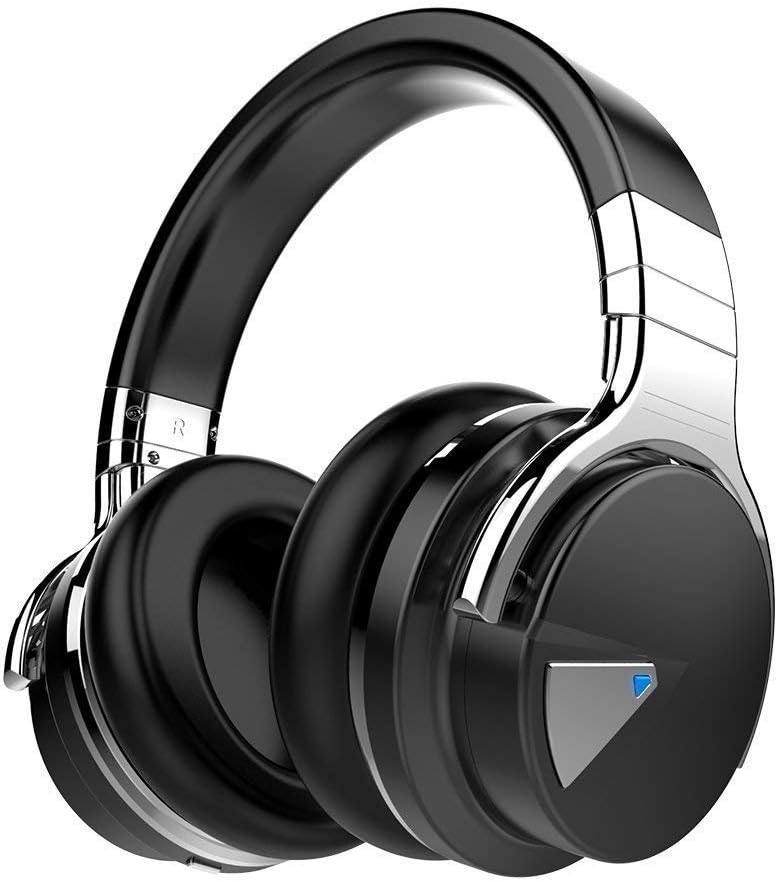
 

This is the COWIN E7 Active Noise Cancelling Headphones Bluetooth Headphones with Mic Deep Bass Wireless Headphones Over Ear with inbuilt mic. It has active noise cancelling technology

Link here: https://www.amazon.com.au/Cancelling-Headphones-Bluetooth-Comfortable-Cellphone/dp/B07RW8DT4S/


If you  got a monitor or need to jack up the height of your laptop then you need this.
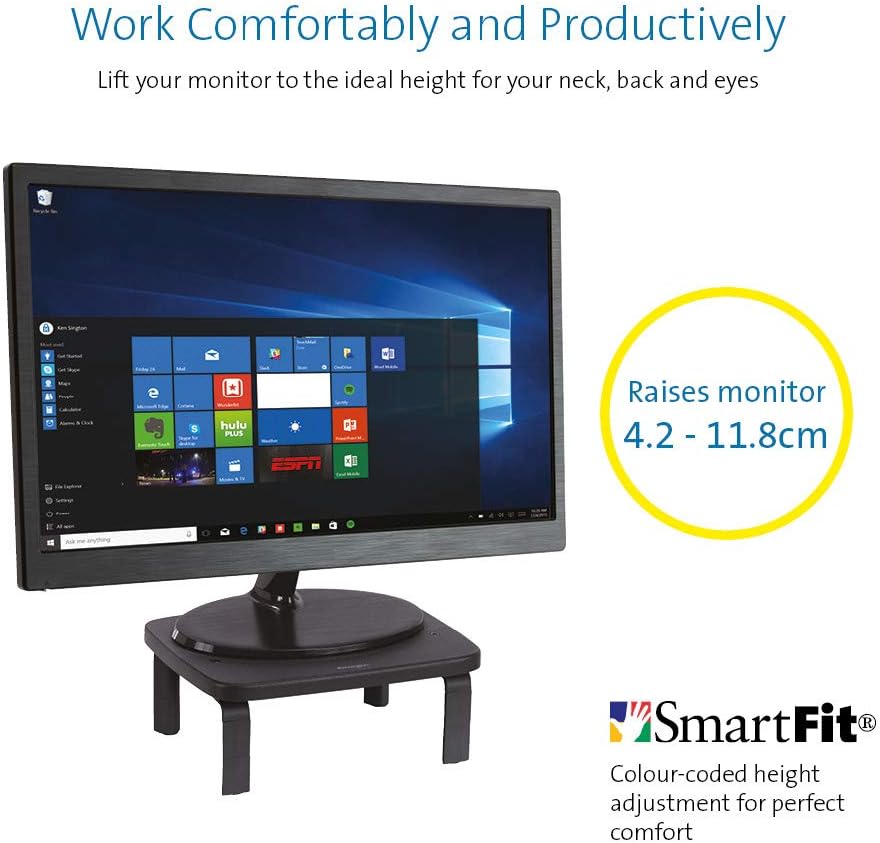
 

KENSINGTON(R) 52785 Monitor Stand, SMARTFIT Standard

Stand positions monitor in line with your eyes to help reduce eye strain.

Price: $39.00 & FREE Delivery.

Check updated prices here 

If this is not your thing, you might want to check laptop stand on Amazon.com.au.

Acer ET322QR 31.5" Curved Flat Panel Monitor

If you are game enough to get a fancy new curved monitor then this is the one you need to pick up from Harvey Norman. It’s the Acer ET322QR 31.5″ Curved Flat Panel Monitor.

This Curved Flat Panel Monitor delivers clear and vibrant images at ideal viewing angles, while also adding a stylish touch to your entertainment setup.

Key Features
  • The Acer ET322QR 31.5″ Curved Flat Panel Monitor has a 1920 x 1080 resolution (60Hz refresh rate and 4ms response time) for sharp and detailed visuals.
  • Made with an 1800R curvature, the ET322QR monitor’s screen has a wrapping effect at optimal viewing distances to provide an immersive viewing experience.
  • Integrating Acer Flicker-less, BlueLight Shield, and Low dimming technologies, the monitor’s visual output is easy on the viewer’s eyes.
  • This Acer curved monitor has one VGA port and two HDMI ports to suit a variety of input sources.
  • For added convenience, this curved flat panel monitor supports a 100 x 100mm VESA wall mount.

Price Range: From $300 to $450

https://www.harveynorman.com.au/acer-et322qr-31-5-curved-flat-panel-monitor.html

If you want something more cheap and traditional looking, this is what you need below from Jb hi fi
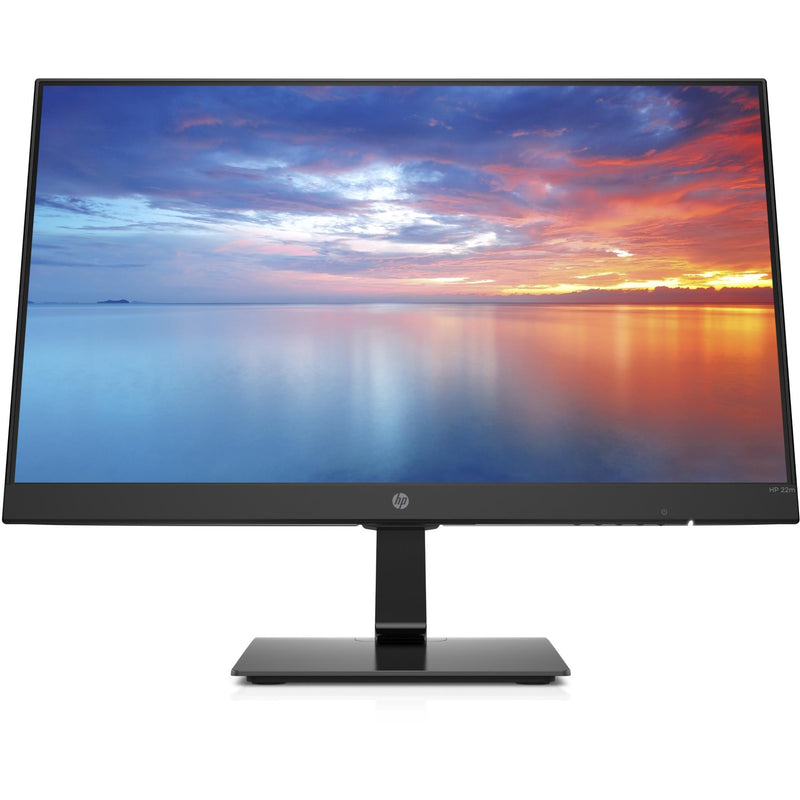

HP 3WL44AA 21.5\" FHD IPS Monitor


HP
Price: $169 to $200

HP 3WL44AA 21.5″ FHD IPS Monitor

Key Features

21.5″ IPS LED Display

FHD (1920 x 1080 @ 60 Hz)

1 HDMI 1.4 (with HDCP support); 1 VGA

Contrast ratio: 1000:1 static

14ms grey to grey response time

Anti-glare

On screen controls

Tilt: -5 to +20°

178° horizontal and vertical viewing angles

If you are going to work from a laptop then  a docking station might come handy. A docking station allows you to connect to devices that you could not use in the past. Devices like flat-panel monitors and digital cameras are not always compatible with laptops.  It provides a single connection point that allows a laptop to use a connected monitor, printer, keyboard, and mouse.

This allows a laptop to function like a desktop computer.

UPTab USB-C Docking Station with Ethernet, DisplayPort 4K, HDMI 4K, VGA, 3 Port USB 3.0, USB C PD and SD/TF Card Reader

Pic above is from https://au.uptab.com/uptab-usb-c-docking-station/

UPTab

USB-C Docking Station

$192.62 $129.41

Some more docking station gadgets

  1. StarTech Thunderbolt 3 Dual-4K Docking Station. …
  2. Targus USB 3.0 Dual Video Docking Station with Power. …
  3. AmazonBasics USB 3.0 Universal Laptop Docking Station. …
  4. Kensington USB 3.0 Docking Station. …
  5. Toshiba Dynadock V3. …
  6. Microsoft Surface Dock. …
  7. J5Create JUD500 USB 3.0 Ultra Station. …
  8. Dell USB 3.0 UHD Triple Video Docking Station.

or just get one from officeworks 

https://www.officeworks.com.au/shop/officeworks/p/kensington-universal-usb-c-powered-laptop-dock-sd4600p-kensd4600p
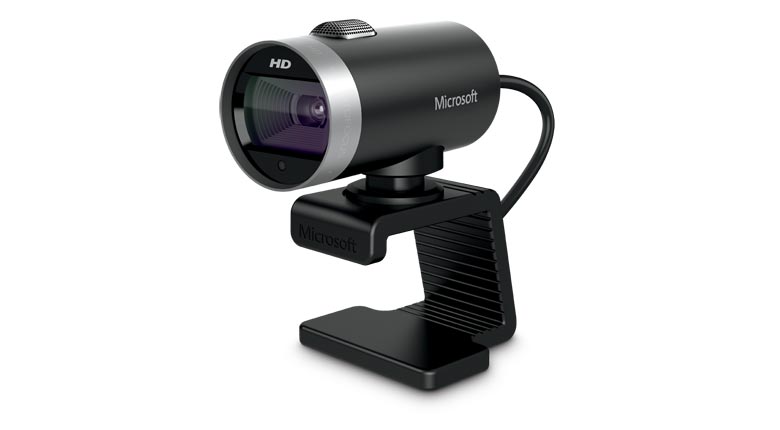
If you are going to do video conferencing or use zoom you will need a webcam 
 
LifeCam Cinema
 
This simple yet high quality webcam will do the job and last you a long time.

Lifecam Cinema

https://www.microsoft.com/accessories/en-us/products/webcams/lifecam-cinema/h5d-00013

Part #: H5D-00013

MSRP

$69.95


Enjoy high-quality 720p HD widescreen video together with crystal clear audio, with the LifeCam Cinema

You dont need a high end camera with ridiculous price, this will do the job

"Ref

Provide guidance on what is a safe home office environment, including what a good work station set up looks like and how to keep physically –  https://www.safeworkaustralia.gov.au/covid-19-information-workplaces/working-home

Fairwork Australia – https://www.fairwork.gov.au/employee-entitlements/flexibility-in-the-workplace/flexible-working-arrangements

Find out which employees can request flexible working arrangements, how to work..

Filed Under: 2020, Australian, Internet, Laptop, Solution, Top 10 Tagged With: Australia, Online, Technology, VIDEO

5 PC hardware pieces you’ll want to try out in 2017

February 13, 2017 by admin Leave a Comment

teh gigabyte laptop

With new-fangled technologies making their way onto the marketplace seemingly every day, PC users are by now undoubtedly familiar with the need to upgrade their systems on a regular basis. Not all hardware pieces are created equal, however, which is why we’ve taken the time to shine a spotlight on the best items currently available in stores:

The ideal video card

For many PC rigs, video cards are unquestionably the stars of the show. They bear the brunt of responsibility when it comes to displaying visual elements on your monitor, which means that everything from games to high-definition videos need them in order to function properly. Luckily, nowadays you can find excellent deals on video cards in online stores such as PC Byte, where a top gaming card like the MSI Radeon RX 480 can be found for just a shade over $400. This video card is powerful enough to allow users to experience the world of virtual reality gaming, while at the same time featuring advanced cooling capabilities that are designed to keep it running silently even when under heavy use.

A processor to rule them all

Next to video cards, processors are just as essential when it comes to keeping your PC running smoothly. Right now, the Intel Core i5-7600K stands out due to offering the best value in its price range. Available for less than $250 dollars in most online stores, the processor is strong enough to handle even the most demanding games, while also boasting some nifty overclocking potential. While it may lack the insane number of cores that defines other high-end processors, the Intel Core i5-7600K is powerful enough to fulfil the needs of most PC users.

A reliable UPS

As electrical grids age and power outages become even more common, the chances of experiencing a blackout that causes you to lose valuable data on your PC will also increase exponentially. This makes the need to purchase a reliable uninterruptible power supply even more urgent. UPSes can be found across multiple prices ranges, but for the average PC user a decent one can be bought for less than $200. For instance, the CyberPower CP1500PFCLCD 1500VA has enough juice to handle most gaming machines, even those running dual GPUs. It’s also quite compact for its load support, and boasts an LCD screen that allows you to monitor your computer’s status closely.

The speediest RAM

Costing much less than a new video card or processor, a good-quality memory card can nevertheless help your PC run much faster than before. Nowadays DDR4 is the latest standard in the industry, but you can still find great deals on DDR3 RAM if your motherboard doesn’t have the appropriate slots for the newest technology. Most PCs will be fine with 8GB of memory, but you can upgrade to 16GB if you really want to stay safe on this front for the next couple of years as well. To that end, the Kingston HyperX Fury Black 16GB DDR4 currently retails at less than $120, making it a great option for people who are relatively short on funds.

The best storage option

Your computer’s storing capabilities are what ultimately determine its capacity to hold whatever it is you want to keep on it. While cloud-based solutions may one day render hardware limitations obsolete, for now having a good storage option is still essential if you want to have apps and games on your PC. While SSDs used to lag behind traditional hard disks when it came to size, they’ve recently caught up. The Samsung 850 EVO 500GB, for instance, retails for around $150 and boasts tremendous read speeds that regularly hit 500MB/second. It can be purchased in versions ranging from the comparatively tiny 120GB to the absolutely massive 4TB, enough to handle the requirements of even the most dedicated of software hoarders.

awesome keypad with lights  pc bytes

Whether you want to use your PC as a high-end gaming rig or if you simply want it to be powerful enough to run full HD videos smoothly, the aforementioned items will give your system the kick it needs to stay with the times. So don’t hesitate to make some timely investments today in order to have a competitive PC tomorrow.

Filed Under: Laptop, PC Tagged With: Gadgets, Gaming, Software

Ultrabooks Vs Laptops: What’s the Difference between them

May 16, 2012 by admin 4 Comments

There is not much different from a new laptop and a ultrabook with the basic Concepts, but when you look much deeper into the technology and features  you can clearly see the difference.

Difference between ultrabooks and Laptops

An Ultrabook is a higher-end type of sub notebook defined by Intel. Ultrabooks are designed to feature reduced size and weight without compromising performance and battery life. They use low-power Intel processors with integrated graphics, and unibody chassis to fit larger batteries into smaller cases. Some models have limited external ports (e.g. USB) due to their extremely thin profile.

clip_image001

Image courtesy of Intel Free Press on WikiMedia

At a presentation at the Consumer Electronics Show, an Intel Manager stated that market analysis revealed that screen size motivated some of the reluctance to switch to 13″ Ultrabooks. As a result, Intel is planning to ensure, through cooperation with manufacturers, a 14 or 15-inch screen on 50% of the 75 Ultrabooks that will likely come to market in 2012


Laptops and ultra books both have their unique features and options the laptop is the more traditional pc laptop, while the ultra-book is the more modern version of the laptop.

Filed Under: 2012, Asus, Computer, Gadgets, Laptop Tagged With: Netbooks, Ultrabooks

Tablets popular for christmas Gifts

February 11, 2012 by admin 1 Comment

Despite the gloomy economy, shoppers all over the world  are expected to shell out for tablet computers this December making them one of the hot gadgets gifts  this Christmas and holiday season

amazon-kindle-fire review prices

Amazon Kindle Fire pictures above

This new Techo gadget are the most-desired electronic devices this holiday season. Of all the gifts people are craving, tablets with clothing taking the no 1 spot according to a consumer Association.

Bob 56, plans to purchase an iPad for his son and his sister  who lives in  Washington. His parents live in Florida. So he’s excited to be able to video chat with his parents – them on the new iPad, him on his iPhone.

Tablets were on many peoples wish lists last year, but they were too pricey and they technology was still new so was still getting adapted too, now with smartphones  everybody is getting more exposed to the new touchscreen technology.

Barnes & Noble Nook Color-w600 reviews

Barnes and noble tablet pictures above

Two of the most promising competitors come from online retailer Amazon.com Inc. and book seller Barnes & Noble Inc.

Some price released recently for the

  1. iPad’s $499 base price
  2.  Amazon’s Kindle Fire, which costs $199
  3. Barnes & Noble’s Nook Tablet, which costs $249.

Tablets are popping up in unexpected places, too. with  the ipad being used to control customised helicopters that can fly indoors , buggys made to be controlled by the iphone and ipad and many more gizmos.For some people, the device has become indispensable for playing and working.

But while many think of the iPad as synonymous with the word “tablet,” plenty of shoppers will be looking for a more affordable tablet to give this year with heaps of new customised software versions coming out with new android software.

“When tablets start to get  below $200, sales go up dramatically,” says technology analyst Rob Enderle and is going to be evident in the good cheaper prices for these gadgets these years. Check out some reviews and pics on the latest tablets here. “PC TABLETS REVIEWS”

Filed Under: 2011, Amazon, Apple, Asus, Computer, Featured, Gadgets, Internet, Ipad, Kindle, Laptop, PC, Top 10 Tagged With: Gadgets, Gifts, Tablets, Valentine Day Gifts

Holiday Gifts and online spending surge benefits e-marketers

December 26, 2011 by admin Leave a Comment

Its that part of the year  when everybody is ready to splurge  and indulge in a little bit  a fancy gadgets  or  clothing. With the increase in online presence of  designer clothing lines, perfume shops and gadgets and  electronic and computer accessories  anyone or everyone can now compare and shop with a click of a mouse , also to benefit of many in the e-marketing  Industry. The ease of set up of a e shop  has the e-commerce advantages in the price factor over setting up a brick and mortar shop has further advanced this  sector.

online sales selling ipad iphone

Online spending habits for 2011- 2012

The boxing day sales  and then the Christmas rush will see the online sales booming over this holiday period , so what has been selling like hotcakes online.

According to many online news and  electronic websites, gadgets seem to be one of the favourite gifts this happy season wether if was bough online or then  through a brick and mortar shop.  Australian online news journal SMH says its Bricks versus clicks this holiday season , as online stores battle with retail shops. In fact  the brick and  mortar shops have joined the Online shopping revolution  with J B HI FI  and  Harvey Norman opening their very own cheap prices Direct import online shops.

Top selling / Sales  for Online Gadgets

PC magazine says “iOS Devices Dominate Mobile Online Shopping” which will certainly see the smart e-marketers make a move on this one. They say “Statistics released this week from the retail analysis firm Rich Relevance indicate that iPads and iPhones are the top mobile devices that consumers use to make retail purchases”  . According to IBM, the iPhone and iPad ranked first and second for consumer shopping on mobile devices on Black Friday on of the High traffic Sales day in the US.

“For the holiday season through Dec. 18, nearly $32 billion has been spent online, a 15 percent increase versus the corresponding days last year” says ecreditdaily.com.

The guardian.co.uk says that e-retailing group Interactive Media in Retail Group (IMRG) forecasts in “UK consumers will spend £186m online on Christmas Day, a retail group forecasts, with the Boxing Day spend expected to be in excess of £365m” One of the popular UK online selling websites is “Argos” .

Popular online sales In UK

The most popular items were audio equipment, laptops , tablets  and gaming items, but customers also snapped up domestic appliances such as kettles, fryers, slow cookers, toasters and vacuum cleaners which were also popular in the stores.

Shop Amazon’s New Kindle Fire

Technorati Tags: online spending figures,Online spending data,online sales statistics,Popular online gadgets sales,Best selling gadgets

Filed Under: 2011, Affiliate, Amazon, Apple, Australian Bloggers, Done Deals, Featured, Gadgets, Ipad, Kindle, Laptop, Marketing, Netbook, PC, Review, Top 10 Tagged With: E-commerce, Online Sales, online selling

Asus EEE pc Netbook 1018PB

July 12, 2011 by admin 1 Comment

The new Asus EEE pc Netbook is super small and handy to lug around or even used as aspare pc for the price it sells at. It has a Atom N450 1.66GHz, processor with  1GB ram , 250GB 10.1” LED Netbook.

Asus EEEPC  Netbook Features in a glance

Widescreen – ASUS – Windows 7 – With Built-in Camera – Intel CPU – Netbook – 250 GB disk.

Asus EEE pc 1018PB Atom N450 1.66GHz 1GB 250GB 10.1' LED Netbook

This ASUS Eee PC 1018P Netbook offers real big performance in a neat and compact design. The 1018PB-BK801 runs on the latest Microsoft Windows 7 Starter and  has a godd size 250 GB hard drive.

It supports SD, MMC and SDHC flash memory cards which makes it easier to trf stuff from your cameras or smartphones to the laptop. The built-in webcam. VGA, USB 2.0 connections make it easier to attach  and transfer stuff and also do video chat taking your small little laptop wherever you want. More info…

Technorati Tags: Asus Eee PC 1005HA-MU17-WT,ASUS Eee PC Seashell 1018P-PU27-BK,ASUS Eee PC 1018P,eepc,ee pc


Some other Mini laptops you might be interested in (check link for updated prices from Amazon)

Dell Pretty Pink 10.1" iM1018-4033PRPNetbook PC with Intel Atom N455
$287

HP Mini 110-3530nr – Atom 1.66 GHz – 10.1″ – 1 GB Ram – 250 GB HDD
$250

Acer Aspire One AOD255E-13639 10.1-Inch Netbook (Diamond Black)

$409

Acer Aspire One 722-BZ197 Netbook – Black

Filed Under: Amazon, Computer, Laptop, Netbook, PC Tagged With: Amazon, Cheap, laptop, Mini PC, Netbook, Review

  • Page 1
  • Page 2
  • Go to Next Page »

Primary Sidebar

Recent Posts

  • Underwater Drones for Recording Video and Taking Pictures
  • Why I chose hostgator for blog hosting
  • Top 10 Software Programs For Your Windows PC
  • What you should know before investing in Cryptocurrency and bitcoin
  • The Best Social Media Platforms for Marketing a Gaming App

Recent Comments

  1. Patrick McCormick on How to secure your desktop and laptop with antivirus software
  2. JJ on 20 Top brands with affilate programs to make you money in 2019
  3. JJ on This WPengine Genesis Pro Deal Will Give You 35 Studiopress themes
  4. Lisa Gomes on 16 Ways to Make Money Online Working From Home
  5. KatVine on This WPengine Genesis Pro Deal Will Give You 35 Studiopress themes

Archives

  • June 2022
  • February 2022
  • July 2021
  • May 2021
  • April 2021
  • March 2021
  • November 2020
  • September 2020
  • August 2020
  • July 2020
  • June 2020
  • May 2020
  • April 2020
  • March 2020
  • February 2020
  • January 2020
  • December 2019
  • September 2019
  • August 2019
  • July 2019
  • June 2019
  • April 2019
  • March 2019
  • February 2019
  • January 2019
  • December 2018
  • November 2018
  • October 2018
  • September 2018
  • July 2018
  • June 2018
  • April 2018
  • February 2018
  • January 2018
  • December 2017
  • October 2017
  • September 2017
  • July 2017
  • June 2017
  • May 2017
  • April 2017
  • March 2017
  • February 2017
  • January 2017
  • December 2016
  • November 2016
  • October 2016
  • September 2016
  • August 2016
  • July 2016
  • May 2016
  • April 2016
  • March 2016
  • February 2016
  • January 2016
  • December 2015
  • November 2015
  • October 2015
  • September 2015
  • August 2015
  • July 2015
  • June 2015
  • May 2015
  • March 2015
  • February 2015
  • January 2015
  • December 2014
  • November 2014
  • October 2014
  • September 2014
  • August 2014
  • July 2014
  • June 2014
  • May 2014
  • April 2014
  • March 2014
  • February 2014
  • January 2014
  • November 2013
  • October 2013
  • September 2013
  • August 2013
  • July 2013
  • June 2013
  • May 2013
  • April 2013
  • March 2013
  • February 2013
  • January 2013
  • December 2012
  • November 2012
  • October 2012
  • September 2012
  • August 2012
  • July 2012
  • June 2012
  • May 2012
  • April 2012
  • March 2012
  • February 2012
  • January 2012
  • December 2011
  • November 2011
  • September 2011
  • August 2011
  • July 2011
  • June 2011
  • May 2011
  • April 2011
  • March 2011
  • February 2011
  • January 2011
  • December 2010
  • November 2010
  • October 2010
  • September 2010
  • August 2010
  • July 2010
  • June 2010
  • May 2010

Categories

  • $heldon $ingh
  • 2010
  • 2011
  • 2012
  • 2013
  • 2015
  • 2017
  • 2018
  • 2019
  • 2020
  • 2021
  • 2022
  • Accounting
  • Adsense
  • Affiliate
  • Amazon
  • Anti Virus
  • Apple
  • Apps
  • Asus
  • Aussie
  • Australia
  • Australian
  • Australian Bloggers
  • Australian wordpress hosting
  • Banks
  • Blog-Hosting
  • Blogger
  • Blogger Tool
  • Blogger Tools
  • BloggerTools
  • BuddyPress
  • CARS
  • CDN
  • Celebrity
  • Clickbank
  • Compare
  • Computer
  • Domains
  • Done Deals
  • Ebook
  • Email
  • Facebook
  • Featured
  • Finance
  • Free
  • Gadgets
  • Google
  • Gpost
  • Guide
  • Hackers
  • Hosting
  • India
  • Internet
  • Ipad
  • Kindle
  • Laptop
  • Make money blogging
  • Makemoney online
  • Marketing
  • Melbourne Cup
  • Movies
  • Netbook
  • Network
  • News
  • Online betting account
  • PC
  • Review
  • Search
  • SEO
  • sheldon singh
  • Software
  • Solution
  • Sports
  • Subscribers
  • Taxes
  • Technology News
  • Themes
  • Top 10
  • Tutorial
  • Video
  • Wacky
  • web hosting
  • Website Review
  • Wierd
  • Windows
  • wordpress
  • Wordpress 3.0
  • Wordpress 3.1
  • wordpress themes
  • World cup
  • Wp Answers
  • WP Turbo
  • WPMU

Footer

Design

With an emphasis on typography, white space, and mobile-optimized design, your website will look absolutely breathtaking.

Learn more about design.

Content

Our team will teach you the art of writing audience-focused content that will help you achieve the success you truly deserve.

Learn more about content.

Strategy

We help creative entrepreneurs build their digital business by focusing on three key elements of a successful online platform.

Learn more about strategy.

Copyright © 2026 · Genesis Sample on Genesis Framework · WordPress · Log in