• Skip to primary navigation
  • Skip to main content
  • Skip to primary sidebar
  • Skip to footer

Digital Grog — Australia’s Tech, Gadgets & Digital Life Unfiltered

Digital Grog is Australia’s go‑to tech blog for sharp reviews, digital trends, AI tools, gadgets, cybersecurity updates, and practical how‑tos covering the latest in Aussie technology

  • About Us
  • Contact Us
  • Block Examples
  • Landing Page

Technology

Top 10 Software Programs For Your Windows PC

February 13, 2022 by admin Leave a Comment

We all have computers at home or at office and they are some programs or software that we just can’t do without for the daily personal work or office work. These program or tools are suitable for most windows based PC’s.

This list of programs are essential software for every computer user

While a lot of the time, people stick to free and trial software which can sometimes do the job, many a time this software is kind of limited in features due to it being free.  If your looking for a good deal, then Black Friday and cyber Monday (a US online discount day) is one of the days that most online software goes at a discount and it’s a good time to get an online deal related to computers even if you are in Australia.

Today I bring you this essential list of software that most computer owners should have on their computer.

Some of these are free/trial software and some of them you pay to get the full versions.


1. ANTIVIRUS

While windows inbuilt antivirus security tool does a good job of blocking nasties on your computer, it is always good to get a good antivirus just to have that extra little bit of protection when your online.

Get an antivirus and computer security software bundled in one . Top providers are AVG, Mcafee, Norton, Bitdefender (check our entire recommended list here). Many of them offer Free trial limited versions which you can use for a long time.

anti virus


2. Unzip utility  / Zipped file extractor

Have you ever heard of winzip or winrar. Its that program that lets you unpack or unzip a locked  or zipped folder and see and use the contents within.

The WinZip file archiver creates archives in ZIP format by default, and can open archives of all popular compressed formats: ZIP, ZIPX, RAR, 7Z, TAR, GZIP, VHD, XZ, and POSIX TAR

The most popular programs are winzip and winrar, but there are others too. Winzip has a black friday deal on. Google it.

Capture unzipped

There is a  entirely free version that  you can use called 7 ZIP. 7-Zip is free software with open source. The most of the code is under the GNU LGPL license.

free unzip tool

Its available for download here. https://www.7-zip.org/

Supported formats:

  • Packing / unpacking: 7z, XZ, BZIP2, GZIP, TAR, ZIP and WIM
  • Unpacking only: AR, ARJ, CAB, CHM, CPIO, CramFS, DMG, EXT, FAT, GPT, HFS, IHEX, ISO, LZH, LZMA, MBR, MSI, NSIS, NTFS, QCOW2, RAR, RPM, SquashFS, UDF, UEFI, VDI, VHD, VMDK, WIM, XAR and Z.

3. Photo Image Editor

Most windows PC’s come with paint tool, however that is just not enough to get photos enhanced or fixed or if your kids want to do their homework. Some good photo tools are Paintshop Pro, Adobe photo shop, Paint.net Gimp.

An online subscription photo editor CANVA  is of great value if you want to create  good graphics easy and quick with a large in built library. If you want an online photo or image editor then Pixlr will do the trick.

Tools like these also help touch up photos taken on your smartphone or camera.

photo and image editor buy


4. Mp3  Downloader/Player

So you need songs to entertain yourself on your pc.

One of the most popular song programs is spotify, youtube or google music today which runs on a monthly subscription model. There are  good value if you like to listen to fresh and old music and create your own playlists.

There are websites like mp3jam and software like Audials that gets mp3s for you from popular online streaming websites.

Music Bee and Foobar are good mp3 music player programs to have ( Winamp used to be my favorite at one time)

MX player is a good Mp3 player for your smartphone

stream youtube online ripper


5. Desktop program/ Icon Organiser

I use fences for organising all the shortcuts that gets created on my desktop for programs that get installed on my computer.

You can manually organise all program or folder shortcuts onto your desktop with windows, however fences by stardock can help make your desktop look cool and clean while still organising it in a good way.

desktop funny


You can set it up so that the icons show only when the mouse is on top of it or you can make the icons on desktop blend into the background. Many more cool  customisation features are available.


6. PDF opener/ editor

Adobe is one of the leading programs for PDFs and they are good.

If you are looking to get pdf editors then have a look at this website for more programs. https://www.softpedia.com/hubs/Edit-PDF/ .

You can also get free programs from Microsoft store.


7. Microsoft Word /Powerpoint software

Today software like Microsoft word and PowerPoint, Publisher is essential for you or then for your kid’s homework. Microsoft software is not cheap and there are alternatives that will do the job like Google docs & Libre office.

Many schools and Uni’s offer student deals for office 365 and Microsoft software


8. VPN Software

If you like watching shows that are available in other countries and are getting blocked or if you want to anonymously download or browse websites then a VPN is what you need. Most VPN’s are easy to set up today with a few clicks.

They also enhance your PC security while browsing or downloading bit torrents due to not leaving any IP footprints. Popular VPN software is NORD VPN, Froot VPN, IP vanish, Express vpn and more.

Here is an entire list on our blog.

froot vpn australia


VPN are also getting popular due to Netflix, Amazon Prime and Disney plus. With a VPN you can check and watch shows  that are exclusive to other countries Netflix users and watch it . I know Breaking bad was available in many countries via netflix before Australia.

9. Movie and Media player

The best media player for years is VLC media player. You throw any file format at it and it will play it. People use it more for playing Movies though rather than mp3s. Get VLC media player here. It’s free.

https://www.videolan.org/vlc/index.html.

I also like GOM Player and MX player, but there are other popular software today like KM player, AIMP and the free windows media player.

DLNA software for tv streaming

[Plex streaming player for your movies and videos on computer via wifi]

Good DLNA/WIFI players to stream/play movies to your other devices or on your TV around the home is KODI and PLEX.

Emby server is another easy to use Home movie server  to play movies on your TV or tablet.

10. Best screen capture tool

If you want to capture your computer screen or screen that you are browsing on the internet – the best free tool to use is windows snipper (snipper tool old version). ( the new screen snip introduced in Windows 10 is crap)

I use screen hunter to get that little bit of extra more flexibility when capturing the screen and you can set easy key shortcuts to open the program if you’re a regular user.

If you want heaps of utilities with your screen capture for free then  ShareX software is another option.

screen hunter tool capture tool

Microsoft has just updated their new snip tool in windows 10, but  I already dont like their update as it does not have user friendly save options.

11. Free space on my computer

There are software’s that will analyse your computer and tell you which stuff on the computer is taking the most space.

So, you can run this program and then delete stuff to make more space on your computer.

This program I use is wiztree  for this. Its good  to keep it handy – as a full computer makes your computer run slow and sluggish just like a full tummy. This tool makes it makes it easy to reduce storage of unwanted large files by  giving an idea of size of files on your pc so that  you can delete unwanted ones.

Auslogics Duplicate finder tool is also a good tool to find duplicate files on your computer taking up a lot of space.

12. Belarc advisor

find computer information specs

This is useful program to have to see all the hardware and software specs of your computer. It will run checks on your computer and tell your how much memory it has, what operating system it has, what hard drives it has, what processor and circuit board it runs and much more information that you would expect that it would extract.

It is good information to give your PC repair guy if he needs it or to check if you need to upgrade hardware on your computer. If you want to find out your windows  software keys for your windows 10,7,8  or your windows office keys then the Jellybean key finder software might also help you.

Lin to software: Belarc Advisor | Belarc, Inc.


Hope you enjoyed my list of essential software for your  windows pc.  My top go to for downloading tools or searching for software are mostly direct from publisher sites or then I use these handy sites like softpedia or cnet download  en.softonic.com and fosshub.

Some other programs while not essential, I can recommend are

  • Filezilla for FTP
  • Camtasia Screen recorder for screen video capture

I do have heaps to add to this post and I can go on recommending tools that I use or have used previously, but I will keep it to 12 for now and add at a later stage.


Let me know if you ended up downloading any of these tools and how did you go.

Filed Under: Software, Windows Tagged With: 2019, Technology

7 Top Electric Cars Available in Australia

March 6, 2021 by admin Leave a Comment

EV cars are the future for now while Hydrogen Fuel Cell Car manufacturers are still developing and refining their car  technology.

In a recent announcement abcnews/Technology/electric696  from General motors one of the leading automobile manufacturers of the world, announced that they had set a goal of making the vast majority of the vehicles it produces electric by 2035. It will offer 30 all-electric models worldwide by the middle of the decade.

We don’t know if it is a bit too late, as Chinese automakers have been striving to make EV cars since 2014 and has already made huge strides into this sector with government subsidies supporting them.

Wall Street has cheered the shift by GM which says the industry has reached a history-changing inflection point for mass adoption of electric vehicles. Australia might benefit from this move if the US decides to source resources for batteries from local lithium and mineral companies over here.

Sales for electric cars have been growing substantially over the last 12 months, with figures sourced by the Electric Vehicle Council (EV Council) showing 6,718 fully electric (EV) and plug-in hybrid (PHEV) cars were sold in Australia in 2019.

This is a 203% jump from the 2,216 sold in the previous year. China is leading the change into EV with the mass production of cars and bus with EV capacity.

Let us look at some of the options available to us here in Australia

Top Small EV Cars Australia

  • BMW i3
  • Hyundai Kona Electric(2019) & Hyundai Ioniq Electric (2020)
  • Nissan Leaf (2019)
  • Tesla Model 3 (2020)
  • Nissan Leaf
  • Mini Cooper SE Hatch
  • Porsche Taycan

BMW i3

The BMW I3 is a compact hybrid or all-electric with a 260 km all-electric range and less than 200 total horsepower. It can go more than 260km with petrol.

BMW i3 Australia

Image from https://www.westcoastbmw.com.au/models/bmw-i/i3

MSRP: From AU$71,900

Range: 260 km battery-only

Maximum power: 135 kW

Battery: 42.2 kWh 352 V lithium-ion

Kerb weight: 1,290 kg

Transmission: 1-speed automatic

The BMW i3 has different EV models with different capacity and horsepower within the i3 range.

Charging:

Charging the i3 can be done via a regular household plug which will take around 19.5 hours to charge the battery to 80%. BMW has redesigned its Wallbox which can charge the i3 to 80% capacity in 3.2 hours. Using a 50kW DC outlet will get it done in 42 minutes

Hyundai Kona Electric

hyundai kona electric australia

The refreshed 2021 Hyundai Kona Electric has been unveiled recently. With the new Upgrades to Hyundai’s Smart Sense safety suite, it includes Blind-Spot Collision-Avoidance Assist (BCA), Rear Cross-Traffic Collision-Avoidance Assist (RCCA), Leading Vehicle Departure Alert (LVDA), Safe Exit Warning (SEW), and Rear Seat Alert (RSA).

Already existing features were forward Collision-Avoidance Assist with pedestrian and cyclist detection (FCA-Ped), Smart Cruise Control with Stop & Go (SCC w/ S&G), Lane Following Assist (LFA), Lane Keeping Assist (LKA), Intelligent Speed Limit Warning (ISLW) and Driver Attention Warning (DAW).

A nice little upgrade is that passengers in the second row now also benefit from a USB port of their own.

The Kona uses regenerative braking which is a system that captures kinetic energy during deceleration, storing it in the battery so it can be used as electricity to power the electric motor. This system is used in many electric cars today.

The updated Hyundai Kona Electric is due in Australia sometime in the first half of 2021 until then you have the 2020 model if you’re keen. Hyundai also has the Ioniq Electric (2020) which is a 5-seater sedan.

Hyundai’s Kona Electric Elite has been named RACV’s EV of the Year for 2020, under $65,000.

MSRP: From AU$60,740

Range: 557 km battery-only

Acceleration 0-100 km/h: 7.6 seconds

Make: Hyundai Motor Company

Dimensions: 4,180 mm L x 1,800 mm W x 1,570 mm H

Approximate model prices

Elite – AU$60,740

Highlander – AU$65,290

Tesla Model 3 

Tesla Electric Vehicle Australia

Tesla Model 3 made available in Australia in August 2019 for $66,000 AUD is Australia’s most popular electric vehicle accounting for 70% of EV sales in 2019. While most teslas are made in US, the 2021 Tesla Model 3 Standard Range Plus and Long Range sold in Australia will now be made in China.

The tesla Model3 is a mid-range car. You can the tesla in different configurations like standard range, long range and performance and is priced accordingly.

The entry-level 2021 Tesla Model 3 Standard Range Plus starts from $66,900, while the mid-spec Model 3 Long Range now starts at $81,900 plus ORCs, and the top-spec Model 3 Performance is priced from $90,900

MSRP: From AU$66,900

Warranty: 4 yr/unlimited mi

Range: 508 to 657 km battery-only

Dimensions: 4,694 mm L x 1,849 mm W x 1,443 mm H

Acceleration 0-100 km/h: 3.3 to 5.6 seconds

Tesla has 30+ charging stations around Australia and you can install a charger at your home for overnight charging. They have app to let you know when your car is done charging.

charging cords for EV cars tesla

At the time of writing the silver wall charging equipment coats $780 and you will need an electrician to install it. The mobile connector which allows you to use a standard power outlet to charge your car costs comes with your car (but charges at low speeds)

MG Motor’s new ZS EV (SUV)

MG British Chinese car brand EV

The Chinese-owned brand sold 268 all-electric version of its ZS compact SUV in 2021 to date after it debuted in late 2020.

Priced from $40,990 before on-road costs (or $43,990 drive away), the ZS EV undercuts many other models with battery-electric offerings. Renault’s compact Zoe hatchback is priced from $50,040, but was recently discontinued in Australia.

The ZS EV is fitted with a 44.5-kilowatt battery and has a driving range of 263 kilometres

MG Motor reckons it will sell about 3000 ZS EVs next year, which would make it one of the top-selling EVs in the country.

Nissan Leaf

Nissan Japan EV car for Australia

The Nissan leaf 40KWH car is available right now in Australia with a driveway price from $53,190. It’s got a 100% electric motor and comes with an 8 year/160,000km battery warranty.

The Leaf can be plugged into any standard Australian 240V electrical socket. With a Type 2 charging unit installed, the LEAF can reach full charge in 7.5 hours, so you can charge overnight and drive with 270km of range.

IT’S got a well laid out and straightforward dashboard with all your infotainment needs and has Apple CarPlay™ and Android Auto™

Charging times and km range will differ from model to model.

Models

  • 2020 Nissan LEAF ZE1
  • 2019 Nissan LEAF ZE1

MSRP: From AU$49,990

Range: 315 km battery-only

Battery: 40 kWh 350 V lithium-ion

Warranty: 5 yr/unlimited mi

Battery charge time: 21h at 220V

Make: Nissan

Public charging stations offer CHAdeMO charging, a fast-charging system that charges the LEAF’s battery from 20% to 80% in just 60 minutes.

The Nissan Leaf, has a ‘Turtle Mode’ which is created when you run out of battery to push you to get an extra few mile before the battery completely dies.

Mini Cooper SE Hatch

The three-door Mini Cooper SE Hatch shares its electric powertrain with parent company BMW’s i3

Its priced at $54,800 before on-road costs and includes standard features like wireless phone charging, Apple CarPlay, 8.8-inch display with sat-nav and voice recognition, 5.5-inch digital cluster, 12-speaker Harman Kardon audio system, head-up display.

It has an eight year/100,000 kilometres battery warranty.

Porsche Taycan

Porsche Taycan Turbo and Taycan Turbo S 2020 are the two new electric models from the Porsche stable. Porsche has sold 51 Taycans, which start at $191,000 before on-roads, and for which deliveries to customers commenced in late February.

It is no slouch on the speed with the electric vehicle completing the 0-100 dash in a claimed 4 seconds flat – 0.2 seconds faster than the equivalent 911.

EV NEWS

Honda wants two thirds of its sales to be electrified in some way by the end of 2030, while Audi, Jaguar, Volvo and Volkswagen will all have a substantial proportion of their vehicles powered by electrons during the next decade. Gas stations or service centres might disappear in the near future to accommodate EV charging stations.

According to KIA “No oil to change, no engine to manage, with fewer parts to wear down, electric cars are cost-efficient and easier to maintain than internal combustion engine vehicles.”

Arriving soon

Audi E- Tron, Mercedes Benz EQC, jaguar I pace, Renault Zoe, Volvo Xc60, Mini country man Hybrid.


Environmental aspects of electric cars

Electric cars have some disadvantages, such as: Reliance on rare-earth elements such as neodymium, lanthanum, terbium, and dysprosium, and other critical metals such as lithium and cobalt, though the quantity of rare metals used differs per car.

Can you tow an electric car?

On the off chance you do run out of electricity, contact your breakdown provider and ask for a flatbed truck to take you to a nearby charging station. Electric vehicles shouldn’t be towed with a rope or lift, as this can damage the traction motors that generate electricity through regenerative braking.

If you need to push the car to safety, there’s no power steering. There’s still a traditional car battery on board though, so there’s power to light up the hazard warning lights

Tesla and Renault, for example, advise owners to only use a flatbed truck for recovery. However, Nissan says that the latest Leaf can be towed with the front wheels raised, as this avoids damaging the traction motor. However, a flatbed is always the safest choice.

This is what happens when your battery is dead when you are driving a Nissan leaf https://leasing.com/car-leasing-news/what-happens-when-you-run-out-of-battery-in-electric-car/

How much charging an EV costs you?

You also can work from the total kilowatt-hours it takes to recharge the EV’s battery. If an EV requires 40 kWh to recharge a fully depleted battery, and the rate is 18 cents per kWh, that’s $7.20 for a fill-up.

The costs to you will depend on what you get charged from your electricity provider as calculated above. If you decide to charge from an outside charging station the cost could obliviously differ based on what they charge.

Difference between AC and DC charging?

AC charging points are slower and require you to BYO charging cable, while DC charging sites are faster and usually come equipped with a cable that plugs into your car.

The two most popular charging types in Australia are CCS and ChaDeMo. CCS combines the AC and DC charging inputs into one plug, while ChaDeMo is DC-only and requires a secondary AC charge point.

These are also different types of AC sockets referenced as Type 1 and Type 2.

Approximate calculated charging times for different charging methods.

Wall socket (2.4kW) = 24+ hours

Home wall box (3-11kW) = 7-12 hours

Public AC charging (7-22kW) = 4-7 hours

Public DC fast/rapid charging (25-150kW) = 1-2 hours

Public DC ultra-rapid/high-powered charging (150-350kW) = 20 – 60 minutes

How long does EV batteries last?

Most EV manufacturers have a five to eight-year warranty on their battery. However, the current prediction is that an electric car battery will last from 10 – 20 years before they need to be replaced.

EV cars and insurance

Electric cars have fewer moving parts than petrol and diesel cars. Some components like the lithium-ion batteries are very expensive to repair if damaged. Insurance providers take this into account when calculating premiums and it can be more expensive than normal car insurance premiums.

Cons of owing an Electric car

  • Electric cars have a shorter range than gas-powered cars.
  • Recharging the battery takes time.
  • More expensive than petrol-powered cars.

Car servicing with EV cars

Despite requiring little maintenance compared to gas-powered cars, EVs do still require regular maintenance, particularly for the braking system. There is similar maintenance requirements for lights, cabin filtration, suspension, tire rotation, body repairs, and windshield wiper blades for EV’s vs regular petrol/diesel cars.

Electric cars use completely different drivetrains, so you will not have to worry about routine oil changes that are necessary for traditional cars.

Government Rebates and Discounts for Electric cars

While electric cars can attract Luxury Car Tax some states do offer rebates for EV cars. In the ACT new EVs pay $0 stamp duty for the car purchase as well as a 20 per cent discount on registration.

In Victoria EVs are exempt from regular ‘luxury vehicle stamp duty and instead EV owners pay $8.40 per $200 of the market value of the vehicle, instead off $18. $100 off annual rego.

In Queensland both EVs and hybrids pay a reduced stamp duty – $2 per $100 up to $100K and $4 per $100 for anything over $100K. Regular ‘polluting vehicles’ pay up to $6 per $100 in stamp duty.

It’s expected that Battery Electric Vehicles (BEVs) and Plug-in Hybrid Electric Vehicles (PHEVs) will reach cost parity with Internal Combustion Engine (ICE) Vehicles by 2025.

Chinese EV Car Brands

While Chinese car makers were once known for knock offs of luxury brand cars, the EV market has brought some change to Auto makers in china.

Three Chinese car makers Nio, Xpeng and Li auto have been forging ahead with their  EV car releases.  All three of them are listed on the US stock exchange. Among these Li Autos – Li One is a electric car, however it also has a fuel tank that helps charge the inbuilt EV battery if needed to get extra kms and range from the vehicle.

What about Hydrogen fuel cell vehicles cars?

Toyota and Hyundai are putting money into this concept as more people start to accept it as an alternative fuel source apart from lithium battery technology.

20 Hyundai Nexo FCEVs (fuel cell electric vehicles) are to be trialled by the ACT government as part of a wind farm deal

Toyota recently unveiled a sleeker and longer-traveling version of Mirai, its flagship hydrogen-powered car.

What Is An FCEV?

In its simplest form, an FECV is a plug-less electric vehicle. The FCEV fuel is compressed hydrogen rather than gasoline. The fuel cell system combines the stored hydrogen with oxygen from the air, and the result is electric current, heat, and water. A FCEV generates its own electricity from hydrogen and oxygen emitting only water vapours. A fill-up takes approximately five minutes at one of the hydrogen fuelling stations.

Expect a car review on FCEV sooner than later from me on this blog.


Recalls EV CARS

https://www.tesla.com/en_au/support/model-s-safety-update

Links

https://www.carsguide.com.au/urban/hacks/what-happens-when-your-electric-car-runs-out-of-juice-77299

EV’s available in Australia – https://electricvehiclecouncil.com.au/about-ev/evs-available/

Calculator – Select your current car and compare it to a range of electric cars available today https://www.ergon.com.au/network/smarter-energy/electric-vehicles/calculator

Filed Under: Australia, CARS Tagged With: Auto, Car Technology, Technology

10 Tips To Get Ready Working From Home Successfully

July 4, 2020 by admin Leave a Comment

[et_pb_section fb_built=”1″ admin_label=”Section” _builder_version=”3.22″ custom_padding=”||0px|” z_index_tablet=”500″][et_pb_row admin_label=”Row” _builder_version=”4.4.2″ background_size=”initial” background_position=”top_left” background_repeat=”repeat”][et_pb_column type=”4_4″ _builder_version=”3.25″ custom_padding=”|||” custom_padding__hover=”|||”][et_pb_post_title title=”off” meta=”off” featured_placement=”above” admin_label=”Post Title” _builder_version=”4.4.2″ z_index_tablet=”500″][/et_pb_post_title][et_pb_text admin_label=”intro” _builder_version=”4.4.2″ background_color=”rgba(237,240,0,0.55)” custom_margin=”0px|5px|5px|5px” custom_padding=”0px|10px|10px|10px” z_index_tablet=”500″ border_radii=”on|10px|10px|10px|10px” border_width_all=”2px” border_color_all=”rgba(12,113,195,0.75)” border_style_all=”groove”]

​Not many people realised that they would be working from home this year, No thanks to the Bl**dy virus that has turned the world upside down.  The covid virus has got hundred and thousands of people sick and has changed our lives in so many ways.

People now have turned to working from home in large numbers due to this calamity. People are self-isolating out of fear and safety.  A lot many have learnt to manage their lives remotely through video conferencing and virtual meetings.  It is essential for you to have a plan if you are going to work from home. In this post, we are going to look at what you need to start working from home ( more like a checklist)

[/et_pb_text][et_pb_text admin_label=”A few things” _builder_version=”4.4.2″ custom_margin=”5px|5px|5px|5px” custom_padding=”10px|10px|10px|10px” z_index_tablet=”500″]

A few things to sort out before you begin to work from home.

  • Make sure you have a proper table and chair that follow appropriate safe, ergonomic standards
  • Get a sit stand up desk if needed
  • Take regular breaks
  • Screen size of your laptop/desktop
  • Lighting in the room
  • Good NBN OR Internet connectivity

[/et_pb_text][/et_pb_column][/et_pb_row][et_pb_row _builder_version="3.25" background_size="initial" background_position="top_left" background_repeat="repeat"][et_pb_column type="4_4" _builder_version="3.25" custom_padding="|||" custom_padding__hover="|||"][et_pb_divider _builder_version="3.21.4" z_index_tablet="500"][/et_pb_divider][et_pb_toggle title=" Table & Chair set up" open="on" admin_label="Toggle Table & Chair set up" _builder_version="4.4.2" title_level="h2" title_font="|700||on|||||" background_color="rgba(13,210,224,0.63)" background_image="https://www.digitalgrog.com.au/wp-content/uploads/2020/04/table-chair-set-up.jpg" background_size="contain" background_position="center_right" z_index_tablet="500"]

A proper table and chair set up is very essential if you are going to be working from home. The long hours (5 to 8 hours a day or more) sitting down can be tiresome, and you need to get your posture right, or you can damage your back or neck.  Luckily when you are in office, this is all taken care off by the workplace, so it is wise to take extra care with this while working from home.  This video here might give you a few tips.

[/et_pb_toggle][/et_pb_column][/et_pb_row][/et_pb_section][et_pb_section fb_built=”1″ _builder_version=”3.22″ custom_margin=”0px||0px|” custom_padding=”0px||0px|” z_index_tablet=”500″][et_pb_row _builder_version=”3.25″ custom_margin=”0px||0px|” custom_padding=”0px||0px|” z_index_tablet=”500″][et_pb_column type=”4_4″ _builder_version=”3.25″ custom_padding=”|||” custom_padding__hover=”|||”][et_pb_divider _builder_version=”3.21.4″ z_index_tablet=”500″][/et_pb_divider][/et_pb_column][/et_pb_row][/et_pb_section][et_pb_section fb_built=”1″ _builder_version=”3.22″][et_pb_row _builder_version=”3.25″ custom_margin=”0px|||” custom_padding=”0px|||” z_index_tablet=”500″][et_pb_column type=”4_4″ _builder_version=”3.25″ custom_padding=”5px|5px|5px|5px” custom_padding__hover=”|||”][et_pb_text admin_label=”sit stand up” _builder_version=”4.4.2″ background_color=”rgba(151,216,91,0.49)” custom_margin=”0px||0px|” custom_padding=”5px|5px|5px|5px” z_index_tablet=”500″ border_radii=”on|5px|5px|5px|5px” border_color_bottom=”rgba(12,113,195,0.61)”]

A sit stand up desk

Sitting down in front of a laptop for long hours can result in cramped shoulders or back. Why not invest in a sit stand up desk. This should allow you to do work while sitting and also do work while standing half the time.  This method does wonders for many.

[/et_pb_text][/et_pb_column][/et_pb_row][/et_pb_section][et_pb_section fb_built="1" specialty="on" padding_top_1="0px" padding_top_2="0px" padding_bottom_1="0px" padding_bottom_2="0px" _builder_version="3.22" custom_margin="0px||0px|" custom_padding="0px||0px|" z_index_tablet="500"][et_pb_column type="1_2" _builder_version="3.25" custom_padding="|||" custom_padding__hover="|||"][et_pb_image src="https://www.digitalgrog.com.au/wp-content/uploads/2020/04/break-capture.jpg" align_tablet="center" align_phone="" align_last_edited="on|desktop" admin_label="Image" _builder_version="4.4.2" z_index_tablet="500"][/et_pb_image][/et_pb_column][et_pb_column type="1_2" specialty_columns="3" _builder_version="3.25" custom_padding="|||" custom_padding__hover="|||"][et_pb_row_inner admin_label="Row" _builder_version="3.25"][et_pb_column_inner saved_specialty_column_type="1_2" _builder_version="3.25" custom_padding="|||" custom_padding__hover="|||"][et_pb_text admin_label="Take Regular breaks" _builder_version="4.4.2" z_index_tablet="500"]

Take Regular breaks

Take breaks as if you would do so at your office.  If you took a morning break and an afternoon break with a walk around your block while at the office – do the same when you work from home.

Exercise keeps you healthy and more productive. Don’t forget when in office you do take some time to have a chat with fellow colleagues as well, so make sure you break up your continuous work time.

[/et_pb_text][/et_pb_column_inner][/et_pb_row_inner][/et_pb_column][/et_pb_section][et_pb_section fb_built="1" _builder_version="3.22" custom_margin="0px||0px|" custom_padding="0px||0px|" z_index_tablet="500"][et_pb_row _builder_version="3.25" background_size="initial" background_position="top_left" background_repeat="repeat"][et_pb_column type="4_4" _builder_version="3.25" custom_padding="|||" custom_padding__hover="|||"][et_pb_divider _builder_version="3.21.4" z_index_tablet="500"][/et_pb_divider][/et_pb_column][/et_pb_row][/et_pb_section][et_pb_section fb_built="1" _builder_version="3.22"][et_pb_row _builder_version="3.25" background_size="initial" background_position="top_left" background_repeat="repeat"][et_pb_column type="4_4" _builder_version="3.25" custom_padding="|||" custom_padding__hover="|||"][et_pb_testimonial portrait_url="https://www.digitalgrog.com.au/wp-content/uploads/2019/11/Capture-unzipped_thumb.jpg" quote_icon="off" _builder_version="4.4.2" background_image="https://www.digitalgrog.com.au/wp-content/uploads/2012/08/wifi-signal-wireless.jpg" background_size="contain" background_blend="darken" z_index_tablet="500"]

Getting Ready to Work from home

Gadgets, Settings and Adjustments you will need to make.

[/et_pb_testimonial][et_pb_toggle title=”Work Monitors/ Docking stations” open=”on” admin_label=”Work Monitors/ Docking stations” _builder_version=”4.4.2″ background_color=”rgba(224,60,51,0.52)” custom_padding=”5px|5px|5px|5px” z_index_tablet=”500″ border_radii=”on|5px|5px|5px|5px”]

​WORK MONITORS: Turn your laptop into a Desktop. Your workplace monitors may be huge or dual monitors, so it enables you to see screens easily for long hours. Make sure you get a laptop which is easy to do work for long hours without strain on your eyes. Eye health is important too.

Get your laptop attached to your home desktop monitor or get your office laptop docking station to your home. Maybe get a laptop glare protector if you need one.

[/et_pb_toggle][et_pb_toggle title=”Proper lighting in room” open=”on” admin_label=”Proper lighting in room” _builder_version=”4.4.2″ background_color=”rgba(237,239,88,0.52)” custom_padding=”5px|5px|5px|5px” z_index_tablet=”500″ border_radii=”on|5px|5px|5px|5px”]

LIGHTS: ​If there isn’t suitable or sufficient light in the room, it can lead to a strain on your eyes affecting your work, so it is essential to have enough light while working and lights that are not reflecting too much on your work area. Adjust as needed.

[/et_pb_toggle][et_pb_toggle title=”Hydrate” open=”on” admin_label=”Hydrate” _builder_version=”4.4.2″ background_color=”rgba(67,137,193,0.52)” custom_padding=”5px|5px|5px|5px” z_index_tablet=”500″ border_radii=”on|5px|5px|5px|5px”]

HYDRATION: If you don’t have a water bottle on your desk at work, you should get one. Office aircon are known to get the air dry around you, and you need to hydrate, so don’t forget to do the same when you are working from home. Get your regular dose of hydration.

​

[/et_pb_toggle][et_pb_toggle title=”Using your own mobile for work” open=”on” admin_label=”Using your own mobile for work” _builder_version=”4.4.2″ background_color=”rgba(224,60,51,0.52)” custom_padding=”5px|5px|5px|5px” z_index_tablet=”500″ border_radii=”on|5px|5px|5px|5px”]

​COMMUNICATION: Enquire with your office how you would make calls to clients. If they provide an office mobile or if you can use your own mobile or home phone and claim deductions or claim expenses back from office.

If you use your own mobile, for Samsung mobile you can block caller id or hide your number for a single call by entering #31# before the number you wish to dial. If you are a iPhone user The quickest way to block your iPhone’s caller ID is to use the *67 trick, which is referred to as “star six seven”

[/et_pb_toggle][/et_pb_column][/et_pb_row][/et_pb_section][et_pb_section fb_built="1" _builder_version="3.22" custom_margin="0px||0px|" custom_padding="0px||0px|" z_index_tablet="500"][et_pb_row _builder_version="3.25" background_size="initial" background_position="top_left" background_repeat="repeat"][et_pb_column type="4_4" _builder_version="3.25" custom_padding="|||" custom_padding__hover="|||"][et_pb_divider _builder_version="3.21.4" z_index_tablet="500"][/et_pb_divider][/et_pb_column][/et_pb_row][/et_pb_section][et_pb_section fb_built="1" _builder_version="3.22"][et_pb_row _builder_version="3.25" background_size="initial" background_position="top_left" background_repeat="repeat"][et_pb_column type="4_4" _builder_version="3.25" custom_padding="|||" custom_padding__hover="|||"][et_pb_testimonial portrait_url="https://www.digitalgrog.com.au/wp-content/uploads/2018/09/toys-are-us.png" admin_label="Testimonial Headset with mic" _builder_version="4.4.2" z_index_tablet="500" border_color_top="#e02b20" border_width_all_portrait="2px" border_color_all_portrait="#e02b20"]

Headset with mic

You might need a good headset or headphones with mic to take part in video conferencing and training from home or then listen to training packages, without disturbing people at home or keeping conversations confidential.

Most laptops have a built-in camera nowadays, but if your doesn’t then just get one from your office or a  portable webcam from the tech shop or online.

[/et_pb_testimonial][/et_pb_column][/et_pb_row][/et_pb_section][et_pb_section fb_built="1" _builder_version="3.22"][et_pb_row admin_label="Row" _builder_version="3.25" background_size="initial" background_position="top_left" background_repeat="repeat"][et_pb_column type="4_4" _builder_version="3.25" custom_padding="|||" custom_padding__hover="|||"][et_pb_testimonial portrait_url="https://www.digitalgrog.com.au/wp-content/uploads/2020/03/kimmy-kadashin.jpg" admin_label="Record Keeping of Expenses" _builder_version="4.4.2" z_index_tablet="500" border_color_top="#e02b20" border_width_all_portrait="2px" border_color_all_portrait="#e02b20"]

Record Keeping of Expenses

Keep records of your expenses incurred due to working from home so that you can claim it from your office or then claim deductions if allowed. It is easy not to get all the expenses claimed back, which is due if you don’t keep detailed records and receipts.

[/et_pb_testimonial][et_pb_toggle title=”Plan your lunch or brekky in advance” open=”on” admin_label=”Plan your lunch or brekky in advance” _builder_version=”4.4.2″ background_color=”rgba(224,60,51,0.52)” custom_padding=”5px|5px|5px|5px” z_index_tablet=”500″ border_radii=”on|5px|5px|5px|5px”]

It is wise to plan your brekky and lunch in advance even though you are working from home to stop unnecessary interruptions at work, just like you would do so regularly. However, make sure you take your breaks.

[/et_pb_toggle][et_pb_toggle title=”Kids at home” open=”on” admin_label=”Kids at home” _builder_version=”4.4.2″ background_color=”rgba(237,239,88,0.52)” custom_padding=”5px|5px|5px|5px” z_index_tablet=”500″ border_radii=”on|5px|5px|5px|5px”]

​Set the rules. If you have kids at home while working, it can be difficult.  Have a sit-down conversation with your kids? Make them understand that you need minimal interruptions. Plan a daily routine for them as well, Learning time (online learning time), TV time and outdoor play time. Pre-plan activities for them to do.

[/et_pb_toggle][et_pb_toggle title=”Good Internet connection” open=”on” admin_label=”Good Internet connection” _builder_version=”4.4.2″ background_color=”rgba(67,137,193,0.52)” custom_padding=”5px|5px|5px|5px” z_index_tablet=”500″ border_radii=”on|5px|5px|5px|5px”]

​A good stress-free work time can be achieved with good internet connections and good connectivity. Make sure you test your laptop if set up to work from home first from your office before you bring it to home.

To avoid disconnections and lag while working – your office will need good virtual network set up, and also you will need a good internet connection. A good idea would be for your kids to not watch Netflix, YouTube videos or stream audio via internet during when you work – if this is possible.

[/et_pb_toggle][et_pb_toggle title=”Work Start /End Timing” open=”on” admin_label=”Work Start /End Timing” _builder_version=”4.4.2″ background_color=”rgba(224,183,96,0.52)” custom_padding=”5px|5px|5px|5px” z_index_tablet=”500″ border_radii=”on|5px|5px|5px|5px”]

All companies or workplaces have different rules, though you can expect quite a few to be the same when it comes to work start and end times. You need to plan your start and finish times.

If you are working from home, you save the travel time. So, with that bonus, you could possibly start a bit early and finish early.  Some offices don’t allow you to accrue flex time, and some do, so if its allowed maybe you can work an extra half hour every day and accumulate some flex with an early start. If its not allowed, then you can still start early and finish early and get more time to your day.

[/et_pb_toggle][et_pb_toggle title=”Psychology of working from home” open=”on” admin_label=”Psychology of working from home” _builder_version=”4.4.2″ background_color=”rgba(237,239,88,0.52)” custom_padding=”5px|5px|5px|5px” z_index_tablet=”500″ border_radii=”on|5px|5px|5px|5px”]

Many people will jump at the idea of working from home, not knowing what it entails or how they will cope. Some will succeed it doing it well, and some will fail miserably and not get much done affecting their productivity.

It is essential to know hat kind of work person you are to succeed, if you can get along just fine without an office formal atmosphere and work in your pyjamas that’s okay. But if you will find it hard to work in a casual home setting, maybe you will still need to dress (formals) and act the part to work from home. It’s all about getting your mind into the right frame of work.

[/et_pb_toggle][/et_pb_column][/et_pb_row][/et_pb_section][et_pb_section fb_built="1" _builder_version="3.22" custom_margin="0px||0px|" custom_padding="0px||0px|" z_index_tablet="500"][et_pb_row _builder_version="3.25" background_size="initial" background_position="top_left" background_repeat="repeat"][et_pb_column type="4_4" _builder_version="3.25" custom_padding="|||" custom_padding__hover="|||"][et_pb_divider _builder_version="3.21.4" z_index_tablet="500"][/et_pb_divider][/et_pb_column][/et_pb_row][/et_pb_section][et_pb_section fb_built="1" _builder_version="3.22"][et_pb_row _builder_version="3.25" background_size="initial" background_position="top_left" background_repeat="repeat"][et_pb_column type="4_4" _builder_version="3.25" custom_padding="|||" custom_padding__hover="|||"][et_pb_testimonial portrait_url="https://www.digitalgrog.com.au/wp-content/uploads/2019/04/coverage.png" quote_icon_color="rgba(0,0,0,0.65)" admin_label="Testimonial Conclusion:" _builder_version="4.4.2" use_background_color_gradient="on" background_color_gradient_direction="165deg" background_color_gradient_start_position="40%" background_color_gradient_end_position="88%" z_index_tablet="500" border_color_all="#f76700" border_width_top="2px" border_color_top="#f42800" border_color_all_portrait="#20a31a"]

Conclusion:

Just finished counting the points, so in total there was “14 tips to get you started working from home successfully”

There are other things you might need – if you suddenly have had to start working from home like printers, printing paper, envelopes, office mobile, paper shredder, filing box or files, stationery and your help desk and support contact numbers ready.  

Enquire with your office if they allow you to take equipment home for working from home- You might be surprised. Good luck and please do comment below if you have any additional tips you can add to my article.

[/et_pb_testimonial][et_pb_tabs active_tab_background_color=”rgba(166,216,119,0.4)” admin_label=”Modem Desc Tabs” _builder_version=”4.4.2″ custom_padding=”10px|10px|10px|10px” z_index_tablet=”500″ border_color_top=”#e01106″][et_pb_tab title=”WiFi Range Extender ” _builder_version=”4.4.2″ tab_text_color=”rgba(224,51,42,0.58)” tab_text_shadow_style=”preset2″]

tp link modem router

WAVLINK WiFi Range Extender AC1200 Wireless Router/AP Access Point/WiFi Extenders Signal Booster/Range Extender with Dual Band 5Ghz 2.4Ghz 1200Mbps Works Any Route

This is something you might need  to get proper wifi coverage to get  your work done at home.  You will only need this if your modem/router is not good enough in distributing the  wifi signal around your house.

 Network extender mode boosts wireless signal to previously unreachable or hard-to-wire areas flawlessly Miniature size and wall-mounted design make it easy to deploy and move flexibly
 
Features

Eliminates Dead Spots and Extends the Existing Wireless-AC Coverage

    1. Using the Wavlink 575A3 Range Extender, you can easily extend the range of your existing wireless router to create a strong Wi-Fi signal for all the devices in and around your home, including smartphones, tablets, ultra-books, and more.
    2. Greater coverage allows you to enjoy fast Wi-Fi speeds on your laptop or tablet .
    3. It can Creates Wi-Fi speeds that are up to three times faster than wireless-N. With this extra speed, you can stream HD-quality videos and play online games seamlessly without interruptions or lag.
 

[/et_pb_tab][et_pb_tab title=”Sit stand up desk” _builder_version=”4.4.2″]

pro plus 36 white desk sit stand up desk

Featured Pro plus 36 Varidesk model

The sit stand up desk is becoming a popular alternative today to improve more healthy computer use and prevent your body from bad posture health risks. It helps reduces incidents at the workplace.

Features:

· Best selling model

· Risk-free for 30 days

· Two-tier design: upper display surface, lower keyboard/mouse deck

· 5 year warranty

· Shipped fully assembled and best-in-class materials used


Prices and more over here


[/et_pb_tab][et_pb_tab title=”Headphones with mic” _builder_version=”4.4.2″]

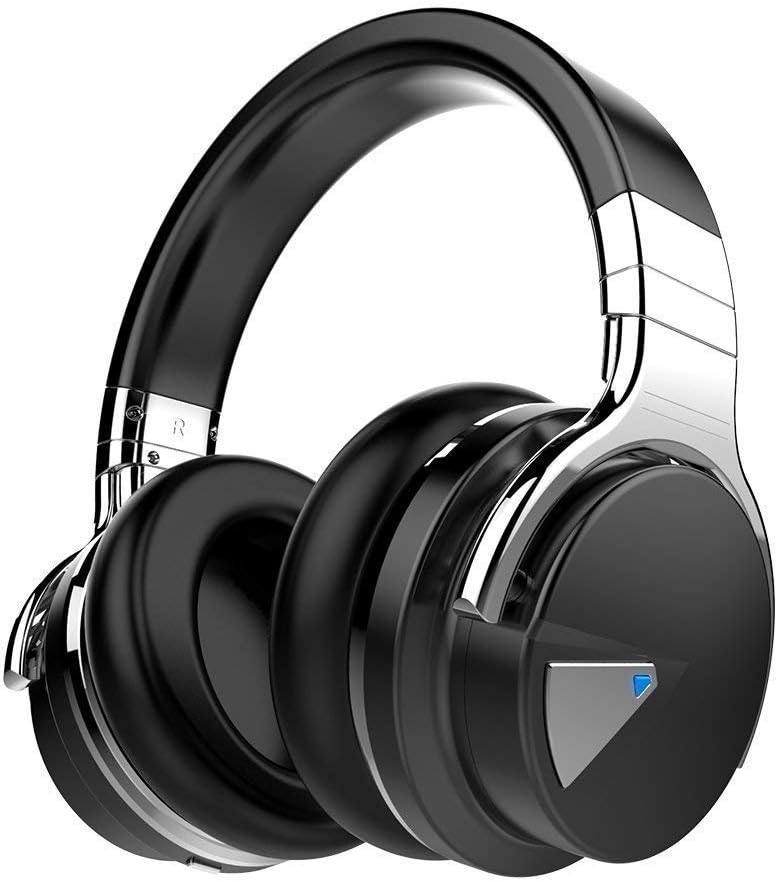
You can get a cheapo PC headset at officeworks  for between $10 to $20 that will do the job  for video and audio conferencing or then you can purchase a fancy noise cancelling headphones with mic  that will do the job and allow you to listen to music at high quality.


This is the COWIN E7 Active Noise Cancelling Headphones Bluetooth Headphones with Mic Deep Bass Wireless Headphones Over Ear with inbuilt mic. It has active noise cancelling technology

Link here: https://www.amazon.com.au/Cancelling-Headphones-Bluetooth-Comfortable-Cellphone/dp/B07RW8DT4S/


[/et_pb_tab][et_pb_tab title=”KENSINGTON Monitor Stand” _builder_version=”4.4.2″]


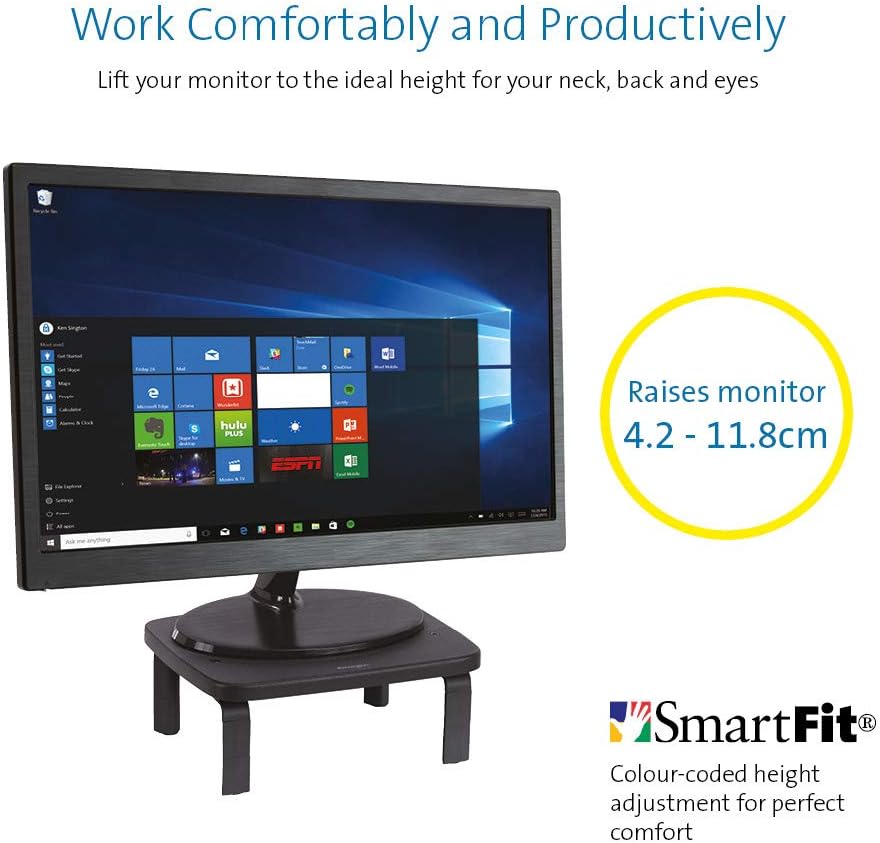
If you  got a monitor or need to jack up the height of your laptop then you need this.


KENSINGTON(R) 52785 Monitor Stand, SMARTFIT Standard

Stand positions monitor in line with your eyes to help reduce eye strain.

Price: $39.00 & FREE Delivery.

Check updated prices here 

If this is not your thing, you might want to check laptop stand on Amazon.com.au.

[/et_pb_tab][et_pb_tab title=”Desktop Monitor” _builder_version=”4.4.2″]

Acer ET322QR 31.5" Curved Flat Panel Monitor

If you are game enough to get a fancy new curved monitor then this is the one you need to pick up from Harvey Norman. It’s the Acer ET322QR 31.5″ Curved Flat Panel Monitor.

This Curved Flat Panel Monitor delivers clear and vibrant images at ideal viewing angles, while also adding a stylish touch to your entertainment setup.

Key Features
  • The Acer ET322QR 31.5″ Curved Flat Panel Monitor has a 1920 x 1080 resolution (60Hz refresh rate and 4ms response time) for sharp and detailed visuals.
  • Made with an 1800R curvature, the ET322QR monitor’s screen has a wrapping effect at optimal viewing distances to provide an immersive viewing experience.
  • Integrating Acer Flicker-less, BlueLight Shield, and Low dimming technologies, the monitor’s visual output is easy on the viewer’s eyes.
  • This Acer curved monitor has one VGA port and two HDMI ports to suit a variety of input sources.
  • For added convenience, this curved flat panel monitor supports a 100 x 100mm VESA wall mount.

Price Range: From $300 to $450

https://www.harveynorman.com.au/acer-et322qr-31-5-curved-flat-panel-monitor.html

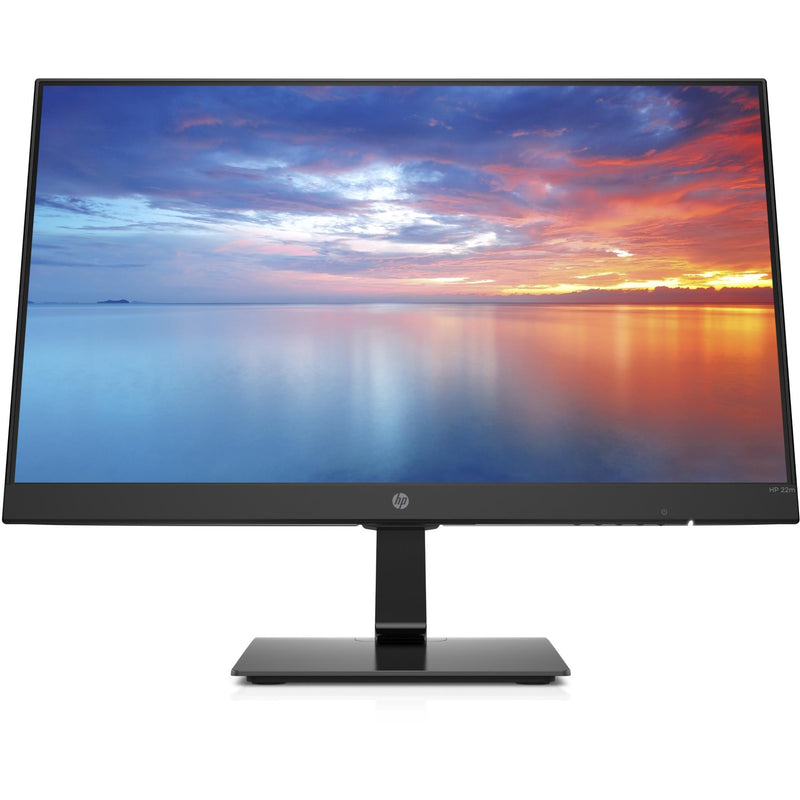
If you want something more cheap and traditional looking, this is what you need below from Jb hi fi

HP 3WL44AA 21.5\" FHD IPS Monitor


HP
Price: $169 to $200

HP 3WL44AA 21.5″ FHD IPS Monitor

Key Features

21.5″ IPS LED Display

FHD (1920 x 1080 @ 60 Hz)

1 HDMI 1.4 (with HDCP support); 1 VGA

Contrast ratio: 1000:1 static

14ms grey to grey response time

Anti-glare

On screen controls

Tilt: -5 to +20°

178° horizontal and vertical viewing angles

[/et_pb_tab][et_pb_tab title=”Docking station for laptops” _builder_version=”4.4.2″]

If you are going to work from a laptop then  a docking station might come handy. A docking station allows you to connect to devices that you could not use in the past. Devices like flat-panel monitors and digital cameras are not always compatible with laptops.  It provides a single connection point that allows a laptop to use a connected monitor, printer, keyboard, and mouse.

This allows a laptop to function like a desktop computer.

UPTab USB-C Docking Station with Ethernet, DisplayPort 4K, HDMI 4K, VGA, 3 Port USB 3.0, USB C PD and SD/TF Card Reader

Pic above is from https://au.uptab.com/uptab-usb-c-docking-station/

UPTab

USB-C Docking Station

$192.62 $129.41

Some more docking station gadgets

  1. StarTech Thunderbolt 3 Dual-4K Docking Station. …
  2. Targus USB 3.0 Dual Video Docking Station with Power. …
  3. AmazonBasics USB 3.0 Universal Laptop Docking Station. …
  4. Kensington USB 3.0 Docking Station. …
  5. Toshiba Dynadock V3. …
  6. Microsoft Surface Dock. …
  7. J5Create JUD500 USB 3.0 Ultra Station. …
  8. Dell USB 3.0 UHD Triple Video Docking Station.

or just get one from officeworks 

https://www.officeworks.com.au/shop/officeworks/p/kensington-universal-usb-c-powered-laptop-dock-sd4600p-kensd4600p

[/et_pb_tab][et_pb_tab title=”Webcam for Desktop or Laptop” _builder_version=”4.4.2″]

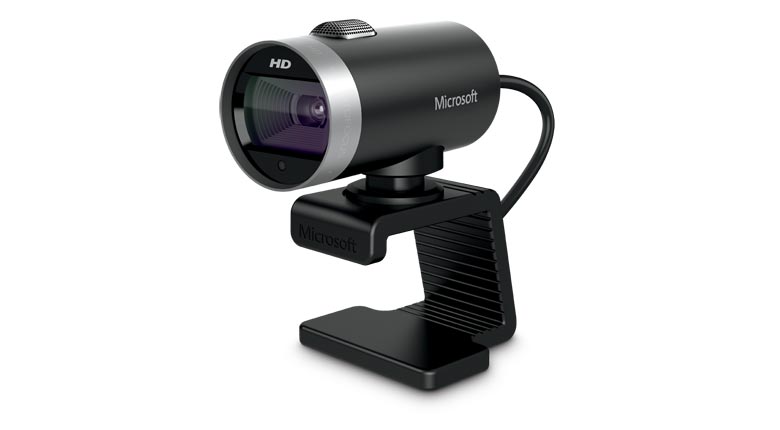
If you are going to do video conferencing or use zoom you will need a webcam 
 
LifeCam Cinema
 
This simple yet high quality webcam will do the job and last you a long time.

Lifecam Cinema

https://www.microsoft.com/accessories/en-us/products/webcams/lifecam-cinema/h5d-00013

Part #: H5D-00013

MSRP

$69.95


Enjoy high-quality 720p HD widescreen video together with crystal clear audio, with the LifeCam Cinema

You dont need a high end camera with ridiculous price, this will do the job

[/et_pb_tab][/et_pb_tabs][/et_pb_column][/et_pb_row][et_pb_row _builder_version="3.25" background_size="initial" background_position="top_left" background_repeat="repeat"][et_pb_column type="4_4" _builder_version="3.25" custom_padding="|||" custom_padding__hover="|||"][et_pb_cta title="Ref links " button_text="Reference Website Links" _builder_version="3.21.4" background_color="#e02b20" z_index_tablet="500"][/et_pb_cta][et_pb_testimonial portrait_url="https://www.digitalgrog.com.au/wp-content/uploads/2019/03/nbn-logo_thumb.png" admin_label="testimonial safe work " _builder_version="4.4.2" background_color="rgba(237,240,0,0.44)" z_index_tablet="500"]

Provide guidance on what is a safe home office environment, including what a good work station set up looks like and how to keep physically –  https://www.safeworkaustralia.gov.au/covid-19-information-workplaces/working-home

[/et_pb_testimonial][et_pb_testimonial portrait_url="https://www.digitalgrog.com.au/wp-content/uploads/2019/02/fast-wireless-five-g-internet-au.png" admin_label="Testimonial Fairwork Australia" _builder_version="4.4.2" background_color="rgba(237,240,0,0.44)" z_index_tablet="500"]

Fairwork Australia – https://www.fairwork.gov.au/employee-entitlements/flexibility-in-the-workplace/flexible-working-arrangements

Find out which employees can request flexible working arrangements, how to work..

[/et_pb_testimonial][/et_pb_column][/et_pb_row][/et_pb_section][et_pb_section fb_built="1" _builder_version="4.4.2"][et_pb_row _builder_version="4.4.2"][et_pb_column type="4_4" _builder_version="4.4.2"][et_pb_image src="https://www.digitalgrog.com.au/wp-content/uploads/2020/04/kids-on-board.jpg" _builder_version="4.4.2" background_image="https://www.digitalgrog.com.au/wp-content/uploads/2020/04/kids-on-board.jpg" background_size="contain" background_position="bottom_right" background_blend="overlay"][/et_pb_image][/et_pb_column][/et_pb_row][/et_pb_section]

Filed Under: 2020, Australian, Internet, Laptop, Solution, Top 10 Tagged With: Australia, Online, Technology, VIDEO

3 Technologies That Need To Become Mainstream To Save The Earth

May 10, 2020 by admin Leave a Comment

tech computer australia 2020

With so many natural disasters and changes to the ecosystem, the evidence of rapidly escalating climate change is unavoidable. Scientists are panicked by the dramatically faster rates of decline than anticipated while much of the public was, at least up until recently, somewhat resistant to even accepting climate change as the reality.

After experiencing inexplicably extreme weathers, people are starting to believe that this is a problem that is only getting worse. According to one scientific report, 40 % of the world’s insects will be extinct over the next few decades. That will be an unprecedented level of disruption in our environment and will likely lead to extinction or endangerment of many other species including humans.

While some claim gloomily that we are beyond point of no return, many have not given up. Global Waves of climate change protests drew six million people out to the street. One of the main sources of this ecological crisis is waste. We dump 2.12 billion tons of waste each year into whichever landfill we can find.

So what are the technologies that need to be developed quickly to combat this massive (literally) issue? How do we save the earth?

Internet of Things (IoT) in Waste Management

Many cities are attempting to use IoT and sensors to better auto-manage waste to keep the cities clean. In Songdo, South Korea, they do not use garbage trucks. They have smart waste bins through which the waste is sucked into pneumatic pipes and transported to a facility where they are automatically sorted and recycled or burned or buried.

new 2020 tech

The lack of landfills is not only economical but also the only environmentally responsible option to tackle the waste crisis. One of the most difficult items to recycle or bury properly is a mattress. In the U.S., 18.2 million mattresses are disposed of each year but there are only 56 facilities available to recycle them. Mattress recycling in Brisbane, Australia, one of the more environmentally conscious cities, is handled by the government with more oversight and care.

There’s also food waste, clothes waste, plastic waste, and many more. We need a more holistic approach to managing waste and real-time waste processing enabled by IoT needs further attention at a wider scale.

Smart Grids to Reduce CO2 Levels

Similar to the smart waste bins enabled by IoT, smart grid enables better communication among the players in the energy production pipelines to better manage and recycle the output. These grids are being tested in the US and various other countries.

These grids can utilise renewable energy to pump the energy into the grid and auto-predict and auto-manage possible outages. When combined with better battery technology, this could mean that we will be able to store energy generated by renewable sources and thus rendering our current environmentally harmful energy production methodology obsolete.

Smart grids, if properly implemented, are expected to reduce carbon emissions by 58% compared to where it was a decade ago. The wider adoption of smart grids is closer than you may think. In 2016, the Brooklyn Microgrid project was initiated using blockchain technology to generate a ‘microgrid’ of neighborhoods to generate solar-powered energy and share P2P. New York, as one of the cities that have frequently experienced storms and hurricanes in the past 10 years, has welcomed this experiment with wide arms as the elimination of their dependence on fuel-based electricity power allows them to have access to energy even if those hurricanes were to make their way back.

While there will be challenges and kinks to work out before we can implement across bigger grids, it is worth the investment and experiments as it is one of the few solutions that could actually move the needle in reversing the current trends.

(Not-so-)Fake Meat

Due to the desire to maximise profit per animal, farmers and food processors started manipulating the animals’ genetics to make them bigger. To put things in perspective, it is said that producing one burger equates to how much fuel a small car uses to drive for 20 miles.

It is absolutely killing the environment.

Many meat lovers will roll their eyes at the anticipated “meat is murder” rhetoric, but the fake meat industry has progressed at an impressive rate to win over the dedicated carnivores. Companies like Beyond Meat and Impossible Foods have conducted countless experiments to ensure the fake burger not only tastes but smells like a real one. So the meat-fans do not have to sacrifice their addictions while trying to save the environment. What do you have to lose?

Filed Under: Australian, Technology News Tagged With: Internet, Technology

What Are the Up & Coming Mobile Apps in the Fintech Industry?

March 10, 2020 by admin Leave a Comment

fintech and apps for future

Perhaps no other sector in the IT industry moves quite as quickly as fintech does. Several new fintech apps make it onto the app store and various gem hosting repositories every single day. Most of these never make it beyond the experimental stage, and an overwhelming majority is forgotten about by consumers.

payment processors foreign exchange

The ones that do make it, however, often find their way onto a huge number of phones across the world. You’ll want to keep your eye on a few recent developments if you’re interested in seeing the direction that the industry is headed in.

Traditional Wire Transfer Apps

People might be under the impression that wire transfers are on their way out, but nothing could be further from the truth. Quite a few people now use various forms of direct money transfer to pay for goods purchased from online auction sites and to satisfy invoices sent in by remote workers they owe.

This means, a number of new pieces of software are starting to make their way into the app store. Perhaps the most notable of these is the recently revamped Western Union money transfer app, which now provides instant estimates based on current fees and exchange rates.

That’s making it attractive to students who are studying abroad for a semester or two and have to transfer money into a local account. Even if they’re not that familiar with the local currency, the app will take care of everything automatically.

Each time a student needs to send another payment, they can simply tap on a few hard coded links to get the job done. Online payments are also streamlined, in part because users merely need to scan a prepaid or credit card with the app. Once they have, it’s as easy as pushing a single button.
Interestingly enough, another aspect of Western Union’s heritage is also starting to come around again. For years, the organization sent telegrams. While they’ve since passed this off to other services, fintech apps that are focused on the real estate market are starting to pick up where Western Union has left off.

Sending a Telegram in the Era of Text Messages

Once you’ve wired money, you might want to send a secure message to the recipient in order to make sure you’ve completed your transaction. Email, SMS texts and even secure cloud-based messages all have faults. As a result, some people in the fintech sector have turned to telegram apps.
Once you’ve installed one of these on a phone or other mobile device, you’re free to compose a message. You then enter a physical address, and the message will be printed out by a local office and delivered to that location. That makes it ideal for those who need to close a major deal after already being given payment.

Those who need to accept payment itself in a secure fashion, however, have turned to cryptocurrency apps in droves. More recently, however, a number of problems with these have necessitated an entirely new generation of apps.

The Unprecedented Growth of Altcoins

Besides the obvious collection of cryptocurrency tokens, five or six serious altcoins seem to come on the market every week. On top of this, there are a number of quick entries that probably shouldn’t be deemed serious entrants.

Most retail investors will want to avoid the vast majority of these, as they represent a very risky investment. Students and those who want to make secure online transactions are usually better off using a wallet app that includes support for the major alternative payment tokens, since these apps are generally the most stable.

While legal issues have plagued the market, it seems that a majority of experts in North America believe that cryptocurrencies essentially don’t constitute actual money. As a result, they’re not subject to regulation.

On one hand, this makes them theoretically dangerous for those who accept payments online. On the other, however, it makes them attractive for anyone offering decentralized services.

A number of fintech publications have recently been fixated on a popular social video sharing mobile app developer that pays contributors with its own independent altcoin tokens. It’s easy to imagine that other developers doing the same over the course of the next few months.

No matter what new technologies emerge, however, there’s always going to be a place for traditional wire transfer programs on the app store.

Filed Under: Finance, Technology News Tagged With: apps, Business Start up, Money for blogging, Technology

3 tricks to reset your forgotten windows password

April 23, 2019 by admin 5 Comments

[et_pb_section fb_built="1" fullwidth="on" _builder_version="3.22"][et_pb_fullwidth_image src="https://www.digitalgrog.com.au/wp-content/uploads/2013/07/how-to-lunlock-forgotten-windows-password-on-pc-small-Png.png" _builder_version="3.16.1"][/et_pb_fullwidth_image][/et_pb_section][et_pb_section fb_built="1" _builder_version="3.22"][et_pb_row _builder_version="3.25" background_size="initial" background_position="top_left" background_repeat="repeat"][et_pb_column type="4_4" _builder_version="3.25" custom_padding="|||" custom_padding__hover="|||"][et_pb_text admin_label="1st 4 paras" _builder_version="3.27.4"]

It happens to everybody at some part of the time. You lose your laptop or a computer password, and now you are locked out of it. This can become quite frustrating as you are unable to gain access back into your windows computer which has important files on it.

Fortunately, there are many options to get back into your desktop computer or laptop with custom paid software and also some free options available. Most of the available software normally works on all versions of windows from windows 10 to windows XP.

Majority of the operating systems on PCs in the world run some form of Windows, and we’re assuming you’ve got a Microsoft-based computer.  Unfortunately, Microsoft won’t help you if you have lost your password – it’s their security policy. There are tricks and methods to unlock your pc.

Below we list some of the options available to you if you find yourself in such a situation and need to unlock your computer again

[/et_pb_text][/et_pb_column][/et_pb_row][et_pb_row _builder_version=”3.25″ background_size=”initial” background_position=”top_left” background_repeat=”repeat”][et_pb_column type=”4_4″ _builder_version=”3.25″ custom_padding=”|||” custom_padding__hover=”|||”][et_pb_divider color=”#020c44″ divider_weight=”2″ _builder_version=”3.16.1″ background_color=”#050963″ height=”4px”][/et_pb_divider][/et_pb_column][/et_pb_row][/et_pb_section][et_pb_section fb_built=”1″ fullwidth=”on” _builder_version=”3.22″][et_pb_fullwidth_code _builder_version=”4.6.1″ hover_enabled=”0″ sticky_enabled=”0″][ninja_tables id=”6390″][/et_pb_fullwidth_code][/et_pb_section][et_pb_section fb_built=”1″ _builder_version=”3.22″][et_pb_row _builder_version=”3.25″ background_size=”initial” background_position=”top_left” background_repeat=”repeat”][et_pb_column type=”4_4″ _builder_version=”3.25″ custom_padding=”|||” custom_padding__hover=”|||”][et_pb_text admin_label=”3 New software” _builder_version=”4.6.1″]

3 NEW UNLOCKING SOFTWARE  BELOW (UPDATED 2020)

  1.  

the zapper australia

Get  the zapper software >> here on Amazon

2.


CD disk for recovery of password

Get the recovery disk >> here on Amazon

3.


win recovery USB

Get The WIN recovery USB >> over here on Amazon

[/et_pb_text][et_pb_text admin_label=”Use Your Windows 10″ _builder_version=”3.27.4″]

Use Your Windows 10 Password Reset Disk


USB stickUnfortunately for this to work, you should have done this before losing your password, and if you were proactive and done it before, then you can easily use this Windows 10 password reset disk that you created to unlock your PC.

The Windows 7 or 10 password reset disk is a disk you can create for free using your existing Windows computer. This acts as a backup forgotten password disk for password recovery when you lose your password on your computer either.

If you don’t already have it, I suggest once you get back access using one of our other methods below – make one immediately. Instructions here.

[/et_pb_text][et_pb_text admin_label=”Reset Your Windows 10″ _builder_version=”3.27.4″ z_index_tablet=”500″]

Reset Your Win 10 With This Free Trick


reset itEverybody likes free. And there is a way to reset your Windows 7 or 10 passwords with nothing but the tools and some skills you will need to learn as we go. This is an easy trick that anyone can pull off with a little bit of understanding and perseverance for the not, so tech minded.

It involves having to boot from a windows disc or flash drive and use your PC’s Command Prompt a few times.

See our – How to Reset a Windows 10 Password for a complete tutorial.

Given the fact that you have forgotten to make a password reset disk or an administrator account without password on your computer, this free option will be the best solution if you are on a budget and need a solution.

There are some other similar free options which need some technical skills as well like using the Emergency Boot CD – The EBCD (Emergency Boot CD) (fix unbootable computers and recover data from them) or the Offline NT Password & Registry Editor (a utility that enables users to overwrite their Windows SAM file). These two utilities will also require using some command line codes.

[/et_pb_text][et_pb_image src="https://www.digitalgrog.com.au/wp-content/uploads/2018/10/Reset-your-Windows-10-local-account.jpg" url_new_window="on" align_tablet="center" align_phone="" align_last_edited="on|desktop" admin_label="textimage microsoft" _builder_version="3.23"][/et_pb_image][/et_pb_column][/et_pb_row][/et_pb_section][et_pb_section fb_built="1" _builder_version="3.22"][et_pb_row _builder_version="3.25" background_size="initial" background_position="top_left" background_repeat="repeat"][et_pb_column type="4_4" _builder_version="3.25" custom_padding="|||" custom_padding__hover="|||"][et_pb_divider color="#020c44" divider_weight="2" _builder_version="3.16.1" background_color="#050963" height="4px"][/et_pb_divider][et_pb_text _builder_version="3.27.4"]

Our picks of top 3 recommended password recovery software

[/et_pb_text][et_pb_divider color="#020c44" divider_weight="2" _builder_version="3.16.1" background_color="#050963" height="4px"][/et_pb_divider][/et_pb_column][/et_pb_row][/et_pb_section][et_pb_section fb_built="1" _builder_version="3.22"][et_pb_row column_structure="3_5,2_5" _builder_version="3.25" background_size="initial" background_position="top_left" background_repeat="repeat"][et_pb_column type="3_5" _builder_version="3.25" custom_padding="|||" custom_padding__hover="|||"][et_pb_image src="https://www.digitalgrog.com.au/wp-content/uploads/2018/10/reset-password-pro-2018.jpg" url_new_window="on" align_tablet="center" align_phone="" align_last_edited="on|desktop" _builder_version="3.23"][/et_pb_image][et_pb_button button_url="http://windowsrecoverpassword.com/" url_new_window="on" button_text="Go to website" _builder_version="3.16.1"][/et_pb_button][/et_pb_column][et_pb_column type="2_5" _builder_version="3.25" custom_padding="|||" custom_padding__hover="|||"][et_pb_number_counter number="1" percent_sign="off" admin_label="Number Counter 1" _builder_version="3.16.1" number_text_color="#7ebec5"][/et_pb_number_counter][et_pb_text admin_label="reset password pro" _builder_version="3.27.4"]

Reset Password Pro

(Recommended)5 stars

We recommend this software because it supports all password recovery for windows versions up to windows 10 and..

  • Its easy to use
  • Supports Windows 32 bit as well as 64 bit
  • Accepts credit card and paypal payments
  • Covered by Clickbank Guarantee

[/et_pb_text][/et_pb_column][/et_pb_row][et_pb_row _builder_version="3.25" background_size="initial" background_position="top_left" background_repeat="repeat"][et_pb_column type="4_4" _builder_version="3.25" custom_padding="|||" custom_padding__hover="|||"][et_pb_divider color="#d2e506" _builder_version="3.16.1" background_color="#ccbb08" height="2px"][/et_pb_divider][/et_pb_column][/et_pb_row][et_pb_row column_structure="3_5,2_5" _builder_version="3.25" background_size="initial" background_position="top_left" background_repeat="repeat"][et_pb_column type="3_5" _builder_version="3.25" custom_padding="|||" custom_padding__hover="|||"][et_pb_video src="https://www.youtube.com/watch?v=NW00gdvSYoU" image_src="//i.ytimg.com/vi/NW00gdvSYoU/hqdefault.jpg" _builder_version="3.16.1"][/et_pb_video][et_pb_button button_url="https://www.digitalgrog.com.au/wp-content/uploads/2019/04/Reset-Windows-10-Password-document.docx" button_text="Go to website" _builder_version="3.22.4" z_index_tablet="500"][/et_pb_button][et_pb_accordion _builder_version="3.16.1"][et_pb_accordion_item title="Ophcrack" open="on" _builder_version="3.16.1"]

Ophcrack supports Windows 8, Windows 7, Windows Vista, and Windows XP. Not so much with with Windows 10 passwords.

[/et_pb_accordion_item][et_pb_accordion_item title=”Offline NT Password & Registry Editor” _builder_version=”3.16.1″ open=”off”]

Offline NT Password & Registry Editor works on 64-bit & 32-bit versions of Windows 10, Windows 8, Windows 7, Windows Vista, and Windows XP PCs, and it reset the passwords immediately without a problem.

[/et_pb_accordion_item][/et_pb_accordion][/et_pb_column][et_pb_column type=”2_5″ _builder_version=”3.25″ custom_padding=”|||” custom_padding__hover=”|||”][et_pb_number_counter number=”2″ percent_sign=”off” admin_label=”Number Counter 2″ _builder_version=”3.16.1″ number_text_color=”#7ebec5″][/et_pb_number_counter][et_pb_text _builder_version=”3.27.4″]

Reset Windows 10 Password -FREE

Guide – to reset administrator password of Windows 10 without any software.( <– Video + tutorial)

  1. Boot from the Windows 10 DVD. Make sure that your PC setup is configured to boot from a DVD and that UEFI and Secure Boot are disabled.
  2. Press SHIFT + F10 to open a command prompt.
  3. Check in which drive your windows is installed as in the  video (diskpart command)
  4. Replace the file utilman.exe with cmd.exe as shown in video. Before you do this, you should make a copy of utilman.exe so that you can restore it later.
  5. After you have replaced utilman.exe successfully, you can remove the DVD and restart your Windows 10 install.
  6. On the Windows 10 sign-in page, click the Utility Manager icon
  7. As we replaced the Utility Manager with the cmd.exe, a command prompt should open now. Don’t worry about the error message.
  8. Used command line as in video to reset administrator password and close command prompt, now you can login

[/et_pb_text][/et_pb_column][/et_pb_row][et_pb_row _builder_version="3.25" background_size="initial" background_position="top_left" background_repeat="repeat"][et_pb_column type="4_4" _builder_version="3.25" custom_padding="|||" custom_padding__hover="|||"][et_pb_divider color="#d2e506" _builder_version="3.16.1" background_color="#ccbb08" height="2px"][/et_pb_divider][/et_pb_column][/et_pb_row][et_pb_row column_structure="3_5,2_5" _builder_version="3.25" background_size="initial" background_position="top_left" background_repeat="repeat"][et_pb_column type="3_5" _builder_version="3.25" custom_padding="|||" custom_padding__hover="|||"][et_pb_image src="https://www.digitalgrog.com.au/wp-content/uploads/2018/10/pasword-resetter-2018.jpg" url_new_window="on" align_tablet="center" align_phone="" align_last_edited="on|desktop" _builder_version="3.23"][/et_pb_image][et_pb_button button_url="http://windowsrecoverpassword.com/" url_new_window="on" button_text="Go to website" _builder_version="3.16.1"][/et_pb_button][/et_pb_column][et_pb_column type="2_5" _builder_version="3.25" custom_padding="|||" custom_padding__hover="|||"][et_pb_number_counter number="3" percent_sign="off" admin_label="Number Counter 3" _builder_version="3.16.1" number_text_color="#7ebec5"][/et_pb_number_counter][et_pb_text admin_label="password resetter" _builder_version="3.27.4"]

Password Resetter

The website is not as up-to date as the software, but the software does the password recovery for windows  computers.

Quick features

  • It supports Windows Vista, XP, NT, 2000, 7 and also the latest version, Windows 8.
  • Rated as safe to download by both Norton and McAfee
  • Two versions available corporate and personal edition

[/et_pb_text][/et_pb_column][/et_pb_row][/et_pb_section][et_pb_section fb_built=”1″ _builder_version=”3.22″][et_pb_row _builder_version=”3.25″ background_size=”initial” background_position=”top_left” background_repeat=”repeat”][et_pb_column type=”4_4″ _builder_version=”3.25″ custom_padding=”|||” custom_padding__hover=”|||”][et_pb_divider color=”#020c44″ divider_weight=”2″ _builder_version=”3.16.1″ background_color=”#050963″ height=”4px”][/et_pb_divider][/et_pb_column][/et_pb_row][et_pb_row column_structure=”1_2,1_2″ make_equal=”on” _builder_version=”3.25″ background_color=”rgba(224,166,40,0.98)” custom_margin=”4px|4px|4px|4px” custom_padding=”4px|4px|4px|4px” border_width_all=”3px” border_color_all=”#330808″][et_pb_column type=”1_2″ _builder_version=”3.25″ custom_padding=”2px|2px|2px|2px” custom_padding__hover=”|||”][et_pb_text admin_label=”Why do you forget your password” _builder_version=”3.27.4″ background_color=”rgba(224,153,0,0.5)”]

Why do you forget your password? ( +Solutions)

We forget passwords because we are human. While most people tend to remember their passwords, there are occasion’s when you can forget them.  You can forget your password for many reasons – some of the reasons are listed below

  • You keep changing their passwords on a regular basis for security and forgot the last one
  • You have not used their laptop for a while and lost the password
  • You did not write down your password (not recommended anyway)
  • You made a complicated long-winded password and now can’t remember it

If you forgot your Microsoft account password, follow these steps.

[/et_pb_text][/et_pb_column][et_pb_column type=”1_2″ _builder_version=”3.25″ custom_padding=”22px|22px|2px|2px” custom_padding__hover=”|||”][et_pb_text admin_label=”Solutions” _builder_version=”3.27.4″ background_color=”rgba(224,153,0,0.5)”]

Solutions:

Write it down

Write it down only if you have to, and if you do make sure it’s kept in a safe place – that you can remember.

Codeword your password

Save your password somewhere, but write it down in code that you can decipher easily looking at the word you have written down Eg if your password  is hpotter32#  and you like harry potter –  you could write down wizard32# in your diary  if that would jog your memory to the actual password hpotter32. While these are risky and not recommended methods as solutions, it is for people with not so good memory and who tend to lose it much more than others.

Lock it in your bank

If you have paid for a sake locker in your bank, write it down on a piece of paper and keep it there with your family jewels J

[/et_pb_text][/et_pb_column][/et_pb_row][et_pb_row _builder_version=”3.25″ background_size=”initial” background_position=”top_left” background_repeat=”repeat”][et_pb_column type=”4_4″ _builder_version=”3.25″ custom_padding=”|||” custom_padding__hover=”|||”][et_pb_divider color=”#020c44″ divider_weight=”2″ _builder_version=”3.16.1″ background_color=”#050963″ height=”4px”][/et_pb_divider][et_pb_text admin_label=”disclaimer” _builder_version=”3.27.4″ use_background_color_gradient=”on” background_color_gradient_start=”#edf000″ background_color_gradient_end=”#e09900″]

* The Windows® logo, Windows NT, the Windows NT logo, Windows 2000, the Windows 2000 logo, Windows XP, the Windows XP logo, Windows Vista, the Windows Vista Logo, Windows 7, the Windows® 7 logo, Windows 8 and the Windows 8 logo are all registered trademarks of Microsoft Corporation in the United States and other countries. This site and the products and services offered on this site are not associated, affiliated, endorsed, or sponsored by Microsoft Corporation., nor have they been reviewed, tested or certified by Microsoft Corporation.

[/et_pb_text][et_pb_text admin_label=”Not an endorsement” _builder_version=”3.27.4″]

Not an endorsement

Please note, by listing the above methods and software tools we’re certainly not advocating hacking in any sense. These tools are recommended to be used only if you lost your password to your own laptop or pc and at your own risk.

In fact, we strongly suggest if you don’t have the required skills you should rather take your computer to the local IT guy or hire someone to come do it for you.

[/et_pb_text][et_pb_text _builder_version=”3.27.4″]

Hope one of the methods above help you get back access into your computer. If you did run into any problems trying the recovery methods  do send the software provider an email  via contact page or then leave a comment here and I can help  you if i can.  Hope you don’t  fall into this situation again,  but just in case I would bookmark this page 🙂

[/et_pb_text][/et_pb_column][/et_pb_row][/et_pb_section][et_pb_section fb_built=”1″ _builder_version=”3.22″][et_pb_row column_structure=”1_4,1_4,1_4,1_4″ _builder_version=”3.3.1″ global_module=”5124″][et_pb_column type=”1_4″ _builder_version=”3.25″ custom_padding=”|||” custom_padding__hover=”|||”][et_pb_blog posts_number=”1″ _builder_version=”3.0.94″]


[/et_pb_blog][/et_pb_column][et_pb_column type=”1_4″ _builder_version=”3.25″ custom_padding=”|||” custom_padding__hover=”|||”][et_pb_blog posts_number=”1″ include_categories=”665″ _builder_version=”3.0.94″]


[/et_pb_blog][/et_pb_column][et_pb_column type=”1_4″ _builder_version=”3.25″ custom_padding=”|||” custom_padding__hover=”|||”][et_pb_blog posts_number=”1″ include_categories=”573″ _builder_version=”3.0.94″]


[/et_pb_blog][/et_pb_column][et_pb_column type=”1_4″ _builder_version=”3.25″ custom_padding=”|||” custom_padding__hover=”|||”][et_pb_blog posts_number=”1″ include_categories=”6″ _builder_version=”3.0.94″]


[/et_pb_blog][/et_pb_column][/et_pb_row][/et_pb_section]

Filed Under: 2018, Asus, Australia, Review, Software Tagged With: Internet, Technology, Windows 8

  • Page 1
  • Page 2
  • Page 3
  • Page 4
  • Go to Next Page »

Primary Sidebar

Recent Posts

  • Underwater Drones for Recording Video and Taking Pictures
  • Why I chose hostgator for blog hosting
  • Top 10 Software Programs For Your Windows PC
  • What you should know before investing in Cryptocurrency and bitcoin
  • The Best Social Media Platforms for Marketing a Gaming App

Recent Comments

  1. Patrick McCormick on How to secure your desktop and laptop with antivirus software
  2. JJ on 20 Top brands with affilate programs to make you money in 2019
  3. JJ on This WPengine Genesis Pro Deal Will Give You 35 Studiopress themes
  4. Lisa Gomes on 16 Ways to Make Money Online Working From Home
  5. KatVine on This WPengine Genesis Pro Deal Will Give You 35 Studiopress themes

Archives

  • June 2022
  • February 2022
  • July 2021
  • May 2021
  • April 2021
  • March 2021
  • November 2020
  • September 2020
  • August 2020
  • July 2020
  • June 2020
  • May 2020
  • April 2020
  • March 2020
  • February 2020
  • January 2020
  • December 2019
  • September 2019
  • August 2019
  • July 2019
  • June 2019
  • April 2019
  • March 2019
  • February 2019
  • January 2019
  • December 2018
  • November 2018
  • October 2018
  • September 2018
  • July 2018
  • June 2018
  • April 2018
  • February 2018
  • January 2018
  • December 2017
  • October 2017
  • September 2017
  • July 2017
  • June 2017
  • May 2017
  • April 2017
  • March 2017
  • February 2017
  • January 2017
  • December 2016
  • November 2016
  • October 2016
  • September 2016
  • August 2016
  • July 2016
  • May 2016
  • April 2016
  • March 2016
  • February 2016
  • January 2016
  • December 2015
  • November 2015
  • October 2015
  • September 2015
  • August 2015
  • July 2015
  • June 2015
  • May 2015
  • March 2015
  • February 2015
  • January 2015
  • December 2014
  • November 2014
  • October 2014
  • September 2014
  • August 2014
  • July 2014
  • June 2014
  • May 2014
  • April 2014
  • March 2014
  • February 2014
  • January 2014
  • November 2013
  • October 2013
  • September 2013
  • August 2013
  • July 2013
  • June 2013
  • May 2013
  • April 2013
  • March 2013
  • February 2013
  • January 2013
  • December 2012
  • November 2012
  • October 2012
  • September 2012
  • August 2012
  • July 2012
  • June 2012
  • May 2012
  • April 2012
  • March 2012
  • February 2012
  • January 2012
  • December 2011
  • November 2011
  • September 2011
  • August 2011
  • July 2011
  • June 2011
  • May 2011
  • April 2011
  • March 2011
  • February 2011
  • January 2011
  • December 2010
  • November 2010
  • October 2010
  • September 2010
  • August 2010
  • July 2010
  • June 2010
  • May 2010

Categories

  • $heldon $ingh
  • 2010
  • 2011
  • 2012
  • 2013
  • 2015
  • 2017
  • 2018
  • 2019
  • 2020
  • 2021
  • 2022
  • Accounting
  • Adsense
  • Affiliate
  • Amazon
  • Anti Virus
  • Apple
  • Apps
  • Asus
  • Aussie
  • Australia
  • Australian
  • Australian Bloggers
  • Australian wordpress hosting
  • Banks
  • Blog-Hosting
  • Blogger
  • Blogger Tool
  • Blogger Tools
  • BloggerTools
  • BuddyPress
  • CARS
  • CDN
  • Celebrity
  • Clickbank
  • Compare
  • Computer
  • Domains
  • Done Deals
  • Ebook
  • Email
  • Facebook
  • Featured
  • Finance
  • Free
  • Gadgets
  • Google
  • Gpost
  • Guide
  • Hackers
  • Hosting
  • India
  • Internet
  • Ipad
  • Kindle
  • Laptop
  • Make money blogging
  • Makemoney online
  • Marketing
  • Melbourne Cup
  • Movies
  • Netbook
  • Network
  • News
  • Online betting account
  • PC
  • Review
  • Search
  • SEO
  • sheldon singh
  • Software
  • Solution
  • Sports
  • Subscribers
  • Taxes
  • Technology News
  • Themes
  • Top 10
  • Tutorial
  • Video
  • Wacky
  • web hosting
  • Website Review
  • Wierd
  • Windows
  • wordpress
  • Wordpress 3.0
  • Wordpress 3.1
  • wordpress themes
  • World cup
  • Wp Answers
  • WP Turbo
  • WPMU

Footer

Design

With an emphasis on typography, white space, and mobile-optimized design, your website will look absolutely breathtaking.

Learn more about design.

Content

Our team will teach you the art of writing audience-focused content that will help you achieve the success you truly deserve.

Learn more about content.

Strategy

We help creative entrepreneurs build their digital business by focusing on three key elements of a successful online platform.

Learn more about strategy.

Copyright © 2026 · Genesis Sample on Genesis Framework · WordPress · Log in