
• Skip to primary navigation
  • Skip to main content
  • Skip to primary sidebar
  • Skip to footer

Digital Grog — Australia’s Tech, Gadgets & Digital Life Unfiltered

Digital Grog is Australia’s go‑to tech blog for sharp reviews, digital trends, AI tools, gadgets, cybersecurity updates, and practical how‑tos covering the latest in Aussie technology

  • About Us
  • Contact Us
  • Block Examples
  • Landing Page

Daily Motion

Capturing Videos from a Website with Movavi Screen Capture Studio

July 16, 2015 by admin Leave a Comment

Since Movavi was discovered in 2004 the capture feature has been noted for being its pilot program. It has allowed many users within or without the professional field to use different forms of audios and videos in their desired formats. When you want to capture video from website such as YouTube or DailyMotion you can do the same with the Movavi Screen Capture Studio. Millions of people have since benefited from the videos which range from entertainment, documentaries, short clips or educational videos. There are millions of videos online and you can get some with the software so you can watch later.

The benefits of Movavi Screen Capture Studio

Ø It can record numerous types of online streaming videos. You don’t have to worry about the format of the video whether it is recorded from your Skype calls, webinars or other forms of video clips.

Ø The recordings are also done depending on the settings that you choose. Different users have different streaming preferences and so it all depends on one’s own choices.

Ø This software can record on its own. This is one of the reasons why many people like the software so much. When you want to capture video from website you can simply set up a time and let the software do the recording. Once it is done it will stop by itself.

Ø It is able to record video and audio from different sources. You can also be recording audios with the use of a microphone, headphones or MIDI devices.

Ø With the software you can perform video editing with the available built in features. This means that you can remove all the unwanted scenes from the video files. Such video cleanups enhance its clarity and quality.

Downloading Streaming Video from a Site

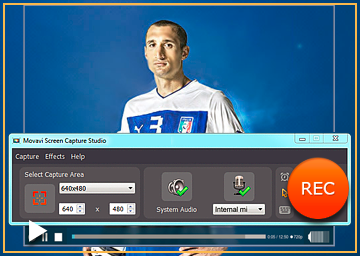
It is very simple to capture video from website with this software. Install the program and once it has finished installing run it. When the program is running you will see a yellow marking of the area that is supposed to be captured. The window size of the web video can be adjusted so that you can be able to view high definition videos. Basically the size of the web video also matters in determining how you mark your frame. HD videos will require that you play the video in a full screen mode. You will also see a green icon of the system audit so you can click it. You can also choose the “Stop capture after” option and define after how long you want your video to be captured. If you want to start recording you should click the REC button and then view the video streaming. Once you have captured your video from the internet you should click stop button and you will see the captured video on the screen for previewing. You can also click on edit tab to make the necessary changes.

It is always no fun when watching a high definition video as it takes so much time to load especially when your bandwidth is low. Movavi Screen Capture Studio helps solve this problem as it helps you in reviewing videos that are online but are otherwise not for downloading. The software does not only record the video but also any other activity that takes place on the screen. If you want to capture video from website now you have your answer.

Filed Under: PC, Review, Software Tagged With: Capture Video, Daily Motion, You Tube

Primary Sidebar

Recent Posts

  • Underwater Drones for Recording Video and Taking Pictures
  • Why I chose hostgator for blog hosting
  • Top 10 Software Programs For Your Windows PC
  • What you should know before investing in Cryptocurrency and bitcoin
  • The Best Social Media Platforms for Marketing a Gaming App

Recent Comments

  1. Patrick McCormick on How to secure your desktop and laptop with antivirus software
  2. JJ on 20 Top brands with affilate programs to make you money in 2019
  3. JJ on This WPengine Genesis Pro Deal Will Give You 35 Studiopress themes
  4. Lisa Gomes on 16 Ways to Make Money Online Working From Home
  5. KatVine on This WPengine Genesis Pro Deal Will Give You 35 Studiopress themes

Archives

  • June 2022
  • February 2022
  • July 2021
  • May 2021
  • April 2021
  • March 2021
  • November 2020
  • September 2020
  • August 2020
  • July 2020
  • June 2020
  • May 2020
  • April 2020
  • March 2020
  • February 2020
  • January 2020
  • December 2019
  • September 2019
  • August 2019
  • July 2019
  • June 2019
  • April 2019
  • March 2019
  • February 2019
  • January 2019
  • December 2018
  • November 2018
  • October 2018
  • September 2018
  • July 2018
  • June 2018
  • April 2018
  • February 2018
  • January 2018
  • December 2017
  • October 2017
  • September 2017
  • July 2017
  • June 2017
  • May 2017
  • April 2017
  • March 2017
  • February 2017
  • January 2017
  • December 2016
  • November 2016
  • October 2016
  • September 2016
  • August 2016
  • July 2016
  • May 2016
  • April 2016
  • March 2016
  • February 2016
  • January 2016
  • December 2015
  • November 2015
  • October 2015
  • September 2015
  • August 2015
  • July 2015
  • June 2015
  • May 2015
  • March 2015
  • February 2015
  • January 2015
  • December 2014
  • November 2014
  • October 2014
  • September 2014
  • August 2014
  • July 2014
  • June 2014
  • May 2014
  • April 2014
  • March 2014
  • February 2014
  • January 2014
  • November 2013
  • October 2013
  • September 2013
  • August 2013
  • July 2013
  • June 2013
  • May 2013
  • April 2013
  • March 2013
  • February 2013
  • January 2013
  • December 2012
  • November 2012
  • October 2012
  • September 2012
  • August 2012
  • July 2012
  • June 2012
  • May 2012
  • April 2012
  • March 2012
  • February 2012
  • January 2012
  • December 2011
  • November 2011
  • September 2011
  • August 2011
  • July 2011
  • June 2011
  • May 2011
  • April 2011
  • March 2011
  • February 2011
  • January 2011
  • December 2010
  • November 2010
  • October 2010
  • September 2010
  • August 2010
  • July 2010
  • June 2010
  • May 2010

Categories

  • $heldon $ingh
  • 2010
  • 2011
  • 2012
  • 2013
  • 2015
  • 2017
  • 2018
  • 2019
  • 2020
  • 2021
  • 2022
  • Accounting
  • Adsense
  • Affiliate
  • Amazon
  • Anti Virus
  • Apple
  • Apps
  • Asus
  • Aussie
  • Australia
  • Australian
  • Australian Bloggers
  • Australian wordpress hosting
  • Banks
  • Blog-Hosting
  • Blogger
  • Blogger Tool
  • Blogger Tools
  • BloggerTools
  • BuddyPress
  • CARS
  • CDN
  • Celebrity
  • Clickbank
  • Compare
  • Computer
  • Domains
  • Done Deals
  • Ebook
  • Email
  • Facebook
  • Featured
  • Finance
  • Free
  • Gadgets
  • Google
  • Gpost
  • Guide
  • Hackers
  • Hosting
  • India
  • Internet
  • Ipad
  • Kindle
  • Laptop
  • Make money blogging
  • Makemoney online
  • Marketing
  • Melbourne Cup
  • Movies
  • Netbook
  • Network
  • News
  • Online betting account
  • PC
  • Review
  • Search
  • SEO
  • sheldon singh
  • Software
  • Solution
  • Sports
  • Subscribers
  • Taxes
  • Technology News
  • Themes
  • Top 10
  • Tutorial
  • Video
  • Wacky
  • web hosting
  • Website Review
  • Wierd
  • Windows
  • wordpress
  • Wordpress 3.0
  • Wordpress 3.1
  • wordpress themes
  • World cup
  • Wp Answers
  • WP Turbo
  • WPMU

Footer

Design

With an emphasis on typography, white space, and mobile-optimized design, your website will look absolutely breathtaking.

Learn more about design.

Content

Our team will teach you the art of writing audience-focused content that will help you achieve the success you truly deserve.

Learn more about content.

Strategy

We help creative entrepreneurs build their digital business by focusing on three key elements of a successful online platform.

Learn more about strategy.

Copyright © 2026 · Genesis Sample on Genesis Framework · WordPress · Log in