• Skip to primary navigation
  • Skip to main content
  • Skip to primary sidebar
  • Skip to footer

Digital Grog — Australia’s Tech, Gadgets & Digital Life Unfiltered

Digital Grog is Australia’s go‑to tech blog for sharp reviews, digital trends, AI tools, gadgets, cybersecurity updates, and practical how‑tos covering the latest in Aussie technology

  • About Us
  • Contact Us
  • Block Examples
  • Landing Page

Technology

The future of toys

September 28, 2018 by admin 1 Comment

clip 2 toys r us


Toys are as old as human beings, toys are us; literally. In prehistoric times, the very first toy was probably a pebble in front of the cave. As you have noticed, we have evolved way past that. What is often not mentioned whenever there is some archaeological digging is that they encountered quite a few toys. Vases and pots aside, toys were a part of every household, regardless of the continent. And, just like us, they have undergone a substantial change, and it seems like it’s a never-ending process, too.

So, let’s take a look at what we can expect when it comes to the forms of future toys, and how the toy industry is going to deal with consumers’ desires.

Toys of the future

Toys nowadays hardly resemble what we used to play with when we were kids, not to mention the fun objects our parents used to play with. Their generation could not even imagine what would come about today. Actually, just to think that we already have a sort of a hoverboard from Back to the Future sums up the advances quite nicely. Toys have evolved beyond everyone’s wildest expectations, so let’s take a look which superb features they will become a part of our households in the future (if they already aren’t).


● 3D printers –  The biggest threat to toy industry, along with the notorious tablet. At the moment, the tablet still holds first place in the eyes of most children, but chances are it is all going to change soon enough.

There are several perfectly legitimate reasons why 3D printers are going to replace traditional toy shopping. Firstly, because it can be a lot cheaper, every parent knows just how much it costs to buy Lego and if there is a cheaper option, it’s one worth exploring. Lego is one of the most creative and addictive games for both adults and children, but does not come at a cheap price. If you need some more building blocks, you have to pay dearly. On the other hand, a 3D printer will quickly provide you with as many blocks as you could wish for. Also, should a piece of a plastic toy break, it wouldn’t be too hard to replace it, you could just print a new one and the toy/game would be as good as new.

While most of us are not really sure how 3D printers work, that’s not going to stop us from using them excessively, and that is actually going to be a good thing. A 3D printer is going to become extremely popular in every household since it’s a great asset for channelling the child’s creative energy. Kids are able to create their own toys and see their ideas manifest. This surely is an amazing confidence booster, showing that what you imagine can actually become a real thing.

The forecast for the global 3D market says it is expected to be worth some $21 billion soon enough, and we’re not talking decades.

● Personalised services

Now, who says that toys are only for the kids? There are plenty of adults who still enjoy creative and fun toys, and toy retails are paying special attention to this consumer group. Bearing in mind how much effect 3D printers are going to have on the overall retail profit, toy shops are going to focus on offering more personalised services to the older generations. This will encourage them to shop more and be confident of their choice when choosing a present for the latest member of generation Z.

● Virtual reality goggles – We are all witness to how much time kids spend online and seem completely immersed in digital reality.

virtual reality

That’s why it comes as no surprise that reality goggles are one of the best ways to experience artificial reality. In addition, they can be used for educational purposes, for example, a child can really see the mountains they are learning about at school, or even go down its slopes at fast speed.


● Drones – indeed, they have been around for quite some time now, but what we can predict with certainty is that they are going to take different shapes.

quadcopter 2018

They no longer have to look like helicopters or planes. For instance, a drone can look like anangler fish, too. We can expect other forms to be flying around us in the future. We’ll just have to wait and see how creative the manufacturers are going to be.


● Face recognition – Xbox One already can recognise your face. The screen will readily greet you the moment you turn it on. This is very pleasing to our egos, so it’s quite possible that your kid’s teddy bear will memorise not only your child’s face and habits, but there may be some memory left for parents, too. As we have already mentioned, it’s all about personalised services nowadays.

Industry trends

According to some predictions, China is the next big toy market. Actually, it will be the biggest consumer market for toys by 2022. This will have US companies recognise its potential and start investing in the foreign market.

Online shopping is not going to lose its value, despite the industry’s efforts to overtake Amazon. Why go to the shop to buy what we need, when we can easily do research online and find the best offer in town?

All in all, the toy and game market is expected to have reached$135 billion by 2020. Truth be told, 3D printers make quite a big part of the total amount.

With a plethora of different blogs and YouTube videos, there seems to be an opportunity to help toy retail retain its former glory. For example, a retailer could let children open their presents in the story, and film it if they want to. YouTube is full of videos with people excitedly opening boxes. This would make a good technique. Also, another way to attract customers would be create rewards programs, such as certificates, or a personalised pizza. Surely every person has their preferences.

The play is eternal

So, what is to be said in the end? Toys are evolving together with us, and though they are changing their shapes, one thing is for sure. Young or old, humans are always going to feel the need to have them, whichever their form may be.


Filed Under: Technology News Tagged With: Technology

Is Google Home Smart Device Worth the Money

June 6, 2018 by admin Leave a Comment

[et_pb_section bb_built="1"][et_pb_row][et_pb_column type="4_4"][et_pb_image admin_label="featured image" _builder_version="3.0.76" src="https://www.digitalgrog.com.au/wp-content/uploads/2017/10/google-home-australia-smart-device.jpg" show_in_lightbox="off" url_new_window="off" use_overlay="off" always_center_on_mobile="on" border_style="solid" force_fullwidth="off" show_bottom_space="on" /][et_pb_text admin_label="I got Google home for myself" _builder_version="3.16.1"]

I got Google home for myself, thinking I would be the only person using Google home (GH) in my household. How wrong was i?

Post updated 11th October 2018 – Google announced the Google Home Hub, the first smart display hardware made by Google.

Google’s Home Hub doesn’t run Android Things—it’s actually built on Google’s Cast platform. The device is tiny, with only a 7-inch screen that isn’t much bigger than the body of a smartphone. Google says it excluded a video camera because it wants users to feel “comfortable” with the Home Hub, but the absence of a camera will also save on the bill of materials.

Google Home was released in the United States on November 4, 2016. I got it two weeks earlier to its Australia launch, thanks to family on a US trip.

Google went on sale in Australia on Thursday July 20 for AU$199 in The Google Store, JB Hi-Fi, Harvey Norman, Officeworks, The Good Guys, Telstra, Optus and Qantas Store.

Comparison of Smart –  Voice Activated Devices  Google Home and Echo

[/et_pb_text][et_pb_text admin_label=”table price” _builder_version=”3.0.76″ background_layout=”light” border_style=”solid”]

[table “3” not found /]

[/et_pb_text][et_pb_text admin_label=”My partner now uses GH” _builder_version=”3.0.76″ background_layout=”light” border_style=”solid”]

My partner now uses Google Home, my daughter loves GH and funnily also thinks there is an actual person hiding in there. My dog thinks Google home is evil, he can’t stop barking at it at times, when it does its thing. But yes this smart home gadget indeed has managed to get everyone in the house and also visitors talking to him.

chromecast 2017

My little one calls the speaker MR .Google and thinks there is a person in there answering all her questions. Dare I swear at Google out of frustration and she will come to the rescue.

[/et_pb_text][et_pb_text admin_label=”How do you speak to Google” _builder_version=”3.0.76″ background_layout=”light” border_style=”solid”]

How do you speak to Google Home?

Just say – OKAY GOOGLE or HEY GOOGLE – and ask it a Question.

hey google

The other day, I had my brother in law visit. He looked at Google gave it a stiff upper lip look and suspicious eye and said, so this is supposed to be the new smart gadget aye. He decided to challenge Google home to see if it is really as smart as it says it is. He threw his best challenge question at the smart device. Google home got asked what the full form of Qantas is.

I will be honest, I didn’t know that one and I wasn’t very confident of my smart Google also being able to retrieve an answer, specially also since I had it for just two weeks now and didn’t ask it any difficult questions yet.

We were all pleasantly surprised, Google managed to  give the correct answer

The Qantas name comes from “QANTAS“, an acronym for its original name, “Queensland and Northern Territory Aerial Services”, and it is nicknamed “The Flying Kangaroo”.

[/et_pb_text][et_pb_text admin_label=”Using your Google Home for kids” _builder_version=”3.0.82″ background_layout=”light” border_style=”solid” box_shadow_position=”outer”]

Using your Google Home for Childrens Education

Technology will always advance and the sooner you adopt it the better for the future of your kids. Smart devices can do a lot for your kids’ education and knowledge, and Google home excels in doing this as well.

I have used this as speech therapy device to make my little one speak more clearly and slowly. I have used it to teach her numbers, maths and science.

[/et_pb_text][et_pb_text admin_label=”Numbers and maths for kids” _builder_version=”3.0.76″ background_layout=”light” border_style=”solid”]

Numbers and maths for kids

Ask google –
Can you count from 1 to 10 / 10 to 20 to 50 and so on and you get them saying numbers
it will count from 1 to 10 and more.

Good if you have kids, who would like to learn the numbers or are a bit slow in this.

Maths teacher
it can do maths. Try it. Tell your kids. Get rid of the calculator!. It can do addition, multiplication and more. Get rid of that maths teacher.

Ask Google- Can you say A to Zee

This is a good command to teach your kids ABCD.

[/et_pb_text][et_pb_text admin_label=”Madlibs” _builder_version=”3.0.76″ background_layout=”light” border_style=”solid”]

Madlibs/ Riddles/ Trivia

Just get your kids to  say to Google – Hey Google Im bored ( I’m sure they will readily say that)

madlibs

This is a fun game. It will play a game with you and if you choose madlibs. It will ask you adjective words.. etc.. Good for kids learning. But better keep a watch on this teacher as I am not 100% confident of th responses for this. Though spin the wheel is fun.

It will also give you options to spin a wheel or tell a riddle or joke.( they keep improving on this one, which means it’s in high demand)

[/et_pb_text][et_pb_counters _builder_version=”3.0.76″ use_percentages=”on” background_layout=”light” border_radius=”0″ border_style=”solid” border_radii=”on|0px|0px|0px|0px” /][et_pb_text admin_label=”Rhymes for kids” _builder_version=”3.0.76″ background_layout=”light” border_style=”solid”]

Rhymes for kids

It knows to do twinkle twinkle little star, you can test out some other rhymes too and keep the little ones entertained.

Spelling bee
Want your kid to get good at spelling bee. Get Google to do the hard work for ya. Ask Google spellings for words.

Learning languages – Japanese- Mandarin and konichiwa

Learning languages can also be fun with Google.  You can teach  your children  to say hello  in Japanese, mandarin, Indian, Spanish and many other  languages thanks to Google home

[/et_pb_text][et_pb_text admin_label=”Want some Google humour” _builder_version=”3.0.76″ background_layout=”light” border_style=”solid”]

Want some Google humour?

Just ask – Hey google sing a song!

This one’s a good one if you have nothing better to do, just tell Google this and keep telling the same thing (Hey google sing a song!). You will realise Google certainly has patience and some humour.

[/et_pb_text][et_pb_text admin_label=”Cooking timer” _builder_version=”3.0.76″ background_layout=”light” border_style=”solid”]

Cooking timer

Just tell Google to set timer for 15 minutes, 30 minutes or a time and it will remind you with an alarm to take the food of the gas or the pizza out of the oven. Quite handy, if your Google home is placed near to the kitchen lounge.

Set timer
You, can use the same feature as above but as a reminder for anything

Set alarm
All you need is to tell Google wake me up at 6am and it works like an morning alarm. Now you can get rid of your alarm clock

How is my day looking
This command makes use of your settings on google assistant. Based on what you have set up on your account, it can read up your appointments, reminders, read the weather for the day and much more. You can also set which website you want your news from.

[/et_pb_text][et_pb_text admin_label=”My adventures with Mr ” _builder_version=”3.0.76″ background_layout=”light” border_style=”solid”]

My adventures with Mr google home

I still remember the first time I got Google home and tried getting the weather. My partner immediately told me – Haha Google H is Americano. He’s giving 68 Fahrenheit weather for today. We live in Australia not USA.  So I thought I will tell try Mr Google himself to fix it and so i told Google to give me weather in Celsius and to my surprise it actually worked.

It confirmed that weather was updates to Celsius settings. I did not believe it being new to all this. So checked weather again and hot diggity damn – Indeed it was updated, without pressing any buttons.

The Google home device is pretty good at listening because that’s the core of what this device does. It listens to your question or suggestion and tries to answer it right.

This device got omni-directional mic’s fitted into it, so you can speak from anywhere within its range and it will hear you and respond. It also works well as speaker.

[/et_pb_text][et_pb_text admin_label=”Google Home as Audio Speakers” _builder_version=”3.0.76″ background_layout=”light” border_style=”solid”]

Google Home as Audio Speakers
You can use your home device to play music too. I managed to play music via my sound cloud app on my smartphone. It’s got good bass in those speakers.

music apps with g home

Apparently It also works with Google music and spotify

[/et_pb_text][et_pb_text admin_label=”Google and Netflix Story” _builder_version=”3.0.76″ background_layout=”light” border_style=”solid”]

Google and Netflix Story

netflix and smart tv

Netflix is quite popular nowdays in aussies homes. Cheap and better than foxtel and guess what – it ties in nicely with your google home.

Just tell google to play the next episode of “House of Cards” or “Narcos” and it will start it for you. You will need to link your netflix account to google assistant to get this happening

So today, i decided to link my netflix to google as they told me I could do it. I linked netflix and told google to play House of cards on the tv.

It didn’t do it!

Two hours later, I had to play doc mcstuffins for my little one and netflix told me I cant as there was somebody else using my netflix account. I found out that House of cards had been streaming in the background because I had told it to. So this happended via chromecast and netflix and i didn’t even know.

Yes that command i gave to start Netflix actually worked but it was streaming on chrome cast, so i forgot to switch source to chromecast to check. Now, I’m two episodes behind on house of cards.

The problem is they made all these gadgets smart, but not smart enough. For eg. Google home started streaming netflix house of cards episode, but it did it via chromecast and not directly via netflix and so it was not able to change the TV source button on my TV, when it started streaming and so it was playing the episode in the background via my Samsung smart TV.

Solution- Change you TV source to Netflix on your TV, then tell home to start next episode of “House of cards”

[/et_pb_text][et_pb_image admin_label="google chromecast image" _builder_version="3.0.76" show_in_lightbox="off" url_new_window="off" use_overlay="off" always_center_on_mobile="on" border_style="solid" force_fullwidth="off" show_bottom_space="on" src="https://www.digitalgrog.com.au/wp-content/uploads/2017/10/google-chromecast.jpg" /][et_pb_text admin_label="Getting your local Bunning" _builder_version="3.0.76" background_layout="light" border_style="solid"]

Getting your local Bunning’s – Store/Bank – open/shut times

I had to go to Bunning’s recently to get some paint for a painting walls job, so i asked google – until what time Bunning’s Morley is open – it did say 7pm (was pretty good, as i didn’t have to search on my phone or desktop). In fact if i wanted i could also ask it for the store number if i wanted to call them on my mobile.

Which I actually made use of later in the day. I needed to know if Bunning’s lets dog into their stores – turns out they do. If the dog is on the trolley and on leash – no muzzle is needed, but if you are walking the dog in store then a muzzle and leash is needed.

I have a cute little Maltese poodle named chase (yes he has his own Facebook page) that was a good fit for the top tray on the Bunning’s trolley, so off we went taking him for a Bunning’s adventure.

You can use this feature to get restaurant, offices, local deli etc open close times

[/et_pb_text][et_pb_text admin_label=”Smart Lights & Devices” _builder_version=”3.0.76″ background_layout=”light” border_style=”solid”]

Smart Lights & Devices

You can just tell google to dim your lights and it will dim your lights or turn it off if you have smart lights in your house. Some of the smart lights that work with GH are below.

  1. Phillips Hue Lights
  2. Nano Leaf Lights
  3. Belkin Wemo APP
  4. Tp Link Kasa

[/et_pb_text][et_pb_text admin_label=”TV speaks to GH ” _builder_version=”3.0.76″ background_layout=”light” border_style=”solid”]

TV speaks  to GH

Today I was watching TV and suddenly Google mumbled something. It almost sounded like an apologetic mumble.

As no one around spoke to Google, I would assume it would have to be the TV speaking to my Google home.  Yeh my smart TV speaks to google home too and that has been happening a lot more with the new Google home ads triggering off my Google home which is sitting right next to the tv.

[/et_pb_text][et_pb_text admin_label=”GHome Makes – 911 Call to Police” _builder_version=”3.0.76″ background_layout=”light” border_style=”solid”]

GHome Makes – 911 Call to Police

Did you read the news of the guy who got caught by police threatening his girlfriend? Our very own gangsta G-home picked up on a few words and called 911. Police listened in and decided to act.

[/et_pb_text][et_pb_text admin_label=”Let us know about your G” _builder_version=”3.0.76″ background_layout=”light” border_style=”solid”]

Let us know about your G home Experience

Do you own a Google home, have you any interesting things to add about your google home experience, just leave me a comment below, I would be glad to hear about it.

[/et_pb_text][et_pb_text admin_label=”Some Helpful Links” _builder_version=”3.0.76″ background_layout=”light” border_style=”solid”]

Some Helpful Links for google home

  • https://productforums.google.com/forum/#!forum/googlehome
  • PDF – Command  and app guide  for Google Home

[/et_pb_text][/et_pb_column][/et_pb_row][/et_pb_section]

Filed Under: 2017, Gadgets, Google Tagged With: Amazon, Big Boys Toys, Review, Technology

Futuristic technology unveiled in new Mercedes Benz E 200 range of cars

April 1, 2017 by admin 4 Comments

s550 e us model

Cars that drive themselves without human intervention are on their way sooner that you would think. The Mercedes Benz new E200  and 500 range of cars has advanced new technology from years of research done in the Mercedes Benz research centre and thousands of kilometres of on-road testing.[article updated 3 January  2017]

There are quite a few companies today ( including the Google self-driving car , Tesla, BMW) that have already launched intelligent self-driving cars, that can do pretty much everything that a normal driver can do on the road.

The new range of 2016 Merc cars has so many autonomous driving features, that you could easily take a step back and let the car do all the hard work, yet the company advises that you keep your hand on the steering wheel , be alert on Australian roads and follow the local rules and regulations. Things have picked since in 2017.

The Mercedes Benz New range of cars including the new Hybrid car boasts many driver assist features that make driving on the road easier. Mercedes-Benz has just announced that three new Plug-In Hybrid models are now available in Australia: the C 350e (Sedan and Estate), GLE 500 e 4MATIC and S 500 e, contributing to an emission free future.

c 350 e model GL 500 E and S 500 model

When I was given a chance (#‎MBTecDay) to go check out these new motor vehicles of the future and how they work, I could not refuse. The event was the Mercedes Benz Tec day where they put forward all their new vehicles to be tested by all the car enthusiasts, media and driving clubs. The Tec day put the car through its paces, allowing testing of the new features in controlled settings (Sandown racetrack) and also real life driving on the road.

The new GLE 500e SUV plug-in hybrid Mercedes-Benz car price has been just announced ahead of its official Australian launch later this month. The price tag for the GLE is $124,900. I had the chance to drive the E- 350 E estate Hybrid car at the Melbourne Sandown Racetrack and the drive was exceptionally smooth with nothing to fault at.

_DSC4437 604 x 403 E class

The New E Class models boast amazing new safety and driver assist technology. Below are some of the exciting features that the new mercs have.

12 Radars and two 360 Cameras

Yep! that’s what it takes, beside the car software to make this car what it does best – Extensive driver assist or autonomous driving. There are 12 radars and four 360 cameras that capture everything around the car to keep you safe on the roads and also assist you with special features like automated parking and other advanced safety features installed in the car. The four 360° cameras between them cover an area of approximately three metres all-round the vehicle, with one at the front, two on the sides and one at the rear

It has many intelligent driver assist autonomous features  that  assists you in doing the job of driving  for you, so much so – that its almost scary  and you feel the robots have taken over. However driving this car made me realise that it will definitely  reduce car accidents, time wasted in traffic, parking hassles, and probably road rage.

Let’s have a look at what some of the new Mercedes Benz cars can do for you.


Emergency brake assist

This safety feature is something that could be very useful in a tight situation, say an accident is imminent and you put on the brakes. The emergency brake assist feature actually applies the needed pressure for your braking, if you have not applied enough brakes to the car to stop. This also helps shorten the stopping distance. This is also called adaptive brake assistance.

The LED adaptive brake lights are activated if the initial speed is greater than 50 km/h and Brake Assist BAS has recognised an emergency braking situation. It sure helps to preventing rear-end collisions or even make it less likely to happen.

There is also the steering assist that ties in very well with this feature, if you brake suddenly to avoid a pedestrian and try to swerve to get on the side lane – The car will also assist you by Applying right amount of steering while swerving to the left and right in such a situation and then straightening up on the other lane.

The radar-based driver assistance system, can depending on the situation deliver a visual distance warning and, if required provide an additional audible warning of an impending collision.

Lane changing Assist feature (Autonomous Driving)

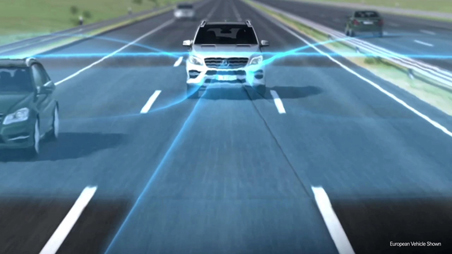
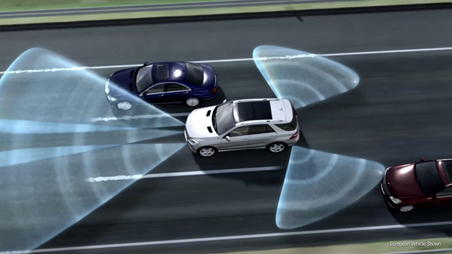
Lance changing has always been bit of chore on the road needing your full attention and alertness while doing this. The new Mercedes Benz car makes this job easier with its sensors and radars. Once you put your turning indicator lights on, the car can automatically scan your surrounding within seconds and then change lanes by itself and align itself to stay within safe distance of cars on both sides of the lanes.

The active lane change assist can be applied at a wide speed range from 80 to 180kmh.

Distance Pilot DISTRONIC Driver assist and safety system

This feature in the new cars allows the car to automatically control distance and speed on the road and freeway. If you set you speed to the speed limit of 100Kmh on the freeway and the car front of you slows down, your car would automatically slow down as well and keep a safe distance. This feature can take off the strain of driving and also be very useful in bumper to bumper traffic.

Play 01:46
distronic plus

PRE-SAFE®

Preparing for an accident before it happens; yes this is programmed for in this car. The amazing PRE-SAFE system can sense that a collision might be imminent, and help prepare for it in the immediate time just before anything happens.

Using a network of sensors/radars, the PRE-SAFE can detect certain conditions that suggest an accident is about to occur and It then tightens the front seat belts, adjusts the front head restraints and passenger seat to keep you safe.

Autonomous driving

Another feature that I tested out in the Tec day drive on the Melbourne freeway was the autonomous driving feature. You set your speed to 100 Kmh and the car maintains the speed on the freeway, while adjusting speed and slowing down or speeding up automatically depending on the car speed in front of you. The radars on the car also help you keep a safe distance between cars on both side of your lane.

Parking Assist

Parking worries with the new Mercedes Benz range has been made a thing of the past. The fully automated parking assist feature is one of the best features if you just want the machine to do the job. The parking assist feature takes full advantage of the radars /sensors mounted on the cars. All you need to do is stop and push the auto parking button and the car does the rest. It calculates the distance etc. and you just need to tell it if you want a reverse or forward parking and it does the parking for you.

All of the above breakthroughs feature in the new Mercedes Benz range of cars help make an accidents less severe, less damaging, or even less likely.

c350 e hybrid

[s350 e dashboard]

The new hybrid S500 E range of cars has innovative new technology that lets you seamlessly use the battery mode as well as electronic combustion mode and you can auto select drive type.

It has four different drive modes

1. Hybrid mode

2. E mode

3. E save

4. Charge mode hybrid model driving modes for mercedes benz australia

Apart from the above features, the New E Class range is going to boast a few exciting features like 64 color ambient lighting inside the car, Wireless charging for your smart device, huge widescreen cockpit display on your dashboard and the DISTRONIC PLUS adaptive cruise control.

All the technical data on merc models can be found on their official website here. You can connect with Mercedes Benz on Facebook , Youtube , Linked In or Instagram to get more information on their new range of motor vehicles

More videos

Play 01:38
active_lane_keeping_452x254.flv
Pricing for cars
The new Mercedes-Benz Plug-in Hybrid models will launch in July 2016 and are now available to order.
The manufacturer’s recommended retail list price is as follows:
  •  C 350 e: $75,300 (MRLP)
  •  C 350 e Estate: $77,800 (MRLP)
  •  GLE 500 e: $124,900 (MRLP)
  •  S 500 e: $319,715 (MRLP)

The MRLP includes GST and any LCT applicable to the base / standard specification model but EXCLUDES DEALER DELIVERY AND ALL ON ROAD COSTS such as, for example, registration fees, stamp duty, CTP and the like.

Below a fully autonomous driverless ride in a driver.ai technology car.


A fully autonomous drive on a rainy night on the streets of Mountain View, CA. Read more @ https://www.drive.ai/

Author Bio: Originally published  July 18, 2016 | Article written by Jeff  from www.digitalgrog.com.au/, I write articles on software, technology and building websites. You can connect with me here  on twitter and  google+

Filed Under: Australia, CARS Tagged With: Auto, Luxury vehicle, Technology

The Many Uses of Facial Recognition Technology

March 27, 2017 by admin 3 Comments

security with cameras being used on casinosSource: Wikimedia

Many people believe facial recognition software technology is only used for security purposes. Others question if the technology even works. I assure you, the technology is very real, and has many uses in addition to surveillance. In fact, there are exciting new uses for the software being created all the time.

how photos are matched with software 448 x336

Source: Wikimedia

What Is It?

So, to begin with—what is facial recognition technology, or biometric face recognition technology? Techopedia defines facial recognition as a “biometric software application capable of uniquely identifying or verifying a person by comparing and analyzing patterns based on the person’s facial contours.”

There are many benefits to facial recognition technology, such as the ability to take a video shot of a person’s face from a distance and analyzing their photo without ever approaching the person. In addition, a person cannot imitate another person. The technology is also inexpensive compared to other biometric technologies.

There are some disadvantages to the software. Of course lighting needs to be considered when the software is in use. The software may not be as reliable if the light is too dim, or if part of the individual’s face is blocked. In addition, sometimes the software can have some trouble when a person’s facial expressions change.

Protecting the Home

Some home cameras use facial recognition technology. These cams use wi-fi cameras along with facial recognition software that checks the identity of houseguests. The technology allows the identity of each member of the household to be registered. This way the technology will turn off when a household member is home. The camera streams video so that the user can see their home live via Android and iOS apps. If an unidentified person is recognised in the home, the user is notified.

facial recognition software in business

Source: Flickr

Smart Restaurant

Facial recognition technology is being used in one unique smart restaurant in Beijing. The software actually makes recommendations as to what a customer may want to order. The facial recognition software scans a customer’s face and makes suggestions based upon different factors such as the customer’s facial expression—the software also guesses the customer’s gender, and age. The technology even recognises return customers, and will remember your past orders. Your favourite meals will then be suggested to you.

Source: Wikimedia

Public Protection

The biometric facial software scans individuals’ faces in CCTV (closed-circuit television). Law enforcement agencies across the world protect the public by identifying potential persons of interest using CCTV. Face recognition technology is also used by border control agencies, verifying travelers’ identities. There are schools that use facial recognition technology software to keep watch on their campuses, keeping them safe. Airport terminals are also using the technology to be sure the public is secure.

The Digital World

Companies with payment apps use the software, and it’s now being used in the digital world. ShutterStock and Facebook, as well as other social media apps that try to identify individuals shown in photos, use the technology. Authentication of a smartphone owner’s identification can be made by taking selfies. Industries, such as marketing, are able to compile demographic information about groups of people.

Source: Flickr

Venue Safety

Facial recognition technology is often used to protect private functions, casinos and small public locations. Photographs are taken of guests as they enter a venue or site. These photos are then run through a facial recognition software, with the objective of recognising and potentially nabbing persons who should not be in attendance.

The software can be useful in providing the necessary safety security and well-being of the attendees or guests.

Changing the World

Whatever facial recognition software is used for, biometric technology is here to stay. It will become more and more accurate as well. Facial recognition technology is truly changing the world. Like it or not, you are being watched!

Any other uses for facial recognition technology you’ve either used or heard of?

Filed Under: Software Tagged With: Gaming, Online betting, Technology

What are the Prospects for Australia’s Technology Sector in 2017?

March 7, 2017 by admin 1 Comment

AUSTRALIA - THE RISE OF TECHNOLOGY compressed

Australia’s tech sector represents over 5.1% of the nation’s GDP and makes up more than 22% of its workforce and make up a considerable proportion of the Australia 200, according to the Deloitte Access Economics Report. While this puts it below the manufacturing, mining and construction sectors, it does mean it contributes a higher percentage to the economy than the transport, real estate, education and retail industries. A few years ago there were even some reports claiming it was outpacing the US and UK tech sectors. But what prospects does it face in 2017?

AgTech

Agriculture is a big part of the Australian economy, employing over 300,000 people in the industry and accounting for a decent proportion of the country’s GDP. It’s therefore little surprise that one of the predicted opportunities for the technology sector to grow in the coming years is through agricultural technology (AgTech).

There already a large number of start-ups introducing innovative new products to improve the efficiency and processes in many areas of agriculture. From sensors used in farming to oyster harvesting and many more, many are already in use. As AFR Weekend reports, the global AgTech market is predicted to be worth US$189 billion by 2022 and food demand grow by 60% by 2060. These offer great opportunities to kick-start AgTech this year.

Rise of Fintech

Investment in Australian fintech hit a record AUS$656 million in 2016, more than three times as much as in 2015, as noted by ZDNet. This bucked the global trend, which saw fintech investment fall by 47% across the board. A mixture of mergers, acquisitions and venture capital transactions were some of the main catalysts for the growth.

Such a strong previous year creates a good building block for the fintech sector in Australia, even though it does make it harder to match or even better those results. Fintech also remains the most popular industry for start-ups in the country, boosting the sector and not looking likely to disappear soon..

Industry Employment Concerns

One area of concern for Australia’s technology industry is with employment in two areas, which could prove troublesome in the near future. The first is that the number of students in Australia studying IT has dropped by 40 to 60% in the last decade, according to the CEO of Freelancer, an online services company. This has and could lead to an employment crisis, with a lack of talent.

The other issue is that Canberra is planning to tighten Australia’s 457 visa program. This would make it a lot harder to bring in talent from overseas that the industry rely on to help grow businesses. Many experts believe it could damage growth opportunities and the tech sector in 2017 if they are tightened.

Future Trends

blockchain australiaAlong with the rise of fintech and predicted emergence of AgTech, the Australian technology sector is likely to experience many opportunities similar to those across the world. Augmented and virtual reality are set to be the next big trend, plus wearable technology is growing, and Australian technology businesses are bound to jump on the back of these areas. Blockchain and bitcoin remain on the verge of something big as well, so any company investing or developing in these sectors will have plenty of opportunities to grow.

There are a number of challenges facing the Australian technology sector in 2017, but if it can take advantage of such opportunities and build on a strong previous year, it could be another reciting few months for the industry.

Filed Under: Australia, Website Review Tagged With: 2017, Technology

The Lotter App Review

March 17, 2016 by admin Leave a Comment

set for life with lotto australia

Who doesn’t dream of winning the lottery? It’s true, we all do, and our hopes are always stimulated when we hear about the hundreds of millions of dollars offered by Powerball or Mega Millions. In fact this whole week was a whopper with multi million ozlotto and Australian lotto’s being available for winning. But, what if you are not in the US? Is it still possible? Yes, it is!

The lotto industry is not far behind  in technology and it is more than ever convenient  now to buy a ticket even from a smartphone  and auto track your winning numbers from apps available on your phone. One new recent launch is the Lotter App.

theLotter’s apps for iOs and Android are free mobile applications that connect users to the biggest lotteries worldwide, featuring results for over 75 global lottery draws and the allowing lottery enthusiasts to buy tickets and try their luck to over 45 lotto games.

There are also notifications and personalized alerts, allowing users to never miss out on any opportunity and letting them know if they won. The application also offers plenty of information related to each lottery’s winning odds and play formats.

How is it possible to play the American lotteries, let’s say, when you are in Europe, Africa or Asia? It’s easy! You order the ticket using pre-picked or your own lucky numbers. theLotter’s team buys them from the official lottery agents in the US, scans tickets and uploads them to your account. This allows a very transparent mode of operation. Watch this video, and you will understand all about theLotter’s lottery tickets purchase service:

Let us take a brief look at what this free lottery app has to offer to users. With a current rating of 9+ out of 10 on the app stores , the app has also been lauded for its features by many users.

Some of the top features to be offered by theLotter app include:

  •  Access to multiple lottery draws

Some of the most popular lottery draws included on theLotter’s list and available through the app include EuroMillions, Mega Millions, SuperEnalotto, EuroJackpot, La Primitiva, US Powerball and many, many more. If you are into huge jackpots that went over the half billion dollars already (who isn’t?), try your luck at the American lotteries. However, with SuperDraws throwing prizes of €100 million in the game, the European champ, EuroMillions is not to be neglected either.

  • Checking of lottery results

Have you played? Then, check your numbers! You can do that on the go, using theLotter’s mobile app. You can also view the schedules of upcoming lottery draws and the prizes they offer, in case you want to get back and try your luck again.

  •  Ultimate information on lotto worldwide

Want to know the winning odds? Which are the hottest and coldest numbers? theLotter offers all the details on the site, but the app will also provide you with the essentials.

You can check out this app in your smart device by searching for it in your play store or apple app store.

Filed Under: Australia Tagged With: Lotto, Technology

  • « Go to Previous Page
  • Page 1
  • Page 2
  • Page 3
  • Page 4
  • Go to Next Page »

Primary Sidebar

Recent Posts

  • Underwater Drones for Recording Video and Taking Pictures
  • Why I chose hostgator for blog hosting
  • Top 10 Software Programs For Your Windows PC
  • What you should know before investing in Cryptocurrency and bitcoin
  • The Best Social Media Platforms for Marketing a Gaming App

Recent Comments

  1. Patrick McCormick on How to secure your desktop and laptop with antivirus software
  2. JJ on 20 Top brands with affilate programs to make you money in 2019
  3. JJ on This WPengine Genesis Pro Deal Will Give You 35 Studiopress themes
  4. Lisa Gomes on 16 Ways to Make Money Online Working From Home
  5. KatVine on This WPengine Genesis Pro Deal Will Give You 35 Studiopress themes

Archives

  • June 2022
  • February 2022
  • July 2021
  • May 2021
  • April 2021
  • March 2021
  • November 2020
  • September 2020
  • August 2020
  • July 2020
  • June 2020
  • May 2020
  • April 2020
  • March 2020
  • February 2020
  • January 2020
  • December 2019
  • September 2019
  • August 2019
  • July 2019
  • June 2019
  • April 2019
  • March 2019
  • February 2019
  • January 2019
  • December 2018
  • November 2018
  • October 2018
  • September 2018
  • July 2018
  • June 2018
  • April 2018
  • February 2018
  • January 2018
  • December 2017
  • October 2017
  • September 2017
  • July 2017
  • June 2017
  • May 2017
  • April 2017
  • March 2017
  • February 2017
  • January 2017
  • December 2016
  • November 2016
  • October 2016
  • September 2016
  • August 2016
  • July 2016
  • May 2016
  • April 2016
  • March 2016
  • February 2016
  • January 2016
  • December 2015
  • November 2015
  • October 2015
  • September 2015
  • August 2015
  • July 2015
  • June 2015
  • May 2015
  • March 2015
  • February 2015
  • January 2015
  • December 2014
  • November 2014
  • October 2014
  • September 2014
  • August 2014
  • July 2014
  • June 2014
  • May 2014
  • April 2014
  • March 2014
  • February 2014
  • January 2014
  • November 2013
  • October 2013
  • September 2013
  • August 2013
  • July 2013
  • June 2013
  • May 2013
  • April 2013
  • March 2013
  • February 2013
  • January 2013
  • December 2012
  • November 2012
  • October 2012
  • September 2012
  • August 2012
  • July 2012
  • June 2012
  • May 2012
  • April 2012
  • March 2012
  • February 2012
  • January 2012
  • December 2011
  • November 2011
  • September 2011
  • August 2011
  • July 2011
  • June 2011
  • May 2011
  • April 2011
  • March 2011
  • February 2011
  • January 2011
  • December 2010
  • November 2010
  • October 2010
  • September 2010
  • August 2010
  • July 2010
  • June 2010
  • May 2010

Categories

  • $heldon $ingh
  • 2010
  • 2011
  • 2012
  • 2013
  • 2015
  • 2017
  • 2018
  • 2019
  • 2020
  • 2021
  • 2022
  • Accounting
  • Adsense
  • Affiliate
  • Amazon
  • Anti Virus
  • Apple
  • Apps
  • Asus
  • Aussie
  • Australia
  • Australian
  • Australian Bloggers
  • Australian wordpress hosting
  • Banks
  • Blog-Hosting
  • Blogger
  • Blogger Tool
  • Blogger Tools
  • BloggerTools
  • BuddyPress
  • CARS
  • CDN
  • Celebrity
  • Clickbank
  • Compare
  • Computer
  • Domains
  • Done Deals
  • Ebook
  • Email
  • Facebook
  • Featured
  • Finance
  • Free
  • Gadgets
  • Google
  • Gpost
  • Guide
  • Hackers
  • Hosting
  • India
  • Internet
  • Ipad
  • Kindle
  • Laptop
  • Make money blogging
  • Makemoney online
  • Marketing
  • Melbourne Cup
  • Movies
  • Netbook
  • Network
  • News
  • Online betting account
  • PC
  • Review
  • Search
  • SEO
  • sheldon singh
  • Software
  • Solution
  • Sports
  • Subscribers
  • Taxes
  • Technology News
  • Themes
  • Top 10
  • Tutorial
  • Video
  • Wacky
  • web hosting
  • Website Review
  • Wierd
  • Windows
  • wordpress
  • Wordpress 3.0
  • Wordpress 3.1
  • wordpress themes
  • World cup
  • Wp Answers
  • WP Turbo
  • WPMU

Footer

Design

With an emphasis on typography, white space, and mobile-optimized design, your website will look absolutely breathtaking.

Learn more about design.

Content

Our team will teach you the art of writing audience-focused content that will help you achieve the success you truly deserve.

Learn more about content.

Strategy

We help creative entrepreneurs build their digital business by focusing on three key elements of a successful online platform.

Learn more about strategy.

Copyright © 2026 · Genesis Sample on Genesis Framework · WordPress · Log in