• Skip to primary navigation
  • Skip to main content
  • Skip to primary sidebar
  • Skip to footer
tech blog au

Digital Grog — Australia’s Tech, Gadgets & Digital Life Unfiltered

Digital Grog is Australia’s go‑to tech blog for sharp reviews, digital trends, AI tools, gadgets, cybersecurity updates, and practical how‑tos covering the latest in Aussie technology

  • About Us
  • Contact Us
  • Block Examples
  • Landing Page

admin

Dr .Ringtone – "Hana Sukkiri Melody” Ringtones good for Your health

May 20, 2010 by admin 1 Comment

Ringtones  has since their inception gotten more weird and weird  and  quite frankly now some can be quite a pain , Luckily Now one Japanese company  has actually made one ringtone that which literally take away the pain.

Index Corporation announced that its cellphone ringtone site Sokuho Music Search (Sokuho = breaking news) provides a new version of ringtone collections “Hana Sukkiri Melody” (Hana Sukkiri = cleared up nostril).

“The ringtone will make a nose has resonant frequency with pollens adherent inside your nasal cavity, so eventually pollens fall down. ”

Index Corporation of Japan introducing a new range of ringtone collections known as "Hana Sukkiri Melody”, or "Cleared up nostril" melody after translation. Apparently, this ringtone is able to make a nose resonate at the same frequency with pollens adherent inside your nasal cavity, letting them fall down eventually thanks to the use of 27 variations of frequency from420Hz to 1070Hz.

A company called Japan Ringing Tone Laboratory has created the "Hana Sukkiri Melody" ringtone, which claims to be able to clear out your sinuses whenever anybody calls you.

The company claims that "the ringtone will make a nose has resonant frequency with pollens adherent inside your nasal cavity, so eventually pollens fall down." The application is developed by Japan Ringing Tone Laboratory (JRTL), who “develops scientific approach on ringtones”, led by Dr. Matsumi Suzuki [J] who is a professor of Adam Smith University (diploma…)

Luckily, JRTL has some much more sensible-sounding ringtones in the pipeline, including "sleep-promoting ringtone," "ringtone makes your date," "crow scarer ringtone," "ringtone makes your skin beautiful," and more.

Filed Under: Gadgets, News, Software Tagged With: Gadgets, Software

Secure your Facebook with proper privacy settings

May 19, 2010 by admin 4 Comments

MySpace recently has announced plans to simplify its privacy settings as it seeks to differentiate itself from social network rival Facebook, which is under fire over its privacy practices and recent privacy breaches due to facebook bugs.

Myspace said "We provide clear privacy settings, allowing not only restrictions on who can view their profile data, but also age restrictions to allow age separation of older and younger users.". The new Facebook features introduced last month include the ability for partner websites to incorporate Facebook user data, a move that would further expand the social network’s presence on the internet.

Facebook privacy settings

Securing your facebook with settings -  A few key things to understand about friend lists:

  • You can add each of your friend to more than one Friend List
  • Friend Lists can have specific privacy applied to them
  • Your friends’ privacy settings will always default to the most restrictive friend list they’ve been placed in. For example, let’s say your friend John is someone you met at work but continue to hang out with outside of work. You may have placed them in your “Work Contacts” Friend List and your “Local Friends” Friend List. If your “Work Contacts” cannot see photos you’ve been tagged in and your “Local Friends” can, John will not be able to see photos you’ve been tagged in.

    You can configure your Friend Lists by visiting the friends area of your Facebook.

Read the Facebook Guide to Privacy


At the very bottom of every page on Facebook, there’s a link that reads "Privacy." The linked page is "A guide to privacy on Facebook," which contains the latest privacy functions and policies. For example, with the latest changes in December 2009, Facebook discloses what it calls "Publicly available information." This is information that is publicly viewable to anyone visiting your profile, and includes sensitive information like your name, current city and gender.

When in doubt, use the "How others see you" tool on Facebook’s privacy guide to check and make sure your privacy settings are properly set.

Facebook’s new simple privacy settings page wants you to make all your posts and photos visible to the whole Web by default.

(Credit: Screenshot by Rafe Needleman/CNET)


Show "limited friends" a cut-down version of your profile

You can choose to make people ‘limited friends’ who only have access to a cut-down version of your profile if you wish. This can be useful if you have associates who you do not wish to give full friend status to, or feel uncomfortable sharing personal information with.


If you’re not sure whether you’ve sufficiently protected what you share on Facebook, thenReclaimPrivacy.org has a bookmarklet to help you be as private as you’d like.

To run the bookmarklet and see how private you may or may not be on Facebook, simply follow these directions:

  1. Drag this link to your web browser bookmarks bar: Scan for Privacy
  2. Log in to facebook.com and then click that bookmarklet
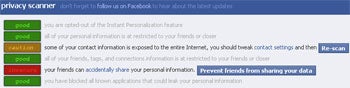
  3. You will see a series of privacy scans that inspect your privacy settings and warn you about settings that might be unexpectedly public.


Facebook Privacy Scanner

For each area, ReclaimPrivacy will give you a green ("good"), yellow ("caution"), or red ("insecure") ranking. If you hit yellow or red, it’ll provide you with specific steps to fix the problem so you don’t have to waste time searching for the right setting.


I YOU STILL HAVE ANY CONCERNS  you can go tot face book privacy settings  page  on face book itself to see what you can  do to make your facebook more secure

Filed Under: Apps, Facebook, Website Review Tagged With: Facebook, Websites

Micro Niche blog making tips

May 17, 2010 by admin Leave a Comment


Niche blog basics

Considering you have the basic knowledge of setting up a blog  and some html, there is not much  rocket science  to getting up at least  1 or 20 niche blogs up quickly and start earning some dough $$.

There are tools that automate all this  and make it quicker , but whatever you do , you gotta be in the game and with the game. Know  what is allowed and what is not and how far you can go  or how far you cannot  g promoting  you blog , adding content etc.

Some basic tips that will help you set up that micro niche blog for $$


Each site should consist of:

  • 4 pages/with 4 different keywords
  • content on each page about 500 words long
  • Proven "HIGH CONVERTING WEB THEME"(over 80% click through rate on most pages)
  • about me page
  • contact page
  • and privacy policy

Best of luck

Filed Under: Make money blogging, Makemoney online, SEO Tagged With: Makingmoney blogging, Money for blogging, SEO

Blogging and making money tools – Browsersize

May 11, 2010 by admin Leave a Comment

The Google labs  guys  are a busy team  and they are forever coming out with some innovative  tools and ideas  that are quite useful to us  internet geeks ( so to speak)  or bloggers. This tool can also help you bloggers make more money.

Their latest tool “browsersize” can be definetly be put to good use by bloggers. It is a very handy tool to increase your google adsense money or affiliate sales  by making using of its innovative features. Browsersize can be used to make money blogging.

Soon as you enter  your  blog or website url at Browsersize googlelabs , you get an instant picture of  your  blog  with the website showing a layer on top of your blog  showing which parts of the website  or blog are most visible  to the viewers. This can come of particular use  when designing your new website or blog. 

How browsersize can make you money blogging ?

You can use this tool to see which parts of your blog is most visible to your viewers and  place your google adsense ads  or affiliate advertisements  in these areas  to maximize you earnings.

browsersize making money blogging

Check out the  example picture of my blog Sheldon Singh  above

For example, the "90%" contour means that 90% of people visiting Google have their browser window open to at least this size or larger. On the example picture above you  can see when you first visit this site, there is a  Ipad picture  in the  70 % to 80 % zone , meaning that 20% to  30% of users cannot see this  area when  they first visit the page.  Thsi percentage is a significant  number which can relate to significant  reduced earnings.

The sizes represented in this snapshot are client area sizes, not browser window sizes. They represent the size of the browser without the title bar, toolbars, status bars, etc., and thus give a true representation of how much content can be seen by a particular segment of the Web-using population

Good luck making some money and if you really wanted to see or check  your browsersize  i suggest you go here – >> Browsersize

Filed Under: Google, Make money blogging, Makemoney online, sheldon singh Tagged With: Google, makemoney blogging, Makemoney online

ipad or die pad – The optus , vodafone , telstra Ipad plans for australia

May 9, 2010 by admin 2 Comments


Ipad launch in Australia – May28th

The date is Friday May 28th , when the iPad will also launch in Australia along with Canada, France, Germany, Italy, Japan, Spain, Switzerland and the UK. Pre-orders can be placed at Apple.com.au from Monday, 10 May, with the device available from Apple’s online store and retail stores plus selected Apple resellers.

In Australia pricing starts at $629 for the 16GB Wi-Fi model, with the 32GB version at $759 and the 64GB model at $879. The entry-level 3G iPad (which also includes GPS and 16GB of storage) will land at $799; the 32GB model comes in at $929, with the flagship 64GB 3G iPad at $1,049.

ipad australia ipad plans optus telstra vodafone

Ipad Internet and Data plans

The competition between telecommunication carrier’s for a piece of Apple’s iPad action has begun, with Optus putting flat month-by-month 3G plans as well as prepaid plans on its iPad menu.

Optus plans for I-pad

Optus has confirmed to APC that it will offer a ‘made for iPad’ microSIM bundle with three month-by-month plans: $20 for 2GB, $30 for 3GB and $60 for 8GB. "Optus will also have prepaid as well as month-to-month data plans suitable for use with the iPad 3G" Optus spokeswoman Liz Greene told APC, with the promise that "we will provide further details of our iPad plans soon."

Telstra Plans for Ipad

Earlier today Telstra revealed its prepaid iPad Next G plans which cost $20 for 1GB, $30 for 3GB and $60 for 6GB on top of the initial $30 ‘Pre-Paid SIM for Apple iPad’ start kit which comes with 1GB (and a bonus 2GB if activated before June 30th). Telstra has not yet revealed if it will also offer month-by-month plans

The entry-level $20 pack comes with 1GB; $30 gets you a 3GB top-up; the mid-range $60 recharge comes with 6GB; $80 lands you 9GB, while the $100 top-up comes with 12GB (although we’re open to suggestions as how any iPad user could gobble up 12GB, or even 6GB, in just 30 days).

The pre-paid iPad microSIM starter pack will be sold at Telstra Stores and "selected partners". Recharges are available via Bpay or through purchasing vouchers at outlets including Telstra stores and dealers, Australia Post, Target, Big W, Dick Smith, Woolworths, Safeway, Coles Fone Zone, K Mart, Retravision and Newslink newsagencies.


Vodafone plans for apple Ipad

VHA partner networks Vodafone and 3 have revealed they will offer a range of mobile broadband plans for the 3G iPad.

The new Month by Month plans offer the value of a contract with complete flexibility of not being locked into a long term commitment.

Available on both Vodafone and 3, mobile broadband can be purchased for as little as $15 per month. This low monthly cost allows the download of 1GB of data. The Month by Month plans are also available at $29 (3GB), $39 (6GB) and $49 (8GB). Customers also have the option to either ‘BYO’ their own broadband modem or purchase a stylish USB modem internet stick for the low one-off cost of $79.

Filed Under: Australian, Gadgets, Software Tagged With: Apple, Electronics, Gadgets

Carl Williams Australian Gangland killer buried in gold-plated coffin

May 1, 2010 by admin Leave a Comment

The funeral for the Australian gangster  carl williams was looking pretty flash and top notch with the Gold coffin

The gold coffin for carl williams

Carl williams gold  coffins australian gangster

Links:

News results for carl williams


ABC Online

Gang war ends in black comedy at Carl Williams funeral‎ – 12 hours ago

A gold coffin containing the body of Carl Williams has arrived at St Therese’s Catholic Church in Essendon. The circling chopper, the spills of …

Herald Sun – 350 related articles »

Gangland lawyer in hiding‎ – BigPond News – 19 related articles »

Carl Williams‘ brain unlikely to reveal secrets‎ –ABC Online – 4 related articles »

Filed Under: Australian, News Tagged With: Australian

  • « Go to Previous Page
  • Page 1
  • Interim pages omitted …
  • Page 55
  • Page 56
  • Page 57
  • Page 58
  • Go to Next Page »

Primary Sidebar

Recent Posts

  • 2026 – Step-by-Step Guide to Building Your Site With AI
  • Underwater Drones for Recording Video and Taking Pictures
  • Why I chose hostgator for blog hosting
  • Top 10 Software Programs For Your Windows PC
  • What you should know before investing in Cryptocurrency and bitcoin

Recent Comments

  1. google on Wacky new underwear invention 2b released by Durex
  2. Patrick McCormick on How to secure your desktop and laptop with antivirus software
  3. JJ on 20 Top brands with affilate programs to make you money in 2019
  4. JJ on This WPengine Genesis Pro Deal Will Give You 35 Studiopress themes
  5. Lisa Gomes on 16 Ways to Make Money Online Working From Home

Archives

  • September 2026
  • June 2022
  • February 2022
  • July 2021
  • May 2021
  • April 2021
  • March 2021
  • November 2020
  • September 2020
  • August 2020
  • July 2020
  • June 2020
  • May 2020
  • April 2020
  • March 2020
  • February 2020
  • January 2020
  • December 2019
  • September 2019
  • August 2019
  • July 2019
  • June 2019
  • April 2019
  • March 2019
  • February 2019
  • January 2019
  • December 2018
  • November 2018
  • October 2018
  • September 2018
  • July 2018
  • June 2018
  • April 2018
  • February 2018
  • January 2018
  • December 2017
  • October 2017
  • September 2017
  • July 2017
  • June 2017
  • May 2017
  • April 2017
  • March 2017
  • February 2017
  • January 2017
  • December 2016
  • November 2016
  • October 2016
  • September 2016
  • August 2016
  • July 2016
  • May 2016
  • April 2016
  • March 2016
  • February 2016
  • January 2016
  • December 2015
  • November 2015
  • October 2015
  • September 2015
  • August 2015
  • July 2015
  • June 2015
  • May 2015
  • March 2015
  • February 2015
  • January 2015
  • December 2014
  • November 2014
  • October 2014
  • September 2014
  • August 2014
  • July 2014
  • June 2014
  • May 2014
  • April 2014
  • March 2014
  • February 2014
  • January 2014
  • November 2013
  • October 2013
  • September 2013
  • August 2013
  • July 2013
  • June 2013
  • May 2013
  • April 2013
  • March 2013
  • February 2013
  • January 2013
  • December 2012
  • November 2012
  • October 2012
  • September 2012
  • August 2012
  • July 2012
  • June 2012
  • May 2012
  • April 2012
  • March 2012
  • February 2012
  • January 2012
  • December 2011
  • November 2011
  • September 2011
  • August 2011
  • July 2011
  • June 2011
  • May 2011
  • April 2011
  • March 2011
  • February 2011
  • January 2011
  • December 2010
  • November 2010
  • October 2010
  • September 2010
  • August 2010
  • July 2010
  • June 2010
  • May 2010

Categories

  • $heldon $ingh
  • 2010
  • 2011
  • 2012
  • 2013
  • 2015
  • 2017
  • 2018
  • 2019
  • 2020
  • 2021
  • 2022
  • Accounting
  • Adsense
  • Affiliate
  • Amazon
  • Anti Virus
  • Apple
  • Apps
  • Asus
  • Aussie
  • Australia
  • Australian
  • Australian Bloggers
  • Australian wordpress hosting
  • Banks
  • Blog-Hosting
  • Blogger
  • Blogger Tool
  • Blogger Tools
  • BloggerTools
  • BuddyPress
  • CARS
  • CDN
  • Celebrity
  • Clickbank
  • Compare
  • Computer
  • Domains
  • Done Deals
  • Ebook
  • Email
  • Facebook
  • Featured
  • Finance
  • Free
  • Gadgets
  • Google
  • Gpost
  • Guide
  • Hackers
  • Hosting
  • India
  • Internet
  • Ipad
  • Kindle
  • Laptop
  • Make money blogging
  • Makemoney online
  • Marketing
  • Melbourne Cup
  • Movies
  • Netbook
  • Network
  • News
  • Online betting account
  • PC
  • Review
  • Search
  • SEO
  • sheldon singh
  • Software
  • Solution
  • Sports
  • Subscribers
  • Taxes
  • Technology News
  • Themes
  • Top 10
  • Tutorial
  • Uncategorized
  • Video
  • Wacky
  • web hosting
  • Website Review
  • Wierd
  • Windows
  • wordpress
  • Wordpress 3.0
  • Wordpress 3.1
  • wordpress themes
  • World cup
  • Wp Answers
  • WP Turbo
  • WPMU

Footer

Design

With an emphasis on typography, white space, and mobile-optimized design, your website will look absolutely breathtaking.

Learn more about design.

Content

Our team will teach you the art of writing audience-focused content that will help you achieve the success you truly deserve.

Learn more about content.

Strategy

We help creative entrepreneurs build their digital business by focusing on three key elements of a successful online platform.

Learn more about strategy.

Copyright © 2026 · Genesis Sample on Genesis Framework · WordPress · Log in