Your signing for the NBN which will inmost cases give you much faster speeds that you currently have and so having a good modem to distribute that fast internet speed around your house is a good idea. You will need an NBN compatible modem if you were on the old ADSL connection with an older modem.
Read about –> NBN internet providers and plans in my last blog post, in this one we look at the best picks for a good modem router for your NBN connection
The good thing is most NBN internet providers give you a free NBN modem if you sign up with them for an 18 month or longer internet plan. Some of them don’t and so you might have to purchase your NBN modem from the shop or pay extra to the provider for the modem.
Which is the best modem for NBN ?
Popular good modem brands in Australia are Netgear, Dlink, Netcomm, Tplink, ASUS, Draytek and Billion among others.
To keep it short, a good NBN modem should be a modem plus router – so that I can recive internet and can also distribute WIFI around the house. It should have at least three minimum ethernet points, one USB storage and a backup USB wifi dongle or 3g/4g/5g sim/dongle would be wishful.
Prices for modems routers In Australia
Generally a good nbn compatible modem can start from $120 onwards , but expect to get a decent one anywhere between $150 to $400 . The $400 are normally top of the range ones in looks and speeds too. Most of them are modem plus routers.
I have made many lists before (for eg myhosting list for starting a website/blog ) .. Below I will give a list of some good modems for the NBN on the market before we get into the nitty gritty of what is the good features to look out for in selecting a modem
Good routers for the NBN
- TP Link TD-VG5612
- TP-Link Archer VR2800
- Netgear Nighthawk X4S D7800
- Netgear D6400
- ASUS DSL-AC56U
- ASUS DSL-AC68U
- D Link DSL-2877AL
- D Link DSL-2885A
Draytek 2860n/n+/Vn/ac/VacDraytek 2760Netcomm NF4V- Netcomm NF17ACV
- Asus ROG GT-AX 11000
- TP Link TD-VG5612
- TP-Link Archer VR2800
- Netgear Nighthawk X4S D7800
- Netgear D6400
- ASUS DSL-AC56U
- ASUS DSL-AC68U
- D Link DSL-2885A
- Draytek Vigor 2862 Vac
- Netcomm NF17ACV
- Asus ROG GT-AX11000

TP-Link TD-VG5612 Wireless router – 4-port switch
- Firewall protection
- DMZ port + NAT support
- Auto-negotiation, IGMP snooping, traffic shaping
- Print server, MAC address filtering, VPN passthrough
- URL filtering, parental control, IP address filtering
- File sharing, Access Control List (ACL) support, Quality of Service (QoS)
- Virtual server support, Wi-Fi Protected Setup (WPS), IPSec pass through
- Samba support, FTP server, port forwarding, UPnP Media Server
- Bandwidth control, DHCP relay, Stateful Packet Inspection Firewall (SPIF)
- DNS relay, static routing, Multicast filtering function
Software / System Requirements
TP-Link Archer VR2800 Wireless router – 4-port switch The Archer VR2800 DSL modem router supports super fast VDSL or ADSL broadband of up to 100 Mbps and other connections.
Additional features
- Cable Modem or Fiber Modem compatible
- Two USB 3.0 ports supporting 3G/4G dongle connections
- Dedicated processor for each band to manage Wi-Fi traffic
- 1GHz dual-core CPU.

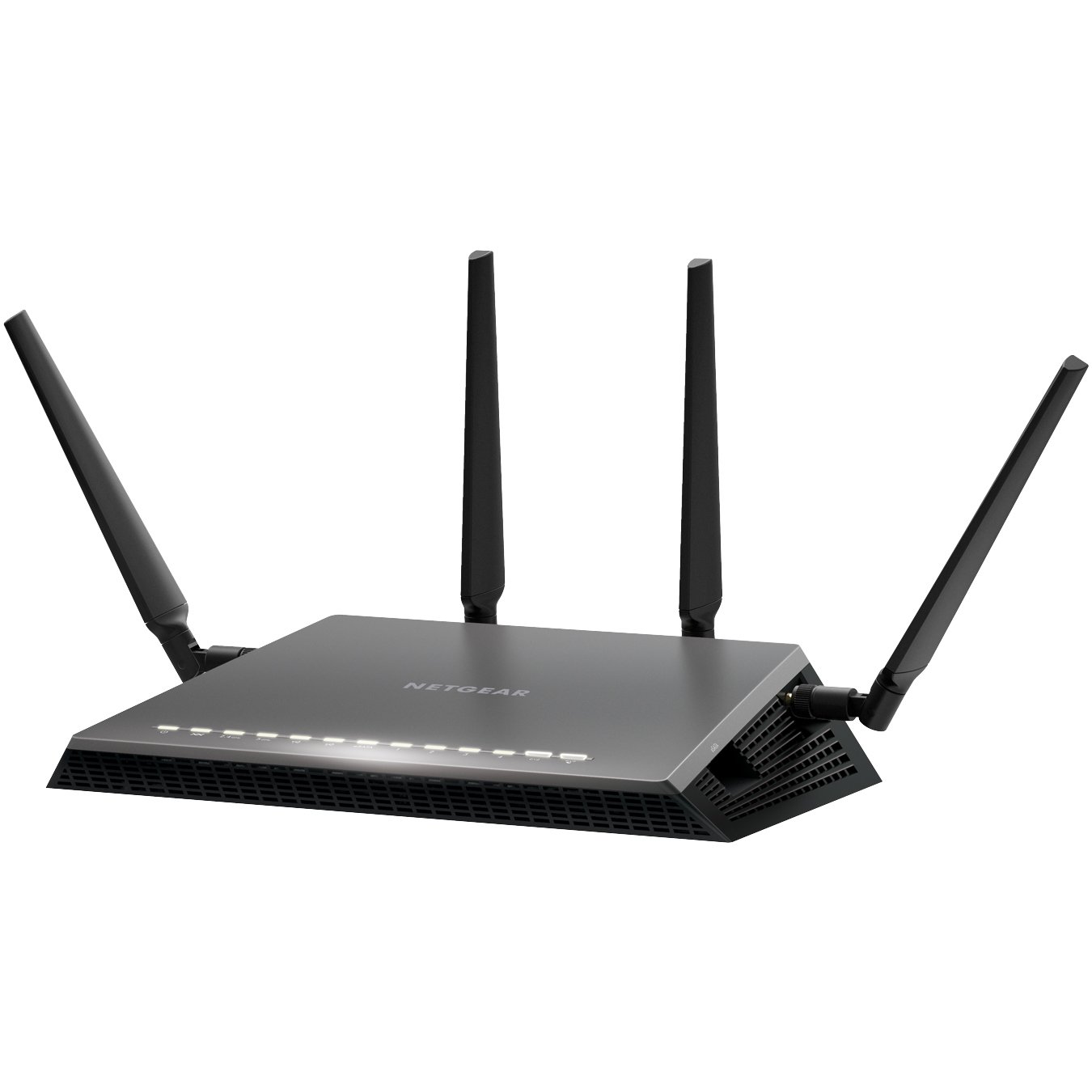
The Netgear’s Nighthawk X4S boasts a dual-core 1.4GHz processor to handle the activity passing through it and a chipset capable of working in the 802.11ac network technology, which is also backwards compatible with the 802.11a/b/g/n networks.
Additional features
- Quad Stream AC2600 WiFi for speeds up to 2.53Gbps (800+1733Mbps)
- Next generation Wave2 WiFi
- Dual Core 1.4GHz processor boosts performance for gaming and streaming
- Built in high speed modem compatible with VDSL, VDSL2, ADSL, ADSL2, ADSL2+
- Gigabit Ethernet WAN port for universal Internet service compatibility
Price range: From $315 to $350

The Netgear AC1600 DSL modem router provides a fast VDSL modem for fibre broadband and also works with ADSL connections.
It is a integrated modem and router as most models and you won’t need separate hardware from your service provider. It can handle homes with up to 10 devices.
Additional Features
- It supports transfer speeds of up to 1300 Mbps.
- It uses Beamforming technology to provide a large, reliable wireless range.
- There are 2 USB 2.0 ports built-in to this router so you can connect a printer or a portable hard drive then access it wirelessly across your network.
- You can use the Netgear Genie app to control and maintain your network.
- This router supports parental controls so you can set up restrictions to your web access.
Price Range: From $197 to $243
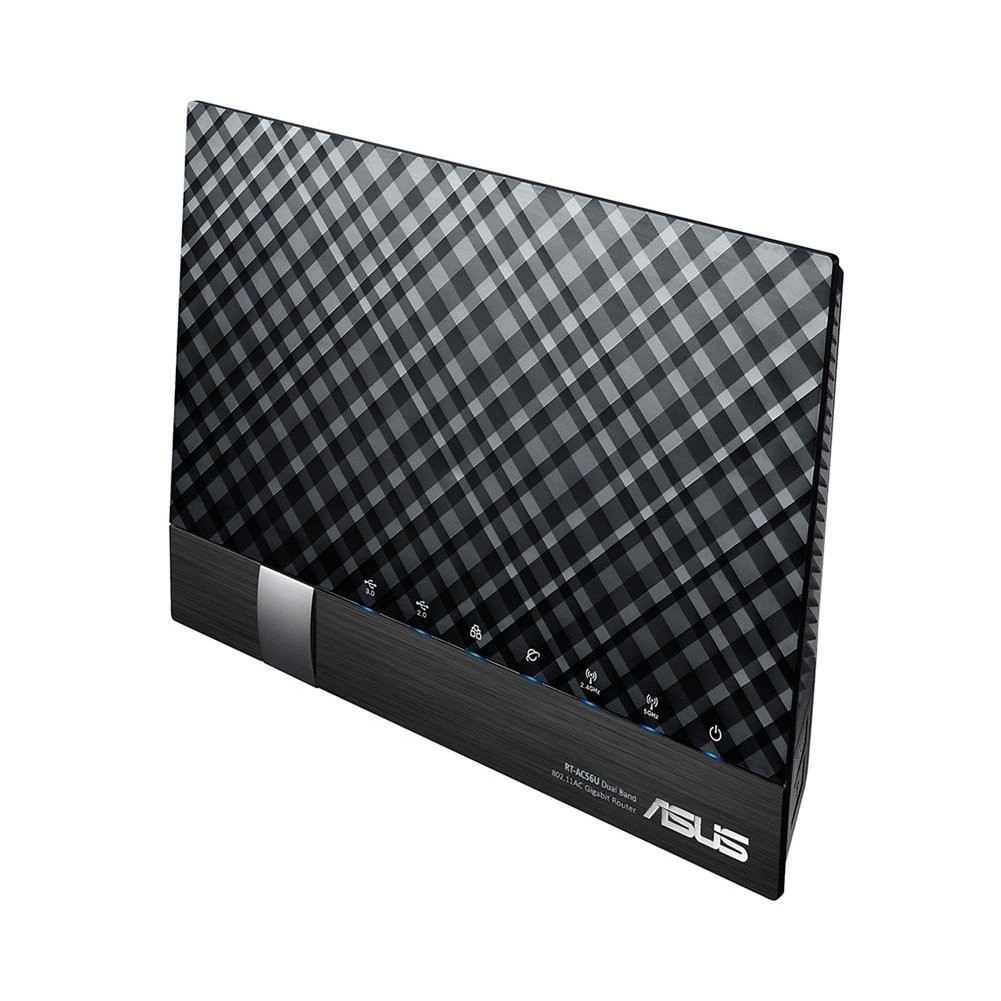
The ASUS DSL-AC56U supports as slew of features and technologies making this versatile modem router future proof. it supports high speeds and a detailed graphical interface to adjust all your settings to your needs.
Additional Features
- Concurrent Dual Band: 867Mbps on 5GHz and 300Mbps on 2.4GHz
- Two WAN ports for DSL and Ethernet
- Gigabit Ethernet ports
- Dual multi-purpose USB ports support file sharing, printer sharing, media streaming and 3G/4G support
- VDSL/ADSL WAN multi service for IPTV support
- PPTP VPN server and VPN client support
- Download Master and enhanced media server let you download and stream anywhere
- Enhanced signal range and stability with ASUS AiRadar using ASUS RF fine-tuning giving you extended coverage, dynamic data speed increases, and enhanced stability.
- Ability for DSL, Ethernet or 3G/4G LTE Internet connections
- Gigabit Internet browsing with hardware NAT
- Ability to add external storage, printers, and other devices directly to your network
- DSL ASUSWRT allows you to setup, monitor, and control network applications all in one intuitive area.
- Online multitasking at up to 300,000 sessions,gives you 20 times the capacity of mainstream routers. More data sessions translate into quicker and buffer-less HD streaming plus lag-free online gaming.
- VPN server and VPN client support
Price Range: From $165 to $269

The ASUS DSL-AC68U is fast with combined dual-band data rates of up to 1900 Mbps. It is compatible with ADSL2/2+, ADSL, VDSL2, fiber and cable services. The easy-to-use ASUSWRT graphical user interface unlocks the power of the DSL-AC68U giving robust control to optimize your network for you. 30-second set-up and easy traffic management means even network newbies can enjoy its sophisticated features, while power users will love its IPv6 support, multiple wireless SSIDs and secure VPN access.
Additional Features
- Compatible with ADSL2/2+, ADSL, VDSL2, fiber and cable services
- 150% wider Wi-Fi coverage* Three external high-gain antennas
- Intuitive ASUS Router app -Manage your network anywhere
- Enterprise-grade security for your home network -ASUS AiProtection with Trend Micro™
- VPN server and client support
- Dual WAN ports
- Multi-purpose USB 3.0 port
Price Range: From $225 to $269

- Dual Band Wireless AC1200 Technology
- Integrated ADSL2+ / VDSL2 Modem
- NBN/UFB Ready (Dedicated Gigabit WAN port)
- 4 x Gigabit Ethernet LAN Ports
- Two USB 2.0 Ports for Storage, File Sharing or 4G USB modem
- Supports AutoZoning technology
Price range: From $149 to $175
Draytek has a range of xDSL routers series which include VDSL2, ADSL2/2+ and G.SHDSL models to meet different infrastructure. WAN failover/load-balancing Bandwidth Management/Firewall/VPN features are available in most models to ensure a secure & reliable network.

They have discontinued quite a few models, list available below.
Draytek Vigor 2862 Vac
Vigor2862 Series features comprehensive firewall and content security management (CSM) to secure the local network. Vigor2862 Series is a VDSL2/ADSL2+ Security Firewall router which is compatible with variants of ADSL and VDSL. All the models have an RJ-11 DSL port, and a Gigabit Ethernet WAN port which can be used with a cable-modem to connect to a second line for load balancing or failover, there are also two USB ports which can work with 3G/4G/LTE USB modems to add wireless connectivity.
Additional Features
| VDSL2 or ADSL2/2+ | |
| Gigabit WAN | |
| 3G / 4G LTE | USB |
| Gigabit LAN | 4 |
| VPN Tunnels | 32 |
| WLAN (AC2000) | 11ac |
| Concurrent Dual Band | |
| VoIP (2xFXS, 1xPSTN) |
Current Selling models in the Vigor 2862 Series are
- Vigor 2862
- Vigor 2862n
- Vigor 2862 AC
- Vigor 2862 VAC
There are also four models in the Vigor 2762 Series and one in Vigor 2832 Series and one in Vigor 2710 e Series.
Discontinued Draytek Vigor model numbers
- Vigor2860n
- Vigor 2860 Ln
- Vigor 2860 L
- Vigor 2860 Vac (AC1600)
- Vigor 2860 ac (AC1600)
- Vigor2860Vn-Plus
- Vigor2860
Netcomm NF17 ACV VDSL/ADSL Dual Band Router

If you end up signing with Aussie Broadband for a NBN connection and paying for a modem, this can be the Modem Router you get. It looks pretty similar in design to the TP Link model TPG bundles free with their NBN connection.
Aussie Broadband Set up guide for this model –> Setup Guide
The NF17ACV is a smart residential VDSL2/ADSL2+ gateway designed to connect to VDSL and ADSL networks as well as nbn and UFB fibre services to deliver the fastest available broadband speeds and performance at home. You can connect up to 2 USB devices, access, and share even more A/V media files and content in real time.
- Fully featured VDSL2 / ADSL2+ gateway
- 4 x Gigabit Ethernet 10/100/1000 LAN ports
- nbn and UFB ready ultra-fast connection to nbn and UFB fibre network
- 1 x 10/100/1000 Gigabit Ethernet WAN port
- VoIP feature for HD quality voice calls – connect up to 2 telephones
- Next generation WiFi 802.11 AC1600, dual band
- 2x WPS push buttons for 2.4GHz and 5GHz bands
- Access and share media and file content across the wireless home network
- Device performance monitoring and management through TR-069
Its a Modem router built for gaming.

Its the first 10 Gigabit Wi-Fi router with a quad-core processor and 2.5G gaming port
AX routers are the emerging technology in modem routers. The Asus ROG Rapture GT-AX 11000 ($450) is the first of the new Wi-Fi 6 class of router. The ROG Rapture GT-AX11000 brings in the new 802.11 ax routers in style and speed.
It is built and designed with gamers in mind. The range and speeds are what this is good for and the throughput rises with the distance, making it the ideal modem router to fill a large house with Wi-Fi.
Additional Features
- Next-Gen WiFi Standard – 802.11ax WiFi standard for better efficiency, throughput and range.
- Ultrafast WiFi Speed – 11000Mbps WiFi speed to handle even the busiest network with ease.
- Triple-level Game Acceleration – Accelerate game traffic every step of the way – from device to game server.
- Battle-ready-hardware – 1.8GHz quad-core CPU and 2.5GBase -T port for ultimate performance.
- Front-line Network Security – Neutralize internet threats before they hit your network.
Price Range: From $701 to $804
Price ranges for modems
Generally a good nbn compatible modem can start from $60 onwards, but expect to get a decent one anywhere between $120 to $1000+. The $400+ price range modems are normally top of the range ones in looks and speeds too. Most of them are modem + routers.
How do I know if I need a New Modem for my NBN connection?
If you have had your modem for more than 3 years its likely that you will have to get a new modem for your NBN connection.
Check online or on the Modem box/paperwork if they mention that your modem is VDSL and VDSL2 compatible. If it is then there is a good chance your modem will work with your new NBN connection.
It is best to check with your new provider if your current modem will work with their internet connection before signing up with them.
What is the difference between modem and router?
A modem is the device that takes your telephone/internet line and makes it ready to use for internet purposes.
The router is the device that takes the telephone line converted to internet and enables it to be distributed via wires and wifi all over the house/designated area to different devices.

Works with Google Home /Alexa
While most modems and routers will connect to your google home and Alexa this router allows you to control your networking commands as well.
If you want a Wifi router that works with google Home and alexa to control your home using voice commands for home networking then the NIGHTHAWK SMART WIFI ROUTER- R7000 model is your router of choice. Its not a modem.
https://www.netgear.com.au/home/products/networking/wifi-routers/R7000.aspx
Do I need both a modem and router?
Today many companies just provide a combined modem + router so you have them both in one device.
The higher priced modem routers enable higher speeds for wired as well as wifi between multiple devices and have better coverage area.
To give you an idea of how people started using modems/routers. Initially when people started using modems/internet, they just had one small modem hooked up to one pc in the house. Most people used that one pc to browse the internet.
Then people started hooking up that modem to a separate device called router, so that they could distribute that internet to multiple computers in the home. Then soon the internet was also distributed via wifi through routers to different devices in your home.
Today you can get a modem + router bundled in one device, doing all these jobs and still called a modem 
ADSL VS VDSL ?
With nbn already here you need a modem router that will do your NBN speeds justice and a VDSL (Very-high-bit-rate digital subscriber line ) or VDSL2 ready modem does just that.
Most new NBN ready modems cater to all kinds of internet connections including a VDSL connection or a fibre to the premises box.
In short ADSL (Asymmetric digital subscriber line) gives slower speeds than VDSL and that’s why most nbn connections deliver internet via VDSL.
A VDSL or VDSL2 Modem will cover all kinds of nbn connections if you got fibre to the node or fibre to your home the VDSL modem will distribute that internet with optimum speed in your house.
More Modems
Some more awesome modems reviewed including new AX featured modems and mesh systems and nodes. Click to show.
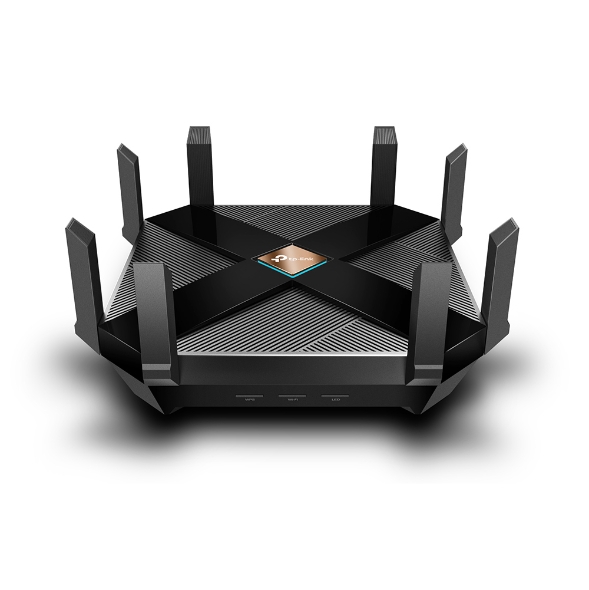
14. TP-Link Archer AX6000 review
TP-Link Archer AX6000
What is 802.11ax Wi-Fi
Fast. High Efficiency.
Gaming, 4K/8K streaming, smart home devices, and AR/VR all compete for network resources, creating lag and crowding your network. To solve this problem,
802.11ax (also known as Wi-Fi 6), a next-genhigh-efficiency Wi-Fi standard, was created. Now, you can simultaneously connect more devices and enjoy the optimum speed for each of them.
AX Wi-Fi aims to enhance wireless network performance by boosting speed and responsiveness better than MU-MIMO . The key improvement is called orthogonal frequency division multiple access (OFDMA) which increases connection capability in a single 20MHz channel from 52 (AC wireless) to 234 and also uses band steering to automatically ensure that less-crowded bands are used. The new Samsung Galaxy S10 smartphones are currently fully compatible to use this service.
This system gives good speeds while playing online PC games and watching YouTube on two old Android tablets, however its expected that performance will drop off with Mesh systems and Wi-Fi extenders. TP-Link’s Archer AX6000 achieves good speeds and will surely compete with mesh networks modem setups.
Its got a 1.8GHz quad-core processor on-board for its serious computing needs. The AX6000 has eight Gigabit Ethernet ports. and the WAN port supports 2.4 Gbps connections. It supports two USB 3.0 ports: Type-A and Type-C.
It also features built-in Trend Micro Security features, which offer antivirus and family filtering options including the ability to set usage limits and bed times for different users across multiple devices.
At $499 it’s not cheap, but it’s got all the important features, looks good and performs so well that you likely won’t need to buy other networking equipment for a long time to come.
Price Range: $499 | WWW.TP-LINK.COM/AU/
15. TP-Link Deco M4 mesh
TP-Link Deco M4 mesh (Double Kit)
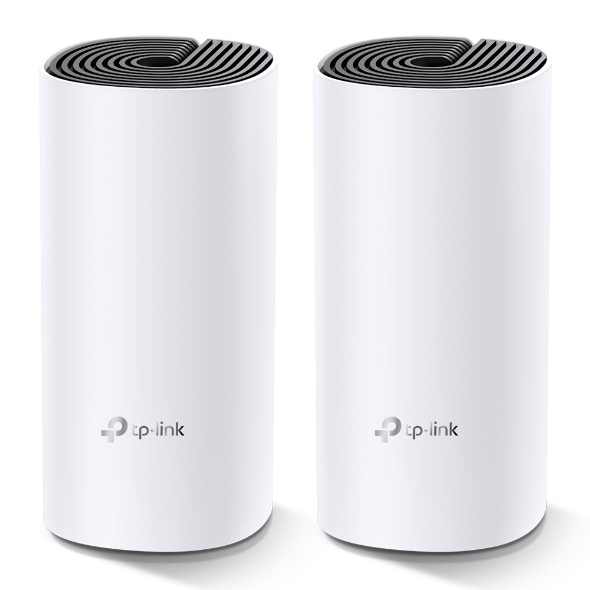
Deco uses a system of units to achieve seamless whole-home Wi-Fi coverage — eliminate weak signal areas once and for all. TP-Link has launched the new mesh WiFi system, called Deco M4 or Deco M4R. Devices automatically switch between Decos as you move through your home for the fastest possible speeds
Additional Features:
Setting up is simple via the Deco app for this mesh system, it walks your through setting up the network, setting the password, updating the firmware and adding the second node. The app is slick, responsive and intuitive to use.
- A Deco M4 two-pack delivers Wi-Fi to an area of up to 260 square metres.
- Deco M4 provides fast and stable connections with speeds of up to 1167 Mbps and works with the major internet service provider (ISP) and modem.
- Deco can handle traffic from even the busiest of networks, providing lag-free connections for up to 100 devices.
- Parental Controls limits online time and block inappropriate websites according to unique profiles created for each family member.
This can be handy, you can switch the LED lights off and turn nodes into access points. It’s also has Amazon Alexa and IFTTT smart device compatibility which is a bit future proof.
The AC1200 Wi-Fi moniker refers to the maximum theoretical throughput of 867Mbps on the 5GHz band plus 300Mbps on 2.4GHz. TP-Link says it can manage 100 different devices but not at the same time.
Cons for this mesh system
- It does not offer a web-based interface for administration
- It has fewer features than other Deco systems, to make up for the price difference
- It is not able to fully utilize 1 Gbps internet connections
In summary, this is about as good as an AC mesh system gets. The advanced features will definitely attract some but the price can be a deterrent. At $230 for a double-pack it’s the cheapest mesh on the market.
Price Range: $230 | WWW.TP-LINK.COM/AU/
16. ASUS RT-AX88U
ASUS RT-AX88U
Asus’ new RTAX88U design makes it look like a racer car just about to kick into gear and leave the rest behind and that is not far from the truth with its specs and features we will look at below. Its got a angular black chassis, four large antennae and gold detailing that makes its presence known.
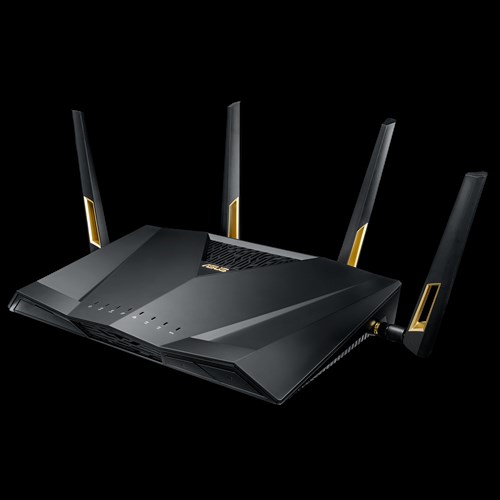
This device has got a impressive feature list with eight gigabit Ethernet plus two USB 3.1 ports and integrated malware and family protection tools that are provided by Trend Micro.
Additional Features:
- Next-Gen WiFi Standard – 802.11ax WiFi standard for better efficiency and throughput.
- Ultrafast WiFi Speed – 6000Mbps WiFi speed to handle even the busiest network with ease.
- Wider Usage and More Convenience – 4 antennas + 8 LAN ports to support more clients at the same time.
- Commercial-grade Security – AiProtection Pro, powered by Trend Micro™, blocks internet security threats for all your connected smart devices.
- Better Partner with Mesh System – Compatible with ASUS AiMesh WiFi system for seamless whole-home coverage.
Gamers should be happy with this one. Its got detailed QoS settings which allow you to set the priority of different types of apps (gaming, VoIP, streaming etc). It also boasts more-specific ‘Game Boost’ QoS integrations including WTFast for maximising MMO game stability and LAN Boost which (also) promises to prioritise game traffic performance.
Future proofing includes web savvy features like VPNs, Alexa plus IFTTT integration with other smart devices.
At $569 it’s not cheap and at the higher end of price spectrum for what it provides.
Price Range: From $569 | WWW.ASUS.COM/AU
Speed of your internet and WIFI
The speed of your internet to your house connection and within your house will depend on a few different factors as given below.
Your internet connection
Is your connection directly fibre to your house or does it convert to copper line before it reaches your house? Is your internet delivered via cable wires? There are different types of connections FTTN, FTTB, FTTP, FTTC and HFC. Generally, if you have fibre right up to your home or via cable you will get good fast speeds.
Copper line connection
If you have the last bit of your internet connection to your home via copper lines, then where is the nearest Fibre box located where it converts to copper and where is the nearest telephone exchange will also determine your internet speeds.
Your modem/router Wi-Fi speeds
Once the internet reaches your house you should also have a good modem router to distribute the internet via good Wi-Fi speeds. If you got a good speed plan your modem should have good Wi-Fi distribution speeds for around the house. Typically, most modems can distribute Wi-Fi on older 2.4 ghz and 5.0 ghz (faster) channels. Check the speeds 300 Mbps will do for your house as starting speeds.
Normally most providers offer a 8 Mbps, 25 Mbps, 50 Mbps and 100 Mbps plans. I would suggest stick with the 50 Mbps plan for decent speeds. If you got fibre connection right to your house and the nearest exchange is near to your house, you will benefit from a 100 Mbps plan.
Coverage of your Wi-Fi signal
Coverage if the Wi-Fi signal used to be a problems with most traditional old modems. The signal got patchy around the front yard or backyard. The new modems do a good job of getting that WIFI signal out there.
Wifi & Speed - 2.4 ghz vs 5 ghz
Most modem routers or routers have two different channels through which they distribute your Wi-Fi across the house. The 2.4 GHZ channel and the 5GHZ channel, typically the 2.4 GHZ can deliver slower speeds than the 5 GHZ channel.
Australian standards
Make sure you get a modem made by a local known company and you should be right. It will cover all Australian standards. Some well-known local brands are Netgear, Netcomm, Billion, Tplink.
Speed measuring tools
Those crafty little buggers advertise speeds like they are taking you on a free trip to the moon, but do they deliver?
Well you can surely find out. These speed measuring tools below will measure how fast your internet is.
-
 https://www.speedtest.net/ – Speedtest by Ookla is one of the popular speed testing websites whihc has been around for a while now. Just click the button and it will test your speed. You can also change the server locations to test speeds from different locations.
  https://www.ozspeedtest.com/ – This website does what its intended to do and tests both download speed and upload speed of your Internet connection, whether it be NBN, ADSL, ADSL2, ADSL2+, Cable, 3G, 4G, Wireless or Satellite.
 https://speedtest.telstra.com/ – This was built for measuring your telstra internet speed, but can measure pretty much any internet connection for speed.
Its worth noting with speeds for internet , The Netflix ISP Speed Index is a measure of prime time Netflix performance on particular ISPs (internet service providers) around the globe, and not a measure of overall performance for other services/data that may travel across the specific ISP network.
This Asia-pacific Australia netflix page here shows some of the fastest internet speeds for Australia according to netflix servers and for March 2019, it ranks Telstra , Optus and Iinet on no#1 , 2 and 3 positions for best speeds.
Gadgets For
Below are gadgets that can extend your wifi within your home or distribute your internet via existing electrical power-points so that you can used a wired connection rather than wifi.
Wifi extender
Then Wi-Fi or internet coverage within your house is important. Most new modems have good coverage and will mention this on the box if they can cover a multi storied house. If your existing modem router does not sufficient coverage then you can add a WIFI extender. A Wi-Fi extender can also enable you to get coverage to your front yard and backyard so that you can connect to an outdoor tv or Wi-Fi music streaming
The Wi-Fi extender which will pick up your router’s Wi-Fi signal, amplify it, and rebroadcast it. They come in both desktop and plug-in variations, and are relatively easy to install. It is recommended to get a extender of the same company brand of your modem or router to get a better seamless experience.
Power line inverter
We all agree that Wi-Fi coverage is getting better with new technology, but you still cant beat a wired connection stability. If you don’t know about powerline inverters, then this is a good way to get wired internet to your tv or Foxtel box/internet device via a ethernet cable. You don’t need any extra wiring.
How powerline inverter works?
You will get two powerline plugs. You plug one ethernet cable from your modem to your powerline adapter plugged into a power point. What this does is distribute your internet into all the power sockets in your home. You just need to plug in the second powerline adapter into any other power socket in your home and you can connect to the 8nternet.
How to set up your router
The NBN Co states that your router can be one of the most important factors that can make or break your NBN plan, saying a decent router can “transform your experience into something spectacular”.
- iiNet advises that routers should be equipped with at least 802.11n or 802.11ac Wi-Fi for an NBN service.
- Devices manufactured before 2009 – potentially only featuring the older 802.11g or b signals – are incapable of supporting the NBN speed capability.
- Optus: Optus has stated in its Critical Information Summary that it will provide a Wi-Fi modem at no extra cost, while a fee of $40 will apply if you upgrade to an AC modem – one that’s likely capable of gigabit speeds.
- Telstra: Telstra includes a Gateway modem on 24 month plans. The Gateway modem comes with 4G connectivity, which can be used as a backup in case your NBN connection falters or for instant internet connectivity.
- iiNet: An iiNet-branded WiFi modem is included on 24 month contracts, while you will need to pay extra for one if opting for a month-to-month contract.
Getting Technical
Below are some Questions and answers (Q &A) regarding modem, NBN and connection related questions
HFC connection modem
For a HFC connection you can use the Arris cable modem to connect to your internet. Other modems that you can get are TP-Link C3150, Asus RT-AC68U , $229 or the Netgear Nighthawk R7000 for $220.
If you got a FTTP connection all you will need is a router, don’t need a modem. Above routers for HFC should work for FTTP connection too.
FTTC vs FTTN for Modems
If you got a FTTC connection or a FTTN connection the modem can be the same as they both use your existing copper wire and phone point. You will need a vdsl modem for both these connections.
However, a FTTC connection will have a NTD box directly outside of your place by the kerb instead of having a node down the street somewhere.
Cant connect to Samsung or LG tv over 5GHz
Well you got a brand-new modem boasting 5GHz transfer, but find out that your Samsung or LG Tv or device can’t receive your 5GHZ signal.
It’s Quite common!
Your TV and smart devices came with only 2.4GHz band built in compatibility so it won’t be able to connect over 5GHz band in spite of updating your tv to the latest firmware update. The good thing is the 2.4GHZ will work as good as a 5GHZ band.
How to set up 5GHZ in your house?
You need to set up 5GHZ in your modem or router. Your modem device will need to be 5GHZ capable to set it up. You will need your modem or router login/pass to go to the modem admin settings and turn 5GHZ on.
Refer to your modem brand website or provided setup instructions in box to login to your modem admin settings. Once you set it up properly, if your tv or smart device is 5GHZ capable then you should be able to connect via 5GHZ Wi-Fi SSID. Tip: name the 5GHZ SSID connection starting with letters 5G to find it on your Wi-Fi list.
The old 802 b/g/n vs 802.11ac VS the new 802.11/a/c/n – What’s the difference between the Wi-Fi standards?
The WIFI distribution bands and frequencies b, g, n, ac… wireless standards haven’t had the most logical of alphabetical progressions
Amon the newer announcements first 802.11n was launched then the Wi-Fi Alliance certified the ‘802.11ac’ standard, paving the way for the mass roll-out of ‘wireless ac’ devices. Like past Wi-Fi standards – 802.11ac is backwards compatible with 802.11b, g and n.
As time passes this standard will be built into routers, laptops, tablets, smartphones, televisions and much more.
What is the range of the Wifi in 5Ghz and 2.4GHZc channels?
To differentiate between these two frequencies, you will need to take the range (coverage) and bandwidth (speed) that both bands provide.
The 2.4 GHz band provides a longer-range coverage(20–30Ft) but transmits data (WIFI) at slower speeds. The 5 GHz band provides less range coverage but transmits data at faster speeds.
The range is lower in the 5 GHz band (10–15 ft) because higher frequencies cannot penetrate solid objects, such as walls and floors. However, higher frequencies allow data to be transmitted faster than lower frequencies, so the 5 GHz band allows you to upload and download files faster.
Is 5GHZ band better for distributing Video via WIFI than the 2.4GHZ?
With streaming via wifi, the size of the file doesn’t matter, only the data rate matters as you are not trying to transfer the whole thing as fast as possible, you are only to keeping up with the demand.
In the above statement makes senses, if you got a 4KTV it would make more sense for your TV to have 5GHZ band compatibility. The 5GHz spectrum is normally used with the 802.11ac standard on your router modem.
802.11ac Speed & Range
Learn more below about Wifi speeds, ranges and internet distribution technology
WIFI SPEED
SPEED: 1.3 gigabits per second (Gbps) is the speed most commonly reported with the 802.11ac standard. This translates to 166 megabytes per second and it is much quicker than the 450Mbit per second (0.45Gbps) speeds quoted on the highest performing 802.11n when it was rolled out.
Modem Router Range
RANGE: The 802.11ac standard lives entirely in the 5GHz spectrum. They are some rare modem/routers that broadcast 802.11n in 5GHz as well as 2.4GHz.
The 5GHz signals do not actually broadcast as far as 2.4GHz signals. The 5GHz is also good to support the faster speeds of wireless ac.
Distribution Standard
Beamforming: The other factor is that the 802.11ac makes ‘beamforming’ a core part of its spec. Rather than throw out wireless signal equally in all directions like standard frequencies do, WIFI with beamforming detects where devices are and intensifies the signal in their direction(s) which can be good for WIFI distribution.
Mesh technology for Modems
Mesh: Wirelessmesh networks often consist of mesh clients, mesh routers and gateways. Mesh networking is a type of network in which a device (node) transmits its own data as well as serves as a relay for other nodes. Mesh WiFi or Whole Home WiFi systems consists of a main router that connects directly to your modem, and a series of satellite modules, or nodes, placed around your house for full WiFi coverage. They are all part of a single wireless network and share the same SSID and password, unlike traditional WiFi routers
Acronyms
- NBN – National Broadband Network
- VDSL – Very High Bitrate Digital Subscriber Line
- ADSL – Asymmetric Digital Subscriber line
- Mbps – Megabits per second (1,000 kilobits of data per second)
- LAN – Local Area Network
- WAN – Wide Area Network
- Gbps – Gigabits per second
- HFC – Hybrid Fibre Co-ax
- SSID – Service Set identifier
- Beamforming – Signal processing Technique
- 4k – Ultra HD covers 4K (also called 2160p)
- MIMO – Multiple Input Multiple Output
- NAS – Network Attached Storage
- WPS – Wi-Fi Protected Setup
"Ref
Australian standards NBN – https://www.legislation.gov.au/Details/F2018L00814
NBN co Builder guidelines – https://www.nbnco.com.au/develop-or-plan-with-the-nbn/new-developments/design-build-install/cabling
Post originally published in April 2019