• Skip to primary navigation
  • Skip to main content
  • Skip to primary sidebar
  • Skip to footer

Digital Grog — Australia’s Tech, Gadgets & Digital Life Unfiltered

Digital Grog is Australia’s go‑to tech blog for sharp reviews, digital trends, AI tools, gadgets, cybersecurity updates, and practical how‑tos covering the latest in Aussie technology

  • About Us
  • Contact Us
  • Block Examples
  • Landing Page

VIDEO

Underwater Drones for Recording Video and Taking Pictures

June 5, 2022 by admin Leave a Comment

Wouldn’t you like a nice underwater camera that can take pictures and video like a professional. Well, it is here, Qysea Fifish series of underwater drones do this job in a professional way. They are priced from a affordable $ 2999 to $50,0000.

These underwater drones or bots can look for treasure, record the underwater fish world and take amazing pictures all underwater while you don’t even have to go into the water. The feature the best of underwater technology.

Qysea Underwater Drone

v6 fifish qysea

Some of the different models available with Qysea is :

· Qysea V6 Fifish

· V6s Fifish

· V6 PRO Fifish

· Fifish p3

Underwater drones have been helping with subsea exploration and missions since the 1950s known as ROVs (remotely operated vehicles) and also UUVs (unmanned underwater vehicles) or AUVs (automated underwater vehicles).

How much does an underwater drone cost?

Underwater drones cost somewhere between $500 and $4000 while the average price is around $1000+ for a good quality underwater drone. However prices can go upto $50,000 for a good top end drone with all the bells and whistles

FIFISH V6 Underwater Robot specifications and features

  • 6 Degrees of Freedom.
  • FIFISH Posture Lock™
  • Head Tracking.
  • 100m Depth Rating.
  • Slow motion at 240 fps.
  • 12 Megapixels.
  • 4K UHD Camera.
  • 166° FOV.

Battery Life: Up to 4 hours

Wireless: Wi-Fi supported


Some more pics of what you can get with Qysea :

How deep can these underwater drones go?

Each drone has different capabilities. However recreational underwater ROVs can on average reach depths of between 10m-150m (33ft-492ft). Professional underwater ROVs can reach depths of between 300m-6,000m (984ft-19,685ft). They can stay underwater for as long as the battery allows which can be from 20 minutes to 4 hours depending on your model. The older models had wires attached to it, but nowadays most models work on wireless.

There are more and more models coming out now with some of them being wireless, some that work in murky water, and some that have attachments that can move or grab stuff underwater.


Some other underwater drones are

· Chasing M2 Pro Underwater Drone ( from 7,499 approx)

· PowerVision PowerRay Underwater Drone ( from $2,788 approx)

· Geneinno Titan Underwater ROV 492′ Depth Rating T6T-1 ( $2,250 Approx)

· CHASING DORY Underwater Drone

· Geneinno T1 Pro Underwater ROV 574′ Depth Rating T1-PRO-200BL

Where can I get an underwater drone in australia ?

You can get an under-water drone here in Australia  either in your local drone shop or J B HI FI  or there is a good range available online in shops like Amazon.com.au, Mydeal.com.au, catch.com.au and qysea.com


Most unmanned vehicles rules and regulations in Australia fall under the https://aaus.org.au/unmanned-systems/  which deals with rules under three categories

  1. Unmanned Aircraft Systems (mainly air drones)
  2. Unmanned Marine Systems (mainly underwater vehicle  also known as USVs and UUVs)
  3. Unmanned Ground Vehicles ( autonomous cars, trucks …)

Australia right now has a visible regulatory website for drones (airfrafts) Quadcopters in  www.casa.gov.au however there  does not seem to be an online presence for underwater vehicles regulation.

We plan to bring out a more in detailed review with more models, so bookmark our blog to check it out later. In the meantime if you enjoyed reading about this underwater robot  you might like to read about the robot that irons and folds your clothes and the future of toys on our blog.

Filed Under: 2022, Australia, Gadgets Tagged With: Gadget, Review, Technology education, VIDEO

Black Friday Deals 2020 – The Top 20 picks for Australia

November 27, 2020 by admin 5 Comments

[et_pb_section fb_built=”1″ _builder_version=”3.22″][et_pb_row _builder_version=”3.25″ custom_margin=”1px|||” custom_padding=”1px|||”][et_pb_column type=”4_4″ _builder_version=”3.25″ custom_padding=”1px|||” custom_padding__hover=”|||”][et_pb_text admin_label=”intro text” _builder_version=”4.7.4″ custom_margin=”1px|||” custom_padding=”1px|||” hover_enabled=”0″ sticky_enabled=”0″]

I search online for black friday deals and find Australian businesses like Harvey Norman, Kogan and News.com.au flogging deals for this American online sale frenzy that happens each year in November. The weird thing is most people in Australia don’t have a clue what this whole online sale event is about.

Before Google Search Australia got invaded with “black friday sales” by all the commercial websites for a “thanksgiving day that Australia does not celebrate”,  it used to show the real black friday bushfires in Australia that everybody knew about. The bushfires that happened in 1939 in Victoria, Australia.

The Royal Commission noted that “it appeared the whole State was alight on Friday, 13 January 1939”. The infamous Black Friday bushfires happened on the 13 January 1939, in Victoria, Australia. It was said to be among the worst natural bushfires (wildfires) in the world. Almost 20,000 km² (4,942,000 acres, 2,000,000 ha) of land was burned, 71 people died, several towns were entirely obliterated. So we pay our respects to those affected by those bush fires.

Black Friday for the US  is a commercial bonanza for  retail and online business. Black Friday  and Cyber Monday is a  big event in the US and massive discounts are available online. Everybody loves a good bargain online and for this reason, I have done a roundup of all the good deals  that I have updated from  2020 to 2018. I made a list, so you too can benefit from these online sale offers here in Australia.

[/et_pb_text][/et_pb_column][/et_pb_row][et_pb_row _builder_version=”4.7.4″ _module_preset=”default”][et_pb_column type=”4_4″ _builder_version=”4.7.4″ _module_preset=”default”][et_pb_text admin_label=”webhosting text” _builder_version=”4.7.4″ _module_preset=”default” background_color=”#EDF000″ custom_margin=”4px|8px|4px|8px|false|false” custom_padding=”4px|4px|4px|4px|false|false” border_radii=”on|10px|10px|10px|10px”]

One deal I always get  every year @blackfriday is a new hosting account as I am into blogging and website as a hobby.   This year I got myself a  siteground website hosting deal . They got 75% off on the 12 month shared hosting $4.99 deal and also deals on the 24 month $7.49 deal.

I signed up as  an affiliate  so you can get their deals here. Maybe I will need to end my $700 Aud Presidium hosting account  now.

australia black friday discounts

I know most  webhosts have deals right now including Bluehost and HostGator which I also use for websites. Bluehost has  Shared Hosting starting at $2.65/mo* for 36 months and Hostgator has a 75% off deal. Connor clothing my local shirt shop also has a 30% off deal right now. Below are some more deals.

[/et_pb_text][/et_pb_column][/et_pb_row][/et_pb_section][et_pb_section fb_built="1" fullwidth="on" _builder_version="3.22"][et_pb_fullwidth_image src="https://www.digitalgrog.com.au/wp-content/uploads/2020/11/Black-Friday-Cyber-Monday-Deals-2020-new1.png" alt="black friday australia 2020" title_text="Black-Friday-Cyber-Monday-Deals-2020 new1" _builder_version="4.7.3"][/et_pb_fullwidth_image][et_pb_fullwidth_code admin_label="Fullwidth table Code"][table “6” not found /]
[/et_pb_fullwidth_code][/et_pb_section][et_pb_section fb_built="1" _builder_version="3.22"][et_pb_row _builder_version="3.25" background_size="initial" background_position="top_left" background_repeat="repeat"][et_pb_column type="4_4" _builder_version="3.25" custom_padding="|||" custom_padding__hover="|||"][et_pb_text admin_label="Most of these crazy " _builder_version="4.7.4" hover_enabled="0" sticky_enabled="0"]

Most of these crazy upto 60% to 70% off online offers are available this cyber weekend (yes that’s what they call it) So you can get off on this – this weekend, but surely some of them companies will extend their offers at the end of this November date, because they so like to give us deals -don’t they.

wordpess dealsSome of the deals/links listed above will convert  to the Black Friday discounts  when they start on black friday and some are just discount offers that are listed  for your online shopping convenience from my affiliate partners.  You get a discount and I get  compensated at no extra cost to you for listing the deals.

I have used  most of these products( tech, website and gadgets related ) on this page  and  hope to  test out the rest, which I have not used yet. Hope you find a deal that interests you.

When is Black friday and cyber monday ?

  • Black Friday 2020 is on 27 November 2020 
  • Cyber Monday is on  Monday, 30 November 2020
Black Friday is an informal name for the day following Thanksgiving Day in the United States.
From wikipedia
The earliest evidence of the phrase Black Friday applied to the day after Thanksgiving in a shopping context suggests that the term originated in Philadelphia, where it was used to describe the heavy and disruptive pedestrian and vehicle traffic that would occur on the day after Thanksgiving.
 
This usage dates to at least 1961. More than twenty years later, as the phrase became more widespread, a popular explanation became that this day represented the point in the year when retailers begin to turn a profit, thus going from being “in the red” to being “in the black”

Website Design and Theme – Offers

Website deals – It is the perfect time to invest in loads of useful wordpress plugins, tools, themes, plans and more. Our list above features a lot of website related products, whether you need it for your own website, or a client’s, purchasing a product that is priced way below its actual price is always a good deal.

Software Blackfriday Deals

The list also features streaming and recording software, video editing  and  website and online shops software. This holiday season is the perfect time  to get into  downloading or editing videos with our discounted software  products listed above.

[/et_pb_text][et_pb_text admin_label=”If you do spot any” _builder_version=”4.7.4″ hover_enabled=”0″ sticky_enabled=”0″]

If you do spot any good deals worth listing here this year, do send me a note over here and I will include it in my 2020-21 edition of deals, if good.

You want to check out what we featured earlier check out our 2016 deals post here and these earlier posts over here and here.

[/et_pb_text][et_pb_button button_url="https://www.digitalgrog.com.au/australia/black-friday-deals/" url_new_window="on" button_text="Blackfriday Deals" button_alignment="center" admin_label="BF Button" _builder_version="3.17.6" custom_button="on" button_text_size="18" button_text_color="#ffffff" button_bg_color="#f27121" button_border_color="#00028c" button_font="Arial||||||||" button_icon="%%40%%" button_icon_color="rgba(209,32,219,0.92)" button_text_color_hover="rgba(222,239,64,0.91)" button_bg_color_hover="#8300e9" saved_tabs="all"][/et_pb_button][et_pb_text admin_label="outro oneliner" _builder_version="4.7.4" use_background_color_gradient="on" background_color_gradient_end="#7cda24" background_color_gradient_direction="275deg" background_color_gradient_start_position="13%" background_color_gradient_overlays_image="on" hover_enabled="0" sticky_enabled="0"]

Happy deal hunting and have a good cyber 2020 !

[/et_pb_text][et_pb_text admin_label=”yellotxt box” _builder_version=”3.27.4″ background_color=”rgba(236,239,59,0.39)” custom_margin=”5px|5px|5px|5px” custom_padding=”10px|10px|10px|10px” border_radii=”|5px|5px|5px|5px” border_color_all=”#071677″ border_style_all=”dotted” saved_tabs=”all”]

Restrictions: Most offers featured over here are valid for new customers . Not valid for existing customers, renewals, upgrades, or any other product purchase. 

Validity: The deals featured above are mostly over the  Black Friday and  Cyber Monday weekend, unless they are extended by respective providers.

[/et_pb_text][/et_pb_column][/et_pb_row][/et_pb_section]

Filed Under: 2018, 2020, Australia, Compare Tagged With: Cybermonday deals, Hosting In australia, Software, VIDEO, Wordpress

Top Video and Audio Conferencing Software for Business in 2020

September 21, 2020 by admin 1 Comment

[et_pb_section fb_built="1" _builder_version="3.22"][et_pb_row _builder_version="3.25" background_size="initial" background_position="top_left" background_repeat="repeat"][et_pb_column type="4_4" _builder_version="3.25" custom_padding="|||" custom_padding__hover="|||"][et_pb_image src="https://www.digitalgrog.com.au/wp-content/uploads/2020/09/video-conferencing-apps-for-business-and-organisations.jpg" alt="best video chat apps" title_text="video conferencing apps for business and organisations" align="center" force_fullwidth="on" align_tablet="center" align_phone="" align_last_edited="on|desktop" _builder_version="4.6.1"][/et_pb_image][et_pb_text admin_label="intro para" _builder_version="4.6.1" background_color="rgba(237,239,110,0.49)" background_size="initial" background_position="top_left" background_repeat="repeat" custom_margin="20px|20px|20px|20px" custom_padding="10px|10px|10px|10px" border_radii="on|10px|10px|10px|10px"]

Covid has brought upon us the work from home generation and this culture is likely here to stay or get absorbed into the new working culture. With these current “do everything from home” circumstances, has come the rise of the new business productivity apps. If you are looking for the top video conferencing app for your business needs, our list and comparison below will point you in the right direction.

Zoom the web conferencing app has had a big exposure due to the current circumstances where a lot more people are using the internet to chat or meet online for personal or business reasons. It has not only multiples its user base in a very short span of time, but allowed itself to grow multifold in its market value due to the current circumstances.

WebEx and Microsoft teams are other such players in this field. Webex has been there for a while, but Microsoft teams is a new and fresh contender which his also gaining popularity for its ease of use in the business world. Below we have some software for business needs and also some for personal use like video chatting with family.

Let’s have a look at some of this apps/software and how they work

[/et_pb_text][et_pb_divider admin_label=”Divider” _builder_version=”4.6.3″ _module_preset=”default”][/et_pb_divider][et_pb_text admin_label=”Webex Teams and zoom intro” _builder_version=”4.6.3″ background_size=”initial” background_position=”top_left” background_repeat=”repeat”]

Top 5 Business Productivity Apps

ZOOM

zoom to video chat

https://zoom.us/whatsnew

Zoom is best-known for being the go-to choice for businesses that need access to quick and convenient video for internal and external audio or video conferencing.

  • Offers high-quality HD video and audio.
  • Simple and easy to use platform
  • Offers  collaboration facilities such as text chat and screen sharing
  • You do not sign up for the app to join a Zoom meeting (hopefully this doesn’t change)
  • To host a video conference, you need to create an account
  • Can sign up using existing Facebook and Google accounts
  • Works with Windows, macOS, Android, and iOS
  • Desktop users can also begin a local recording
  • There is extra functionality with plugins like integration with outlook , google chrome, Firefox to make using the app from within these software easier

Zoom app is offered in both free and paid versions. The paid version has some additional features like you can add up to 1000 participants, record calls, and much more.


WEBEX by cisco

webex australia

https://www.webex.com/pricing/index.html

WebEx is a flexible conferencing solution designed for businesses of any sizes you can think. Cisco owns the WebEx brand and has been around for a while with a high degree of reliability.

  • High quality web and HD video meeting software
  • It has Integrated application/file sharing(screen sharing)
  • Integrated with Outlook – add WebEx to a meeting in my calendar and all invitees will have the information
  • Cross platform – works with Windows, Mac, iPad and support mobile meetings for iPhones, Blackberries, Androids.
  • With WebEx meetings you can also chat using your phone or home line and watching the video/ video conference or meeting using your internet connection.
  • Supports immediate playback of multi-media content like flash and windows media player
  • Great customer service

Webex makes a good reliable software/app for  video and audio conferencing  for business needs and integrates well with their  most browsers and  their other products like jabber.


Microsoft Teams by Microsoft

teams by microsoft

https://www.microsoft.com/en-au/microsoft-365/microsoft-teams/

Microsoft Teams is a new player in the market that has rapidly taken over market share from webex and zoom.

With the competition heating up for video conferencing platforms like Google Meet and many other free video conferencing platforms, Microsoft has made it free to collaborate with your colleagues with some limitations.


  • Multi-Platform support -You can use Microsoft Teams on most platforms including Android, iOS, Windows, Linux, and macOS.
  • Schedule video/audio meetings with one person or a team or make a call directly to your teammates.
  • Features includes screen sharing and call recording, background blur and chat.
  • Just share a link with your team to join the call or a meeting.
  • Easy to use – The interface is clean and simple to understand. You can initiate an online meeting or can schedule one as per your requirement.
  • Host a webinar or meeting with up to 10,000 participants.
  • App is integrated with Microsoft 365
  • If the other person is unable to answer, you can leave a voicemail-like message.
  • With Microsoft Teams integrations with Outlook, you can schedule a video call in advance and you get an alert before it begins.
  • The free account offers 10 GB of team file storage and 2 GB of personal file storage per person
  • It supports most Microsoft software. Teams let you collaborate in real-time with MS Office including Word, Excel, PowerPoint, and OneNote. Let your teammates access, share, and edit Word docs, PowerPoint, and Excel files in real-time
  • You can communicate and collaborate with teams up to 500K users
  • Microsoft keeps your data secure by using Secure Real-time Transport Protocol (SRTP) technology for video and audio data encryption.


How to set up Microsoft Teams:

You can download the app directly from the app store or Microsoft website and use your email account to log in. It can also be accessed via a web browser.

If you remember skype owned by Microsoft and still use it, MT has been built using some features “Skype for Business” that has been rolled into Teams. Teams support VoIP calling features where you can call anyone with a phone using Microsoft’s cloud-based PBX.

Microsoft Teams is ideal for businesses who already use or are familiar with Microsoft products and for others it could be an expensive option. It is however a perfect solution to collaborate with your team with plenty of features and third-party app integration options, which is not available with competitors.


How to use and set up Zoom Meeting:

First, you need to get the Zoom app on your device.

You will need the code and password for the meeting you wish to join.

At the time of the meeting, enter your Zoom app and type in the meeting code. After a short while, you will be prompted to put in the password. Type it on the password line. You will get a message telling you to wait to be invited into the meeting by the host.

Once you get the invitation, you will see the host (or some meeting participants) on your screen. If you want them to be able to see and hear you during the meeting, tap the video and audio icons at the bottom of the screen to join the meeting with visual and audio.

You can also press “mute” any time you want to remain silent to the host or other participants. Just remember to press “unmute” if you want to be heard again. [ These zoom instructions can be quite similar to use for most other video conferencing apps too ]

[/et_pb_text][et_pb_divider _builder_version=”4.6.3″ _module_preset=”default”][/et_pb_divider][et_pb_text admin_label=”Other Business Video apps” _builder_version=”4.6.1″]


Most of these apps work by creating a meeting id or a URL that you can share with people to join your meeting or video chat.

Companies or organisations will have to take into account – companies licensing agreements, hardware, budget, communication needs before signing up with such providers.

Historically with these apps none has been truly web-based, as they require a download, only work on certain devices, and don’t always work on all browsers. But this has changed now with most of these being able to be used with web browsers using plugins as alternatives and some even in stand- alone browsers.

Zoom vs WebEx

Zoom is the hot new web conferencing toy in the industry, but is proving itself to be well received in the workplace due to its ease of use and nice video interface. Cisco is a bit pricier when compared to others, but Zoom costs can add on with charges for add-on charges for extra features.


Other Business Video conferencing & Productivity APPS

Below are some apps that have been used for business as well as popular with personal use for video chat and audio calling features


GoToMeeting (popular with business use)

go to meeting business app

Go TO Meeting has been popular as a video conferencing app prior to the launch of these new popular apps who have grabbed user share. With GoToMeeting, you can schedule conferences for any time or place you choose. Additionally, attendees can join from a computer, laptop, tablet or smartphone.


Google Meet (popular with personal use)

video by google meet

If you have heard of google hangouts, this had evolved into google meet.  You can plan a video meeting in the Google calendar, Gmail, or Meet by signing in to the G Suite account.  Enter https://meet.google.com in a web browser

It has features like real-time captions and support for up to 250 participants and 100,000 live stream viewers


Facebook Messenger & What’s app (popular with personal use)

facebook messengerwhatsapp videochat

Both are owned by Facebook.

WhatsApp is one of the most popular chats on the planet. It counts over 1 billion active users. It offers you voice calls, video calls, and many other features.


Slack (business and personal use)

group chat by slack

Slack is a useful chat or conferencing app where you can create chats with different users, mention users via @ and view all team members files at one place. Slack allows you to make voice and video calls and show your work, you can share your screen just like in Skype.


Viber for Business (popular with personal use)

viber of business chat

Viber for Business completes the Skype for Business alternatives when looking for a collaboration or team chat environment.

[/et_pb_text][et_pb_divider _builder_version=”4.6.3″ _module_preset=”default”][/et_pb_divider][et_pb_text admin_label=”conclusion” _builder_version=”4.6.3″ hover_enabled=”0″ sticky_enabled=”0″]

Pricing:

Most providers have different type of plans like Pro, Business or Enterprise which are quoted according to your needs.  Pricing can also be calculated on per participant per meeting prices or then flat licensing deals. The typical lowest starting price is from $12/month to $15/ a month , however price can vary according to your  business needs.

Conclusion:

You can’t run a company without meetings and you cant video chat with friends without a video chat app.  Video conferencing services make communicating with your entire team or your group of friends and family easy. Today its possible to video chat or conference with large number of people depending on which platform you are using.

Which video conferencing apps do you use? Let us know in the comments below!

[/et_pb_text][/et_pb_column][/et_pb_row][/et_pb_section]

Filed Under: 2020, Apps, Australia, Compare, Internet, Software, Solution, Video Tagged With: apps, Comparison, Internet, Security, smartphone app, Technology education, VIDEO

10 Tips To Get Ready Working From Home Successfully

July 4, 2020 by admin Leave a Comment

[et_pb_section fb_built=”1″ admin_label=”Section” _builder_version=”3.22″ custom_padding=”||0px|” z_index_tablet=”500″][et_pb_row admin_label=”Row” _builder_version=”4.4.2″ background_size=”initial” background_position=”top_left” background_repeat=”repeat”][et_pb_column type=”4_4″ _builder_version=”3.25″ custom_padding=”|||” custom_padding__hover=”|||”][et_pb_post_title title=”off” meta=”off” featured_placement=”above” admin_label=”Post Title” _builder_version=”4.4.2″ z_index_tablet=”500″][/et_pb_post_title][et_pb_text admin_label=”intro” _builder_version=”4.4.2″ background_color=”rgba(237,240,0,0.55)” custom_margin=”0px|5px|5px|5px” custom_padding=”0px|10px|10px|10px” z_index_tablet=”500″ border_radii=”on|10px|10px|10px|10px” border_width_all=”2px” border_color_all=”rgba(12,113,195,0.75)” border_style_all=”groove”]

​Not many people realised that they would be working from home this year, No thanks to the Bl**dy virus that has turned the world upside down.  The covid virus has got hundred and thousands of people sick and has changed our lives in so many ways.

People now have turned to working from home in large numbers due to this calamity. People are self-isolating out of fear and safety.  A lot many have learnt to manage their lives remotely through video conferencing and virtual meetings.  It is essential for you to have a plan if you are going to work from home. In this post, we are going to look at what you need to start working from home ( more like a checklist)

[/et_pb_text][et_pb_text admin_label=”A few things” _builder_version=”4.4.2″ custom_margin=”5px|5px|5px|5px” custom_padding=”10px|10px|10px|10px” z_index_tablet=”500″]

A few things to sort out before you begin to work from home.

  • Make sure you have a proper table and chair that follow appropriate safe, ergonomic standards
  • Get a sit stand up desk if needed
  • Take regular breaks
  • Screen size of your laptop/desktop
  • Lighting in the room
  • Good NBN OR Internet connectivity

[/et_pb_text][/et_pb_column][/et_pb_row][et_pb_row _builder_version="3.25" background_size="initial" background_position="top_left" background_repeat="repeat"][et_pb_column type="4_4" _builder_version="3.25" custom_padding="|||" custom_padding__hover="|||"][et_pb_divider _builder_version="3.21.4" z_index_tablet="500"][/et_pb_divider][et_pb_toggle title=" Table & Chair set up" open="on" admin_label="Toggle Table & Chair set up" _builder_version="4.4.2" title_level="h2" title_font="|700||on|||||" background_color="rgba(13,210,224,0.63)" background_image="https://www.digitalgrog.com.au/wp-content/uploads/2020/04/table-chair-set-up.jpg" background_size="contain" background_position="center_right" z_index_tablet="500"]

A proper table and chair set up is very essential if you are going to be working from home. The long hours (5 to 8 hours a day or more) sitting down can be tiresome, and you need to get your posture right, or you can damage your back or neck.  Luckily when you are in office, this is all taken care off by the workplace, so it is wise to take extra care with this while working from home.  This video here might give you a few tips.

[/et_pb_toggle][/et_pb_column][/et_pb_row][/et_pb_section][et_pb_section fb_built=”1″ _builder_version=”3.22″ custom_margin=”0px||0px|” custom_padding=”0px||0px|” z_index_tablet=”500″][et_pb_row _builder_version=”3.25″ custom_margin=”0px||0px|” custom_padding=”0px||0px|” z_index_tablet=”500″][et_pb_column type=”4_4″ _builder_version=”3.25″ custom_padding=”|||” custom_padding__hover=”|||”][et_pb_divider _builder_version=”3.21.4″ z_index_tablet=”500″][/et_pb_divider][/et_pb_column][/et_pb_row][/et_pb_section][et_pb_section fb_built=”1″ _builder_version=”3.22″][et_pb_row _builder_version=”3.25″ custom_margin=”0px|||” custom_padding=”0px|||” z_index_tablet=”500″][et_pb_column type=”4_4″ _builder_version=”3.25″ custom_padding=”5px|5px|5px|5px” custom_padding__hover=”|||”][et_pb_text admin_label=”sit stand up” _builder_version=”4.4.2″ background_color=”rgba(151,216,91,0.49)” custom_margin=”0px||0px|” custom_padding=”5px|5px|5px|5px” z_index_tablet=”500″ border_radii=”on|5px|5px|5px|5px” border_color_bottom=”rgba(12,113,195,0.61)”]

A sit stand up desk

Sitting down in front of a laptop for long hours can result in cramped shoulders or back. Why not invest in a sit stand up desk. This should allow you to do work while sitting and also do work while standing half the time.  This method does wonders for many.

[/et_pb_text][/et_pb_column][/et_pb_row][/et_pb_section][et_pb_section fb_built="1" specialty="on" padding_top_1="0px" padding_top_2="0px" padding_bottom_1="0px" padding_bottom_2="0px" _builder_version="3.22" custom_margin="0px||0px|" custom_padding="0px||0px|" z_index_tablet="500"][et_pb_column type="1_2" _builder_version="3.25" custom_padding="|||" custom_padding__hover="|||"][et_pb_image src="https://www.digitalgrog.com.au/wp-content/uploads/2020/04/break-capture.jpg" align_tablet="center" align_phone="" align_last_edited="on|desktop" admin_label="Image" _builder_version="4.4.2" z_index_tablet="500"][/et_pb_image][/et_pb_column][et_pb_column type="1_2" specialty_columns="3" _builder_version="3.25" custom_padding="|||" custom_padding__hover="|||"][et_pb_row_inner admin_label="Row" _builder_version="3.25"][et_pb_column_inner saved_specialty_column_type="1_2" _builder_version="3.25" custom_padding="|||" custom_padding__hover="|||"][et_pb_text admin_label="Take Regular breaks" _builder_version="4.4.2" z_index_tablet="500"]

Take Regular breaks

Take breaks as if you would do so at your office.  If you took a morning break and an afternoon break with a walk around your block while at the office – do the same when you work from home.

Exercise keeps you healthy and more productive. Don’t forget when in office you do take some time to have a chat with fellow colleagues as well, so make sure you break up your continuous work time.

[/et_pb_text][/et_pb_column_inner][/et_pb_row_inner][/et_pb_column][/et_pb_section][et_pb_section fb_built="1" _builder_version="3.22" custom_margin="0px||0px|" custom_padding="0px||0px|" z_index_tablet="500"][et_pb_row _builder_version="3.25" background_size="initial" background_position="top_left" background_repeat="repeat"][et_pb_column type="4_4" _builder_version="3.25" custom_padding="|||" custom_padding__hover="|||"][et_pb_divider _builder_version="3.21.4" z_index_tablet="500"][/et_pb_divider][/et_pb_column][/et_pb_row][/et_pb_section][et_pb_section fb_built="1" _builder_version="3.22"][et_pb_row _builder_version="3.25" background_size="initial" background_position="top_left" background_repeat="repeat"][et_pb_column type="4_4" _builder_version="3.25" custom_padding="|||" custom_padding__hover="|||"][et_pb_testimonial portrait_url="https://www.digitalgrog.com.au/wp-content/uploads/2019/11/Capture-unzipped_thumb.jpg" quote_icon="off" _builder_version="4.4.2" background_image="https://www.digitalgrog.com.au/wp-content/uploads/2012/08/wifi-signal-wireless.jpg" background_size="contain" background_blend="darken" z_index_tablet="500"]

Getting Ready to Work from home

Gadgets, Settings and Adjustments you will need to make.

[/et_pb_testimonial][et_pb_toggle title=”Work Monitors/ Docking stations” open=”on” admin_label=”Work Monitors/ Docking stations” _builder_version=”4.4.2″ background_color=”rgba(224,60,51,0.52)” custom_padding=”5px|5px|5px|5px” z_index_tablet=”500″ border_radii=”on|5px|5px|5px|5px”]

​WORK MONITORS: Turn your laptop into a Desktop. Your workplace monitors may be huge or dual monitors, so it enables you to see screens easily for long hours. Make sure you get a laptop which is easy to do work for long hours without strain on your eyes. Eye health is important too.

Get your laptop attached to your home desktop monitor or get your office laptop docking station to your home. Maybe get a laptop glare protector if you need one.

[/et_pb_toggle][et_pb_toggle title=”Proper lighting in room” open=”on” admin_label=”Proper lighting in room” _builder_version=”4.4.2″ background_color=”rgba(237,239,88,0.52)” custom_padding=”5px|5px|5px|5px” z_index_tablet=”500″ border_radii=”on|5px|5px|5px|5px”]

LIGHTS: ​If there isn’t suitable or sufficient light in the room, it can lead to a strain on your eyes affecting your work, so it is essential to have enough light while working and lights that are not reflecting too much on your work area. Adjust as needed.

[/et_pb_toggle][et_pb_toggle title=”Hydrate” open=”on” admin_label=”Hydrate” _builder_version=”4.4.2″ background_color=”rgba(67,137,193,0.52)” custom_padding=”5px|5px|5px|5px” z_index_tablet=”500″ border_radii=”on|5px|5px|5px|5px”]

HYDRATION: If you don’t have a water bottle on your desk at work, you should get one. Office aircon are known to get the air dry around you, and you need to hydrate, so don’t forget to do the same when you are working from home. Get your regular dose of hydration.

​

[/et_pb_toggle][et_pb_toggle title=”Using your own mobile for work” open=”on” admin_label=”Using your own mobile for work” _builder_version=”4.4.2″ background_color=”rgba(224,60,51,0.52)” custom_padding=”5px|5px|5px|5px” z_index_tablet=”500″ border_radii=”on|5px|5px|5px|5px”]

​COMMUNICATION: Enquire with your office how you would make calls to clients. If they provide an office mobile or if you can use your own mobile or home phone and claim deductions or claim expenses back from office.

If you use your own mobile, for Samsung mobile you can block caller id or hide your number for a single call by entering #31# before the number you wish to dial. If you are a iPhone user The quickest way to block your iPhone’s caller ID is to use the *67 trick, which is referred to as “star six seven”

[/et_pb_toggle][/et_pb_column][/et_pb_row][/et_pb_section][et_pb_section fb_built="1" _builder_version="3.22" custom_margin="0px||0px|" custom_padding="0px||0px|" z_index_tablet="500"][et_pb_row _builder_version="3.25" background_size="initial" background_position="top_left" background_repeat="repeat"][et_pb_column type="4_4" _builder_version="3.25" custom_padding="|||" custom_padding__hover="|||"][et_pb_divider _builder_version="3.21.4" z_index_tablet="500"][/et_pb_divider][/et_pb_column][/et_pb_row][/et_pb_section][et_pb_section fb_built="1" _builder_version="3.22"][et_pb_row _builder_version="3.25" background_size="initial" background_position="top_left" background_repeat="repeat"][et_pb_column type="4_4" _builder_version="3.25" custom_padding="|||" custom_padding__hover="|||"][et_pb_testimonial portrait_url="https://www.digitalgrog.com.au/wp-content/uploads/2018/09/toys-are-us.png" admin_label="Testimonial Headset with mic" _builder_version="4.4.2" z_index_tablet="500" border_color_top="#e02b20" border_width_all_portrait="2px" border_color_all_portrait="#e02b20"]

Headset with mic

You might need a good headset or headphones with mic to take part in video conferencing and training from home or then listen to training packages, without disturbing people at home or keeping conversations confidential.

Most laptops have a built-in camera nowadays, but if your doesn’t then just get one from your office or a  portable webcam from the tech shop or online.

[/et_pb_testimonial][/et_pb_column][/et_pb_row][/et_pb_section][et_pb_section fb_built="1" _builder_version="3.22"][et_pb_row admin_label="Row" _builder_version="3.25" background_size="initial" background_position="top_left" background_repeat="repeat"][et_pb_column type="4_4" _builder_version="3.25" custom_padding="|||" custom_padding__hover="|||"][et_pb_testimonial portrait_url="https://www.digitalgrog.com.au/wp-content/uploads/2020/03/kimmy-kadashin.jpg" admin_label="Record Keeping of Expenses" _builder_version="4.4.2" z_index_tablet="500" border_color_top="#e02b20" border_width_all_portrait="2px" border_color_all_portrait="#e02b20"]

Record Keeping of Expenses

Keep records of your expenses incurred due to working from home so that you can claim it from your office or then claim deductions if allowed. It is easy not to get all the expenses claimed back, which is due if you don’t keep detailed records and receipts.

[/et_pb_testimonial][et_pb_toggle title=”Plan your lunch or brekky in advance” open=”on” admin_label=”Plan your lunch or brekky in advance” _builder_version=”4.4.2″ background_color=”rgba(224,60,51,0.52)” custom_padding=”5px|5px|5px|5px” z_index_tablet=”500″ border_radii=”on|5px|5px|5px|5px”]

It is wise to plan your brekky and lunch in advance even though you are working from home to stop unnecessary interruptions at work, just like you would do so regularly. However, make sure you take your breaks.

[/et_pb_toggle][et_pb_toggle title=”Kids at home” open=”on” admin_label=”Kids at home” _builder_version=”4.4.2″ background_color=”rgba(237,239,88,0.52)” custom_padding=”5px|5px|5px|5px” z_index_tablet=”500″ border_radii=”on|5px|5px|5px|5px”]

​Set the rules. If you have kids at home while working, it can be difficult.  Have a sit-down conversation with your kids? Make them understand that you need minimal interruptions. Plan a daily routine for them as well, Learning time (online learning time), TV time and outdoor play time. Pre-plan activities for them to do.

[/et_pb_toggle][et_pb_toggle title=”Good Internet connection” open=”on” admin_label=”Good Internet connection” _builder_version=”4.4.2″ background_color=”rgba(67,137,193,0.52)” custom_padding=”5px|5px|5px|5px” z_index_tablet=”500″ border_radii=”on|5px|5px|5px|5px”]

​A good stress-free work time can be achieved with good internet connections and good connectivity. Make sure you test your laptop if set up to work from home first from your office before you bring it to home.

To avoid disconnections and lag while working – your office will need good virtual network set up, and also you will need a good internet connection. A good idea would be for your kids to not watch Netflix, YouTube videos or stream audio via internet during when you work – if this is possible.

[/et_pb_toggle][et_pb_toggle title=”Work Start /End Timing” open=”on” admin_label=”Work Start /End Timing” _builder_version=”4.4.2″ background_color=”rgba(224,183,96,0.52)” custom_padding=”5px|5px|5px|5px” z_index_tablet=”500″ border_radii=”on|5px|5px|5px|5px”]

All companies or workplaces have different rules, though you can expect quite a few to be the same when it comes to work start and end times. You need to plan your start and finish times.

If you are working from home, you save the travel time. So, with that bonus, you could possibly start a bit early and finish early.  Some offices don’t allow you to accrue flex time, and some do, so if its allowed maybe you can work an extra half hour every day and accumulate some flex with an early start. If its not allowed, then you can still start early and finish early and get more time to your day.

[/et_pb_toggle][et_pb_toggle title=”Psychology of working from home” open=”on” admin_label=”Psychology of working from home” _builder_version=”4.4.2″ background_color=”rgba(237,239,88,0.52)” custom_padding=”5px|5px|5px|5px” z_index_tablet=”500″ border_radii=”on|5px|5px|5px|5px”]

Many people will jump at the idea of working from home, not knowing what it entails or how they will cope. Some will succeed it doing it well, and some will fail miserably and not get much done affecting their productivity.

It is essential to know hat kind of work person you are to succeed, if you can get along just fine without an office formal atmosphere and work in your pyjamas that’s okay. But if you will find it hard to work in a casual home setting, maybe you will still need to dress (formals) and act the part to work from home. It’s all about getting your mind into the right frame of work.

[/et_pb_toggle][/et_pb_column][/et_pb_row][/et_pb_section][et_pb_section fb_built="1" _builder_version="3.22" custom_margin="0px||0px|" custom_padding="0px||0px|" z_index_tablet="500"][et_pb_row _builder_version="3.25" background_size="initial" background_position="top_left" background_repeat="repeat"][et_pb_column type="4_4" _builder_version="3.25" custom_padding="|||" custom_padding__hover="|||"][et_pb_divider _builder_version="3.21.4" z_index_tablet="500"][/et_pb_divider][/et_pb_column][/et_pb_row][/et_pb_section][et_pb_section fb_built="1" _builder_version="3.22"][et_pb_row _builder_version="3.25" background_size="initial" background_position="top_left" background_repeat="repeat"][et_pb_column type="4_4" _builder_version="3.25" custom_padding="|||" custom_padding__hover="|||"][et_pb_testimonial portrait_url="https://www.digitalgrog.com.au/wp-content/uploads/2019/04/coverage.png" quote_icon_color="rgba(0,0,0,0.65)" admin_label="Testimonial Conclusion:" _builder_version="4.4.2" use_background_color_gradient="on" background_color_gradient_direction="165deg" background_color_gradient_start_position="40%" background_color_gradient_end_position="88%" z_index_tablet="500" border_color_all="#f76700" border_width_top="2px" border_color_top="#f42800" border_color_all_portrait="#20a31a"]

Conclusion:

Just finished counting the points, so in total there was “14 tips to get you started working from home successfully”

There are other things you might need – if you suddenly have had to start working from home like printers, printing paper, envelopes, office mobile, paper shredder, filing box or files, stationery and your help desk and support contact numbers ready.  

Enquire with your office if they allow you to take equipment home for working from home- You might be surprised. Good luck and please do comment below if you have any additional tips you can add to my article.

[/et_pb_testimonial][et_pb_tabs active_tab_background_color=”rgba(166,216,119,0.4)” admin_label=”Modem Desc Tabs” _builder_version=”4.4.2″ custom_padding=”10px|10px|10px|10px” z_index_tablet=”500″ border_color_top=”#e01106″][et_pb_tab title=”WiFi Range Extender ” _builder_version=”4.4.2″ tab_text_color=”rgba(224,51,42,0.58)” tab_text_shadow_style=”preset2″]

tp link modem router

WAVLINK WiFi Range Extender AC1200 Wireless Router/AP Access Point/WiFi Extenders Signal Booster/Range Extender with Dual Band 5Ghz 2.4Ghz 1200Mbps Works Any Route

This is something you might need  to get proper wifi coverage to get  your work done at home.  You will only need this if your modem/router is not good enough in distributing the  wifi signal around your house.

 Network extender mode boosts wireless signal to previously unreachable or hard-to-wire areas flawlessly Miniature size and wall-mounted design make it easy to deploy and move flexibly
 
Features

Eliminates Dead Spots and Extends the Existing Wireless-AC Coverage

    1. Using the Wavlink 575A3 Range Extender, you can easily extend the range of your existing wireless router to create a strong Wi-Fi signal for all the devices in and around your home, including smartphones, tablets, ultra-books, and more.
    2. Greater coverage allows you to enjoy fast Wi-Fi speeds on your laptop or tablet .
    3. It can Creates Wi-Fi speeds that are up to three times faster than wireless-N. With this extra speed, you can stream HD-quality videos and play online games seamlessly without interruptions or lag.
 

[/et_pb_tab][et_pb_tab title=”Sit stand up desk” _builder_version=”4.4.2″]

pro plus 36 white desk sit stand up desk

Featured Pro plus 36 Varidesk model

The sit stand up desk is becoming a popular alternative today to improve more healthy computer use and prevent your body from bad posture health risks. It helps reduces incidents at the workplace.

Features:

· Best selling model

· Risk-free for 30 days

· Two-tier design: upper display surface, lower keyboard/mouse deck

· 5 year warranty

· Shipped fully assembled and best-in-class materials used


Prices and more over here


[/et_pb_tab][et_pb_tab title=”Headphones with mic” _builder_version=”4.4.2″]

You can get a cheapo PC headset at officeworks  for between $10 to $20 that will do the job  for video and audio conferencing or then you can purchase a fancy noise cancelling headphones with mic  that will do the job and allow you to listen to music at high quality.


This is the COWIN E7 Active Noise Cancelling Headphones Bluetooth Headphones with Mic Deep Bass Wireless Headphones Over Ear with inbuilt mic. It has active noise cancelling technology

Link here: https://www.amazon.com.au/Cancelling-Headphones-Bluetooth-Comfortable-Cellphone/dp/B07RW8DT4S/


[/et_pb_tab][et_pb_tab title=”KENSINGTON Monitor Stand” _builder_version=”4.4.2″]


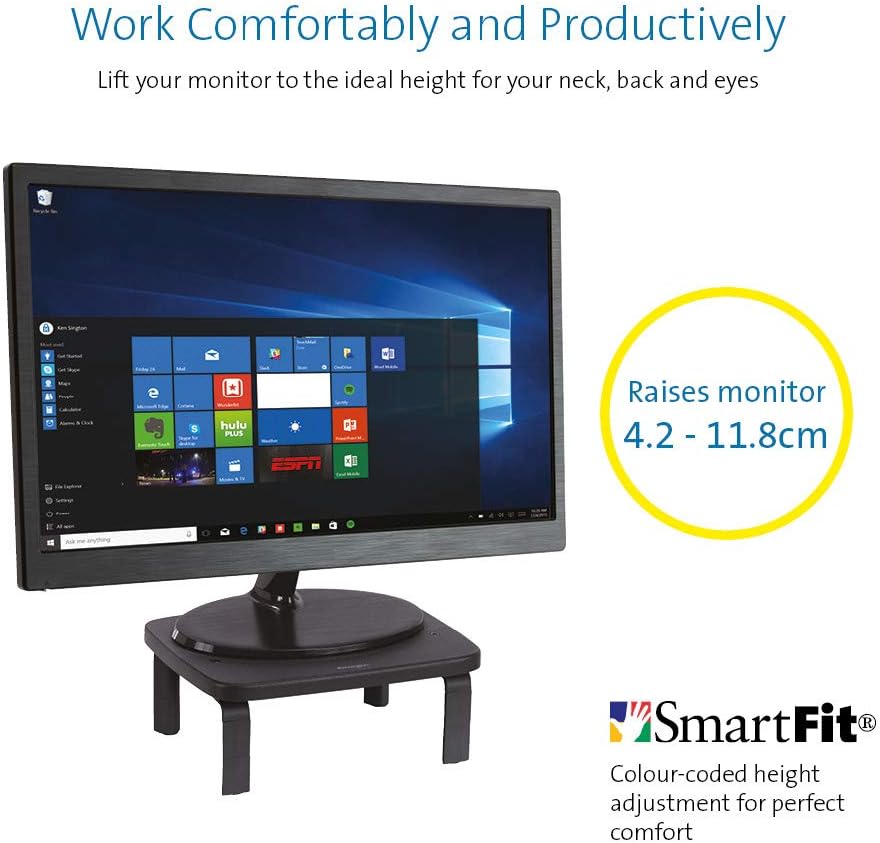
If you  got a monitor or need to jack up the height of your laptop then you need this.


KENSINGTON(R) 52785 Monitor Stand, SMARTFIT Standard

Stand positions monitor in line with your eyes to help reduce eye strain.

Price: $39.00 & FREE Delivery.

Check updated prices here 

If this is not your thing, you might want to check laptop stand on Amazon.com.au.

[/et_pb_tab][et_pb_tab title=”Desktop Monitor” _builder_version=”4.4.2″]

Acer ET322QR 31.5" Curved Flat Panel Monitor

If you are game enough to get a fancy new curved monitor then this is the one you need to pick up from Harvey Norman. It’s the Acer ET322QR 31.5″ Curved Flat Panel Monitor.

This Curved Flat Panel Monitor delivers clear and vibrant images at ideal viewing angles, while also adding a stylish touch to your entertainment setup.

Key Features
  • The Acer ET322QR 31.5″ Curved Flat Panel Monitor has a 1920 x 1080 resolution (60Hz refresh rate and 4ms response time) for sharp and detailed visuals.
  • Made with an 1800R curvature, the ET322QR monitor’s screen has a wrapping effect at optimal viewing distances to provide an immersive viewing experience.
  • Integrating Acer Flicker-less, BlueLight Shield, and Low dimming technologies, the monitor’s visual output is easy on the viewer’s eyes.
  • This Acer curved monitor has one VGA port and two HDMI ports to suit a variety of input sources.
  • For added convenience, this curved flat panel monitor supports a 100 x 100mm VESA wall mount.

Price Range: From $300 to $450

https://www.harveynorman.com.au/acer-et322qr-31-5-curved-flat-panel-monitor.html

If you want something more cheap and traditional looking, this is what you need below from Jb hi fi

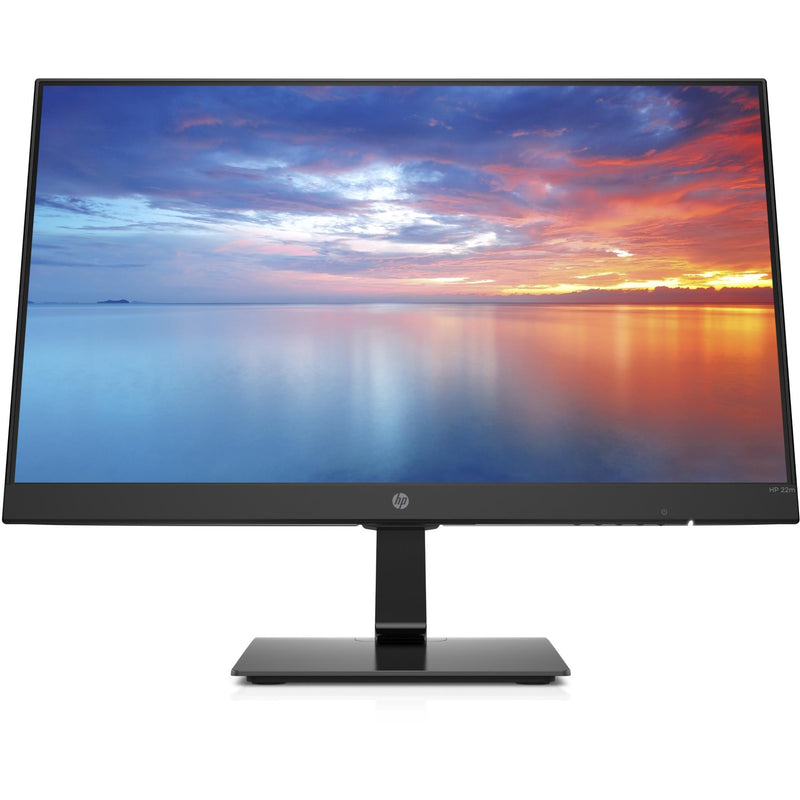
HP 3WL44AA 21.5\" FHD IPS Monitor


HP
Price: $169 to $200

HP 3WL44AA 21.5″ FHD IPS Monitor

Key Features

21.5″ IPS LED Display

FHD (1920 x 1080 @ 60 Hz)

1 HDMI 1.4 (with HDCP support); 1 VGA

Contrast ratio: 1000:1 static

14ms grey to grey response time

Anti-glare

On screen controls

Tilt: -5 to +20°

178° horizontal and vertical viewing angles

[/et_pb_tab][et_pb_tab title=”Docking station for laptops” _builder_version=”4.4.2″]

If you are going to work from a laptop then  a docking station might come handy. A docking station allows you to connect to devices that you could not use in the past. Devices like flat-panel monitors and digital cameras are not always compatible with laptops.  It provides a single connection point that allows a laptop to use a connected monitor, printer, keyboard, and mouse.

This allows a laptop to function like a desktop computer.

UPTab USB-C Docking Station with Ethernet, DisplayPort 4K, HDMI 4K, VGA, 3 Port USB 3.0, USB C PD and SD/TF Card Reader

Pic above is from https://au.uptab.com/uptab-usb-c-docking-station/

UPTab

USB-C Docking Station

$192.62 $129.41

Some more docking station gadgets

  1. StarTech Thunderbolt 3 Dual-4K Docking Station. …
  2. Targus USB 3.0 Dual Video Docking Station with Power. …
  3. AmazonBasics USB 3.0 Universal Laptop Docking Station. …
  4. Kensington USB 3.0 Docking Station. …
  5. Toshiba Dynadock V3. …
  6. Microsoft Surface Dock. …
  7. J5Create JUD500 USB 3.0 Ultra Station. …
  8. Dell USB 3.0 UHD Triple Video Docking Station.

or just get one from officeworks 

https://www.officeworks.com.au/shop/officeworks/p/kensington-universal-usb-c-powered-laptop-dock-sd4600p-kensd4600p

[/et_pb_tab][et_pb_tab title=”Webcam for Desktop or Laptop” _builder_version=”4.4.2″]

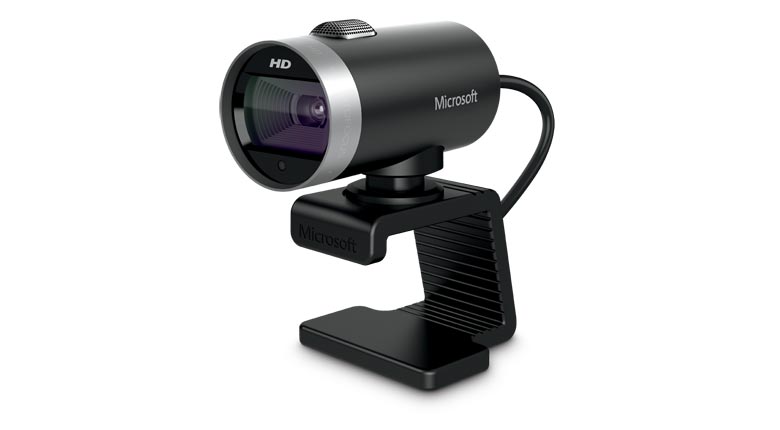
If you are going to do video conferencing or use zoom you will need a webcam 
 
LifeCam Cinema
 
This simple yet high quality webcam will do the job and last you a long time.

Lifecam Cinema

https://www.microsoft.com/accessories/en-us/products/webcams/lifecam-cinema/h5d-00013

Part #: H5D-00013

MSRP

$69.95


Enjoy high-quality 720p HD widescreen video together with crystal clear audio, with the LifeCam Cinema

You dont need a high end camera with ridiculous price, this will do the job

[/et_pb_tab][/et_pb_tabs][/et_pb_column][/et_pb_row][et_pb_row _builder_version="3.25" background_size="initial" background_position="top_left" background_repeat="repeat"][et_pb_column type="4_4" _builder_version="3.25" custom_padding="|||" custom_padding__hover="|||"][et_pb_cta title="Ref links " button_text="Reference Website Links" _builder_version="3.21.4" background_color="#e02b20" z_index_tablet="500"][/et_pb_cta][et_pb_testimonial portrait_url="https://www.digitalgrog.com.au/wp-content/uploads/2019/03/nbn-logo_thumb.png" admin_label="testimonial safe work " _builder_version="4.4.2" background_color="rgba(237,240,0,0.44)" z_index_tablet="500"]

Provide guidance on what is a safe home office environment, including what a good work station set up looks like and how to keep physically –  https://www.safeworkaustralia.gov.au/covid-19-information-workplaces/working-home

[/et_pb_testimonial][et_pb_testimonial portrait_url="https://www.digitalgrog.com.au/wp-content/uploads/2019/02/fast-wireless-five-g-internet-au.png" admin_label="Testimonial Fairwork Australia" _builder_version="4.4.2" background_color="rgba(237,240,0,0.44)" z_index_tablet="500"]

Fairwork Australia – https://www.fairwork.gov.au/employee-entitlements/flexibility-in-the-workplace/flexible-working-arrangements

Find out which employees can request flexible working arrangements, how to work..

[/et_pb_testimonial][/et_pb_column][/et_pb_row][/et_pb_section][et_pb_section fb_built="1" _builder_version="4.4.2"][et_pb_row _builder_version="4.4.2"][et_pb_column type="4_4" _builder_version="4.4.2"][et_pb_image src="https://www.digitalgrog.com.au/wp-content/uploads/2020/04/kids-on-board.jpg" _builder_version="4.4.2" background_image="https://www.digitalgrog.com.au/wp-content/uploads/2020/04/kids-on-board.jpg" background_size="contain" background_position="bottom_right" background_blend="overlay"][/et_pb_image][/et_pb_column][/et_pb_row][/et_pb_section]

Filed Under: 2020, Australian, Internet, Laptop, Solution, Top 10 Tagged With: Australia, Online, Technology, VIDEO

The surging rise of AI technology

February 5, 2020 by admin 1 Comment

ai 2020 australia

We live in a digital era where technological advancement and rapid digitalisation positively rule. Look around you. Technological influence and rapid digitalisation are present in practically every avenue possible these days. Whether it is the Godox photography accessories available on the market or the introduction of intelligent technology that is geared towards propelling a vehicle without much (if any) manual input from the driver, technological advancement is well and truly here and making impressive impact on an ongoing basis.

There are many forms of technology out there that are impressive and are worth their weight in gold. Some of them are decidedly more valuable than others, purely for the reason that they are more broadly applicable and thus more easily utilised across the board. Of all the impressive feats in technological advancement to date, there is one that is breaking down barriers and performing exceptionally well across the board, even in its early stages. That branch of technology is none other than artificial intelligence.

The surging rise of AI capability and technology

Take the investments and rising interest in AI (artificial intelligence) for what they are worth (which is a lot, by the way). AI capabilities were once merely a plot point in movies and books, but today we are beginning to see AI technology become an instrumental force to be reckoned with in this digital era. This is just the beginning of AI implementation and growth, but it is a promising start that yields a hopeful result for the near future and beyond. We are seeing this technology brace for impact and then exceed expectations time and again.

Why AI is such a powerful branch of modern tech

ai robot

Essentially, AI is such a powerful branch of modern technology because it not only seeks to make life easier, but it actively and consistently takes charge and not only achieves that goal, but exceeds it by effectively taking control of some aspects of life altogether. Of course, this frees up more time for other areas of life to be manually taken care of by human action. This is a positive, and it is a positive that not nearly enough people are talking about or appreciating to its fullest degree.

What we can expect from AI technology in the future

AI is only getting bolder and smarter. This is a theme that is going to prove to be an ongoing theme and it is a theme that we must pay the utmost attention to. A technology like AI that is not only useful but highly intelligent is a technology that is gearing up to change the world in all the best and brightest of ways. From daily tasks to medical and environmental research and exploration, AI technology is a branch of modern technology that is changing the world – and will continue to do so – in all the most positive ways. We should be embracing AI technology entirely and without exception, and we are finally starting to do that.

Filed Under: Gadgets, Technology News Tagged With: Technology education, VIDEO

How to Build a WordPress Website – Youtube Video Tutorial

July 29, 2018 by admin Leave a Comment

[et_pb_section bb_built=”1″][et_pb_row][et_pb_column type=”4_4″][et_pb_text _builder_version=”3.11.1″]

If you are looking to make a website yourself then the best way is to either follow a written step by step tutorial, or then learn from a video guide that shows you how to build one from scratch. WordPress is one of the easiest software to create your first site and so below I have included a  collection of videos that show you how it is done, so that you can follow the same and get started today.

seo ready wordpress theme

Watching these videos  you will learn how to create a website  with wordpress  and with a awesome Free template system you can get started  with a professional looking template design for your website. The WP Content Management System (wordpress) has one of the biggest collection of free plugins  that can add different  functionality to your website in just 1 click – that is why its the preferred website software for all the top webhosts.

I have included online video guides for different hosts like  Bluehost, Godaddy, Hostgator, WpEngine, Dreamhost and Hostmonster. I recommend Bluehost as a reliable  and budget host for a beginner website, but feel free to choose whichever hosting company comes across as the best to you.

[/et_pb_text][et_pb_divider _builder_version=”3.10.2″ /][et_pb_text _builder_version=”3.10.2″]

1. Bluehost Online Website Building Tutorial

[/et_pb_text][et_pb_video admin_label=”Videopatflyn” _builder_version=”3.10.2″ src=”https://www.youtube.com/watch?v=wPwQvnar99w” image_src=”//i.ytimg.com/vi/wPwQvnar99w/hqdefault.jpg” /][et_pb_button admin_label=”Buttonbluhost” _builder_version=”3.10.2″ button_text=”Bluehost Discount Offer” button_url=”https://www.bluehost.com/track/jeromejf/” url_new_window=”on” /][et_pb_text _builder_version=”3.10.2″]

In this bluehost video, Pat Flyn – Online Blogger shows you how to build a website with wordpress from scratch. Pat Flyn is a $40,000 a month super blogger and he knows what he is talking about. You can access the bluehost discount code link below to get started with the video

[/et_pb_text][et_pb_divider _builder_version=”3.10.2″ /][et_pb_text _builder_version=”3.10.2″]

2. Godaddy Website Builder

[/et_pb_text][et_pb_video admin_label=”Videogodaddy” _builder_version=”3.10.2″ src=”https://www.youtube.com/watch?v=-HtVJyxSQmw” image_src=”//i.ytimg.com/vi/-HtVJyxSQmw/hqdefault.jpg” /][et_pb_button admin_label=”Buttongodaddy” _builder_version=”3.10.2″ button_text=”Godaddy 2018 Special Deals” button_url=”http://start-a-website.info/1dollarhosting” url_new_window=”on” /][et_pb_text _builder_version=”3.10.2″]

Godaddy is one of the biggest domain name sellers online that has a massive range of website products from hosting to SSL certificates, Ecommerce shops, domain auctions and many more. They are well known for their regular sales for domain names where their prices for a domain name go as low as $0.99 cents for a .com domain name and $1 a month for wordpress hosting(sometimes with a free domain name). Check out their special deals below.

[/et_pb_text][et_pb_divider _builder_version=”3.10.2″ /][et_pb_text admin_label=”Dreamhost 1 click install Website” _builder_version=”3.10.2″]

3. Dreamhost 1 click install Website Maker

[/et_pb_text][et_pb_video admin_label=”Videodreamhost” _builder_version=”3.10.2″ src=”https://www.youtube.com/watch?v=b75h9OkjhBs” image_src=”//i.ytimg.com/vi/b75h9OkjhBs/hqdefault.jpg” /][et_pb_button admin_label=”Buttondreamhost” _builder_version=”3.10.2″ button_text=”Dreamhost Discount Deal” button_url=”http://www.dreamhost.com/r.cgi?545960″ url_new_window=”on” /][et_pb_text _builder_version=”3.10.2″]

The tutorial  by shaun Timmey is pretty straightforward if you want  to set a wordpress website up using 1 click install. Dreamhost provides shared and managed WP hosting. Dreamhost has a 1 click installer like so many other hosts and this step by step video guide will take you through the steps  to install a website quickly with Dreamhost. Click below to get the latest discount from Dreamhost.

[/et_pb_text][et_pb_divider _builder_version=”3.10.2″ /][et_pb_text admin_label=”WPengine New WordPress Install” _builder_version=”3.10.2″]

4. WPengine New WordPress Install

[/et_pb_text][et_pb_video admin_label=”VideoWpengine” _builder_version=”3.10.2″ src=”https://www.youtube.com/watch?v=CneqMnUum5c” image_src=”//i.ytimg.com/vi/CneqMnUum5c/hqdefault.jpg” /][et_pb_button admin_label=”ButtonWpengine” _builder_version=”3.10.2″ button_text=”2018 WPengine Deal” button_url=”http://www.shareasale.com/r.cfm?B=398775&U=1414492&M=41388&urllink=” url_new_window=”on” /][et_pb_text _builder_version=”3.10.2″]

In this video by Chris Hardin you will learn how to add a new installation of WordPress to your WP Engine server using the WP Engine’s Dashboard tools. This is the first step regardless id your creating a new website or migrating and existing one to WP Engine. This video is a bit old and the dashboard has changed, but the process is till quite similar for a install. Click below for the WPengine Deal

[/et_pb_text][et_pb_divider _builder_version=”3.10.2″ /][et_pb_text admin_label=”Start a Free/Paid Blog with WordPress.com” _builder_version=”3.10.2″]

5. Start a Free/Paid Blog with WordPress.com

[/et_pb_text][et_pb_video admin_label=”VideoWordpress.com” _builder_version=”3.10.2″ src=”https://www.youtube.com/watch?v=uFo9GMfmezQ” image_src=”//i.ytimg.com/vi/uFo9GMfmezQ/hqdefault.jpg” /][/et_pb_column][/et_pb_row][et_pb_row][et_pb_column type=”1_2″][et_pb_button admin_label=”ButtonFreewordpress.com” _builder_version=”3.10.2″ button_text=”Create Free WordPress.com Website/Blog” button_url=”https://wordpress.com/create/?aff=8693&cid=894426″ url_new_window=”on” /][/et_pb_column][et_pb_column type=”1_2″][et_pb_button admin_label=”ButtonPaidwordpress.com” _builder_version=”3.10.2″ button_text=”Create Paid WordPress.com Website/Blog” button_url=”https://wordpress.com/create/?aff=8693&cid=894426″ url_new_window=”on” /][/et_pb_column][/et_pb_row][et_pb_row][et_pb_column type=”4_4″][et_pb_text _builder_version=”3.11.1″]

In this video by Amir Parmar, a step by step tutorial is given on how to start a blog on WordPress.com. In this video you will learn how-to create blog posts/pages with images and text for your blog and make your blog look like a website.

WordPress.com has both free and paid versions – The free version is more suited for people who are just blogging as a hobby, while the paid version is more suited to people who want to blog as well as make some side money from their blog/website

[/et_pb_text][et_pb_text _builder_version=”3.11.1″]

Learn to get your domain name, hosting, install WordPress, create your website, make a logo and the best tips and tricks to make your website #1

Here are some other  blog posts that should help you with starting a blog :

  • Getting a Good domain name for your website
  • Making a Cheap logo for your  blog
  • Choosing from different webhosting 
  • Real pricey hosts for fast servers
  • Making money with your website 
  • Software for making viral/promo videos

I hope one of these online video tutorials helped you get started today. If  there is anything I can help you with – please feel free to shoot me a comment here or get in touch via the contact page button and I would be glad to help you out 🙂

[/et_pb_text][et_pb_text admin_label=”disclosure” _builder_version=”3.10.2″]

Disclosure: Digital Grog is a professional blog and review site that receives compensation from the companies whose products we review. We test each product thoroughly and give reviews based on our own usage and testing to only the very best. We are independently owned and the opinions expressed here are our own.

[/et_pb_text][et_pb_divider _builder_version=”3.10.2″ /][et_pb_text _builder_version=”3.10.2″]

More Posts from my blog:

[/et_pb_text][et_pb_blog _builder_version=”3.10.2″ posts_number=”4″ include_categories=”63″ /][/et_pb_column][/et_pb_row][/et_pb_section]

Filed Under: wordpress Tagged With: Australia, Comparison, Deals, Discounts, VIDEO

  • Page 1
  • Page 2
  • Page 3
  • Go to Next Page »

Primary Sidebar

Recent Posts

  • Underwater Drones for Recording Video and Taking Pictures
  • Why I chose hostgator for blog hosting
  • Top 10 Software Programs For Your Windows PC
  • What you should know before investing in Cryptocurrency and bitcoin
  • The Best Social Media Platforms for Marketing a Gaming App

Recent Comments

  1. Patrick McCormick on How to secure your desktop and laptop with antivirus software
  2. JJ on 20 Top brands with affilate programs to make you money in 2019
  3. JJ on This WPengine Genesis Pro Deal Will Give You 35 Studiopress themes
  4. Lisa Gomes on 16 Ways to Make Money Online Working From Home
  5. KatVine on This WPengine Genesis Pro Deal Will Give You 35 Studiopress themes

Archives

  • June 2022
  • February 2022
  • July 2021
  • May 2021
  • April 2021
  • March 2021
  • November 2020
  • September 2020
  • August 2020
  • July 2020
  • June 2020
  • May 2020
  • April 2020
  • March 2020
  • February 2020
  • January 2020
  • December 2019
  • September 2019
  • August 2019
  • July 2019
  • June 2019
  • April 2019
  • March 2019
  • February 2019
  • January 2019
  • December 2018
  • November 2018
  • October 2018
  • September 2018
  • July 2018
  • June 2018
  • April 2018
  • February 2018
  • January 2018
  • December 2017
  • October 2017
  • September 2017
  • July 2017
  • June 2017
  • May 2017
  • April 2017
  • March 2017
  • February 2017
  • January 2017
  • December 2016
  • November 2016
  • October 2016
  • September 2016
  • August 2016
  • July 2016
  • May 2016
  • April 2016
  • March 2016
  • February 2016
  • January 2016
  • December 2015
  • November 2015
  • October 2015
  • September 2015
  • August 2015
  • July 2015
  • June 2015
  • May 2015
  • March 2015
  • February 2015
  • January 2015
  • December 2014
  • November 2014
  • October 2014
  • September 2014
  • August 2014
  • July 2014
  • June 2014
  • May 2014
  • April 2014
  • March 2014
  • February 2014
  • January 2014
  • November 2013
  • October 2013
  • September 2013
  • August 2013
  • July 2013
  • June 2013
  • May 2013
  • April 2013
  • March 2013
  • February 2013
  • January 2013
  • December 2012
  • November 2012
  • October 2012
  • September 2012
  • August 2012
  • July 2012
  • June 2012
  • May 2012
  • April 2012
  • March 2012
  • February 2012
  • January 2012
  • December 2011
  • November 2011
  • September 2011
  • August 2011
  • July 2011
  • June 2011
  • May 2011
  • April 2011
  • March 2011
  • February 2011
  • January 2011
  • December 2010
  • November 2010
  • October 2010
  • September 2010
  • August 2010
  • July 2010
  • June 2010
  • May 2010

Categories

  • $heldon $ingh
  • 2010
  • 2011
  • 2012
  • 2013
  • 2015
  • 2017
  • 2018
  • 2019
  • 2020
  • 2021
  • 2022
  • Accounting
  • Adsense
  • Affiliate
  • Amazon
  • Anti Virus
  • Apple
  • Apps
  • Asus
  • Aussie
  • Australia
  • Australian
  • Australian Bloggers
  • Australian wordpress hosting
  • Banks
  • Blog-Hosting
  • Blogger
  • Blogger Tool
  • Blogger Tools
  • BloggerTools
  • BuddyPress
  • CARS
  • CDN
  • Celebrity
  • Clickbank
  • Compare
  • Computer
  • Domains
  • Done Deals
  • Ebook
  • Email
  • Facebook
  • Featured
  • Finance
  • Free
  • Gadgets
  • Google
  • Gpost
  • Guide
  • Hackers
  • Hosting
  • India
  • Internet
  • Ipad
  • Kindle
  • Laptop
  • Make money blogging
  • Makemoney online
  • Marketing
  • Melbourne Cup
  • Movies
  • Netbook
  • Network
  • News
  • Online betting account
  • PC
  • Review
  • Search
  • SEO
  • sheldon singh
  • Software
  • Solution
  • Sports
  • Subscribers
  • Taxes
  • Technology News
  • Themes
  • Top 10
  • Tutorial
  • Video
  • Wacky
  • web hosting
  • Website Review
  • Wierd
  • Windows
  • wordpress
  • Wordpress 3.0
  • Wordpress 3.1
  • wordpress themes
  • World cup
  • Wp Answers
  • WP Turbo
  • WPMU

Footer

Design

With an emphasis on typography, white space, and mobile-optimized design, your website will look absolutely breathtaking.

Learn more about design.

Content

Our team will teach you the art of writing audience-focused content that will help you achieve the success you truly deserve.

Learn more about content.

Strategy

We help creative entrepreneurs build their digital business by focusing on three key elements of a successful online platform.

Learn more about strategy.

Copyright © 2026 · Genesis Sample on Genesis Framework · WordPress · Log in