
• Skip to primary navigation
  • Skip to main content
  • Skip to primary sidebar
  • Skip to footer

Digital Grog — Australia’s Tech, Gadgets & Digital Life Unfiltered

Digital Grog is Australia’s go‑to tech blog for sharp reviews, digital trends, AI tools, gadgets, cybersecurity updates, and practical how‑tos covering the latest in Aussie technology

  • About Us
  • Contact Us
  • Block Examples
  • Landing Page

Online

10 Tips To Get Ready Working From Home Successfully

July 4, 2020 by admin Leave a Comment

[et_pb_section fb_built=”1″ admin_label=”Section” _builder_version=”3.22″ custom_padding=”||0px|” z_index_tablet=”500″][et_pb_row admin_label=”Row” _builder_version=”4.4.2″ background_size=”initial” background_position=”top_left” background_repeat=”repeat”][et_pb_column type=”4_4″ _builder_version=”3.25″ custom_padding=”|||” custom_padding__hover=”|||”][et_pb_post_title title=”off” meta=”off” featured_placement=”above” admin_label=”Post Title” _builder_version=”4.4.2″ z_index_tablet=”500″][/et_pb_post_title][et_pb_text admin_label=”intro” _builder_version=”4.4.2″ background_color=”rgba(237,240,0,0.55)” custom_margin=”0px|5px|5px|5px” custom_padding=”0px|10px|10px|10px” z_index_tablet=”500″ border_radii=”on|10px|10px|10px|10px” border_width_all=”2px” border_color_all=”rgba(12,113,195,0.75)” border_style_all=”groove”]

​Not many people realised that they would be working from home this year, No thanks to the Bl**dy virus that has turned the world upside down.  The covid virus has got hundred and thousands of people sick and has changed our lives in so many ways.

People now have turned to working from home in large numbers due to this calamity. People are self-isolating out of fear and safety.  A lot many have learnt to manage their lives remotely through video conferencing and virtual meetings.  It is essential for you to have a plan if you are going to work from home. In this post, we are going to look at what you need to start working from home ( more like a checklist)

[/et_pb_text][et_pb_text admin_label=”A few things” _builder_version=”4.4.2″ custom_margin=”5px|5px|5px|5px” custom_padding=”10px|10px|10px|10px” z_index_tablet=”500″]

A few things to sort out before you begin to work from home.

  • Make sure you have a proper table and chair that follow appropriate safe, ergonomic standards
  • Get a sit stand up desk if needed
  • Take regular breaks
  • Screen size of your laptop/desktop
  • Lighting in the room
  • Good NBN OR Internet connectivity

[/et_pb_text][/et_pb_column][/et_pb_row][et_pb_row _builder_version="3.25" background_size="initial" background_position="top_left" background_repeat="repeat"][et_pb_column type="4_4" _builder_version="3.25" custom_padding="|||" custom_padding__hover="|||"][et_pb_divider _builder_version="3.21.4" z_index_tablet="500"][/et_pb_divider][et_pb_toggle title=" Table & Chair set up" open="on" admin_label="Toggle Table & Chair set up" _builder_version="4.4.2" title_level="h2" title_font="|700||on|||||" background_color="rgba(13,210,224,0.63)" background_image="https://www.digitalgrog.com.au/wp-content/uploads/2020/04/table-chair-set-up.jpg" background_size="contain" background_position="center_right" z_index_tablet="500"]

A proper table and chair set up is very essential if you are going to be working from home. The long hours (5 to 8 hours a day or more) sitting down can be tiresome, and you need to get your posture right, or you can damage your back or neck.  Luckily when you are in office, this is all taken care off by the workplace, so it is wise to take extra care with this while working from home.  This video here might give you a few tips.

[/et_pb_toggle][/et_pb_column][/et_pb_row][/et_pb_section][et_pb_section fb_built=”1″ _builder_version=”3.22″ custom_margin=”0px||0px|” custom_padding=”0px||0px|” z_index_tablet=”500″][et_pb_row _builder_version=”3.25″ custom_margin=”0px||0px|” custom_padding=”0px||0px|” z_index_tablet=”500″][et_pb_column type=”4_4″ _builder_version=”3.25″ custom_padding=”|||” custom_padding__hover=”|||”][et_pb_divider _builder_version=”3.21.4″ z_index_tablet=”500″][/et_pb_divider][/et_pb_column][/et_pb_row][/et_pb_section][et_pb_section fb_built=”1″ _builder_version=”3.22″][et_pb_row _builder_version=”3.25″ custom_margin=”0px|||” custom_padding=”0px|||” z_index_tablet=”500″][et_pb_column type=”4_4″ _builder_version=”3.25″ custom_padding=”5px|5px|5px|5px” custom_padding__hover=”|||”][et_pb_text admin_label=”sit stand up” _builder_version=”4.4.2″ background_color=”rgba(151,216,91,0.49)” custom_margin=”0px||0px|” custom_padding=”5px|5px|5px|5px” z_index_tablet=”500″ border_radii=”on|5px|5px|5px|5px” border_color_bottom=”rgba(12,113,195,0.61)”]

A sit stand up desk

Sitting down in front of a laptop for long hours can result in cramped shoulders or back. Why not invest in a sit stand up desk. This should allow you to do work while sitting and also do work while standing half the time.  This method does wonders for many.

[/et_pb_text][/et_pb_column][/et_pb_row][/et_pb_section][et_pb_section fb_built="1" specialty="on" padding_top_1="0px" padding_top_2="0px" padding_bottom_1="0px" padding_bottom_2="0px" _builder_version="3.22" custom_margin="0px||0px|" custom_padding="0px||0px|" z_index_tablet="500"][et_pb_column type="1_2" _builder_version="3.25" custom_padding="|||" custom_padding__hover="|||"][et_pb_image src="https://www.digitalgrog.com.au/wp-content/uploads/2020/04/break-capture.jpg" align_tablet="center" align_phone="" align_last_edited="on|desktop" admin_label="Image" _builder_version="4.4.2" z_index_tablet="500"][/et_pb_image][/et_pb_column][et_pb_column type="1_2" specialty_columns="3" _builder_version="3.25" custom_padding="|||" custom_padding__hover="|||"][et_pb_row_inner admin_label="Row" _builder_version="3.25"][et_pb_column_inner saved_specialty_column_type="1_2" _builder_version="3.25" custom_padding="|||" custom_padding__hover="|||"][et_pb_text admin_label="Take Regular breaks" _builder_version="4.4.2" z_index_tablet="500"]

Take Regular breaks

Take breaks as if you would do so at your office.  If you took a morning break and an afternoon break with a walk around your block while at the office – do the same when you work from home.

Exercise keeps you healthy and more productive. Don’t forget when in office you do take some time to have a chat with fellow colleagues as well, so make sure you break up your continuous work time.

[/et_pb_text][/et_pb_column_inner][/et_pb_row_inner][/et_pb_column][/et_pb_section][et_pb_section fb_built="1" _builder_version="3.22" custom_margin="0px||0px|" custom_padding="0px||0px|" z_index_tablet="500"][et_pb_row _builder_version="3.25" background_size="initial" background_position="top_left" background_repeat="repeat"][et_pb_column type="4_4" _builder_version="3.25" custom_padding="|||" custom_padding__hover="|||"][et_pb_divider _builder_version="3.21.4" z_index_tablet="500"][/et_pb_divider][/et_pb_column][/et_pb_row][/et_pb_section][et_pb_section fb_built="1" _builder_version="3.22"][et_pb_row _builder_version="3.25" background_size="initial" background_position="top_left" background_repeat="repeat"][et_pb_column type="4_4" _builder_version="3.25" custom_padding="|||" custom_padding__hover="|||"][et_pb_testimonial portrait_url="https://www.digitalgrog.com.au/wp-content/uploads/2019/11/Capture-unzipped_thumb.jpg" quote_icon="off" _builder_version="4.4.2" background_image="https://www.digitalgrog.com.au/wp-content/uploads/2012/08/wifi-signal-wireless.jpg" background_size="contain" background_blend="darken" z_index_tablet="500"]

Getting Ready to Work from home

Gadgets, Settings and Adjustments you will need to make.

[/et_pb_testimonial][et_pb_toggle title=”Work Monitors/ Docking stations” open=”on” admin_label=”Work Monitors/ Docking stations” _builder_version=”4.4.2″ background_color=”rgba(224,60,51,0.52)” custom_padding=”5px|5px|5px|5px” z_index_tablet=”500″ border_radii=”on|5px|5px|5px|5px”]

​WORK MONITORS: Turn your laptop into a Desktop. Your workplace monitors may be huge or dual monitors, so it enables you to see screens easily for long hours. Make sure you get a laptop which is easy to do work for long hours without strain on your eyes. Eye health is important too.

Get your laptop attached to your home desktop monitor or get your office laptop docking station to your home. Maybe get a laptop glare protector if you need one.

[/et_pb_toggle][et_pb_toggle title=”Proper lighting in room” open=”on” admin_label=”Proper lighting in room” _builder_version=”4.4.2″ background_color=”rgba(237,239,88,0.52)” custom_padding=”5px|5px|5px|5px” z_index_tablet=”500″ border_radii=”on|5px|5px|5px|5px”]

LIGHTS: ​If there isn’t suitable or sufficient light in the room, it can lead to a strain on your eyes affecting your work, so it is essential to have enough light while working and lights that are not reflecting too much on your work area. Adjust as needed.

[/et_pb_toggle][et_pb_toggle title=”Hydrate” open=”on” admin_label=”Hydrate” _builder_version=”4.4.2″ background_color=”rgba(67,137,193,0.52)” custom_padding=”5px|5px|5px|5px” z_index_tablet=”500″ border_radii=”on|5px|5px|5px|5px”]

HYDRATION: If you don’t have a water bottle on your desk at work, you should get one. Office aircon are known to get the air dry around you, and you need to hydrate, so don’t forget to do the same when you are working from home. Get your regular dose of hydration.

​

[/et_pb_toggle][et_pb_toggle title=”Using your own mobile for work” open=”on” admin_label=”Using your own mobile for work” _builder_version=”4.4.2″ background_color=”rgba(224,60,51,0.52)” custom_padding=”5px|5px|5px|5px” z_index_tablet=”500″ border_radii=”on|5px|5px|5px|5px”]

​COMMUNICATION: Enquire with your office how you would make calls to clients. If they provide an office mobile or if you can use your own mobile or home phone and claim deductions or claim expenses back from office.

If you use your own mobile, for Samsung mobile you can block caller id or hide your number for a single call by entering #31# before the number you wish to dial. If you are a iPhone user The quickest way to block your iPhone’s caller ID is to use the *67 trick, which is referred to as “star six seven”

[/et_pb_toggle][/et_pb_column][/et_pb_row][/et_pb_section][et_pb_section fb_built="1" _builder_version="3.22" custom_margin="0px||0px|" custom_padding="0px||0px|" z_index_tablet="500"][et_pb_row _builder_version="3.25" background_size="initial" background_position="top_left" background_repeat="repeat"][et_pb_column type="4_4" _builder_version="3.25" custom_padding="|||" custom_padding__hover="|||"][et_pb_divider _builder_version="3.21.4" z_index_tablet="500"][/et_pb_divider][/et_pb_column][/et_pb_row][/et_pb_section][et_pb_section fb_built="1" _builder_version="3.22"][et_pb_row _builder_version="3.25" background_size="initial" background_position="top_left" background_repeat="repeat"][et_pb_column type="4_4" _builder_version="3.25" custom_padding="|||" custom_padding__hover="|||"][et_pb_testimonial portrait_url="https://www.digitalgrog.com.au/wp-content/uploads/2018/09/toys-are-us.png" admin_label="Testimonial Headset with mic" _builder_version="4.4.2" z_index_tablet="500" border_color_top="#e02b20" border_width_all_portrait="2px" border_color_all_portrait="#e02b20"]

Headset with mic

You might need a good headset or headphones with mic to take part in video conferencing and training from home or then listen to training packages, without disturbing people at home or keeping conversations confidential.

Most laptops have a built-in camera nowadays, but if your doesn’t then just get one from your office or a  portable webcam from the tech shop or online.

[/et_pb_testimonial][/et_pb_column][/et_pb_row][/et_pb_section][et_pb_section fb_built="1" _builder_version="3.22"][et_pb_row admin_label="Row" _builder_version="3.25" background_size="initial" background_position="top_left" background_repeat="repeat"][et_pb_column type="4_4" _builder_version="3.25" custom_padding="|||" custom_padding__hover="|||"][et_pb_testimonial portrait_url="https://www.digitalgrog.com.au/wp-content/uploads/2020/03/kimmy-kadashin.jpg" admin_label="Record Keeping of Expenses" _builder_version="4.4.2" z_index_tablet="500" border_color_top="#e02b20" border_width_all_portrait="2px" border_color_all_portrait="#e02b20"]

Record Keeping of Expenses

Keep records of your expenses incurred due to working from home so that you can claim it from your office or then claim deductions if allowed. It is easy not to get all the expenses claimed back, which is due if you don’t keep detailed records and receipts.

[/et_pb_testimonial][et_pb_toggle title=”Plan your lunch or brekky in advance” open=”on” admin_label=”Plan your lunch or brekky in advance” _builder_version=”4.4.2″ background_color=”rgba(224,60,51,0.52)” custom_padding=”5px|5px|5px|5px” z_index_tablet=”500″ border_radii=”on|5px|5px|5px|5px”]

It is wise to plan your brekky and lunch in advance even though you are working from home to stop unnecessary interruptions at work, just like you would do so regularly. However, make sure you take your breaks.

[/et_pb_toggle][et_pb_toggle title=”Kids at home” open=”on” admin_label=”Kids at home” _builder_version=”4.4.2″ background_color=”rgba(237,239,88,0.52)” custom_padding=”5px|5px|5px|5px” z_index_tablet=”500″ border_radii=”on|5px|5px|5px|5px”]

​Set the rules. If you have kids at home while working, it can be difficult.  Have a sit-down conversation with your kids? Make them understand that you need minimal interruptions. Plan a daily routine for them as well, Learning time (online learning time), TV time and outdoor play time. Pre-plan activities for them to do.

[/et_pb_toggle][et_pb_toggle title=”Good Internet connection” open=”on” admin_label=”Good Internet connection” _builder_version=”4.4.2″ background_color=”rgba(67,137,193,0.52)” custom_padding=”5px|5px|5px|5px” z_index_tablet=”500″ border_radii=”on|5px|5px|5px|5px”]

​A good stress-free work time can be achieved with good internet connections and good connectivity. Make sure you test your laptop if set up to work from home first from your office before you bring it to home.

To avoid disconnections and lag while working – your office will need good virtual network set up, and also you will need a good internet connection. A good idea would be for your kids to not watch Netflix, YouTube videos or stream audio via internet during when you work – if this is possible.

[/et_pb_toggle][et_pb_toggle title=”Work Start /End Timing” open=”on” admin_label=”Work Start /End Timing” _builder_version=”4.4.2″ background_color=”rgba(224,183,96,0.52)” custom_padding=”5px|5px|5px|5px” z_index_tablet=”500″ border_radii=”on|5px|5px|5px|5px”]

All companies or workplaces have different rules, though you can expect quite a few to be the same when it comes to work start and end times. You need to plan your start and finish times.

If you are working from home, you save the travel time. So, with that bonus, you could possibly start a bit early and finish early.  Some offices don’t allow you to accrue flex time, and some do, so if its allowed maybe you can work an extra half hour every day and accumulate some flex with an early start. If its not allowed, then you can still start early and finish early and get more time to your day.

[/et_pb_toggle][et_pb_toggle title=”Psychology of working from home” open=”on” admin_label=”Psychology of working from home” _builder_version=”4.4.2″ background_color=”rgba(237,239,88,0.52)” custom_padding=”5px|5px|5px|5px” z_index_tablet=”500″ border_radii=”on|5px|5px|5px|5px”]

Many people will jump at the idea of working from home, not knowing what it entails or how they will cope. Some will succeed it doing it well, and some will fail miserably and not get much done affecting their productivity.

It is essential to know hat kind of work person you are to succeed, if you can get along just fine without an office formal atmosphere and work in your pyjamas that’s okay. But if you will find it hard to work in a casual home setting, maybe you will still need to dress (formals) and act the part to work from home. It’s all about getting your mind into the right frame of work.

[/et_pb_toggle][/et_pb_column][/et_pb_row][/et_pb_section][et_pb_section fb_built="1" _builder_version="3.22" custom_margin="0px||0px|" custom_padding="0px||0px|" z_index_tablet="500"][et_pb_row _builder_version="3.25" background_size="initial" background_position="top_left" background_repeat="repeat"][et_pb_column type="4_4" _builder_version="3.25" custom_padding="|||" custom_padding__hover="|||"][et_pb_divider _builder_version="3.21.4" z_index_tablet="500"][/et_pb_divider][/et_pb_column][/et_pb_row][/et_pb_section][et_pb_section fb_built="1" _builder_version="3.22"][et_pb_row _builder_version="3.25" background_size="initial" background_position="top_left" background_repeat="repeat"][et_pb_column type="4_4" _builder_version="3.25" custom_padding="|||" custom_padding__hover="|||"][et_pb_testimonial portrait_url="https://www.digitalgrog.com.au/wp-content/uploads/2019/04/coverage.png" quote_icon_color="rgba(0,0,0,0.65)" admin_label="Testimonial Conclusion:" _builder_version="4.4.2" use_background_color_gradient="on" background_color_gradient_direction="165deg" background_color_gradient_start_position="40%" background_color_gradient_end_position="88%" z_index_tablet="500" border_color_all="#f76700" border_width_top="2px" border_color_top="#f42800" border_color_all_portrait="#20a31a"]

Conclusion:

Just finished counting the points, so in total there was “14 tips to get you started working from home successfully”

There are other things you might need – if you suddenly have had to start working from home like printers, printing paper, envelopes, office mobile, paper shredder, filing box or files, stationery and your help desk and support contact numbers ready.  

Enquire with your office if they allow you to take equipment home for working from home- You might be surprised. Good luck and please do comment below if you have any additional tips you can add to my article.

[/et_pb_testimonial][et_pb_tabs active_tab_background_color=”rgba(166,216,119,0.4)” admin_label=”Modem Desc Tabs” _builder_version=”4.4.2″ custom_padding=”10px|10px|10px|10px” z_index_tablet=”500″ border_color_top=”#e01106″][et_pb_tab title=”WiFi Range Extender ” _builder_version=”4.4.2″ tab_text_color=”rgba(224,51,42,0.58)” tab_text_shadow_style=”preset2″]

tp link modem router

WAVLINK WiFi Range Extender AC1200 Wireless Router/AP Access Point/WiFi Extenders Signal Booster/Range Extender with Dual Band 5Ghz 2.4Ghz 1200Mbps Works Any Route

This is something you might need  to get proper wifi coverage to get  your work done at home.  You will only need this if your modem/router is not good enough in distributing the  wifi signal around your house.

 Network extender mode boosts wireless signal to previously unreachable or hard-to-wire areas flawlessly Miniature size and wall-mounted design make it easy to deploy and move flexibly
 
Features

Eliminates Dead Spots and Extends the Existing Wireless-AC Coverage

    1. Using the Wavlink 575A3 Range Extender, you can easily extend the range of your existing wireless router to create a strong Wi-Fi signal for all the devices in and around your home, including smartphones, tablets, ultra-books, and more.
    2. Greater coverage allows you to enjoy fast Wi-Fi speeds on your laptop or tablet .
    3. It can Creates Wi-Fi speeds that are up to three times faster than wireless-N. With this extra speed, you can stream HD-quality videos and play online games seamlessly without interruptions or lag.
 

[/et_pb_tab][et_pb_tab title=”Sit stand up desk” _builder_version=”4.4.2″]

pro plus 36 white desk sit stand up desk

Featured Pro plus 36 Varidesk model

The sit stand up desk is becoming a popular alternative today to improve more healthy computer use and prevent your body from bad posture health risks. It helps reduces incidents at the workplace.

Features:

· Best selling model

· Risk-free for 30 days

· Two-tier design: upper display surface, lower keyboard/mouse deck

· 5 year warranty

· Shipped fully assembled and best-in-class materials used


Prices and more over here


[/et_pb_tab][et_pb_tab title=”Headphones with mic” _builder_version=”4.4.2″]

You can get a cheapo PC headset at officeworks  for between $10 to $20 that will do the job  for video and audio conferencing or then you can purchase a fancy noise cancelling headphones with mic  that will do the job and allow you to listen to music at high quality.

 

This is the COWIN E7 Active Noise Cancelling Headphones Bluetooth Headphones with Mic Deep Bass Wireless Headphones Over Ear with inbuilt mic. It has active noise cancelling technology

Link here: https://www.amazon.com.au/Cancelling-Headphones-Bluetooth-Comfortable-Cellphone/dp/B07RW8DT4S/


[/et_pb_tab][et_pb_tab title=”KENSINGTON Monitor Stand” _builder_version=”4.4.2″]


If you  got a monitor or need to jack up the height of your laptop then you need this.
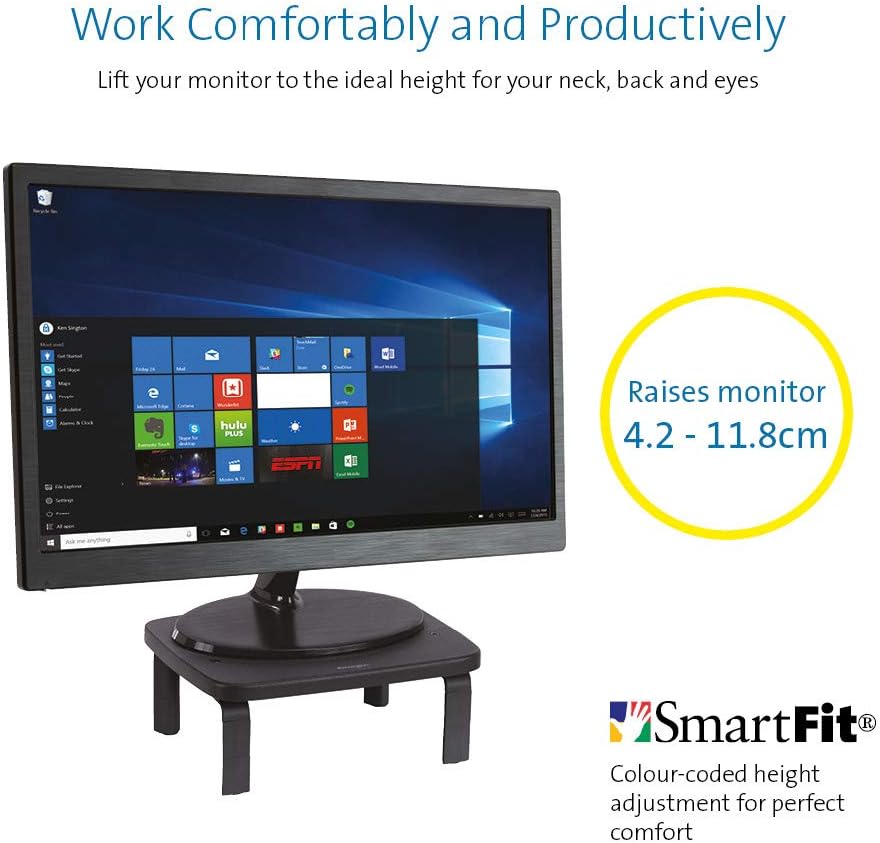
 

KENSINGTON(R) 52785 Monitor Stand, SMARTFIT Standard

Stand positions monitor in line with your eyes to help reduce eye strain.

Price: $39.00 & FREE Delivery.

Check updated prices here 

If this is not your thing, you might want to check laptop stand on Amazon.com.au.

[/et_pb_tab][et_pb_tab title=”Desktop Monitor” _builder_version=”4.4.2″]

Acer ET322QR 31.5" Curved Flat Panel Monitor

If you are game enough to get a fancy new curved monitor then this is the one you need to pick up from Harvey Norman. It’s the Acer ET322QR 31.5″ Curved Flat Panel Monitor.

This Curved Flat Panel Monitor delivers clear and vibrant images at ideal viewing angles, while also adding a stylish touch to your entertainment setup.

Key Features
  • The Acer ET322QR 31.5″ Curved Flat Panel Monitor has a 1920 x 1080 resolution (60Hz refresh rate and 4ms response time) for sharp and detailed visuals.
  • Made with an 1800R curvature, the ET322QR monitor’s screen has a wrapping effect at optimal viewing distances to provide an immersive viewing experience.
  • Integrating Acer Flicker-less, BlueLight Shield, and Low dimming technologies, the monitor’s visual output is easy on the viewer’s eyes.
  • This Acer curved monitor has one VGA port and two HDMI ports to suit a variety of input sources.
  • For added convenience, this curved flat panel monitor supports a 100 x 100mm VESA wall mount.

Price Range: From $300 to $450

https://www.harveynorman.com.au/acer-et322qr-31-5-curved-flat-panel-monitor.html

If you want something more cheap and traditional looking, this is what you need below from Jb hi fi
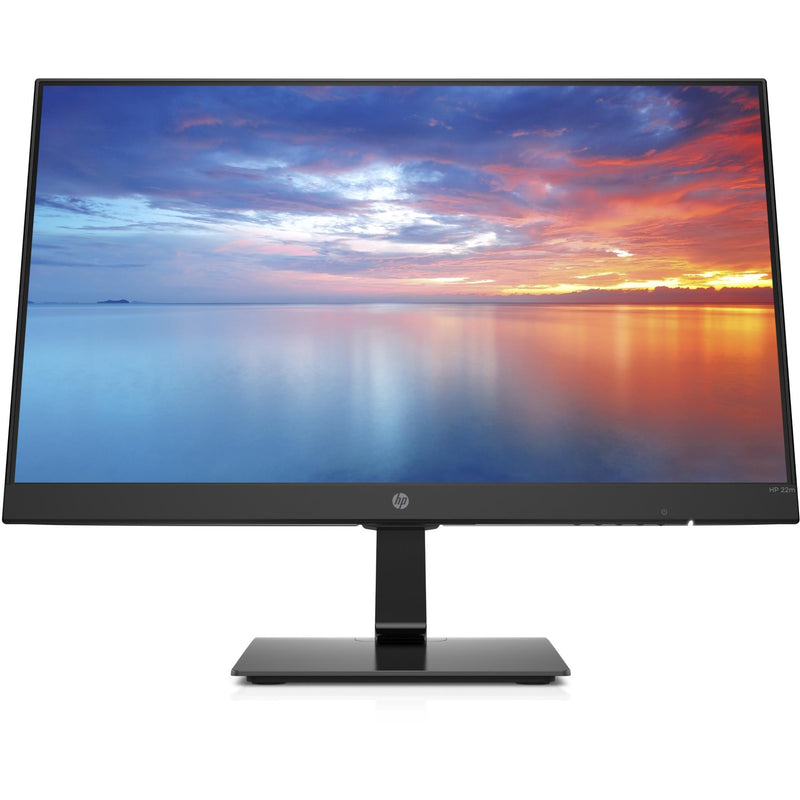

HP 3WL44AA 21.5\" FHD IPS Monitor


HP
Price: $169 to $200

HP 3WL44AA 21.5″ FHD IPS Monitor

Key Features

21.5″ IPS LED Display

FHD (1920 x 1080 @ 60 Hz)

1 HDMI 1.4 (with HDCP support); 1 VGA

Contrast ratio: 1000:1 static

14ms grey to grey response time

Anti-glare

On screen controls

Tilt: -5 to +20°

178° horizontal and vertical viewing angles

[/et_pb_tab][et_pb_tab title=”Docking station for laptops” _builder_version=”4.4.2″]

If you are going to work from a laptop then  a docking station might come handy. A docking station allows you to connect to devices that you could not use in the past. Devices like flat-panel monitors and digital cameras are not always compatible with laptops.  It provides a single connection point that allows a laptop to use a connected monitor, printer, keyboard, and mouse.

This allows a laptop to function like a desktop computer.

UPTab USB-C Docking Station with Ethernet, DisplayPort 4K, HDMI 4K, VGA, 3 Port USB 3.0, USB C PD and SD/TF Card Reader

Pic above is from https://au.uptab.com/uptab-usb-c-docking-station/

UPTab

USB-C Docking Station

$192.62 $129.41

Some more docking station gadgets

  1. StarTech Thunderbolt 3 Dual-4K Docking Station. …
  2. Targus USB 3.0 Dual Video Docking Station with Power. …
  3. AmazonBasics USB 3.0 Universal Laptop Docking Station. …
  4. Kensington USB 3.0 Docking Station. …
  5. Toshiba Dynadock V3. …
  6. Microsoft Surface Dock. …
  7. J5Create JUD500 USB 3.0 Ultra Station. …
  8. Dell USB 3.0 UHD Triple Video Docking Station.

or just get one from officeworks 

https://www.officeworks.com.au/shop/officeworks/p/kensington-universal-usb-c-powered-laptop-dock-sd4600p-kensd4600p
[/et_pb_tab][et_pb_tab title=”Webcam for Desktop or Laptop” _builder_version=”4.4.2″]

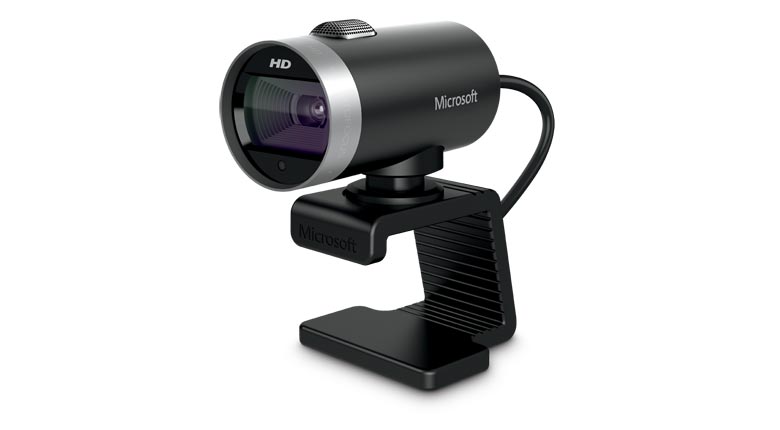
If you are going to do video conferencing or use zoom you will need a webcam 
 
LifeCam Cinema
 
This simple yet high quality webcam will do the job and last you a long time.

Lifecam Cinema

https://www.microsoft.com/accessories/en-us/products/webcams/lifecam-cinema/h5d-00013

Part #: H5D-00013

MSRP

$69.95


Enjoy high-quality 720p HD widescreen video together with crystal clear audio, with the LifeCam Cinema

You dont need a high end camera with ridiculous price, this will do the job

[/et_pb_tab][/et_pb_tabs][/et_pb_column][/et_pb_row][et_pb_row _builder_version="3.25" background_size="initial" background_position="top_left" background_repeat="repeat"][et_pb_column type="4_4" _builder_version="3.25" custom_padding="|||" custom_padding__hover="|||"][et_pb_cta title="Ref links " button_text="Reference Website Links" _builder_version="3.21.4" background_color="#e02b20" z_index_tablet="500"][/et_pb_cta][et_pb_testimonial portrait_url="https://www.digitalgrog.com.au/wp-content/uploads/2019/03/nbn-logo_thumb.png" admin_label="testimonial safe work " _builder_version="4.4.2" background_color="rgba(237,240,0,0.44)" z_index_tablet="500"]

Provide guidance on what is a safe home office environment, including what a good work station set up looks like and how to keep physically –  https://www.safeworkaustralia.gov.au/covid-19-information-workplaces/working-home

[/et_pb_testimonial][et_pb_testimonial portrait_url="https://www.digitalgrog.com.au/wp-content/uploads/2019/02/fast-wireless-five-g-internet-au.png" admin_label="Testimonial Fairwork Australia" _builder_version="4.4.2" background_color="rgba(237,240,0,0.44)" z_index_tablet="500"]

Fairwork Australia – https://www.fairwork.gov.au/employee-entitlements/flexibility-in-the-workplace/flexible-working-arrangements

Find out which employees can request flexible working arrangements, how to work..

[/et_pb_testimonial][/et_pb_column][/et_pb_row][/et_pb_section][et_pb_section fb_built="1" _builder_version="4.4.2"][et_pb_row _builder_version="4.4.2"][et_pb_column type="4_4" _builder_version="4.4.2"][et_pb_image src="https://www.digitalgrog.com.au/wp-content/uploads/2020/04/kids-on-board.jpg" _builder_version="4.4.2" background_image="https://www.digitalgrog.com.au/wp-content/uploads/2020/04/kids-on-board.jpg" background_size="contain" background_position="bottom_right" background_blend="overlay"][/et_pb_image][/et_pb_column][/et_pb_row][/et_pb_section]

Filed Under: 2020, Australian, Internet, Laptop, Solution, Top 10 Tagged With: Australia, Online, Technology, VIDEO

Is Online Learning Part of a New Educational Evolution

June 30, 2020 by admin Leave a Comment

love to learn (1)

Inked feathers, pens, typewriters, computers, and now online learning. Each had its own place in the evolution of modern education. The COVID global lockdown spurred a new appreciation for studying at home rather than slogging down to a college or university. With that in mind, the question is, is online learning now a component of educational evolution.

I Had to Go to a Library

Here is a line from the great comedian Ron White, “Back when I was in school, if we wanted to know something, we had to go to a library, which was a building. We would walk down there seeking knowledge, and sometimes, they would tell us that the knowledge we seek isn’t there, and to come back next week.”

Most millennials have a vague recollection of those days of visiting a library and hoping the book you need is there. When you look back, it is frightening to think that we had to go through all of that just to learn whatever our teachers had set out. Yet, education evolved, and online learning is no doubt a component in the next step of education evolution.

I Filled My Head with Garbage

While quoting popular culture, here is a snippet from the Simpsons. A new teacher asks a question, Martin Prince answers, and the teacher says, “Why have you learned that fact off by heart when anybody with a smartphone can look it up in seconds, To which Martin replies dramatically, “I’ve crammed my head full of garbage.”

We are leaving the era where you have to memorise a bunch of facts and figures in order to pass a test. In fact, the few places where such learning is still relevant is chemistry and physics. Other than those two, we are seeing exams rely less and less on the regurgitation of facts and figures from memory. This ties in very well with online learning because it is almost devoid of such memorising. You may need to memorise concepts and/or scenarios, but the verbatim recital of facts and figures are not as heavily relied upon, which is in line with the current evolution of the education system.

More Sit-at-a-Computer Vocations

Perhaps online learning courses are becoming more popular because they are also becoming more relevant. For example, twenty years ago there were far fewer jobs that could be done at a computer, and even fewer that could be (or learned) from home. For example, you cannot learn how to change a tyre from home, but you can learn logistics, programming, digital marketing, graphic design, bookkeeping, video editing, audio editing, and so forth from home.

You can then go out and get a job working in an office using those skills, or perhaps get remote work using those skills. The COVID lockdown has perhaps proven that many in-classroom courses need not take place in a classroom, which spurs on the changes that make digital learning a larger part of the mainstream education system.

Will the Human Factor Change?

There are some people who learn better when they are told by a teacher rather than reading it from a screen. A teacher can adapt and change the lesson based on the comprehension of the group, and in-classroom learning creates a sense of urgency, whereas many online courses can be failed through simple procrastination or lack of the sort of motivation that a teacher gives.

Conclusion – Digital Learning Should be a Facet of Modern Education

One could argue that online digital learning (from home) just doesn’t work for some people, but the same can be said for classroom learning and on-the-job learning. Nobody is saying that digital learning should become the one and only method of learning. It should simply factor into what makes up the modern education system.

Perhaps modern learning should be more adaptive. There are some students who will never learn chemistry through reading alone, who will need practical lessons, teachers, and so forth. There are some people who will never learn engineering correctly without on-the-job learning, self-teaching, and so forth. With any hope, modern education will one day lean towards teaching students the way they learn the best, be that in classrooms, digitally, on the job, or some mixture that works for the student in hand.

Filed Under: 2020, Australian, Internet, Netbook, Solution Tagged With: Online, Technology education

7 Chrome Extensions to Help You Protect Your Online Safety and Privacy

September 25, 2019 by admin 1 Comment

secure your apps on mobile

There are thousands of different extensions for Chrome. Some of them are designed specifically to make your browsing experience more secure and private. If this is something you are looking for, keep on reading, as we’re about to unveil the top cybersecurity extensions that are worth looking into. That being said, let’s cover the basics first.

These extensions will customize your browsing experience and unlock new functionalities

Some of the extensions are limited to improving the looks and other cosmetic elements of your browser. Others, however, will unlock the kind of functionality that’s not available in its vanilla version. Like a character counter for your emails or a built-in to-do list, for example. Of course, these can be enabled or disabled at any time you see fit, so you’re by no means tied to your choices.

In the world of cybersecurity, you can never be safe enough

It’s important to keep a tight grip on cybersecurity essentials, like cookie management, browsing history, password storage, etc. But thanks to the Chrome extensions, there’s no need to do it manually. You can even set it to lock all of your passwords under one master key, effectively doing away with the need to remember every single piece by heart. There’s also a plugin that disables the scripts that you don’t want to run (like those annoying ads, for example).

With that out of the way, what are the top cybersecurity extensions for Chrome?

1. Adblock Plus

Malware that gets distributed through ads, also known as malvertising, can wreak havoc on your device. Adblock not only stops them from ever loading up in the first place but also brings all the unsolicited website tracking to an end.

2. Blur

One of the best extensions for privacy. Organizing your passwords, hiding your traffic, encrypting your data – all in one little extension. If you’re not a fan of companies collecting your data for marketing purposes, this is one of the answers. In addition to that, certain social media like Facebook are known to track you even during the time when you’re not logged in, which is another thing Blur prevents from happening.

3. Click&Clean

When browsing, your device gets cluttered over time with things like cookies, temporary files, etc. This extension declutters it at the click of a button. In the end, you want to keep your browser running smoothly and get rid of any unwanted baggage – it’s also a matter of keeping your privacy protected.

4. NordVPN

In this day and age, whenever you go online, a VPN is a must. Having one available straight from your browser always comes in handy. Whether it’s government censorship you’re trying to bypass or merely caring for the safety of your sensitive data that you transfer over the web, this should be a part of every modern online surfer’s repertoire.

5. Sneekr

Your browsing history should remain a private matter, and you must do your best to protect it in the same manner you’d protect the privacy of your own home. This particular extension places everything behind a password-only screen so that no one can see it but you. Plus, it gives you the option of accessing it from anywhere you want (and even wipe it if deemed necessary).

6. DuckDuckGo

Protecting your privacy at all costs is the motto behind this extension’s design. Their search engine is known as presenting a viable alternative to Google’s search query tracking. But their Chrome extension does wonders in terms of decoding privacy policies and escaping advertiser tracking. Also, it forces encryption when you’re surfing the web, which helps you stay safe from those prying eyes some ISPs are notorious for.

7. LastPass

Too many users resort to keeping their passwords simple and easy to guess, just for the sake of convenience. Worse yet, some are re-using the same passwords over and over again, so they don’t have to remember what password goes where. Guess what? The hackers are smiling, because you’ve made their job easier this way. LastPass is a solution to the problem; by using one master password, you’ll be free to design your passwords to be as complex and impenetrable as possible without having to remember them all.

apps security store online

Conclusion

The extensions we’ve mentioned are by no means the end of the list, but they make for a good start. At the very least, this should be enough to get you thinking about how these can bolster your cybersecurity defenses and help protect your online safety and privacy at all times.

Filed Under: Google, Hackers, Software Tagged With: Android, Antivirus, apps, Online, Secure, Security, Virtual Reality

How much money can you save using a money transfer provider?

March 24, 2019 by admin Leave a Comment

Why is it so expensive to send money across international borders? Each time we send money to loved ones, buy property overseas or move assets abroad, the banks ding us. Unlike them, we don’t have unlimited sums of money – paying their ridiculous spreads and fees hurts us financially.

dollar to rupee transfer

Technology has grown leaps and bounds, yet the take up if unique start-ups services are lagging. Today money transfer and exchange is becoming more easy with new start up services offering much more than traditional banks.

For years, we’ve had no choice but to put up with the status quo. Then, the internet came along. This platform gave unique advantages to new money transfer providers – with little overhead, they could offer far lower rates.

How much can you save using a money transfer provider? We’ll lay it all out for you below.

What is a money transfer provider?

Before we get into the meat and potatoes of this article, let’s define what money transfer providers do. A money transfer provider moves capital for businesses and individuals across borders. As you know, banks already offer this service, but at extortionate rates.

For years, they were the only show in town, apart from Western Union and Moneygram. There was no competition, which meant they could charge whatever the market would bear.

Things are different these days. Thanks to the emergence of the World Wide Web, there are a lot of providers to choose from. How did today’s money transfer providers disrupt the market? We’ll address that in the next section.

How are money transfer providers stealing market share?

So, how did a bunch of online fintech startups overturn the status quo in the money transfer space? Online businesses enjoy key advantages over their brick and mortar counterparts.

For starters, their physical footprint is much smaller – they pay far less in rent, salaries, and utilities. This advantage allows money transfer providers to offer fees and spreads that are considerably less than the banks.

Customer service is another area where money transfer providers have outflanked the banks. People have been upset with their financial institutions for years. When these startups came on the scene, they won over customers not just with cheap rates, but by treating them with respect.

How have money transfer providers stolen market share from legacy financial institutions? Take the example of Transferwise. Founded in 2011 by two Estonians fed up with paying obscene fees, they now move £12 billion per year. That’s right – in the space of eight years, they went from zero to transporting immense sums of money.

How did it all start? One day back in 2010, our founders were commiserating over their frustrations with money transfer. Taavet, who worked for Skype, got paid in EUR. However, he lived in London, so he needed to change his pay into GBP. His friend Kristo had a mortgage back home in Estonia, so he experienced similar pain when converting GBP for EUR.

Out of the blue, they had a eureka moment. Why not look up the interbank rate on Reuters, and use it to help each other? For instance, Taavet needed GBP, so he sent Kristo the equivalent in EUR. In turn, Kristo compensated Taavet in GBP, completing the transaction.

This way, they avoided usurious fees and margins charged by the banks. Shortly thereafter, they had another ‘aha’ moment – how many other people were similarly frustrated? And thus, Taavet’s and Kristo’s little arrangement became the business model for Transferwise.

In their first year of business, they transferred £10 million, saving early adopters £500,000 in fees. Two years later, they transferred £1 billion – this attracted the attention of Richard Branson, who later invested $25 million.

Today, they are the #1 alternative to the banks and legacy money transfer firms, moving $46.8 billion in 2018. Why have they become so popular? It’s simple – they change money using the interbank rate. To make money, they charge fees as low as 0.53% on the amount exchanged.

Combine that with fast transfers (90% of UK-Europe transfers are same day) and friendly customer service, and it’s no mystery how Transferwise has become a force to be reckoned with.

Money transfer providers offer much better rates than the banks

sending money to country

It’s all about the Benjamins, baby. The #1 pain point of money transfer customers are the obscene fees and spreads they are forced to pay. Online money transfer providers from CurrencyFair to Transferwise have attacked this vulnerability, offering tight margins and low/no fees.

Let’s compare Bank of America and OFX. To send international money transfers, Bank of America charges customers $35 to send local currency and $45 to wire USD. Compare that with OFX, who charges its users nothing to move money abroad.

What about exchange rates? Let’s say you just accepted a job in New York City, and you need to move your money stateside. If you have 20,000 CAD to move, you’ll get $14,140 on the other end, as they offer an exchange rate of 0.707. On the other hand, those using OFX will get $14,916 – almost $800 more, thanks to a rate of 0.746.

Put yourself in the position of a business that moves these volumes of cash regularly. That $800 difference becomes tens or even hundreds of thousands of lost revenue over a year.

But an even bigger problem is for freelancers, for which every penny is important. The speed of the transfers is another factor that can be hindering their growth and deadlines for future projects. That’s why companies like Payoneer and Paypal have tailored their services to help the freelancing community and the gig economy in general.

Are there other ways to save cash with money transfer providers?

As mentioned earlier, money transfer providers have not only won over customers with cheap wires, but with superior service. In addition to offering low/no fees, the guidance they offer has saved their customers even more cash.

They keep their eyes on the news, advising clients to transfer before or after specific events. For example, Theresa May lost another vote on Brexit this week, sending the GBP 1.15% lower against the USD. If a provider felt the vote would fail, ordering a transfer beforehand could save hundreds or even thousands of GBP.

Taxation is another area where money transfer providers have saved their client’s money. In Europe, some countries have adopted gift taxes. For example, in Croatia, you can send someone up to 50,000 HRK (~$7,600); after that, taxes apply. By sending money in tranches, these laws can be circumvented, saving cash and your sanity.

Don’t let the banks rob you blind

The banks once had a monopoly on money transfer. Now, they rely on their customer’s ignorance. With dozens of alternatives, virtually all offering better rates and service, there’s no reason to remain. Do your research, and you’ll find the money transfer service that’s right for you.

Filed Under: Makemoney online, Technology News Tagged With: Business Start up, Finance, Online

Best radio app for instant online music – all countries available

October 27, 2018 by admin Leave a Comment

[et_pb_section bb_built=”1″][et_pb_row][et_pb_column type=”4_4″][et_pb_text]

If you are looking for a app that  that can instantly  give you radio music from anywhere around the world then this one of the links which you will definitely save on your

If you are looking for a app that  that can instantly  give you radio music from anywhere around the world then this one of the links which you will definitely save on your phone or desktop.


[/et_pb_text][et_pb_image _builder_version="3.17.2" src="https://www.digitalgrog.com.au/wp-content/uploads/2018/10/onlien-radio-facebook-post.png" /][et_pb_text admin_label="This radio link 2nd para" _builder_version="3.17.2"]

This radio link works instantly if you click it on your phone or then you can also download their app on your smartphone.

Here is the live link:

http://radio.garden/live (this direct link works on any smartphone)

Here is the app download link:

Google Play Store –

https://play.google.com/store/apps/details?id=com.jonathanpuckey.radiogarden&hl=en

Apple App Store –

https://itunes.apple.com/au/app/radio-garden-live/id1339670993?mt=8

[/et_pb_text][et_pb_text admin_label=”About Radio Garden” _builder_version=”3.17.2″ background_color=”rgba(236,239,40,0.83)” text_orientation=”justified” custom_margin=”2px|2px|2px|2px” custom_padding=”4px|4px|4px|4px” border_radii=”on|6px|6px|6px|6px” box_shadow_style=”preset6″]

About Radio Garden

garden radio liveRadio Garden was designed by Jonathan Puckey in collaboration with the Netherlands Institute for Sound and Vision. There are currently more than 15,000 radio stations who have provided their radio stations to be published online as of now and this is expected to be increasing

[/et_pb_text][et_pb_text admin_label=”Dutch radio quote” _builder_version=”3.17.2″]

Radio Garden is a project of Dutch of radio and search digital, non-profit, developed in 2013 to 2016 by the Netherlands Institute for Sound and Vision in Hilversum and by the Transnational Radio Knowledge Platform and 5 other European universities^. It is funded by HERA.

[/et_pb_text][et_pb_image _builder_version="3.17.2" src="https://www.digitalgrog.com.au/wp-content/uploads/2018/10/sounds-garden-live-radio-broadcast-global.jpg" /][et_pb_text admin_label="Radio Garden allows" _builder_version="3.17.2"]

Radio Garden allows you to listen to thousands of live radio stations world wide by rotating the globe. Every green dot represents a city or town. Tap on it to tune into the radio stations broadcasting from that city.

If your listening to Radio garden via their downloaded app, you can Shake your phone to go to a random station!

Rumours Bunked:

No the Radio Garden is not connected to any of the satellites launched by ISRO (India Space research organisation).Radio Garden is an online portal that connects the radio all over the world.

Other radio Apps:

Apart from radio garden there are other apps that stream live radio, one of them is “world radio”. There is software that also allows you to download from popular online radios and music and video streaming services which we have reviewed here.

Googpleplay store app link :

https://play.google.com/store/apps/details?hl=en&id=com.app.worldradio

Here are some of the radio stations that this app plays, i haven’t tried it out yet – so if you do, please do drop a comment here.

What World Radio broadcasts – countries
Armenia (Armenian radio: Radio Van, Radio Aurora, Lratvakan Radio, Radio Hay etc.)
Ethiopia (Ethiopian radio: Sheger FM 102.1, Feel Jah FM, Zami 90.7 FM, Tsega FM etc.)
Pakistan (Pakistani radio: Samaa FM, City FM 89, Apna Karachi, National Radio of Pakistan etc.)
Iran (Iranian / Persian radio: Hamasafar Radio, Radio Asal, Radio Javan, Radio Mani, Radio Mojdeh, London Persian Radio, KIRN 670am Radio etc.)
Cambodia (Cambodian radio: Vayo FM, Tonle Fm, Radio Sarika etc.)
Algeria (Algerian radio: Alger one, Radio Djurdjura, Dima FM, Radio Elissa, K Sun Country etc.)
Egypt (Egyptian radio: Rehab FM, Eman Live, Nojoom FM, Nineties FM etc.)
Georgia (Georgian radio: Radio Hereti, Radio Soma, Radio Hamdam, etc.)
Sri Lanka (Sri Lankan radio: Shakthi FM 105.1, NETH FM, E FM, Lankasri FM, Tamil 2 FM etc.)
Afghanistan (Afghan radio: Arman FM, Arakozia FM, Radio Ariana, BFBS Afghanistan etc.)
Nepal (Nepalese radio: Radio Kantipur, Kalika FM, Radio Nepal, Nepaliko Radio, Capital FM etc.)

[/et_pb_text][et_pb_text admin_label=”last para” _builder_version=”3.17.2″]

Apart from these featured here,there are quite a few mainstream internet online music portals like Spotify, Soundcloud,Last FM, Tune in and Google Play.

[/et_pb_text][/et_pb_column][/et_pb_row][/et_pb_section]

Filed Under: Free, Internet, Software, Technology News, Website Review Tagged With: Gadgets, Music, Online

Ralph Willgoss: Industry Expert Profile

February 27, 2017 by admin Leave a Comment

February 22, 2016

Ralph Willgoss: Industry Expert Profile

Once a month we’ll be catching up with an industry expert to gain insight into what it’s like working in a particular industry.

This month we’ve turned our focus to IT and interviewed Ralph Willgoss, a Cloud Services Engineer for a video game developer located in the United Kingdom. Ralph commenced his career developing large corporate websites that featured Ecommerce and Content Management. Prior to shifting to the video game industry, he worked in financial services developing online banking and trading programs.

His qualifications include:

– Bachelor of Commerce, Computer Programming and Financial Analysis

– Java Developer – Java Developer Course

– Cloudera Certified Hadoop Developer, Hadoop Developer Certification

We chatted to Ralph about this current position, what it’s like to work in software development, and how he got his start in this broad but dynamic industry.

If you’re already in IT, do you have any words of wisdom for students thinking about transitioning into the industry?

Upskilled: What does your job involve?

Ralph: My current job involves writing and enhancing Cloud services and associated infrastructure for an online computer game.

In terms of a typical day, I develop software following a process known as Agile software development. First thing in the morning we have what’s called a stand-up – a meeting where we have a quick overview of what we did yesterday, what we’re going to do today, and if we’re blocked in anyway. Then across a typical day I might write new software features, meet with other teams to design new features, or fix issues that have been reported.

Upskilled: Where did you acquire the knowledge to undertake this role? Was it through tertiary education, or was it through work experience?

Ralph: The knowledge I have at the moment is all stuff I’ve learned on the job, all based on experience I’ve had while working. The study I undertook beforehand provided me with the foundations and concepts.

Upskilled: Could you provide us with a summary of your job history? We’re interested in understanding how you got to where you are today.

Ralph: My first job in IT was when I received a contract to update a company’s website back in the mid-nineties. That’s how I started. I got into that more deeply and started working for a digital agency where we built entire websites – big corporate website creation is probably a good way of describing it. Here I focused on building large scale Ecommerce and Content Managed websites.

Upskilled: IT is broad, it’s complex, and it’s always changing. How do you stay educated in your role? Do you undertake new courses through tertiary education, or do you keep abreast by reading journals, magazines and speaking with people?

Ralph: I do a lot of focused reading. There’s so much coming out everyday – new everything. I focus on the areas in which I work and want to work.

Then I moved into building online banking and trading systems. And now, here I am, in computer gaming.

Upskilled: So do you refer to any specific newsletters or websites?

Ralph: Due to the number of websites and new content released every day, I get sent a daily digest of what’s going on in my specific part of the software ecosystem. That helps me keep an eye out for topics I’m interested in learning more about. Second to that, I listen to podcasts in the area of software development in which I work.

Upskilled: What are the big growth areas for IT?

Ralph: That’s a tough question as there are so many growth areas in IT at the moment. Certainly, Big Data/Data Science and Machine Learning are definitely in a growth phase. Cloud Computing and Cyber Security are other areas growing rapidly too.

Upskilled: Do you find the industry to be cyclical?

Ralph: I’d say it moves with the business cycle, although there have been times when the industry, for example with the dot-com boom, had its own cycle. There could be many other smaller IT cycles within the business cycle.

Upskilled: What is it about software development that makes the job right for you?

Ralph: There’s a certain satisfaction in designing, creating and watching what you have built come to life. It also involves problem solving, a process I enjoy.

Upskilled: What sort of work-life balance have you been able to achieve?

Ralph: Over the years I’ve got used to the nature of project-based work, so everywhere I’ve worked has always provided a good work-life balance. There’s a give and a take. At the beginning of a project, time is very flexible. Towards the end, where things can change for any number of reasons, more work may be required and I know we’ll need to put in more effort to get it over the line.

Upskilled: Finally, what’s the secret to your success in IT?

Ralph: With IT it can be really hard to get your start. If you don’t have existing skills, it’s competitive. The trick is to get skills in an area and that will allow you to break in. That’s one formula. Whether that’s through networking or even teaching yourself. And then you have to make yourself known to employers.

Find out what your preferred employers need. This is where I come back to networking, it could even be cold calling and saying ‘I want to get into this area, what do I need to do?” Sometimes it might appear as a closed shop, but on the other side, it’s a case of trying to find people with the right skill set.

It’s not just software skills; it’s finding people with soft skills. They’re really important. You can be the smartest person in the room, but if you cannot communicate to those around you, your intelligence will not be appreciated or put to good use.

Thinking about a career in IT? Check out some of our IT courses here to make sure you’re qualified

Filed Under: Australia, Featured, Solution Tagged With: Online, Technology education

  • Page 1
  • Page 2
  • Go to Next Page »

Primary Sidebar

Recent Posts

  • Underwater Drones for Recording Video and Taking Pictures
  • Why I chose hostgator for blog hosting
  • Top 10 Software Programs For Your Windows PC
  • What you should know before investing in Cryptocurrency and bitcoin
  • The Best Social Media Platforms for Marketing a Gaming App

Recent Comments

  1. Patrick McCormick on How to secure your desktop and laptop with antivirus software
  2. JJ on 20 Top brands with affilate programs to make you money in 2019
  3. JJ on This WPengine Genesis Pro Deal Will Give You 35 Studiopress themes
  4. Lisa Gomes on 16 Ways to Make Money Online Working From Home
  5. KatVine on This WPengine Genesis Pro Deal Will Give You 35 Studiopress themes

Archives

  • June 2022
  • February 2022
  • July 2021
  • May 2021
  • April 2021
  • March 2021
  • November 2020
  • September 2020
  • August 2020
  • July 2020
  • June 2020
  • May 2020
  • April 2020
  • March 2020
  • February 2020
  • January 2020
  • December 2019
  • September 2019
  • August 2019
  • July 2019
  • June 2019
  • April 2019
  • March 2019
  • February 2019
  • January 2019
  • December 2018
  • November 2018
  • October 2018
  • September 2018
  • July 2018
  • June 2018
  • April 2018
  • February 2018
  • January 2018
  • December 2017
  • October 2017
  • September 2017
  • July 2017
  • June 2017
  • May 2017
  • April 2017
  • March 2017
  • February 2017
  • January 2017
  • December 2016
  • November 2016
  • October 2016
  • September 2016
  • August 2016
  • July 2016
  • May 2016
  • April 2016
  • March 2016
  • February 2016
  • January 2016
  • December 2015
  • November 2015
  • October 2015
  • September 2015
  • August 2015
  • July 2015
  • June 2015
  • May 2015
  • March 2015
  • February 2015
  • January 2015
  • December 2014
  • November 2014
  • October 2014
  • September 2014
  • August 2014
  • July 2014
  • June 2014
  • May 2014
  • April 2014
  • March 2014
  • February 2014
  • January 2014
  • November 2013
  • October 2013
  • September 2013
  • August 2013
  • July 2013
  • June 2013
  • May 2013
  • April 2013
  • March 2013
  • February 2013
  • January 2013
  • December 2012
  • November 2012
  • October 2012
  • September 2012
  • August 2012
  • July 2012
  • June 2012
  • May 2012
  • April 2012
  • March 2012
  • February 2012
  • January 2012
  • December 2011
  • November 2011
  • September 2011
  • August 2011
  • July 2011
  • June 2011
  • May 2011
  • April 2011
  • March 2011
  • February 2011
  • January 2011
  • December 2010
  • November 2010
  • October 2010
  • September 2010
  • August 2010
  • July 2010
  • June 2010
  • May 2010

Categories

  • $heldon $ingh
  • 2010
  • 2011
  • 2012
  • 2013
  • 2015
  • 2017
  • 2018
  • 2019
  • 2020
  • 2021
  • 2022
  • Accounting
  • Adsense
  • Affiliate
  • Amazon
  • Anti Virus
  • Apple
  • Apps
  • Asus
  • Aussie
  • Australia
  • Australian
  • Australian Bloggers
  • Australian wordpress hosting
  • Banks
  • Blog-Hosting
  • Blogger
  • Blogger Tool
  • Blogger Tools
  • BloggerTools
  • BuddyPress
  • CARS
  • CDN
  • Celebrity
  • Clickbank
  • Compare
  • Computer
  • Domains
  • Done Deals
  • Ebook
  • Email
  • Facebook
  • Featured
  • Finance
  • Free
  • Gadgets
  • Google
  • Gpost
  • Guide
  • Hackers
  • Hosting
  • India
  • Internet
  • Ipad
  • Kindle
  • Laptop
  • Make money blogging
  • Makemoney online
  • Marketing
  • Melbourne Cup
  • Movies
  • Netbook
  • Network
  • News
  • Online betting account
  • PC
  • Review
  • Search
  • SEO
  • sheldon singh
  • Software
  • Solution
  • Sports
  • Subscribers
  • Taxes
  • Technology News
  • Themes
  • Top 10
  • Tutorial
  • Video
  • Wacky
  • web hosting
  • Website Review
  • Wierd
  • Windows
  • wordpress
  • Wordpress 3.0
  • Wordpress 3.1
  • wordpress themes
  • World cup
  • Wp Answers
  • WP Turbo
  • WPMU

Footer

Design

With an emphasis on typography, white space, and mobile-optimized design, your website will look absolutely breathtaking.

Learn more about design.

Content

Our team will teach you the art of writing audience-focused content that will help you achieve the success you truly deserve.

Learn more about content.

Strategy

We help creative entrepreneurs build their digital business by focusing on three key elements of a successful online platform.

Learn more about strategy.

Copyright © 2026 · Genesis Sample on Genesis Framework · WordPress · Log in