• Skip to primary navigation
  • Skip to main content
  • Skip to primary sidebar
  • Skip to footer
tech blog au

Digital Grog — Australia’s Tech, Gadgets & Digital Life Unfiltered

Digital Grog is Australia’s go‑to tech blog for sharp reviews, digital trends, AI tools, gadgets, cybersecurity updates, and practical how‑tos covering the latest in Aussie technology

  • Home
  • Webhosting
    • List of WordPress Web hosts
    • Comparisons
    • Blog Hosting
  • Make Money Online
    • Clickbank
    • Affiliate Programs Australia
      • Amazon
  • Domains Australia
    • Australian Domain Names
    • Register a domain name
  • Technology
    • Technology News
      • Gadgets
      • Software
  • Guest Posts
  • About
  • Contact us

Website Review

The Basics of a Strong E-Commerce Website

June 30, 2014 by admin 1 Comment

Whether you are selling expendable luxuries or crucial items that people need, a well thought-out and practical approach to an e-commerce site is critical to achieving those sales. Some people will try and model their site on another one or spend hours online searching for the key to unlock the secret to an effective site. Inevitably, scores of people end up turning to professionals like 4040 Creative to help them achieve the competitive edge.

Curious on how to get started? Read on and discover the three basics that you need for a strong e-commerce website.

business website creative templates for wordpress

Simplicity

Don’t get carried away with fancy widgets and distracting nonsense. A tasteful and effective e-commerce site has just enough style and flair to highlight the products, but not so much that it distracts or adds clutter that can make the site difficult to navigate.

Simplicity and ease of usability is what is strived for. Avoid disguised or hard to find navigation buttons and try to stick with normal website conventions. You want your website to stand out, be memorable and, most importantly, make sales, but try and step out of your shoes and pretend to be a customer navigating your site. Are buttons and sliders where you expect them? Do the browsing and purchasing processes feel familiar and hassle-free?

Branding

As an e-commerce site, you want to strive for not only more customers, but return customers. To help you get those repeat purchases, have a strongly branded site. When people think about going online to buy something, they may have an idea of where to go to get it and a mental picture of that site in their mind. To achieve this, have an eye-catching logo and use a consistent colour palette throughout the site.

Tools

Every website has a goal and with an e-commerce site, that goal is to make sales. To make these sales, you need to be selling what your customer wants, but you also need to make it as smooth and painless as possible for them to conduct a transaction from start to end.

From the get-go, if people can’t find what they are looking for quickly and easily they will move on. Studies show that people have extremely low attention spans and little patience when looking for something in particular online. Having a streamlined search function will help connect interested customers with the products they are looking for quickly.

Providing customers with the ability to create an account is another effective way of getting them to make future purchases. If customers can create an account which saves their billing information, purchase history and shipping address, the purchase process will be expedited for them the next time. This should be optional though, as forcing them to create an account to make a purchase may turn some people away.

There are many features of an e-commerce website that make it an effective one – being familiar with some of them will help you make informed decisions when planning yours.

Filed Under: web hosting, Website Review, Wordpress 3.0 Tagged With: Blog, E-commerce

5 Signs Your Website Needs a Redesign

May 22, 2014 by admin Leave a Comment

Your website is often the first impression that people will get of your brand or business and while revamping it may be a significant time and cost expense, sometimes it’s not something that you can afford to delay. How do you know when it’s time to redesign your website? Read on to find out.

Photoria free wp zoom theme

It Isn’t Mobile Friendly

Mobile matters. At the TechCrunch conference in early 2014, Yahoo! Chief Executive Marissa Mayer told attendees that their mobile users are already up 43% from this time last year and they expect that figure to keep climbing in 2014 to a point where they will potentially outnumber desk top users before the end of the year.

There Is No Social Media Integration

Including links to your social media platforms from your website is the absolute minimum you should be doing. Ideally, you should be making it as easy as possible for people to share your content across Pinterest, Facebook and Twitter. Incorporating social sharing tools enables your customers to help spread the word about your business organically across their digital profiles.

It’s Cumbersome to Update

Do you still have to email off changes to your web design team or allocate half a day just to upload a new special to your website? Websites were never meant to be a static medium and regularly updating your content means that your site visitors have a reason to keep coming back. If you can’t update it yourself or your content management system is hard to use, it may be time to consider and upgrade.

You’re Losing Traffic

Have your website visitors declined in recent years, or do they leave your site quickly after finding it? It may be that your content – or your whole design – needs to be updated. Things that you can immediately do to remedy this is do an audit of your website and remove anything that is obviously out of date – a promotion that expired six months ago or even held last year for example. Regularly updating your website with useful information not only helps with your search engine rankings, but also ensures that there is a purpose for people to visit – and revisit – your website.

You’ve Rebranded

This one might seem a little obvious but there are a surprising number of businesses out there who’ve updated their logo and branding but haven’t transferred the new look to their website. The same look and feel should be consistently applied across all facets of your business – if the website doesn’t match your Facebook page or what people experience when they come into your premises, it can have a negative impact on how they view your brand.

If your website can identify with any of these five warning signs that it might be time to redesign, you should start making plans and enquiries now. A professional audit by an integrated digital agency like Simple can arm you with tips that can help your current site while planning ahead to make sure that you’re maximising your online potential and staying ahead of the competition.

When was the last time your website was revamped?

Filed Under: Blogger, Blogger Tools, Website Review Tagged With: Blog, Wordpress

Talk is cheap – except in Australia

September 29, 2013 by admin 2 Comments

New cost of living figures reveal the price of a pre-paid mobile phone is nearly 9 times more in Sydney than Los Angeles.

Whether it’s surfing the net, grabbing a bite out with friends after work or going to see the latest blockbuster movie, on average Australians are paying some of the highest prices in the world.

Comparison of a night out in AUSTRALIA Vs UK vsUS

Below is snapshot from the comparison website

The comparison  below is  for a night out  if  you are visiting   any of the cities London , Sydney or New york and the price of the beer, wine or cocktail

numbeo compariosn cost of living by budget direct  us uk australia

Comparison tool link url : http://www.budgetdirect.com.au/costofliving/

The tool is quite handy and you can compare living costs, shopping  and getting around costs  in most major cities, though  the comparison is only focussed to a few  cities  and i would much rather have some more cities in the list  to get a better comparison figure (Comparison website  link below)

One of the differences that stood out was the cost of a pre-paid mobile phone tariff. Australians are paying on average nearly four times more for this than the US and nearly three times more than they are in the UK. When comparing the individual cities, LA costs $0.11 per minutes compared to Sydney, which is nearly 9 times more at $1.00 per minute.

It’s not only chatting on the phone that’s more expensive. Surfing the net costs considerably more in “Australia than the US and UK”. Regardless of what politicians future plans are for Australia’s NBN the data shows that Aussies are currently paying on average over 80% more than the UK and over 25% more than the US.

On a more positive note, the data shows Australians do have the highest median monthly disposable salary after tax.

The comparison guide uses data collected primarily from Numbeo, the world’s largest database of user-contributed data, which allows users to compare three cities across a number of key categories including their weekly shop, living and getting around.

To find out more about the data and make your own cost comparisons, please click here to try the tool yourself.

Filed Under: 2013, Australia, Website Review Tagged With: Comparison, Review, UK, USA

Freelancer Not so good after all

September 22, 2013 by admin 1 Comment

They are mulling a release on  the stock market (freelancer.com) , and i was also thinking of participating  and buying some of their IPO  stock , but after I checked my email this week and saw that  i got charged $5.89 for nothing from freelancer.com, i  changed my mind. I’m no more buying any Shares in freelancer.com if it lists on  the stock market and just  started looking for alternatives for freelancer to get my freelancing  jobs done . Any company that has a sneaky tactic to charge you more and more fees, even while not providing a service can be termed bit off a rip off IMHO.

the rip off from my paypal account by freelancer

Not PayPal’s fault … just freelancer taking money outta my paypal

I had to  do a bit of further investigation to see why i was charged when i didn’t even use their service in the last month or so. I found out  after their last upgrade they  actually upgraded my account to the  Basic membership rather than the $0 fee account, which is wrong in my opinion , you just cant upgrade an existing  no fee account to basic account which automatically starts to charge your account regularly  for money when  you don’t even use that account. .

basic account versus free account  at freelancer

If they were fair dinkum they would  automatically  change all the accounts to the $0  no fees account (rather than basic where users started getting charged suddenly)  and then whoever wanted to upgrade  could do so themselves.


i got ripped of by freelancer


Result:

I immediately  downgraded my freelancer account to $0 fees


why is freelancer charging me fees

and  cancelled freelancer authorisation to my paypal account  so that they cant force bill me anymore. I can see many people going forward  looking for alternatives  other than freelancer who are using these kinds of tactics that  lets down that trust of users and secondly also  increasing and  charging quite a hefty fee rapidly  for doing transactions with them. They are services out there that charge less than 40 % of what they charge and  I will be using them from now on.

I’m not telling that freelancer is not a good service , i have used them for my projects  but when they do this kind of stuff it lets down your trust  and you are forced to look elsewhere . Let me know if you have been a victim of the same predicament.


UPDATE : EVEN MORE disturbing

I got this email after downgrading … Even more P*** off now

You have successfully downgraded to a free membership. Your membership will remain active until Oct 21, 2013.

Filed Under: 2013, Australian Bloggers, Blogger, Blogger Tools, Website Review Tagged With: Free, Paypal

Do u use Wikipedia ! do a good deed – Donate

September 11, 2013 by admin Leave a Comment

Wikipedia needs your help !!

website of wikipedia


I  searched  for  a term in Wikipedia today and was surprised  to see a donation message pop up. Without a blink I transferred a small amount  to my favourite free website that I regularly use.

(Edit: Later on I found this)

donate to wikipedia button

One of the most used general information site that everybody uses for free needs help  to keep it alive  and why not , they serve billions off users for free , but they can’t do it forever.

I know i have used them  for information sourced for my blog  and article that i write, and so it was fair that i donate. I know most aussies  are fair dinkum and they will be a fair bit donating, so go to Wikipedia today  and when that pop up  comes up , do your bit and donate a couple of gold coins or  more if you can afford they are not asking for much

My donation  to wikipedia

how to donate to wikipedia or wikimedia website

You can go here  to this—>  official Wikimedia donation page  to donate

The message I recieved after donating

Thank you for your support. Read about why other donors around the world support Wikipedia and its sister projects, or find out if your company has a corporate matching gift program. Tell the world that you support Wikimedia: tweet it with hashtag #keepitfree!


Wikipedia is a project of the Wikimedia Foundation.

Questions or comments?

Write to: donate(at)wikimedia.org   Learn more about local chapters and their projects

Filed Under: $heldon $ingh, 2013, Website Review Tagged With: Official

10 Alternatives to Google RSS News reader

March 14, 2013 by admin 3 Comments

Everyone’s favourite Free RSS Google reader “Google reader” is set to retire on  1 July. Google reader  is a free RSS aggregator service where you can  add rss feeds from different websites  and track all  the different feeds data from those websites in one place

In a Google blogpost google’ senior vice-president of technical infrastructure, Urs Hölzle, said google Reader launched in 2005 will be retired as part of a Google spring clean.

The best RSS reader options after Google reader

There are different types of rss readers , some of them are “Desktop RSS readers” , “Standalone RSS reader” software” , RSS reader apps and also plugins that attaché to your favourite browser

google reader api

Well luckily Google is not the only provider that  provides a free rss reader service , so here are some alternatives  that do  a excellent job of aggregating all the news you interested in in one place

Feedly News reader

Feedly is a news aggregator or RSS feed reader application for various Web browsers and mobile devices running iOS and Android. It compiles news feeds from a variety of online sources for the user to customize and share with others Connect here at feedly

feedly screenshot

FeedDemon Lite or pro

Feed demon is  a RSS and Atom feed readers. FeedDemon has a clean interface,is excellent for managing hundreds of feeds (or more); lets you set up watch lists; offers an online edition; syncs podcasts with iPods and other handheld media players.

feed demon rss reader alternatives

Its Flexible, easy to read and organize news and articles from different websites. This used to be free but now they have a FeedDemon Pro or FeedDemon Lite. Download here


Fuzzy Duck RSS Reader 1.6.0.0 ( FREE)

Fuzzy Duck RSS Reader was designed to be a freeware RSS, ATOM and RDF news reader. Simple, fast and extremly small, this reader is designed to sit on your desktop and give you the latest headlines and descriptions from all of your news feeds DOWNLOAD HERE

FUzzy duck rss reader


Bloglines Web-based newsreader

The Bloglines Web-based newsreader runs inside your browser; no software to install; it’s free. It requires no software installation, so you can access your newsfeeds from any Internet-enabled computer.

bloglines web based newsreader browser

Download here


Feedreader ( FREE windows application)

Feedreader is a free RSS and Atom aggregator for Windows. It has a stripped down, though configurable, three-pane interface similar toNetNewsWire on Mac OS X. Recent beta versions use MySQL as database back-end.

feed reader windows software

Website – www.feedreader.com

Feedreader is a FREE RSS news aggregation solution. There is also a online version ( Feedreader Online )allows you to view your feeds from any web browser, on any device, without installing any software


NEWSGATOR FOR OUTLOOK

If you already rely heavily on your Microsoft Outlook, this newsreader is for you. NewsGator 2.6 is a unique newsreader, in that it integrates with Microsoft Outlook, thereby allowing Outlook users to browse newsfeeds from within the same program that delivers daily e-mail.

NewsGator Inbox for Outlook

Go to thier website


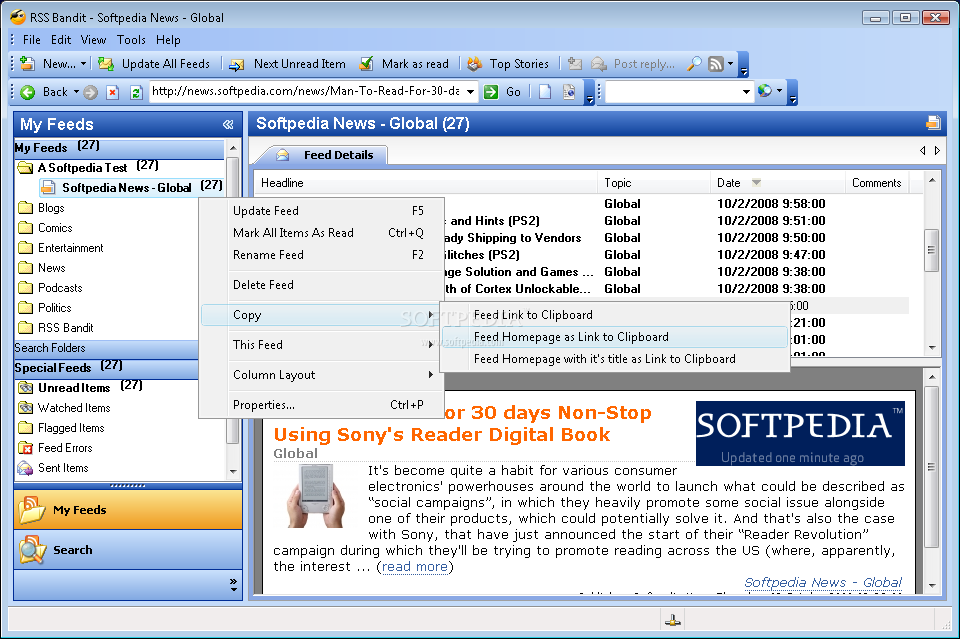
RSS Bandit

RSS Bandit is a nice, simple feed reader that lets you browse news in an organized fashion and has a Microsoft outlook type interface. With this software you can organize feeds in folders, RSS Bandit also detects relations between individual posts and threads them logically

RSS Bandit screenshot 1 - This is the main window of RSS Bandit where you can view all your categories and news feeds.

RSS Bandit is a RSS desktop feed aggregator.Check screenshots and download here


RSSOwl

RSSOwl is a free and powerful news feed reader. RSSOwl lets you gather, organize and search news in a convenient, easy to use interface with endless flexibility.
Home

WindowsDownload RSSOwl 2.1.6
Release Notes | Other Systems & Languages

Many people saddened by the announcement of this demise of Google reader  have taken to Twitter using the #SaveGoogleReader hashtag, determined to keep the site alive by creating  a online petition, you might wanna join the cause if you still like Google reader

Filed Under: Apps, Blogger Tool, Internet, Software, Solution, Technology News, Website Review Tagged With: RSS, Web browser News reader

  • « Go to Previous Page
  • Page 1
  • Page 2
  • Page 3
  • Page 4
  • Page 5
  • Page 6
  • Page 7
  • Go to Next Page »

Primary Sidebar

Recent Posts

  • Cute & Funny USB Drives (Perfect Gifts!)
  • 2026 – Step-by-Step Guide to Building Your Site With AI
  • Underwater Drones for Recording Video and Taking Pictures
  • Why I chose hostgator for blog hosting
  • Top 10 Software Programs For Your Windows PC

Recent Comments

  1. Roberto Mcgee on 2026 – Step-by-Step Guide to Building Your Site With AI
  2. google on Wacky new underwear invention 2b released by Durex
  3. Patrick McCormick on How to secure your desktop and laptop with antivirus software
  4. JJ on 20 Top brands with affilate programs to make you money in 2019
  5. JJ on This WPengine Genesis Pro Deal Will Give You 35 Studiopress themes

Archives

  • September 2026
  • June 2022
  • February 2022
  • July 2021
  • May 2021
  • April 2021
  • March 2021
  • November 2020
  • September 2020
  • August 2020
  • July 2020
  • June 2020
  • May 2020
  • April 2020
  • March 2020
  • February 2020
  • January 2020
  • December 2019
  • September 2019
  • August 2019
  • July 2019
  • June 2019
  • April 2019
  • March 2019
  • February 2019
  • January 2019
  • December 2018
  • November 2018
  • October 2018
  • September 2018
  • July 2018
  • June 2018
  • April 2018
  • February 2018
  • January 2018
  • December 2017
  • October 2017
  • September 2017
  • July 2017
  • June 2017
  • May 2017
  • April 2017
  • March 2017
  • February 2017
  • January 2017
  • December 2016
  • November 2016
  • October 2016
  • September 2016
  • August 2016
  • July 2016
  • May 2016
  • April 2016
  • March 2016
  • February 2016
  • January 2016
  • December 2015
  • November 2015
  • October 2015
  • September 2015
  • August 2015
  • July 2015
  • June 2015
  • May 2015
  • March 2015
  • February 2015
  • January 2015
  • December 2014
  • November 2014
  • October 2014
  • September 2014
  • August 2014
  • July 2014
  • June 2014
  • May 2014
  • April 2014
  • March 2014
  • February 2014
  • January 2014
  • November 2013
  • October 2013
  • September 2013
  • August 2013
  • July 2013
  • June 2013
  • May 2013
  • April 2013
  • March 2013
  • February 2013
  • January 2013
  • December 2012
  • November 2012
  • October 2012
  • September 2012
  • August 2012
  • July 2012
  • June 2012
  • May 2012
  • April 2012
  • March 2012
  • February 2012
  • January 2012
  • December 2011
  • November 2011
  • September 2011
  • August 2011
  • July 2011
  • June 2011
  • May 2011
  • April 2011
  • March 2011
  • February 2011
  • January 2011
  • December 2010
  • November 2010
  • October 2010
  • September 2010
  • August 2010
  • July 2010
  • June 2010
  • May 2010

Categories

  • $heldon $ingh
  • 2010
  • 2011
  • 2012
  • 2013
  • 2015
  • 2017
  • 2018
  • 2019
  • 2020
  • 2021
  • 2022
  • Accounting
  • Adsense
  • Affiliate
  • Amazon
  • Anti Virus
  • Apple
  • Apps
  • Asus
  • Aussie
  • Australia
  • Australian
  • Australian Bloggers
  • Australian wordpress hosting
  • Banks
  • Blog-Hosting
  • Blogger
  • Blogger Tool
  • Blogger Tools
  • BloggerTools
  • BuddyPress
  • CARS
  • CDN
  • Celebrity
  • Clickbank
  • Compare
  • Computer
  • Domains
  • Done Deals
  • Ebook
  • Email
  • Facebook
  • Featured
  • Finance
  • Free
  • Gadgets
  • Google
  • Gpost
  • Guide
  • Hackers
  • Hosting
  • India
  • Internet
  • Ipad
  • Kindle
  • Laptop
  • Make money blogging
  • Makemoney online
  • Marketing
  • Melbourne Cup
  • Movies
  • Netbook
  • Network
  • News
  • Online betting account
  • PC
  • Review
  • Search
  • SEO
  • sheldon singh
  • Software
  • Solution
  • Sports
  • Subscribers
  • Taxes
  • Technology News
  • Themes
  • Top 10
  • Tutorial
  • Video
  • Wacky
  • web hosting
  • Website Review
  • Wierd
  • Windows
  • wordpress
  • Wordpress 3.0
  • Wordpress 3.1
  • wordpress themes
  • World cup
  • Wp Answers
  • WP Turbo
  • WPMU

Footer

Technology

With an emphasis on technology, webdesign, and gadgets, our blog features articles related to these categories.

Browse our archives.

Privacy

Your privacy matters. We collect only essential information to ensure your data stays safe and confidential.

Learn more about Privacy.

Videos

Explore our video library designed to teach, inspire, and guide you. Dive in and discover content that brings ideas to life..

Check out our videopage.

Copyright © 2026 · Genesis Sample on Genesis Framework · WordPress · Log in

  • Resources
  • Privacy policy
  • Website Review
  • Subscribe