• Skip to primary navigation
  • Skip to main content
  • Skip to primary sidebar
  • Skip to footer
tech blog au

Digital Grog — Australia’s Tech, Gadgets & Digital Life Unfiltered

Digital Grog is Australia’s go‑to tech blog for sharp reviews, digital trends, AI tools, gadgets, cybersecurity updates, and practical how‑tos covering the latest in Aussie technology

  • Home
  • Webhosting
    • List of WordPress Web hosts
    • Comparisons
    • Blog Hosting
  • Make Money Online
    • Clickbank
    • Affiliate Programs Australia
      • Amazon
  • Domains Australia
    • Australian Domain Names
    • Register a domain name
  • Technology
    • Technology News
      • Gadgets
      • Software
  • Guest Posts
  • About
  • Contact us

Website Review

Free Photo album software – Visual lightbox

May 10, 2011 by admin 2 Comments

Did you ever want to  create a photo gallery  or a “online photo album” ,but did not know how to do it  or construct the code to put it online on a website , now this free software “visual lightbox” makes this job real easy

Free photo album software

Visual LightBox JS is a free wizard program that helps you easily generate web photo galleries with a nice Lightbox-style overlay effect, in a few clicks without writing a single line of code. Just drag&drop your photos into Visual LightBox window, press "Publish" and your own web gallery with beautiful LightBox 2 effects will open in the browser instantly! No javascript,css,html coding, no image editing, just a click to get your gallery ready.
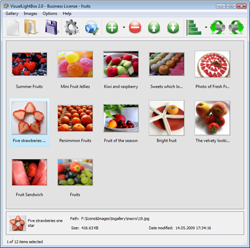
Click to see full size image

Check out a demo of the visual light box gallery over here

Visual LightBox is available as Prototype or jQuery plugin, for Windows and Mac, it is translated by volunteers to 28 languages! its also recently been updated  to work with bloogin software joomla. Now you can create Joomla module for you Joomla website.

Online gallery creating software Visual lightbox features

Visual box has support for Flickr and photobucket and also enables you to create slideshows. it also boasts a built in ftp client  and has some  basic gallery themes  and a  auto thumbnail creating  feature. For more features visit the –>> Visual lightbox webpage

This software is free and quick and easy to produce albums and online galleries  and also easy to use for the beginner.Go grab it !!

Filed Under: Free, Software, Website Review Tagged With: Free, photo album, Software

No daddy or go daddy !! Don’t lose your domain

February 12, 2011 by admin 6 Comments

Today i was just glancing through  my renewals of domains that keep popping up often  and something caught my eye , i saw this little note  telling me that i could lose my domain  if i didn’t renew it by the 20th  of the month

GO daddy domain renewal

Note at end of renewal email :

NOTE: For certain ccTLDs† you must renew no later than the 20th of the month prior to the expiration date. If you fail to do so, your domain name will be placed on non-renewal status and you will only be able to renew the name by calling Go Daddy.

I was shocked  , imaging loosing  a domain  that you have worked hard on for the last 5 years. Off course  do put it on auto renew and it gets renewed auto , bu then when you have so many domains you dont want to put all on auto re-new

Dont lose your Domain !! ACT NOW


Anyway i did a little more research  and here is what i found

Go to here –> http://documents.secureserver.net/show/document.aspx?plvid=1&name=reg_sa

and there is further explanation

For certain ccTLDs (.am, .at, .be, .cn, .com.cn, .net.cn, .org.cn, .de, .eu, .fm, .gs, .it, .jp, .ms, .nu, .nz, .co.nz, .net.nz, .org.nz, .tc, .tk, .tw, .com.tw, .org.tw, .idv.tw, .uk, .co.uk, .me.uk, .org.uk, and .vg) You must renew no later than the 20th of the month prior to the expiration date, or Your domain name will be placed on non-renewal status. When the domain name is in non-renewal status, You can renew the domain name only by calling Go Daddy and requesting that the domain name be renewed. You cannot renew the domain name through your Account Manager . If You fail to manually implement the renewal before the expiration date, the domain name will be cancelled and You will no longer have use of that name.

go daddy domains

You agree that Go Daddy will not be responsible for cancelled domain names that You fail to renew, either automatically or manually in the timeframes indicated in this Agreement. In any case, if You fail to renew Your domain name in a timely fashion, additional charges may apply. If You signed up for domain masking, domain forwarding, or any other similar service, with Your domain registration, these services will be automatically renewed when Your domain registration is up for renewal, and You will incur the applicable additional renewal fee unless You cancel in advance.

Therefore i feel this is sorta forcing you to get your domains on auto –renew for your safety as well as their  profit.

Technorati Tags: Go daddy,No daddy,Domains australia,hosting provider,Aussie domains

Filed Under: 2011, Domains, web hosting, Website Review Tagged With: Buy Domain Name, Go daddy, Godaddy

Embed playlists of different videos from you tube , Daily motion Etc With a nice Video player

December 27, 2010 by admin 2 Comments


Did you wish you could  have your own video player look on your website , something that looks better than the you tube video player  or the my space or dailymotion video. Well now you can thanks to embedr.com.

This sites pulls the video from  these major video sharing sites like  YouTube, MySpace, Vimeo, DailyMotion and more and you can mix and match videos from these websites to make yourself a nice playlist of videos or then just a better looking video player with your video displaying on your website or blog.

The new Video embedding website on the block – embedr.com

Embedr does not host any videos. Embedr simply let’s you take your favorite videos from all over the web and make them into a playlist. Most of the top video sites like YouTube, MySpace, Vimeo, Dailymotion, and Blip.Tv work with Embedr right now. Here is a complete list of all Embedr compatible sites.

embedr.com Embed you tube playlists video script

Embed your You tube Videos with a nice looking Video player

Take a look at this example  at of of India’s leading local newspaper mid-day.com or then a few other playlist created by users at this website like  most-watched-music-videos-vevogo-com ,lsome indonesioan my-video-playlist_19707 , worldwide-water-conspiracy-theory-with-jesse-ventura

embed videoplayer for you tube playlists other videos 

This website can embed videos in  two ways , A Standard Playlist is made up of a list of specific videos you choose in the order you specify or the  you can go for the smart playlist , A Smart Playlist is a playlist of YouTube only videos that is constantly changing depending on a list of keywords you specify. The playlist can pull videos from all of YouTube, or from a specific YouTube User ID. Both relevant to the keywords you specify. What videos display in the playlist depends on how the date the video was created and how highly rated it is.

In the websites own words here are how they describe themselves  “Embedr is a free service that lets anyone create a custom playlist of videos from the top video sites on the web. Now start building that playlist of the best 80s music videos that are spread throughout YouTube, MySpace, Vimeo, DailyMotion and more”. » Learn More About Embedr

Filed Under: 2010, 2011, Internet, Software, Video, Website Review Tagged With: Blogs, Websites

Get Multi user blogs on wordpress

June 6, 2010 by admin 1 Comment

I wanted to create something like this for a long time and i was looking in all the wrong places. I searched for  “wordpress cms themes” on google I searched for “forum blogs” and “multi user blogs” etc but got nowhere. The suddenly while browsing one of my favorite  forums i chanced upon a thread  “wpmu Blogs” and ended up doing more research.

Buddypress & WPMU for multi user blogs

Turns out , its just what  i was looking for so long. With “WPMU” or “wordpress Multi blogs” you can install it have have thousand of wordpress blogs from that one install and give permission to their people to run blogs of their own under your domain or hosting.

in my quest for this new  multi user blog i also  came across the “buddy press plugin” , for which i did not know much about and got it added to  my wordpress install. Turns out it give nice added functionality  like unique user profiles can be set up, and  you can  have your own activity rss feed  and connect to other users of the blog. So buddy press is certainly a good plugin for a more interactive blog.

Buddy press sample  Wpmu demo

If you install buddy press on a WPMU which is a multi user blog , you get many more added benefits liek a very large  blogging community that can speak  and interact with each other.

So follow me  as i experiment more with Buddypress and WPMU “wordpress Multi User blogs”. in the meantime check out some blogs that are online that use buddy press and WPMU

Blogs on Buddy press and WPMU

1. Harvey Norman Gadget blog

2. Tosh O

3. H mag

4. New York Times

5. Crikey.com.au

wpmu blogs crikey australian ebsite

Here is what wordpress MU does !!
Features
  • Everything WordPress does.
  • Scaling to tens of millions of pageviews per day.
  • Unlimited users and blogs.
  • Different permissions on different blogs.
  • Ambiguity about how to pronounce its name
    • A campus wide social network for your university, school or college.
    • An internal communication tool for your company.
    • A niche social network for your interest topic.
    • A focused social network for your new product.
  • What can I use BuddyPress for?

    BuddyPress is built to bring people together. It works well to enable people with similar interests to connect and communicate. Some of the fantastic uses might be:

Part 1( this one )  Part 2 == >> Part 3 to come

Enhanced by Zemanta

Filed Under: 2010, Australian, Blogger Tools, BuddyPress, Make money blogging, Software, Website Review, wordpress, wordpress themes Tagged With: Australian, Blogs, Websites

Google does the pac man !!ooh yeaH

May 23, 2010 by admin Leave a Comment

Pac..pacc.ppac man. Yeh no spiderman ..no superman ..!! hell yeah its the PAC man.

Internet giant Google marked the 30th birthday of Pac-Man by featuring the classic arcade videogame in the first-ever playable doodle on its home page. The game designed by Toru Iwatani was first released by Japan-based Namco into arcades on May 22, 1980.

Google pac man Doodle  On google homepage

Snapshot of the google.com.au home page with the playable pac man game

Web users who opened Google’s homepage including australia google.com.au after 1500 GMT Friday — which is midnight in Japan, where Pac-Man was born — were greeted by a small-scale Pac-man game set around a barely discernible "Google" in the middle of the game’s colorful maze. No suprise  it is with small things like these  that Google manages to keep its  Goog pr in good stead with the general public

The playable Pac-Man doodle will stay on Google for 48 hours. ENJOY courtest google !! GO paC MAN. CHomp Chomp ..chomp

Filed Under: Google, Software, Website Review Tagged With: Google

Secure your Facebook with proper privacy settings

May 19, 2010 by admin 4 Comments

MySpace recently has announced plans to simplify its privacy settings as it seeks to differentiate itself from social network rival Facebook, which is under fire over its privacy practices and recent privacy breaches due to facebook bugs.

Myspace said "We provide clear privacy settings, allowing not only restrictions on who can view their profile data, but also age restrictions to allow age separation of older and younger users.". The new Facebook features introduced last month include the ability for partner websites to incorporate Facebook user data, a move that would further expand the social network’s presence on the internet.

Facebook privacy settings

Securing your facebook with settings -  A few key things to understand about friend lists:

  • You can add each of your friend to more than one Friend List
  • Friend Lists can have specific privacy applied to them
  • Your friends’ privacy settings will always default to the most restrictive friend list they’ve been placed in. For example, let’s say your friend John is someone you met at work but continue to hang out with outside of work. You may have placed them in your “Work Contacts” Friend List and your “Local Friends” Friend List. If your “Work Contacts” cannot see photos you’ve been tagged in and your “Local Friends” can, John will not be able to see photos you’ve been tagged in.

    You can configure your Friend Lists by visiting the friends area of your Facebook.

Read the Facebook Guide to Privacy


At the very bottom of every page on Facebook, there’s a link that reads "Privacy." The linked page is "A guide to privacy on Facebook," which contains the latest privacy functions and policies. For example, with the latest changes in December 2009, Facebook discloses what it calls "Publicly available information." This is information that is publicly viewable to anyone visiting your profile, and includes sensitive information like your name, current city and gender.

When in doubt, use the "How others see you" tool on Facebook’s privacy guide to check and make sure your privacy settings are properly set.

Facebook’s new simple privacy settings page wants you to make all your posts and photos visible to the whole Web by default.

(Credit: Screenshot by Rafe Needleman/CNET)


Show "limited friends" a cut-down version of your profile

You can choose to make people ‘limited friends’ who only have access to a cut-down version of your profile if you wish. This can be useful if you have associates who you do not wish to give full friend status to, or feel uncomfortable sharing personal information with.


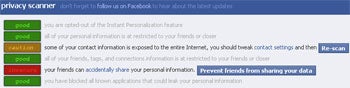
If you’re not sure whether you’ve sufficiently protected what you share on Facebook, thenReclaimPrivacy.org has a bookmarklet to help you be as private as you’d like.

To run the bookmarklet and see how private you may or may not be on Facebook, simply follow these directions:

  1. Drag this link to your web browser bookmarks bar: Scan for Privacy
  2. Log in to facebook.com and then click that bookmarklet
  3. You will see a series of privacy scans that inspect your privacy settings and warn you about settings that might be unexpectedly public.


Facebook Privacy Scanner

For each area, ReclaimPrivacy will give you a green ("good"), yellow ("caution"), or red ("insecure") ranking. If you hit yellow or red, it’ll provide you with specific steps to fix the problem so you don’t have to waste time searching for the right setting.


I YOU STILL HAVE ANY CONCERNS  you can go tot face book privacy settings  page  on face book itself to see what you can  do to make your facebook more secure

Filed Under: Apps, Facebook, Website Review Tagged With: Facebook, Websites

  • « Go to Previous Page
  • Page 1
  • Interim pages omitted …
  • Page 5
  • Page 6
  • Page 7

Primary Sidebar

Recent Posts

  • Cute & Funny USB Drives (Perfect Gifts!)
  • 2026 – Step-by-Step Guide to Building Your Site With AI
  • Underwater Drones for Recording Video and Taking Pictures
  • Why I chose hostgator for blog hosting
  • Top 10 Software Programs For Your Windows PC

Recent Comments

  1. Roberto Mcgee on 2026 – Step-by-Step Guide to Building Your Site With AI
  2. google on Wacky new underwear invention 2b released by Durex
  3. Patrick McCormick on How to secure your desktop and laptop with antivirus software
  4. JJ on 20 Top brands with affilate programs to make you money in 2019
  5. JJ on This WPengine Genesis Pro Deal Will Give You 35 Studiopress themes

Archives

  • September 2026
  • June 2022
  • February 2022
  • July 2021
  • May 2021
  • April 2021
  • March 2021
  • November 2020
  • September 2020
  • August 2020
  • July 2020
  • June 2020
  • May 2020
  • April 2020
  • March 2020
  • February 2020
  • January 2020
  • December 2019
  • September 2019
  • August 2019
  • July 2019
  • June 2019
  • April 2019
  • March 2019
  • February 2019
  • January 2019
  • December 2018
  • November 2018
  • October 2018
  • September 2018
  • July 2018
  • June 2018
  • April 2018
  • February 2018
  • January 2018
  • December 2017
  • October 2017
  • September 2017
  • July 2017
  • June 2017
  • May 2017
  • April 2017
  • March 2017
  • February 2017
  • January 2017
  • December 2016
  • November 2016
  • October 2016
  • September 2016
  • August 2016
  • July 2016
  • May 2016
  • April 2016
  • March 2016
  • February 2016
  • January 2016
  • December 2015
  • November 2015
  • October 2015
  • September 2015
  • August 2015
  • July 2015
  • June 2015
  • May 2015
  • March 2015
  • February 2015
  • January 2015
  • December 2014
  • November 2014
  • October 2014
  • September 2014
  • August 2014
  • July 2014
  • June 2014
  • May 2014
  • April 2014
  • March 2014
  • February 2014
  • January 2014
  • November 2013
  • October 2013
  • September 2013
  • August 2013
  • July 2013
  • June 2013
  • May 2013
  • April 2013
  • March 2013
  • February 2013
  • January 2013
  • December 2012
  • November 2012
  • October 2012
  • September 2012
  • August 2012
  • July 2012
  • June 2012
  • May 2012
  • April 2012
  • March 2012
  • February 2012
  • January 2012
  • December 2011
  • November 2011
  • September 2011
  • August 2011
  • July 2011
  • June 2011
  • May 2011
  • April 2011
  • March 2011
  • February 2011
  • January 2011
  • December 2010
  • November 2010
  • October 2010
  • September 2010
  • August 2010
  • July 2010
  • June 2010
  • May 2010

Categories

  • $heldon $ingh
  • 2010
  • 2011
  • 2012
  • 2013
  • 2015
  • 2017
  • 2018
  • 2019
  • 2020
  • 2021
  • 2022
  • Accounting
  • Adsense
  • Affiliate
  • Amazon
  • Anti Virus
  • Apple
  • Apps
  • Asus
  • Aussie
  • Australia
  • Australian
  • Australian Bloggers
  • Australian wordpress hosting
  • Banks
  • Blog-Hosting
  • Blogger
  • Blogger Tool
  • Blogger Tools
  • BloggerTools
  • BuddyPress
  • CARS
  • CDN
  • Celebrity
  • Clickbank
  • Compare
  • Computer
  • Domains
  • Done Deals
  • Ebook
  • Email
  • Facebook
  • Featured
  • Finance
  • Free
  • Gadgets
  • Google
  • Gpost
  • Guide
  • Hackers
  • Hosting
  • India
  • Internet
  • Ipad
  • Kindle
  • Laptop
  • Make money blogging
  • Makemoney online
  • Marketing
  • Melbourne Cup
  • Movies
  • Netbook
  • Network
  • News
  • Online betting account
  • PC
  • Review
  • Search
  • SEO
  • sheldon singh
  • Software
  • Solution
  • Sports
  • Subscribers
  • Taxes
  • Technology News
  • Themes
  • Top 10
  • Tutorial
  • Video
  • Wacky
  • web hosting
  • Website Review
  • Wierd
  • Windows
  • wordpress
  • Wordpress 3.0
  • Wordpress 3.1
  • wordpress themes
  • World cup
  • Wp Answers
  • WP Turbo
  • WPMU

Footer

Technology

With an emphasis on technology, webdesign, and gadgets, our blog features articles related to these categories.

Browse our archives.

Privacy

Your privacy matters. We collect only essential information to ensure your data stays safe and confidential.

Learn more about Privacy.

Videos

Explore our video library designed to teach, inspire, and guide you. Dive in and discover content that brings ideas to life..

Check out our videopage.

Copyright © 2026 · Genesis Sample on Genesis Framework · WordPress · Log in

  • Resources
  • Privacy policy
  • Website Review
  • Subscribe