• Skip to primary navigation
  • Skip to main content
  • Skip to primary sidebar
  • Skip to footer

Digital Grog — Australia’s Tech, Gadgets & Digital Life Unfiltered

Digital Grog is Australia’s go‑to tech blog for sharp reviews, digital trends, AI tools, gadgets, cybersecurity updates, and practical how‑tos covering the latest in Aussie technology

  • About Us
  • Contact Us
  • Block Examples
  • Landing Page

IOS

Top 5 antivirus solutions with prices for smartphones and computer cover

January 31, 2019 by admin 6 Comments

[et_pb_section fb_built="1" _builder_version="3.0.47"][et_pb_row _builder_version="3.0.48" background_size="initial" background_position="top_left" background_repeat="repeat"][et_pb_column type="4_4" _builder_version="3.0.47" parallax="off" parallax_method="on"][et_pb_image src="https://www.digitalgrog.com.au/wp-content/uploads/2018/10/antivirus-program-for-phone-and-pc.png" url="https://www.digitalgrog.com.au/" url_new_window="on" align="center" force_fullwidth="on" admin_label="antivirus Image" _builder_version="3.15"][/et_pb_image][et_pb_text admin_label="intro Text" _builder_version="3.15"]

Securing you data, be it your smartphone tablet or computer is very important in today’s day and age. With hacking and social engineering getting more rampant having  good security for your personal data and information is becoming more important.

We compared top internet security programs looking at features, prices and cover for multiple devices. We also considered whether the program slows down your system and evaluated the number and quality of advanced security tools.

Having a good antivirus or security software for your device (smartphone, tablet, IOT or laptops) is vital. Getting hacked, tricked by email into giving out personal information or just being infected by a dodgy app from a play store is something that can create a lot of problems for you.

Thankfully software companies are quite pro-active and have kept up with trends, releasing all in one security product packages that cover your smart devices including laptop or pc and other smart devices all in one package.

Different vendors have different computer security packages that cover from 2 to 5 devices and more based on what you need.

Below is a list of multi-device packages prices and also one device internet security solutions for you.

[/et_pb_text][et_pb_text admin_label=”yellotxt box” _builder_version=”3.17.2″ background_color=”rgba(236,239,59,0.39)” border_radii=”|5px|5px|5px|5px” border_color_all=”#071677″ border_style_all=”dotted” custom_margin=”5px|5px|5px|5px” custom_padding=”10px|10px|10px|10px” saved_tabs=”all”]

FEB 2018 Kaspersky Deal – Australia / New Zealand: 
Get up to 30% Off. Kaspersky Internet Security / Total Security / Anti Virus

Coupon “FEB30” 30% Off Home Security AVAILABLE from 11 Feb to 18 Feb.
Coupon “FAB20″ 20% Off ALL B2c & B2b products Available from 22 Feb to 28 Feb.

[/et_pb_text][/et_pb_column][/et_pb_row][/et_pb_section][et_pb_section fb_built=”1″ fullwidth=”on” _builder_version=”3.17.2″][et_pb_fullwidth_code background_color=”rgba(236,239,64,0.69)” custom_margin=”5px|5px|5px|5px” custom_padding=”10px|10px|10px|10px”][ninja_tables id=”6351″][/et_pb_fullwidth_code][/et_pb_section][et_pb_section fb_built=”1″ _builder_version=”3.0.47″][et_pb_row _builder_version=”3.0.48″ background_size=”initial” background_position=”top_left” background_repeat=”repeat”][et_pb_column type=”4_4″ _builder_version=”3.0.47″ parallax=”off” parallax_method=”on”][et_pb_divider color=”#1e0010″ height=”24px” _builder_version=”3.15″ mix_blend_mode=”color-burn”][/et_pb_divider][et_pb_text admin_label=”smartphone security Text” _builder_version=”3.15″]

Smartphone Security

In today’s world the smartphone holds as much of your personal information as a computer or laptop would – sometimes even more. Today your smartphone is just like a small computer and stores most of your email logins and passwords, and bank login details and so security for devices have to be more secure than before as your personal data is spread over multiple devices.

Securing it becomes even more important because of this. The first things you should do is activate remote delete on your phone in case it gets lost or stolen.

You can do this for free by using your Google Gmail account or your Samsung account. For apple or IOS devices there is the inbuilt tracker on their devices too attached to your apple id. They are also special free and paid apps that you can download from the app store to do this same thing.

The second and more important layer of security you need is a smartphone antivirus software or app. This product will protect your smartphone the same way software protects your pc/computer against viruses, hackers, malware and dodgy apps.

It will scan and alert you about any insecure apps, software, files on your phone and block them. This software now has ability to secure your device in real time as well.

Below are some top security software providers that have multi device internet security plans and also single device plans that can get your device secured.

[/et_pb_text][et_pb_divider color=”#1e0010″ height=”24px” _builder_version=”3.17.2″ mix_blend_mode=”color-burn” saved_tabs=”all”][/et_pb_divider][et_pb_text admin_label=”yellotxt box” _builder_version=”3.17.2″ background_color=”rgba(236,239,59,0.39)” border_radii=”|5px|5px|5px|5px” border_color_all=”#071677″ border_style_all=”dotted” custom_margin=”5px|5px|5px|5px” custom_padding=”10px|10px|10px|10px” saved_tabs=”all”]

We follow four labs that regularly release detailed reports: SE Labs, AV-Test Institute, MRG-Effitas, and AV-Comparatives. We also note whether vendors have contracted with ICSA Labs and West Coast labs for certification.

[/et_pb_text][/et_pb_column][/et_pb_row][et_pb_row _builder_version="3.0.48" background_size="initial" background_position="top_left" background_repeat="repeat"][et_pb_column type="2_3" _builder_version="3.0.47" parallax="off" parallax_method="on"][et_pb_image src="https://www.digitalgrog.com.au/wp-content/uploads/2018/10/norton-webapge.jpg" _builder_version="3.15"][/et_pb_image][et_pb_text admin_label="norton Text" _builder_version="3.15"]

Norton Security Premium for Five Devices

The best protection, plus PC backup and family safety features, for you and the people you care about

Benefits for you and your family:

  • Protects up to 5 PCs, Macs, Androids and iOS devices with a single subscription.
  • Helps provide real-time protection against existing and emerging malware including ransomware and viruses.
  • Advanced security helps protect your private and financial information when you go online.
  • Protects better and faster than the competition.1
  • Provides tools to help your kids safely explore the Internet.‡
  • Offers 25 GB of secure PC cloud backup, providing additional protection against ransomware.
  • Alerts you about risky Android apps before you download them, with our award-winning technology.

Includes our 100% money-back guarantee: From the moment you subscribe, a Norton expert is available to help keep your device virus-free or give you a refund!

[/et_pb_text][et_pb_button button_url="https://www.digitalgrog.com.au/nortonsecuritydeals" url_new_window="on" button_text="Go to Norton Website" admin_label="norton Button" _builder_version="3.16.1" button_text_size__hover_enabled="off" button_text_size__hover="null" button_one_text_size__hover_enabled="off" button_one_text_size__hover="null" button_two_text_size__hover_enabled="off" button_two_text_size__hover="null" button_text_color__hover_enabled="off" button_text_color__hover="null" button_one_text_color__hover_enabled="off" button_one_text_color__hover="null" button_two_text_color__hover_enabled="off" button_two_text_color__hover="null" button_border_width__hover_enabled="off" button_border_width__hover="null" button_one_border_width__hover_enabled="off" button_one_border_width__hover="null" button_two_border_width__hover_enabled="off" button_two_border_width__hover="null" button_border_color__hover_enabled="off" button_border_color__hover="null" button_one_border_color__hover_enabled="off" button_one_border_color__hover="null" button_two_border_color__hover_enabled="off" button_two_border_color__hover="null" button_border_radius__hover_enabled="off" button_border_radius__hover="null" button_one_border_radius__hover_enabled="off" button_one_border_radius__hover="null" button_two_border_radius__hover_enabled="off" button_two_border_radius__hover="null" button_letter_spacing__hover_enabled="off" button_letter_spacing__hover="null" button_one_letter_spacing__hover_enabled="off" button_one_letter_spacing__hover="null" button_two_letter_spacing__hover_enabled="off" button_two_letter_spacing__hover="null" button_bg_color__hover_enabled="off" button_bg_color__hover="null" button_one_bg_color__hover_enabled="off" button_one_bg_color__hover="null" button_two_bg_color__hover_enabled="off" button_two_bg_color__hover="null"][/et_pb_button][/et_pb_column][et_pb_column type="1_3" _builder_version="3.0.47" parallax="off" parallax_method="on"][et_pb_text admin_label="norton Text" _builder_version="3.15"]

About Norton Security

Peter Norton Computing, Inc., was a software company founded by Peter Norton. Norton and his company developed various DOS utilities including the Norton Utilities, which did not include antivirus features. In 1990, the company was acquired by Symantec and renamed Peter Norton Consulting Group. Symantec’s consumer antivirus and data management utilities are still marketed under the Norton name.

By early 1991, Symantec’s Norton Group launched Norton AntiVirus 1.0 for PC and compatible computers. Since then, the company has updated and diversified its product line until combining its offerings into one seamless product, Norton Security

Norton, also known as Norton by Symantec, is a division of Symantec, and is based out of Mountain View, California. Since being acquired by the Symantec Corporation in 1990, Norton has offered a variety of products and services related to digital security In 2014, it was announced that Norton’s parent company Symantec would split its business into two units – one focused on security, and one focused on information management, with Norton being placed in the unit focused on security.

Thanks to 63 million attack sensors in over 157 countries and 15 global security centres, Norton blocked three billion attacks in 2016 and protected 63 million customers and four million small businesses in the process.

Symantec’s Norton suite is trusted by organisations around the globe to provide integrated solutions that defend against the most sophisticated attacks. Its comprehensive protection footprint and extensive intelligence network is constantly gathering insights into the latest threats to keep you and your devices safe when you are online.

[/et_pb_text][/et_pb_column][/et_pb_row][et_pb_row _builder_version="3.0.48" background_size="initial" background_position="top_left" background_repeat="repeat"][et_pb_column type="4_4" _builder_version="3.0.47" parallax="off" parallax_method="on"][et_pb_divider color="#1e0010" height="24px" _builder_version="3.15" mix_blend_mode="color-burn"][/et_pb_divider][/et_pb_column][/et_pb_row][/et_pb_section][et_pb_section fb_built="1" fullwidth="on" _builder_version="3.0.47"][et_pb_fullwidth_image src="https://www.digitalgrog.com.au/wp-content/uploads/2018/10/awards-antivirus-accreditation.jpg" admin_label="certified products Fullwidth Image" _builder_version="3.15"][/et_pb_fullwidth_image][/et_pb_section][et_pb_section fb_built="1" _builder_version="3.0.47"][et_pb_row _builder_version="3.0.48" background_size="initial" background_position="top_left" background_repeat="repeat"][et_pb_column type="4_4" _builder_version="3.0.47" parallax="off" parallax_method="on"][et_pb_divider color="#1e0010" height="24px" _builder_version="3.15" mix_blend_mode="color-burn"][/et_pb_divider][/et_pb_column][/et_pb_row][et_pb_row _builder_version="3.0.48" background_size="initial" background_position="top_left" background_repeat="repeat"][et_pb_column type="2_3" _builder_version="3.0.47" parallax="off" parallax_method="on"][et_pb_image src="https://www.digitalgrog.com.au/wp-content/uploads/2018/10/mcafee-website.jpg" admin_label="mcafee full Image" _builder_version="3.15"][/et_pb_image][et_pb_text admin_label="mcafee Text" _builder_version="3.15"]

McAfee® Total Protection

For 10 Devices

Get the premium protection you need

Get 1 device , 5 devices and 10 devices protection

With every one of the McAfee® Total Protection products, you get the premium antivirus, identity and privacy protection you need for your PCs, Macs, smartphones, and tablets* —now backed by our 100% guarantee*: a McAfee expert will remove a virus, or your money back!

FREE Support

Get free customer support via phone,

[/et_pb_text][et_pb_button button_url=”https://www.mcafee.com/en-au/index.html” url_new_window=”on” button_text=”Go to Mcafee” admin_label=”mcafeeButton” _builder_version=”3.16″ button_text_size__hover_enabled=”off” button_text_size__hover=”null” button_one_text_size__hover_enabled=”off” button_one_text_size__hover=”null” button_two_text_size__hover_enabled=”off” button_two_text_size__hover=”null” button_text_color__hover_enabled=”off” button_text_color__hover=”null” button_one_text_color__hover_enabled=”off” button_one_text_color__hover=”null” button_two_text_color__hover_enabled=”off” button_two_text_color__hover=”null” button_border_width__hover_enabled=”off” button_border_width__hover=”null” button_one_border_width__hover_enabled=”off” button_one_border_width__hover=”null” button_two_border_width__hover_enabled=”off” button_two_border_width__hover=”null” button_border_color__hover_enabled=”off” button_border_color__hover=”null” button_one_border_color__hover_enabled=”off” button_one_border_color__hover=”null” button_two_border_color__hover_enabled=”off” button_two_border_color__hover=”null” button_border_radius__hover_enabled=”off” button_border_radius__hover=”null” button_one_border_radius__hover_enabled=”off” button_one_border_radius__hover=”null” button_two_border_radius__hover_enabled=”off” button_two_border_radius__hover=”null” button_letter_spacing__hover_enabled=”off” button_letter_spacing__hover=”null” button_one_letter_spacing__hover_enabled=”off” button_one_letter_spacing__hover=”null” button_two_letter_spacing__hover_enabled=”off” button_two_letter_spacing__hover=”null” button_bg_color__hover_enabled=”off” button_bg_color__hover=”null” button_one_bg_color__hover_enabled=”off” button_one_bg_color__hover=”null” button_two_bg_color__hover_enabled=”off” button_two_bg_color__hover=”null”][/et_pb_button][/et_pb_column][et_pb_column type=”1_3″ _builder_version=”3.0.47″ parallax=”off” parallax_method=”on”][et_pb_text admin_label=”mcafee Text” _builder_version=”3.15″]

About McAfee® Security

McAfee is the device-to-cloud cybersecurity company. McAfee – a long-trusted name in protection against hackers, malware, phishing and other online threats.

The company was founded in 1987 as McAfee Associates, named for its founder John McAfee, who resigned from the company in 1994. McAfee was incorporated in the state of Delaware in 1992. Network Associates was formed in 1997 as a merger of McAfee Associates, Network General, PGP Corporation and Helix Software.

McAfee, LLC (/ˈmækəfiː/ formerly known as McAfee Associates, Inc. from 1987–2014 and Intel Security Group from 2014–2017) is an American global computer security software company headquartered in Santa Clara, California and claims to be the world’s largest dedicated security technology company.

The company was purchased by Intel in February 2011 and became part of the Intel Security division. McAfee® customers range from government agencies to millions of home users. Businesses range from the smallest startups to the largest enterprises. McAfee mobile security solutions safeguard devices such as smartphones, tablets, and corporate networks.

Home users buy McAfee technology online and from retail stores around the world, or they get protection
through cell phone carriers, Internet service providers (ISPs), their device maker, or other McAfee partners.

[/et_pb_text][/et_pb_column][/et_pb_row][et_pb_row _builder_version="3.0.48" background_size="initial" background_position="top_left" background_repeat="repeat"][et_pb_column type="4_4" _builder_version="3.0.47" parallax="off" parallax_method="on"][et_pb_divider color="#1e0010" height="24px" _builder_version="3.15" mix_blend_mode="color-burn"][/et_pb_divider][/et_pb_column][/et_pb_row][et_pb_row _builder_version="3.0.48" background_size="initial" background_position="top_left" background_repeat="repeat"][et_pb_column type="2_3" _builder_version="3.0.47" parallax="off" parallax_method="on"][et_pb_image src="https://www.digitalgrog.com.au/wp-content/uploads/2018/10/avg-website-resize-50-percent.jpg" admin_label="avg reduced Image" _builder_version="3.15"][/et_pb_image][et_pb_text _builder_version="3.16.1"]

AVG ULTIMATE PROTECTION

A$ 139.99/year

Unlimited devices. As the plan says this one is ultimate protection that can be used  for all your devices  you own for personal use.  It’s a All-in-one antivirus and tuneup for all your family’s devices

  • Webcam Protection
  • Ransomware Protection
  • enhanced firewall
  • AI-based real-time threat detection and removal
  • Tune up – cleans up junk data
  • Payments Protection
  • Shop and bank online freely and securely

A single subscription covers every PC in your family, so you can install AVG Internet Security on every computer in your household.  You also get antivirus for all your Android devices.

Install Help – AVG also has a Express Install service for A$ 24.99  where they help you install, set up, and optimise your AVG security products for you. Check it out here

[/et_pb_text][et_pb_button button_url="https://www.digitalgrog.com.au/avgultimateoffer" url_new_window="on" button_text="Go to AVG Website" admin_label="avg Button" _builder_version="3.16.1" button_text_size__hover_enabled="off" button_text_size__hover="null" button_one_text_size__hover_enabled="off" button_one_text_size__hover="null" button_two_text_size__hover_enabled="off" button_two_text_size__hover="null" button_text_color__hover_enabled="off" button_text_color__hover="null" button_one_text_color__hover_enabled="off" button_one_text_color__hover="null" button_two_text_color__hover_enabled="off" button_two_text_color__hover="null" button_border_width__hover_enabled="off" button_border_width__hover="null" button_one_border_width__hover_enabled="off" button_one_border_width__hover="null" button_two_border_width__hover_enabled="off" button_two_border_width__hover="null" button_border_color__hover_enabled="off" button_border_color__hover="null" button_one_border_color__hover_enabled="off" button_one_border_color__hover="null" button_two_border_color__hover_enabled="off" button_two_border_color__hover="null" button_border_radius__hover_enabled="off" button_border_radius__hover="null" button_one_border_radius__hover_enabled="off" button_one_border_radius__hover="null" button_two_border_radius__hover_enabled="off" button_two_border_radius__hover="null" button_letter_spacing__hover_enabled="off" button_letter_spacing__hover="null" button_one_letter_spacing__hover_enabled="off" button_one_letter_spacing__hover="null" button_two_letter_spacing__hover_enabled="off" button_two_letter_spacing__hover="null" button_bg_color__hover_enabled="off" button_bg_color__hover="null" button_one_bg_color__hover_enabled="off" button_one_bg_color__hover="null" button_two_bg_color__hover_enabled="off" button_two_bg_color__hover="null"][/et_pb_button][/et_pb_column][et_pb_column type="1_3" _builder_version="3.0.47" parallax="off" parallax_method="on"][et_pb_text admin_label="about Avg security" _builder_version="3.15"]

About AVG Security

AVG AntiVirus (previously known as AVG, abbreviation of Anti-Virus Guard) is a family of antivirus software developed by AVG Technologies, a subsidiary of Avast. It is available for Windows, macOS and Android.

The AVG goal is a world in which people can enjoy their lives online without worries. AVG is now part of the Avast family of world leading digital security products, dedicated to keeping people around the world safe.

AVG features most of the common functions available in modern antivirus and Internet security programs, including periodic scans, scans of sent and received emails (including adding footers to the emails indicating this), the ability to repair some virus-infected files, and a quarantine area (virus vault) in which infected files are held.

According to AVG Technologies, the company has more than 200 million active users worldwide, including more than 100 million who use their products and services on mobile devices.

On 7 July 2016, Avast announced an agreement to acquire AVG for $1.3 billion.

[/et_pb_text][/et_pb_column][/et_pb_row][/et_pb_section][et_pb_section fb_built=”1″ _builder_version=”3.0.47″][et_pb_row _builder_version=”3.0.48″ background_size=”initial” background_position=”top_left” background_repeat=”repeat”][et_pb_column type=”4_4″ _builder_version=”3.0.47″ parallax=”off” parallax_method=”on”][et_pb_divider color=”#1e0010″ divider_weight=”4″ height=”24px” _builder_version=”3.15″ mix_blend_mode=”color-burn”][/et_pb_divider][et_pb_text admin_label=”How this software works ” _builder_version=”3.15″]

How Internet Security Software Works – How to install?

Computer/Laptop or PC

For computers and laptops, you just download the software and click on it  to install and the rest is done by the program/software and it is up and running. You will be required to run a scan on your first install and then regular scans can be scheduled by you at a preset time automatically or then done manually by you on a regular basis.

Smartphone/Tablet

Just go the play store  or apple  app store and download the app and install. If you have purchased  a multi-device  license, you can then input the license key in the app to activate the software on your smartphone or tablet.

[/et_pb_text][et_pb_divider color=”#1e0010″ height=”24px” _builder_version=”3.15″ mix_blend_mode=”color-burn”][/et_pb_divider][et_pb_text admin_label=”General information about security product” _builder_version=”3.16.1″]

What Security Software covers ?

Where before you would normally get just one device protection and had to purchase more software for more devices, now you can get a variety of cover for your devices. They are multi-device family plans for devices covering 1 device, 3 devices, 5 devices, 10 devices and also unlimited devices. So everybody can get covered with just one software purchase.

Password manager

password software

The software also comes with lots of free add-ons like Password Manager, where you can manage and secure all your passwords for different websites on your computer securely.

Kid’s safe website security blockers

Most Software allows you to block websites that are not kid safe and   also block websites manually  so that your kids can’t access certain websites

Free trials

Free trails are quite popular with most security software companies, where you can try the software for a certain limited time before you decide to buy. Some providers provide the full version of the software for trial, while some of them provide limited feature version for trial.

[/et_pb_text][et_pb_divider color=”#1e0010″ height=”24px” _builder_version=”3.15″ mix_blend_mode=”color-burn”][/et_pb_divider][et_pb_text admin_label=”Mcafee vs Norton 2018″ _builder_version=”3.15″]

Mcafee vs Norton 2018

McAfee and Norton (also called Symantec) are both familiar names in the antivirus realm, but how do they compare to each other in a head-to-head battle for dominance?

Prices differ as prices keep changing with promo deals being released. However, right now as a comparison between 1 device vs. 5 devices cover, you can see that MacAfee has a lower price than Norton.

Norton’s suite is more extensive, including features such as safe reboot, email support, social media protection, and chat and instant messaging protection. McAfee scores well regarding usability, but Norton is more reliable in protecting against new and existing threats.

The feature set for both cover the basic features as well as some add-ons, so this is where it would be a decider for you if it is not the price.

[/et_pb_text][et_pb_divider color="#1e0010" height="24px" _builder_version="3.15" mix_blend_mode="color-burn"][/et_pb_divider][/et_pb_column][/et_pb_row][/et_pb_section][et_pb_section fb_built="1" fullwidth="on" _builder_version="3.0.47"][et_pb_fullwidth_code background_color="rgba(236,239,64,0.69)" max_width="95%" custom_margin="5px|5px|5px|5px" custom_padding="10px|10px|10px|10px"][ninja_tables id="6357"][/et_pb_fullwidth_code][/et_pb_section][et_pb_section fb_built="1" _builder_version="3.0.47"][et_pb_row _builder_version="3.0.48" background_size="initial" background_position="top_left" background_repeat="repeat"][et_pb_column type="4_4" _builder_version="3.0.47" parallax="off" parallax_method="on"][et_pb_divider color="#1e0010" divider_weight="2" height="24px" _builder_version="3.15" mix_blend_mode="color-burn"][/et_pb_divider][/et_pb_column][/et_pb_row][et_pb_row _builder_version="3.0.48" background_size="initial" background_position="top_left" background_repeat="repeat"][et_pb_column type="2_3" _builder_version="3.0.47" parallax="off" parallax_method="on"][et_pb_image src="https://www.digitalgrog.com.au/wp-content/uploads/2018/10/bitdefender-website-reduced-compressed-59.7kb-doc-size.jpg" admin_label="bitdefender Image" _builder_version="3.15"][/et_pb_image][et_pb_text admin_label="biitdefender" _builder_version="3.15"]

Bitdefender COMPLETE PROTECTION

A$ 59.99/year

Bitdefender has  1 device , 3 device and 5 device security solutions.  They have the basic windows protection, advanced windows protection and  the complete protection solution in the price range from $35 to $59.99.

With the above $59.99 – Total Security 2019 package you get protection for up to 5 devices / 1 YEAR and Complete protection for Windows, macOS, iOS and Android

  • Complete anti-malware protection: Windows, macOS, Android and iOS
  • Multi-layer ransomware protection with ransomware remediation NEW
  • Network Threat Prevention: stops attacks before they even begin NEW
  • Parental Control IMPROVED
  • Optimized speed and cross-platform performance
  • Comprehensive Support 24/7

They also have the family pack that covers more devices than the normal plans.


[/et_pb_text][et_pb_button button_url=”https://www.bitdefender.com.au/solutions/” url_new_window=”on” button_text=”Go to Bitdefender Website” admin_label=”bitdefender Button” _builder_version=”3.16″ button_text_size__hover_enabled=”off” button_text_size__hover=”null” button_one_text_size__hover_enabled=”off” button_one_text_size__hover=”null” button_two_text_size__hover_enabled=”off” button_two_text_size__hover=”null” button_text_color__hover_enabled=”off” button_text_color__hover=”null” button_one_text_color__hover_enabled=”off” button_one_text_color__hover=”null” button_two_text_color__hover_enabled=”off” button_two_text_color__hover=”null” button_border_width__hover_enabled=”off” button_border_width__hover=”null” button_one_border_width__hover_enabled=”off” button_one_border_width__hover=”null” button_two_border_width__hover_enabled=”off” button_two_border_width__hover=”null” button_border_color__hover_enabled=”off” button_border_color__hover=”null” button_one_border_color__hover_enabled=”off” button_one_border_color__hover=”null” button_two_border_color__hover_enabled=”off” button_two_border_color__hover=”null” button_border_radius__hover_enabled=”off” button_border_radius__hover=”null” button_one_border_radius__hover_enabled=”off” button_one_border_radius__hover=”null” button_two_border_radius__hover_enabled=”off” button_two_border_radius__hover=”null” button_letter_spacing__hover_enabled=”off” button_letter_spacing__hover=”null” button_one_letter_spacing__hover_enabled=”off” button_one_letter_spacing__hover=”null” button_two_letter_spacing__hover_enabled=”off” button_two_letter_spacing__hover=”null” button_bg_color__hover_enabled=”off” button_bg_color__hover=”null” button_one_bg_color__hover_enabled=”off” button_one_bg_color__hover=”null” button_two_bg_color__hover_enabled=”off” button_two_bg_color__hover=”null”][/et_pb_button][/et_pb_column][et_pb_column type=”1_3″ _builder_version=”3.0.47″ parallax=”off” parallax_method=”on”][et_pb_text admin_label=”about bitdefender” _builder_version=”3.15″]

About Bitdefender

Bitfdefender is a Romanian cyber security and anti-virus software company which was founded in 2001. It was founded in 2001 by Florin Talpeş who is currently the CEO. Bitdefender develops and sells anti-virus software, internet security software, endpoint security software, and other cyber security products and services

Bitdefender has the largest security delivery infrastructure on the globe With a worldwide network of 500 million machines. They have Technology alliances with Citrix, VMware, Nutanix, Linux Foundation, Microsoft.

Bitdefender’s Internet of things device protection solution is called Bitdefender BOX. The box is a router designed to protect smart home products and Internet of Things devices by blocking malicious internet traffic.

Bitdefender offers a cloud-based security solution with anti-malware and anti-theft capabilities for Android and iOS users that is called Bitdefender Mobile Security.

[/et_pb_text][/et_pb_column][/et_pb_row][et_pb_row _builder_version="3.0.48" background_size="initial" background_position="top_left" background_repeat="repeat"][et_pb_column type="4_4" _builder_version="3.0.47" parallax="off" parallax_method="on"][et_pb_divider color="#1e0010" height="24px" _builder_version="3.15" mix_blend_mode="color-burn"][/et_pb_divider][/et_pb_column][/et_pb_row][et_pb_row _builder_version="3.0.48" background_size="initial" background_position="top_left" background_repeat="repeat"][et_pb_column type="2_3" _builder_version="3.0.47" parallax="off" parallax_method="on"][et_pb_image src="https://www.digitalgrog.com.au/wp-content/uploads/2018/10/trend-micro-website-compressed-doc.jpg" admin_label="trend micro Image" _builder_version="3.15"][/et_pb_image][et_pb_text admin_label="trend micro" _builder_version="3.15"]

Trend Micro Maximum Security Protection

A$ 99.95/year

Trend micro has unique solutions named maximum security and premium security plans for computer and smart device protection. They have 1 device, 6 device and separate windows, mac and smart device solutions as well.

The maximum security is one of the best suited midsize plan priced at $99.95 142.95 and is a multi device cover covering 6 devices with comprehensive security for your PC, Mac and mobile devices.

  • Complete protection: Windows, macOS, Android and iOS
  • Bank online more safely with Trend Micro™ Pay Guard to ensure the legitimacy of financial sites
  • Defend against ransomware and other online dangers.
  • Block dangerous websites that can steal personal data.
  • Allow children to explore the web safely with both time and content limits.
  • Fix common computer problems and get everything running at top speed

They also have the Home network security plan that can protect all smart devices in your network.


[/et_pb_text][et_pb_button button_url=”https://www.trendmicro.com/en_au/forHome/products.html” url_new_window=”on” button_text=”Go to Trend Micro Website” admin_label=”terend micro button” _builder_version=”3.16″ button_text_size__hover_enabled=”off” button_text_size__hover=”null” button_one_text_size__hover_enabled=”off” button_one_text_size__hover=”null” button_two_text_size__hover_enabled=”off” button_two_text_size__hover=”null” button_text_color__hover_enabled=”off” button_text_color__hover=”null” button_one_text_color__hover_enabled=”off” button_one_text_color__hover=”null” button_two_text_color__hover_enabled=”off” button_two_text_color__hover=”null” button_border_width__hover_enabled=”off” button_border_width__hover=”null” button_one_border_width__hover_enabled=”off” button_one_border_width__hover=”null” button_two_border_width__hover_enabled=”off” button_two_border_width__hover=”null” button_border_color__hover_enabled=”off” button_border_color__hover=”null” button_one_border_color__hover_enabled=”off” button_one_border_color__hover=”null” button_two_border_color__hover_enabled=”off” button_two_border_color__hover=”null” button_border_radius__hover_enabled=”off” button_border_radius__hover=”null” button_one_border_radius__hover_enabled=”off” button_one_border_radius__hover=”null” button_two_border_radius__hover_enabled=”off” button_two_border_radius__hover=”null” button_letter_spacing__hover_enabled=”off” button_letter_spacing__hover=”null” button_one_letter_spacing__hover_enabled=”off” button_one_letter_spacing__hover=”null” button_two_letter_spacing__hover_enabled=”off” button_two_letter_spacing__hover=”null” button_bg_color__hover_enabled=”off” button_bg_color__hover=”null” button_one_bg_color__hover_enabled=”off” button_one_bg_color__hover=”null” button_two_bg_color__hover_enabled=”off” button_two_bg_color__hover=”null”][/et_pb_button][/et_pb_column][et_pb_column type=”1_3″ _builder_version=”3.0.47″ parallax=”off” parallax_method=”on”][et_pb_text admin_label=”about trend micro” _builder_version=”3.15″]

About Trend Micro

The company was founded in 1988 in Los Angeles by Steve Chang (張明正, Chang Ming-cheng), his wife, Jenny Chang, and her sister, Eva Chen (陳怡樺)

Trend Micro Inc. is a Japanese multinational cyber security and defense company founded in Los Angeles, California with global headquarters in Tokyo, Japan, a R&D center in Taipei, Taiwan, and regional headquarters in Asia, Europe and the Americas.

[/et_pb_text][/et_pb_column][/et_pb_row][et_pb_row _builder_version="3.0.48" background_size="initial" background_position="top_left" background_repeat="repeat"][et_pb_column type="4_4" _builder_version="3.0.47" parallax="off" parallax_method="on"][et_pb_image src="https://www.digitalgrog.com.au/wp-content/uploads/2018/09/red-and-white-bar.jpg" _builder_version="3.15"][/et_pb_image][et_pb_text admin_label="SYSTEM REQUIREMENTS" _builder_version="3.15"]

SYSTEM REQUIREMENTS FOR ANTI-VIRUS AND SECURITY SOFTWARE

[/et_pb_text][/et_pb_column][/et_pb_row][et_pb_row _builder_version=”3.0.48″ background_size=”initial” background_position=”top_left” background_repeat=”repeat”][et_pb_column type=”1_2″ _builder_version=”3.0.47″ parallax=”off” parallax_method=”on”][et_pb_text _builder_version=”3.15″]

Operating system 

  • Microsoft Windows 10, 8.1, 8, and 7 (32- and 64-bit)
  • Mac OS X 10.12 or later
  • Google Android smartphones and tablets 4.1 or higher
  • Apple iOS 10 or later
[/et_pb_text][/et_pb_column][et_pb_column type=”1_2″ _builder_version=”3.0.47″ parallax=”off” parallax_method=”on”][et_pb_text _builder_version=”3.15″]

Hardware

  • 2 GB RAM for Windows 7 and above
  • 500 MB free drive space
  • 1 GHz Processor
[/et_pb_text][/et_pb_column][/et_pb_row][et_pb_row _builder_version=”3.0.48″ background_size=”initial” background_position=”top_left” background_repeat=”repeat”][et_pb_column type=”1_2″ _builder_version=”3.0.47″ parallax=”off” parallax_method=”on”][et_pb_text _builder_version=”3.15″]

Supported Browsers

  • Internet Explorer 10.0 or later
  • Firefox
  • Google Chrome
  • Safari (Mac and iOS OS Only)
  • Microsoft Edge
[/et_pb_text][/et_pb_column][et_pb_column type=”1_2″ _builder_version=”3.0.47″ parallax=”off” parallax_method=”on”][et_pb_text _builder_version=”3.15″]

Android Operating Systems

  • Android 4.0.3 or later. Must have Google Play app installed.
  • Android 4 or later required for Norton Family Premier Android app (Norton Security Premier Only)
  • iOS Operating Systems
  • iOS 8 or later
[/et_pb_text][/et_pb_column][/et_pb_row][et_pb_row _builder_version=”3.0.48″ background_size=”initial” background_position=”top_left” background_repeat=”repeat”][et_pb_column type=”4_4″ _builder_version=”3.0.47″ parallax=”off” parallax_method=”on”][et_pb_text admin_label=”More security products ” _builder_version=”3.15″]

Harden Your PC Security  – (Add-On Products)

[/et_pb_text][/et_pb_column][/et_pb_row][et_pb_row _builder_version=”3.0.48″ background_size=”initial” background_position=”top_left” background_repeat=”repeat”][et_pb_column type=”1_3″ _builder_version=”3.0.47″ parallax=”off” parallax_method=”on”][et_pb_text admin_label=”Microsoft Security Essentials” _builder_version=”3.15″]

Free Microsoft antivirus for windows 7, 8 and 10 :

Free windows antivirus

Microsoft Security Essentials provides protection to people who might not otherwise install antivirus software, and it gives them a good basic level of protection

Microsoft Security Essentials is a antivirus program that provides real-time security. The protects your computer against existing malware, viruses, and spyware. Microsoft Security Essentials can detect malicious software that is trying to infiltrate your data and also block them by activating or increasing the firewall mode (while connected to the internet). The software is programmable to run scans at set intervals, including monthly and annually.

Microsoft Security Essentials is a free* download from Microsoft that is simple to install, easy to use, and always kept up-to-date so you can be assured your PC is protected by the latest technology.

Download link

https://www.microsoft.com/en-au/download/details.aspx?id=5201

[/et_pb_text][et_pb_text admin_label=”Hacker Protection” _builder_version=”3.16.1″ link_option_url_new_window=”on”]

Hacker Protection

You can never be fully 100% secure.

Firewalls are a good addition to have with antivirus and malware protection. Good free firewall software’s are Kerio (free version- NA) and Zone Alarm (free version).

A firewall can be a hardware or software device. A hardware firewall is a unit that is connected between the network and the device for connecting to the Internet. A software firewall is a program that is installed on the computer with the Internet connection.

software firewall free

ZoneAlarm is an internet security software company that provides consumer antivirus and firewall products. ZoneAlarm was developed by Zone Labs, which was acquired in March 2004 by Check Point. Current deals here.

[/et_pb_text][/et_pb_column][et_pb_column type=”1_3″ _builder_version=”3.0.47″ parallax=”off” parallax_method=”on”][et_pb_text admin_label=”Norton WiFi Privacy” _builder_version=”3.16.1″]

Norton WiFi Privacy

norton australia

Adds bank-grade encryption to help protect you on public Wi-Fi hotspots

A$129.99  A$79.99

A$50 OFF*

Chat or online for the life of your subscription.

[/et_pb_text][et_pb_text admin_label=”AVG Camera Trap” _builder_version=”3.15″]

AVG Camera Trap

avg net security download

See who’s got your phone or tablet if its lost or stolen.

Now you’ll know if an annoying brother—or master thief—tries snooping on your phone or tablet. When anyone fails 3 times to unlock your device, Camera Trap will take a secret photo of them and then email that photo to you with the time and location of the incident.

Go to our AVG website link above to check out more features for this.

[/et_pb_text][et_pb_text admin_label=”AVG Secure VPN ” _builder_version=”3.16.1″]

AVG Secure VPN :

AVG Secure VPN is an application which enables you to connect to the internet via secure VPN servers using an encrypted tunnel to protect your online activity from eavesdropping.

Browse any website anonymously

A$ 79.99 A$ 39.99

20%off now -Deal

What is a VPN?

A Virtual Private Network (VPN) protects the data you upload and download from the internet, provides security for any data you send from your device, and anonymizes that internet activity.
[/et_pb_text][/et_pb_column][et_pb_column type=”1_3″ _builder_version=”3.0.47″ parallax=”off” parallax_method=”on”][et_pb_text admin_label=”AVG AntiVirus for Android free” _builder_version=”3.15″]

AVG AntiVirus for Android (FREE)

free and trial version
Mobile security for your photos, messages, & memories

AVG antivirus app on Google Play has had 100 million downloads, and is used today to secure phones and tablets across the globe.Once installed, it protects you from the latest viruses, malware, spyware, unsafe apps and settings, unwanted callers, and other nasty threats.

Go to our AVG website link above to get the free version.

[/et_pb_text][et_pb_text admin_label=”Malware Scan Softwar” _builder_version=”3.15″]

Malware Scan Software’s

Malware and spyware can be a nasty problem to get rid of, and they can sometimes enter your computer, even if you have internet security either through websites or human error. Below are some Free software’s that can help you remove malware or spyware from your computer.

scan for malware on pc

Malware bytes free offer the best protection that will work with your existing antivirus. Your best bet is to install the free protection and then do a manual scan at least every two weeks with the malware bytes program. They also have ADWCleaner program.

adware cleaner

Other Free programs choices are – SpywareBlaster, Spybot – Search and Destroy, Ewido, adaware ad block, CCcleaner or Microsoft AntiSpyware.

SpyBot Search & Destroy

spyware scanner

An anti-malware and anti-spyware stalwart that’s ideal for diagnosing existing infections. This is more of a system repair tool than a system protection tool. The free software does a decent job of finding and fixing adware, malware and spyware.

[/et_pb_text][/et_pb_column][/et_pb_row][/et_pb_section]

Filed Under: 2019, Anti Virus, Australia, Compare, Review, Software Tagged With: Android, Antivirus software, IOS, Security, Stop hackers software

5 Best Apps to Help You Get Organised

July 31, 2016 by admin 1 Comment

Best NoteTaking apps 2016 smaller

Being organised is both a personal skill and a professional attribute. To some people it comes naturally — they live by their daily planner and never forget to print their tickets. To others, getting organised is a challenge and wearing mismatched socks is a regular occurrence.

That’s where technology comes in. We have smartphones and tablets to help us stay organised on the go, and computers to do the work at home or in the office. There are so many amazing apps out there, but the right solution for you will depend on what you believe to be your biggest challenge when it comes to getting organised.

Whether you need to take better notes, improve your team’s performance, backup your files, organise your life, or simply need a little something to stay focused, the trick is to identify your pain point, find an app, master using it, then move on to a new challenge.

As a starting point, here are 5 of the best apps to help you get organised.

Dropbox

Dropbox originally grew in popularity because it offered an easy-to-use and extremely functional method of file sharing. Attaching a document or photo to an email is easy enough, but when multiple files come into play it’s not the most efficient way of transferring files from one person to another.

However, for the purpose of getting organised, Dropbox is a lifesaver when it comes to backing up your files. Let’s be honest — no one has the time to connect a hard drive to their computer and patiently wait until their files are transferred across. That’s not to mention that you’re then dependent on two types of hardware, rather than letting a cloud-based software take on the backup role.

Once you’ve created an account online, you should install Dropbox onto your computer and it’ll appear in your files as a regular folder. When you transfer or copy files into this folder, they’ll automatically sync with your Dropbox account in the background, presuming you’re connected to the internet.

The best part is files are never truly deleted from Dropbox. One barrier to an organised file folder is keeping everything in there, thinking you may need it again in the future. With Dropbox, you have the option to restore files after deleting them.

best-apps-to-help-you-get-organised-dropbox.jpg

The downside to Dropbox is that it stops being free if you require more than 2GB of space. To get 1TB of space, you need to upgrade to Dropbox Pro, which costs AU$11.58/month or AU$13.99/month, depending on how whether you choose to get billed annually or monthly. It may seem like a lot but when you think about the cost of a 1TB hard drive that requires a lot more human intervention, it’s worth it.

If you’re an Apple fanatic, Dropbox works the same way as iCloud does. However, it can operate on multiple devices and it’s easy to use across different operating systems without having to take extra steps.

On that note, Google Drive is another option that works great with all operating systems, where your first 15GB are free. It has the added benefit of being able to create documents, sheets, and slides within the platform that can be shared, edited and updated in real-time.

If you’re not a naturally organised person, the extra features offered by Google Drive can be overwhelming and you’ll end up with a messy folder, which defeats the whole purpose of using Dropbox as an organization tool in the first place. I’ve also found that Google Drive rarely generates previews of files, so if you haven’t quite mastered the art of naming your files in a systematic way, this isn’t the best first step towards a cloud-based backup. I’d personally recommend starting with Dropbox, learning to love the cloud, and jumping to a more complex and more functional platform.

Trello

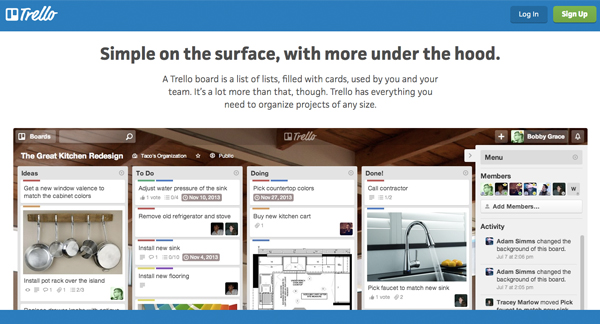
If you’re a visual person, Trello is definitely one of the best apps to help you get organised. The idea behind it is to create ‘boards’, and move things from one board to another, depending on its status. For example, you could have a low priority to-do list, a high priority to-do list, as well as lists for things that are in progress or completed.

You don’t have to do it this way — this was initially done to add an element of interactivity, where you drag and drop things from board to board in order to get more engaged with your tasks/goals and the processes involved in completing them. You can create a board for work, a board for home, a board for events etc. and simply view it as multiple to-do lists laid out in front of you.

best-online-apps-to-help-you-get-organised-trello.jpg

You can attach files, build checklists, and connect Trello to other apps with ‘Power-Ups’. These features are all available for free, if you sign up for the most basic version of Trello which was intended for personal use. If you’re using it as a business tool (it’s extremely popularly amongst marketing teams and product developers) you may want to look into the more advanced options.

Asana

Asana is a must-have organisation tool for any team. Think of it as a to-do list on steroids.

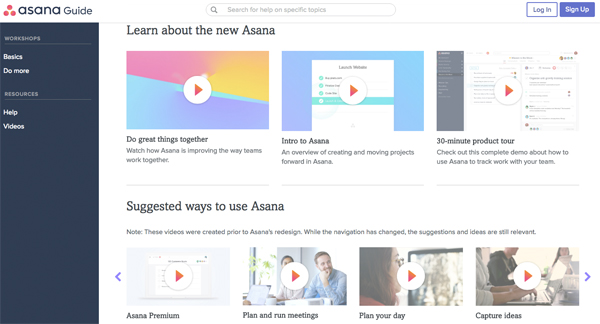
Every team member has a to-do list — you can add to your own list as well as to others’. You can create teams within the tool, and then individual projects within the teams. These projects can have their own project-specific to-do list, where all the tasks involved in the project are listed. These tasks are pushed into team members’ to-do lists when they’re assigned, with the ability to set deadlines, attach files, and add comments to each individual task.

It sounds complicated, but the ability to organise tasks via team, project, and team member can result in a much more efficient and effective way of getting things done. If you’re having trouble visualising it (I don’t blame you), Asana has an awesome range of intro videos, as well as tool-specific videos to help you.  

best-online-apps-to-help-you-get-organised-asana.jpg

Asana has two packages: Free and Premium. If you have a team of under 15 people, definitely get stuck into it with the free version and master it before you add on more tools. It’s a lot harder to implement an organisation strategy with more people.

Evernote

Evernote is an old favourite and can be found on every list of the best apps to help you get organised. I’ve added it because for one thing it’s awesome, and for another, a lot of people aren’t aware of its full potential.

First up, it is essentially a note-taking app. I can’t deny that Microsoft hasn’t revolutionized the way we create documents with Word, but something about saving notes to a specific document often means we don’t revisit them — they get lost amongst all your other files and documents.  

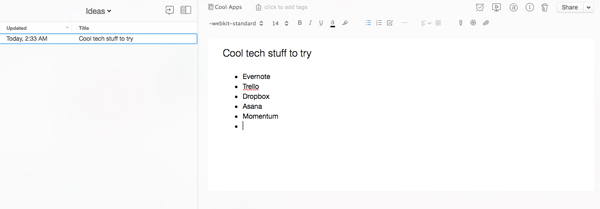
This is where Evernote comes in. You can keep all of your notes on one platform, where you can group them into general notebooks as a way to stay organised. You can search all your notes for something in particular, and also change your view to what works for you. It’s such a handy tool if you’re studying or working, particularly because you can share notes with others. 

best-online-apps-to-help-you-get-organised-evernote.jpg

One of the best things about Evernote is that it’s entirely cloud-based, which means you don’t have to save anything. If organisation isn’t your forte, you can skip the ‘save your work’ step and not lose all your valuable notes in the case of a hardware failure.

This also means you can add to your notes off any device (presuming you have the app and are logged in) and it’ll all sync up on its own. You can switch between your phone, tablet, and computer and access all the same information.

The really nifty thing about Evernote (that a lot of people don’t know about) is that the company has built and acquired a lot of awesome tools that’ll make your Evernote experience all the more awesome. One of them is Web Clipper, a web extension which lets you screenshot web pages as you go. You can clip small sections or capture the entire page, and automatically store and organise them within Evernote.

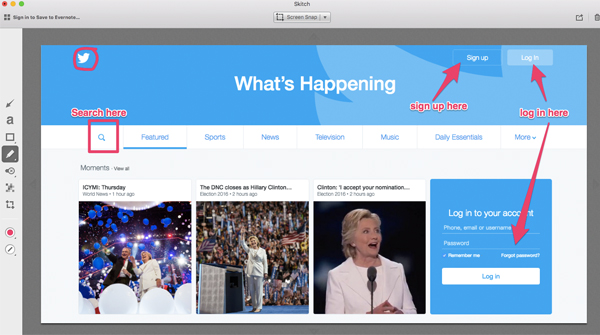
Skitch is a similar tool, though it’s an app rather than an extension. It lets you screenshot elements but also label and draw on them. It’s not as efficient as Web Clipper in terms of the whole screenshotting process, but being able to add arrows, text, circles and more can be really useful.

best-online-apps-to-help-you-get-organised-skitch.jpg

Skitch was acquired by Evernote in 2011, and in 2016 Evernote discontinued the option to download Android and Windows versions of the software. This was done in order to move Evernote in the direction of a more integrated solution, rather than increasing the number of standalone apps it supports.

You can still get it on a Mac and I’d highly recommend using it if you need to create process documents for anything on the web, i.e how to create an account on a specific platform. 

Another awesome tool (that’s sadly only for iOs users) is Scannable. It’s an iPhone app that lets you scan documents using your phone’s camera, which are then enhanced to produce high quality digital documents. These are synced to Evernote automatically.

In terms of pricing, start with the Basic model and test it out. If you’re leaning towards using Evernote frequently in a professional environment that involves presenting and collaborating with co-workers, you may want to look into thePlus, Premium, or Business models.

Momentum

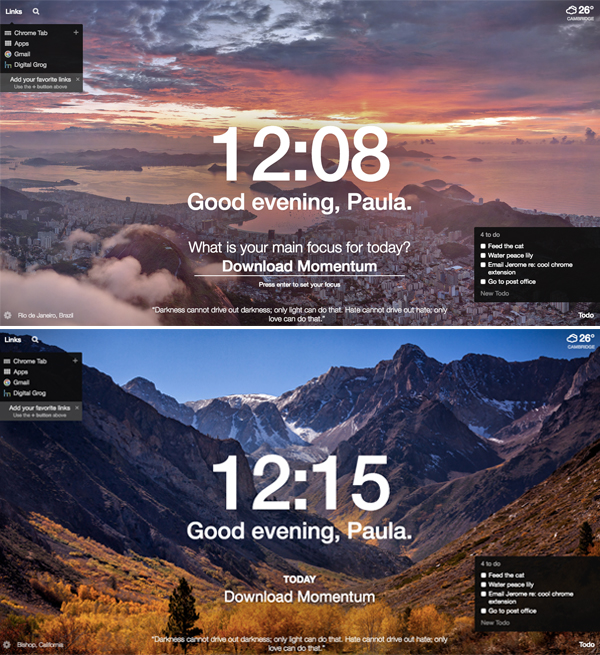
Momentum is a Google Chrome extension, so technically not an app but I guarantee you that it’ll bring life to your browser. Every time you open a new tab, you’ll get a picturesque photo with an inspirational quote.

You’ll also get the time and weather at your current location, as well as an option to search Google (or Bing if that’s your go-to search engine) and a list of your favourite links.

You have the option to create a to-do list and a main focus for the day, so if you’re not ready to dive into the deep end with an organisation app, start here.

best-online-apps-to-help-you-get-organised-momentum.jpg

Remember: organisation won’t happen overnight 

Downloading any of these apps will not instantly result in being organised. You have to be patient, make a consistent effort, and get into the habit of using the app to stay organised. The beauty of technology is that if one app doesn’t work for you, there are hundreds of others that you can try until you find what works for you. 

Bio: Paula is the founder of Joobly, an initiative that aims to connect aspiring student interns to tech startups in Sydney. She majors in Business Information Systems at Macquarie University.

Filed Under: Software, Solution Tagged With: Android, apps, IOS, Websites

Primary Sidebar

Recent Posts

  • Underwater Drones for Recording Video and Taking Pictures
  • Why I chose hostgator for blog hosting
  • Top 10 Software Programs For Your Windows PC
  • What you should know before investing in Cryptocurrency and bitcoin
  • The Best Social Media Platforms for Marketing a Gaming App

Recent Comments

  1. Patrick McCormick on How to secure your desktop and laptop with antivirus software
  2. JJ on 20 Top brands with affilate programs to make you money in 2019
  3. JJ on This WPengine Genesis Pro Deal Will Give You 35 Studiopress themes
  4. Lisa Gomes on 16 Ways to Make Money Online Working From Home
  5. KatVine on This WPengine Genesis Pro Deal Will Give You 35 Studiopress themes

Archives

  • June 2022
  • February 2022
  • July 2021
  • May 2021
  • April 2021
  • March 2021
  • November 2020
  • September 2020
  • August 2020
  • July 2020
  • June 2020
  • May 2020
  • April 2020
  • March 2020
  • February 2020
  • January 2020
  • December 2019
  • September 2019
  • August 2019
  • July 2019
  • June 2019
  • April 2019
  • March 2019
  • February 2019
  • January 2019
  • December 2018
  • November 2018
  • October 2018
  • September 2018
  • July 2018
  • June 2018
  • April 2018
  • February 2018
  • January 2018
  • December 2017
  • October 2017
  • September 2017
  • July 2017
  • June 2017
  • May 2017
  • April 2017
  • March 2017
  • February 2017
  • January 2017
  • December 2016
  • November 2016
  • October 2016
  • September 2016
  • August 2016
  • July 2016
  • May 2016
  • April 2016
  • March 2016
  • February 2016
  • January 2016
  • December 2015
  • November 2015
  • October 2015
  • September 2015
  • August 2015
  • July 2015
  • June 2015
  • May 2015
  • March 2015
  • February 2015
  • January 2015
  • December 2014
  • November 2014
  • October 2014
  • September 2014
  • August 2014
  • July 2014
  • June 2014
  • May 2014
  • April 2014
  • March 2014
  • February 2014
  • January 2014
  • November 2013
  • October 2013
  • September 2013
  • August 2013
  • July 2013
  • June 2013
  • May 2013
  • April 2013
  • March 2013
  • February 2013
  • January 2013
  • December 2012
  • November 2012
  • October 2012
  • September 2012
  • August 2012
  • July 2012
  • June 2012
  • May 2012
  • April 2012
  • March 2012
  • February 2012
  • January 2012
  • December 2011
  • November 2011
  • September 2011
  • August 2011
  • July 2011
  • June 2011
  • May 2011
  • April 2011
  • March 2011
  • February 2011
  • January 2011
  • December 2010
  • November 2010
  • October 2010
  • September 2010
  • August 2010
  • July 2010
  • June 2010
  • May 2010

Categories

  • $heldon $ingh
  • 2010
  • 2011
  • 2012
  • 2013
  • 2015
  • 2017
  • 2018
  • 2019
  • 2020
  • 2021
  • 2022
  • Accounting
  • Adsense
  • Affiliate
  • Amazon
  • Anti Virus
  • Apple
  • Apps
  • Asus
  • Aussie
  • Australia
  • Australian
  • Australian Bloggers
  • Australian wordpress hosting
  • Banks
  • Blog-Hosting
  • Blogger
  • Blogger Tool
  • Blogger Tools
  • BloggerTools
  • BuddyPress
  • CARS
  • CDN
  • Celebrity
  • Clickbank
  • Compare
  • Computer
  • Domains
  • Done Deals
  • Ebook
  • Email
  • Facebook
  • Featured
  • Finance
  • Free
  • Gadgets
  • Google
  • Gpost
  • Guide
  • Hackers
  • Hosting
  • India
  • Internet
  • Ipad
  • Kindle
  • Laptop
  • Make money blogging
  • Makemoney online
  • Marketing
  • Melbourne Cup
  • Movies
  • Netbook
  • Network
  • News
  • Online betting account
  • PC
  • Review
  • Search
  • SEO
  • sheldon singh
  • Software
  • Solution
  • Sports
  • Subscribers
  • Taxes
  • Technology News
  • Themes
  • Top 10
  • Tutorial
  • Video
  • Wacky
  • web hosting
  • Website Review
  • Wierd
  • Windows
  • wordpress
  • Wordpress 3.0
  • Wordpress 3.1
  • wordpress themes
  • World cup
  • Wp Answers
  • WP Turbo
  • WPMU

Footer

Design

With an emphasis on typography, white space, and mobile-optimized design, your website will look absolutely breathtaking.

Learn more about design.

Content

Our team will teach you the art of writing audience-focused content that will help you achieve the success you truly deserve.

Learn more about content.

Strategy

We help creative entrepreneurs build their digital business by focusing on three key elements of a successful online platform.

Learn more about strategy.

Copyright © 2026 · Genesis Sample on Genesis Framework · WordPress · Log in