• Skip to primary navigation
  • Skip to main content
  • Skip to primary sidebar
  • Skip to footer
tech blog au

Digital Grog — Australia’s Tech, Gadgets & Digital Life Unfiltered

Digital Grog is Australia’s go‑to tech blog for sharp reviews, digital trends, AI tools, gadgets, cybersecurity updates, and practical how‑tos covering the latest in Aussie technology

  • About Us
  • Contact Us
  • Block Examples
  • Landing Page

Australian

Listing of the Top WordPress Webhosting plans for 2018 – Features and Review

January 3, 2018 by admin 7 Comments

If you are looking  to start a wordpress blog or website  you need to check out  these web host’s that we have reviewed and listed below. I have  tried and tested 15 web-hosts until now for my website projects and below are some that I can recommend.

aussie webhosts

1

BEST SOFTWARE FOR WEBSITE BUILDING

WordPress, the world’s top content management system (CMS),  is a versatile and flexible blogging platform  that is simple to use by even beginners and can be customised extensively if needed. The software has one of the largest library of free and premium themes and plug-ins  to make the task of creating and managing your website a breeze. With this  CMS, you can build professional looking business websites, personal blogs  and even large entertainment and news portals like MTV and CNN has done with wordpress.

With word-press and a  good web hosting provider you can easily build a  small personal blog  to a large business website with  little to no skills. If you’ve thought about building a website, you should definitely consider a WordPress web host.

With the list below, there is a mix of Australian and US Webhosts that support WP hosting and “Managed wordpress hosting”. I have always used  US based hosts  due to their affordable  pricing  compared to some local aussie hosts and also the benefit of their easy website setup scripts for installing websites in minutes.

Below you can check out their features and plan prices  and choose for yourself.


2

2018: Price comparison Table for hosting companies

[table “7” not found /]

Choosing a “hosting company” for your blog or website is  a tough decision to make. You have  to consider  to cost of the web server plan, the value you will get,  the customer service  you can expect  among many other  smaller factors.

Hosting companies dont make it easy for you,  changing their prices and features included on a regular basis making it more difficult for you to compare  and choose among different hosts. So  what we have done is  drilled down to  a few of  top 10 hosts that are already listed above and given a little bit of an overview on them below.

Jeff

Jeff

Blogger

Digital Grog

  • Facebook
  • X
3

Australian Web Hosting Comparison: Top 5 Recommended

Bluehost is a  highly recommended web host by many bloggers and its  the same host I started  my blogging journey with. They  have good prices and plans for shared plans which is the best value option for beginners or to start an affiliate or small business website.

Bluehost is a web hosting company owned by Endurance International Group. It is one of the 20 largest web hosts, collectively hosting well over 2 million domains with its sister companies, HostMonster, FastDomain and iPage.

Bluehost Plans :

Shared Plan – $3.95 month  [ Includes free domain + 1 click WordPress install]

Cloud Hosting – $6.95 month [Free domain  + 1 Website hosting]

VPS hosting – $19.99  month [Free domain  + unlimited bandwidth]

  • 1 click Install "90"% "90"%
  • Good Pricing Plans "91"% "91"%
  • Performance "95"% "95"%
  • Ease of use "89"% "89"%

WP Engine is the leading WordPress digital premium hosting platform. They use premium plugins like content performance  to optimise and promote your website. They integrate with best-in-breed technology partners like Google, AWS and New Relic, and optimise their technology for WordPress.

All customers get access to 24/7/365, award-winning customer support. They  have Free months  special plans that deliver a discount for new customers. They are suitable for serious bloggers and small businesses that are starting out  with a robust host and web provider.

You can build faster, protect your brand, and grow your business with a WordPress platform built to power remarkable online experiences with WPEngine.

WP ENGINE Plans :

Personal Plan – $29 month  [ Includes free SSL]

Professional Plan – $99 month [Free SSL Certificates]

Business Hosting – $249  month [Free SSL  + 25 Installs]


  • 1 click Install "90"% "90"%
  • Good Pricing Plans "91"% "91"%
  • Performance "95"% "95"%
  • Ease of use "89"% "89"%

Godaddy is one of the biggest domain name registrars online and  they  offer a range of  services including webhosting, domain  name registration, transfer of domains, https (SSL certificates), domain name auctions,  Ecommerce shops and  SEO services.

They support Windows and Linux hosting and support most popular website platforms like WordPress, Joomla and many more. They also have a large number of PHP scripts for galleries, forums etc that are 1 click install. Bob Parsons founded the Internet domain registrar and Web hosting company GoDaddy in 1997.

Go daddy is popular as a wholesaler of these services and hence they have many ongoing sales and discount offers for their products on a regular basis.

The Most Popular Godaddy OFFERS :

Hosting with FREE Domain Name – $1.99

Domain name  for your website  – $0.99 cents


Australian .com.au Domains – $7.99/year ( 2 years minimum registration for au)


  • 1 click Install "90"% "90"%
  • Good Pricing Plans "91"% "91"%
  • Awesomeness "90"% "90"%
  • Ease of use "89"% "89"%

Underwater Drones for Recording Video and Taking Pictures

The best underwater drones in 2022. These underwater drones (or rovs) are submersible, waterproof machines that capture the wonders of the ocean sea and rivers.

Why I chose hostgator for blog hosting

Choose from some of the best Hostgator Hosting plans on the internet for 2016 while choosing from the hatching plan, the baby plan and the business plan with a price affordable to you

Top 10 Software Programs For Your Windows PC

Today I bring you this essential list of software that most computer owners should have on their computer. Some of these are free software and some of them you pay to get the full versions.

What you should know before investing in Cryptocurrency and bitcoin

Everything you need to know about bitcoin and crypto investing in Australia. Learn what it is, the different types of coins available and investing in blockchain and digital currency.

The Best Social Media Platforms for Marketing a Gaming App

Once you’ve created a gaming app, the next step is to think about how you’re going to promote it. Naturally, the more people who see your app, the more downloads you’ll receive. When you consider that there are over 2.5 billion gamers across the world, it’s easy to...

How to start a new wordpress blog in 15 minutes without breaking a sweat

Get WebHosting Discounts. The Easy Way to Create a Custom Website using WordPress in 2021. Use this method to make your first professional looking blog in 15 minutes.

Difference between hosting plans


Shared hosting

Shared hosting is one of the  most suitable plan  for  beginners  as  these plans  are normally cheap and yet have all the basic features that a  beginner blogger or webmaster needs. These plans are cheap because the servers provided are shared by many users and the load on servers is balanced.

Dedicated or VPS hosting

This is hosting that is better than shared, as you get more exclusive use of the servers and therefore the server speeds are a bit better than shared. The basic features are the same, but you get some more freedom with the server end features. If you have some technical knowledge of servers you can take advantage of some of these features, but these additional features are not necessary  for basic running of a website.

VPS servers generally allow root access and Dedicated plans allow customisation of  your hosting environment.

The benefit  for one of these plans would be for better speed and custom backend modifications of your website. Dedicated servers can be priced higher than a lot of  VPS plans. This hosting is often the next step upgrade from shared hosting.

Cloud and Managed wordpress hosts

Even though cloud and managed hosting is different. They both can be termed as managed hosting.

Cloud hosting is basically managed in the cloud automatically  and therefore  the main feature of this is that load balancing of your servers are all automated, to give your website the best performance according to your needs.

Managed wordpress hosting on the other hand is where the host has spent time  to modify the  server architecture to make you server optimised to load your website  quickly and keep it  running smooth and nicely with wordpress platform. They often have caching inbuilt with nginx. Some also provide CDNs with their hosting. This hosting is considered premium hosting and can cost more or even similar to dedicated.

Features that most hosting plans need

Disk storage
Disk storage Websites don’t need much storage and so you can see many providers offer unlimited storage. Most basic plans also have enough storage to run a couple of sites without any problems.
Uptime
Uptime This can differ from host to host, but if your host is offering an uptime of somewhere close to 99% you should be good. Watch out for hosts that can’t offer good uptime speeds, which means that your website won’t be available to your viewers occasionally when they have server problems.
Bandwidth
Bandwidth This is an important one; as more viewers to your website mean you use more bandwidth. More plugins and add-ons to your website mean more bandwidth.  Most shared plans have enough bandwidth  for a normal popular website, but you can upgrade if you really get popular and start getting like 5,000 hits a day( which can take a lot of time to achieve).


Leave comments

That’s it,  for our 2018  webhosting review.  Wish you luck in your new venture . If you have any questions,  do leave a comment below and I’d be happy to answer anything that comes up. 

Filed Under: 2018, Hosting, web hosting, wordpress Tagged With: Australian, Blog, Comparison, Coupons, Hosting In australia, Review, Website Hosting

Best Rated Webhosting for Australia – Comparisons Price and Reviews

September 12, 2017 by admin

Based on our own usage and comparison reviews , we bring you the

2017 webhosting prices and comparison australia 2

The top website hosting for March 2018

As a blogger and website builder, I have used many webhosting companies including US and Australia based ones  to create websites and below is collection of some of the best that I would recommend for this year.

I have used over  20 companies to test out reliable providers over time and below are some of them that I would still gladly suggest to anyone in 2018.

Let’s check out our listing of best webhosts for 2017-18 after our analysis, review and comparison from the past few years to make it easier for you to make the right informed choice.

I have written a “recommended” against our tops pick of hosts, but feel free to choose which one suit’s you needs best.

[table “2” not found /]

Choosing a service provider to start your first website, online store or blog can be the most important step you take while building your business and its essential to do the right thing from the start.

Some of the important factors are the obvious – Site speed, Disk space, Ease of use, Flexibility, how many websites can I host on the webhosting-plan.


Australian Hosting or US hosting – what should i choose ?

How important is server location

server in australia for January February or march The  decision is always divided on this one, that is – if the server location should be in Australia or the US for your Australian based site. But I like to think that this decision is really  based of  the traffic that your beginner blog will attract.

If you are going  to get 100 % off all your traffic from Australia ,it makes sense to get an Australian host, but the truth is 90% of the websites always get a lot of traffic from the US, even if they are Australian based  and so  it makes sense to get a cheaper US host.

Keep in mind that most Australian hosting providers are more expensive than their US counterparts so this will definitely make a difference to your budget.


What Plan is good for me ?

Most of the plans listed here  are  suitable for beginner websites as well as established websites. These shared plans while cheap can still easily take upto 2000 to 3,000 hits a day and function  smoothly, so you don’t need to upgrade for a while at least.

Some starter plans allow just one  website, so  choose the correct plan if you think you are going to start more than 1 website. Most shared plans allow you to host multiple websites with  1 hosting account purchase.

Once you are doing big numbers like 3000 + hits a day it is wise  to consider new hosting or then  getting CDN services which are a cheaper upgrade for higher traffic. If you get a CDN  add-on  once you start getting higher traffic you can still use your existing host and still enjoy faster speeds.

Price of wordpress Hosting

There is no  fixed price  for  hosting  as companies run deals all the time,which we update over here, but generally  the price range for  hosting is anywhere  between $3.45 to $5.95 a month, though when there are special deals you can get prices going down as low as $1 month, $1.95 a month  or as high as $7.99 month to $11 a month and this is all for the starter plans  or shared hosting.

As soon as  you talk about VPSs , dedicated, Cloud  and managed  hosting plans  the prices  start from $11 and upwards. There are some premium WP hosts that  charge upto $30,000 a month for high traffic plans  with CDN etc inbuilt.

What is CDN services?

Its just a service that  routes your traffic via the fastest route to your audience or website visitors, keeping your blog or webpage fast.It normally costs between $3 to $4 a month  depending on which provider you go with. CDN’s are Quite popular today  for blogs that have traffic spikes.

Different Kinds of hosting services

There are three main types of hosting:

  1. Cheap Shared Hosting
  2.  VPS Hosting
  3.  Dedicated Hosting & Managed or optimised Hosting

For most of those reading this, you’ll want to go for the cheap web hosting type (shared hosting), as it’s perfect for small to medium sized businesses.

However if  you want to go one step further  and get a little more bang for your buck, then you can choose a VPS or Dedicated plan by clicking a  link and then exploring more plans on the seller website. There are shared plans, then  starter plans , Pro plans  all named differently with every different provider.

There are different plans like Linux hosting plans  and Windows Hosting plans, but they both do a excellent job of  displaying your wordpress website , irrespective of all this technical jargon.

One click Install for WordPress

1 click install for webs and cpanel for july august or septemberSetting up your  first website-Or-blog will be something that you will always remember  and its best to hope for it  to be a good experience.  I would definitely suggest a host that makes the process easier  with easy to install automated scripts  to set up your blog yourself.

Bluehost and Godaddy has a customised install process and  they have “1 click install”. With this custom install process – you can  install a new wordpress site in as quick as 10 minutes with just a few clicks.

There is step by step instructions given to you through the install process via the admin dashboard, to make the website installing as easy as possible and that is why my top recommendations are for these two webhosts.

Cpanel the Hosting and  WordPress backend

The backend for the hosting account is the cpanel admin area. This is where you can get a bit technical and adjust things further, like get detailed stats for your blog. Set up FTP access. Peek into your SQL database and php admin area. Change admin passwords  and do heaps of other stuff.

But messing around in this area is not necessary, as you could do easily do most of the basic and important stuff like adding graphics and content from the front end of your website.

WordPress as a website builder

WordPress is a very versatile  website building software. Once you install your  wordpress site you can  change the look/design of your blog in one click  by changing the wordpress theme or template.

You get thousands of free templates via the wordpress admin area. If you want a robust  and well supported professional looking template design – you can also buy premium template designs from online sellers.

WordPress uses a system called plugins to add functionality to your website. You can easily add many functionalities by adding free WP plugins available in the free word-press marketplace or then again you can just buy some premium plugins for  adding further functionality.

The flexibility is there, to use either free or paid wp themes with your site and any plugins you choose to enhance  your wp site functionality is a bonus with these wordpress hosting-plans listed above.

No software is easier that WP software for building a website quickly and easily  and that is why this software has become one of the topmost used software for website building. Popular websites like  CNN,  SONY, MTV and BBC America also use them.

Most of them providers I have listed above do cover most of these features that are needed for your webpage/site.

Not many people  focus on ease of use and flexibility when choosing a service provider – but these are very important factors to consider while signing up for a new hosting plan to set up your new blog or site/shop.

Bluehost and Godaddy have millions of user’s setting up their first online-website by themselves and have made it the easiest process to do it yourself.  They can also be considered “cheap web hosting providers”  when their deals are on.

Saying that tho, the rest are not far behind in pricing and most providers will provide you a quick click and install process to get started with a professional WordPress(WP) website.

Is wordpress free to use ?

free to use software for april may or juneYes  word press is free software by itself  and can be used by anybody, the problem is that  if you want  to get it working  from your own pc as a server, you will have to go through a lot of technical settings  like DNS adjustments,  routing domain names   which will be through your pc .

Most providers  already have their custom built installers for  wp  and so provide provide wp as a 1 click install With hosting for the easy building of your WP blog/website.

Most of the above providers allow you to build your website with wordpress and also have many other website platforms like joomla, Drupal and many more.

Our Featured 2017 Hosting Providers


Bluehost.com

bluehost australia


Bluehost’s fast and reliable website hosting gives you everything you need to get your website online quickly. Bluehost is a web hosting company owned by Endurance International Group

Key people in bluehost –  Matt Heaton (Founder, CEO 2003-2011) Dan Handy (CEO 2011-2015) Mike Olson (CEO 2015-present)

They have servers in Provo, Utah, USA. Bluehost’s uptime is just about perfect (99.98%), well over industry standard which is around 99.90%.  Prior to last 6 months.


Hostgator.com

hostgator australia


HostGator recently launched their new, premium hosting called HostGator WordPress Cloud.

Founded in a dorm room at Florida Atlantic University by Brent Oxley, HostGator has grown into a leading provider of Shared, Reseller, VPS, and Dedicated web hosting. HostGator is headquartered in Houston and Austin, Texas, with several international offices throughout the globe.

HostGator has been around since 2002, originally founded by Brent Oxley before being acquired a decade later by Endurance International Group (EIG).

HostGator Shared Plans

  1. HostGator Hatching Plan: Well suited for Hosting single domain
  2. HostGator Baby Plan: Most recommended if you are interested in hosting multiple domains
  3. HostGator Business Plan: Most features will be that of HostGator Baby Plan. Additional features that you will get will be dedicated IP Address, Private SSL and Toll Free Number


Godaddy.com

cheap au domain names


Bob Parsons the founder of godaddy is a serial entrepreneur. He sold his first company to Intuit, Inc. in 1994. Three years later Parsons started Jomax Technologies, renaming the company GoDaddy in 1999. In 2000, GoDaddy became an ICANN-accredited domain name registrar. Designated CEO Now: Scott Wagner (Jan 1, 2018).

They have many different kind of plans. While Deluxe and Unlimited WebHosting Plans support and host unlimited Web Sites, owners of single plans may experience periodic decreases in performance once they more than 400 Web Sites.


Crucial.com

crucial australia


The Sydney-based company has focused on delivering a better experience for customers, with the roll-out of an industry first concept; Managed Google Apps.

Crucial’s roots trace back to a student bedroom in Bondi in 2003 where the company was first formed, and its headcount currently sits at 20 employees before the AVS buy.


Wpengine.com

Hosts like WP Engine actually guarantee the security of your site so if you’re hacked, the hosting company will cover the clean-up costs, which can be thousands of dollars, depending on the size of the site.


wp engine founder


JASON COHEN

FOUNDER


I started WP Engine because I wanted to work on interesting, real problems experienced by interesting, real customers, and come to the office every day thrilled to be working with the people around me. Somehow, we’ve been lucky enough to make that dream a reality.

The company was founded in 2010 and is based in Austin, Texas. It has additional offices in San Francisco, California – San Antonio, Texas, Brisbane, Australia, and London, England.

I will be adding more content and updates  to this post as we progress through  2017, so do let me know how you go  with your  new venture and leave me a comment if you have any queries, I will do my best to reply to you  as soon as i can.

Filed Under: web hosting Tagged With: Australian, Coupons, Discounts, Hosting In australia, Websites, Wordpress

Choose from the best web hosting plans for 2018: Australia Vs US Hosting

February 19, 2017 by admin

Here at DigitalGrog we regularly publish  step by step guides to creating a website, web hosting comparisons, reviews of hosting providers and domain name services.

Below is a detailed listing of webhosting companies with prices and features. This will help  you get started on your new journey if your creating a new business website or just a personal blog.

Godaddy Australia

If you are on a budget and price matters to get you started, you might want to try the current Godaddy deal- Click here above

Our recommendation is for Bluehost – Current deal here for a WordPress website or blog  and WP-Engine if your starting a business website – Current deal here.


[go_pricing id=”compare7hosts”]


Hosting Comparison – Australia Or US Host ?

Hosting in Australia is significantly more expensive than most other places in the world. Most of it comes down to some of the high cost of labour in Australia and of course infrastructure/backhaul internet/DC fees.

Latency is not the most important aspect of the loading times between here and the US and should be considered if you are running a high traffic website.

australia

Often when comparing how fast a server is providing content, factors like comparing the application stack, use of hardware load balancers, caching, CDN’s server technology etc are not taken into account when it should be.


Does US hosting IP affect my website ranking?

Search engines like google base their algorithms on a number of factors, one of them being the IP address location. Getting a country TLD domain can help, such as a .com.au domain for a business website or blog targeting Australian viewers.

Overseas hosting can still get results  by using proper SEO techniques and Google tweaks, like logging into the google search engine webmaster tools and telling them who your target market is.

A US host with a CDN can also help, if you want to go one step further by speeding up your loading time further and getting a nearby network point to your country.

Webhosting Acronyms Glossary and Meanings

Below is many words related to website hosting and managing. It is acronyms, features and just about a glossary for website related terms. This might be helpful when you are trying to make sense of terms when you build your first website or purchase services to create your first blog or webpage.

CMS – Content Management System is a program used to publish, edit and modify content on a given websites. CMS is often used to run websites containing blogs, news and shopping sites.

SSL – Secure Socket Layer is a cryptographic protocol that was designed to provide communication security over the internet.

CSS – Cascading Style Sheets is a style sheet language used to describe the overall look and format of a site that has been written in a markup language.

Disk Space – The amount of space allocated to you on the server to store files, pages, emails, and more.

Uptime – The amount of time the server is uninterrupted and your website is accessible. This is typically shown as a percentage. You want a high uptime (99% and above) so as not to disrupt access to your site

Reseller Hosting – Where a block of server resources is sold to an individual for purposes of using it to host multiple domains under their own name

Control Panel – The control panel is the central hub for a web hosting account. This is where the user modifies and controls all aspects of their web hosting such as adding new domains and sub domains, uploading web pages and installing server applications

MySQL – A database system that is often included in hosting packages. It is commonly used with a variety of applications

PHP – Hypertext Pre-Processor is a server-side scripting language designed for the development of websites and can also be used as a general-purpose programming language

Linux Server – A server that uses Linux, a free, open source operating system used by most shared and free web hosts

Windows Server – A server that uses Windows as the operating system. This type of plan is typically more expensive but necessary to accommodate specific applications

Add-domain – It is additional domains which can be createed from the main domain control panel without having a separate hosting account. It had all features just like a main domain, but with no cPanel control.

Sub-domain – A subdomain is a subsection of your website that can exist as a new website without a new domain name. Use subdomains to create memorable URLs for different content areas of your site.

Dont delay getting started! Better today than tomorrow.

Good luck!

Our Other popular related posts :

Why I love elegant themes website builder plugin

JJ | July 29, 2017 | 5 Comments
Why I love elegant themes website builder plugin

Looking for the perfect fully mobile responsive WordPress themes for your site? Check out our expert pick of the best responsive WordPress theme suitable for blog websites and even landing pages.

This page builder plugin and theme is the ultimate resource you need to enhance and build with any wp site to transform your pages and blog posts.

CONTINUE READING

Is Google Home Smart Device Worth the Money

JJ | October 3, 2017 | 0 Comments
Is Google Home Smart Device Worth the Money

I could think of at least a dozen reasons why Google Home actions would be useful, such as playing music when I get home or telling me the weather for the next day or just reading me the news or playing the next episode of Narcos on netflix.

CONTINUE READING


Compare the best web hosting plans for 2017: Australia Vs US Hosting

JJ | February 19, 2017 | 19 Comments
Compare the best web hosting plans for 2017: Australia Vs US Hosting

Compare the top webhosting providers for Australia and US in 2017 before you get a new hosting account. Compare features and prices and more

CONTINUE READING

Filed Under: 2017, Australia, Compare, web hosting, wordpress Tagged With: 2016, Australian, Hosting In australia, USA, Websites

This Guy bought Million dollar Google.com for just $12 dollars

October 3, 2015 by admin

domains for cheap what - and not even godaddy but Google domain registration service

Domain Names Sell for as low as 0.99 cents to $35.6 million just for internet domain name. Google.com which is probably worth millions of dollars got accidentally sold to a buyer last week for a very small fee this week, possibly leaving many google employees redfaced. In fact insurance .com did sell for $35.6million (yep just for the name www.insurance.com) in 2010.

How did google lose google.com domain name for just $12

In one of the weirdest stories I’ve ever read online a guy called Sanmay Ved has detailed how he was able to use Google’s own domain service to buy Google.com for just $12.

the google.com accidental sale for $12 and purchase

Apparently Sanmay was playing around in Google Domains just to see if there was any interesting domains he could buy. He searched google.com and was surprised that it was available. He could not believe his luck and instantly just purchased the domain without thinking about it. He then decided to add it to his cart and check out and realised all he needed to pay was just the small amount of $12 to own one of the most popular names on the internet.

While this story is as unbelievable as it is, like hitting a gold mine, the joy didn’t last for long. The domain was for a short time was actually registered to Sanmay Ved, as it showed in his Google Webmaster Tools with his existing domain and he also received a set of emails from Google accounts, the details of which he hasn’t disclosed.

Surprisingly he did say that that he had not received similar emails for previous domain purchases.THE domain at THE price! $.99 .COM Domains from GoDaddy!

What happened next was expected, Google managed to reverse the transaction and sanmay was refunded the $12 he spent for the domain and the domain name went back to google.

It is said that this obviously could be done easily because google domains owns the registration service, however had another big registrar like godaddy.com ( which sells domains names for currently as low as 0.99 cents ) or Bing.com or yahoo.com had laid their hands on such a nice prize it would have been another story altogether.


You can read the whole post that sanmay ved posted on his linked in account over here.

Here are some pics from his Linked in account

His linked in profile

sanmay ved in linked in domain hunter

His google.com purchase

the sanmay ved cheap google.com domain name purchase

This news story has rocked the internet going viral  and has been reported by many tops technology news giants like Cnet, Forbes and many more (including us)

New Domains now available from GoDaddy! Get your .GURU, .UNO, .LUXURY and more! Click here

[Read more…] about This Guy bought Million dollar Google.com for just $12 dollars

Filed Under: Facebook, Google, Technology News Tagged With: Australian, Google, Technology, Websites, Wordpress

Smartphone App launched by Dan Murphy’s Australia

October 19, 2013 by admin

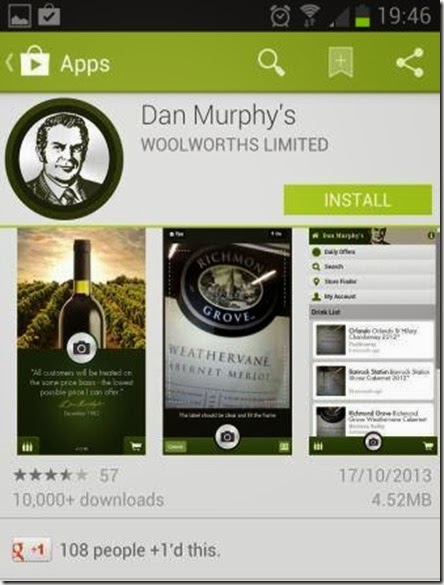
If you like a glass of wine or beer or spirit, getting your favourite beer or wine has just become easier with the new DAN MURPHY’S SMARTPHONE APP. Dan Murphy’s has just launched their new application for smartphone that makes it easier for you to browse what’s available in their store on your smartphone and even place an order

review of apps australia

I downloaded the Dan Murphy’s smartphone app this weekend and was quite surprised with the professional looking and functional app that they have produced. The app screen makes it easy to browse and search the store for wines, beers and other alcohol and the weekly deals etc. are conveniently placed just in reach of a quick tap on the screen.

Dan Murphy’s gets social with smartphone launch


Right now they are offering the special smartphone application launch deals… so go grab it. When i checked on my phone there was the “ Yellowglen Vintage Perle”  white wine award winner for $89.40 for a case of 6 bottles with delivery. That brings the price down to $14.90 for a bottle for this classic vintage wine (definitely a good deal to get delivered to your home).

The Dan Murphy’s app main screen is as below (in pic)

dan murphys New mobile app

If you tap on the left bottle icon , you get taken to the screen with weekly deals/offers, search , store finder and  your account. Its advisable to  create a account if you get alcohol regularly from  Dan murphy’s. You can shop for alcohol right from this app and either get it delivered ( if available – mostly on six or 12 packs )  or pick it up from store. The bottom right shopping cart button on the screen shows what alcohol you have already checked in or bought via the smartphone app

The Dan Murphy’s story in short

In 1952 a bright young man, Daniel Francis Murphy was working in a liquor store owned and run by his father Timothy Murphy. Dan looked around one day and decided that he could run the shop better than his father and requested to take the reins and the rest is history.  Today  he has about 140 stores all around Australia and it is part of the Woolworths chain.

appstore dan murphy app australia

App download screen in Google play

According to wikipedia

“Dan Murphy’s is an Australian liquor supermarket chain owned by Woolworths Limited, which also owns BWS, another liquor chain with smaller stores. Dan Murphy’s competes principally with 1st Choice Liquor Superstore”

I tried out a special feature on the Dan Murphy’s  app, this app has got label recognition technology built in to the app. If you just click a photo ( via camera icon/button in app- see pic below) of  a label of the bottle in your bar or fridge and if the item is stocked at Dan Murphy’s, the app will come back with the current price of the bottle and also provide  information and reviews on the drink ( pretty neat huh).

smartphone app of dan murphy australia[how%2520the%2520dan%2520murphy%2520app%2520works%255B4%255D.jpg]

Img from:http://australianchinwag.blogspot.com.au/

This new app from Dan Murphy’s could possibly do wonders for many undiscovered small brands or relatively unknown wineries, by bringing them  into focus and increasing their audience  by putting them on  show to the world.

With an increasing number of smartphone users now using their devices to research products or services on-line, apps like this one are becoming the norm for tech-savvy shoppers. The Dan Murphy’s App is free to download onto your android and apple devices.

Customers can download the Dan Murphy’s App for free on their iPhone or Android device by searching for “Dan Murphy’s” in the App Store.

For more information on the Dan Murphy’s App and to view an instructional video, please visit:www.danmurphys.com.au/guides/app-content.

So go give this app a whirl , say cheers to me  and my blog “Digital GROG” and let me know your views on the app

Filed Under: 2013, Apps, Australia, Gpost, Review Tagged With: Australian, Deals, smartphone app

Get $1 billion for playing a online game

June 11, 2013 by admin

This is what the website says

Take Part in the $1 Billion Game for Good

If you won $1 billion, how much would you give to charity?Play your part in creating the world’s largest prize and charitable event.

jaro game win 1 billion australia

Ten leading charities including WSPA Australia ( the reason why i am promoting this game) have signed up to be beneficiaries of the game. Other charities include: Age UK, Amnesty UK, British Red Cross, Cool Earth, Guide Dogs UK, Merlin, World Cancer Research Fund, World Heart Foundation and WWF UK.Funds raised for WSPA Australia will support our overall vision for animal welfare.

Jaro aims to be the single largest fundraising initiative in the world and potentially the provider of the biggest single prize pot of money ever!

Rules of Jaro

In Jaro, the goal is to guess the location of your opponent’s numbers (1 to 9 inclusive). The player who guesses most accurately, wins the game and progresses into the next round. The last player left standing wins the Jaro tournament and the prize pool can win upto 1 billion. There are no cash prizes for second place.


Entry

Tickets cost US$10 plus a 5% service fee plus any payment processing fees. Payment processing fees will vary depending on payment method and card provider.


Prize pool and charity contribution split

Firstly, each player chooses how much of their ticket purchase should be donated to charity and how much should be contributed to the prize pool.This is what we refer to as the ‘split’. For example if a player purchases one US$10 ticket and he or she chooses to split 50% of the purchase with their charitable causes—US$5 goes to the prize pool and US$5 is donated to charity.

Visit  https://www.jaro.com/ for more details

Interesting take on the – > maths of wining jaro

Filed Under: 2013, Internet, Solution, Video Tagged With: Australia, Australian, Australian Blog, Charity, Technology Blog, Video Games

  • Page 1
  • Page 2
  • Go to Next Page »

Primary Sidebar

Recent Posts

  • Underwater Drones for Recording Video and Taking Pictures
  • Why I chose hostgator for blog hosting
  • Top 10 Software Programs For Your Windows PC
  • What you should know before investing in Cryptocurrency and bitcoin
  • The Best Social Media Platforms for Marketing a Gaming App

Recent Comments

  1. Patrick McCormick on How to secure your desktop and laptop with antivirus software
  2. JJ on 20 Top brands with affilate programs to make you money in 2019
  3. JJ on This WPengine Genesis Pro Deal Will Give You 35 Studiopress themes
  4. Lisa Gomes on 16 Ways to Make Money Online Working From Home
  5. KatVine on This WPengine Genesis Pro Deal Will Give You 35 Studiopress themes

Archives

  • June 2022
  • February 2022
  • July 2021
  • May 2021
  • April 2021
  • March 2021
  • November 2020
  • September 2020
  • August 2020
  • July 2020
  • June 2020
  • May 2020
  • April 2020
  • March 2020
  • February 2020
  • January 2020
  • December 2019
  • September 2019
  • August 2019
  • July 2019
  • June 2019
  • April 2019
  • March 2019
  • February 2019
  • January 2019
  • December 2018
  • November 2018
  • October 2018
  • September 2018
  • July 2018
  • June 2018
  • April 2018
  • February 2018
  • January 2018
  • December 2017
  • October 2017
  • September 2017
  • July 2017
  • June 2017
  • May 2017
  • April 2017
  • March 2017
  • February 2017
  • January 2017
  • December 2016
  • November 2016
  • October 2016
  • September 2016
  • August 2016
  • July 2016
  • May 2016
  • April 2016
  • March 2016
  • February 2016
  • January 2016
  • December 2015
  • November 2015
  • October 2015
  • September 2015
  • August 2015
  • July 2015
  • June 2015
  • May 2015
  • March 2015
  • February 2015
  • January 2015
  • December 2014
  • November 2014
  • October 2014
  • September 2014
  • August 2014
  • July 2014
  • June 2014
  • May 2014
  • April 2014
  • March 2014
  • February 2014
  • January 2014
  • November 2013
  • October 2013
  • September 2013
  • August 2013
  • July 2013
  • June 2013
  • May 2013
  • April 2013
  • March 2013
  • February 2013
  • January 2013
  • December 2012
  • November 2012
  • October 2012
  • September 2012
  • August 2012
  • July 2012
  • June 2012
  • May 2012
  • April 2012
  • March 2012
  • February 2012
  • January 2012
  • December 2011
  • November 2011
  • September 2011
  • August 2011
  • July 2011
  • June 2011
  • May 2011
  • April 2011
  • March 2011
  • February 2011
  • January 2011
  • December 2010
  • November 2010
  • October 2010
  • September 2010
  • August 2010
  • July 2010
  • June 2010
  • May 2010

Categories

  • $heldon $ingh
  • 2010
  • 2011
  • 2012
  • 2013
  • 2015
  • 2017
  • 2018
  • 2019
  • 2020
  • 2021
  • 2022
  • Accounting
  • Adsense
  • Affiliate
  • Amazon
  • Anti Virus
  • Apple
  • Apps
  • Asus
  • Aussie
  • Australia
  • Australian
  • Australian Bloggers
  • Australian wordpress hosting
  • Banks
  • Blog-Hosting
  • Blogger
  • Blogger Tool
  • Blogger Tools
  • BloggerTools
  • BuddyPress
  • CARS
  • CDN
  • Celebrity
  • Clickbank
  • Compare
  • Computer
  • Domains
  • Done Deals
  • Ebook
  • Email
  • Facebook
  • Featured
  • Finance
  • Free
  • Gadgets
  • Google
  • Gpost
  • Guide
  • Hackers
  • Hosting
  • India
  • Internet
  • Ipad
  • Kindle
  • Laptop
  • Make money blogging
  • Makemoney online
  • Marketing
  • Melbourne Cup
  • Movies
  • Netbook
  • Network
  • News
  • Online betting account
  • PC
  • Review
  • Search
  • SEO
  • sheldon singh
  • Software
  • Solution
  • Sports
  • Subscribers
  • Taxes
  • Technology News
  • Themes
  • Top 10
  • Tutorial
  • Video
  • Wacky
  • web hosting
  • Website Review
  • Wierd
  • Windows
  • wordpress
  • Wordpress 3.0
  • Wordpress 3.1
  • wordpress themes
  • World cup
  • Wp Answers
  • WP Turbo
  • WPMU

Footer

Design

With an emphasis on typography, white space, and mobile-optimized design, your website will look absolutely breathtaking.

Learn more about design.

Content

Our team will teach you the art of writing audience-focused content that will help you achieve the success you truly deserve.

Learn more about content.

Strategy

We help creative entrepreneurs build their digital business by focusing on three key elements of a successful online platform.

Learn more about strategy.

Copyright © 2026 · Genesis Sample on Genesis Framework · WordPress · Log in