
• Skip to primary navigation
  • Skip to main content
  • Skip to primary sidebar
  • Skip to footer

Digital Grog — Australia’s Tech, Gadgets & Digital Life Unfiltered

Digital Grog is Australia’s go‑to tech blog for sharp reviews, digital trends, AI tools, gadgets, cybersecurity updates, and practical how‑tos covering the latest in Aussie technology

  • About Us
  • Contact Us
  • Block Examples
  • Landing Page

apps

5 Best Apps to Help You Get Organised

July 31, 2016 by admin 1 Comment

Best NoteTaking apps 2016 smaller

Being organised is both a personal skill and a professional attribute. To some people it comes naturally — they live by their daily planner and never forget to print their tickets. To others, getting organised is a challenge and wearing mismatched socks is a regular occurrence.

That’s where technology comes in. We have smartphones and tablets to help us stay organised on the go, and computers to do the work at home or in the office. There are so many amazing apps out there, but the right solution for you will depend on what you believe to be your biggest challenge when it comes to getting organised.

Whether you need to take better notes, improve your team’s performance, backup your files, organise your life, or simply need a little something to stay focused, the trick is to identify your pain point, find an app, master using it, then move on to a new challenge.

As a starting point, here are 5 of the best apps to help you get organised.

Dropbox

Dropbox originally grew in popularity because it offered an easy-to-use and extremely functional method of file sharing. Attaching a document or photo to an email is easy enough, but when multiple files come into play it’s not the most efficient way of transferring files from one person to another.

However, for the purpose of getting organised, Dropbox is a lifesaver when it comes to backing up your files. Let’s be honest — no one has the time to connect a hard drive to their computer and patiently wait until their files are transferred across. That’s not to mention that you’re then dependent on two types of hardware, rather than letting a cloud-based software take on the backup role.

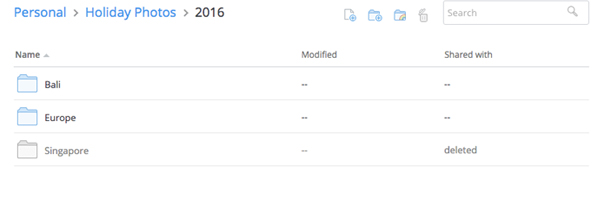
Once you’ve created an account online, you should install Dropbox onto your computer and it’ll appear in your files as a regular folder. When you transfer or copy files into this folder, they’ll automatically sync with your Dropbox account in the background, presuming you’re connected to the internet.

The best part is files are never truly deleted from Dropbox. One barrier to an organised file folder is keeping everything in there, thinking you may need it again in the future. With Dropbox, you have the option to restore files after deleting them.
best-apps-to-help-you-get-organised-dropbox.jpg

The downside to Dropbox is that it stops being free if you require more than 2GB of space. To get 1TB of space, you need to upgrade to Dropbox Pro, which costs AU$11.58/month or AU$13.99/month, depending on how whether you choose to get billed annually or monthly. It may seem like a lot but when you think about the cost of a 1TB hard drive that requires a lot more human intervention, it’s worth it.

If you’re an Apple fanatic, Dropbox works the same way as iCloud does. However, it can operate on multiple devices and it’s easy to use across different operating systems without having to take extra steps.

On that note, Google Drive is another option that works great with all operating systems, where your first 15GB are free. It has the added benefit of being able to create documents, sheets, and slides within the platform that can be shared, edited and updated in real-time.

If you’re not a naturally organised person, the extra features offered by Google Drive can be overwhelming and you’ll end up with a messy folder, which defeats the whole purpose of using Dropbox as an organization tool in the first place. I’ve also found that Google Drive rarely generates previews of files, so if you haven’t quite mastered the art of naming your files in a systematic way, this isn’t the best first step towards a cloud-based backup. I’d personally recommend starting with Dropbox, learning to love the cloud, and jumping to a more complex and more functional platform.

Trello

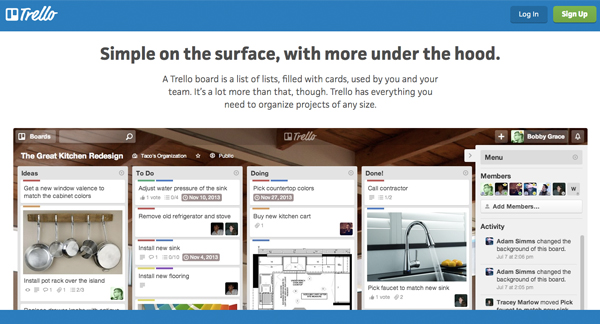
If you’re a visual person, Trello is definitely one of the best apps to help you get organised. The idea behind it is to create ‘boards’, and move things from one board to another, depending on its status. For example, you could have a low priority to-do list, a high priority to-do list, as well as lists for things that are in progress or completed.

You don’t have to do it this way — this was initially done to add an element of interactivity, where you drag and drop things from board to board in order to get more engaged with your tasks/goals and the processes involved in completing them. You can create a board for work, a board for home, a board for events etc. and simply view it as multiple to-do lists laid out in front of you.
best-online-apps-to-help-you-get-organised-trello.jpg

You can attach files, build checklists, and connect Trello to other apps with ‘Power-Ups’. These features are all available for free, if you sign up for the most basic version of Trello which was intended for personal use. If you’re using it as a business tool (it’s extremely popularly amongst marketing teams and product developers) you may want to look into the more advanced options.

Asana

Asana is a must-have organisation tool for any team. Think of it as a to-do list on steroids.

Every team member has a to-do list — you can add to your own list as well as to others’. You can create teams within the tool, and then individual projects within the teams. These projects can have their own project-specific to-do list, where all the tasks involved in the project are listed. These tasks are pushed into team members’ to-do lists when they’re assigned, with the ability to set deadlines, attach files, and add comments to each individual task.

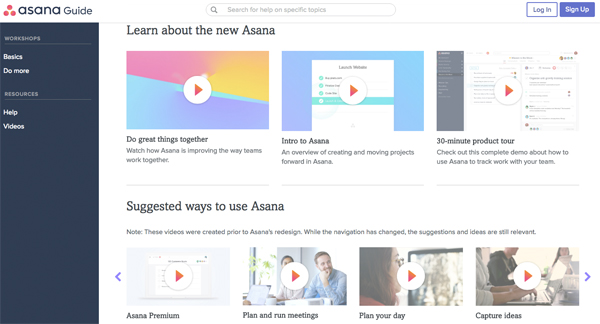
It sounds complicated, but the ability to organise tasks via team, project, and team member can result in a much more efficient and effective way of getting things done. If you’re having trouble visualising it (I don’t blame you), Asana has an awesome range of intro videos, as well as tool-specific videos to help you.  
best-online-apps-to-help-you-get-organised-asana.jpg

Asana has two packages: Free and Premium. If you have a team of under 15 people, definitely get stuck into it with the free version and master it before you add on more tools. It’s a lot harder to implement an organisation strategy with more people.

Evernote

Evernote is an old favourite and can be found on every list of the best apps to help you get organised. I’ve added it because for one thing it’s awesome, and for another, a lot of people aren’t aware of its full potential.

First up, it is essentially a note-taking app. I can’t deny that Microsoft hasn’t revolutionized the way we create documents with Word, but something about saving notes to a specific document often means we don’t revisit them — they get lost amongst all your other files and documents.  

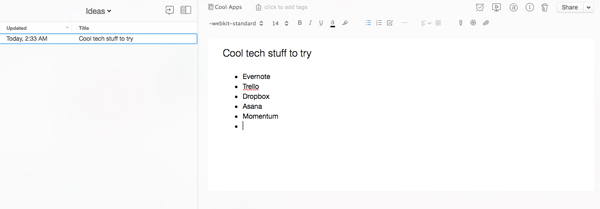
This is where Evernote comes in. You can keep all of your notes on one platform, where you can group them into general notebooks as a way to stay organised. You can search all your notes for something in particular, and also change your view to what works for you. It’s such a handy tool if you’re studying or working, particularly because you can share notes with others. 
best-online-apps-to-help-you-get-organised-evernote.jpg

One of the best things about Evernote is that it’s entirely cloud-based, which means you don’t have to save anything. If organisation isn’t your forte, you can skip the ‘save your work’ step and not lose all your valuable notes in the case of a hardware failure.

This also means you can add to your notes off any device (presuming you have the app and are logged in) and it’ll all sync up on its own. You can switch between your phone, tablet, and computer and access all the same information.

The really nifty thing about Evernote (that a lot of people don’t know about) is that the company has built and acquired a lot of awesome tools that’ll make your Evernote experience all the more awesome. One of them is Web Clipper, a web extension which lets you screenshot web pages as you go. You can clip small sections or capture the entire page, and automatically store and organise them within Evernote.

Skitch is a similar tool, though it’s an app rather than an extension. It lets you screenshot elements but also label and draw on them. It’s not as efficient as Web Clipper in terms of the whole screenshotting process, but being able to add arrows, text, circles and more can be really useful.
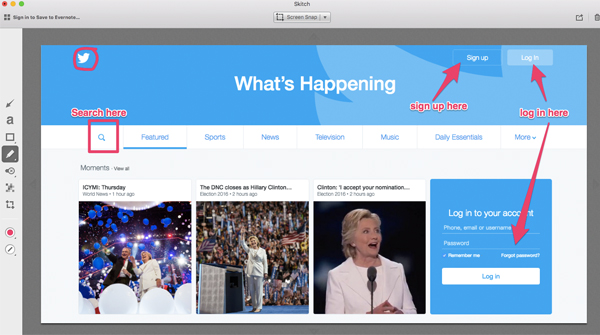
best-online-apps-to-help-you-get-organised-skitch.jpg

Skitch was acquired by Evernote in 2011, and in 2016 Evernote discontinued the option to download Android and Windows versions of the software. This was done in order to move Evernote in the direction of a more integrated solution, rather than increasing the number of standalone apps it supports.

You can still get it on a Mac and I’d highly recommend using it if you need to create process documents for anything on the web, i.e how to create an account on a specific platform. 

Another awesome tool (that’s sadly only for iOs users) is Scannable. It’s an iPhone app that lets you scan documents using your phone’s camera, which are then enhanced to produce high quality digital documents. These are synced to Evernote automatically.

In terms of pricing, start with the Basic model and test it out. If you’re leaning towards using Evernote frequently in a professional environment that involves presenting and collaborating with co-workers, you may want to look into thePlus, Premium, or Business models.

Momentum

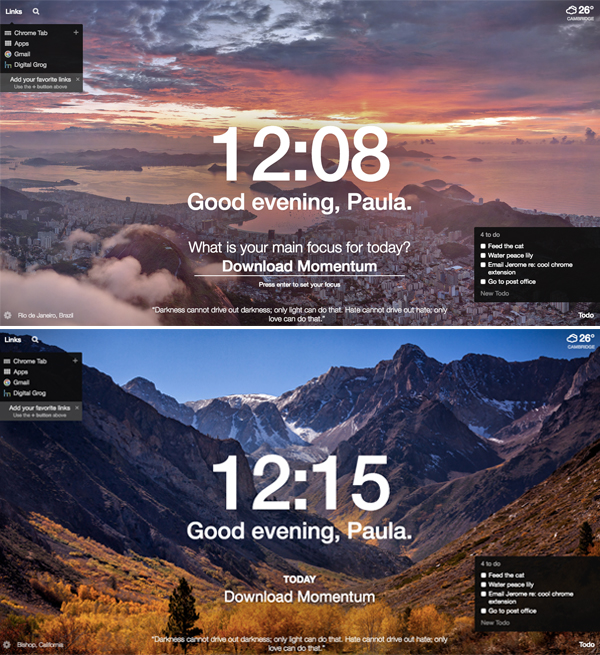
Momentum is a Google Chrome extension, so technically not an app but I guarantee you that it’ll bring life to your browser. Every time you open a new tab, you’ll get a picturesque photo with an inspirational quote.

You’ll also get the time and weather at your current location, as well as an option to search Google (or Bing if that’s your go-to search engine) and a list of your favourite links.

You have the option to create a to-do list and a main focus for the day, so if you’re not ready to dive into the deep end with an organisation app, start here.
best-online-apps-to-help-you-get-organised-momentum.jpg

Remember: organisation won’t happen overnight 

Downloading any of these apps will not instantly result in being organised. You have to be patient, make a consistent effort, and get into the habit of using the app to stay organised. The beauty of technology is that if one app doesn’t work for you, there are hundreds of others that you can try until you find what works for you. 

Bio: Paula is the founder of Joobly, an initiative that aims to connect aspiring student interns to tech startups in Sydney. She majors in Business Information Systems at Macquarie University.

Filed Under: Software, Solution Tagged With: Android, apps, IOS, Websites

Get your daily dose of news with this app

July 15, 2016 by admin Leave a Comment

The internet has emerged as an incredible tool for learning everything from Miley Cyrus’ tattoo designs, to the state of politics in the Middle East.

inkl news app

[Screenshots of app available on apple store and Android play store]

The one problem with this, is that sometimes the information coming at us is way too much. We’ll go to find out what has happened in the news today and there will be hundreds of thousands of news sites vying for our attention. Which leads to the even bigger problem of clickbait – news outlets so desperate to get you to come to their site that they resort to morally scrupulous headlines such as ‘you’ll never guess what happened next!” or “5 things that will shock you.”

This in and of itself is enough to make you want to duck your head away from all the noise, but when you think of how important journalism is to keep us abreast of the serious issues going on in the world, suddenly the situation becomes even more dire.

Enter a new app that promises to solve this problem – inkl. The app inkl provides a wonderful respite from the clickbait and noise of the internet. A ‘clean’ and clear view of the news that really matters, free of trashy non news and misleading headlines.

You have the option to create an account completely free, and it gets access to global publishers such as the Guardian, Al Jazeera, Sydney Morning Herald and more. You can also opt in to their paid tiers – either 10c per article or $15 a month. That gets you ad free access to publishers that traditionally sit behind a paywall like the Washington Post, offline mode, and a whole other host of cool features.

Opening the app, one of my favourite things was the Editor’s Pick section. It contained a bunch of interesting and important news that would traditionally get left aside in favour of the breaking stuff on normal news sites. Playing around on the interface some of the premium features such as bookmarks and news filters, enabling me to block out content or publishers that I don’t want to read.

rating and review for app

[ Rating and review of app ]

Overall it’s a pleasantly user friendly app, and something that is aiming to address a serious problem in the world of journalism. I think that especially given the current circumstances in the world, it has never been so important to focus on supporting quality news.

Filed Under: Apple, Software Tagged With: apps

The Instagram Purchase – What Does It Really Mean?

April 23, 2012 by admin 1 Comment

The investment of a cool $1 billion from the Facebook bank account was enough to purchase the digital photo-editing app Instagram, in a deal that has led inevitably to some people claiming that Zukerberg and his firm are all cash and no sense. What, in the grand scheme of it, could this purchase mean?

instagram purchase by facebook

Instagram to grow FACEBOOKS CLOUT

Facebook’s user lists will grow even more. For a network with a usership only slightly smaller than the population of China, it could be argued that the last thing they need is more members. However, with Instagram’s usership listed at over 30 million accounts, more viewers is exactly what Facebook will get. Many users have already speculated that it was actually this which caused Zuckerberg to get his wallet out in the first place.

Instagram Will Change. That 30 million user figure does a hell of a lot to show you that the app got something seriously, seriously right. How, though, will the new purchase change the app? It seems hard to believe that it will have no effect at all, and many users have reacted to the purchase by simply disconnecting from the app. How the changes will be made has yet to become apparent, but we’d be surprised if there were none at all.

Zuckerberg will do anything to remove competition. Whilst Instagram started as a simple photographic app, there is no denying that in the weeks leading up to the sale it was becoming a legitimate social demon. After all, the first day of use by Android users involved a massive one million uploads, making it essentially a very serious social competitor to Facebook. Or at least it was, until the ‘lightning strike’ deal was struck.

Entrepreneurs rejoice. With only thirteen staff, this sale means that the Instagram head honcho Kevin Systrom will stand to make an extra-ordinary $400 million personally, with his co-founder Mike Krieger also pocketing a cool $100 million. The Instagram sale is a proven example of what one good idea can do.

Charlotte Daniels is a tech fanatic and freelance writer working in association with FactoryFast Online Shopping.

Filed Under: 2012, Facebook, Network, Website Review Tagged With: apps, Deals, Facebook, Instagram, Social Network

  • « Go to Previous Page
  • Page 1
  • Page 2

Primary Sidebar

Recent Posts

  • Underwater Drones for Recording Video and Taking Pictures
  • Why I chose hostgator for blog hosting
  • Top 10 Software Programs For Your Windows PC
  • What you should know before investing in Cryptocurrency and bitcoin
  • The Best Social Media Platforms for Marketing a Gaming App

Recent Comments

  1. Patrick McCormick on How to secure your desktop and laptop with antivirus software
  2. JJ on 20 Top brands with affilate programs to make you money in 2019
  3. JJ on This WPengine Genesis Pro Deal Will Give You 35 Studiopress themes
  4. Lisa Gomes on 16 Ways to Make Money Online Working From Home
  5. KatVine on This WPengine Genesis Pro Deal Will Give You 35 Studiopress themes

Archives

  • June 2022
  • February 2022
  • July 2021
  • May 2021
  • April 2021
  • March 2021
  • November 2020
  • September 2020
  • August 2020
  • July 2020
  • June 2020
  • May 2020
  • April 2020
  • March 2020
  • February 2020
  • January 2020
  • December 2019
  • September 2019
  • August 2019
  • July 2019
  • June 2019
  • April 2019
  • March 2019
  • February 2019
  • January 2019
  • December 2018
  • November 2018
  • October 2018
  • September 2018
  • July 2018
  • June 2018
  • April 2018
  • February 2018
  • January 2018
  • December 2017
  • October 2017
  • September 2017
  • July 2017
  • June 2017
  • May 2017
  • April 2017
  • March 2017
  • February 2017
  • January 2017
  • December 2016
  • November 2016
  • October 2016
  • September 2016
  • August 2016
  • July 2016
  • May 2016
  • April 2016
  • March 2016
  • February 2016
  • January 2016
  • December 2015
  • November 2015
  • October 2015
  • September 2015
  • August 2015
  • July 2015
  • June 2015
  • May 2015
  • March 2015
  • February 2015
  • January 2015
  • December 2014
  • November 2014
  • October 2014
  • September 2014
  • August 2014
  • July 2014
  • June 2014
  • May 2014
  • April 2014
  • March 2014
  • February 2014
  • January 2014
  • November 2013
  • October 2013
  • September 2013
  • August 2013
  • July 2013
  • June 2013
  • May 2013
  • April 2013
  • March 2013
  • February 2013
  • January 2013
  • December 2012
  • November 2012
  • October 2012
  • September 2012
  • August 2012
  • July 2012
  • June 2012
  • May 2012
  • April 2012
  • March 2012
  • February 2012
  • January 2012
  • December 2011
  • November 2011
  • September 2011
  • August 2011
  • July 2011
  • June 2011
  • May 2011
  • April 2011
  • March 2011
  • February 2011
  • January 2011
  • December 2010
  • November 2010
  • October 2010
  • September 2010
  • August 2010
  • July 2010
  • June 2010
  • May 2010

Categories

  • $heldon $ingh
  • 2010
  • 2011
  • 2012
  • 2013
  • 2015
  • 2017
  • 2018
  • 2019
  • 2020
  • 2021
  • 2022
  • Accounting
  • Adsense
  • Affiliate
  • Amazon
  • Anti Virus
  • Apple
  • Apps
  • Asus
  • Aussie
  • Australia
  • Australian
  • Australian Bloggers
  • Australian wordpress hosting
  • Banks
  • Blog-Hosting
  • Blogger
  • Blogger Tool
  • Blogger Tools
  • BloggerTools
  • BuddyPress
  • CARS
  • CDN
  • Celebrity
  • Clickbank
  • Compare
  • Computer
  • Domains
  • Done Deals
  • Ebook
  • Email
  • Facebook
  • Featured
  • Finance
  • Free
  • Gadgets
  • Google
  • Gpost
  • Guide
  • Hackers
  • Hosting
  • India
  • Internet
  • Ipad
  • Kindle
  • Laptop
  • Make money blogging
  • Makemoney online
  • Marketing
  • Melbourne Cup
  • Movies
  • Netbook
  • Network
  • News
  • Online betting account
  • PC
  • Review
  • Search
  • SEO
  • sheldon singh
  • Software
  • Solution
  • Sports
  • Subscribers
  • Taxes
  • Technology News
  • Themes
  • Top 10
  • Tutorial
  • Video
  • Wacky
  • web hosting
  • Website Review
  • Wierd
  • Windows
  • wordpress
  • Wordpress 3.0
  • Wordpress 3.1
  • wordpress themes
  • World cup
  • Wp Answers
  • WP Turbo
  • WPMU

Footer

Design

With an emphasis on typography, white space, and mobile-optimized design, your website will look absolutely breathtaking.

Learn more about design.

Content

Our team will teach you the art of writing audience-focused content that will help you achieve the success you truly deserve.

Learn more about content.

Strategy

We help creative entrepreneurs build their digital business by focusing on three key elements of a successful online platform.

Learn more about strategy.

Copyright © 2026 · Genesis Sample on Genesis Framework · WordPress · Log in