• Skip to primary navigation
  • Skip to main content
  • Skip to primary sidebar
  • Skip to footer

Digital Grog — Australia’s Tech, Gadgets & Digital Life Unfiltered

Digital Grog is Australia’s go‑to tech blog for sharp reviews, digital trends, AI tools, gadgets, cybersecurity updates, and practical how‑tos covering the latest in Aussie technology

  • About Us
  • Contact Us
  • Block Examples
  • Landing Page

Websites

20 Best E-Commerce Templates for Your Eye-Grabbing Start-up Site

September 21, 2017 by admin Leave a Comment

Are you one of those who want to launch their startup without questions? Then you’ve come to the right place.

A startup itself is a quite interesting business model allowing both investments and partners to get their ideas off the ground. There are many startups out there offering great ideas and heading in the right direction, but most aren’t. However, there are some successful that help their partners bring massive returns on their investment. Their secret?

They’ve designed their product in the package that people want. And TemplateMonsteris here to help you with your design and looks of your website. You’re professional – so let’s make your startup site say you are, too.

When you’re passionate about your new project, it’s easy to be more creative and impulsive. A website for any startup is a fantastic opportunity to distinguish itself from competitors and promote its value for prospects. Thanks to a vast amount of information available on the web these days, there’s no lack of beautiful e-Commerce website templates that allow you launch an enticing site with a user-friendly interface.

Really, it’s that simple. Thanks to such web developing companies like TemplateMonster, it’s not a rocket science, in fact. What’s even better, no more waiting until you have money to hire a professional developer.

All you need is to choose the right e-Commerce template that fits your delicate taste. Besides, it takes much less time and money as if you would have to hire a developer. And what is time? Time is money.

Look, there are plenty of e-Commerce platforms such as PrestaShop, WooCommerce, OpenCart, Magento, Shopify, etc. which offer you fantastic opportunity to customize the look and feel of your startup site to an astonishing degree.

Don’t talk yourself out of creating an eye-grabbing startup site only because you don’t have a sharp eye for the web design. Make no mistake. Contact TM Service Center and let the magic happen.

Don’t underestimate the importance of a friendly customer support that can help you turn your startup site into something truly unique.

Not sure which way to go? Don’t fret. Choosing the right e-Commerce template is always the hardest thing as there are thousands of outstanding ones. Most all of them come with a mobile-friendly layout, eye-grabbing visuals, and user-friendly interface.

However, please look at these beautiful e-Commerce templates to help you make the right decision. Make sure, at least one of them will help you boost your startup’s reputation as a trustworthy brand.

Intrigued? Time to expand your circle. Click the live demo button to play around with each e-Commerce template and find whether it fits your unique start-up mission. Believe in yourself. Let’s turn your passion into a thriving business.

GrindBean – Responsive Coffee Shop WooCommerce Theme

64026-big copy

Details | Demo


ClassyGift – Responsive Gifts Store Shopify Theme

64401-big copy

Details | Demo


Cosmettele – Beauty and Fashion Shop PrestaShop Theme

64113-big copy

Details | Demo


Carromi – Professional Tools PrestaShop Theme

64144-big copy

Details | Demo


Tm Francy – Cosmetic and Perfume Online Shop WooCommerce Theme

62048-big copy

Details | Demo


Covertati – Fashion Sunglasses & Accessories Magento Theme

64134-big copy

Details | Demo


Black Dragon – Responsive Grocery Store OpenCart Template

63347-big copy

Details | Demo


FloraFest – Flower Bouqet Shop Responsive Magento Theme

62284-big copy

Details | Demo


Food Basket – Food Market Shopify Theme

63575-big copy

Details | Demo


Magetique – Fashion Lingerie Magento Theme

63516-big copy

Details | Demo


Multifly – Multipurpose Online Store Shopify Theme

63842-big copy

Details | Demo


Agrilloc – Natural Products Responsive OpenCart Template

63370-big copy

Details | Demo


Magetique – Modern Furniture and Design Magento Theme

63514-big copy

Details | Demo


Bikes Equipment Online Store Magento Theme

63513-big copy

Details | Demo


EMpower – Solar Energy Services Shopify Theme

58455-big copy

Details | Demo


Bookinti – Modern Book Store PrestaShop Theme

63998-big copy

Details | Demo


HomeBrew – Brewery Store Responsive OpenCart Template

62057-big copy

Details | Demo


Cosmetti – Cosmetics and Beauty Products PrestaShop Theme

63628-big copy

Details | Demo


Tearider – Herbal & Spiced Tea Store Responsive PrestaShop Theme

63336-big copy

Details | Demo


Fooder – Modern Pizza House With Online Ordering System OpenCart Template

62294-big copy

Details | Demo

Hope you enjoyed this selection of awesome templates and wish you the best in your new online venture.

Filed Under: Website Review Tagged With: Design for websites, Templates, Theme wordpress, Websites

Best Rated Webhosting for Australia – Comparisons Price and Reviews

September 12, 2017 by admin 9 Comments

[et_pb_section bb_built=”1″][et_pb_row][et_pb_column type=”4_4″][et_pb_text _builder_version=”3.0.105″ background_layout=”light”]

Based on our own usage and comparison reviews , we bring you the

2017 webhosting prices and comparison australia 2

The top website hosting for March 2018

As a blogger and website builder, I have used many webhosting companies including US and Australia based ones  to create websites and below is collection of some of the best that I would recommend for this year.

I have used over  20 companies to test out reliable providers over time and below are some of them that I would still gladly suggest to anyone in 2018.

Let’s check out our listing of best webhosts for 2017-18 after our analysis, review and comparison from the past few years to make it easier for you to make the right informed choice.

I have written a “recommended” against our tops pick of hosts, but feel free to choose which one suit’s you needs best.

[table “2” not found /]

Choosing a service provider to start your first website, online store or blog can be the most important step you take while building your business and its essential to do the right thing from the start.

Some of the important factors are the obvious – Site speed, Disk space, Ease of use, Flexibility, how many websites can I host on the webhosting-plan.


Australian Hosting or US hosting – what should i choose ?

How important is server location

server in australia for January February or march The  decision is always divided on this one, that is – if the server location should be in Australia or the US for your Australian based site. But I like to think that this decision is really  based of  the traffic that your beginner blog will attract.

If you are going  to get 100 % off all your traffic from Australia ,it makes sense to get an Australian host, but the truth is 90% of the websites always get a lot of traffic from the US, even if they are Australian based  and so  it makes sense to get a cheaper US host.

Keep in mind that most Australian hosting providers are more expensive than their US counterparts so this will definitely make a difference to your budget.


What Plan is good for me ?

Most of the plans listed here  are  suitable for beginner websites as well as established websites. These shared plans while cheap can still easily take upto 2000 to 3,000 hits a day and function  smoothly, so you don’t need to upgrade for a while at least.

Some starter plans allow just one  website, so  choose the correct plan if you think you are going to start more than 1 website. Most shared plans allow you to host multiple websites with  1 hosting account purchase.

Once you are doing big numbers like 3000 + hits a day it is wise  to consider new hosting or then  getting CDN services which are a cheaper upgrade for higher traffic. If you get a CDN  add-on  once you start getting higher traffic you can still use your existing host and still enjoy faster speeds.

Price of wordpress Hosting

There is no  fixed price  for  hosting  as companies run deals all the time,which we update over here, but generally  the price range for  hosting is anywhere  between $3.45 to $5.95 a month, though when there are special deals you can get prices going down as low as $1 month, $1.95 a month  or as high as $7.99 month to $11 a month and this is all for the starter plans  or shared hosting.

As soon as  you talk about VPSs , dedicated, Cloud  and managed  hosting plans  the prices  start from $11 and upwards. There are some premium WP hosts that  charge upto $30,000 a month for high traffic plans  with CDN etc inbuilt.

What is CDN services?

Its just a service that  routes your traffic via the fastest route to your audience or website visitors, keeping your blog or webpage fast.It normally costs between $3 to $4 a month  depending on which provider you go with. CDN’s are Quite popular today  for blogs that have traffic spikes.

Different Kinds of hosting services

There are three main types of hosting:

  1. Cheap Shared Hosting
  2.  VPS Hosting
  3.  Dedicated Hosting & Managed or optimised Hosting

For most of those reading this, you’ll want to go for the cheap web hosting type (shared hosting), as it’s perfect for small to medium sized businesses.

However if  you want to go one step further  and get a little more bang for your buck, then you can choose a VPS or Dedicated plan by clicking a  link and then exploring more plans on the seller website. There are shared plans, then  starter plans , Pro plans  all named differently with every different provider.

There are different plans like Linux hosting plans  and Windows Hosting plans, but they both do a excellent job of  displaying your wordpress website , irrespective of all this technical jargon.

One click Install for WordPress

1 click install for webs and cpanel for july august or septemberSetting up your  first website-Or-blog will be something that you will always remember  and its best to hope for it  to be a good experience.  I would definitely suggest a host that makes the process easier  with easy to install automated scripts  to set up your blog yourself.

Bluehost and Godaddy has a customised install process and  they have “1 click install”. With this custom install process – you can  install a new wordpress site in as quick as 10 minutes with just a few clicks.

There is step by step instructions given to you through the install process via the admin dashboard, to make the website installing as easy as possible and that is why my top recommendations are for these two webhosts.

Cpanel the Hosting and  WordPress backend

The backend for the hosting account is the cpanel admin area. This is where you can get a bit technical and adjust things further, like get detailed stats for your blog. Set up FTP access. Peek into your SQL database and php admin area. Change admin passwords  and do heaps of other stuff.

But messing around in this area is not necessary, as you could do easily do most of the basic and important stuff like adding graphics and content from the front end of your website.

WordPress as a website builder

WordPress is a very versatile  website building software. Once you install your  wordpress site you can  change the look/design of your blog in one click  by changing the wordpress theme or template.

You get thousands of free templates via the wordpress admin area. If you want a robust  and well supported professional looking template design – you can also buy premium template designs from online sellers.

WordPress uses a system called plugins to add functionality to your website. You can easily add many functionalities by adding free WP plugins available in the free word-press marketplace or then again you can just buy some premium plugins for  adding further functionality.

The flexibility is there, to use either free or paid wp themes with your site and any plugins you choose to enhance  your wp site functionality is a bonus with these wordpress hosting-plans listed above.

No software is easier that WP software for building a website quickly and easily  and that is why this software has become one of the topmost used software for website building. Popular websites like  CNN,  SONY, MTV and BBC America also use them.

Most of them providers I have listed above do cover most of these features that are needed for your webpage/site.

Not many people  focus on ease of use and flexibility when choosing a service provider – but these are very important factors to consider while signing up for a new hosting plan to set up your new blog or site/shop.

Bluehost and Godaddy have millions of user’s setting up their first online-website by themselves and have made it the easiest process to do it yourself.  They can also be considered “cheap web hosting providers”  when their deals are on.

Saying that tho, the rest are not far behind in pricing and most providers will provide you a quick click and install process to get started with a professional WordPress(WP) website.

Is wordpress free to use ?

free to use software for april may or juneYes  word press is free software by itself  and can be used by anybody, the problem is that  if you want  to get it working  from your own pc as a server, you will have to go through a lot of technical settings  like DNS adjustments,  routing domain names   which will be through your pc .

Most providers  already have their custom built installers for  wp  and so provide provide wp as a 1 click install With hosting for the easy building of your WP blog/website.

Most of the above providers allow you to build your website with wordpress and also have many other website platforms like joomla, Drupal and many more.

Our Featured 2017 Hosting Providers


Bluehost.com

bluehost australia


Bluehost’s fast and reliable website hosting gives you everything you need to get your website online quickly. Bluehost is a web hosting company owned by Endurance International Group

Key people in bluehost –  Matt Heaton (Founder, CEO 2003-2011) Dan Handy (CEO 2011-2015) Mike Olson (CEO 2015-present)

They have servers in Provo, Utah, USA. Bluehost’s uptime is just about perfect (99.98%), well over industry standard which is around 99.90%.  Prior to last 6 months.


Hostgator.com

hostgator australia


HostGator recently launched their new, premium hosting called HostGator WordPress Cloud.

Founded in a dorm room at Florida Atlantic University by Brent Oxley, HostGator has grown into a leading provider of Shared, Reseller, VPS, and Dedicated web hosting. HostGator is headquartered in Houston and Austin, Texas, with several international offices throughout the globe.

HostGator has been around since 2002, originally founded by Brent Oxley before being acquired a decade later by Endurance International Group (EIG).

HostGator Shared Plans

  1. HostGator Hatching Plan: Well suited for Hosting single domain
  2. HostGator Baby Plan: Most recommended if you are interested in hosting multiple domains
  3. HostGator Business Plan: Most features will be that of HostGator Baby Plan. Additional features that you will get will be dedicated IP Address, Private SSL and Toll Free Number


Godaddy.com

cheap au domain names


Bob Parsons the founder of godaddy is a serial entrepreneur. He sold his first company to Intuit, Inc. in 1994. Three years later Parsons started Jomax Technologies, renaming the company GoDaddy in 1999. In 2000, GoDaddy became an ICANN-accredited domain name registrar. Designated CEO Now: Scott Wagner (Jan 1, 2018).

They have many different kind of plans. While Deluxe and Unlimited WebHosting Plans support and host unlimited Web Sites, owners of single plans may experience periodic decreases in performance once they more than 400 Web Sites.


Crucial.com

crucial australia


The Sydney-based company has focused on delivering a better experience for customers, with the roll-out of an industry first concept; Managed Google Apps.

Crucial’s roots trace back to a student bedroom in Bondi in 2003 where the company was first formed, and its headcount currently sits at 20 employees before the AVS buy.


Wpengine.com

Hosts like WP Engine actually guarantee the security of your site so if you’re hacked, the hosting company will cover the clean-up costs, which can be thousands of dollars, depending on the size of the site.


wp engine founder


JASON COHEN

FOUNDER


I started WP Engine because I wanted to work on interesting, real problems experienced by interesting, real customers, and come to the office every day thrilled to be working with the people around me. Somehow, we’ve been lucky enough to make that dream a reality.

The company was founded in 2010 and is based in Austin, Texas. It has additional offices in San Francisco, California – San Antonio, Texas, Brisbane, Australia, and London, England.

I will be adding more content and updates  to this post as we progress through  2017, so do let me know how you go  with your  new venture and leave me a comment if you have any queries, I will do my best to reply to you  as soon as i can.

[/et_pb_text][/et_pb_column][/et_pb_row][/et_pb_section]

Filed Under: web hosting Tagged With: Australian, Coupons, Discounts, Hosting In australia, Websites, Wordpress

Why I love elegant themes website builder plugin

July 29, 2017 by admin 5 Comments

[et_pb_section bb_built=”1″][et_pb_row][et_pb_column type=”4_4″][et_pb_text admin_label=”Text full module transformed” _builder_version=”3.0.76″ background_layout=”light” border_style=”solid”]

divi builder plugin

Today I am going to show you an amazing WordPress Wp plugin that can make any WordPress website awesome. I will test elements of the design modules within the post to show you what can be done.

Its from elegant themes.This is not a review, but a honest write up on a amazing WP plugin that can transform your website design and look of your blog posts.

I love this plugin as you can use it with any theme. I have been using elegant  themes and plugins for the  past 7+ years.

The Divi Builder plugin from elegant

flexible website builder

This  wordpress web builder plugin can make landing pages, faq pages, lead or sale buttons, your profile or portfolio page, an awesome price comparison page or just mix this all together in one page seamlessly. You could easily add any of these above mentioned features to any page on your website. The plugin that does this is called the divi builder plugin from elegant themes. I have been using elegant for the last 7 years and they are the most value for money wp theme provider IMHO.

To be honest I got to know about the divi builder plugin only a bit recently and I m a fan already. I like it because it does not restrict and can be used with any WP theme you have installed on your webpage. It can make your website look like a professional landing page in a minute, if you like . It builds webpages as responsive pages. You can easily chop and change design elements on a page  including  adding  a pic background , transparent color background  and many more features to any section of your page.

The beauty of this all is anybody can now design an awesome looking page or website with this website builder plugin without having to know any coding. This plugin uses the new drag and drop technology, where you can just drag a premade section or style to your page and drop it where you want it to appear. You can then go ahead and edit elements further if you want, like adding a background color or pic, changing the font and font colors size for that section, adjusting margins , padding etc and much more.

Using this plugin, I almost felt like i am using microsoft word and making an amazing looking document – its so easy. For people entirely new to websites or minimum knowledge of websites, this might still take a few days of getting used to how you use this plugin, but once you know what you can do with it, you will use it everywhere. what does this Website builder plugin cost –  It is available with purchasing a yearly membership to elegant themes, but  for sure  you get much more in value than you can imagine with the membership fees. Details of fees below.

So what’s the price of their membership today ?

socail media sharing plugin

The cost for  a elegant  WP theme membership today is $89 per year. For this you get access to their whole collection of 87 premium wordpress themes, access to all plugins,updates and premium support. The got two awesome plugins Bloom email opt in plugin free ( email opt in plugins for  collecting emails) and  Monarch ( Social media sharing plugin) that by itself is of great value and is included  with the membership fees.

different kinds of wp themes from elegant responsive

They have an amazing 22 responsive themes and  many more themes  including ecommerce, magazine and 4 free tumblr themes.


Divi builder plugin vs Divi theme

The divi website builder plugin was built as an afterthought to the release of the Divi theme, but both of them are awesome in thier own ways. Divi theme has all the features of the divi builder inbuilt into the theme, while the builder plugin can be used as a stand alone wp plugin to work with any wordpress theme.

I actually tried this plugin on one website that i am building for a friend. I used the genesis pro theme with the divi builder plugin and was amazed I managed a google page 1 ranking for him within a week .

extra divi based theme template

There is also the “EXTRA Theme” from elegant wordpress themes that makes use of the divi functionality and is an amazing theme itself out of the box. When I first purchased my elegant theme membership 5+ years ago it was only $39 a year for like 60 or so premium wordpress themes and it was a steal then. Today prices have increased with most premium wp theme and template providers, yet elegant is the cheapest with the most professionally coded themes on the internet.

When I first started blogging i was on a budget and purchased single themes costing me anywhere betwen $15 to $30 for each theme at that time. So when I came across 60 plus quality themes, it just made sense to sign up for a yearly membership. I didnt regret it and my active membership today and use of thier plugins is proof of that.

Apart from this plugin they do have some other amazing WP plugins like bloom and Monarch that I use on some other websites and those add value for the membership too.

I have websites as online web directories that I launched 3 years ago and still doing well with the elegant elist theme.

To be fair I do have other favorite theme providers too. After elegant, I would rate Solostream WP themes and the Studiopress Genesis themes as my second best WPtheme providers. I used to use wpzoom for quite some time, but then they started charging more for extended support etc , so I ditchedd them. Thier themes are still good and helped me rank sone sites up , but i feel Studiopress Genesis themes much better and getting ranked with thier in built seo. I have made sites that make me money withdc elegant themes and rank on google as well, so I hope im not confusing you.

Each theme provider has their own unique strong points and so its always good to sign up with at least three if you can afford to. If you cant then the choice is clear for me.

If you are looking for a good design option for your existing or new wordpress blog , then do check out their themes here, before you go elswhere. You will thank me later! 🙂

[/et_pb_text][et_pb_text _builder_version=”3.0.76″ background_color=”rgba(236,239,62,0.54)” background_layout=”light” border_style=”solid”]

Designing your page/post with Divi pre-made modules

Below is live examples of  different pre-made modules you can insert into you page or post with the divi builder plugin to  design your page or post to look better.

[/et_pb_text][et_pb_text admin_label=”Text for blurb module” _builder_version=”3.0.76″ background_color=”#edf000″ background_layout=”light” border_style=”solid”]

Blurb Module Example 

[/et_pb_text][et_pb_blurb admin_label="Blurb example" _builder_version="3.0.76" title="This is the blurb module with icon inserted" url="https://www.digitalgrog.com.au/?s=elegant+themes" url_new_window="on" use_icon="on" font_icon="%%85%%" use_circle="off" use_circle_border="off" icon_placement="top" use_icon_font_size="off" background_layout="light" border_style="solid"]

The elegance of the blurb module can be seen int his example . You click and choose the blurb an then  insert content. You can make the blurb a link or then also use an icon for the blurb, as we have done.

[/et_pb_blurb][et_pb_text _builder_version="3.0.76" background_layout="light" border_style="solid" background_color="#edf000"]

Countdown Timer Module 

[/et_pb_text][et_pb_countdown_timer _builder_version=”3.0.76″ title=”Countdown to New year – Digital Grog” date_time=”December 31, 2017 23:54″ background_color=”#7cda24″ use_background_color=”on” background_layout=”light” /][et_pb_text _builder_version=”3.0.76″ background_layout=”light” border_style=”solid” background_color=”#edf000″]

Circle counter module.

You can define color, number and percentage for the circle

[/et_pb_text][et_pb_circle_counter admin_label=”Circle Counter module ” _builder_version=”3.0.76″ title=”The Circle Counter Module at 65 %” number=”95″ percent_sign=”on” background_color=”#bc1ab4″ background_layout=”light” /][et_pb_text admin_label=”txt for button” _builder_version=”3.0.76″ background_layout=”light” border_style=”solid” background_color=”#edf000″]

Button Module 

A Button to click  banner module

[/et_pb_text][et_pb_button admin_label=”Button get divi” _builder_version=”3.0.76″ button_text=”Get the Divi Builder Plugin” button_url=”http://www.elegantthemes.com/affiliates/idevaffiliate.php?id=14427″ url_new_window=”on” background_layout=”light” custom_button=”off” button_letter_spacing=”0″ button_icon_placement=”right” button_letter_spacing_hover=”0″ /][et_pb_text admin_label=”Text for Gallery module ” _builder_version=”3.0.76″ background_layout=”light” border_style=”solid” background_color=”#edf000″]

Gallery module

Its a gallery of pictures module 

[/et_pb_text][et_pb_gallery admin_label=”Gallery module” _builder_version=”3.0.76″ gallery_orderby=”rand” posts_number=”6″ show_title_and_caption=”on” show_pagination=”on” background_color=”#afafaf” gallery_ids=”3576,3577,3578,3579,3580,3581,3582,3583,3584,3585,3586,3587,3969,3826,3808,3794,3751,3680,3511,3481″ fullwidth=”off” orientation=”landscape” hover_overlay_color=”rgba(255,255,255,0.9)” background_layout=”light” pagination_font_size_tablet=”51″ pagination_line_height_tablet=”2″ border_style=”solid” /][et_pb_text admin_label=”Text for person module” _builder_version=”3.0.76″ background_color=”#edf000″ background_layout=”light” border_style=”solid”]

Person Module

This is a person module, you can insert a bio for yourself and your social media links

[/et_pb_text][et_pb_team_member _builder_version="3.0.76" name="Jeff" position="Expert Blogger" background_layout="light" border_style="solid" facebook_url="https://www.facebook.com/jeffdigitalgrog/" twitter_url="https://twitter.com/undermarrest" google_url="https://plus.google.com/+DigitalgrogAu?prsrc=5" linkedin_url="https://au.linkedin.com/in/jeffdez" image_url="https://www.digitalgrog.com.au/wp-content/uploads/2012/03/jj-Ferns-for-yu-snooper.jpg%22]

You can check out about me at my about page here, but I think Elly Glendenning from influencing.com has done a better job writing  about me  on their website Influencing.com over here.

[/et_pb_team_member][et_pb_text admin_label=”text for number counter ” _builder_version=”3.0.76″ background_layout=”light” border_style=”solid”]

Number Counter

Thisis the number counter module

[/et_pb_text][et_pb_number_counter _builder_version=”3.0.76″ title=”Number Count” number=”1″ percent_sign=”on” background_layout=”light” number_text_color=”#7ebec5″ border_style=”solid” /][et_pb_text admin_label=”Text for comments module ” _builder_version=”3.0.76″ background_layout=”light” border_style=”solid” background_color=”#edf000″]

Comments Module 

This is the Comment Module below, which you can insert anywhere  on your page  to display comments nicely

[/et_pb_text][et_pb_comments admin_label=”Comments module” _builder_version=”3.0.76″ show_avatar=”on” show_reply=”on” show_count=”on” background_layout=”light” border_style=”solid” custom_button=”off” button_letter_spacing=”0″ button_icon_placement=”right” button_letter_spacing_hover=”0″ /][/et_pb_column][/et_pb_row][/et_pb_section]

Filed Under: wordpress, wordpress themes Tagged With: Plugin, Templates, Websites, WordPress Plugin

Choose from the best web hosting plans for 2018: Australia Vs US Hosting

February 19, 2017 by admin 5 Comments

[et_pb_section bb_built=”1″][et_pb_row][et_pb_column type=”4_4″][et_pb_text admin_label=”Textntable” _builder_version=”3.0.105″ background_layout=”light”]

Here at DigitalGrog we regularly publish  step by step guides to creating a website, web hosting comparisons, reviews of hosting providers and domain name services.

Below is a detailed listing of webhosting companies with prices and features. This will help  you get started on your new journey if your creating a new business website or just a personal blog.

Godaddy Australia

If you are on a budget and price matters to get you started, you might want to try the current Godaddy deal- Click here above

Our recommendation is for Bluehost – Current deal here for a WordPress website or blog  and WP-Engine if your starting a business website – Current deal here.


[go_pricing id=”compare7hosts”]


[/et_pb_text][et_pb_text _builder_version=”3.0.105″ background_layout=”light”]

Hosting Comparison – Australia Or US Host ?

Hosting in Australia is significantly more expensive than most other places in the world. Most of it comes down to some of the high cost of labour in Australia and of course infrastructure/backhaul internet/DC fees.

Latency is not the most important aspect of the loading times between here and the US and should be considered if you are running a high traffic website.

australia

Often when comparing how fast a server is providing content, factors like comparing the application stack, use of hardware load balancers, caching, CDN’s server technology etc are not taken into account when it should be.


Does US hosting IP affect my website ranking?

Search engines like google base their algorithms on a number of factors, one of them being the IP address location. Getting a country TLD domain can help, such as a .com.au domain for a business website or blog targeting Australian viewers.

Overseas hosting can still get results  by using proper SEO techniques and Google tweaks, like logging into the google search engine webmaster tools and telling them who your target market is.

A US host with a CDN can also help, if you want to go one step further by speeding up your loading time further and getting a nearby network point to your country.

[/et_pb_text][et_pb_text admin_label=”acronyms” _builder_version=”3.0.98″ background_layout=”light”]

Webhosting Acronyms Glossary and Meanings

Below is many words related to website hosting and managing. It is acronyms, features and just about a glossary for website related terms. This might be helpful when you are trying to make sense of terms when you build your first website or purchase services to create your first blog or webpage.

CMS – Content Management System is a program used to publish, edit and modify content on a given websites. CMS is often used to run websites containing blogs, news and shopping sites.

SSL – Secure Socket Layer is a cryptographic protocol that was designed to provide communication security over the internet.

CSS – Cascading Style Sheets is a style sheet language used to describe the overall look and format of a site that has been written in a markup language.

Disk Space – The amount of space allocated to you on the server to store files, pages, emails, and more.

Uptime – The amount of time the server is uninterrupted and your website is accessible. This is typically shown as a percentage. You want a high uptime (99% and above) so as not to disrupt access to your site

Reseller Hosting – Where a block of server resources is sold to an individual for purposes of using it to host multiple domains under their own name

Control Panel – The control panel is the central hub for a web hosting account. This is where the user modifies and controls all aspects of their web hosting such as adding new domains and sub domains, uploading web pages and installing server applications

MySQL – A database system that is often included in hosting packages. It is commonly used with a variety of applications

PHP – Hypertext Pre-Processor is a server-side scripting language designed for the development of websites and can also be used as a general-purpose programming language

Linux Server – A server that uses Linux, a free, open source operating system used by most shared and free web hosts

Windows Server – A server that uses Windows as the operating system. This type of plan is typically more expensive but necessary to accommodate specific applications

Add-domain – It is additional domains which can be createed from the main domain control panel without having a separate hosting account. It had all features just like a main domain, but with no cPanel control.

Sub-domain – A subdomain is a subsection of your website that can exist as a new website without a new domain name. Use subdomains to create memorable URLs for different content areas of your site.

[/et_pb_text][et_pb_text admin_label=”Related posts ” _builder_version=”3.0.98″ background_layout=”light”]

Dont delay getting started! Better today than tomorrow.

Good luck!

Our Other popular related posts :

Why I love elegant themes website builder plugin

JJ | July 29, 2017 | 5 Comments
Why I love elegant themes website builder plugin

Looking for the perfect fully mobile responsive WordPress themes for your site? Check out our expert pick of the best responsive WordPress theme suitable for blog websites and even landing pages.

This page builder plugin and theme is the ultimate resource you need to enhance and build with any wp site to transform your pages and blog posts.

CONTINUE READING

Is Google Home Smart Device Worth the Money

JJ | October 3, 2017 | 0 Comments
Is Google Home Smart Device Worth the Money

I could think of at least a dozen reasons why Google Home actions would be useful, such as playing music when I get home or telling me the weather for the next day or just reading me the news or playing the next episode of Narcos on netflix.

CONTINUE READING


Compare the best web hosting plans for 2017: Australia Vs US Hosting

JJ | February 19, 2017 | 19 Comments
Compare the best web hosting plans for 2017: Australia Vs US Hosting

Compare the top webhosting providers for Australia and US in 2017 before you get a new hosting account. Compare features and prices and more

CONTINUE READING

[/et_pb_text][et_pb_divider _builder_version=”3.0.98″ show_divider=”on” /][et_pb_comments _builder_version=”3.0.98″ show_avatar=”on” show_reply=”on” show_count=”on” background_layout=”light” header_font_size_tablet=”51″ header_line_height_tablet=”2″ custom_button=”off” button_icon_placement=”right” /][/et_pb_column][/et_pb_row][/et_pb_section]

Filed Under: 2017, Australia, Compare, web hosting, wordpress Tagged With: 2016, Australian, Hosting In australia, USA, Websites

Defence-in-depth – protecting us from ourselves

August 28, 2016 by admin Leave a Comment

security for wordpress plugins  themes with https and ssl

It really is astonishing how many cyber-attacks we hear about in the media. How can these companies that have become household names be so vulnerable to attack?

It’s a little bit disillusioning, in a lot of ways like finding out that a superhero isn’t real. We waggle our finger and chastise, but sometimes it’s worth taking a step back and looking at our own cyber hygiene. The tech industry is booming, and for a long time the mantra has been “how easy can we make this for the consumer?”. At the end of the day, this has done the average computer user a tremendous disservice. It’s all of our responsibilities to follow secure practices, and the best way to do that is to practice what the security community refers to as “defense-in-depth”.

By making sure that we follow secure practices every step of the way, we can protect ourselves from one or even many failing. Some of the biggest offenders might surprise you, and some you might have been aware of but never had it hit home exactly how this can be exploited. This article aims to take a practical approach at how failing to follow safe practices can easily be manipulated.


Thinking HTTP is okay on your local network:

security for  wordc press websites  in 2016Gone are the days where we can trust your local network. Each piece of equipment should be configured such that it believes every other piece of equipment is potentially malicious. BYOD (Bring Your Own Device) has become a very popular paradigm for corporations, but it means that someone might bring an infected device onto the network. It’s absolutely trivial for say, malware to put the infected user’s NIC into promiscuous mode and sniff specifically for authentication over HTTP. Then, your credentials get stolen and possibly used to log into a machine that allows RDP access for all domain members (any machine).

Numerous privilege escalation attacks exist allowing the attacker to then simply monitor main memory (RAM) for juicier credentials. Always use https, for all of your communications, and ideally only allow ECDHE ciphers to allow for Perfect Forward Secrecy.

Not treating your private keys like a valuable:

As you should all know by now, SSL/TLS functions by establishing a shared session key (symmetric encryption) by forging a temporary secure channel via public key cryptography (asymmetric encryption). This relies on generating a public/private keypair.

The private key is known only to the secure web endpoint, and the public key is your certificate which must be signed by a trusted third party (a CA, like SSLTrust.AU) for browsers to mark it as safe to visit. What happens if you’re lax with the private key though? Well, it depends. If communication is over SSL/TLS with a cipher that utilized Diffie-Hellman with large enough parameters, you’re still safe.

This kind of cipher guarantees that even if the private key is compromised, the communication remains illegible by use of constantly changing session keys. Without this special kind of cipher though, an attacker could have been sitting on your communication for months, waiting for you to do something insecure like generating the keypair on your laptop and then leaving it in the open. Then, the attacker merely needs to open up wire shark, provide it with the private key, and can read the communication – passwords and all! Protect your private keys – they are passwords.

The best way to store these certificates is in an HSM – a hardware module that makes absolutely sure the key can never leave the device. They’re expensive, but if you can afford one they’re well worth it. Did you know that even if you mark a private key as non-exportable in Windows that it can still be easily exported?

Blindly trusting certificates, or worse, root certificates:

How many times has it happened to you? “Just click past the SSL/TLS warning. Trust the cert.” This one boggles my mind how many professionals don’t realize this – a self-signed cert is its own root certificate. They’re not inherently dangerous, in that if you take proper precautions you’re limiting your exposure, but how many of you realize that every time you add a self-signed cert to your root certificate store that that route certificate can now be used in conjunction with manipulating your routing in order to pose as legitimate for any site or service?

With an SSL/TLS intercepting forward proxy, an attacker can sit between you and any legitimate service, inspecting all traffic in the clear. All they have to do is control any hop before you get to the internet, and they can route through their own malicious service. If they can run an executable on your machine with an administrative user’s context, they can also poison your static route table and accomplish the same thing. If this happens, the only thing protecting you from sure ruin is that your browser does not trust the SSL/TLS cert of their malicious endpoint!

If you ever hop onto a free Wi-Fi hotspot, and it wants you to install something on your computer before you connect, it’s game over. That’s both protections from your traffic being decrypted transparently being stripped in one fell swoop. Make sure you don’t reuse keys between different services if it’s not needed, however tempting!

Not using Extended Validation certs for your business:

Hear me out on this one. I know that they’re more expensive and that we have a vested interest in selling them to you, but they really do make a difference. The extra verification procedures protect the end user against a lot of shenanigans – time and time again people are able to game automated systems that use a poor algorithm for choosing administrative contact email addresses for verification. Having to revoke a certificate, especially a wildcard certificate, that your clients trust can do a lot of harm to your reputation.

Conversely, extended validation certificates can help bring in security conscious clients who see that you’ve gone the extra mile for them to conduct business with you safely. They can’t see the measures you’ve got behind the scenes. They need to accept on blind faith that you hash and salt their credentials correctly. This is something they can see, and it does make a difference.

Security for your websites should definitely be a priority for your privacy and your users privacy, and while taking measures to minimize breaches make it more secure, there is no fool proof way to 100% secure a website.

As they say “Prepare for Disaster: Recover Faster”

paul bakaPaul Baka is an Account Manager for Website Security Solutions, SSLTrust [https://www.ssltrust.com.au] Specialising in Website and Server Security for small to medium sized businesses and educational institutions, SSLTrust has fast become Australia’s #1 source for SSL Certificates, Code Signing Certificates, Security Scanners and Cyber Security Support.
Paul specialises in industry leading brands including Symantec, GeoTrust, Thawte and Comodo. He guides customers through the process of selecting and installing the optimal solution for their needs.

Filed Under: Hackers, Internet, Software, Solution Tagged With: Websites

5 Best Apps to Help You Get Organised

July 31, 2016 by admin 1 Comment

Best NoteTaking apps 2016 smaller

Being organised is both a personal skill and a professional attribute. To some people it comes naturally — they live by their daily planner and never forget to print their tickets. To others, getting organised is a challenge and wearing mismatched socks is a regular occurrence.

That’s where technology comes in. We have smartphones and tablets to help us stay organised on the go, and computers to do the work at home or in the office. There are so many amazing apps out there, but the right solution for you will depend on what you believe to be your biggest challenge when it comes to getting organised.

Whether you need to take better notes, improve your team’s performance, backup your files, organise your life, or simply need a little something to stay focused, the trick is to identify your pain point, find an app, master using it, then move on to a new challenge.

As a starting point, here are 5 of the best apps to help you get organised.

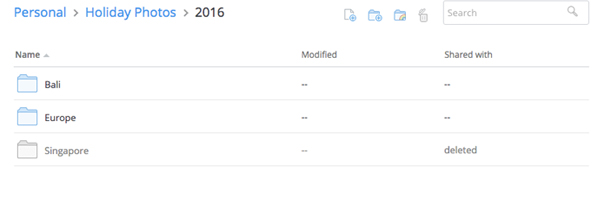
Dropbox

Dropbox originally grew in popularity because it offered an easy-to-use and extremely functional method of file sharing. Attaching a document or photo to an email is easy enough, but when multiple files come into play it’s not the most efficient way of transferring files from one person to another.

However, for the purpose of getting organised, Dropbox is a lifesaver when it comes to backing up your files. Let’s be honest — no one has the time to connect a hard drive to their computer and patiently wait until their files are transferred across. That’s not to mention that you’re then dependent on two types of hardware, rather than letting a cloud-based software take on the backup role.

Once you’ve created an account online, you should install Dropbox onto your computer and it’ll appear in your files as a regular folder. When you transfer or copy files into this folder, they’ll automatically sync with your Dropbox account in the background, presuming you’re connected to the internet.

The best part is files are never truly deleted from Dropbox. One barrier to an organised file folder is keeping everything in there, thinking you may need it again in the future. With Dropbox, you have the option to restore files after deleting them.

best-apps-to-help-you-get-organised-dropbox.jpg

The downside to Dropbox is that it stops being free if you require more than 2GB of space. To get 1TB of space, you need to upgrade to Dropbox Pro, which costs AU$11.58/month or AU$13.99/month, depending on how whether you choose to get billed annually or monthly. It may seem like a lot but when you think about the cost of a 1TB hard drive that requires a lot more human intervention, it’s worth it.

If you’re an Apple fanatic, Dropbox works the same way as iCloud does. However, it can operate on multiple devices and it’s easy to use across different operating systems without having to take extra steps.

On that note, Google Drive is another option that works great with all operating systems, where your first 15GB are free. It has the added benefit of being able to create documents, sheets, and slides within the platform that can be shared, edited and updated in real-time.

If you’re not a naturally organised person, the extra features offered by Google Drive can be overwhelming and you’ll end up with a messy folder, which defeats the whole purpose of using Dropbox as an organization tool in the first place. I’ve also found that Google Drive rarely generates previews of files, so if you haven’t quite mastered the art of naming your files in a systematic way, this isn’t the best first step towards a cloud-based backup. I’d personally recommend starting with Dropbox, learning to love the cloud, and jumping to a more complex and more functional platform.

Trello

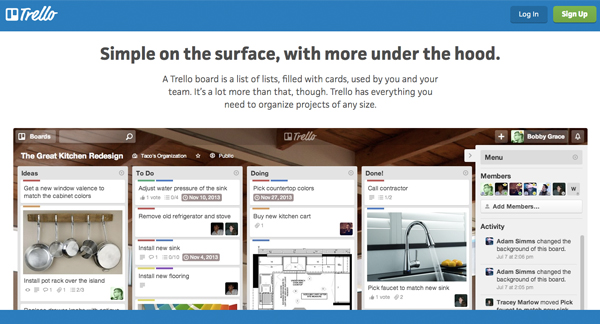
If you’re a visual person, Trello is definitely one of the best apps to help you get organised. The idea behind it is to create ‘boards’, and move things from one board to another, depending on its status. For example, you could have a low priority to-do list, a high priority to-do list, as well as lists for things that are in progress or completed.

You don’t have to do it this way — this was initially done to add an element of interactivity, where you drag and drop things from board to board in order to get more engaged with your tasks/goals and the processes involved in completing them. You can create a board for work, a board for home, a board for events etc. and simply view it as multiple to-do lists laid out in front of you.

best-online-apps-to-help-you-get-organised-trello.jpg

You can attach files, build checklists, and connect Trello to other apps with ‘Power-Ups’. These features are all available for free, if you sign up for the most basic version of Trello which was intended for personal use. If you’re using it as a business tool (it’s extremely popularly amongst marketing teams and product developers) you may want to look into the more advanced options.

Asana

Asana is a must-have organisation tool for any team. Think of it as a to-do list on steroids.

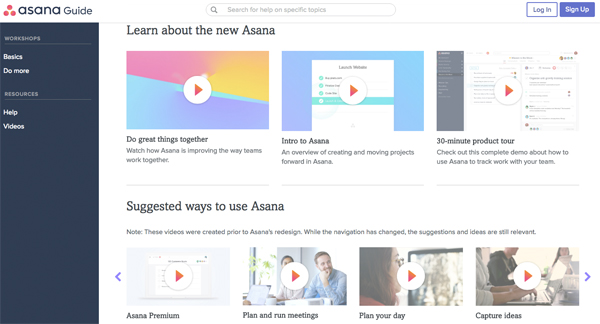
Every team member has a to-do list — you can add to your own list as well as to others’. You can create teams within the tool, and then individual projects within the teams. These projects can have their own project-specific to-do list, where all the tasks involved in the project are listed. These tasks are pushed into team members’ to-do lists when they’re assigned, with the ability to set deadlines, attach files, and add comments to each individual task.

It sounds complicated, but the ability to organise tasks via team, project, and team member can result in a much more efficient and effective way of getting things done. If you’re having trouble visualising it (I don’t blame you), Asana has an awesome range of intro videos, as well as tool-specific videos to help you.  

best-online-apps-to-help-you-get-organised-asana.jpg

Asana has two packages: Free and Premium. If you have a team of under 15 people, definitely get stuck into it with the free version and master it before you add on more tools. It’s a lot harder to implement an organisation strategy with more people.

Evernote

Evernote is an old favourite and can be found on every list of the best apps to help you get organised. I’ve added it because for one thing it’s awesome, and for another, a lot of people aren’t aware of its full potential.

First up, it is essentially a note-taking app. I can’t deny that Microsoft hasn’t revolutionized the way we create documents with Word, but something about saving notes to a specific document often means we don’t revisit them — they get lost amongst all your other files and documents.  

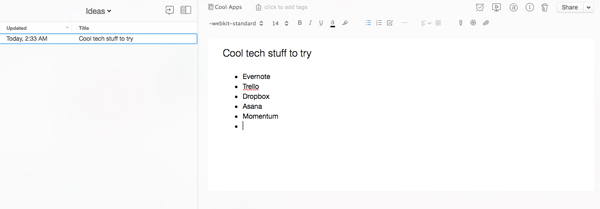
This is where Evernote comes in. You can keep all of your notes on one platform, where you can group them into general notebooks as a way to stay organised. You can search all your notes for something in particular, and also change your view to what works for you. It’s such a handy tool if you’re studying or working, particularly because you can share notes with others. 

best-online-apps-to-help-you-get-organised-evernote.jpg

One of the best things about Evernote is that it’s entirely cloud-based, which means you don’t have to save anything. If organisation isn’t your forte, you can skip the ‘save your work’ step and not lose all your valuable notes in the case of a hardware failure.

This also means you can add to your notes off any device (presuming you have the app and are logged in) and it’ll all sync up on its own. You can switch between your phone, tablet, and computer and access all the same information.

The really nifty thing about Evernote (that a lot of people don’t know about) is that the company has built and acquired a lot of awesome tools that’ll make your Evernote experience all the more awesome. One of them is Web Clipper, a web extension which lets you screenshot web pages as you go. You can clip small sections or capture the entire page, and automatically store and organise them within Evernote.

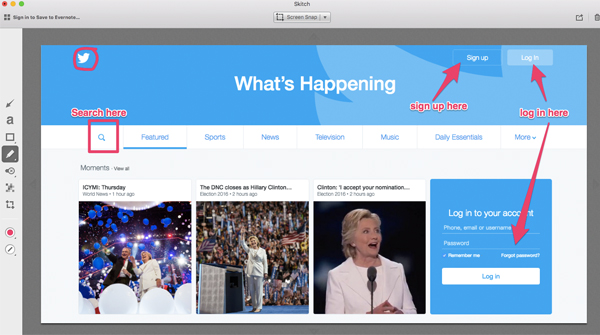
Skitch is a similar tool, though it’s an app rather than an extension. It lets you screenshot elements but also label and draw on them. It’s not as efficient as Web Clipper in terms of the whole screenshotting process, but being able to add arrows, text, circles and more can be really useful.

best-online-apps-to-help-you-get-organised-skitch.jpg

Skitch was acquired by Evernote in 2011, and in 2016 Evernote discontinued the option to download Android and Windows versions of the software. This was done in order to move Evernote in the direction of a more integrated solution, rather than increasing the number of standalone apps it supports.

You can still get it on a Mac and I’d highly recommend using it if you need to create process documents for anything on the web, i.e how to create an account on a specific platform. 

Another awesome tool (that’s sadly only for iOs users) is Scannable. It’s an iPhone app that lets you scan documents using your phone’s camera, which are then enhanced to produce high quality digital documents. These are synced to Evernote automatically.

In terms of pricing, start with the Basic model and test it out. If you’re leaning towards using Evernote frequently in a professional environment that involves presenting and collaborating with co-workers, you may want to look into thePlus, Premium, or Business models.

Momentum

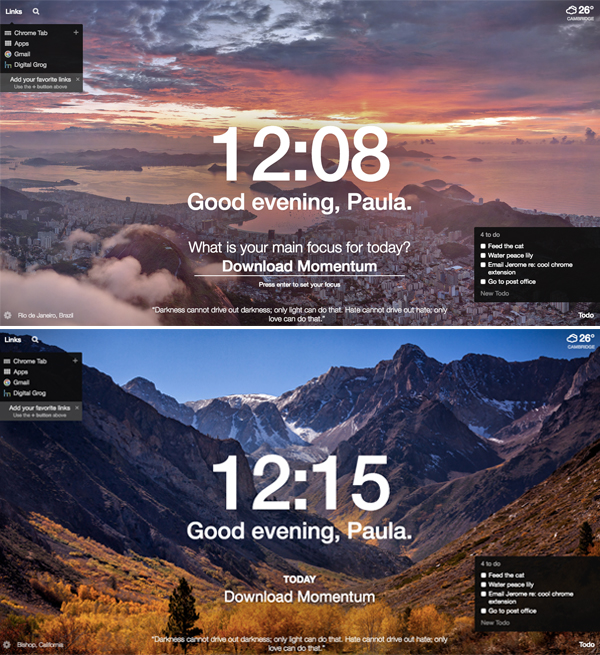
Momentum is a Google Chrome extension, so technically not an app but I guarantee you that it’ll bring life to your browser. Every time you open a new tab, you’ll get a picturesque photo with an inspirational quote.

You’ll also get the time and weather at your current location, as well as an option to search Google (or Bing if that’s your go-to search engine) and a list of your favourite links.

You have the option to create a to-do list and a main focus for the day, so if you’re not ready to dive into the deep end with an organisation app, start here.

best-online-apps-to-help-you-get-organised-momentum.jpg

Remember: organisation won’t happen overnight 

Downloading any of these apps will not instantly result in being organised. You have to be patient, make a consistent effort, and get into the habit of using the app to stay organised. The beauty of technology is that if one app doesn’t work for you, there are hundreds of others that you can try until you find what works for you. 

Bio: Paula is the founder of Joobly, an initiative that aims to connect aspiring student interns to tech startups in Sydney. She majors in Business Information Systems at Macquarie University.

Filed Under: Software, Solution Tagged With: Android, apps, IOS, Websites

  • « Go to Previous Page
  • Page 1
  • Page 2
  • Page 3
  • Page 4
  • Page 5
  • Go to Next Page »

Primary Sidebar

Recent Posts

  • Underwater Drones for Recording Video and Taking Pictures
  • Why I chose hostgator for blog hosting
  • Top 10 Software Programs For Your Windows PC
  • What you should know before investing in Cryptocurrency and bitcoin
  • The Best Social Media Platforms for Marketing a Gaming App

Recent Comments

  1. Patrick McCormick on How to secure your desktop and laptop with antivirus software
  2. JJ on 20 Top brands with affilate programs to make you money in 2019
  3. JJ on This WPengine Genesis Pro Deal Will Give You 35 Studiopress themes
  4. Lisa Gomes on 16 Ways to Make Money Online Working From Home
  5. KatVine on This WPengine Genesis Pro Deal Will Give You 35 Studiopress themes

Archives

  • June 2022
  • February 2022
  • July 2021
  • May 2021
  • April 2021
  • March 2021
  • November 2020
  • September 2020
  • August 2020
  • July 2020
  • June 2020
  • May 2020
  • April 2020
  • March 2020
  • February 2020
  • January 2020
  • December 2019
  • September 2019
  • August 2019
  • July 2019
  • June 2019
  • April 2019
  • March 2019
  • February 2019
  • January 2019
  • December 2018
  • November 2018
  • October 2018
  • September 2018
  • July 2018
  • June 2018
  • April 2018
  • February 2018
  • January 2018
  • December 2017
  • October 2017
  • September 2017
  • July 2017
  • June 2017
  • May 2017
  • April 2017
  • March 2017
  • February 2017
  • January 2017
  • December 2016
  • November 2016
  • October 2016
  • September 2016
  • August 2016
  • July 2016
  • May 2016
  • April 2016
  • March 2016
  • February 2016
  • January 2016
  • December 2015
  • November 2015
  • October 2015
  • September 2015
  • August 2015
  • July 2015
  • June 2015
  • May 2015
  • March 2015
  • February 2015
  • January 2015
  • December 2014
  • November 2014
  • October 2014
  • September 2014
  • August 2014
  • July 2014
  • June 2014
  • May 2014
  • April 2014
  • March 2014
  • February 2014
  • January 2014
  • November 2013
  • October 2013
  • September 2013
  • August 2013
  • July 2013
  • June 2013
  • May 2013
  • April 2013
  • March 2013
  • February 2013
  • January 2013
  • December 2012
  • November 2012
  • October 2012
  • September 2012
  • August 2012
  • July 2012
  • June 2012
  • May 2012
  • April 2012
  • March 2012
  • February 2012
  • January 2012
  • December 2011
  • November 2011
  • September 2011
  • August 2011
  • July 2011
  • June 2011
  • May 2011
  • April 2011
  • March 2011
  • February 2011
  • January 2011
  • December 2010
  • November 2010
  • October 2010
  • September 2010
  • August 2010
  • July 2010
  • June 2010
  • May 2010

Categories

  • $heldon $ingh
  • 2010
  • 2011
  • 2012
  • 2013
  • 2015
  • 2017
  • 2018
  • 2019
  • 2020
  • 2021
  • 2022
  • Accounting
  • Adsense
  • Affiliate
  • Amazon
  • Anti Virus
  • Apple
  • Apps
  • Asus
  • Aussie
  • Australia
  • Australian
  • Australian Bloggers
  • Australian wordpress hosting
  • Banks
  • Blog-Hosting
  • Blogger
  • Blogger Tool
  • Blogger Tools
  • BloggerTools
  • BuddyPress
  • CARS
  • CDN
  • Celebrity
  • Clickbank
  • Compare
  • Computer
  • Domains
  • Done Deals
  • Ebook
  • Email
  • Facebook
  • Featured
  • Finance
  • Free
  • Gadgets
  • Google
  • Gpost
  • Guide
  • Hackers
  • Hosting
  • India
  • Internet
  • Ipad
  • Kindle
  • Laptop
  • Make money blogging
  • Makemoney online
  • Marketing
  • Melbourne Cup
  • Movies
  • Netbook
  • Network
  • News
  • Online betting account
  • PC
  • Review
  • Search
  • SEO
  • sheldon singh
  • Software
  • Solution
  • Sports
  • Subscribers
  • Taxes
  • Technology News
  • Themes
  • Top 10
  • Tutorial
  • Video
  • Wacky
  • web hosting
  • Website Review
  • Wierd
  • Windows
  • wordpress
  • Wordpress 3.0
  • Wordpress 3.1
  • wordpress themes
  • World cup
  • Wp Answers
  • WP Turbo
  • WPMU

Footer

Design

With an emphasis on typography, white space, and mobile-optimized design, your website will look absolutely breathtaking.

Learn more about design.

Content

Our team will teach you the art of writing audience-focused content that will help you achieve the success you truly deserve.

Learn more about content.

Strategy

We help creative entrepreneurs build their digital business by focusing on three key elements of a successful online platform.

Learn more about strategy.

Copyright © 2026 · Genesis Sample on Genesis Framework · WordPress · Log in