
• Skip to primary navigation
  • Skip to main content
  • Skip to primary sidebar
  • Skip to footer

Digital Grog — Australia’s Tech, Gadgets & Digital Life Unfiltered

Digital Grog is Australia’s go‑to tech blog for sharp reviews, digital trends, AI tools, gadgets, cybersecurity updates, and practical how‑tos covering the latest in Aussie technology

  • About Us
  • Contact Us
  • Block Examples
  • Landing Page

X Change my windows 8 start menu

June 21, 2015 by admin 1 Comment

Like to stay abreast with new technology updates &  windows , but don’t like the windows 8 start menu. You are not alone, windows 8 was a good update,modernised an all – but millions of people have shown their displeasure in how the start menu was totally obliterated and not user friendly with the windows 8 release.

They are two solutions for this,  either wait for windows 10 to release ( which should not be too far away) and hope they make some good changes to this  or then  force your windows 8 to go back to the much friendly Windows 7 start menu.

I have windows 8 on my laptop and  the nutty metro start menu started to drive me crazy, enough for me to look for a solution to make life easier. Here are the two solutions that will get you faster to where you want, when you start up a windows 8 laptop.

windows 7 start menu for windows 8  get it back

Luckily  there re programs out there that can  easily make your windows 8 start menu just like windows7 and also allow you to switch back and forth between them both, if you want to change your mind.

how to get the old windows start menu back

Below i will give you a paid product (stardock) short review  that does this and also  a  FREE version called  (classic shell) that  does a good job with changing the start menu.

Classic shell ( free version) – So what does classic shell do

[from thier website]

Classic Shell™ is free software that improves your productivity, enhances the usability of Windows and empowers you to use the computer the way you like it ( Like windows 7 start menu).
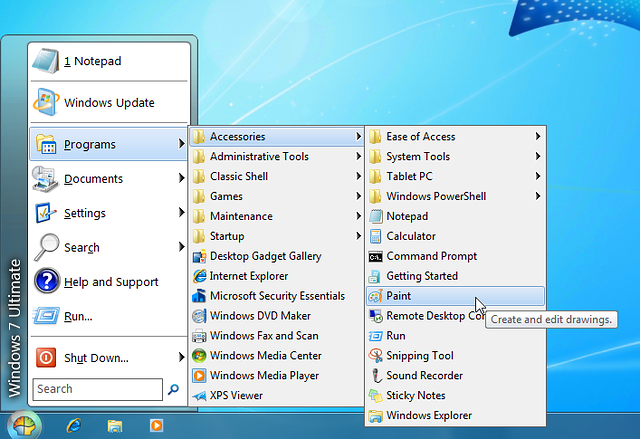
Classic start menu

[imgfrom http://www.classicshell.net/]

The main features are:

  • Highly customizable start menu with multiple styles and skins
  • Quick access to recent, frequently-used, or pinned programs
  • Start button for Windows 7, Windows 8, Windows 8.1 and Windows 10
  • Toolbar and status bar for Windows Explorer

Classic Shell has been in active development for 5 years and has over 25 million downloads.[DOWNLOAD NOW] .Visit their homepage if you like the program and interested in making a donation

Note: Classic Shell works on Windows 7, Windows 8, Windows 8.1, Windows 10 and their server counterparts (Windows Server 2008 R2, Windows Server 2012, and Windows Server 2012 R2). Both 32 and 64-bit versions are supported. The same installer works for all versions.

Start8 By Stardock (paid software $4.99)

This software is good, in that it does allow you to either go straight to the windows desktop,avoiding the windows 8 start screen. It also allows you to access the windows 8 start screen from the windows 7 style start menu you customised or created.

I  use another software by star dock called fences , which i truly recommend and has been of great use to me until today in organising my windows 7 desktop icons and shortcuts ( you can check it out in their website). However this windows 8 start menu software also has many good features

Start8 Features

  • Adds a Windows 7-styled Start menu with Windows 8 enhancements
  • Boot directly to the Windows 8 desktop (no more searching for your desktop)
  • Windows 8 Start screen accessible from Start menu
  • Adds option for WinKey to show fullscreen metro desktop
  • Skinnable start button

stardock start 8 and windows shell 7 start menu

Start Menu 8 is specially designed for Windows 8/8.1, as a freeware that can restore (simulate) the classic start menu of earlier version of Windows. It can be set to boot from startup, in order to skip the system default Metro start screen, thereby directly start into the traditional Windows desktop which is familiar for us.

There is the basic version that costs $4.99 and the Deluxe version that includes many other software enhancements and features for a windows desktop  that is $9.99 with a recurring monthly fee. Get details and download here

System Requirements

Windows 8.1/8 or Windows Server 2012/R2

If you have been searching google with any of these queries below,

  • How to bring back the Start Menu in Windows 8.1 / Windows 8
    Remove windows 8 start menu to windows 7
    Change the Start menu to Classic view – Windows – Microsoft
    Ways To Customize the Windows 8 Start Screen
    Change windows 8 start menu style
    How to change windows 8.1 start menu

then..these two software’s listed above will surely be able to help you in some way , let me know  how this works out for you and do leave me a comment 🙂

Filed Under: Windows Tagged With: Windows 10, windows 7 Activate, Windows 8, Windows Phone 8.1

Reader Interactions

Comments

  1. Chanu's Tech Tube says

    June 30, 2015 at 2:00 am

    Thanks for the tip. It was a headache for me use win 8 without startup menu.

    Reply

Leave a Reply Cancel reply

Your email address will not be published. Required fields are marked *

Primary Sidebar

Recent Posts

  • Underwater Drones for Recording Video and Taking Pictures
  • Why I chose hostgator for blog hosting
  • Top 10 Software Programs For Your Windows PC
  • What you should know before investing in Cryptocurrency and bitcoin
  • The Best Social Media Platforms for Marketing a Gaming App

Recent Comments

  1. Patrick McCormick on How to secure your desktop and laptop with antivirus software
  2. JJ on 20 Top brands with affilate programs to make you money in 2019
  3. JJ on This WPengine Genesis Pro Deal Will Give You 35 Studiopress themes
  4. Lisa Gomes on 16 Ways to Make Money Online Working From Home
  5. KatVine on This WPengine Genesis Pro Deal Will Give You 35 Studiopress themes

Archives

  • June 2022
  • February 2022
  • July 2021
  • May 2021
  • April 2021
  • March 2021
  • November 2020
  • September 2020
  • August 2020
  • July 2020
  • June 2020
  • May 2020
  • April 2020
  • March 2020
  • February 2020
  • January 2020
  • December 2019
  • September 2019
  • August 2019
  • July 2019
  • June 2019
  • April 2019
  • March 2019
  • February 2019
  • January 2019
  • December 2018
  • November 2018
  • October 2018
  • September 2018
  • July 2018
  • June 2018
  • April 2018
  • February 2018
  • January 2018
  • December 2017
  • October 2017
  • September 2017
  • July 2017
  • June 2017
  • May 2017
  • April 2017
  • March 2017
  • February 2017
  • January 2017
  • December 2016
  • November 2016
  • October 2016
  • September 2016
  • August 2016
  • July 2016
  • May 2016
  • April 2016
  • March 2016
  • February 2016
  • January 2016
  • December 2015
  • November 2015
  • October 2015
  • September 2015
  • August 2015
  • July 2015
  • June 2015
  • May 2015
  • March 2015
  • February 2015
  • January 2015
  • December 2014
  • November 2014
  • October 2014
  • September 2014
  • August 2014
  • July 2014
  • June 2014
  • May 2014
  • April 2014
  • March 2014
  • February 2014
  • January 2014
  • November 2013
  • October 2013
  • September 2013
  • August 2013
  • July 2013
  • June 2013
  • May 2013
  • April 2013
  • March 2013
  • February 2013
  • January 2013
  • December 2012
  • November 2012
  • October 2012
  • September 2012
  • August 2012
  • July 2012
  • June 2012
  • May 2012
  • April 2012
  • March 2012
  • February 2012
  • January 2012
  • December 2011
  • November 2011
  • September 2011
  • August 2011
  • July 2011
  • June 2011
  • May 2011
  • April 2011
  • March 2011
  • February 2011
  • January 2011
  • December 2010
  • November 2010
  • October 2010
  • September 2010
  • August 2010
  • July 2010
  • June 2010
  • May 2010

Categories

  • $heldon $ingh
  • 2010
  • 2011
  • 2012
  • 2013
  • 2015
  • 2017
  • 2018
  • 2019
  • 2020
  • 2021
  • 2022
  • Accounting
  • Adsense
  • Affiliate
  • Amazon
  • Anti Virus
  • Apple
  • Apps
  • Asus
  • Aussie
  • Australia
  • Australian
  • Australian Bloggers
  • Australian wordpress hosting
  • Banks
  • Blog-Hosting
  • Blogger
  • Blogger Tool
  • Blogger Tools
  • BloggerTools
  • BuddyPress
  • CARS
  • CDN
  • Celebrity
  • Clickbank
  • Compare
  • Computer
  • Domains
  • Done Deals
  • Ebook
  • Email
  • Facebook
  • Featured
  • Finance
  • Free
  • Gadgets
  • Google
  • Gpost
  • Guide
  • Hackers
  • Hosting
  • India
  • Internet
  • Ipad
  • Kindle
  • Laptop
  • Make money blogging
  • Makemoney online
  • Marketing
  • Melbourne Cup
  • Movies
  • Netbook
  • Network
  • News
  • Online betting account
  • PC
  • Review
  • Search
  • SEO
  • sheldon singh
  • Software
  • Solution
  • Sports
  • Subscribers
  • Taxes
  • Technology News
  • Themes
  • Top 10
  • Tutorial
  • Video
  • Wacky
  • web hosting
  • Website Review
  • Wierd
  • Windows
  • wordpress
  • Wordpress 3.0
  • Wordpress 3.1
  • wordpress themes
  • World cup
  • Wp Answers
  • WP Turbo
  • WPMU

Footer

Design

With an emphasis on typography, white space, and mobile-optimized design, your website will look absolutely breathtaking.

Learn more about design.

Content

Our team will teach you the art of writing audience-focused content that will help you achieve the success you truly deserve.

Learn more about content.

Strategy

We help creative entrepreneurs build their digital business by focusing on three key elements of a successful online platform.

Learn more about strategy.

Copyright © 2026 · Genesis Sample on Genesis Framework · WordPress · Log in