• Skip to primary navigation
  • Skip to main content
  • Skip to primary sidebar
  • Skip to footer
tech blog au

Digital Grog — Australia’s Tech, Gadgets & Digital Life Unfiltered

Digital Grog is Australia’s go‑to tech blog for sharp reviews, digital trends, AI tools, gadgets, cybersecurity updates, and practical how‑tos covering the latest in Aussie technology

  • Home
  • Webhosting
    • List of WordPress Web hosts
    • Comparisons
    • Blog Hosting
  • Make Money Online
    • Clickbank
    • Affiliate Programs Australia
      • Amazon
  • Domains Australia
    • Australian Domain Names
    • Register a domain name
  • Technology
    • Technology News
      • Gadgets
      • Software
  • Guest Posts
  • About
  • Contact us

Australia

How To Combine Technology And Art In Coffee Making

May 27, 2020 by admin Leave a Comment

technology in coffee 2020

The art of coffee making has evolved a lot. Now a sophisticated coffee maker is considered an everyday household item. 68 per cent of US households own an electric drip coffee maker. Taste of coffee depends on a range of variables such as quality of the roast, origin of the coffee beans, humidity, temperature, and ratio of liquid. These variables are managed by the talent of baristas.

Unlike any other industry, the coffee industry has also seen technological advancements reshape the market and consumer expectations over time. Many drink coffee not just for the caffeine needed in the morning. 69% of coffee lovers drink it for its taste and 54% of adults drink 2 or more cups a day. Thus, continual improvement of coffee flavours has benefited from the rise of sophisticated technologies.

History of Coffee Technology

Earliest record of coffee consumption in the western culture dates back to 1615 when Europeans imported it from the Ottoman Turks. The method of product was obviously much more simplistic then. They simply boiled some finely ground coffee beans in a pot. Soon after though, the French reached the next milestone by putting the ground coffee in a linen bag and infusing it in the water to make drinking smoother. They also discovered that boiling water ruined the coffee flavour so the new ideal temperature was determined to be just below boiling.

In 1800, the first drip coffee pot which enabled easy filtering of the ground coffee into a container was invented. Coffee started becoming popular across much of the anglo-saxon world. The French continued to dominate further improvements to the drip coffee makers, perfecting the infusion process to create silkier, smoother flavour. They did so by adding components and altering shapes.

Then in 1915, two British sisters took coffee technology to the next level by replacing regular glass with the heat resistant Pyrex glass. Then more inventors from Europe continued to sophisticate the machine, enhancing the pressing and brewing processes with intricate design inside the pot.

With the industrial revolution, coffee maker innovations reached a new level. Different design variations were made possible through the power of manufacturing to create and enhance a wider range of flavours.

Today we have a long list of coffee machines available: pod coffee machines, drip coffee makers, cappuccino machines, espresso machines, French press, percolators, and more.

Evolution of The Role of a Barista

making coffee

While it’s easy to assume that the technological progress of coffee machines replaced the need for a barista, that would be a mistake. All the inventors who contributed to the advancement of coffee making throughout history were passionate baristas who wanted to make it easier for baristas to make coffee with their style and artisanry.

Baristas’ judgment and artwork can make a huge difference even if using the same machine and ingredients. Experts such as Adam Carr from Coffee Science & Research Centre argue that the role of a barista is not threatened by the advancement of the machines. A coffee machine can only replace repetitive and manual tasks, allowing the baristas to do their work faster. Baristas can tweak proportions of the ingredients as well as other various settings to produce unique flavours. Skilled baristas also bring unique coffee art to bring visual pleasure to coffee drinking as well as the great taste.

The cost of a barista is also lower than running a full-time, top-notch machine. Such machines will cost anywhere between $20,000 and $40,000 plus frequent maintenance. A barista with a lower-quality machine has much lower running costs than an automated machine. And the coffee will still taste better!

It is also important to highlight the human-to-human interaction that people enjoy in their daily routine. Coffee is a personal purchase as it is an important and consistent part of many people’s day. Having a barista who understands their preference is an unspoken yet valuable part of why people become regulars at any cafes

Filed Under: Australia, Technology News Tagged With: Food, Software, Technology education

Top Free Antivirus For Your Computer and Smart devices

May 18, 2020 by admin Leave a Comment

"protect

​Need to keep your computer safe from bad internet  viruses and hackers, then you need an antivirus for your computer, laptop or whichever device  you normally do most of your important transactions.

In today’s world a lot of the daily transactions and chores like paying your bills and shopping is done online on your computer, laptop or mobile.  The risk of your credentials or banking passwords falling into the wrong hands are very real. Forget someone stealing your online passwords , even kidnapping your computer is very real  since the last couple of years.

A bad person can get your computer infected or hacked and plant a virus that will lock your computer and important files and you won’t be able to get into it without paying up a ransom. These types of virus that infect your computer are called ransomware.

While there is no 100% way of defending your passwords, getting a computer security product like a antivirus is a must in today’s world to at least  secure yourself against many nasties and lessen the chance of a hacker or a virus  getting into your computer and stealing your passwords.

Bitdefender is a trusted product that does the job of protecting your computer quite well and for free. It’s a Fast, Free Virus Protection for 2020.  It can protect all your computers and devices from viruses and malware and it’s a 100% Free Antivirus.

There are other providers who also provide a free product like AVG Antivirus, Avast and Avira.  Windows 10 does come with its own software called Windows Defender which is good, however a good malware protector is also needed to be fully secure. Bitdefender provides them both in one software.

How do I download and install Bitdefender​ Free Version?

If you are used to working on computers, it’s a easy 3 step process done in minutes.

  1. Download the Free antivirus program from the >> website
  2. Click on downloaded file to Install it (register or create a Bitdefender account will doing so)
  3. Do a scan to check if any nasties exist on your computer and Bitdefender stay on  to protect your computer.

Bitdefender Link : Free Antivirus 

"2020

free software

To use the free version, you will need to register or create a bit defender account (does not cost you anything). You will need to register with your name and email.

​Scan your computer :

Once started, the online protection will automatically start and you can start a first scan of your computer for any nasties lurking around.  If you choose you can scan you whole computer or then just choose which folder you want to scan.

scan for virus


DASHBOARD:

If you go into the settings or the dashboard you can see four tabs

dashboard for software

Events, Quarantine, Exclusions and Protections, I will explain what they all do below

​

Events ♣

Events is where it shows what scans has been done so far for your system and when it was last done. It will also show if your antivirus has been updated recently.

Quarantine æ

This is where any suspect files that has showed up in the scan will show up. Those files will get quarantined and you can check them here to see details. The files shown over here can be deleted if you think its unsafe. You can exclude or restore them if needed.

Exclusions ⊄

This is where the files that was detected as suspect, but then you said was okay will show up (in exclusion).  You can exclude files that are safe so that it doesn’t get picked up every time you run a scan. Each time the antivirus detects or blocks a website, you can exclude them from scanning  if safe. Use this with caution.

Protection ψ

This column will show a history of attacks on your computer system via software or websites and you can access more details from your dashboard whenever a threat is detected.  This is the protection shield and you can turn it on/off at the top right of this tab, but for security it is preferred to be always on.

[[[[ Help and support tab ]]]]

This is where you can ask for help or support 24/7 with using the Bitdefender product or giving feedback about the product you have. This is available when you upgrade to the version of Bitdefender with full protection. You can click over here on the view offer button to upgrade and get the full version at a special deal price.

bitdefender 2020 offers and deals

With these offers, you can get deals on Bitdefender

  • Antivirus Plus 2019 (1 device/1 year)
  • Bitdefender Total Security 2019 (5 devices/ 1 year)

The upgrade gives you heaps of features that are not included with the basic free version. The features you get is is based on which version you purchase.

Free trials

Free trails are quite popular with most security software companies, where you can try the software for a certain limited time before you decide to buy. Some providers provide the full version of the software for trial, while some of them provide limited feature version for trial.

Some of the features among others that are worth mentioning that you get with the upgrade is

  • Webcam Protection
  • Password Manager
  • Parental Control
  • And VPN (use limits apply)

What Free vs paid version this Software covers ?

The free version is a basic version that just protects you from viruses and online threats for one device.  With the paid version you can get a variety of cover for your devices. They are multi-device family plans for devices covering 1 device, 5 devices and more. So everybody can get covered with just one software purchase.

The paid version comes with many bonus features

Password manager

password software

The software also comes with lots of free add-ons like Password Manager, where you can manage and secure all your passwords for different websites on your computer securely.

Parental control – Kid’s safe website security blockers

Most Software allows you to block websites that are not kid safe and  also block websites manually  so that your kids can’t access certain websites. The bit-defender advanced parental controls will keep your kids safe online

Secure VPN

Secure VPN for complete online privacy, 200 MB/day/device

File shredder

delete files securely forever

Got files on your computer that you want to delete securely ? the File shredder will do this for you.

Apart from these above features new features like anti-tracker, microphone monitor and wifi-security advisor will give you that extra security you need to secure your critical devices on your pc.

The best way to test this product is to use the free version provided and then if happy, upgrade to the version you need. You can access the userguide for 2020 Bit-defender over here  and access our free step by step install guide over here.

Bitdefender has won a couple of awards and the basic version will protect your computer, and the upgrade will do so much more and give you peace of mind.

Bitdefender  Free Version

A$0 Completely Free

Paid version

Bitdefender has  1 device  to 15 devices  security solutions for your computer and network.  They have multi device plans to suit all devices windows or apple and also a mix of devices.  They even have a  new product specially built for the  internet of things devices on your network.  They have home pc plans , business software plans and  special industry grade network security software.

They have the basic windows protection, advanced windows protection and  the complete protection solution in the price range from $29.99 to $299.99+. You can purchase plans for 1 year , 2 years or 3 year plans to access competitive pricing.

Bitdefender total security – 5 devices

With the above $44.99 – Total Security 2020 software you get protection for up to 5 devices / 1 year and complete protection for Windows, macOS, iOS and Android

  • Complete anti-malware protection: Windows, macOS, Android and iOS
  • Multi-layer ransomware protection with ransomware remediation
  • Network Threat Prevention: stops attacks before they even begin
  • Parental Control
  • Optimized speed and cross-platform performance
  • Comprehensive Support 24/7

They also have the family pack that covers more devices than the normal plans.

Bitdefender Internet Security 2020 has won the Outstanding Product award from AV-Comparatives, as well as Best Protection, Best Performance and Best Repair from AV-TEST.


About Bitdefender

Bitdefender has the largest security delivery infrastructure on the globe With a worldwide network of 500 million machines. They have Technology alliances with Citrix, VMware, Nutanix, Linux Foundation, Microsoft. For businesses they also offer an integrated endpoint protection, risk management, and attack forensics platform called Gravity Zone Elite to protect your network.

Bitdefender’s Internet of things device protection solution is called Bitdefender Box. The box is a router designed to protect smart home products and Internet of Things devices by blocking malicious internet traffic.

Bitdefender offers a cloud-based security solution with anti-malware and anti-theft capabilities for Android and iOS users that is called Bitdefender Mobile Security.

Bitfdefender is a Romanian cyber security and anti-virus software company which was founded in 2001. It was founded in 2001 by Florin Talpeş who is currently the CEO. Bitdefender develops and sells anti-virus software, internet security software, endpoint security software, and other cyber security products and services

How antivirus software works?

Computer/Laptop or  Android /Mac Devices

For computers and laptops or smart devices including tablets and smartphones, the antivirus works in a similar way to each device. Once you install the software it has a updating engine built into the software. This engine updates new virus defence definitions to your software as new viruses and malware emerge, so that your  device is protected against any new types of viruses.  Most software or antivirus providers  provide their own inbuilt  virus defence updates or then subscribe to a larger virus defence update provider and provide you with the latest security updates to your existing software.

Smartphone/Tablet

With  smartphones or tablets you install the free antivirus  through the android or apple app store. The app will get regular updates  to keep the antivirus fresh and ready to protect against any new smartphone or smart device nasties.


[ninja_tables id="8787"]

SYSTEM REQUIREMENTS FOR ANTI-VIRUS AND SECURITY SOFTWARE

Supported Browsers

  • Internet Explorer 10.0 or later
  • Firefox
  • Google Chrome
  • Safari (Mac and iOS OS Only)
  • Microsoft Edge

Android Operating Systems

  • Android 4.1 or later. Must have Google Play app installed.
  • macOSX 11.2 and later operating Systems
  • iOS 10.10 or later

Operating system 

  • Microsoft Windows 10, 8.1, 8, and 7 (32- and 64-bit)
  • Mac OS X 10.12 or later
  • Google Android smartphones and tablets 4.1 or higher
  • Apple iOS 10 or later

Hardware

  • 2 GB RAM for Windows 7 and above
  • 2.5 GB free drive space
  • 2 GHz Processor

Filed Under: 2020, Anti Virus, Australia, Software, Solution Tagged With: Malware, Security, Stop hackers software, Technology education

Top tips to choosing a Good NBN modem router

March 2, 2020 by admin 6 Comments

Your signing for the NBN which will inmost cases give you much faster speeds that you currently have and so having a good modem to distribute that fast internet speed around your house is a good idea.  You will need an NBN compatible modem if you were on the old ADSL connection with an older modem.

Read about –> NBN internet providers and plans in my last blog post, in this one  we look at the best picks for a good modem router for your NBN connection

The good thing is most NBN internet providers give you a free NBN modem if you sign up with them for an 18 month or longer internet plan. Some of them don’t and so you might have to purchase your NBN modem from the shop or pay extra to the provider for the modem.

Which is the best modem for NBN ?

Popular good modem brands in Australia are Netgear, Dlink, Netcomm, Tplink, ASUS, Draytek and Billion among others.

To keep it short, a good NBN modem should be a modem plus router – so that I can recive internet and can also distribute WIFI around the house. It should have at least three minimum ethernet points, one USB storage and a backup USB wifi dongle or 3g/4g/5g sim/dongle would be wishful.

Prices for modems routers In Australia
Generally a good nbn compatible modem can start from $120 onwards , but expect to get a decent one anywhere between $150 to $400 . The $400 are normally top of the range ones in looks and speeds too. Most of them are modem  plus routers.

I have made many lists before (for eg myhosting list for starting a website/blog ) .. Below I will give a list of some good modems for the NBN on the market before we get into the nitty gritty of what is the good features to look out for in selecting a modem

Good routers for the NBN

  1. TP Link TD-VG5612
  2. TP-Link Archer VR2800
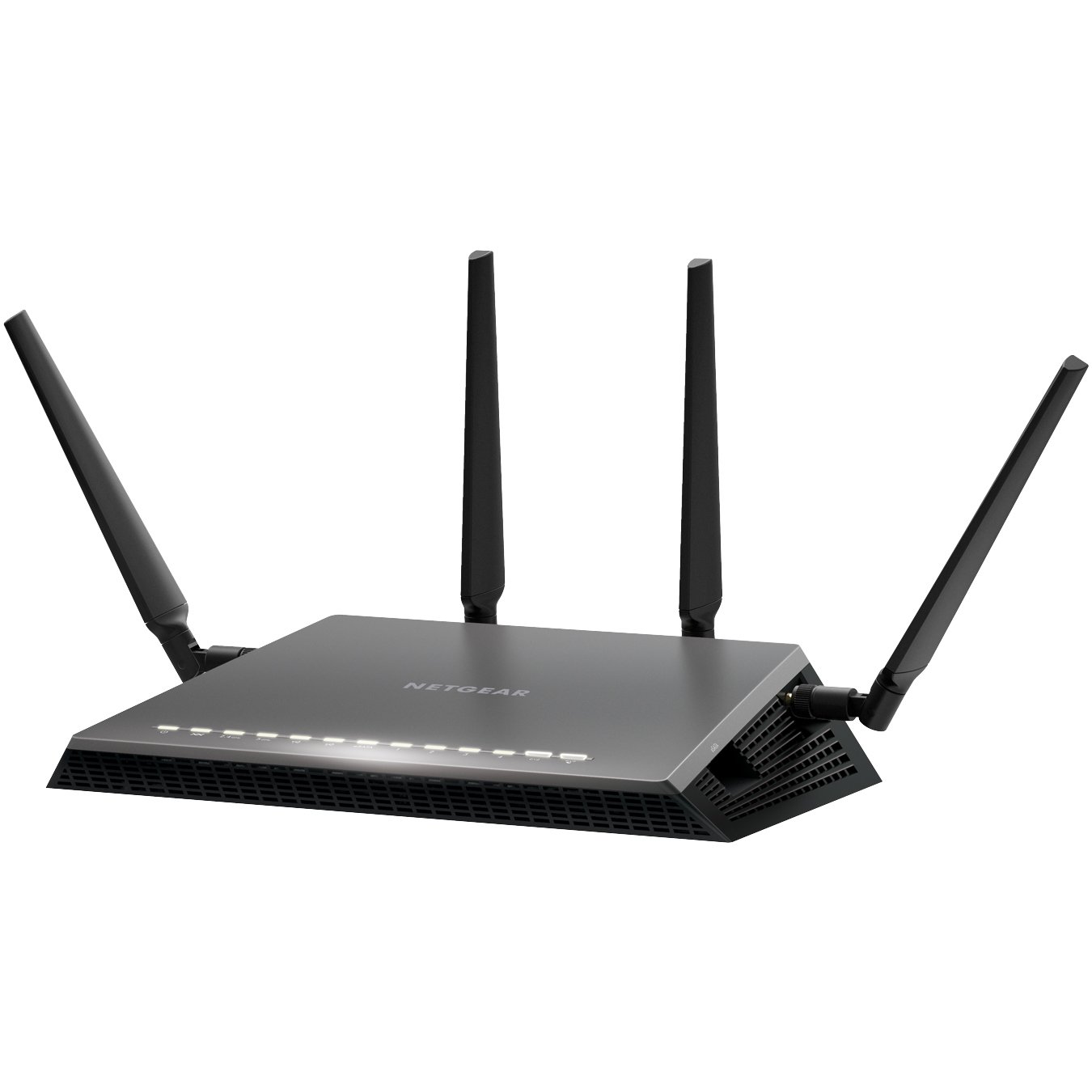
  3. Netgear Nighthawk X4S D7800
  4. Netgear D6400
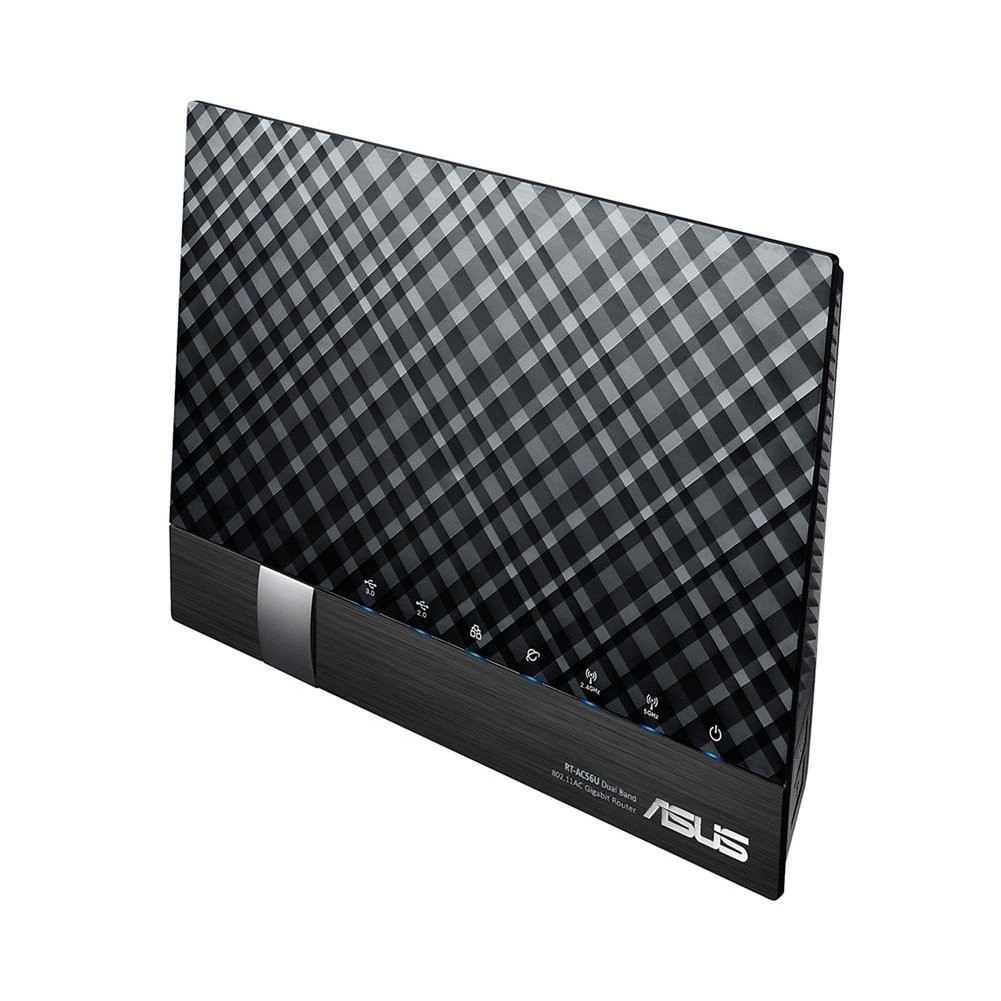
  5. ASUS DSL-AC56U
  6. ASUS DSL-AC68U
  7. D Link DSL-2877AL
  8. D Link DSL-2885A
  9. Draytek 2860n/n+/Vn/ac/Vac
  10. Draytek 2760
  11. Netcomm NF4V
  12. Netcomm NF17ACV
  13. Asus ROG GT-AX 11000
  • TP Link TD-VG5612
  • TP-Link Archer VR2800
  • Netgear Nighthawk X4S D7800
  • Netgear D6400
  • ASUS DSL-AC56U
  • ASUS DSL-AC68U
  • D Link DSL-2885A
  • Draytek Vigor 2862 Vac
  • Netcomm NF17ACV
  • Asus ROG GT-AX11000

tp link modem router

TP-Link TD-VG5612 Wireless router – 4-port switch

Brand: TP-Link
Connectivity: Wireless
Wireless standard: Wireless-N, Wireless-G
Encryption type: WEP, WPA, WPA2
Modem type: DSL Modem
Aerial: Internal
 
Features
  • Firewall protection
  • DMZ port + NAT support
  • Auto-negotiation, IGMP snooping, traffic shaping
  • Print server, MAC address filtering, VPN passthrough
  • URL filtering, parental control, IP address filtering
  • File sharing, Access Control List (ACL) support, Quality of Service (QoS)
  • Virtual server support, Wi-Fi Protected Setup (WPS), IPSec pass through
  • Samba support, FTP server, port forwarding, UPnP Media Server
  • Bandwidth control, DHCP relay, Stateful Packet Inspection Firewall (SPIF)
  • DNS relay, static routing, Multicast filtering function

Software / System Requirements

Software Included Drivers & Utilities
OS Required Apple Mac OS, Linux, Microsoft Windows Vista / XP / 7 / 8
 
Included Accessories
ADSL splitter
Cables Included 1 x modem cable 1 x network cable

TP-Link Archer VR2800 Wireless router – 4-port switch The Archer VR2800 DSL modem router supports super fast VDSL or ADSL broadband of up to 100 Mbps and other connections.

Additional features

  • Cable Modem or Fiber Modem compatible
  • Two USB 3.0 ports supporting 3G/4G dongle connections
  • Dedicated processor for each band to manage Wi-Fi traffic
  • 1GHz dual-core CPU.

The Netgear’s Nighthawk X4S boasts a dual-core 1.4GHz processor to handle the activity passing through it and a chipset capable of working in the 802.11ac network technology, which is also backwards compatible with the 802.11a/b/g/n networks.

Additional features

  • Quad Stream AC2600 WiFi for speeds up to 2.53Gbps (800+1733Mbps)
  • Next generation Wave2 WiFi
  • Dual Core 1.4GHz processor boosts performance for gaming and streaming
  • Built in high speed modem compatible with VDSL, VDSL2, ADSL, ADSL2, ADSL2+
  • Gigabit Ethernet WAN port for universal Internet service compatibility

Price range: From $315 to $350

The Netgear AC1600 DSL modem router provides a fast VDSL modem for fibre broadband and also works with ADSL connections.

It is a integrated modem and router as most models and you won’t need separate hardware from your service provider. It can handle homes with up to 10 devices.

Additional Features

  • It supports transfer speeds of up to 1300 Mbps.
  • It uses Beamforming technology to provide a large, reliable wireless range.
  • There are 2 USB 2.0 ports built-in to this router so you can connect a printer or a portable hard drive then access it wirelessly across your network.
  • You can use the Netgear Genie app to control and maintain your network.
  • This router supports parental controls so you can set up restrictions to your web access.

Price Range: From $197 to $243

https://www.youtube.com/watch?v=7jtYN9RP0SQ

The ASUS DSL-AC56U supports  as slew of features and technologies making this versatile modem router future proof. it supports  high speeds and  a detailed graphical interface to adjust  all your settings to your needs.

Additional Features

  • Concurrent Dual Band: 867Mbps on 5GHz and 300Mbps on 2.4GHz
  • Two WAN ports for DSL and Ethernet
  • Gigabit Ethernet ports 
  • Dual multi-purpose USB ports support file sharing, printer sharing, media streaming and 3G/4G support
  • VDSL/ADSL WAN multi service for IPTV support
  • PPTP VPN server and VPN client support
  • Download Master and enhanced media server let you download and stream anywhere
  • Enhanced signal range and stability with ASUS AiRadar using ASUS RF fine-tuning giving you extended coverage, dynamic data speed increases, and enhanced stability.
  • Ability for DSL, Ethernet or 3G/4G LTE Internet connections
  • Gigabit Internet browsing with hardware NAT
  • Ability to add external storage, printers, and other devices directly to your network
  • DSL ASUSWRT allows you to setup, monitor, and control network applications all in one intuitive area. 
  • Online multitasking at up to 300,000 sessions,gives you 20 times the capacity of mainstream routers. More data sessions translate into quicker and buffer-less HD streaming plus lag-free online gaming.
  • VPN server and VPN client support

Price Range: From $165 to $269


The ASUS DSL-AC68U is fast with combined dual-band data rates of up to 1900 Mbps. It is compatible with ADSL2/2+, ADSL, VDSL2, fiber and cable services. The easy-to-use ASUSWRT graphical user interface unlocks the power of the DSL-AC68U giving robust control to optimize your network for you. 30-second set-up and easy traffic management means even network newbies can enjoy its sophisticated features, while power users will love its IPv6 support, multiple wireless SSIDs and secure VPN access.

Additional Features

  • Compatible with ADSL2/2+, ADSL, VDSL2, fiber and cable services
  • 150% wider Wi-Fi coverage* Three external high-gain antennas 
  • Intuitive ASUS Router app -Manage your network anywhere
  • Enterprise-grade security for your home network -ASUS AiProtection with Trend Micro™ 
  • VPN server and client support
  • Dual WAN ports
  • Multi-purpose USB 3.0 port

Price Range: From $225 to $269

D-Link DSL-2885A Wireless Modem Router – 4-port switch
Dlink DSL-2885A Dual Band AC1200 Wireless Modem Router
 
The Dual Band Wireless AC1200 Gigabit ADSL2+/VDSL2 Modem Router helps with multiple connection options for sharing your high speed internet connection with a multitude of both wireless and wired devices. Dual band, NBN compatible, and capable of speeds up to 1200Mbps makes it a internet ready device for your home.
 
Details
Brand: D-Link
Connectivity: Wireless
Wireless standard: Wireless-AC, Wireless-N, Wireless-G
Feature: Dual Band, Gigabit Ethernet
Encryption type: WPA, WPA2
Modem type: DSL Modem
 
Additional Features:
  • Dual Band Wireless AC1200 Technology
  • Integrated ADSL2+ / VDSL2 Modem
  • NBN/UFB Ready (Dedicated Gigabit WAN port)
  • 4 x Gigabit Ethernet LAN Ports
  • Two USB 2.0 Ports for Storage, File Sharing or 4G USB modem
  • Supports AutoZoning technology

Price range: From $149 to $175

Visit official website

Draytek has a  range of xDSL routers series which include VDSL2, ADSL2/2+ and G.SHDSL models to meet different infrastructure. WAN failover/load-balancing Bandwidth Management/Firewall/VPN features are available in most models to ensure a secure & reliable network.

They have discontinued quite a few models, list available below.

Draytek Vigor 2862 Vac

Vigor2862 Series features comprehensive firewall and content security management (CSM) to secure the local network. Vigor2862 Series is a VDSL2/ADSL2+ Security Firewall router which is compatible with variants of ADSL and VDSL. All the models have an RJ-11 DSL port, and a Gigabit Ethernet WAN port which can be used with a cable-modem to connect to a second line for load balancing or failover, there are also two USB ports which can work with 3G/4G/LTE USB modems to add wireless connectivity.

Additional Features

VDSL2 or ADSL2/2+  
Gigabit WAN  
3G / 4G LTE USB
Gigabit LAN 4
VPN Tunnels 32
WLAN (AC2000) 11ac
Concurrent Dual Band  
VoIP (2xFXS, 1xPSTN)


Current Selling models in the Vigor 2862 Series are

  • Vigor 2862
  • Vigor 2862n
  • Vigor 2862 AC
  • Vigor 2862 VAC

There are also four models in the Vigor 2762 Series and one in Vigor 2832 Series and one in Vigor 2710 e Series.

Discontinued Draytek Vigor model numbers

  • Vigor2860n
  • Vigor 2860 Ln
  • Vigor 2860 L
  • Vigor 2860 Vac (AC1600)
  • Vigor 2860 ac (AC1600)
  • Vigor2860Vn-Plus
  • Vigor2860

Netcomm NF17 ACV VDSL/ADSL Dual Band Router

NF17ACV Side Angle

If you end up signing with Aussie Broadband for a NBN connection and paying for a modem,  this can  be the Modem Router you get. It looks pretty similar in design to the  TP Link model  TPG bundles free with their NBN connection.

Aussie Broadband Set up guide for this model –> Setup Guide

The NF17ACV is a smart residential VDSL2/ADSL2+ gateway designed to connect to VDSL and ADSL networks as well as nbn and UFB fibre services to deliver the fastest available broadband speeds and performance at home. You can connect up to 2 USB devices, access, and share even more A/V media files and content in real time.

Product details
Connectivity: Wireless
Wireless standard: Wireless-AC, Wireless-N, Wireless-G
Feature: Dual Band, Gigabit Ethernet
Modem type: DSL Modem
 
 
Additional Features
  • Fully featured VDSL2 / ADSL2+ gateway
  • 4 x Gigabit Ethernet 10/100/1000 LAN ports
  • nbn and UFB ready ultra-fast connection to nbn and UFB fibre network
  • 1 x 10/100/1000 Gigabit Ethernet WAN port
  • VoIP feature for HD quality voice calls – connect up to 2 telephones
  • Next generation WiFi 802.11 AC1600, dual band
  • 2x WPS push buttons for 2.4GHz and 5GHz bands
  • Access and share media and file content across the wireless home network
  • Device performance monitoring and management through TR-069
 
Price Range: From $90 to $199

Its a Modem router built for gaming.

rog rapture

Its the first 10 Gigabit Wi-Fi router with a quad-core processor and 2.5G gaming port

AX routers are the emerging technology in modem routers. The Asus ROG Rapture GT-AX 11000 ($450) is the first of the new Wi-Fi 6 class of router. The ROG Rapture GT-AX11000 brings in the new 802.11 ax routers in style and speed.

It is built and designed with gamers in mind. The range and speeds are what this is good for and the throughput rises with the distance, making it the ideal modem router to fill a large house with Wi-Fi.

Product details
Brand: ASUS
Connectivity: Wireless
Feature: Dual Band, Gigabit Ethernet

Additional Features

  • Next-Gen WiFi Standard – 802.11ax WiFi standard for better efficiency, throughput and range.
  • Ultrafast WiFi Speed – 11000Mbps WiFi speed to handle even the busiest network with ease.
  • Triple-level Game Acceleration – Accelerate game traffic every step of the way – from device to game server.
  • Battle-ready-hardware – 1.8GHz quad-core CPU and 2.5GBase -T port for ultimate performance.
  • Front-line Network Security – Neutralize internet threats before they hit your network.

Price Range: From $701 to $804

https://www.asus.com/au/Networking/ROG-Rapture-GT-AX11000/

Price ranges for modems
Generally a good nbn compatible modem can start from $60 onwards, but expect to get a decent one anywhere between $120 to $1000+. The $400+ price range modems are normally top of the range ones in looks and speeds too. Most of them are modem + routers.

How do I know if I need a New Modem for my NBN connection?

If you have had your modem for more than 3 years its likely that you will have to get a new modem for your NBN connection.

Check online or on the Modem box/paperwork if they mention that your modem is VDSL and VDSL2 compatible. If it is then there is a good chance your modem will work with your new NBN connection.

It is best to check with your new provider if your current modem will work with their internet connection before signing up with them.



What is the difference between modem and router?

A modem is the device that takes your telephone/internet line and makes it ready to use for internet purposes.

The router is the device that takes the telephone line converted to internet and enables it to be distributed via wires and wifi all over the house/designated area to different devices.

Works with Google Home /Alexa

While most modems and routers will connect to your google home and Alexa this router allows you to control your networking commands as well.

If you want a Wifi router that works with google Home and alexa to control your home using voice commands for home networking then the NIGHTHAWK SMART WIFI ROUTER-   R7000 model is your router of choice. Its not a modem.

https://www.netgear.com.au/home/products/networking/wifi-routers/R7000.aspx



Do I need both a modem and router?

Today many companies just provide a combined modem + router so you have them both in one device.

The higher priced modem routers enable higher speeds for wired as well as wifi between multiple devices and have better coverage area.

To give you an idea of how people started using modems/routers. Initially when people started using modems/internet, they just had one small modem hooked up to one pc in the house. Most people used that one pc to browse the internet.

Then people started hooking up that modem to a separate device called router, so that they could distribute that internet to multiple computers in the home. Then soon the internet was also distributed via wifi through routers to different devices in your home.

Today you can get a modem + router bundled in one device, doing all these jobs and still called a modem 😉



ADSL VS VDSL ?

With nbn already here you need a modem router that will do your NBN speeds justice and a VDSL (Very-high-bit-rate digital subscriber line ) or VDSL2 ready modem does just that.

Most new NBN ready modems cater to all kinds of internet connections  including a VDSL connection or a fibre to the premises box.

In short ADSL (Asymmetric digital subscriber line) gives slower speeds than VDSL and that’s why most nbn connections deliver internet via VDSL.

A VDSL or VDSL2 Modem will cover all kinds of nbn connections if you got fibre to the node or fibre to your home the VDSL modem will distribute that internet with optimum speed in your house.

More Modems 

Some more awesome modems reviewed including new AX  featured modems and mesh systems and nodes. Click to show.

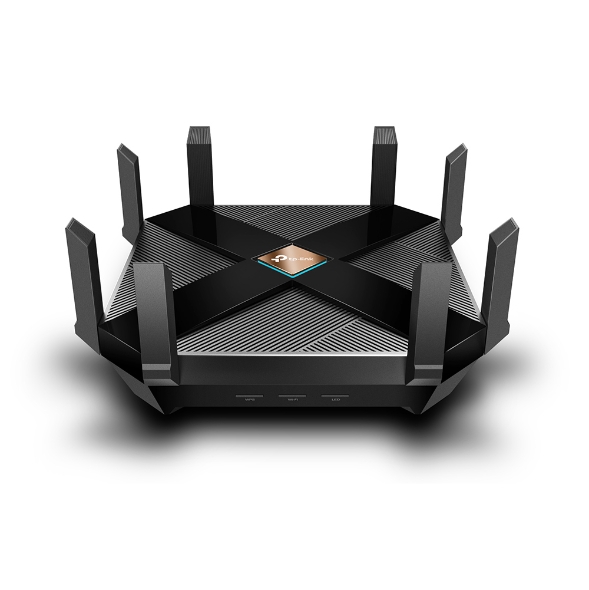
14. TP-Link Archer AX6000 review

TP-Link Archer AX6000


What is 802.11ax Wi-Fi

Fast. High Efficiency.

Gaming, 4K/8K streaming, smart home devices, and AR/VR all compete for network resources, creating lag and crowding your network. To solve this problem,

802.11ax (also known as Wi-Fi 6), a next-genhigh-efficiency Wi-Fi standard, was created. Now, you can simultaneously connect more devices and enjoy the optimum speed for each of them.

AX Wi-Fi  aims to enhance wireless network performance by boosting speed and responsiveness better than MU-MIMO . The key improvement is called orthogonal frequency division multiple access (OFDMA) which increases connection capability in a single 20MHz channel from 52 (AC wireless) to 234 and also uses band steering to automatically ensure that less-crowded bands are used. The new Samsung Galaxy S10 smartphones are currently fully compatible to use this service. 

This system gives good speeds while playing online PC games and watching YouTube on two old Android tablets, however its expected that performance will drop off with Mesh systems and Wi-Fi extenders.  TP-Link’s Archer AX6000 achieves good speeds and will surely compete with mesh networks modem setups.

Its got a  1.8GHz quad-core processor on-board for its serious computing needs. The AX6000 has eight Gigabit Ethernet ports. and the WAN port supports 2.4 Gbps connections. It supports  two USB 3.0 ports: Type-A and Type-C. 

It also features built-in Trend Micro Security features, which offer antivirus and family filtering options including the ability to set usage limits and bed times for different users across multiple devices.

At $499 it’s not cheap, but it’s got all the important features, looks good and performs so well that you likely won’t need to buy other networking equipment for a long time to come.

Price Range: $499 | WWW.TP-LINK.COM/AU/


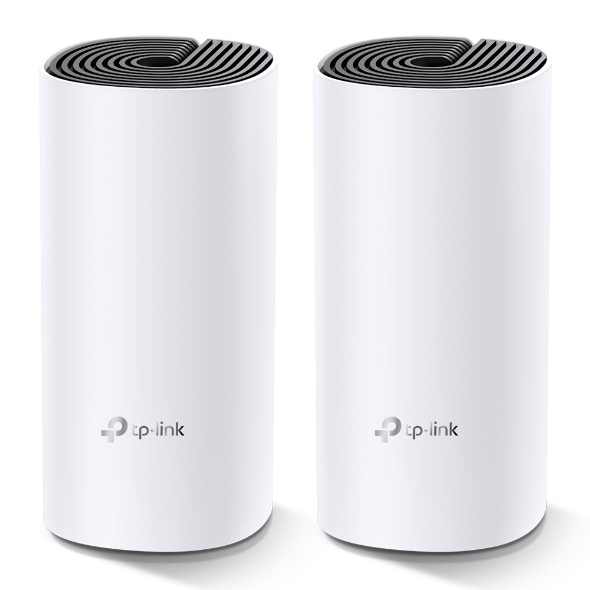
15. TP-Link Deco M4 mesh

TP-Link Deco M4 mesh (Double Kit)

Deco uses a system of units to achieve seamless whole-home Wi-Fi coverage — eliminate weak signal areas once and for all. TP-Link has launched the new mesh WiFi system, called Deco M4 or Deco M4R. Devices automatically switch between Decos as you move through your home for the fastest possible speeds

Additional Features:

Setting up is simple via the Deco app for this mesh system, it walks your through setting up the network, setting the password, updating the firmware and adding the second node. The app is slick, responsive and intuitive to use. 

  • A Deco M4 two-pack delivers Wi-Fi to an area of up to 260 square metres. 
  • Deco M4 provides fast and stable connections with speeds of up to 1167 Mbps and works with the major internet service provider (ISP) and modem.
  • Deco can handle traffic from even the busiest of networks, providing lag-free connections for up to 100 devices.
  • Parental Controls limits online time and block inappropriate websites according to unique profiles created for each family member.

This can be handy, you can switch the LED lights off and turn nodes into access points.  It’s also has Amazon Alexa and IFTTT smart device compatibility which is a bit future proof. 

The AC1200 Wi-Fi moniker refers to the maximum theoretical throughput of 867Mbps on the 5GHz band plus 300Mbps on 2.4GHz. TP-Link says it can manage 100 different devices but not at the same time. 

Cons for this mesh system 

  • It does not offer a web-based interface for administration
  • It has fewer features than other Deco systems, to make up for the price difference
  • It is not able to fully utilize 1 Gbps internet connections

In summary, this is about as good as an AC mesh system gets. The advanced features will definitely  attract some but the price can be a deterrent. At $230 for a double-pack it’s the cheapest mesh on the market. 

Price Range: $230 | WWW.TP-LINK.COM/AU/

16. ASUS RT-AX88U

ASUS RT-AX88U

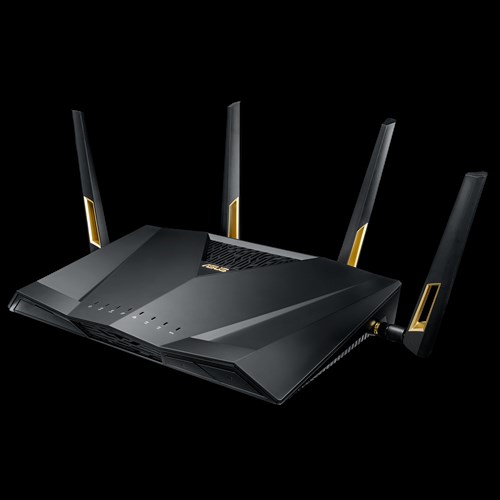
Asus’ new RTAX88U design makes it look like a racer car just about to kick into gear and leave the rest behind and that is not far from the truth with its specs and features we will look at below. Its got a angular black chassis, four large antennae and gold detailing that makes its presence known.

RT-AX88U

This device has got a impressive feature list with eight gigabit Ethernet plus two USB 3.1 ports and integrated malware and family protection tools that are provided by Trend Micro. 

Additional Features:

  • Next-Gen WiFi Standard – 802.11ax WiFi standard for better efficiency and throughput.
  • Ultrafast WiFi Speed – 6000Mbps WiFi speed to handle even the busiest network with ease.
  • Wider Usage and More Convenience – 4 antennas + 8 LAN ports to support more clients at the same time.
  • Commercial-grade Security – AiProtection Pro, powered by Trend Micro™, blocks internet security threats for all your connected smart devices.
  • Better Partner with Mesh System – Compatible with ASUS AiMesh WiFi system for seamless whole-home coverage.

Gamers should be happy with this one. Its got detailed QoS settings which allow you to set the priority of different types of apps (gaming, VoIP, streaming etc). It also boasts more-specific ‘Game Boost’ QoS integrations including WTFast for maximising MMO game stability and LAN Boost which (also) promises to prioritise game traffic performance. 

Future proofing includes web savvy features like VPNs, Alexa plus IFTTT integration with other smart devices.

 At $569 it’s not cheap and at the higher end of price spectrum for  what it provides.

Price Range: From $569 | WWW.ASUS.COM/AU

Speed of your internet and WIFI

The speed of your internet to your house connection and within your house will depend on a few different factors as given below.


Your internet connection

Is your connection directly fibre to your house or does it convert to copper line before it reaches your house? Is your internet delivered via cable wires? There are different types of connections FTTN, FTTB, FTTP, FTTC and HFC. Generally, if you have fibre right up to your home or via cable you will get good fast speeds.

Copper line connection

If you have the last bit of your internet connection to your home via copper lines, then where is the nearest Fibre box located where it converts to copper and where is the nearest telephone exchange will also determine your internet speeds.

Your modem/router Wi-Fi speeds

Once the internet reaches your house you should also have a good modem router to distribute the internet via good Wi-Fi speeds. If you got a good speed plan your modem should have good Wi-Fi distribution speeds for around the house. Typically, most modems can distribute Wi-Fi on older 2.4 ghz and 5.0 ghz (faster) channels. Check the speeds 300 Mbps will do for your house as starting speeds.

Normally most providers offer a 8 Mbps, 25 Mbps, 50 Mbps and 100 Mbps plans. I would suggest stick with the 50 Mbps plan for decent speeds. If you got fibre connection right to your house and the nearest exchange is near to your house, you will benefit from a 100 Mbps plan.

Coverage of your Wi-Fi signal

Coverage if the Wi-Fi signal used to be a problems with most traditional old modems. The signal got patchy around the front yard or backyard. The new modems do a good job of getting that WIFI signal out there.

Wifi & Speed - 2.4 ghz vs 5 ghz

Most modem routers or routers have two different channels through which they distribute your Wi-Fi across the house. The 2.4 GHZ channel and the 5GHZ channel, typically the 2.4 GHZ can deliver slower speeds than the 5 GHZ channel.

Australian standards

Make sure you get a modem made by a local known company and you should be right. It will cover all Australian standards. Some well-known local brands are Netgear, Netcomm, Billion, Tplink.

Speed measuring tools

Those crafty little buggers advertise speeds like they are taking you on a free trip to the moon, but do they deliver?

Well you can surely find out. These speed measuring tools below will measure how fast your internet is.

  1.   ooklahttps://www.speedtest.net/ – Speedtest by Ookla is one of the popular speed testing websites  whihc has been around for a while now. Just click the button and it will test your speed. You can also change the server locations to test speeds from different locations.
  2. oz broadbandhttps://www.ozspeedtest.com/ – This website  does  what its intended to do and tests both download speed and upload speed of your Internet connection, whether it be NBN, ADSL, ADSL2, ADSL2+, Cable, 3G, 4G, Wireless or Satellite.
  3. telstrahttps://speedtest.telstra.com/ – This was built for measuring  your telstra internet speed, but can measure pretty much any internet connection for speed.


Its worth noting with speeds for internet ,  The Netflix ISP Speed Index is a measure of prime time Netflix performance on particular ISPs (internet service providers) around the globe, and not a measure of overall performance for other services/data that may travel across the specific ISP network.

This  Asia-pacific Australia netflix  page here shows some of the fastest internet speeds for Australia according to netflix servers and for March 2019, it ranks Telstra , Optus and Iinet  on no#1 , 2 and 3 positions for best speeds.

Gadgets For 

Below are gadgets that can extend your wifi within your home or distribute your internet via existing electrical power-points so that  you can used a wired connection rather than wifi.

Wifi extender

Then Wi-Fi or internet coverage within your house is important. Most new modems have good coverage and will mention this on the box if they can cover a multi storied house. If your existing modem router does not sufficient coverage then you can add a WIFI extender. A Wi-Fi extender can also enable  you to get coverage to your front yard and backyard  so that you can connect to an outdoor tv or Wi-Fi music streaming

The Wi-Fi extender which will pick up your router’s Wi-Fi signal, amplify it, and rebroadcast it. They come in both desktop and plug-in variations, and are relatively easy to install. It is recommended to get a extender of the same company brand of your modem or router to get a better seamless experience.

Power line inverter
We all agree that Wi-Fi coverage is getting better with new technology, but you still cant beat a wired connection stability. If you don’t know about powerline inverters, then this is a good way to get wired internet to your tv or Foxtel box/internet device via a ethernet cable. You don’t need any extra wiring.

How powerline inverter works?

You will get two powerline plugs. You plug one ethernet cable from your modem to your powerline adapter plugged into a power point. What this does is distribute your internet into all the power sockets in your home. You just need to plug in the second powerline adapter into any other power socket in your home and you can connect to the 8nternet.



How to set up your router

The NBN Co states that your router can be one of the most important factors that can make or break your NBN plan, saying a decent router can “transform your experience into something spectacular”.

  • iiNet advises that routers should be equipped with at least 802.11n or 802.11ac Wi-Fi for an NBN service.
  • Devices manufactured before 2009 – potentially only featuring the older 802.11g or b signals – are incapable of supporting the NBN speed capability.


  • Optus: Optus has stated in its Critical Information Summary that it will provide a Wi-Fi modem at no extra cost, while a fee of $40 will apply if you upgrade to an AC modem – one that’s likely capable of gigabit speeds.
  • Telstra: Telstra includes a Gateway modem on 24 month plans. The Gateway modem comes with 4G connectivity, which can be used as a backup in case your NBN connection falters or for instant internet connectivity.
  • iiNet: An iiNet-branded WiFi modem is included on 24 month contracts, while you will need to pay extra for one if opting for a month-to-month contract.

Getting Technical

Below are some Questions and answers (Q &A)  regarding modem, NBN and connection related questions



HFC connection modem

For a HFC connection you can use the Arris cable modem to connect to your internet. Other modems that you can get are TP-Link C3150, Asus RT-AC68U , $229 or the Netgear Nighthawk R7000 for $220.

If you got a FTTP connection all you will need is a router, don’t need a modem. Above routers for HFC should work for FTTP connection too.



FTTC vs FTTN for Modems

If you got a FTTC connection or a FTTN connection the modem can be the same as they both use your existing copper wire and phone point. You will need a vdsl modem for both these connections.

However, a FTTC connection will have a NTD box directly outside of your place by the kerb instead of having a node down the street somewhere.



Cant connect to Samsung or LG tv over 5GHz

Well you got a brand-new modem boasting 5GHz transfer, but find out that your Samsung or LG Tv or device can’t receive your 5GHZ signal.

It’s Quite common!

Your TV and smart devices came with only 2.4GHz band built in compatibility so it won’t be able to connect over 5GHz band in spite of updating your tv to the latest firmware update. The good thing is the 2.4GHZ will work as good as a 5GHZ band.



How to set up 5GHZ in your house?

You need to set up 5GHZ in your modem or router. Your modem device will need to be 5GHZ capable to set it up.  You will need your modem or router login/pass to go to the modem admin settings and turn 5GHZ on.

Refer to your modem brand website or provided setup instructions in box to login to your modem admin settings. Once you set it up properly, if your tv or smart device is 5GHZ capable then you should be able to connect via 5GHZ Wi-Fi SSID. Tip: name the 5GHZ SSID connection starting with letters 5G to find it on your Wi-Fi list.

The old 802 b/g/n vs 802.11ac VS the new 802.11/a/c/n – What’s the difference between the Wi-Fi standards?

The WIFI distribution bands and frequencies b, g, n, ac… wireless standards haven’t had the most logical of alphabetical progressions

Amon the newer announcements first 802.11n was launched then the Wi-Fi Alliance certified the ‘802.11ac’ standard, paving the way for the mass roll-out of ‘wireless ac’ devices. Like past Wi-Fi standards – 802.11ac is backwards compatible with 802.11b, g and n.

As time passes this standard will be built into routers, laptops, tablets, smartphones, televisions and much more.



What is the range of the Wifi in 5Ghz and 2.4GHZc channels?

To differentiate between these two frequencies, you will need to take the range (coverage) and bandwidth (speed) that both bands provide.

The 2.4 GHz band provides a longer-range coverage(20–30Ft) but transmits data (WIFI) at slower speeds. The 5 GHz band provides less range coverage but transmits data at faster speeds.

The range is lower in the 5 GHz band (10–15 ft) because higher frequencies cannot penetrate solid objects, such as walls and floors. However, higher frequencies allow data to be transmitted faster than lower frequencies, so the 5 GHz band allows you to upload and download files faster.



Is 5GHZ band better for distributing Video via WIFI than the 2.4GHZ?

With streaming via wifi, the size of the file doesn’t matter, only the data rate matters as you are not trying to transfer the whole thing as fast as possible, you are only to keeping up with the demand.

In the above statement makes senses, if you got a 4KTV it would make more sense for your TV to have 5GHZ band compatibility. The 5GHz spectrum is normally used with the 802.11ac standard on your router modem.

802.11ac Speed & Range

Learn more below  about Wifi speeds, ranges and  internet distribution technology

WIFI SPEED

SPEED: 1.3 gigabits per second (Gbps) is the speed most commonly reported with the 802.11ac standard. This translates to 166 megabytes per second and it is much quicker than the 450Mbit per second (0.45Gbps) speeds quoted on the highest performing 802.11n when it was rolled out.

Modem Router Range

RANGE: The 802.11ac standard lives entirely in the 5GHz spectrum. They are some rare modem/routers that broadcast 802.11n in 5GHz as well as 2.4GHz.

The 5GHz signals do not actually broadcast as far as 2.4GHz signals. The 5GHz is also good to support the faster speeds of wireless ac.

Distribution Standard

Beamforming: The other factor is that the 802.11ac makes ‘beamforming’ a core part of its spec. Rather than throw out wireless signal equally in all directions like standard frequencies do, WIFI with beamforming detects where devices are and intensifies the signal in their direction(s) which can be good for WIFI distribution.

Mesh technology for Modems

Mesh: Wirelessmesh networks often consist of mesh clients, mesh routers and gateways. Mesh networking is a type of network in which a device (node) transmits its own data as well as serves as a relay for other nodes. Mesh WiFi or Whole Home WiFi systems consists of a main router that connects directly to your modem, and a series of satellite modules, or nodes, placed around your house for full WiFi coverage. They are all part of a single wireless network and share the same SSID and password, unlike traditional WiFi routers

Acronyms

    1. NBN – National Broadband Network
    2. VDSL – Very High Bitrate Digital Subscriber Line
    3. ADSL – Asymmetric Digital Subscriber line
    4. Mbps – Megabits per second (1,000 kilobits of data per second)
    5. LAN – Local Area Network
    6. WAN – Wide Area Network
    7. Gbps – Gigabits per second
    8. HFC – Hybrid Fibre Co-ax
    9. SSID – Service Set identifier
    10. Beamforming – Signal processing Technique
    11. 4k – Ultra HD covers 4K (also called 2160p)
    12. MIMO – Multiple Input Multiple Output
    13. NAS – Network Attached Storage
    14. WPS –  Wi-Fi Protected Setup

"Ref

Australian standards NBN – https://www.legislation.gov.au/Details/F2018L00814

NBN co Builder guidelines – https://www.nbnco.com.au/develop-or-plan-with-the-nbn/new-developments/design-build-install/cabling

Post originally published in April 2019

Filed Under: Australia, Gadgets, Internet, Review Tagged With: Broadband, Electronics, ISP

How technology is changing the property rental market

January 28, 2020 by admin Leave a Comment

property markets australia Reit

Technology has had a huge impact on the rental market over the past few decades. This has had a mostly positive impact on landlords, real estate agents and tenants alike. Here are some of the ways the whole rental market has changed.

Apps, Apps and More Apps

There’s an app for everything and the rental market is no exception. Mobile users use apps for their property rental search. All of the major real estate portals have their own free apps on iOS and Android. Some of these apps have better features than the desktop version of their website, giving renters a better experience.

But it doesn’t end there. Tech-savvy rental agencies have their own apps that allow faster than ever communication between the agent, landlord and tenant via text. It also allows for 24/7 communication, rather than having a tenant call up the agency and someone manning the phones. Cutting out the middleman allows for lower rental property management fees to the owner.

Better Data

With the numerous data sources that both the public and agents can now access, people can make better decisions. This includes comparing the rental prices of nearby similar properties, as well as historical rental data in the area. This helps price properties appropriately and fairly, but well enough so that it will fill quickly, reducing vacancy rates.

Digital Photography

There are a lot of uses for digital photography for rental properties. The obvious being in the initial property listing, but where it gets really convenient is for capturing any issues with the property. For example, digital photos are used for property condition reports, where any existing damage to the property can be documented, recorded and easily shared. The same goes for any new damage or issues that the tenant needs to share with the property manager. This allows for any repairs to be organised more quickly.

The Application Process

When you are applying for rental properties, different digital platforms make it easier for you to apply for properties quickly. For property managers, you can also sort applicants easily and have access to tenancy databases to check if they have a bad history.

New Types of Renting

Whilst short-term holiday rentals have always been around, there is no denying how much Airbnb has influenced this type of property investment. The main difference is that now any property owner can rent out their own home or an investment property themselves. It’s now so easy to advertise your property whenever you want to on various websites. Advertising across as many as possible is great as it helps you reduce your vacancy rate.

Home Security

In terms of locks for rental houses, there are a lot of options that don’t involve keys. Fingerprint locks might be good for long-term rentals. Keypad locks for Airbnb and short-term rentals. Security alarms and security cameras can be a good deterrent to property damage from intruders. Better security also makes your insurance cheaper for both renters and landlords.

Better energy efficiency

Many household items have become more energy efficient. Fitting out any property with energy-saving light bulbs, solar panels, solar hot water and modern kitchen appliances can keep bills down. This is important to some people and also good for the planet.

Remote Viewing

For high-end properties, 3D tours and video tours are becoming increasingly popular for rentals, not just premium for property sales. Augmented reality is also possible and trendy for promoting properties online. These all make it easier for people to make a decision if they are moving from interstate or overseas.

Online Payments

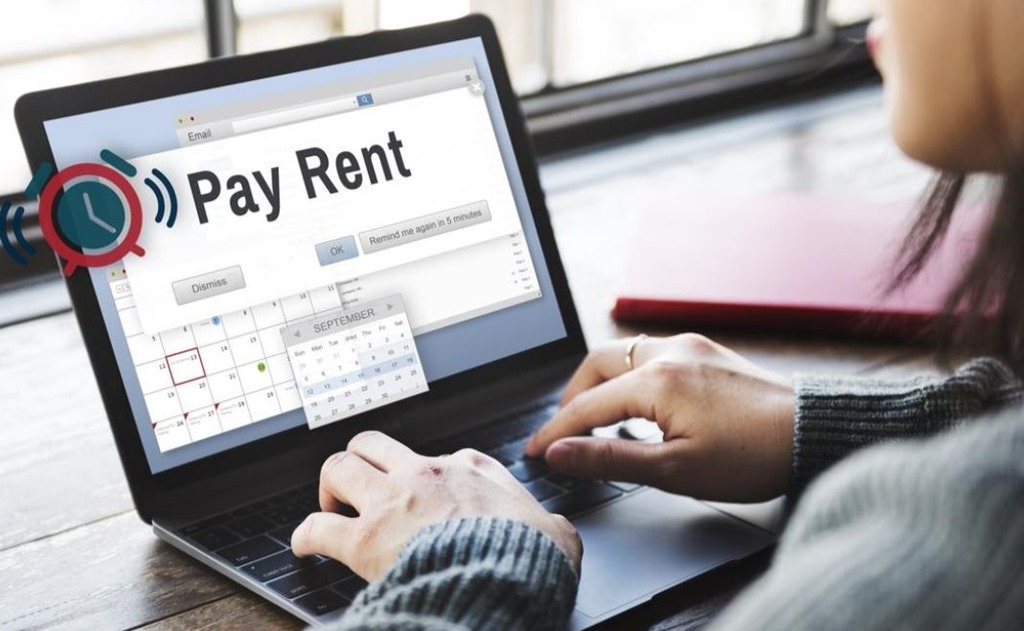
Internet banking and direct debits have made it easier than ever to pay your rent on time, bills and transfer money for rental repairs. It’s much easier than the old days of having to manually pay your rent every time it was due.

Overall, renting has become easier and more streamlined than ever before, but be warned – your behaviour as a renter is now more important than ever before. Records of bad tenancy can haunt you forever.

Filed Under: 2020, Accounting, Australia, Finance Tagged With: apps, Digitech, Software

Why You Should Use a VPN for Trading and Buying Bitcoins

September 25, 2019 by admin Leave a Comment

crypto currency australia and annonymity

Cryptocurrencies are a growing trend in the global financial market. But as much of a novelty as the technology still may be to some, there are equally as many pitfalls waiting for those who approach cryptocurrency trading too casually. Since the hackers are always on the lookout for easy prey, it’s your objective to not make yourself an easy target by learning about cybersecurity threats that are out there.

Whether you’re using a VPN Australia or the one from another country, this is an invaluable tool in your overall arsenal. In today’s post, we’ll be listing the reasons why you should consider one if you haven’t already:

1. Man-In-The-Middle attacks

One of the cleverest ways hackers can steal your Bitcoins is throughMTM attacks. In practical terms, this is when they trick you into sending the coins to their address instead of the one belonging to the intended recipient. Keeping your eyes peeled won’t be enough since certain types of malware can sneak into your device if you’re careless enough regarding what links you click online or the kind of networks you’re connecting to.

If a person is connected to the same public Wi-Fi network as you, they can install malware on your device without you knowing. Using a VPN will shield you from such attacks. This is because everything you send and receive when having it enabled is placed inside an encrypted tunnel that’s safe from those trying to intercept it. Another benefit of using a VPN is that your IP will remain hidden, which makes you much more resilient against hackers in general.

2. Online wallet safety

While you’re holding onto the Bitcoin you’ve purchased, a cryptocurrency wallet is a necessity, whether you like it or not. But if you’re not careful and don’t protect it well enough, its contents can fall into the wrong hands before you know it.

Regardless of the type of wallet you’re using, you’re subjecting yourself to cryptocurrency theft. While it’s quite a challenge to snatch Bitcoin off of a hardware wallet through digital means, online wallets are a different story. Even though you may choose a strong password to protect them, you’re still dependent on how secure the platform is. So if you’re going with the online variant, it sure doesn’t hurt to do your due diligence and stick to reputable providers. And never log in to any of these without having a VPN enabled. This is necessary to keep your login credentials safe from being intercepted.

3. Government surveillance

Lots of Bitcoin traders are confident about their anonymity. But the fact of the matter is that Bitcoin ispseudonymous at best – the rest depends on how smart, educated, and careful you are when initiating any kind of transaction. But no matter how much effort you put into it, there’s another enemy on the horizon – your ISP. One thing’s for sure: they know every single website you’ve ever connected to. This is problematic not only from the perspective of protecting your privacy. Depending on the laws in your country, the government can come knocking on their doors. And if ISPs are obligated to forward your data to the authorities – there goes your privacy.

facebook bitcoin register

Fortunately, the answer to this problem is using a VPN. Yes, not only does it keep your web traffic hidden from would-be snoopers, but also from your ISP. If being a thorn in the foot of government surveillance sounds in any way appealing to you, this is the route to take. After all, they have no business examining it, nor should you let them. By using a VPN, what you do online will be left a secret safely kept between you and the server you’re connecting to.

Conclusion

As is evident from the points made above, using a VPN is the only safe way to trade cryptocurrencies online. Without one, you’re subjecting yourself to so many risks – the kind that are not worth taking. This is especially true since most modern VPN providers can offer you a monthly subscription rate that will set you back for a measly $3. Clearly, the risk/reward ratio is in favor of staying safe and taking them up on their offer.

Filed Under: Australia, Internet, News, Technology News Tagged With: Bitcoin, Technology education, VPN

3 tricks to reset your forgotten windows password

April 23, 2019 by admin 5 Comments

It happens to everybody at some part of the time. You lose your laptop or a computer password, and now you are locked out of it. This can become quite frustrating as you are unable to gain access back into your windows computer which has important files on it.

Fortunately, there are many options to get back into your desktop computer or laptop with custom paid software and also some free options available. Most of the available software normally works on all versions of windows from windows 10 to windows XP.

Majority of the operating systems on PCs in the world run some form of Windows, and we’re assuming you’ve got a Microsoft-based computer.  Unfortunately, Microsoft won’t help you if you have lost your password – it’s their security policy. There are tricks and methods to unlock your pc.

Below we list some of the options available to you if you find yourself in such a situation and need to unlock your computer again

[ninja_tables id="6390"]

3 NEW UNLOCKING SOFTWARE  BELOW (UPDATED 2020)

  1.  

the zapper australia

Get  the zapper software >> here on Amazon

2.


CD disk for recovery of password

Get the recovery disk >> here on Amazon

3.


win recovery USB

Get The WIN recovery USB >> over here on Amazon

Use Your Windows 10 Password Reset Disk


USB stickUnfortunately for this to work, you should have done this before losing your password, and if you were proactive and done it before, then you can easily use this Windows 10 password reset disk that you created to unlock your PC.

The Windows 7 or 10 password reset disk is a disk you can create for free using your existing Windows computer. This acts as a backup forgotten password disk for password recovery when you lose your password on your computer either.

If you don’t already have it, I suggest once you get back access using one of our other methods below – make one immediately. Instructions here.

Reset Your Win 10 With This Free Trick


reset itEverybody likes free. And there is a way to reset your Windows 7 or 10 passwords with nothing but the tools and some skills you will need to learn as we go. This is an easy trick that anyone can pull off with a little bit of understanding and perseverance for the not, so tech minded.

It involves having to boot from a windows disc or flash drive and use your PC’s Command Prompt a few times.

See our – How to Reset a Windows 10 Password for a complete tutorial.

Given the fact that you have forgotten to make a password reset disk or an administrator account without password on your computer, this free option will be the best solution if you are on a budget and need a solution.

There are some other similar free options which need some technical skills as well like using the Emergency Boot CD – The EBCD (Emergency Boot CD) (fix unbootable computers and recover data from them) or the Offline NT Password & Registry Editor (a utility that enables users to overwrite their Windows SAM file). These two utilities will also require using some command line codes.

Our picks of top 3 recommended password recovery software

"Go

Reset Password Pro

(Recommended)5 stars

We recommend this software because it supports all password recovery for windows versions up to windows 10 and..

  • Its easy to use
  • Supports Windows 32 bit as well as 64 bit
  • Accepts credit card and paypal payments
  • Covered by Clickbank Guarantee
"Go
"Ophcrack"

Ophcrack supports Windows 8, Windows 7, Windows Vista, and Windows XP. Not so much with with Windows 10 passwords.

Offline NT Password & Registry Editor

Offline NT Password & Registry Editor works on 64-bit & 32-bit versions of Windows 10, Windows 8, Windows 7, Windows Vista, and Windows XP PCs, and it reset the passwords immediately without a problem.

Reset Windows 10 Password -FREE

Guide – to reset administrator password of Windows 10 without any software.( <– Video + tutorial)

  1. Boot from the Windows 10 DVD. Make sure that your PC setup is configured to boot from a DVD and that UEFI and Secure Boot are disabled.
  2. Press SHIFT + F10 to open a command prompt.
  3. Check in which drive your windows is installed as in the  video (diskpart command)
  4. Replace the file utilman.exe with cmd.exe as shown in video. Before you do this, you should make a copy of utilman.exe so that you can restore it later.
  5. After you have replaced utilman.exe successfully, you can remove the DVD and restart your Windows 10 install.
  6. On the Windows 10 sign-in page, click the Utility Manager icon
  7. As we replaced the Utility Manager with the cmd.exe, a command prompt should open now. Don’t worry about the error message.
  8. Used command line as in video to reset administrator password and close command prompt, now you can login
"Go

Password Resetter

The website is not as up-to date as the software, but the software does the password recovery for windows  computers.

Quick features

  • It supports Windows Vista, XP, NT, 2000, 7 and also the latest version, Windows 8.
  • Rated as safe to download by both Norton and McAfee
  • Two versions available corporate and personal edition

Why do you forget your password? ( +Solutions)

We forget passwords because we are human. While most people tend to remember their passwords, there are occasion’s when you can forget them.  You can forget your password for many reasons – some of the reasons are listed below

  • You keep changing their passwords on a regular basis for security and forgot the last one
  • You have not used their laptop for a while and lost the password
  • You did not write down your password (not recommended anyway)
  • You made a complicated long-winded password and now can’t remember it

If you forgot your Microsoft account password, follow these steps.

Solutions:

Write it down

Write it down only if you have to, and if you do make sure it’s kept in a safe place – that you can remember.

Codeword your password

Save your password somewhere, but write it down in code that you can decipher easily looking at the word you have written down Eg if your password  is hpotter32#  and you like harry potter –  you could write down wizard32# in your diary  if that would jog your memory to the actual password hpotter32. While these are risky and not recommended methods as solutions, it is for people with not so good memory and who tend to lose it much more than others.

Lock it in your bank

If you have paid for a sake locker in your bank, write it down on a piece of paper and keep it there with your family jewels J

* The Windows® logo, Windows NT, the Windows NT logo, Windows 2000, the Windows 2000 logo, Windows XP, the Windows XP logo, Windows Vista, the Windows Vista Logo, Windows 7, the Windows® 7 logo, Windows 8 and the Windows 8 logo are all registered trademarks of Microsoft Corporation in the United States and other countries. This site and the products and services offered on this site are not associated, affiliated, endorsed, or sponsored by Microsoft Corporation., nor have they been reviewed, tested or certified by Microsoft Corporation.

Not an endorsement

Please note, by listing the above methods and software tools we’re certainly not advocating hacking in any sense. These tools are recommended to be used only if you lost your password to your own laptop or pc and at your own risk.

In fact, we strongly suggest if you don’t have the required skills you should rather take your computer to the local IT guy or hire someone to come do it for you.

Hope one of the methods above help you get back access into your computer. If you did run into any problems trying the recovery methods  do send the software provider an email  via contact page or then leave a comment here and I can help  you if i can.  Hope you don’t  fall into this situation again,  but just in case I would bookmark this page 🙂

Why I chose hostgator for blog hosting

by admin | Jun 4, 2022 | 2010, Australian wordpress hosting, Done Deals, Featured, web hosting

Choose from some of the best Hostgator Hosting plans on the internet for 2016 while choosing from the hatching plan, the baby plan and the business plan with a price affordable to you

« Older Entries
Next Entries »

Why I chose hostgator for blog hosting

by admin | Jun 4, 2022 | 2010, Australian wordpress hosting, Done Deals, Featured, web hosting

Choose from some of the best Hostgator Hosting plans on the internet for 2016 while choosing from the hatching plan, the baby plan and the business plan with a price affordable to you

« Older Entries
Next Entries »

Why I chose hostgator for blog hosting

by admin | Jun 4, 2022 | 2010, Australian wordpress hosting, Done Deals, Featured, web hosting

Choose from some of the best Hostgator Hosting plans on the internet for 2016 while choosing from the hatching plan, the baby plan and the business plan with a price affordable to you

« Older Entries
Next Entries »

20 Black Friday/Cyber Monday Deals for Web professionals and more

by admin | Nov 26, 2013 | 2013

It’s a good idea to get the black friday and cyber monday deals now while the offers are on, rather than when the prices are back to normal and you are likely to be paying double the price. The biggest discounts for Australians and bloggers like me on Black Friday are things like software, wordpress themes and web hosting, you can lock in savings from anywhere between 50% to 75%.

« Older Entries
Next Entries »

Filed Under: 2018, Asus, Australia, Review, Software Tagged With: Internet, Technology, Windows 8

  • « Go to Previous Page
  • Page 1
  • Page 2
  • Page 3
  • Page 4
  • Page 5
  • Interim pages omitted …
  • Page 17
  • Go to Next Page »

Primary Sidebar

Recent Posts

  • 2026 – Step-by-Step Guide to Building Your Site With AI
  • Underwater Drones for Recording Video and Taking Pictures
  • Why I chose hostgator for blog hosting
  • Top 10 Software Programs For Your Windows PC
  • What you should know before investing in Cryptocurrency and bitcoin

Recent Comments

  1. google on Wacky new underwear invention 2b released by Durex
  2. Patrick McCormick on How to secure your desktop and laptop with antivirus software
  3. JJ on 20 Top brands with affilate programs to make you money in 2019
  4. JJ on This WPengine Genesis Pro Deal Will Give You 35 Studiopress themes
  5. Lisa Gomes on 16 Ways to Make Money Online Working From Home

Archives

  • September 2026
  • June 2022
  • February 2022
  • July 2021
  • May 2021
  • April 2021
  • March 2021
  • November 2020
  • September 2020
  • August 2020
  • July 2020
  • June 2020
  • May 2020
  • April 2020
  • March 2020
  • February 2020
  • January 2020
  • December 2019
  • September 2019
  • August 2019
  • July 2019
  • June 2019
  • April 2019
  • March 2019
  • February 2019
  • January 2019
  • December 2018
  • November 2018
  • October 2018
  • September 2018
  • July 2018
  • June 2018
  • April 2018
  • February 2018
  • January 2018
  • December 2017
  • October 2017
  • September 2017
  • July 2017
  • June 2017
  • May 2017
  • April 2017
  • March 2017
  • February 2017
  • January 2017
  • December 2016
  • November 2016
  • October 2016
  • September 2016
  • August 2016
  • July 2016
  • May 2016
  • April 2016
  • March 2016
  • February 2016
  • January 2016
  • December 2015
  • November 2015
  • October 2015
  • September 2015
  • August 2015
  • July 2015
  • June 2015
  • May 2015
  • March 2015
  • February 2015
  • January 2015
  • December 2014
  • November 2014
  • October 2014
  • September 2014
  • August 2014
  • July 2014
  • June 2014
  • May 2014
  • April 2014
  • March 2014
  • February 2014
  • January 2014
  • November 2013
  • October 2013
  • September 2013
  • August 2013
  • July 2013
  • June 2013
  • May 2013
  • April 2013
  • March 2013
  • February 2013
  • January 2013
  • December 2012
  • November 2012
  • October 2012
  • September 2012
  • August 2012
  • July 2012
  • June 2012
  • May 2012
  • April 2012
  • March 2012
  • February 2012
  • January 2012
  • December 2011
  • November 2011
  • September 2011
  • August 2011
  • July 2011
  • June 2011
  • May 2011
  • April 2011
  • March 2011
  • February 2011
  • January 2011
  • December 2010
  • November 2010
  • October 2010
  • September 2010
  • August 2010
  • July 2010
  • June 2010
  • May 2010

Categories

  • $heldon $ingh
  • 2010
  • 2011
  • 2012
  • 2013
  • 2015
  • 2017
  • 2018
  • 2019
  • 2020
  • 2021
  • 2022
  • Accounting
  • Adsense
  • Affiliate
  • Amazon
  • Anti Virus
  • Apple
  • Apps
  • Asus
  • Aussie
  • Australia
  • Australian
  • Australian Bloggers
  • Australian wordpress hosting
  • Banks
  • Blog-Hosting
  • Blogger
  • Blogger Tool
  • Blogger Tools
  • BloggerTools
  • BuddyPress
  • CARS
  • CDN
  • Celebrity
  • Clickbank
  • Compare
  • Computer
  • Domains
  • Done Deals
  • Ebook
  • Email
  • Facebook
  • Featured
  • Finance
  • Free
  • Gadgets
  • Google
  • Gpost
  • Guide
  • Hackers
  • Hosting
  • India
  • Internet
  • Ipad
  • Kindle
  • Laptop
  • Make money blogging
  • Makemoney online
  • Marketing
  • Melbourne Cup
  • Movies
  • Netbook
  • Network
  • News
  • Online betting account
  • PC
  • Review
  • Search
  • SEO
  • sheldon singh
  • Software
  • Solution
  • Sports
  • Subscribers
  • Taxes
  • Technology News
  • Themes
  • Top 10
  • Tutorial
  • Uncategorized
  • Video
  • Wacky
  • web hosting
  • Website Review
  • Wierd
  • Windows
  • wordpress
  • Wordpress 3.0
  • Wordpress 3.1
  • wordpress themes
  • World cup
  • Wp Answers
  • WP Turbo
  • WPMU

Footer

Technology

With an emphasis on technology, webdesign, and gadgets, our blog features articles related to these categories.

Browse our archives.

Privacy

Your privacy matters. We collect only essential information to ensure your data stays safe and confidential.

Learn more about Privacy.

Videos

Explore our video library designed to teach, inspire, and guide you. Dive in and discover content that brings ideas to life..

Check out our videopage.

Copyright © 2026 · Genesis Sample on Genesis Framework · WordPress · Log in

  • Resources
  • Privacy policy
  • Website Review
  • Subscribe