• Skip to primary navigation
  • Skip to main content
  • Skip to primary sidebar
  • Skip to footer
tech blog au

Digital Grog — Australia’s Tech, Gadgets & Digital Life Unfiltered

Digital Grog is Australia’s go‑to tech blog for sharp reviews, digital trends, AI tools, gadgets, cybersecurity updates, and practical how‑tos covering the latest in Aussie technology

  • Home
  • Webhosting
    • List of WordPress Web hosts
    • Comparisons
    • Blog Hosting
  • Make Money Online
    • Clickbank
    • Affiliate Programs Australia
      • Amazon
  • Domains Australia
    • Australian Domain Names
    • Register a domain name
  • Technology
    • Technology News
      • Gadgets
      • Software
  • Guest Posts
  • About
  • Contact us

Software

PST Merge: Apt Solution for Getting All PST Files at One Place

February 24, 2016 by admin Leave a Comment

It is obvious for the employees using Outlook from decades, to possess multiple PST files with them. Since earlier the format of Outlook PST files was ANSI, the user may possess both ANSI and UNICODE PST files. Storing all these PST files in the user machine might not be problematic for the users, but it does give rise to issues when the user may require sharing all the PST files or may require transferring the files to a different machine. Thus, in order to avoid any file from being left behind, consolidating all the files in a single PST is a wise option.

PST Merge software is the solution that fits this very problem and merges Outlook PST files into one. Whether the collection of PST files is of both ANSI and UNICODE PST or only ANSI or UNICODE type PST, the software will support merging of both types of files. The resultant PST file will be of UNICODE type, which can be easily accessed in Outlook 2003 and later versions.

Quick View

Developer

MS Outlook Tools

Function

Merges multiple PST files into UNICODE PST file

Current version

3.2

Size

7.6 MB

Interface

Graphical User Interface

MS Outlook installation required

Yes

Windows version supported

8.1 and below versions

Trial version

Available for free

Features In Brief

· Merges multiple PST files and associated items like emails, contacts, etc.

· Offers three merging options- Merge, Join and Merge Contacts.

· Removes duplicate items from getting merged when option is selected.

· Excludes merging of emails residing in the deleted items folder of PST.

· It supports merging both ANSI and UNICODE type PST files altogether.

· No limitation on the number of PST files that can be merged together.

· Merge Outlook contacts exclusively with Merge Contacts option.

Versions Of The Tool

Trial Version: In order to get an idea of the working of PST Merge, it is recommended to download the trial version of the software. The trial version is completely free of cost and gives an overall idea of the working of the tool.

Licensed version: Once satisfied with its working, the user can go for the license version of PST Merge. It can be purchased from the official website at a price of $69 only.

Test Run On PST Merge

For giving a clear idea of the working of PST Merge to our users, we did a test run on the demo version of the software. The software got downloaded within a few minutes and got installed easily. The demo version has some limitations in context to the number of items that can be merged. However, the working of both trial and license version is similar in every aspect. Now let us go over the working steps of the software in detail:

1) Activation Window

Once the software is run, a window named Evaluation Version will appear before you. Since we are going for the demo of the software, we selected the Continue Demo option. In case you want to purchase the software click on Buy. If you have already purchased the License version and want to activate it, then select Activate option.

clip_image002

2) Add PST Files

The next step is to add the PST files that have to be merged. The software offers two options for adding the PST files. The first option Add Files can be chosen in case the user wants to add the PST files one by one. The second option Add Folder is opted if all the PST files reside in the same folder and the user wants to add the entire folder.

clip_image004

3) Three Ways To Merge PST Files

The software offers three options for merging the PST files. They are as follows:

· Join

The Join option combines multiple PST files whilst showing the joined PST files as different folders of the resultant PST. For example if PST1 and PST2 are joined, the output PST file will have 2 folders with the name Personal Folder [1] and Personal Folder [2] in it. The Personal Folder [1] will represent the PST1 and the entire folder structure of the file will be kept intact. In a similar manner, Personal Folder [2] will denote PST2 file.

clip_image006

· Merge

The Merge option will combine the input PST files by merging all the similar folders of the files. For example, if PST1 and PST2 files are merged, the output PST file will have only 1 inbox folder which will store all the mails of inbox folder of PST1 and PST2. The same goes with the other folders as well.

clip_image008

· Merge Contacts

Merge Contacts option as the name suggests is merging the contacts folder of the input PST files. The contacts of all the input PST files will be combined and stored in a single PST.

clip_image010

· Remove Duplicate Items While Merging

Once you have selected the option for combining PST files, the next option you will get is Remove Duplicates. The option is enabled for Merge and Merge Contacts only. It removes the duplicate items like emails, contacts, calendars, etc. and does not include them in the resultant PST file.

clip_image012

· Exclude Mails of Deleted Items Folder

If you don’t want to merge the mails stored in the deleted items folder of the PST files, and then select the Exclude Deleted Items option. This option is only enabled for Join and Merge and not for Merge Contacts option.

clip_image014

PROS

· Three variant options for consolidating PST files.

· Supports both ANSI and UNICODE type PST files.

· Option to exclude deleted mails and duplicate items.

CONS

· No option to merge selective items of the PST file.

· No preview of PST files before merging.

THE VERDICT

PST Merge is a commendable tool that comes from trustworthy sources. Based on its overall working and all the features, we would rate it as 9.7/10. Even though the software does not allow selective merging but it does enable the users to exclude deleted emails and duplicates item from getting merged. It will definitely not burn a hole in your pocket and functions really well.

Filed Under: Australia, Email, Software Tagged With: 2016, Email client, Microsoft

Movavi Screen Capture for Mac Review

February 20, 2016 by admin 1 Comment

Download this convenient screen recorder for Mac

At some point or other you’ve probably entertained the notion of recording videos directly from your Mac’s screen. It may be that there was something in particular that you wanted to capture, or it may have been that you heard about how you could record online video streams or Skype calls by doing so.

In any case – with screen capture software it is certainly possible to record video on Mac directly from your screen, and what you may not realize is that with the Movavi Screen Capture for Mac it is actually a whole lot easier than you probably ever imagined.

Intuitively Designed Screen capture Software

Mac screen capture software

Nowadays the Movavi Screen Capture for Mac is extremely popular – and a lot of that popularity is due to the fact that it is designed to make screen capture an intuitive and user-friendly process. When you use it you won’t have to worry about being confronted with complicated menus or technical settings, and in fact it should just take you a couple of clicks to record the video footage you need.

Even saving your videos is simplified with the Movavi Screen Capture for Mac’s hundreds of presets that will help you to automatically use the best possible format and video settings for any device or platform you choose. The presets support mobile devices and popular online platforms such as Facebook and YouTube – so you should easily find what you need.

Complete Control

While it is undeniable that the focus of the Movavi Screen Capture for Mac is on making it easy to record videos, it also ensures that you will have full control over your screen capture.

It will let you set up the frame rate, capture area and audio source with a few simple clicks, and you can even choose to grab sound from microphones or third party MIDI devices if you want to. On top of that there is also a feature that will let you record keyboard and mouse actions – which will prove useful if and when you want to create video guides or tutorials.

Record screen activityAfter you set up your screen capture preferences, you can manage the recording effectively with the hotkey system of the Movavi Screen Capture for Mac. Assuming you need to step away from your Mac for whatever reason, you could set a timer so that the recording stops after a certain duration.

To put it quite simply, the Movavi Screen Capture for Mac is a comprehensive and yet easy to use software – and that blend is what makes it so unique.

Regardless of whether you’re a beginner or ‘power user’, it will give you the tools that you need to record video footage from your screen according to your exact specifications.

Filed Under: Review, Software Tagged With: Apple, macbook, Screen Capture

Grab these “Free Antivirus Software” offers before they run out

January 29, 2016 by admin 3 Comments

Updated 17 November 2015 –> Go here

best antivirus security software for 2015 prices downloads trials comparison and free versions

<< — New offers  | Old post  — >>>

Yes not one but  two offers (Norton Internet security and AVG Antivirus). If you PC is not secured by a antivirus and security  software , its not to late yet , we are giving you the chance to trial these two popular security software’s on your computer for free and then you can decide if you want to buy it.

1. Norton Internet Security 2011 – 60 day trial

“Norton Internet Security 2011” is a versatile suite that includes everything you need to keep your PC safe from malware, online scams and identity thieves.A highly configurable firewall blocks external attacks, while simultaneously looking out for suspicious programs on your PC that are trying to make unauthorized outgoing connections.

Download the 60 day trial from this Link –> Free Trial Norton Internet security

free 60 day trial Norton internet security

Buy Paid Full version here – Norton Internet Security 2011 – 1 User/3 Pc

2. AVG Anti-Virus Free Edition 2011 v10.0.1136

AVG Anti-Virus Free Edition 2011 is the latest version of AVG’s popular malware detector.

At the program’s heart is a strong core antivirus engine, which monitors incoming and outgoing emails, as well as every file you access, detecting and blocking threats before they can cause any damage.

Download the “AVG anti virus 2011” from this link –> AVG Anti- Virus 2011

Free software avg anti virus

Buy Paid Full version here – Anti-Virus & Anti-Spyware – 2 Year Subscription


AVIRA Antivirus — > trial Offer

Password software video

Check out password reset guide here 

Filed Under: 2010, 2011, Done Deals, Free, Internet, Software Tagged With: Antivirus, Free, Software

Capturing Videos from a Website with Movavi Screen Capture Studio

July 16, 2015 by admin Leave a Comment

Since Movavi was discovered in 2004 the capture feature has been noted for being its pilot program. It has allowed many users within or without the professional field to use different forms of audios and videos in their desired formats. When you want to capture video from website such as YouTube or DailyMotion you can do the same with the Movavi Screen Capture Studio. Millions of people have since benefited from the videos which range from entertainment, documentaries, short clips or educational videos. There are millions of videos online and you can get some with the software so you can watch later.

The benefits of Movavi Screen Capture Studio

Ø It can record numerous types of online streaming videos. You don’t have to worry about the format of the video whether it is recorded from your Skype calls, webinars or other forms of video clips.

Ø The recordings are also done depending on the settings that you choose. Different users have different streaming preferences and so it all depends on one’s own choices.

Ø This software can record on its own. This is one of the reasons why many people like the software so much. When you want to capture video from website you can simply set up a time and let the software do the recording. Once it is done it will stop by itself.

Ø It is able to record video and audio from different sources. You can also be recording audios with the use of a microphone, headphones or MIDI devices.

Ø With the software you can perform video editing with the available built in features. This means that you can remove all the unwanted scenes from the video files. Such video cleanups enhance its clarity and quality.

Downloading Streaming Video from a Site

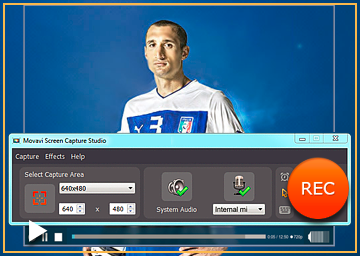
It is very simple to capture video from website with this software. Install the program and once it has finished installing run it. When the program is running you will see a yellow marking of the area that is supposed to be captured. The window size of the web video can be adjusted so that you can be able to view high definition videos. Basically the size of the web video also matters in determining how you mark your frame. HD videos will require that you play the video in a full screen mode. You will also see a green icon of the system audit so you can click it. You can also choose the “Stop capture after” option and define after how long you want your video to be captured. If you want to start recording you should click the REC button and then view the video streaming. Once you have captured your video from the internet you should click stop button and you will see the captured video on the screen for previewing. You can also click on edit tab to make the necessary changes.

It is always no fun when watching a high definition video as it takes so much time to load especially when your bandwidth is low. Movavi Screen Capture Studio helps solve this problem as it helps you in reviewing videos that are online but are otherwise not for downloading. The software does not only record the video but also any other activity that takes place on the screen. If you want to capture video from website now you have your answer.

Filed Under: PC, Review, Software Tagged With: Capture Video, Daily Motion, You Tube

How secure is your Tablet or smartphone ?

November 15, 2014 by admin Leave a Comment

With the popularity of android mobile phones and apple Iphones and tablets in the last couple of years, hackers and criminals are also shifting the focus from desktops  to smart devices. Victims of malicious software is no more just desktops pcs but also smartphones and tablets with these devices can be exploited to gather their personal information.

security for mobile smartphones and apple

Today’s smartphones are capable of doing so much more than the mobile phones of a few years ago  and this has greatly extended range of capabilities has also seen the introduction of some new security risks.

Signs that your smartphone of tablet is infected

Is your phone bill bigger than normal?

Dropping a lot of calls?

Your Android or apple device may be infected with malware.

Significant changes in your download or upload patterns could be a sign that someone or something has control over your device

City Ranking of  Malware threat in Australia

These cities are most susceptible to malware threats

The 1.Melbourne CBD ranks as the number one

2. Brisbane

3. Perth

4.Sydney

Research by internet security pioneer F-Secure reveals, amongst the suburbs, South Yarra – located just outside of the Melbourne CBD – ranks first, with 10% of all threats identified. Brisbane ranks second amongst the CBD areas in capital cities (14%), with Perth coming in at third (11%), followed by Sydney (9%).

It is said that malware and internet virus threats  are mainly due to  people  having their devices infected with malware due to downloading of  risky apps.

How to prevent malware  from stealing your data

Scan all downloaded apps

Once your smart device is infected ,the virus or malware can  take money from unwitting users who install infected apps.

Set up message barring

One common method is the app sends text messages to a premium rate number

Amongst other suburbs, 9% of malware threats were recorded in Sandgate, north of Brisbane; and 8% were identified in Merrylands, in Sydney’s west. 

Ransomware

This is a nasty virus or malware that can be difficult to get rid off. Ransomware can lock access to a device until the user pays a ransom, usually by sending bitcoins to the attacker. Internationally.

For instance, a report from Trend Micro (PDF) includes a chart that shows a large spike in the amount of total Android malware.

The vast majority of malware detected in Australia is a  type of malware that may be intrusive or inadvertently introduces privacy or security risks. Users typically accept the potential risk associated with the program, and elect to install and use the application.

Top 6 smartphone /tablet  security tips are:

1.     lock your device

2.     set up message barring

3.     use anti-theft protection

4.     scrutinise permission requests

5.     download only from trusted sources

6.     scan downloaded apps

F-Secure’s suite of award-winning security products includes F-Secure SAFE, which protects users from online threats with automatic protection, and secures online banking transactions.

A variety of paid and free security apps are available in the Google Play Android app store or apple store to help prevent apps from doing bad things

Among other popular providers here is a list of some  security software’s for you smart devices  to keep it secure and clean

app scanner for virus

1. Lookout – https://www.lookout.com/

2. AVG Mobile security

3.Trend Micro –http://www.trendmicro.com/

4. McAfee -  WaveSecure –https://www.wavesecure.com/

5.Kapersky Mobile security

6. Norton Mobile Security Lite

remove smartphone virus

*Sources:

 Australian Department of Defence http://www.defence.gov.au/defencenews/stories/2013/jan/0124.htm

 Australian Payments Clearing Association http://apca.com.au/docs/fraud-statistics/Australian-payments-fraud-details-and-data-2014.pdf

Incoming related search terms

  • security for smartphones
  • lookout security and antivirus app
  • mobile security and antivirus app
  • avg tablet antivirus security
  • norton security antivirus app
  • virus protection for smartphones
  • security smart phones

Filed Under: Anti Virus, Software Tagged With: Android, Apple, smartphone app

How to improve your internet security in this modern day and age

September 16, 2014 by admin Leave a Comment

Sometimes we get feedback from people who wonder what all the internet security fuss is about, they don’t quite understand why their tried and tested methods for online safety need to change. They haven’t had much trouble so far, so why the big push to improve internet security?

metdata vpn security

There are some tried and tested methods for good Internet security such as downloading your normal anti-virus software packages. But downloading a piece of software without knowing what it does just is not good enough anymore in this day and age – where new technology means that black hat hackers are always around the corner to steal your personal data, or 3rd party agencies are stealing your internet browsing habits.

Try and imagine a world where everything you are doing online is being looked at by someone else, to build up a personality portfolio of you – and analysed to see how much of a threat you are…Scary!

Now meta-data surveillance (the practice of looking at, and analysing personalities through browsing habits) may be good to counter black hat and criminal activities – but data surveillance also means that what you do online now, could be held against you in court in 10-20 years.

This is how internet and online security has evolved over the last few years, and this is why more recently, there have been a spate of celebrity hacks, such as the recent iCloud hacking incident.

Below we try to outline the good, the bad, and the ugly so that Internet users can make more informed security choices and understand the differences between traditional internet security and more contemporary ways to browse anonymously.

Traditional Software

Soft-ware such as antivirus, firewalls and cleaners are the three top tried and tested Internet security staples for any internet security conscious browser. As long as they are downloaded from the correct sources and are kept updated, they will serve and protect for the long term.

It’s recommended that the only time that a user needs to change any of these tools is if the provider is no longer offering support, if they are found to have misled users about their products, or if the tool no longer suits the user’s online activities and can therefore no longer provide adequate protection.

However antiviruses, firewalls and hard drive cleaners only serve to protect what is downloaded from the internet. A normal net savvy consumer would have no problems avoiding downloading these viruses. So what else can be done to protect your browsing activities?

New Must-Haves

As mentioned in the first paragraph, it may be difficult for some hardened users to give up their current methods of internet security in favour for newer means. A more modern method of protecting internet security is through VPN tools. VPNs are more than just office network access tools. They have evolved over the past decade to become one of the most useful personal Internet security tools available.

How it works is that a VPN (virtual private network) uses remote IP locations around the world to mask the users IP address. Therefore 3rd party individuals can’t ‘snoop’ or look at what you’re looking at while you’re using your VPN.

There are stories in the U.S of 3rd party ‘interceptors’ which basically intercept your unencrypted internet network in order to steal your data and browsing habits. This is becoming increasingly commonplace, to the point where if you were to buy a book (1984 by George Orwell for example) on Amazon – every single government body in the world would be able to see your purchase.

The Internet is an Increasingly Ugly Place

The first rule of security is staying on your toes. Internet security has grown too far more than what you download, but more of what you are exposing to the world.

People who are looking to steal your data isn’t now just the criminals looking to steal your bank details, or implant a harmful virus into your machine – but information agencies, looking to steal your meta-data and use it against you with or without your permission.

The above article was written by Kar, an internet security professional and ExpressVPN.com

Filed Under: Anti Virus, Internet, Review, Software, Website Review Tagged With: VPN, Websites

  • « Go to Previous Page
  • Page 1
  • Interim pages omitted …
  • Page 5
  • Page 6
  • Page 7
  • Page 8
  • Page 9
  • Interim pages omitted …
  • Page 16
  • Go to Next Page »

Primary Sidebar

Recent Posts

  • 2026 – Step-by-Step Guide to Building Your Site With AI
  • Underwater Drones for Recording Video and Taking Pictures
  • Why I chose hostgator for blog hosting
  • Top 10 Software Programs For Your Windows PC
  • What you should know before investing in Cryptocurrency and bitcoin

Recent Comments

  1. google on Wacky new underwear invention 2b released by Durex
  2. Patrick McCormick on How to secure your desktop and laptop with antivirus software
  3. JJ on 20 Top brands with affilate programs to make you money in 2019
  4. JJ on This WPengine Genesis Pro Deal Will Give You 35 Studiopress themes
  5. Lisa Gomes on 16 Ways to Make Money Online Working From Home

Archives

  • September 2026
  • June 2022
  • February 2022
  • July 2021
  • May 2021
  • April 2021
  • March 2021
  • November 2020
  • September 2020
  • August 2020
  • July 2020
  • June 2020
  • May 2020
  • April 2020
  • March 2020
  • February 2020
  • January 2020
  • December 2019
  • September 2019
  • August 2019
  • July 2019
  • June 2019
  • April 2019
  • March 2019
  • February 2019
  • January 2019
  • December 2018
  • November 2018
  • October 2018
  • September 2018
  • July 2018
  • June 2018
  • April 2018
  • February 2018
  • January 2018
  • December 2017
  • October 2017
  • September 2017
  • July 2017
  • June 2017
  • May 2017
  • April 2017
  • March 2017
  • February 2017
  • January 2017
  • December 2016
  • November 2016
  • October 2016
  • September 2016
  • August 2016
  • July 2016
  • May 2016
  • April 2016
  • March 2016
  • February 2016
  • January 2016
  • December 2015
  • November 2015
  • October 2015
  • September 2015
  • August 2015
  • July 2015
  • June 2015
  • May 2015
  • March 2015
  • February 2015
  • January 2015
  • December 2014
  • November 2014
  • October 2014
  • September 2014
  • August 2014
  • July 2014
  • June 2014
  • May 2014
  • April 2014
  • March 2014
  • February 2014
  • January 2014
  • November 2013
  • October 2013
  • September 2013
  • August 2013
  • July 2013
  • June 2013
  • May 2013
  • April 2013
  • March 2013
  • February 2013
  • January 2013
  • December 2012
  • November 2012
  • October 2012
  • September 2012
  • August 2012
  • July 2012
  • June 2012
  • May 2012
  • April 2012
  • March 2012
  • February 2012
  • January 2012
  • December 2011
  • November 2011
  • September 2011
  • August 2011
  • July 2011
  • June 2011
  • May 2011
  • April 2011
  • March 2011
  • February 2011
  • January 2011
  • December 2010
  • November 2010
  • October 2010
  • September 2010
  • August 2010
  • July 2010
  • June 2010
  • May 2010

Categories

  • $heldon $ingh
  • 2010
  • 2011
  • 2012
  • 2013
  • 2015
  • 2017
  • 2018
  • 2019
  • 2020
  • 2021
  • 2022
  • Accounting
  • Adsense
  • Affiliate
  • Amazon
  • Anti Virus
  • Apple
  • Apps
  • Asus
  • Aussie
  • Australia
  • Australian
  • Australian Bloggers
  • Australian wordpress hosting
  • Banks
  • Blog-Hosting
  • Blogger
  • Blogger Tool
  • Blogger Tools
  • BloggerTools
  • BuddyPress
  • CARS
  • CDN
  • Celebrity
  • Clickbank
  • Compare
  • Computer
  • Domains
  • Done Deals
  • Ebook
  • Email
  • Facebook
  • Featured
  • Finance
  • Free
  • Gadgets
  • Google
  • Gpost
  • Guide
  • Hackers
  • Hosting
  • India
  • Internet
  • Ipad
  • Kindle
  • Laptop
  • Make money blogging
  • Makemoney online
  • Marketing
  • Melbourne Cup
  • Movies
  • Netbook
  • Network
  • News
  • Online betting account
  • PC
  • Review
  • Search
  • SEO
  • sheldon singh
  • Software
  • Solution
  • Sports
  • Subscribers
  • Taxes
  • Technology News
  • Themes
  • Top 10
  • Tutorial
  • Uncategorized
  • Video
  • Wacky
  • web hosting
  • Website Review
  • Wierd
  • Windows
  • wordpress
  • Wordpress 3.0
  • Wordpress 3.1
  • wordpress themes
  • World cup
  • Wp Answers
  • WP Turbo
  • WPMU

Footer

Technology

With an emphasis on technology, webdesign, and gadgets, our blog features articles related to these categories.

Browse our archives.

Privacy

Your privacy matters. We collect only essential information to ensure your data stays safe and confidential.

Learn more about Privacy.

Videos

Explore our video library designed to teach, inspire, and guide you. Dive in and discover content that brings ideas to life..

Check out our videopage.

Copyright © 2026 · Genesis Sample on Genesis Framework · WordPress · Log in

  • Resources
  • Privacy policy
  • Website Review
  • Subscribe