
• Skip to primary navigation
  • Skip to main content
  • Skip to primary sidebar
  • Skip to footer
tech blog au

Digital Grog — Australia’s Tech, Gadgets & Digital Life Unfiltered

Digital Grog is Australia’s go‑to tech blog for sharp reviews, digital trends, AI tools, gadgets, cybersecurity updates, and practical how‑tos covering the latest in Aussie technology

  • Home
  • Webhosting
    • List of WordPress Web hosts
    • Comparisons
    • Blog Hosting
  • Make Money Online
    • Clickbank
    • Affiliate Programs Australia
      • Amazon
  • Domains Australia
    • Australian Domain Names
    • Register a domain name
  • Technology
    • Technology News
      • Gadgets
      • Software
  • Guest Posts
  • About
  • Contact us

Solution

5 Best Apps to Help You Get Organised

July 31, 2016 by admin 1 Comment

Best NoteTaking apps 2016 smaller

Being organised is both a personal skill and a professional attribute. To some people it comes naturally — they live by their daily planner and never forget to print their tickets. To others, getting organised is a challenge and wearing mismatched socks is a regular occurrence.

That’s where technology comes in. We have smartphones and tablets to help us stay organised on the go, and computers to do the work at home or in the office. There are so many amazing apps out there, but the right solution for you will depend on what you believe to be your biggest challenge when it comes to getting organised.

Whether you need to take better notes, improve your team’s performance, backup your files, organise your life, or simply need a little something to stay focused, the trick is to identify your pain point, find an app, master using it, then move on to a new challenge.

As a starting point, here are 5 of the best apps to help you get organised.

Dropbox

Dropbox originally grew in popularity because it offered an easy-to-use and extremely functional method of file sharing. Attaching a document or photo to an email is easy enough, but when multiple files come into play it’s not the most efficient way of transferring files from one person to another.

However, for the purpose of getting organised, Dropbox is a lifesaver when it comes to backing up your files. Let’s be honest — no one has the time to connect a hard drive to their computer and patiently wait until their files are transferred across. That’s not to mention that you’re then dependent on two types of hardware, rather than letting a cloud-based software take on the backup role.

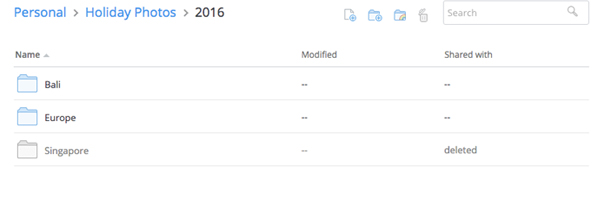
Once you’ve created an account online, you should install Dropbox onto your computer and it’ll appear in your files as a regular folder. When you transfer or copy files into this folder, they’ll automatically sync with your Dropbox account in the background, presuming you’re connected to the internet.

The best part is files are never truly deleted from Dropbox. One barrier to an organised file folder is keeping everything in there, thinking you may need it again in the future. With Dropbox, you have the option to restore files after deleting them.
best-apps-to-help-you-get-organised-dropbox.jpg

The downside to Dropbox is that it stops being free if you require more than 2GB of space. To get 1TB of space, you need to upgrade to Dropbox Pro, which costs AU$11.58/month or AU$13.99/month, depending on how whether you choose to get billed annually or monthly. It may seem like a lot but when you think about the cost of a 1TB hard drive that requires a lot more human intervention, it’s worth it.

If you’re an Apple fanatic, Dropbox works the same way as iCloud does. However, it can operate on multiple devices and it’s easy to use across different operating systems without having to take extra steps.

On that note, Google Drive is another option that works great with all operating systems, where your first 15GB are free. It has the added benefit of being able to create documents, sheets, and slides within the platform that can be shared, edited and updated in real-time.

If you’re not a naturally organised person, the extra features offered by Google Drive can be overwhelming and you’ll end up with a messy folder, which defeats the whole purpose of using Dropbox as an organization tool in the first place. I’ve also found that Google Drive rarely generates previews of files, so if you haven’t quite mastered the art of naming your files in a systematic way, this isn’t the best first step towards a cloud-based backup. I’d personally recommend starting with Dropbox, learning to love the cloud, and jumping to a more complex and more functional platform.

Trello

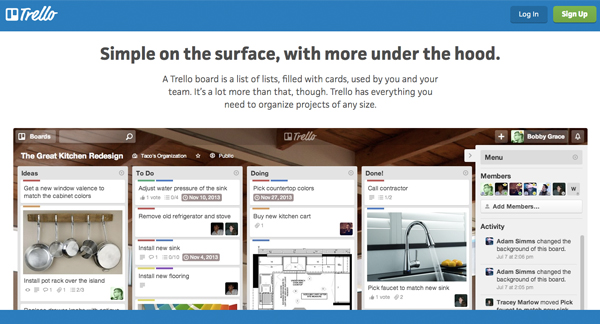
If you’re a visual person, Trello is definitely one of the best apps to help you get organised. The idea behind it is to create ‘boards’, and move things from one board to another, depending on its status. For example, you could have a low priority to-do list, a high priority to-do list, as well as lists for things that are in progress or completed.

You don’t have to do it this way — this was initially done to add an element of interactivity, where you drag and drop things from board to board in order to get more engaged with your tasks/goals and the processes involved in completing them. You can create a board for work, a board for home, a board for events etc. and simply view it as multiple to-do lists laid out in front of you.
best-online-apps-to-help-you-get-organised-trello.jpg

You can attach files, build checklists, and connect Trello to other apps with ‘Power-Ups’. These features are all available for free, if you sign up for the most basic version of Trello which was intended for personal use. If you’re using it as a business tool (it’s extremely popularly amongst marketing teams and product developers) you may want to look into the more advanced options.

Asana

Asana is a must-have organisation tool for any team. Think of it as a to-do list on steroids.

Every team member has a to-do list — you can add to your own list as well as to others’. You can create teams within the tool, and then individual projects within the teams. These projects can have their own project-specific to-do list, where all the tasks involved in the project are listed. These tasks are pushed into team members’ to-do lists when they’re assigned, with the ability to set deadlines, attach files, and add comments to each individual task.

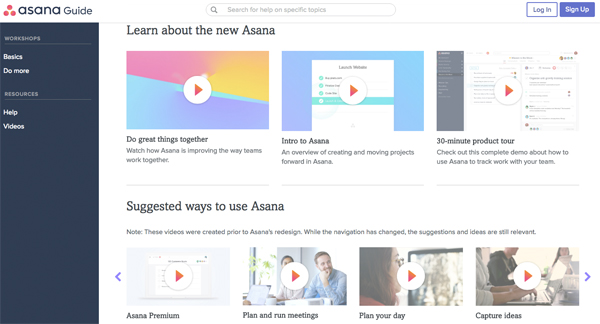
It sounds complicated, but the ability to organise tasks via team, project, and team member can result in a much more efficient and effective way of getting things done. If you’re having trouble visualising it (I don’t blame you), Asana has an awesome range of intro videos, as well as tool-specific videos to help you.  
best-online-apps-to-help-you-get-organised-asana.jpg

Asana has two packages: Free and Premium. If you have a team of under 15 people, definitely get stuck into it with the free version and master it before you add on more tools. It’s a lot harder to implement an organisation strategy with more people.

Evernote

Evernote is an old favourite and can be found on every list of the best apps to help you get organised. I’ve added it because for one thing it’s awesome, and for another, a lot of people aren’t aware of its full potential.

First up, it is essentially a note-taking app. I can’t deny that Microsoft hasn’t revolutionized the way we create documents with Word, but something about saving notes to a specific document often means we don’t revisit them — they get lost amongst all your other files and documents.  

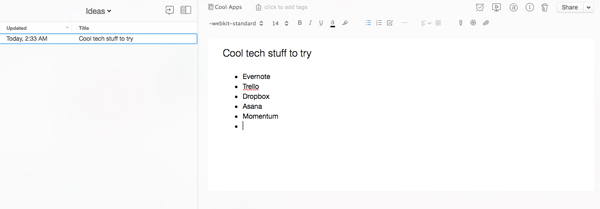
This is where Evernote comes in. You can keep all of your notes on one platform, where you can group them into general notebooks as a way to stay organised. You can search all your notes for something in particular, and also change your view to what works for you. It’s such a handy tool if you’re studying or working, particularly because you can share notes with others. 
best-online-apps-to-help-you-get-organised-evernote.jpg

One of the best things about Evernote is that it’s entirely cloud-based, which means you don’t have to save anything. If organisation isn’t your forte, you can skip the ‘save your work’ step and not lose all your valuable notes in the case of a hardware failure.

This also means you can add to your notes off any device (presuming you have the app and are logged in) and it’ll all sync up on its own. You can switch between your phone, tablet, and computer and access all the same information.

The really nifty thing about Evernote (that a lot of people don’t know about) is that the company has built and acquired a lot of awesome tools that’ll make your Evernote experience all the more awesome. One of them is Web Clipper, a web extension which lets you screenshot web pages as you go. You can clip small sections or capture the entire page, and automatically store and organise them within Evernote.

Skitch is a similar tool, though it’s an app rather than an extension. It lets you screenshot elements but also label and draw on them. It’s not as efficient as Web Clipper in terms of the whole screenshotting process, but being able to add arrows, text, circles and more can be really useful.
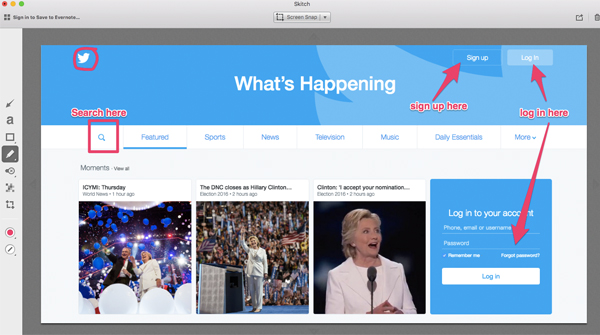
best-online-apps-to-help-you-get-organised-skitch.jpg

Skitch was acquired by Evernote in 2011, and in 2016 Evernote discontinued the option to download Android and Windows versions of the software. This was done in order to move Evernote in the direction of a more integrated solution, rather than increasing the number of standalone apps it supports.

You can still get it on a Mac and I’d highly recommend using it if you need to create process documents for anything on the web, i.e how to create an account on a specific platform. 

Another awesome tool (that’s sadly only for iOs users) is Scannable. It’s an iPhone app that lets you scan documents using your phone’s camera, which are then enhanced to produce high quality digital documents. These are synced to Evernote automatically.

In terms of pricing, start with the Basic model and test it out. If you’re leaning towards using Evernote frequently in a professional environment that involves presenting and collaborating with co-workers, you may want to look into thePlus, Premium, or Business models.

Momentum

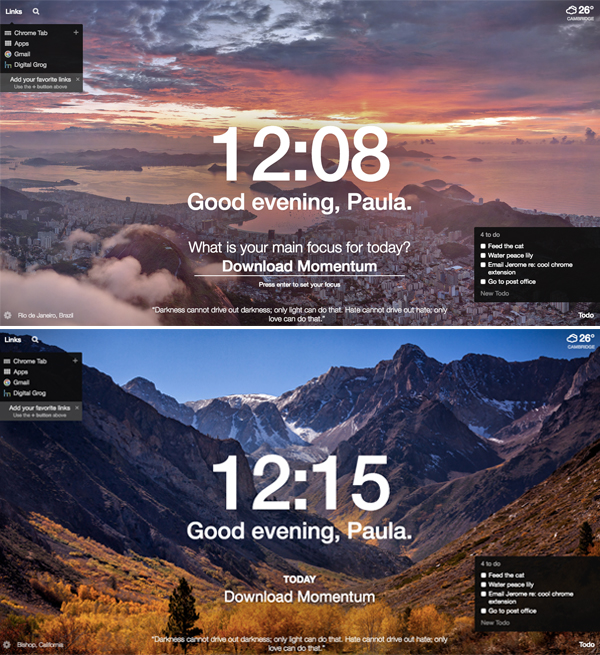
Momentum is a Google Chrome extension, so technically not an app but I guarantee you that it’ll bring life to your browser. Every time you open a new tab, you’ll get a picturesque photo with an inspirational quote.

You’ll also get the time and weather at your current location, as well as an option to search Google (or Bing if that’s your go-to search engine) and a list of your favourite links.

You have the option to create a to-do list and a main focus for the day, so if you’re not ready to dive into the deep end with an organisation app, start here.
best-online-apps-to-help-you-get-organised-momentum.jpg

Remember: organisation won’t happen overnight 

Downloading any of these apps will not instantly result in being organised. You have to be patient, make a consistent effort, and get into the habit of using the app to stay organised. The beauty of technology is that if one app doesn’t work for you, there are hundreds of others that you can try until you find what works for you. 

Bio: Paula is the founder of Joobly, an initiative that aims to connect aspiring student interns to tech startups in Sydney. She majors in Business Information Systems at Macquarie University.

Filed Under: Software, Solution Tagged With: Android, apps, IOS, Websites

3 Ways to Download Free Movies for Android You Need to Know

April 29, 2016 by admin 2 Comments

PS: OUR  FREE GIVEAWAY IS BELOW THE POST

One of the most booming businesses today is the market for various entertainments. Among them, the movie and video sharing sites are increasingly popular. Whether you commute for thirty minutes or travel a long distance, you need something to help you kill the time. Watching a video clip can be a great choice during metro or car. In this tutorial I’d love to introduce three ways to free download movies for Android.

clip_image002

[Solution 1] Free Movie Apps for Android

These free movie apps for Android are available to stream movies, like Showbox, SnagFilms and more. Yes, stream media on your Android, which is some futuristic technology right here. But mind you that such kind of apps needs constant internet connection to your mobile and take a bit of time to load the video. And of course the quality of movies can never be as great as the paid services. However, free movies don’t cost us a dime and we can’t complain about too much.

Here I list a few that work.

  • Mediatap
  • Flipps HD
    Google Play Movies
    Paramount Movies
    Movies by Flixster
    HD Video Downloader

[Solution 2] Online Sites to Download Free Movies for Android

Streaming is actually a difficult and painful task if you have poor connection. Buffering is the most annoying thing one can face. If you’re actually worried about that, downloading movies directly from the online sites may be another good choice for you. This method does not require installing apps. Some sites provide Hollywood, Bollywood movies from various categories like Sci-fi, Crime, Horror and even Family dramas too. Once registered, you can get HD quality movies for Android. Those sites are usually growing fairly fast that also provides you the best movies you need, fast download links and user-friendly UI.

That’s all good, but there are still some limitations. If you want to store and play the video on your Android phone, the large file size and non-mp4 format would become an issue.

Also, I’d like to show you a bunch of amazing online video sites for Android. Check them out.

  • Movies Mobile
  • HDMoviesLuv
  • MovieCinema
  • Fzmovies

[Solution 3]: Desktop Free Movie Download for Android Downloader

If you’re sick of streaming videos online as well as the limitation of online site contents, desktop downloaders can be a third choice to enhance experience by giving quick downloads from websites and offering playable files on your devices. MacX Video Converter Pro is a program embedded with an online video downloader and my favorite to download free movies. Whenever I decide to download, this program can help me download online videos from YouTube, Dailymotion, Metacafe, movieclips.com, moviefone.com etc, and convert toMP4, AVI, WMV, MOV, etc. Downloading is quite easy and straight. Paste your movie link and click download option.

Software Features in  snapshot:

converter to mac converter from mac

convert video files to macc

dvd ripper for mac

The software has an edge that it could also help compress video file and convert to any playable format on designated devices. Once you import a video/audio file, the window for output profile will pop up automatically, where lists a host of specific handheld devices and recommends suitable formats to you. With cutting-edge hardware acceleration technologies applied, MacX Video Converter Pro can download free movies for Android in mp4 HD 720P/1080P 4K UHD from 300+ online movie sites with super-fast speed and high quality.

How to use MacX Video Converter Pro to Download Free Movies?

clip_image004Step 1: Navigate the online video sites and copy the target URL of the movies you’d like to download to Android for watching.

Step 2: Click "+" button, and hit the "Paste & Analyze" Button. You can free to add any movie and music as you wish.
Step 3: After successful loading, a pop-up window shows a list of resolution, codec and format for you to choose. 
Note: If you want to further compress the video file, you can tweak the settings after downloading in converter interface, even editing the videos, like cropping, trimming. 
Step 4: Select the Target Folder for the output, then click "Download Now" to start the downloading and converting process.

Finding the right way to download free movies suited to your Android is important, especially with so many different methods. Desktop downloaders like MacX Video Converter Pro provides superior additional features in downloading plan, something that users should consider when weighing value. Online Sites takes small perks, like abundant movie resource, and downloading option. Free movie app for Android may be associated with network connection problems but still has the edge in terms of convenience and flexibility. Each of these methods shows its own advantages.

Author Bio: Jessie Phang, a free walker in the Internet world. She is full of weird but interesting ideas. Her wish is WORLD PEACE!

GIVEWAY (5 Fully Licensed keys giveaways to use your MacX DVD Ripper Pro software)

ScreenHunter2015163 Apr. 29ScreenHunter2015161 Apr. 29

5 Copy Gieaway MacX DVD Ripper Pro

Digitalgrog.com.au is giving away  Free License Keys  to this amazing software.

All you have to do is comment  below  this article  –  In one sentence or two  why this software would be useful to you and what’s your first movie CD you own that you would rip to make a digital copy.

Where to comment ? –  You can comment either here  below this post in comments or on then on our Facebook page DVD software giveaway post .Make sure you provide email (to get notified) with comment on blog post/ On Facebook I will contact you directly if you win a copy.

Filed Under: Software, Solution Tagged With: Convert Video Files, DVD CD RIP, Solutions

How to embed your Amazon Astore in wordpress or blogger blog

January 18, 2016 by admin 12 Comments

create an amazon store and product

I needed to integrate a  “AMAZON ASTORE” into a self hosted wordpress site as a test on one of my websites. I trawled and searched  the internet for ways to best put in the “amazon astore”  to match my blog theme and design of this blog. [updated 18 jan 2016]

I came across  this site “ Robin Maluau – rockstar now geek” and “ Kristella’s blog” that gave me some useful but more technical tips. These tips could probably wont make sense to some , as you ned to have some technical knowledge to understand their jargon.  Since they had published those useful posts and tips  for getting a Amazon store to work with wordpress and blogger ,  blogger and wordpress itself has changed  and got updated. These updates  to new versions  have made  “integrating  you amazon Astore into your blog or website more easy” than ever.

Before i got much deeper into creating a  Amazon store within your blog –

Here is some basic info on amazon store and making money

An amazon store is a quick store that you can build online for free with amazon  to sell products  and earn a commission when a product gets sold. You need to register with amazon as a  affiliate to get this started. You dont need to make a Amazon store to sell products, you can just insert  your affilaite link to the product on your blog or website  and if a person clicks on that links and buys something you earn a commission.

How Do I Get Started? 

1. If you are not a member of the Associates program, start by joining the program.
2. If you are already a member of the Associates program, visit the aStore section of Associates Central.

So, I  had the job of updating  this wordpress blog/website “www.australianpropertymarket.com.au” with a Amazon product store, so  I did a bit of research on the internet  and found many articles – some useful – most outdated. I decided to work it out on my own and managed to get a Amazon store nicely working  with wordpress, just by copying and pasting code provided by amazon  into wordpress. Its that simple now !! ( however this task was made easy  with my blog theme solostream  – which has integration options  to make this task easier )


Integrate amazon astore in wordpress blogger website
How to make a Amazon store ?


Integrating Amazon A store Into wordpress / Blogger

or

How to make a amazon store in WordPress ?

I will show you how to integrate  “your amazon store” in few easy steps with a basic wordpress site .

Make sure you change the theme  while making the amazon astore  to match your store theme colours.


create amazon page website Integrate amazon html code for wordpress


I am assuming  that you already signed up as a affilaite  with amazon  and can now create a  Astore through your account .

Next Step.

Create the Astore in amazon and get the inline frame embed link like above.

Login and Go to your word press blog – Click on add new page

Click the html/text  button  where you write content and  paste the embed  code you got from amazon into the page Next – Click save

Now go to page attributes on your right  and switch the page template column to “page template – no sidebars” so that  your amazon sidebar is the only  sidebar that’s seen on the theme.

Some themes block this feature to not have the regular sidebar option , and you might have to mess around further with their  code to get this option installed or then just get the Solsotream theme that I use it will make the process easier) .

Here is another example  of  australian book website page on a standard wordpress template but without the Amazon sidebar ( adjusting the  width and height dimension in the  inline embed frame code of amazon will get  you this type of amazon page) .

You can check out the example  link below  for the Full amazon astore embed page in the word press website on propertymarket website

wordpress theme settings to integrate amazon code html into website or blog


The theme used on  the Australian property website is the same theme that is being used by my blog as well and you can get a $10 discount currently on this solostream theme , Solostream Themes are quite robust and SEO friendly and I do recommend them, you can read a review of some of the themes i recommend over here , but Solostream themes has been one of my favorites for years.

Create word press Amazon page

Y0u can further mess around with the amazon code for width and height and change size as necessary or then change the page attributes while generating the  embed code Or manually   to suit your design. You can also place a link on your blog menu  to your “amazon page”  to promote it.

You can follow a similar way to get this “amazon page on blogger” . I will  post a tutorial  how to integrate  Amazon Astore on blogger   when i get some spare time.

You can check out the result here  at the property  market website  &  another example  of  the Investor property book store page 

All the best  and let me know if you run into any problems implementing this. You can comment below or get in touch with me via contact form  if you need any help setting this up.

Below Are Some products and books that can help you in your amazon journey

Book from Amazon  – How to sell on Amazon for beginners 

http://amzn.to/1Rzta5Q


Product from clickbank  Marketplace

make money 2016 with amazon affiliates

Amazon Selling Blueprint – How to Find and Launch Your First Private-Label Product on Amazon in 90 Days or Less

More..

Kindle Money Mastery 2.0 no 1 Amazon Kindle Training

Enhanced by Zemanta

Filed Under: 2011, Amazon, Australia, Blogger, Featured, Marketing, Solution, wordpress, Wordpress 3.1 Tagged With: Amazon, Astore, Blog, Blogger, Wordpress, Worpress Amazon

Making money with PPC Advertising and Blogging

June 14, 2015 by admin 2 Comments

Every day thousands of make money on-line affiliates or website owners ask the same question –

“Why I cant sell anything online?

Do you know why most people fail ?

It is the topic/niche .

Almost every beginner starts in network marketing/make money online  niche and to cut long story short this niche  is overcrowded. Not many know of pay per click (PPC) adverting. To give you stats here, less than 1% of them are interested in how to make money from home.

What Are Bing Ads?

Bing Ads is the advertising platform you use to show ads on the Bing and Yahoo search engines – also referred to as Yahoo Bing Network. You also have the ability for your ads to show on their syndicated partners such as Facebook, Amazon, Monster, WebMD, CNBC, and Viacom. They are the direct competitor to Google adwords and PPC. Bing ads is normally cheaper to run than google as they are rated No#2 search engine  and get cheaper clicks for advertising

PPC GAME WITH  CLICKBANK

You can make money with your website and clickbank by using the relevant search terms in your ppc campaigns and advertisements. Here is how-

Go find buying keywords using the Google keyword tool.

Type in keywords like where to buy {item}, where to purchase {item}, buying {item} (get creative) and take the results and research them again until you find more buying keywords that you didn’t find before.

If you do this multiple times you will find a lot of purchase keywords that people are entering in google to find a specific item.

They might not get a lot of traffic but typically people who type in these keywords into the search engines  have their wallet in hand. Use these buying terms in your PPC ADS, I did this for a acai berry product and had some good success.

Hot targeted Marketing with PPC & CLICKBANK

If you are spending money on PPC, use every bit of it (dont waste it).You should be pushing these people(traffic) to an opt-in page for an email list. That way you can significantly seo Vs ppc and ppc marketingincrease the chances of converting them later on  through your email campaigns /Newsletters and this will reduce some of your expenses.

Free resources are great like SEO organic traffic . However Using  PPC even for at least for a short period of time, you can find out the best converting keywords. Then you can take those keywords, build optimized pages, and promote them via SEO to get high search engine rankings and make money. This way you can make money both with SEO organic traffic and paid traffic at the same time.

How do you make money with PPC such as Bing OR Google Adwords?

Bing advertises your webpage and every time someone clicks it you must pay Google. You pay anywhere from 0.2 cents  to 0.30 or even more for a click on your ad. People who are interested in your ad will only click, so it is targeted traffic.Conversion depends on how good your ad  and content on that page is. You will need to do the maths to get  good returns and profit from PPC, but you can just get lucky if the niche is not too competitive

Promoting Affiliate Products (pay per click internet marketing method :-

If you want to promote an affiliate product and expect higher level of purchase, you can choose a particular item from sites like Commission Junction or ClickBank. Try to select a high selling item from the site’s list. After this you can create a pay per click ad for the affiliate product which will send traffic to the site. This can be an excellent step to get as much traffic for their product.

Sometimes PPC seems to work much better with physical items than digital downloads. If you manage to get regular sales with PPC  and make a profit then its gold, as you will have a regular  income on auto pilot. You can always refine your PPC strategy  to get more out of it and increase your income, by learning more on how to improve your PPC skills.

Here are some free Bing PPC coupons If you are interested In trying out PPC/Search engine Advertising ?

These coupons are only good for new customers.

New Business and website customers in the following markets receive free search adverting credits to help them get started:

  • US – $50 in Bing Ads credit – united-states-flag for bing coupon
  • Canada (English and French)- $50 in Bing Ads credit  – canadian-flag for bingads coupon
  • UK – £50in Bing Ads credit – uk-flagfor ppc advertising credits
  • France – €50in Bing Ads credit
  • Germany – €50in Bing Ads credit
  • Brazil – R$60in Bing Ads credit
  • Australia – $40 in Bing Ads credit – au-flag for bing microsoft advertising offers for bing7
  • New Zealand – $40 in Bing Ads credit – nz-flagfor yahoobing
  • India – Rs1000 in Bing Ads credit – india-flagfor rupees in 1000 advertising credits
  • Spain – €50in Bing Ads credit ( New market!) –

Italy – €50 in Bing Ads credit (New market!) –


Filed Under: 2011, Adsense, Affiliate, Clickbank, Solution Tagged With: Australia, Reviews

The new wordpress theme that’s truly radiant

July 17, 2014 by admin 5 Comments

Welcome to Radiant! (Updated July 17, 2014)If you are looking for a wordpress theme  that has a professional look, can alternate between blog  or professional look and is truly flexible “wp radiant” is the theme  you want.

This Theme is also built “ready for lazy bloggers” the theme will function just fine without changing any of the default values but if you are truly keen you can make it blossom and shine and fill your blog with inspiring radiance

New wordpress theme from solostream

Screenshot of the New solostream theme WP radiance, Check demo here

wp radiance new solostream wordpress theme

Regenerate Thumbnails

This feature is awesome , they got this built in  plugin that just regenerates all the pictures on your existing blog to fit in to the theme properly

WOrdpress theme features

That’s the message i got

All done! 80 image(s) were successfully resized in 79 seconds and there were 0 failures.

when  it processed all  the images. You can also check out another demo website here.

Responsive Design Framework (Mobile Ready Theme )

This theme is also Responsive Design Framework (Mobile Ready) – Adjusts to Browser Size

The alternate layout  Home page below  for this solo stream website  gives you  totally different look , if this is what you like.

alternate responsive solostream new wordpress theme

There is  an offer for this New wordpress radiance  theme at the moment CLick here  to get this saving while using code below

solostream savings coupon for wordpress themes

The theme itself is $59  for the wp radiant theme.Use the discount code above to get a $10 discount on this price.

The usual price for a Gold membership is $129 per year. Click to   Check for  any discounts if available 

If you do blogging , you would know the importance of gathering emails  and this theme has this inbuilt  and displayed prominently if you wish. The inbuilt  subscription widget does this job efficiently

The Video tutorials, demo site and support forum are very useful and I have been  able to do many customizations with the support of all this excellent material.

I have been able to customize killer websites that bring me passive income years to come without touching the designs or playing with codes

Check  it out below

neat Subscribe Box Widget. form

Its also got heaps of advertisement options if you use AdSense and other affiliate banners

If you decide  to have multiple authors for you blog or website  you also have a inbuilt author page  where all authors will be listed with a short profile on a profile page  giving more authority to your website.

GPL Theme License/Unrestricted Use

All Solostream  wordpress themes are licensed under the General Public Licence (GPL). This means there are no restictions on how you use the themes.

You can modify them and use them for both personal or commercial projects on as many websites as you like. Get your discounted copy here

If  you want to check out on of my other favourite wordpress themes  provider check out  this  website who also have a coupon for Wp zoom

Some of the other solo stream themes i like and are really good  are below

Check out the demo sites

WP-DaVinci Premium WordPress Theme
WP-Prosper Premium WordPress Theme
WP-Chatter Premium WordPress Theme
WP-Mystique Premium WordPress Theme

The latest release wordpress theme from solostream is WP-Blossom

Filed Under: 2012, Software, Solution, Website Review, wordpress, Wordpress 3.1, wordpress themes Tagged With: Theme wordpress, Wordpress update

My battle to get back my windows 7 ultimate

July 2, 2013 by admin Leave a Comment

Today  suddenly i got  this message that “ my copy of windows 7 “ is not genuine.

Windows 7 activation problems

Daymm !!!  i paid good money  to get my windows 7 pack software   from a newspaper advertisement ( guy who got a prize  and wanted to sell his software ) and made sure  the pack was genuine by checking  the Microsoft seal and also  having a look at a genuine one bought from the shop  before i bought it from this advertiser in the newspaper.

samantha stosur says micrsoft aint cool

It turned out to be a perfect genuine copy  and i have been using it for almost 2 years now and suddenly i get a message that it has been blocked today

Immediately i went to Google  and on some site they told me to renter my product key  by right clicking on  my computer and properties and then re entering my product key at the bottom of that screen

Guess what “ it  didn’t work” said your  software is blocked or something.

are yu kidding me my software is not genuine


I managed to find a link to self help check on my pc and phone support  by going through a help link on my pc.


I went through this automated phone help process  that  provided me a installion id  set of numbers , there were 9 sets of numbers of 6 numbers each that i needed to type into the phone pad  and when i finished typing it ,it said my windows is blocked


Image from this site –>  http://dnyankosh.files.wordpress.com

i got a different set of contact numbers on that screen  due to me being in Australia

This led me to the next step  where they provided me phone support numbers ( a local Australian 13 zero number as well- ( Australian number going to Indian call center))


The girl in Microsoft support asked me for the  same set of numbers once again  and i provided it  and she told me the same thing , your software is blocked  and it old her i know that , thats why i have called your support number and she said sorry but i will give you a website url  and you can send all your details over there

THAT WASNT MUCH HELP AT ALL MICROSFT , Why offer phone support then ?

Anyway the url she gave me  was http://www.microsoft.com/howtotell/default.aspx

I  decided to try another thing . ie restore back my pc from before  and things seemed to be normal  once again ,, however i noticed that  my copy of windows 7 is still showing as not activated  and now suddenly  i keep getting this pop up  ..my software is not genuine

Microsoft are you hearing me !!  This is how genuine customers are treated ! not happy !!

I have a nagging suspicion that this could have happened  due to software that i keep downloading and testing on my pc ,, with one of them turning out to be rogue software

————— Update  14 july 2013 —-

I am still battling to get my genuine windows 7 ultimate genuine copy recovered ( Microsoft has suddenly decided to blok my copy of windows even though its a genuine copy i paid good money for)

Today i went to the “Australian Microsoft”  website once more  to give another try ,

I clicked on on of th suggestions worked – to get this message

  • If you need additional support, we are here to help. Get in touch with a local support professional.
    Click here for support

The next message i got was to activate windows , which was already done  but i was desperate enough( from seeing the regualr counterfeit software message ) to try again. IT TOLD NE TO GET THE PRODUCT ID

”

activate windows product id


”

I got these instructions from the website 

  1. Click Start and then click Control Panel.
  2. In the Category View, click System and Security, and then click System. In the Classic View, double-click System.
  3. Under the Windows Activation section of the page, the Product ID (PID) is a 20 digit number next to Product ID.

No result from validation , Back to square one 

I just got a contact number for Microsoft  Australia, hope i get something useful from this now ( as i haven’t really got any real help from Microsoft so far from on-line nor from phone to solve my issue) . Let’s see how this goes !!

  • Contact Australia Microsoft

    • Contact Us
    • Call 13 20 58

Hope i can sort this out eventually


( Let me know if you have  got into similar circumstances and what you have done to fix it  !!)

Filed Under: 2013, Australia, India, Internet, Software, Solution Tagged With: Australian Blog, Technology Blog, Vista Windows, windows 7 Activate, windows 7 Professional, Windows 8, windows ultimate 7

  • « Go to Previous Page
  • Page 1
  • Page 2
  • Page 3
  • Page 4
  • Page 5
  • Interim pages omitted …
  • Page 7
  • Go to Next Page »

Primary Sidebar

Recent Posts

  • Cute & Funny USB Drives (Perfect Gifts!)
  • 2026 – Step-by-Step Guide to Building Your Site With AI
  • Underwater Drones for Recording Video and Taking Pictures
  • Why I chose hostgator for blog hosting
  • Top 10 Software Programs For Your Windows PC

Recent Comments

  1. Roberto Mcgee on 2026 – Step-by-Step Guide to Building Your Site With AI
  2. google on Wacky new underwear invention 2b released by Durex
  3. Patrick McCormick on How to secure your desktop and laptop with antivirus software
  4. JJ on 20 Top brands with affilate programs to make you money in 2019
  5. JJ on This WPengine Genesis Pro Deal Will Give You 35 Studiopress themes

Archives

  • September 2026
  • June 2022
  • February 2022
  • July 2021
  • May 2021
  • April 2021
  • March 2021
  • November 2020
  • September 2020
  • August 2020
  • July 2020
  • June 2020
  • May 2020
  • April 2020
  • March 2020
  • February 2020
  • January 2020
  • December 2019
  • September 2019
  • August 2019
  • July 2019
  • June 2019
  • April 2019
  • March 2019
  • February 2019
  • January 2019
  • December 2018
  • November 2018
  • October 2018
  • September 2018
  • July 2018
  • June 2018
  • April 2018
  • February 2018
  • January 2018
  • December 2017
  • October 2017
  • September 2017
  • July 2017
  • June 2017
  • May 2017
  • April 2017
  • March 2017
  • February 2017
  • January 2017
  • December 2016
  • November 2016
  • October 2016
  • September 2016
  • August 2016
  • July 2016
  • May 2016
  • April 2016
  • March 2016
  • February 2016
  • January 2016
  • December 2015
  • November 2015
  • October 2015
  • September 2015
  • August 2015
  • July 2015
  • June 2015
  • May 2015
  • March 2015
  • February 2015
  • January 2015
  • December 2014
  • November 2014
  • October 2014
  • September 2014
  • August 2014
  • July 2014
  • June 2014
  • May 2014
  • April 2014
  • March 2014
  • February 2014
  • January 2014
  • November 2013
  • October 2013
  • September 2013
  • August 2013
  • July 2013
  • June 2013
  • May 2013
  • April 2013
  • March 2013
  • February 2013
  • January 2013
  • December 2012
  • November 2012
  • October 2012
  • September 2012
  • August 2012
  • July 2012
  • June 2012
  • May 2012
  • April 2012
  • March 2012
  • February 2012
  • January 2012
  • December 2011
  • November 2011
  • September 2011
  • August 2011
  • July 2011
  • June 2011
  • May 2011
  • April 2011
  • March 2011
  • February 2011
  • January 2011
  • December 2010
  • November 2010
  • October 2010
  • September 2010
  • August 2010
  • July 2010
  • June 2010
  • May 2010

Categories

  • $heldon $ingh
  • 2010
  • 2011
  • 2012
  • 2013
  • 2015
  • 2017
  • 2018
  • 2019
  • 2020
  • 2021
  • 2022
  • Accounting
  • Adsense
  • Affiliate
  • Amazon
  • Anti Virus
  • Apple
  • Apps
  • Asus
  • Aussie
  • Australia
  • Australian
  • Australian Bloggers
  • Australian wordpress hosting
  • Banks
  • Blog-Hosting
  • Blogger
  • Blogger Tool
  • Blogger Tools
  • BloggerTools
  • BuddyPress
  • CARS
  • CDN
  • Celebrity
  • Clickbank
  • Compare
  • Computer
  • Domains
  • Done Deals
  • Ebook
  • Email
  • Facebook
  • Featured
  • Finance
  • Free
  • Gadgets
  • Google
  • Gpost
  • Guide
  • Hackers
  • Hosting
  • India
  • Internet
  • Ipad
  • Kindle
  • Laptop
  • Make money blogging
  • Makemoney online
  • Marketing
  • Melbourne Cup
  • Movies
  • Netbook
  • Network
  • News
  • Online betting account
  • PC
  • Review
  • Search
  • SEO
  • sheldon singh
  • Software
  • Solution
  • Sports
  • Subscribers
  • Taxes
  • Technology News
  • Themes
  • Top 10
  • Tutorial
  • Video
  • Wacky
  • web hosting
  • Website Review
  • Wierd
  • Windows
  • wordpress
  • Wordpress 3.0
  • Wordpress 3.1
  • wordpress themes
  • World cup
  • Wp Answers
  • WP Turbo
  • WPMU

Footer

Technology

With an emphasis on technology, webdesign, and gadgets, our blog features articles related to these categories.

Browse our archives.

Privacy

Your privacy matters. We collect only essential information to ensure your data stays safe and confidential.

Learn more about Privacy.

Videos

Explore our video library designed to teach, inspire, and guide you. Dive in and discover content that brings ideas to life..

Check out our videopage.

Copyright © 2026 · Genesis Sample on Genesis Framework · WordPress · Log in

  • Resources
  • Privacy policy
  • Website Review
  • Subscribe