• Skip to primary navigation
  • Skip to main content
  • Skip to primary sidebar
  • Skip to footer
tech blog au

Digital Grog — Australia’s Tech, Gadgets & Digital Life Unfiltered

Digital Grog is Australia’s go‑to tech blog for sharp reviews, digital trends, AI tools, gadgets, cybersecurity updates, and practical how‑tos covering the latest in Aussie technology

  • Home
  • Webhosting
    • List of WordPress Web hosts
    • Comparisons
    • Blog Hosting
  • Make Money Online
    • Clickbank
    • Affiliate Programs Australia
      • Amazon
  • Domains Australia
    • Australian Domain Names
    • Register a domain name
  • Technology
    • Technology News
      • Gadgets
      • Software
  • Guest Posts
  • About
  • Contact us

Solution

Software to recover permanently deleted files

December 15, 2012 by admin 2 Comments

You accidentally permanently deleted a big folder or file in your pc  and now want to get it back but cant find it  because your pc said its permanently deleted.

If you got a problem with any of these situations below

“permanently deleted mp3 folder”

“Permenantely deleted Video or movie”

‘”how to undelete deleted file”

“recover deleted files”

Recover accidentally-deleted files

Then read below for some solutions.

Before  you try expensive  data recovery services ,giving this software one shot is probably worth it specially if you are on a budget

Well guess  what – it isn’t  permanently deleted !!

When a file is deleted from your computer, its contents aren’t immediately destroyed. Windows simply marks the hard drive space as being available for use by changing one character in the file table. If you manage to start an undelete process before Windows overwrites that part of hard disk with new files. You can set that flag back to "on" and get your file.

I recently had this situation  and immediately did a Google search  and found this software listed on a website.

pandora recover permenantely deleted files

Its called Panda Recovery and it worked like magic . I managed to recover most files in click of a button. You can check out their software on their website Panda Recovery

Website and download : http://www.pandorarecovery.com/

Other File undelete software

There are two more software that you can try out if you want more options

Undelete plus

Website and download -  http://undelete-plus.com/

The plus in this software, It can also recover files that have been emptied from the Recycle Bin and permanently
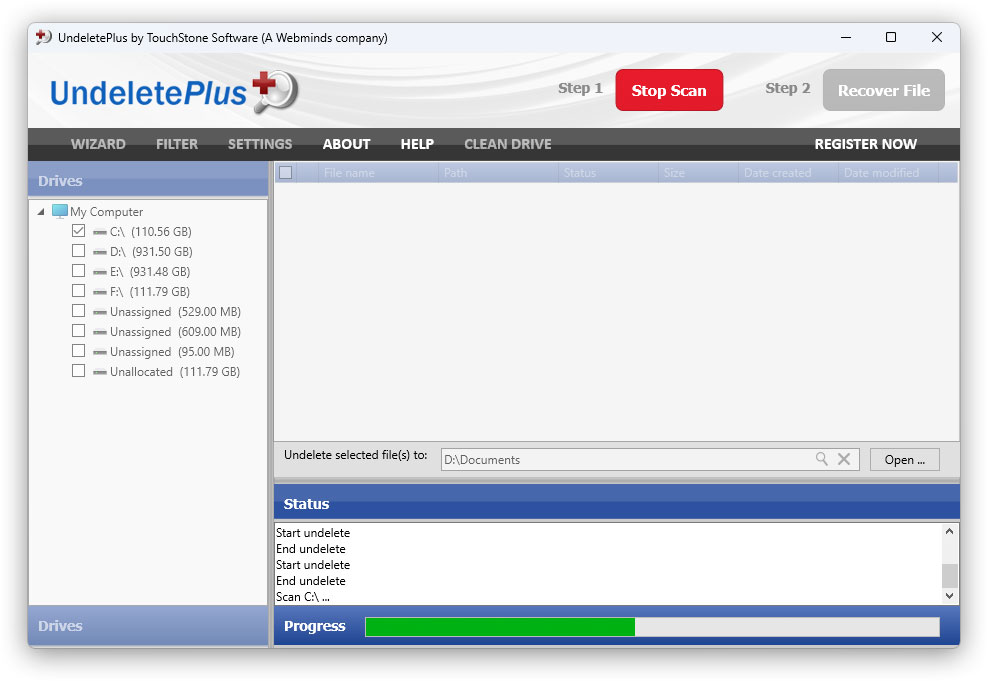
eSupport UndeletePlus Scan

It also recovers files

  1. Deleted files within Windows using the Shift + Delete
  2. Files that have been deleted from within a Command Prompt.
  3. Works with win 98/Me/NT/2000/XP/2003/Vista operating systems.
  4. The program supports FAT12/16/32,NTFS/NTFS5 and image recovery from CompactFlash, SmartMedia, MultiMedia and Secure Digital cards.
  5. Program is only 583 KB in size and requires no installation and is  Portable

With so much features and so small size i would buy  a special usb drive just to have this loaded and kept ready for emergencies

Tokiwa Data Recovery software -  Japanese software untility

DataRecovery is a  freeware tool that does the job of undeleting permanently deleted files even from recycle bin.

recover permanently deleted files

It supports FAT12, FAT16, FAT32 and NTFS undeletion including NTFS compressed files and EFS encrypted files.

The Zip file is only 198 KB in size, no installation required and it’s portable.

Download: TOKIWA Data Recovery or Download CNet Link

Filed Under: $heldon $ingh, 2012, Software, Solution, Website Review Tagged With: Data recovery, Permenantely Deleted files, Recover, Undelete

Best home pc to tv gadget wifi USB media drives

August 27, 2012 by admin 5 Comments

This post was originally written in 2010 but a lot has happened since then, tv’s have become smarter and so a lot of these gadgets  reviewed  below have become obsolete now in 2018 and beyond. The eye-fi pro still stands out as a gadget that can stand the test of time for its unique capabilities. Do check out our latest Google home gadget  & tech reviews too.

Share Your PC media to your TV wirelessly

The IUM has built in WiFi and pairs to the WiFi Interface of your laptop.The IUM is paired with one Host PC/Laptop then can be used in any USB Equipped Device that accepts USB Flash Drives

3 Great wireless USB  Memory  Media sharing drives

Infinite IUM USB Media drive

Open for orders from 01 august 2010

The device has built-in wireless and uses the wireless interface of your laptop on the end. The connection is point to point and not via other access point or internet.

PC to PC works fine. The shared files are visible on the IUM like a normal flash drive so the PC will read them as if they are actually on the device.

IUM wireless usb drive media drive

It’s very nice and handy, but as you said, $129 is a bit much for something like this.

“instead of storing data inside the stick it uses any thing that has a USB port as the storage space, enabling “infinite” data sharing ( videos, photos, doc..etc) using WIFI network meaning the device act as wireless connector between a personal computer and anything that is USB-enabled.”

More features for this drive at the vendor website at http://www.infinitec.com/ium_drive/features.php

HSTI Wireless Media Stick™ @ $99 Only

THE Option similar to this which is already available in the market is the “HSTI Wireless Media Stick™”.

hsti_wireless_media_stick

Simply share your files from any computer within your home/work wireless network, plug the Wireless Media Stick™ into the USB port of your playback device and stream your media instantly. The Wireless Media Stick™ references shared media files from any networked computers and NAS devices and presents them to the playback device it’s mounted to as if the files were stored locally.

Once a file is selected for playback, the Wireless Media Stick™ then streams the file via a wireless router from any PC, Laptop and NAS device.

MSRP: $99.99 – Introductory Price!


wifi stick in usbThe Wireless Media Stick™ is a patented technology (Patent Pending and World P.C.T) that streams media files from any computer connected to a home/office wireless network to any USB enabled media playback device.

Files are not copied or moved from the original location. The capacity of the stick varies according to how many files are shared and can grow in relation to the file systems that are shared. – Ref ( More info @ HSTI Media Stick )

Features of the HSTI Media stick

  • Wireless USB Dongle
  • Wireless Media Streaming
  • 720p Resolution Limit
  • Windows Compatibility
  • 2.4GHz Wireless Technology
  • Preloaded Software

SPECS

  • Wireless: IEEE 802.11a/b/g/n (2.4GHz)
  • Host Interface: USB 2.0
  • Frequency Range: 2.412 ~ 2.4835GHz
  • Security: WEP 64/128, WPA, WPA2, TKIP, AES
  • Data Range (802.11a/g): Up to 54Mbps
  • Data Range (802.11b): Up to 11Mbps
  • Data Range (802.11n): Up to 300Mbps

“Eye-Fi Pro”  Wireless memory card

The cost for this convenience is $129, which seems rather steep to me, although (for what it’s worth) it’s generally equivalent to the Eye-Fi Pro, which offers the same kind of wireless ad-hoc network functionality.

eye wifi memory card

Also released recently “Eye-Fi card”, the “Eye-Fi Pro”. It costs $150, and is able to handle RAW files, as well as connect to a computer via an ad-hoc wireless network, i.e. no router necessary. These are certainly nice features, although RAW support at least seems more like a firmware upgrade, and it would be cool if Eye-Fi would push that option out to their other cards

Get your eye-fi pro from amazon here –> Eye-Fi Pro X2 8 GB Class 6 SDHC Wireless Flash Memory Card EYE-FI-8PC

Overview:

The Eye-Fi Pro X2 Features:

  • Fast wireless transfers of photos and videos from your camera to computer or favourite online site.
  • Instant photo and video sharing while on the go.
  • Loads of storage space with 8GB of high performance Class 6 memory capacity.
  • Location information that is captured and stored in each photo.
  • RAW file wireless uploads so you can edit photos like a pro.
  • Wirelessly uploads your photos (RAW and JPEG) and videos via Wi-Fi or via an ad hoc connection
  • Wirelessly uploads only the photos and videos you select to your computer

Filed Under: 2010, Gadgets, Software, Solution Tagged With: Electronics, Featured, Gadgets, Software

Importing Users from word press user back up

August 26, 2012 by admin Leave a Comment

I learnt this the hard way .  I recently  re installed on my blogs. I had 5000 registered users in that blog.  I did a back up of my users from the blue host  cpanel.

import users wordpres plugins

WordPress plugins for  import users does not work

Then i re installed the blog  and tried one  wordpress back up plugin after the other and they all failed to import my  CSV back up file of the 5000 users. I typed import users and tried the first five plugins that import users with csv files . There was one that at least did something and worked , but worked wrong ( CSV user import – Visit plugin site). It uploaded the file but put the passwords salts as the username.

php my admin database back up users

It got all messed up,  then i realised in should have done this in the first instance. I went back to my bluehost cpanel / php admin  where i did the back up in the first place , and then deleted all the wrong entries  that got uploaded ( deleted 400 entiries in one go  and repeated—maybe you can do more than 400 )

wordpress users backup with php my admin  and admin panel

Then i  clicked import and imported the csv file an hey presto in a second all the 5000 users were back up.

This goes to prove that use the same tool or process to export and the same tool to import , wether it is from the php my admin  or then from the wordpress admin panel , make sure the plugin does import and export or then  the same author of the toll has created similar plugins for import or export ,w hereby you have a better chance of them working both ways together.

Also attached some snapshots of the cpanel and php my admin in blue host.

Let me know if this helped you and give us a like Smile

Filed Under: 2012, Solution, Subscribers, wordpress, Wordpress 3.0 Tagged With: Wordpress backup

From Panda to penguin with Google link building algorithm

August 3, 2012 by admin 3 Comments

IF your stats are out of whack and you  have been linked to  to your website  with a majority of the same keywords ( or anchor text ) to the same home page  and those  words are quite popular ( or pricey) keywords too . Then you have probably been officially been demoted on the Google search by Google.

Tools for penguin algorithm  update checking

And yes,  they can do it because they are the market leader in search. I do remember something similar happening with  Microsoft as well in a different aspect.

So how to get the Monkey ( penguin ) off your BACK

As you can see in the above pic   for eg

if you got a website with  a name  “Australian stock market” and  a majority of the links  are  mentioning  Australian stock market ( green  or brown in pie chart) and pointing to the  home page then its quite likely  you could be hit by the Google penguin.

seo penguin panda chart linking solution fix

The solution for linking properly and to show some love to the penguin

Here is what to do

Linking to be distributed in  4 different forms as below  including to home pages and internal; pages

digitalgrog.com.au

www.digitalkgrog.com.au

https://www.digitalgrog.com.au/

Http://digitalgrog.com.au


How to use anchor text

we will take the example of Digital grog Blog

Digital Grog Blog

DigitalGrogBlog

Digital grog blog

DGB

[Carefully notice the differences in linking above]

How to also use Mixed anchor text

Tech blog – digital grog

Australian Blog Digital Grog

Digital grog, a Australian tech blog

Common Anchor text is back in action

If your website is popular your are going to get genuine links like these( below)  to your website and Google knows this

“click here,”  “visit this website,” and “here.”

These links ( anchor text)  above which has  been regularly  used by  punters, now also help you escape the Google big hand  by diluting   your linking profile  so that they can see its genuine.

Delete or Dilute  your links ( anchor text) to fix them

so if you have been inadvertently been caught up in the big mad Google seo updates algorithm changes.  You will either need to dilute your links with more different  keywords  or gain more genuine links with different keywords or then change your already existing links ( if you can) and anchor text from links that  link to you.

Tools for penguin algorithm  update checking

Tools like  Majestic SEO or Open Site Explorer can help you find out your linking and anchor texts for your website

Filed Under: $heldon $ingh, Blogger Tool, Domains, Featured, Google, SEO, Solution, Tutorial Tagged With: Digital, Link profile, Panda Update, Penguin, SEO

Get your Author Photo in Google search results to increase site Authority

April 29, 2012 by admin Leave a Comment

How to Show Your Author Photo in Google Search Results

I decided to do a detailed post on how to get your google + profile photo show up on google search results and had  made up half a post 1 week ago   but now decided not ot post about it  as the internet is full of “how to” posts within that  7 days. Serves me right for being so lazy and procrastinating.. so now i have changed my post a bit and made it short for you.

google   profile pic showing in google search results

Get your picture in google search results

What you will need to check if you have done the right thing  to get your google Plus picture in google search results is the Google rich snippets checker  which is also available outside Google webmaster tools, so get a google webmaster tools account if you dont have acess to it  and add your website domain  while you are there. It will also help to get your google analytics account linked to your webmaster tools while you are doing this b, but its not necessary.

When i put one of my blog posts in this to check if my photo appeared in search results ,its gave me a warning ( VERIFY two author profiles showing up ) that two author profiles  were showing up , after a lot o checking i found out that  in my word press user profile  i had put in my google+ login username  in the google username column and then  in the theme where it asked for google username after the url https://plus.google.com  – i put in my google plus  id 103166021597134967036 , so this were actually showing up as two different  Google ids creating a problem. so i went back to my word press user  profile and changed the username over there to to the user id digits( 103166021597134967036)  i got from my google + profile and now both google plus usernames matched and it got verified.

Essentially   if you get your pic from google profile in google search results you are stealing clicks from your  google top rankers as google searchers always like a image instead of normal boring text. Getting your  author profile photos in the search results is a feature Google began rolling out in  2010.

This tutorial  is mainly for WordPress blogging platform, but can be applied to tother blogs and websites with minor edits.

Verifiying your Author Profile with Google

There are many benefits to verifying your author name and profile with Google like below

  • Build Author Rank with Google search.
  • Facial images in google search results are very eye-catching.
  • Google will promote your content over duplicate content on the internet.

How to – Google Author Verification in WordPress

Step 1: Create a Google+ Profile

Step 2 : Make sure you list your google + user id  ( which is numbers immediately after your google + profile url) in your google username column in wordpress user profile and in your theme settings ( where it asks for google username)as well

Step 3:  Check with rich snippets tool   to verify if your author photo will show up.( link above)

If you want to read articles with more detailed post on how to do this  you can read  Micheal Grays post  or then Mohammad posts   or Virante posts on this.

Google + picture from profile not showing up

If after doing all this  and getting verified in google rich snippets , your picture in still not showing up in google search results , it can be because of this note from google (Note that there is no guarantee that a Rich Snippet will be shown for this page on actual search results. For more details, see the FAQ.)

Filed Under: 2012, Google, Solution, Tutorial Tagged With: Google, Google Profile, Search

Alternative to Windows livewriter for blogger blogs Publishing

March 13, 2012 by admin Leave a Comment

Simple Free application to make post to Blogger

Simple Blogger is a small and very easy to use FRE software application that enables you to quickly write and publish a new post to your blog.
The tool can get all your blogs from Google account making it easy to publish to nay of your blogs on your blogger account.

simple blogger tool for blogspot publishing livewriter alterantive

Image ref :http//www.softpedia.com

Blogger Publishing tool for users who dont have windows Livewriter software

It also has the ability to post with labels.  This is essentially a light and simple program that you can install in a flash on any pc to manages posts to blogger( blogspot)

Key features of "Simple Blogger":

Features

  • Make post to your Blogger
  • Labels support
  • Local draft support
  • Automatically adds all your blogs from Google account
  • Tag templates
  • Upload image to Picasa web service
  • Image scale and align
  • Cross platform
  • Portable

You can either download this tool from the softpedia link below  that is tested  for any malware or spyware or then directly from the authors (Yauhen Shulitski) sourceforge webpage 

Filed Under: 2012, Blogger, Blogger Tools, BloggerTools, Free, Google, Software, Solution

  • « Go to Previous Page
  • Page 1
  • Interim pages omitted …
  • Page 3
  • Page 4
  • Page 5
  • Page 6
  • Page 7
  • Go to Next Page »

Primary Sidebar

Recent Posts

  • Cute & Funny USB Drives (Perfect Gifts!)
  • 2026 – Step-by-Step Guide to Building Your Site With AI
  • Underwater Drones for Recording Video and Taking Pictures
  • Why I chose hostgator for blog hosting
  • Top 10 Software Programs For Your Windows PC

Recent Comments

  1. Roberto Mcgee on 2026 – Step-by-Step Guide to Building Your Site With AI
  2. google on Wacky new underwear invention 2b released by Durex
  3. Patrick McCormick on How to secure your desktop and laptop with antivirus software
  4. JJ on 20 Top brands with affilate programs to make you money in 2019
  5. JJ on This WPengine Genesis Pro Deal Will Give You 35 Studiopress themes

Archives

  • September 2026
  • June 2022
  • February 2022
  • July 2021
  • May 2021
  • April 2021
  • March 2021
  • November 2020
  • September 2020
  • August 2020
  • July 2020
  • June 2020
  • May 2020
  • April 2020
  • March 2020
  • February 2020
  • January 2020
  • December 2019
  • September 2019
  • August 2019
  • July 2019
  • June 2019
  • April 2019
  • March 2019
  • February 2019
  • January 2019
  • December 2018
  • November 2018
  • October 2018
  • September 2018
  • July 2018
  • June 2018
  • April 2018
  • February 2018
  • January 2018
  • December 2017
  • October 2017
  • September 2017
  • July 2017
  • June 2017
  • May 2017
  • April 2017
  • March 2017
  • February 2017
  • January 2017
  • December 2016
  • November 2016
  • October 2016
  • September 2016
  • August 2016
  • July 2016
  • May 2016
  • April 2016
  • March 2016
  • February 2016
  • January 2016
  • December 2015
  • November 2015
  • October 2015
  • September 2015
  • August 2015
  • July 2015
  • June 2015
  • May 2015
  • March 2015
  • February 2015
  • January 2015
  • December 2014
  • November 2014
  • October 2014
  • September 2014
  • August 2014
  • July 2014
  • June 2014
  • May 2014
  • April 2014
  • March 2014
  • February 2014
  • January 2014
  • November 2013
  • October 2013
  • September 2013
  • August 2013
  • July 2013
  • June 2013
  • May 2013
  • April 2013
  • March 2013
  • February 2013
  • January 2013
  • December 2012
  • November 2012
  • October 2012
  • September 2012
  • August 2012
  • July 2012
  • June 2012
  • May 2012
  • April 2012
  • March 2012
  • February 2012
  • January 2012
  • December 2011
  • November 2011
  • September 2011
  • August 2011
  • July 2011
  • June 2011
  • May 2011
  • April 2011
  • March 2011
  • February 2011
  • January 2011
  • December 2010
  • November 2010
  • October 2010
  • September 2010
  • August 2010
  • July 2010
  • June 2010
  • May 2010

Categories

  • $heldon $ingh
  • 2010
  • 2011
  • 2012
  • 2013
  • 2015
  • 2017
  • 2018
  • 2019
  • 2020
  • 2021
  • 2022
  • Accounting
  • Adsense
  • Affiliate
  • Amazon
  • Anti Virus
  • Apple
  • Apps
  • Asus
  • Aussie
  • Australia
  • Australian
  • Australian Bloggers
  • Australian wordpress hosting
  • Banks
  • Blog-Hosting
  • Blogger
  • Blogger Tool
  • Blogger Tools
  • BloggerTools
  • BuddyPress
  • CARS
  • CDN
  • Celebrity
  • Clickbank
  • Compare
  • Computer
  • Domains
  • Done Deals
  • Ebook
  • Email
  • Facebook
  • Featured
  • Finance
  • Free
  • Gadgets
  • Google
  • Gpost
  • Guide
  • Hackers
  • Hosting
  • India
  • Internet
  • Ipad
  • Kindle
  • Laptop
  • Make money blogging
  • Makemoney online
  • Marketing
  • Melbourne Cup
  • Movies
  • Netbook
  • Network
  • News
  • Online betting account
  • PC
  • Review
  • Search
  • SEO
  • sheldon singh
  • Software
  • Solution
  • Sports
  • Subscribers
  • Taxes
  • Technology News
  • Themes
  • Top 10
  • Tutorial
  • Video
  • Wacky
  • web hosting
  • Website Review
  • Wierd
  • Windows
  • wordpress
  • Wordpress 3.0
  • Wordpress 3.1
  • wordpress themes
  • World cup
  • Wp Answers
  • WP Turbo
  • WPMU

Footer

Technology

With an emphasis on technology, webdesign, and gadgets, our blog features articles related to these categories.

Browse our archives.

Privacy

Your privacy matters. We collect only essential information to ensure your data stays safe and confidential.

Learn more about Privacy.

Videos

Explore our video library designed to teach, inspire, and guide you. Dive in and discover content that brings ideas to life..

Check out our videopage.

Copyright © 2026 · Genesis Sample on Genesis Framework · WordPress · Log in

  • Resources
  • Privacy policy
  • Website Review
  • Subscribe