• Skip to primary navigation
  • Skip to main content
  • Skip to primary sidebar
  • Skip to footer
tech blog au

Digital Grog — Australia’s Tech, Gadgets & Digital Life Unfiltered

Digital Grog is Australia’s go‑to tech blog for sharp reviews, digital trends, AI tools, gadgets, cybersecurity updates, and practical how‑tos covering the latest in Aussie technology

  • Home
  • Webhosting
    • List of WordPress Web hosts
    • Comparisons
    • Blog Hosting
  • Make Money Online
    • Clickbank
    • Affiliate Programs Australia
      • Amazon
  • Domains Australia
    • Australian Domain Names
    • Register a domain name
  • Technology
    • Technology News
      • Gadgets
      • Software
  • Guest Posts
  • About
  • Contact us

Capturing Videos from a Website with Movavi Screen Capture Studio

July 16, 2015 by admin Leave a Comment

Since Movavi was discovered in 2004 the capture feature has been noted for being its pilot program. It has allowed many users within or without the professional field to use different forms of audios and videos in their desired formats. When you want to capture video from website such as YouTube or DailyMotion you can do the same with the Movavi Screen Capture Studio. Millions of people have since benefited from the videos which range from entertainment, documentaries, short clips or educational videos. There are millions of videos online and you can get some with the software so you can watch later.

The benefits of Movavi Screen Capture Studio

Ø It can record numerous types of online streaming videos. You don’t have to worry about the format of the video whether it is recorded from your Skype calls, webinars or other forms of video clips.

Ø The recordings are also done depending on the settings that you choose. Different users have different streaming preferences and so it all depends on one’s own choices.

Ø This software can record on its own. This is one of the reasons why many people like the software so much. When you want to capture video from website you can simply set up a time and let the software do the recording. Once it is done it will stop by itself.

Ø It is able to record video and audio from different sources. You can also be recording audios with the use of a microphone, headphones or MIDI devices.

Ø With the software you can perform video editing with the available built in features. This means that you can remove all the unwanted scenes from the video files. Such video cleanups enhance its clarity and quality.

Downloading Streaming Video from a Site

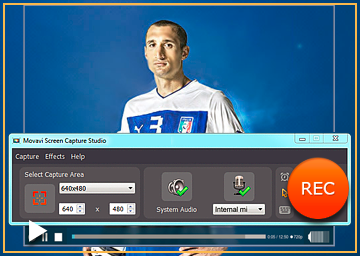
It is very simple to capture video from website with this software. Install the program and once it has finished installing run it. When the program is running you will see a yellow marking of the area that is supposed to be captured. The window size of the web video can be adjusted so that you can be able to view high definition videos. Basically the size of the web video also matters in determining how you mark your frame. HD videos will require that you play the video in a full screen mode. You will also see a green icon of the system audit so you can click it. You can also choose the “Stop capture after” option and define after how long you want your video to be captured. If you want to start recording you should click the REC button and then view the video streaming. Once you have captured your video from the internet you should click stop button and you will see the captured video on the screen for previewing. You can also click on edit tab to make the necessary changes.

It is always no fun when watching a high definition video as it takes so much time to load especially when your bandwidth is low. Movavi Screen Capture Studio helps solve this problem as it helps you in reviewing videos that are online but are otherwise not for downloading. The software does not only record the video but also any other activity that takes place on the screen. If you want to capture video from website now you have your answer.

Filed Under: PC, Review, Software Tagged With: Capture Video, Daily Motion, You Tube

X Change my windows 8 start menu

June 21, 2015 by admin 1 Comment

Like to stay abreast with new technology updates &  windows , but don’t like the windows 8 start menu. You are not alone, windows 8 was a good update,modernised an all – but millions of people have shown their displeasure in how the start menu was totally obliterated and not user friendly with the windows 8 release.

They are two solutions for this,  either wait for windows 10 to release ( which should not be too far away) and hope they make some good changes to this  or then  force your windows 8 to go back to the much friendly Windows 7 start menu.

I have windows 8 on my laptop and  the nutty metro start menu started to drive me crazy, enough for me to look for a solution to make life easier. Here are the two solutions that will get you faster to where you want, when you start up a windows 8 laptop.

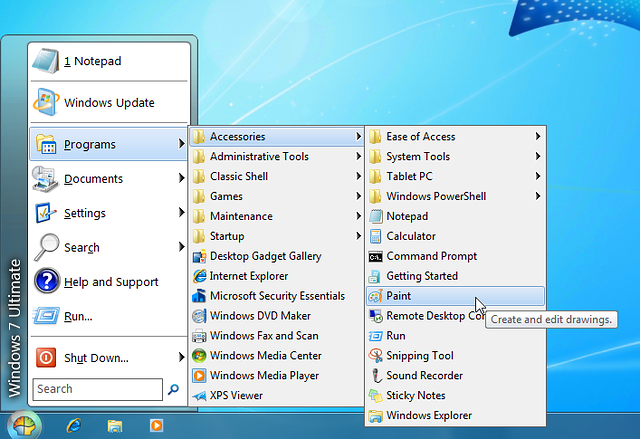
windows 7 start menu for windows 8  get it back

Luckily  there re programs out there that can  easily make your windows 8 start menu just like windows7 and also allow you to switch back and forth between them both, if you want to change your mind.

how to get the old windows start menu back

Below i will give you a paid product (stardock) short review  that does this and also  a  FREE version called  (classic shell) that  does a good job with changing the start menu.

Classic shell ( free version) – So what does classic shell do

[from thier website]

Classic Shell™ is free software that improves your productivity, enhances the usability of Windows and empowers you to use the computer the way you like it ( Like windows 7 start menu).

Classic start menu

[imgfrom http://www.classicshell.net/]

The main features are:

  • Highly customizable start menu with multiple styles and skins
  • Quick access to recent, frequently-used, or pinned programs
  • Start button for Windows 7, Windows 8, Windows 8.1 and Windows 10
  • Toolbar and status bar for Windows Explorer

Classic Shell has been in active development for 5 years and has over 25 million downloads.[DOWNLOAD NOW] .Visit their homepage if you like the program and interested in making a donation

Note: Classic Shell works on Windows 7, Windows 8, Windows 8.1, Windows 10 and their server counterparts (Windows Server 2008 R2, Windows Server 2012, and Windows Server 2012 R2). Both 32 and 64-bit versions are supported. The same installer works for all versions.

Start8 By Stardock (paid software $4.99)

This software is good, in that it does allow you to either go straight to the windows desktop,avoiding the windows 8 start screen. It also allows you to access the windows 8 start screen from the windows 7 style start menu you customised or created.

I  use another software by star dock called fences , which i truly recommend and has been of great use to me until today in organising my windows 7 desktop icons and shortcuts ( you can check it out in their website). However this windows 8 start menu software also has many good features

Start8 Features

  • Adds a Windows 7-styled Start menu with Windows 8 enhancements
  • Boot directly to the Windows 8 desktop (no more searching for your desktop)
  • Windows 8 Start screen accessible from Start menu
  • Adds option for WinKey to show fullscreen metro desktop
  • Skinnable start button

stardock start 8 and windows shell 7 start menu

Start Menu 8 is specially designed for Windows 8/8.1, as a freeware that can restore (simulate) the classic start menu of earlier version of Windows. It can be set to boot from startup, in order to skip the system default Metro start screen, thereby directly start into the traditional Windows desktop which is familiar for us.

There is the basic version that costs $4.99 and the Deluxe version that includes many other software enhancements and features for a windows desktop  that is $9.99 with a recurring monthly fee. Get details and download here

System Requirements

Windows 8.1/8 or Windows Server 2012/R2

If you have been searching google with any of these queries below,

  • How to bring back the Start Menu in Windows 8.1 / Windows 8
    Remove windows 8 start menu to windows 7
    Change the Start menu to Classic view – Windows – Microsoft
    Ways To Customize the Windows 8 Start Screen
    Change windows 8 start menu style
    How to change windows 8.1 start menu

then..these two software’s listed above will surely be able to help you in some way , let me know  how this works out for you and do leave me a comment 🙂

Filed Under: Windows Tagged With: Windows 10, windows 7 Activate, Windows 8, Windows Phone 8.1

Making money with PPC Advertising and Blogging

June 14, 2015 by admin 2 Comments

Every day thousands of make money on-line affiliates or website owners ask the same question –

“Why I cant sell anything online?

Do you know why most people fail ?

It is the topic/niche .

Almost every beginner starts in network marketing/make money online  niche and to cut long story short this niche  is overcrowded. Not many know of pay per click (PPC) adverting. To give you stats here, less than 1% of them are interested in how to make money from home.

What Are Bing Ads?

Bing Ads is the advertising platform you use to show ads on the Bing and Yahoo search engines – also referred to as Yahoo Bing Network. You also have the ability for your ads to show on their syndicated partners such as Facebook, Amazon, Monster, WebMD, CNBC, and Viacom. They are the direct competitor to Google adwords and PPC. Bing ads is normally cheaper to run than google as they are rated No#2 search engine  and get cheaper clicks for advertising

PPC GAME WITH  CLICKBANK

You can make money with your website and clickbank by using the relevant search terms in your ppc campaigns and advertisements. Here is how-

Go find buying keywords using the Google keyword tool.

Type in keywords like where to buy {item}, where to purchase {item}, buying {item} (get creative) and take the results and research them again until you find more buying keywords that you didn’t find before.

If you do this multiple times you will find a lot of purchase keywords that people are entering in google to find a specific item.

They might not get a lot of traffic but typically people who type in these keywords into the search engines  have their wallet in hand. Use these buying terms in your PPC ADS, I did this for a acai berry product and had some good success.

Hot targeted Marketing with PPC & CLICKBANK

If you are spending money on PPC, use every bit of it (dont waste it).You should be pushing these people(traffic) to an opt-in page for an email list. That way you can significantly seo Vs ppc and ppc marketingincrease the chances of converting them later on  through your email campaigns /Newsletters and this will reduce some of your expenses.

Free resources are great like SEO organic traffic . However Using  PPC even for at least for a short period of time, you can find out the best converting keywords. Then you can take those keywords, build optimized pages, and promote them via SEO to get high search engine rankings and make money. This way you can make money both with SEO organic traffic and paid traffic at the same time.

How do you make money with PPC such as Bing OR Google Adwords?

Bing advertises your webpage and every time someone clicks it you must pay Google. You pay anywhere from 0.2 cents  to 0.30 or even more for a click on your ad. People who are interested in your ad will only click, so it is targeted traffic.Conversion depends on how good your ad  and content on that page is. You will need to do the maths to get  good returns and profit from PPC, but you can just get lucky if the niche is not too competitive

Promoting Affiliate Products (pay per click internet marketing method :-

If you want to promote an affiliate product and expect higher level of purchase, you can choose a particular item from sites like Commission Junction or ClickBank. Try to select a high selling item from the site’s list. After this you can create a pay per click ad for the affiliate product which will send traffic to the site. This can be an excellent step to get as much traffic for their product.

Sometimes PPC seems to work much better with physical items than digital downloads. If you manage to get regular sales with PPC  and make a profit then its gold, as you will have a regular  income on auto pilot. You can always refine your PPC strategy  to get more out of it and increase your income, by learning more on how to improve your PPC skills.

Here are some free Bing PPC coupons If you are interested In trying out PPC/Search engine Advertising ?

These coupons are only good for new customers.

New Business and website customers in the following markets receive free search adverting credits to help them get started:

  • US – $50 in Bing Ads credit – united-states-flag for bing coupon
  • Canada (English and French)- $50 in Bing Ads credit  – canadian-flag for bingads coupon
  • UK – £50in Bing Ads credit – uk-flagfor ppc advertising credits
  • France – €50in Bing Ads credit
  • Germany – €50in Bing Ads credit
  • Brazil – R$60in Bing Ads credit
  • Australia – $40 in Bing Ads credit – au-flag for bing microsoft advertising offers for bing7
  • New Zealand – $40 in Bing Ads credit – nz-flagfor yahoobing
  • India – Rs1000 in Bing Ads credit – india-flagfor rupees in 1000 advertising credits
  • Spain – €50in Bing Ads credit ( New market!) –

Italy – €50 in Bing Ads credit (New market!) –


Filed Under: 2011, Adsense, Affiliate, Clickbank, Solution Tagged With: Australia, Reviews

How server technology is becoming agile with co-location

June 5, 2015 by admin Leave a Comment

Colocation is the hot new thing in the IT crowd and for small businesses – but what exactly is it? To explain things in a way that is going to be easy to understand for you, colocation is a process that effectively works to give you the ability to own your own hardware and servers, but to locate them in another company’s data centre. What this means is that instead of keeping all of the systems and equipment in house, and paying to maintain them and keep them powered and up and running – even in the event of a power outage or a storm (the consequences of not doing so can be disastrous!) you pay someone else to do it for you.

Captureheart merger new

Colocation is a new innovation driven by the fact that there are many new startups and businesses around who simply do not have the facilities to store something like servers within their own office. These companies want the freedom to have their own servers but don’t want to maintain them, and thus, colocation was the best option.

This practice gives you the freedom to upgrade the hardware as and when you need to, and it also proves to be a far cheaper option as a business owner. Now that we’ve outlined some of the basics of colocation, we can have a look at some of the pros of colocation for a business.

You own the server and the machinery. That means that if you suddenly decide that a machine is too slow for your needs, or that it doesn’t have the memory that your business required to run successfully, then you can simply upgrade it without having to ask anyone else about it. Another benefit to this is that you own the server software that comes with your machinery. You do not have to sit around waiting for a provider to make some upgrades if things are slow or too behind the times. You can just do it yourself. The same things goes if you decide that you want to use ASP or ColdFusion, you can just buy the software and then go and install it all.

Another bonus to using server colocation is that if you move offices for example, you can leave the server that you have in the borrowed rack up and running for the entire time. If you host your own domain, you’re going to find that you have to pay for two lines for a period of time in order to move domains over to a new location or to deal with the possible outages while the servers take time to move over to the new location.

Using colocation means that there is additional security being provided for your machines, and your server is going to be stored and maintained in a secure and well-maintained environment. After all, the company who is going to be storing your servers are also going to be storing their own servers there, so it makes sense that they would take care of things really well. You will also find that many colocation servers are going to offer a service whereby they take care of and manage your server – for an additional cost on top of your service agreement. If you don’t have an IT department this is going to be a very useful service for you.

Hopefully this article has gone some way towards explaining what colocation is, with a quick look at some of the advantages of using it for your business as well. Only time will tell how effective this practice is going to be in the future – but suffice to say, it’s working well so far. For further information regarding the benefits of colocation and how it could help your business, click here.

Filed Under: CDN, Computer, Network, PC Tagged With: ASP, Coldfusion, Colocation, Hosting In australia

And then there was The google sandbox .. lo and behold

May 17, 2015 by admin Leave a Comment

the google new domain website blog sandbox

What is the Google sandbox

You just launched a new website with a new domain and its links are still not showing up in Google search engine. You probably are experiencing the Google sandbox. Here are some of the symptoms of Google sandbox

I just bough domain and no backlinks are showing for website

I just made a new website and no links are showing

My new website is not ranking on Google

Google Sandbox 2.0 a.k.a. “Google Waiting Period”

When a brand new site on a brand new domain is launched, it gets put into what SEO professionals have dubbed the Google Sandbox. The Google Sandbox effect is theory that exists among webmasters on the Internet that web pages on new domain names rank poorly in the SERP (search engine result page) even though they have a high page rank. The sandbox will be on new domain names for a period from 3-8 months. The months in sandbox is just speculation and could be anywhere from 3 months to 6 months from reports by seo researchers.

The Google Sandbox is for new domains, not new sites

Check out Google’s Matt Cutts discussing the relevance of domain age.

How to get a Cheap domain from godaddy

In that video Cutts said:

matt cutts on twitter  with seo block for new domain

“The difference between a domain that’s six months old vs one year old is really not that big at all. As long as you’ve been around for at least a couple of months, you should be able make sure that you can show up in search results.”

Matt Cutts said, there is some difference between a domain that’s six months old and one that’s 12 months old, but the difference at that point is incredibly small. The important thing is to wait out those first few month.

How to rank, even in the Google Sandbox

You can still rank your website even is Google is punishing your new site by placing it in the Sandbox. You can absolutely build a brand new site on a brand new domain and still rank well in Google — but you’ll have to likely target keywords for which there is relatively low competition.

2nd method

Get a existing domain that has already had a website for some time, but make sure its relevant o your niche not penalised or has a spam link profile. You can quickly do this by a quick check in google search engine like this , search for Site:http://www.thedomain.com where the domain is the site which you are checking, it will show up all the backlinks for that website.

moz ope site explorer

Or you can also check it here https://moz.com/researchtools/ose/

Acquire links from authoritative sites.

Plan ahead– contrary to the general practice of launching a site when it is absolutely complete, launch a couple of pages, when you have them. This will start the clock and time will be running parallel to your site development efforts.

Try to gain some social shares to validate the links that your site has recently got.

Google is still indexing your site, even while you’re in the Google Sandbox. You’re still a part of their index. In addition to the number and quality of links pointing to your website, the age of those links is also important in determining your site’s TrustRank. On the day a link to your website is published, Google awards your site only a portion of the total TrustRank that link possesses

Why your website or blog might not be ranking

If you were ranking well and suddenly vanished from the rankings, that usually indicates either: you had low quality backlinks and those backlinks have been removed from the link index (and indeed open site explorer shows zero quality backlinks for your site); that your site has duplicate content, spun content, shallow content, or too many ads and has run afoul of Panda, or is suffering a manual penalty.

corporate guy

To conclude its best to build authority links and links in a natural manner over a period of time. If your blog backlink profile is a gradual steady rise as most authorative blogs would be, with a mix of social shares etc . then it should slowly rise out of the sandbox and climbing the slippery mountain called google search engine

Filed Under: Australia, Google, SEO Tagged With: Blog, Domains, Websites

What Type of Web Hosting Service Suits your Business?

May 6, 2015 by admin 1 Comment

do you need hosting  in australia

Web hosting is a service that every business, regardless of size or market demand needs to address, however, a company’s individual need may vary greatly in the services they require to accommodate their online needs. When deciding how to deal with your business’s web hosting needs it is important to know the basic varieties, including shared hosting, VPS, hosted services and self hosted, as well as the differences between them.

Web Hosting

The first step in finding a company’s web hosting demands is to fully understand web hosting, and the services it can provide. A website host is a server or computer that constantly remains online, making a website accessible via the internet. When visitors access the site they are actually downloading files from the computer in which they are stored.

In reality, any computer can be used to host a website, but professional services use computers specifically configured for power, using large amounts of memory and hard disks to efficiently deliver data and website content to potentially thousands of users at the same time. Any business with a website will require web hosting, and the larger the brand, and the more active the website, the more powerful the service will need to be.

Self Hosted

The self hosted approach is probably best suited to smaller businesses running very basic sites, as it consists of hosting the website independently off of a home or office internet connection. Hosting your own website has a few advantages, including freedom to do as you please with the website.

In addition to this it can be quite powerful, depending on how many computing resources you have to commit to it. Self hosting is not without it’s drawbacks, and these should be considered. Disadvantages of a self hosted site include the amount of technical knowledge necessary to execute it, and speeds can be greatly lacking due to poor upload speeds, as well self hosting may violate your ISP’s terms of agreement and all traffic you host will be reflected on your bandwidth usage.

Shared Hosting

Shared hosting is when your site is powered by one server, acting a host to thousands of other websites as well. Shared hosting is a budget friendly alternative, so it is great for small or new businesses, offering an all in one package, with domain name and hosting, bringing your brand to the internet.Major advantages of shared hosting include the cost effectiveness of the service, the ability to provide a custom domain, and an easy to use interface for blogging and forums – all requiring minimal technical knowledge.

Disadvantages are the incredibly slow speeds, and the fact that it has only basic capabilities due to the limitations of a shared server.

VPS and Dedicated Servers

These are the most ideal type of website hosting servers because they provide each client their own individual server space. VPS, or virtual private server, is a virtual machine, compared to a dedicated server that is similar in nature but is a physical system dedicated to hosting the site.

The major benefits of going with this type of hosting is that it offers essentially unlimited domain hosting and offers incomparable loading speeds, often 5 times faster than other approaches. As with anything, there are drawbacks to this particular service, and they include the associated costs as this is the priciest alternative, as well as the amount of knowledge required. These techniques are excellent for popular and intricate websites that see a lot of traffic and have a lot of content.

Hosted Services

Hosted services is the simplest form of web hosting, and involves creating a smaller, or subsite with a larger site. These websites are often committed to one purpose, like blogging, and many are free to use. Advantages of using hosted services include the simplicity and ease of getting started, as well as good speeds because you are dealing with a specialised company.

The biggest disadvantages to this technique include the lack over control over a technicality, and a lack of support for things like plugins. Also the portability is an issue, as you are part of a bigger site, and if your popularity rises it is difficult to witch hosts without losing fans and followers.

Whichever type of hosting solution you choose, ensure you go for one that is able to grow with your business.

Filed Under: Gpost, Hosting, Website Review, Wordpress 3.0 Tagged With: Hosting In australia, Wordpress4.0

  • « Go to Previous Page
  • Page 1
  • Interim pages omitted …
  • Page 23
  • Page 24
  • Page 25
  • Page 26
  • Page 27
  • Interim pages omitted …
  • Page 58
  • Go to Next Page »

Primary Sidebar

Recent Posts

  • Cute & Funny USB Drives (Perfect Gifts!)
  • 2026 – Step-by-Step Guide to Building Your Site With AI
  • Underwater Drones for Recording Video and Taking Pictures
  • Why I chose hostgator for blog hosting
  • Top 10 Software Programs For Your Windows PC

Recent Comments

  1. Roberto Mcgee on 2026 – Step-by-Step Guide to Building Your Site With AI
  2. google on Wacky new underwear invention 2b released by Durex
  3. Patrick McCormick on How to secure your desktop and laptop with antivirus software
  4. JJ on 20 Top brands with affilate programs to make you money in 2019
  5. JJ on This WPengine Genesis Pro Deal Will Give You 35 Studiopress themes

Archives

  • September 2026
  • June 2022
  • February 2022
  • July 2021
  • May 2021
  • April 2021
  • March 2021
  • November 2020
  • September 2020
  • August 2020
  • July 2020
  • June 2020
  • May 2020
  • April 2020
  • March 2020
  • February 2020
  • January 2020
  • December 2019
  • September 2019
  • August 2019
  • July 2019
  • June 2019
  • April 2019
  • March 2019
  • February 2019
  • January 2019
  • December 2018
  • November 2018
  • October 2018
  • September 2018
  • July 2018
  • June 2018
  • April 2018
  • February 2018
  • January 2018
  • December 2017
  • October 2017
  • September 2017
  • July 2017
  • June 2017
  • May 2017
  • April 2017
  • March 2017
  • February 2017
  • January 2017
  • December 2016
  • November 2016
  • October 2016
  • September 2016
  • August 2016
  • July 2016
  • May 2016
  • April 2016
  • March 2016
  • February 2016
  • January 2016
  • December 2015
  • November 2015
  • October 2015
  • September 2015
  • August 2015
  • July 2015
  • June 2015
  • May 2015
  • March 2015
  • February 2015
  • January 2015
  • December 2014
  • November 2014
  • October 2014
  • September 2014
  • August 2014
  • July 2014
  • June 2014
  • May 2014
  • April 2014
  • March 2014
  • February 2014
  • January 2014
  • November 2013
  • October 2013
  • September 2013
  • August 2013
  • July 2013
  • June 2013
  • May 2013
  • April 2013
  • March 2013
  • February 2013
  • January 2013
  • December 2012
  • November 2012
  • October 2012
  • September 2012
  • August 2012
  • July 2012
  • June 2012
  • May 2012
  • April 2012
  • March 2012
  • February 2012
  • January 2012
  • December 2011
  • November 2011
  • September 2011
  • August 2011
  • July 2011
  • June 2011
  • May 2011
  • April 2011
  • March 2011
  • February 2011
  • January 2011
  • December 2010
  • November 2010
  • October 2010
  • September 2010
  • August 2010
  • July 2010
  • June 2010
  • May 2010

Categories

  • $heldon $ingh
  • 2010
  • 2011
  • 2012
  • 2013
  • 2015
  • 2017
  • 2018
  • 2019
  • 2020
  • 2021
  • 2022
  • Accounting
  • Adsense
  • Affiliate
  • Amazon
  • Anti Virus
  • Apple
  • Apps
  • Asus
  • Aussie
  • Australia
  • Australian
  • Australian Bloggers
  • Australian wordpress hosting
  • Banks
  • Blog-Hosting
  • Blogger
  • Blogger Tool
  • Blogger Tools
  • BloggerTools
  • BuddyPress
  • CARS
  • CDN
  • Celebrity
  • Clickbank
  • Compare
  • Computer
  • Domains
  • Done Deals
  • Ebook
  • Email
  • Facebook
  • Featured
  • Finance
  • Free
  • Gadgets
  • Google
  • Gpost
  • Guide
  • Hackers
  • Hosting
  • India
  • Internet
  • Ipad
  • Kindle
  • Laptop
  • Make money blogging
  • Makemoney online
  • Marketing
  • Melbourne Cup
  • Movies
  • Netbook
  • Network
  • News
  • Online betting account
  • PC
  • Review
  • Search
  • SEO
  • sheldon singh
  • Software
  • Solution
  • Sports
  • Subscribers
  • Taxes
  • Technology News
  • Themes
  • Top 10
  • Tutorial
  • Video
  • Wacky
  • web hosting
  • Website Review
  • Wierd
  • Windows
  • wordpress
  • Wordpress 3.0
  • Wordpress 3.1
  • wordpress themes
  • World cup
  • Wp Answers
  • WP Turbo
  • WPMU

Footer

Technology

With an emphasis on technology, webdesign, and gadgets, our blog features articles related to these categories.

Browse our archives.

Privacy

Your privacy matters. We collect only essential information to ensure your data stays safe and confidential.

Learn more about Privacy.

Videos

Explore our video library designed to teach, inspire, and guide you. Dive in and discover content that brings ideas to life..

Check out our videopage.

Copyright © 2026 · Genesis Sample on Genesis Framework · WordPress · Log in

  • Resources
  • Privacy policy
  • Website Review
  • Subscribe